
Sponsored
FINALLY, FORScan coding to disable the Seatbelt Information Screen! (CONFIRMED WORKING)


- First Name
- Dean
- Joined
- Oct 1, 2022
- Threads
- 10
- Messages
- 113
- Reaction score
- 252
- Location
- Western NY
- Vehicle(s)
- Honda Civic
- Engine
- 2.5L Hybrid
Worked perfectly on my 23 XL Hybrid. This has been driving me nuts since day one, now just need to figure out the ready to drive and lane keeping assist reminders.
Thanks for sharing!!
Thanks for sharing!!
- First Name
- Mark
- Joined
- Jul 22, 2021
- Threads
- 12
- Messages
- 1,504
- Reaction score
- 2,281
- Location
- North Carolina
- Vehicle(s)
- 2025 Maverick Lariat AWD Hybrid, 2024 2dr Bronco Heritage Limited Edition
- Engine
- 2.5L Hybrid
I had the same exact As Built numbers on my '24 Lariat Tremor. I changed 720-13-01 to 0000 0000 003B and 720-13-02 to 0000 003C. When I did a write it changed 720-14-01 to 1000 0000 004C. Nag/monitor gone.Still a no-go. According to the spreadsheet, but nag/monitor should be gone, but it's back with those numbers. I'm sure I had the numbers correct. In case it helps someone else, my As Built numbers for my '23 EB Lariat Lux FX4 4K are as follows:
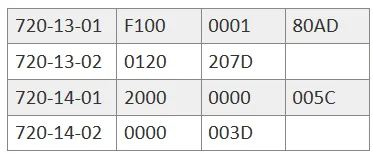
Not that big of a deal to stick with the all zeros thing for me because I naturally snap in when I get in. Just thought it'd be nice to have the reminder for any passengers.
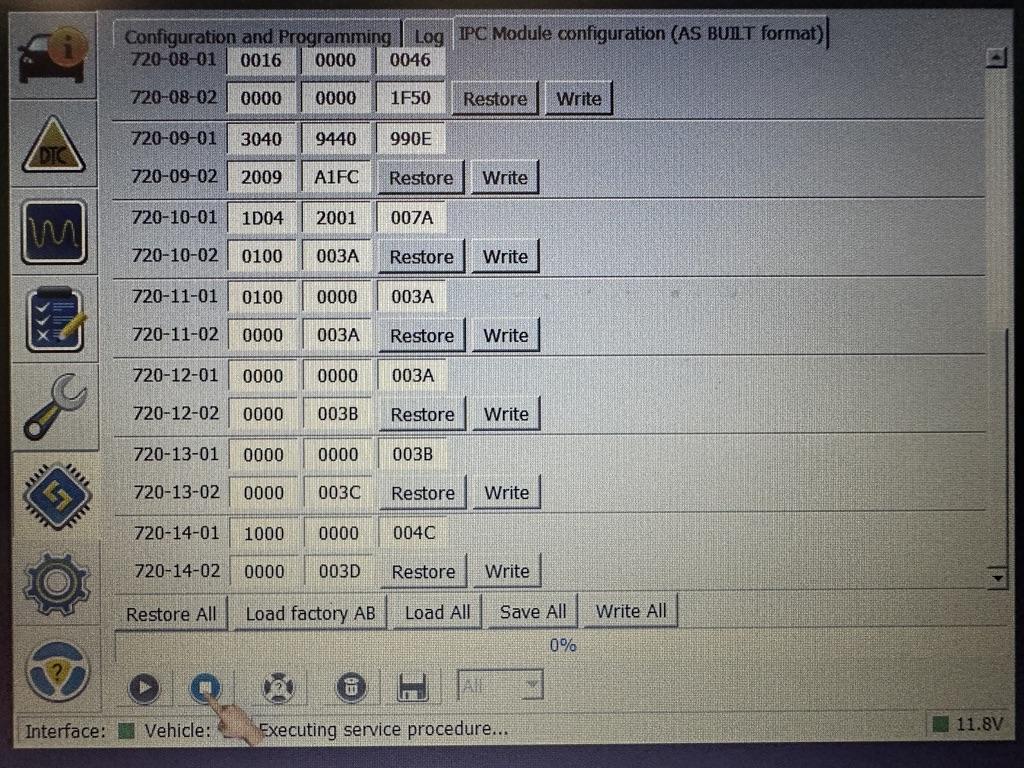

Just did this on my MY24 Lariat Hybrid. Tried to remove the nag screen while keeping the symbol/chime but it didn't work. Ended up just disabling everything like in the first post. Thanks!
OP
OP

- First Name
- Swag
- Joined
- Feb 26, 2024
- Threads
- 44
- Messages
- 1,442
- Reaction score
- 1,655
- Location
- United States
- Vehicle(s)
- 2024 Ford Maverick XL
- Engine
- 2.0L EcoBoost
- Thread starter
- #95
Just checked and my stock codes look identical to yours. I rechecked that coding I calculated and its correct BASED ON the 2023 maverick Livnitup spreadsheet which I think could be inaccurate. Maybe people are getting different checksums somehow?? or Maybe the coding could be fixed by replacing the 8 with a 0??Still a no-go. According to the spreadsheet, but nag/monitor should be gone, but it's back with those numbers. I'm sure I had the numbers correct. In case it helps someone else, my As Built numbers for my '23 EB Lariat Lux FX4 4K are as follows:
Not that big of a deal to stick with the all zeros thing for me because I naturally snap in when I get in. Just thought it'd be nice to have the reminder for any passengers.
Sponsored
OP
OP
- First Name
- Swag
- Joined
- Feb 26, 2024
- Threads
- 44
- Messages
- 1,442
- Reaction score
- 1,655
- Location
- United States
- Vehicle(s)
- 2024 Ford Maverick XL
- Engine
- 2.0L EcoBoost
- Thread starter
- #96
I went ahead and deleted the alternative coding from the original post that kept the chime but disabled the monitor. It only worked on a few Mavericks and wasn't working for several others and I don't want to put false info out there and waste anyone's time in the future! IF I can change the coding and get it working for all trims, I will add It back.
Also, the "Ready to drive" screen on the HYBRID is unremovable because disabling it disables other hybrid features along with it as discovered by @CaptBanana . It seems to be integrated into every Ford Hybrid.
Also, the "Ready to drive" screen on the HYBRID is unremovable because disabling it disables other hybrid features along with it as discovered by @CaptBanana . It seems to be integrated into every Ford Hybrid.
Last edited:
- Joined
- Nov 30, 2022
- Threads
- 7
- Messages
- 105
- Reaction score
- 197
- Location
- California
- Vehicle(s)
- Toyota Tacoma
- Engine
- 2.0L EcoBoost
- First Name
- Christopher
- Joined
- Jun 30, 2023
- Threads
- 11
- Messages
- 271
- Reaction score
- 167
- Location
- Buffalo, NY
- Vehicle(s)
- 2024 maverick XLT, Lux, FX4, AWD, 4K
- Engine
- 2.0L EcoBoost
I tried your edit of removing screen but keeping the light on… no dice. Forscan finds a checksum error and reverts it to default. Anyone else get it working?Hello everyone!
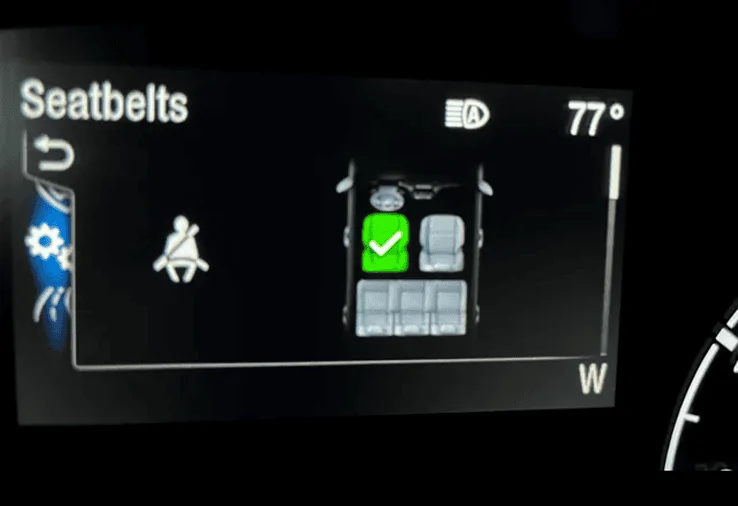
I finally found the way to disable the ANNOYING Seatbelt information screen that comes on when you start the truck and stays on even after you buckle your seatbelt. Thank you to @ZOODAD over on the F250 forums for the coding information. THIS SUPER DUTY spreadsheet he put together might be useful for future MAVERICK FORScan Mods. THIS IS CONFIRMED TO WORK FOR ALL MAVERICK TRIMS!
DISABLE SEATBELT INFORMATION SCREEN
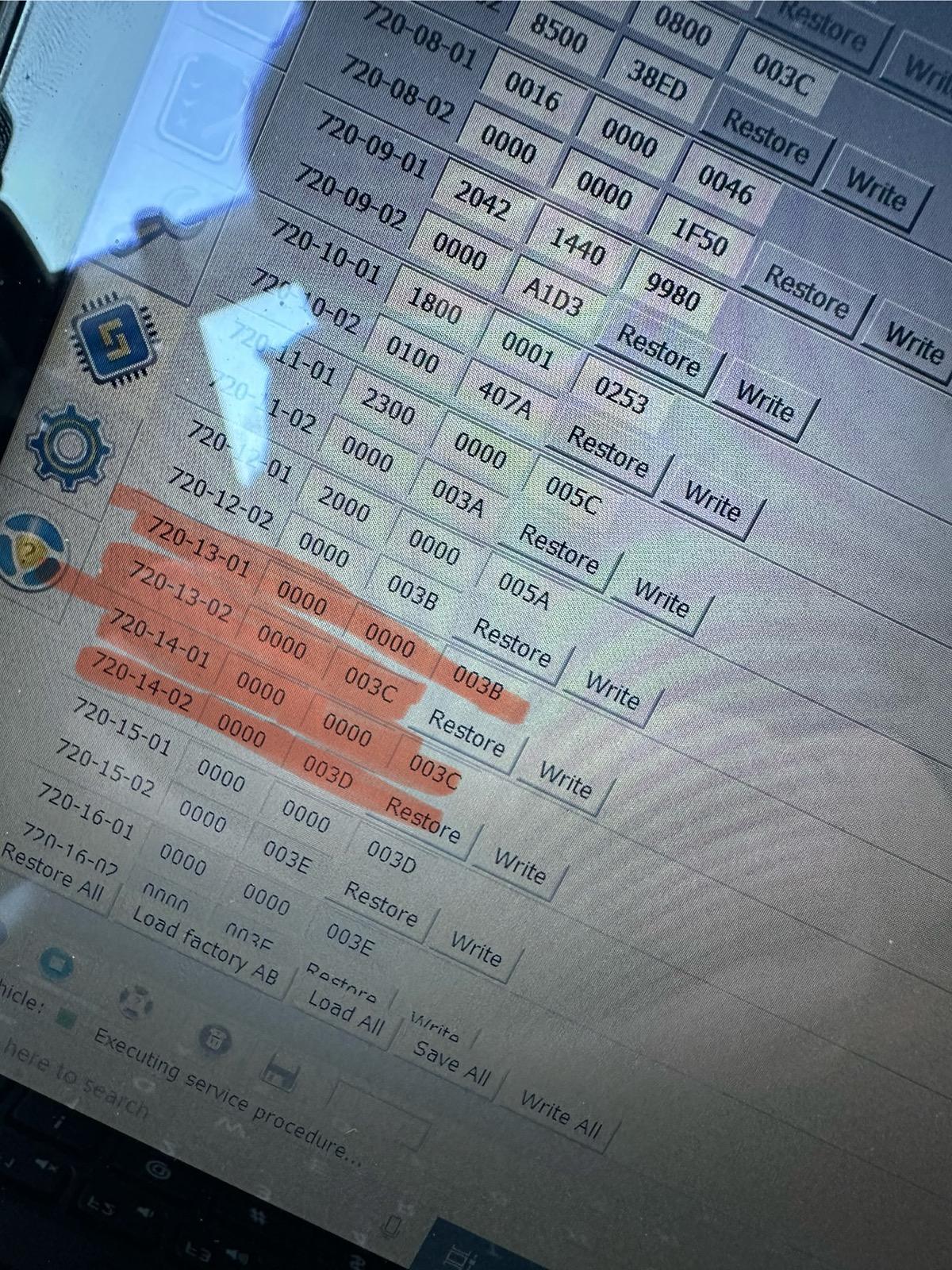
1. Open IPC AS BUILT
2. Change line 720-13-01 and 720-13-02 to ALL ZEROS. And WRITE the changes. Click yes to let Forscan correct the checksum.
3. Change line 720-14-01 and 720-14-02 to ALL ZEROS. And WRITE the changes. Click yes to let Forscan correct the checksum.
These changes remove the seatbelt info screen pictured below entirely and it also disables the seatbelt chime too. I would love to hear from other members to see if these changes work in your Maverick! Tested on my 2024 Maverick XL AWD ECOBOOST with the smaller instrument cluster. (The 4 inch Instrument Cluster)
EDIT: Here is a link to 2 more changes that DISABLE DOOR AND KEY CHIMES .
I have successfully tested both of these coding changes!
Let me know if these codings work for your Mavericks out there!
DISABLE DOOR CHIMES
1. IPC AS BUILT
2. Go to 720-01-02
3. Replace the third digit with a "0" as shown here
xx0x-xxxx
DISABLE KEY-IN IGNITON CHIME
1. IPC AS BUILT
2. Go to 720-01-02
3. Replace the fifth digit with a "2" as shown here
xxxx-x2xx



- Joined
- Dec 6, 2022
- Threads
- 2
- Messages
- 12
- Reaction score
- 27
- Location
- East Coast
- Vehicle(s)
- 22 Maverick
- Engine
- 2.0L EcoBoost
Worked for my 22 XLT, THANK YOU!!
OP
OP
- First Name
- Swag
- Joined
- Feb 26, 2024
- Threads
- 44
- Messages
- 1,442
- Reaction score
- 1,655
- Location
- United States
- Vehicle(s)
- 2024 Ford Maverick XL
- Engine
- 2.0L EcoBoost
- Thread starter
- #100
Hey so @Mavrik23 got it working. It seems the coding for keeping the chime but disabling the seatbelt infor screen doesn’t work for every trim and model. The coding for disabling the chime, belt light and the monitor screen work for all trims!!I tried your edit of removing screen but keeping the light on… no dice. Forscan finds a checksum error and reverts it to default. Anyone else get it working?
Sponsored
- First Name
- Christopher
- Joined
- Jun 30, 2023
- Threads
- 11
- Messages
- 271
- Reaction score
- 167
- Location
- Buffalo, NY
- Vehicle(s)
- 2024 maverick XLT, Lux, FX4, AWD, 4K
- Engine
- 2.0L EcoBoost
Thanks for the info, I ended up disabling everything and works great! No more nanny screen! Thank you!!!Hey so @Mavrik23 got it working. It seems the coding for keeping the chime but disabling the seatbelt infor screen doesn’t work for every trim and model. The coding for disabling the chime, belt light and the monitor screen work for all trims!!
OP
OP
- First Name
- Swag
- Joined
- Feb 26, 2024
- Threads
- 44
- Messages
- 1,442
- Reaction score
- 1,655
- Location
- United States
- Vehicle(s)
- 2024 Ford Maverick XL
- Engine
- 2.0L EcoBoost
- Thread starter
- #102
It’s weird the other way isn’t working for everyone. Every single maverick with varying trims has the same exact coding from the factory for these 4 lines. I might ask @Mavrik23 and see what his codings look like now! I think maybe Forscan is incorrectly calculating checksums possibly!Thanks for the info, I ended up disabling everything and works great! No more nanny screen! Thank you!!!
- First Name
- Christopher
- Joined
- Jun 30, 2023
- Threads
- 11
- Messages
- 271
- Reaction score
- 167
- Location
- Buffalo, NY
- Vehicle(s)
- 2024 maverick XLT, Lux, FX4, AWD, 4K
- Engine
- 2.0L EcoBoost
Please keep us posted if you find a resolution!It’s weird the other way isn’t working for everyone. Every single maverick with varying trims has the same exact coding from the factory for these 4 lines. I might ask @Mavrik23 and see what his codings look like now! I think maybe Forscan is incorrectly calculating checksums possibly!
- First Name
- Lane
- Joined
- Jul 20, 2023
- Threads
- 15
- Messages
- 407
- Reaction score
- 979
- Location
- Central Wisconsin
- Website
- photos.app.goo.gl
- Vehicle(s)
- 2023 Area 51 Hybrid XL, 2006 VW Jetta Smyth UTE
- Engine
- 2.5L Hybrid
Good way to look at it.These delays give your motor a minute to circulate that oil around before you start driving..
Unless you have a hybrid. My engine doesn't start until after I drive a few miles. So the nag screen serves no incidental useful purpose. It just uses up a tiny bit of my patience which it shouldn't need to, and even though it's only a few seconds at a time, an anonymous Ford engineer and/or NHTSA rule writer has decided that they must take that time off of my life which I'll never get back.
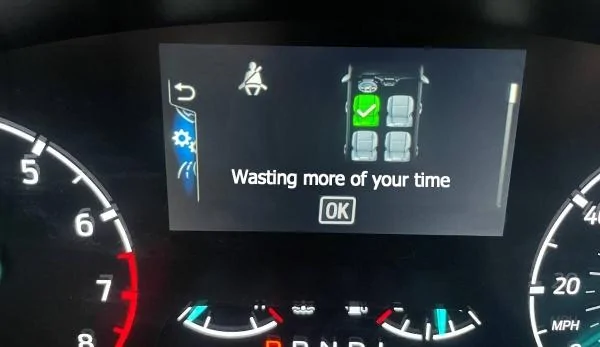
As the years go by, it's starting to annoy me more when I realize others are making design decisions with that as an end result. It's not by accident - they've chosen to create an annoyance for a reason that's marginal at best. (I've spent a lot of years in software development and user interface design and this feels like deliberate friction.)
This likely is useful if you have a vehicle full of unruly kids and you want to know they're all bucked up before starting off. But it irks me that the vehicle knows it's just me, and I'm already buckled up, and it still brings up the screen and makes me click to get rid of it before I can set my drive mode.
I'm super thankful for a community like this that comes together and wants to correct issues like this.
This concludes my cranky guy rant for the day.
 We now rejoin your regularly scheduled program.
Last edited:

Also wanted to check in and verify that it 100% works on my 2024 XLT tremor. It also took care of my double honk when my key is in the ignition and I exit the truck. Thanks so much for the post it was very helpful.Just verified that it works on my 2024 Lariat hybrid. Thank you for posting.
Other things to note that I was able to successfully change/code using FORScan:
Touch screen startup to ST (only option)
Road sign recognition (it’s the European round speed limit sign only but it does work. I don’t mind I was born in Europe so it’s sentimental to me that way not sure how to bring up USA speed limit version)
Launch Control (holds RPM right around 3k)
Eco mode
Sport mode (this is a fun and interesting one. Once you code it the auto start stop illuminates to off by default as soon as you scroll to sport.
Auto start stop (it didn’t work in BCM “easy way” so I explored a bit more and found that you need to go to PSCM easy version and change it in there. You can tell it works off the brake pedal. As soon as I complete stop in any driving mode the little @ comes on in the cluster and the car never shuts off. I can’t say for sure if going back to BCM and changing start/stop back to enabled and just trying the PSCM module to see if it’s all that’s needed but I can confirm with both of them if it DOES work.
I can confirm that in this OP post changing the door chimes and seatbelt chime the “easy” way it will not work. So you must go to as build for sure as the OP stated.
Sponsored
Last edited:
Similar threads

- Replies
- 30
- Views
- 22,376


- Replies
- 495
- Views
- 185,948


