Sponsored
OP
OP
EONR24

EONR24

2.0L EcoBoost
Well-known member
First Name
Swag
Joined
Feb 26, 2024
Threads
44
Messages
1,442
Reaction score
1,655
Location
United States
Vehicle(s)
2024 Ford Maverick XL
Engine
2.0L EcoBoost
Well, it worked but I seem to have lost a feature. Instant MPG is now not available. I've tried everything possible to get it back but it appears to be permanently disabled. I'll have to revert back to defaults I guess.
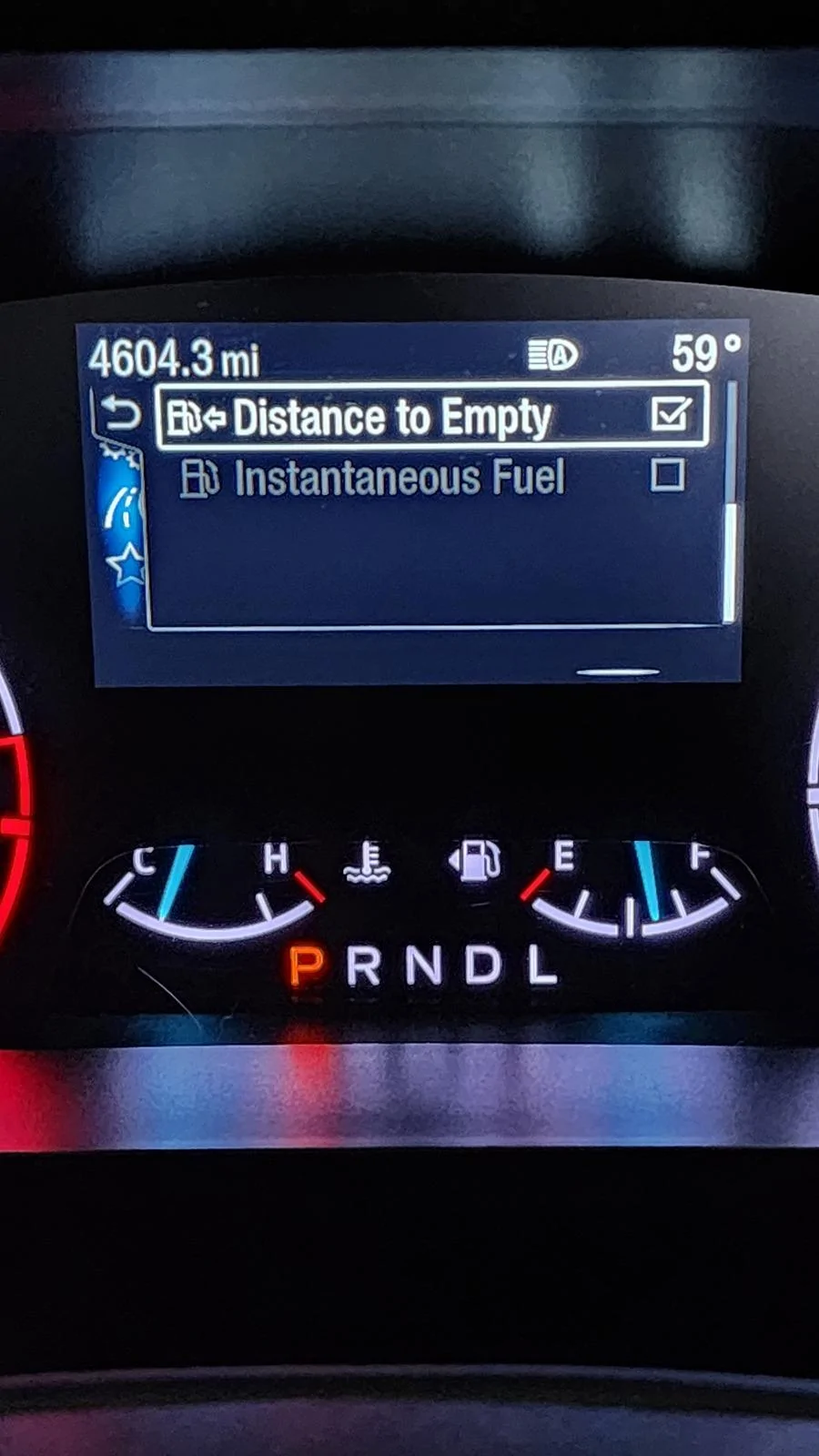
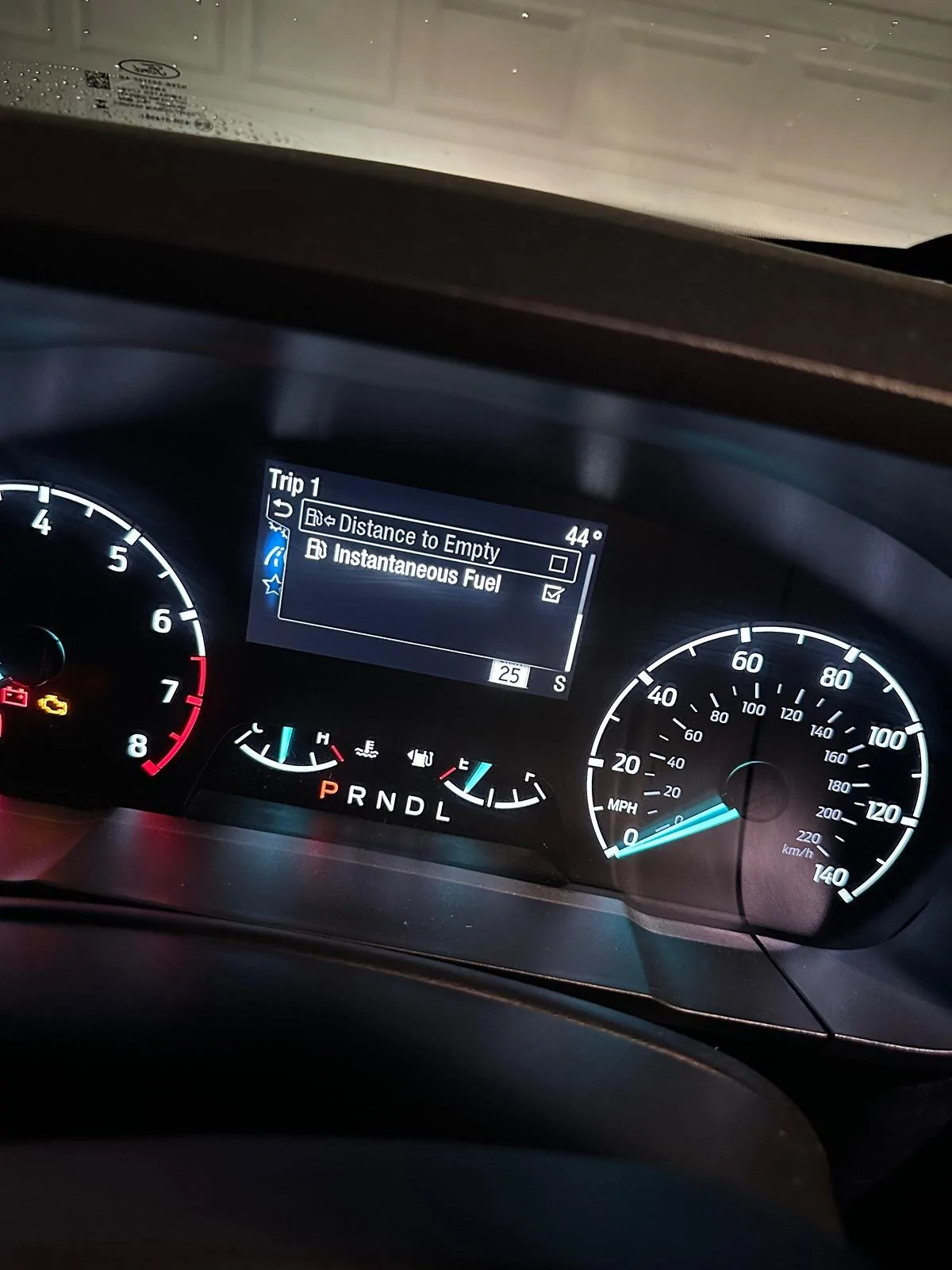
1000009209.webp
Hey so I tested it and all of those trip menu settings work even instantaneous fuel. THE SEATBELT CODING HAS NO EFFECT ON THIS. The thing is that you can’t have more than 4 of these trip displays turned on at once!!
Ford Maverick FINALLY, FORScan coding to disable the Seatbelt Information Screen! (CONFIRMED WORKING) IMG_2914
Sponsored

 
OP
OP
EONR24

EONR24

2.0L EcoBoost
Well-known member
First Name
Swag
Joined
Feb 26, 2024
Threads
44
Messages
1,442
Reaction score
1,655
Location
United States
Vehicle(s)
2024 Ford Maverick XL
Engine
2.0L EcoBoost
Worked great here also on a '23 Hybrid XL w/ CP360. Thanks @EONR24 !

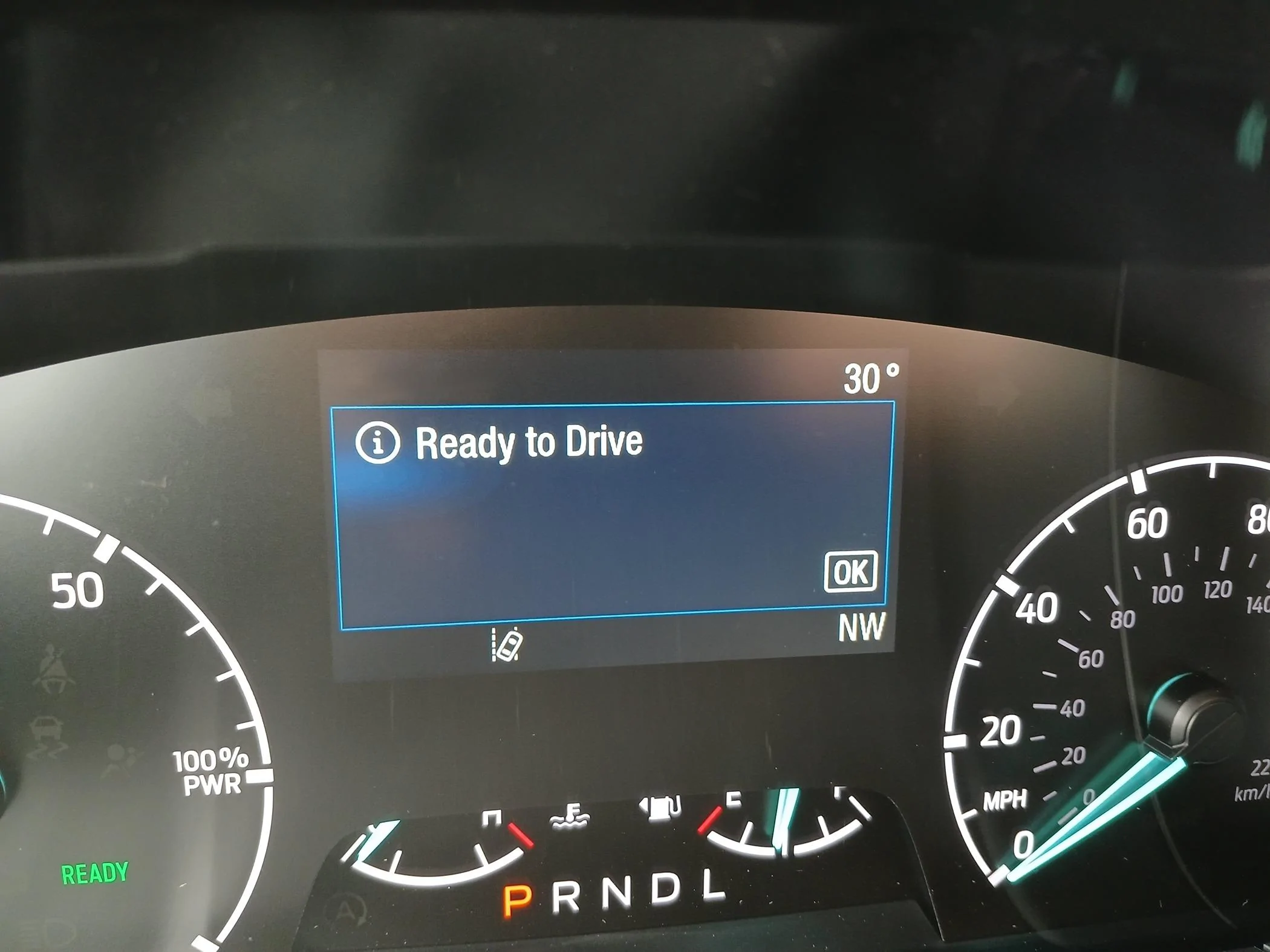
Yes! The "Ready to Drive" can get axed also if you'd like to keep up your momentum in figuring these things out.

20240322_172658.jpg


I'm in the driver's seat. I'm the one that put in the key in the ignition and turned it. I know it's ready to drive, dammit! That green text that says READY on the left is more than sufficient.
I will look into removing the blue ready to drive info screen and keeping the green “ready” dash light. Looking into this for the HYBRID OWNERS OUT THERE!
 
OP
OP
EONR24

EONR24

2.0L EcoBoost
Well-known member
First Name
Swag
Joined
Feb 26, 2024
Threads
44
Messages
1,442
Reaction score
1,655
Location
United States
Vehicle(s)
2024 Ford Maverick XL
Engine
2.0L EcoBoost
@EONR24, first of all, thank you for posting this spreadsheet. I found the full spreadsheet, but where can I find the key to these items in this spreadsheet? I can't figure out what some of the acronyms mean, and I can't find the right search term for google's help. Some are very clear, some can be guessed at, and some are just gibberish for me, anyway. For example, what does LDWOFFTT stand for (720-02-01), RBMFES (720-02-02), "telltale" (lots of entries, including in easy mode), or any of 30 or 40 other terms. Any hint as to where I might find these terms spelled out in plain or nearly plain English? Thanks.
I would love to know the same thing! Many of the items in that spreadsheet have confusing Acronyms that I’m not able to decipher either.
 

Justin says...

2.0L EcoBoost
Well-known member
First Name
Justin
Joined
Jul 17, 2023
Threads
29
Messages
281
Reaction score
313
Location
NC
Vehicle(s)
'22 Ranger XLT
Engine
2.0L EcoBoost
@EONR24 Hey looks like I was wrong, or at least jumped the gun. I think all the changes reset my IPC. Eco Coach feature was also gone but I found and reactivated it. The instant MPG came back after I disabled the trip timer. I didn't expect it to do that.

The only concern I have, and this might be crazy, is that I sure hope the airbags work in the event of an accident. I'm sure they will and this has nothing do to with that but there's that .0001% chance nagging me. I realize this is reversible and I can go back anytime. Still, thanks for discovering this.
 
OP
OP
EONR24

EONR24

2.0L EcoBoost
Well-known member
First Name
Swag
Joined
Feb 26, 2024
Threads
44
Messages
1,442
Reaction score
1,655
Location
United States
Vehicle(s)
2024 Ford Maverick XL
Engine
2.0L EcoBoost
@EONR24 Hey looks like I was wrong, or at least jumped the gun. I think all the changes reset my IPC. Eco Coach feature was also gone but I found and reactivated it. The instant MPG came back after I disabled the trip timer. I didn't expect it to do that.

The only concern I have, and this might be crazy, is that I sure hope the airbags work in the event of an accident. I'm sure they will and this has nothing do to with that but there's that .0001% chance nagging me. I realize this is reversible and I can go back anytime. Still, thanks for discovering this.
I had that thought too honestly about the airbags but from all the information I have read, the RCM (Restraint Control Module) controls the airbag function! Let me know if you have any other questions or concerns. Thank you!
 

Sponsored

CaptBanana

2.5L Hybrid
Well-known member
First Name
Joe
Joined
Sep 16, 2022
Threads
4
Messages
54
Reaction score
85
Location
Massachusetts
Vehicle(s)
'23 Lariat Lux Hybrid, '06 Chevy Cobalt
Engine
2.5L Hybrid
Clubs
 
I will look into removing the blue ready to drive info screen and keeping the green “ready” dash light. Looking into this for the HYBRID OWNERS OUT THERE!
Thank you! My Ready to Drive screen looks the same, just larger due to the 6" screen. I imagine the configuration field would be the same. I see you have an EB so if you need someone to try the values or you want my asbuilt, let me know.
 
OP
OP
EONR24

EONR24

2.0L EcoBoost
Well-known member
First Name
Swag
Joined
Feb 26, 2024
Threads
44
Messages
1,442
Reaction score
1,655
Location
United States
Vehicle(s)
2024 Ford Maverick XL
Engine
2.0L EcoBoost
Worked great here also on a '23 Hybrid XL w/ CP360. Thanks @EONR24 !

Yes! The "Ready to Drive" can get axed also if you'd like to keep up your momentum in figuring these things out.

20240322_172658.webp


I'm in the driver's seat. I'm the one that put in the key in the ignition and turned it. I know it's ready to drive, dammit! That green text that says READY on the left is more than sufficient.
Send me a picture of all of your IPC AS BUILT Codings when you get a chance. I will compare them to mine and the maverick spreadsheet to try to narrow down this ready to drive screen!
 
OP
OP
EONR24

EONR24

2.0L EcoBoost
Well-known member
First Name
Swag
Joined
Feb 26, 2024
Threads
44
Messages
1,442
Reaction score
1,655
Location
United States
Vehicle(s)
2024 Ford Maverick XL
Engine
2.0L EcoBoost
Thank you! My Ready to Drive screen looks the same, just larger due to the 6" screen. I imagine the configuration field would be the same. I see you have an EB so if you need someone to try the values or you want my asbuilt, let me know.
Send me a picture of all of your IPC AS BUILT Codings when you get a chance. I will compare them to mine and the maverick spreadsheet to try to narrow down this ready to drive screen!
 

Toinky

2.0L EcoBoost
Well-known member
Joined
Nov 30, 2022
Threads
7
Messages
105
Reaction score
197
Location
California
Vehicle(s)
Toyota Tacoma
Engine
2.0L EcoBoost
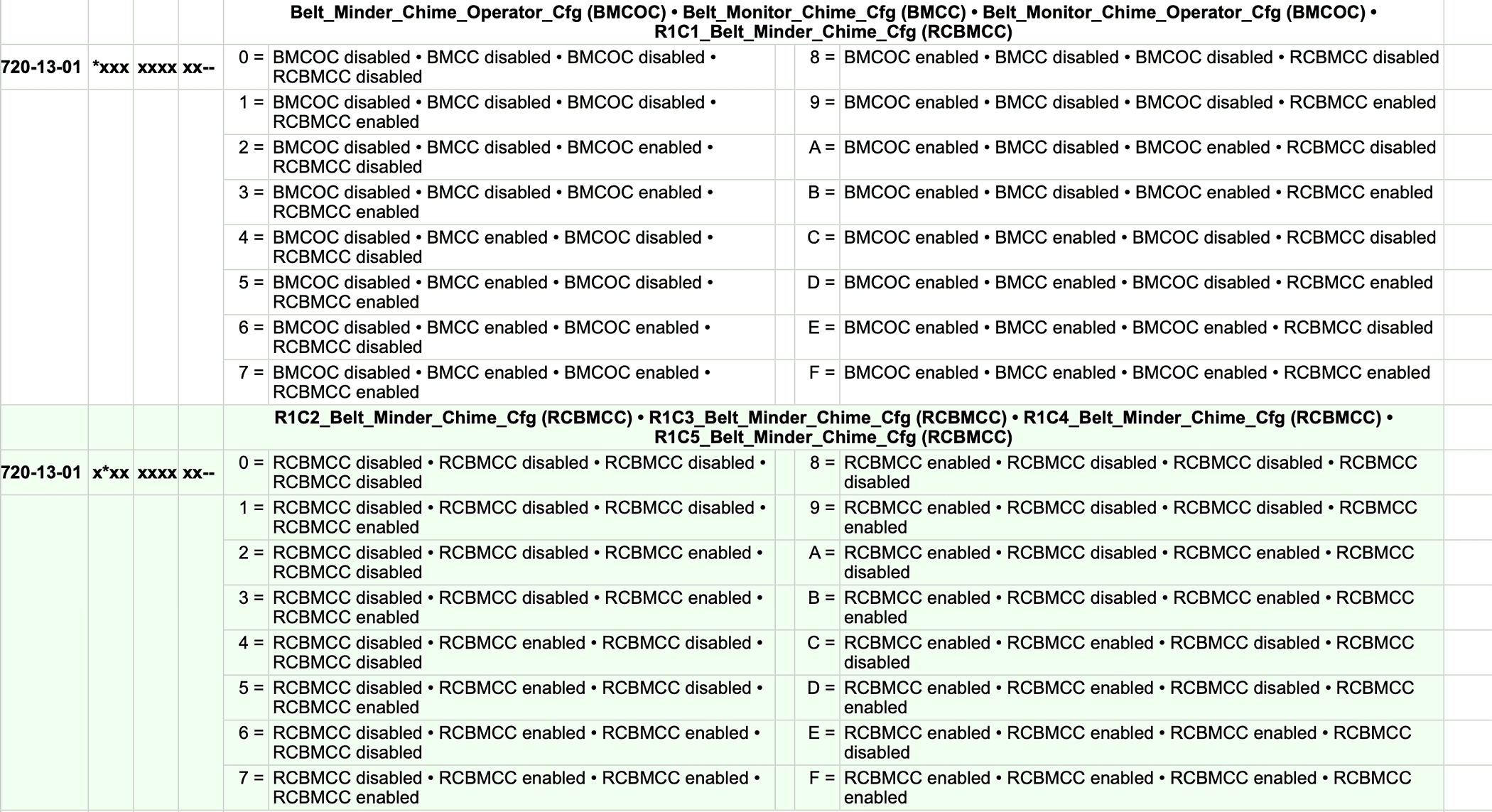
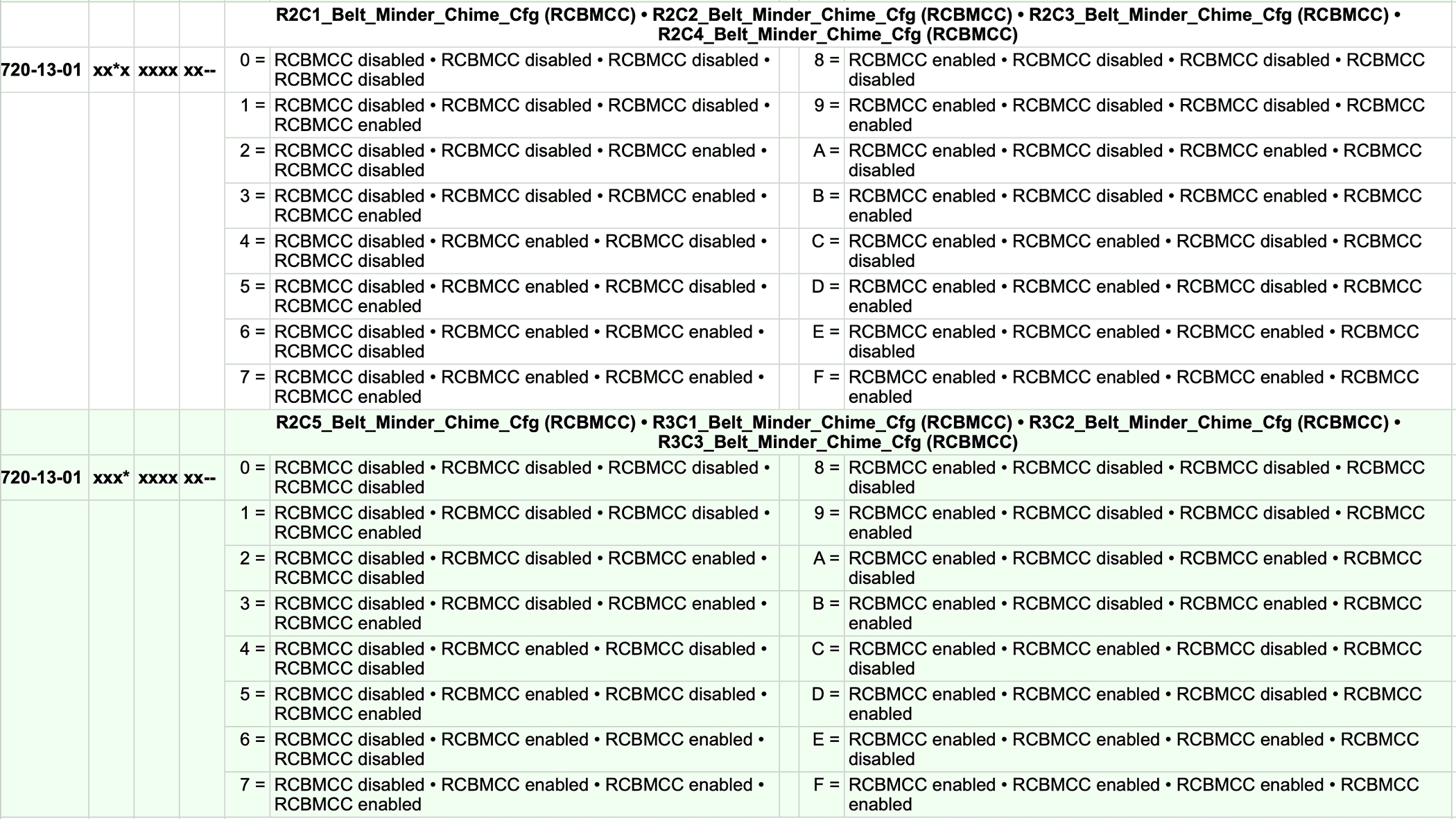
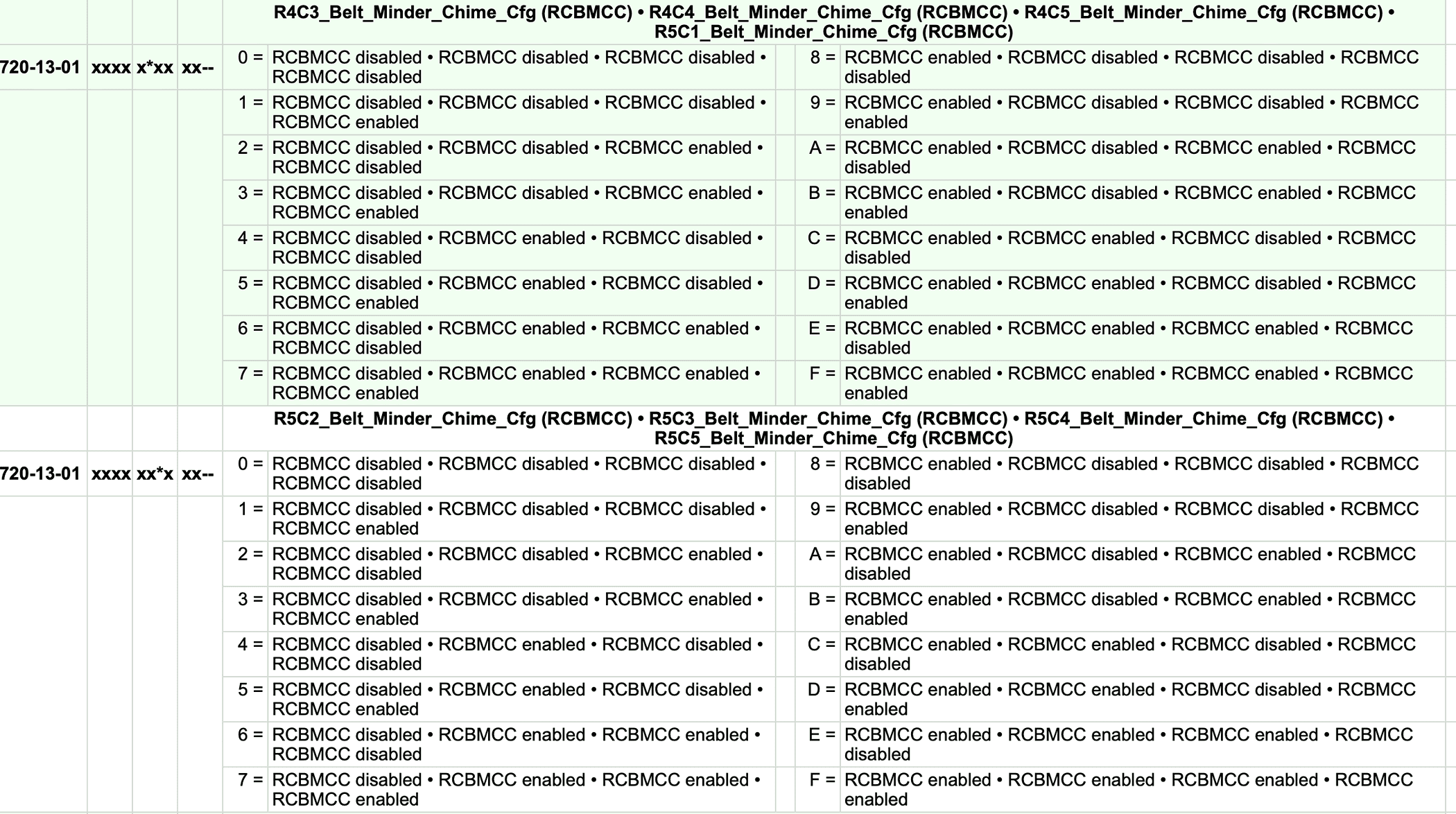
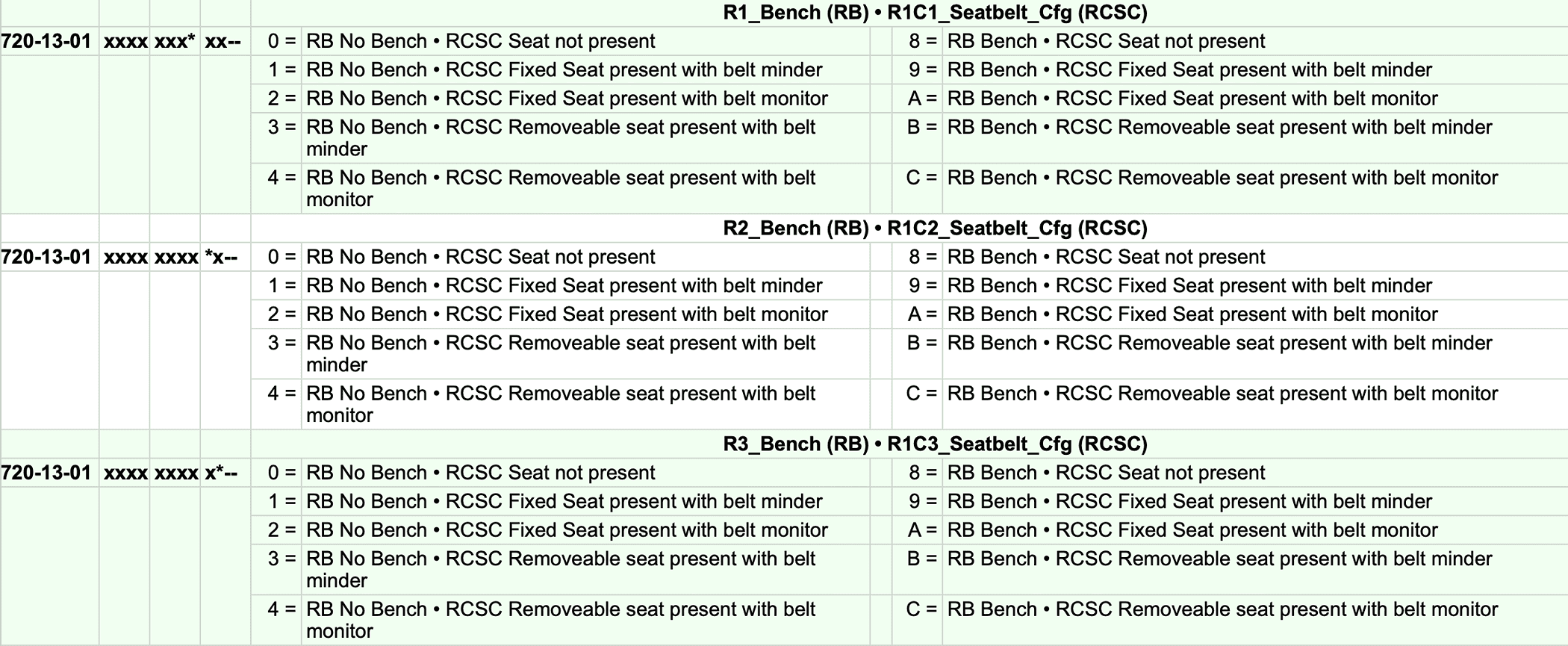
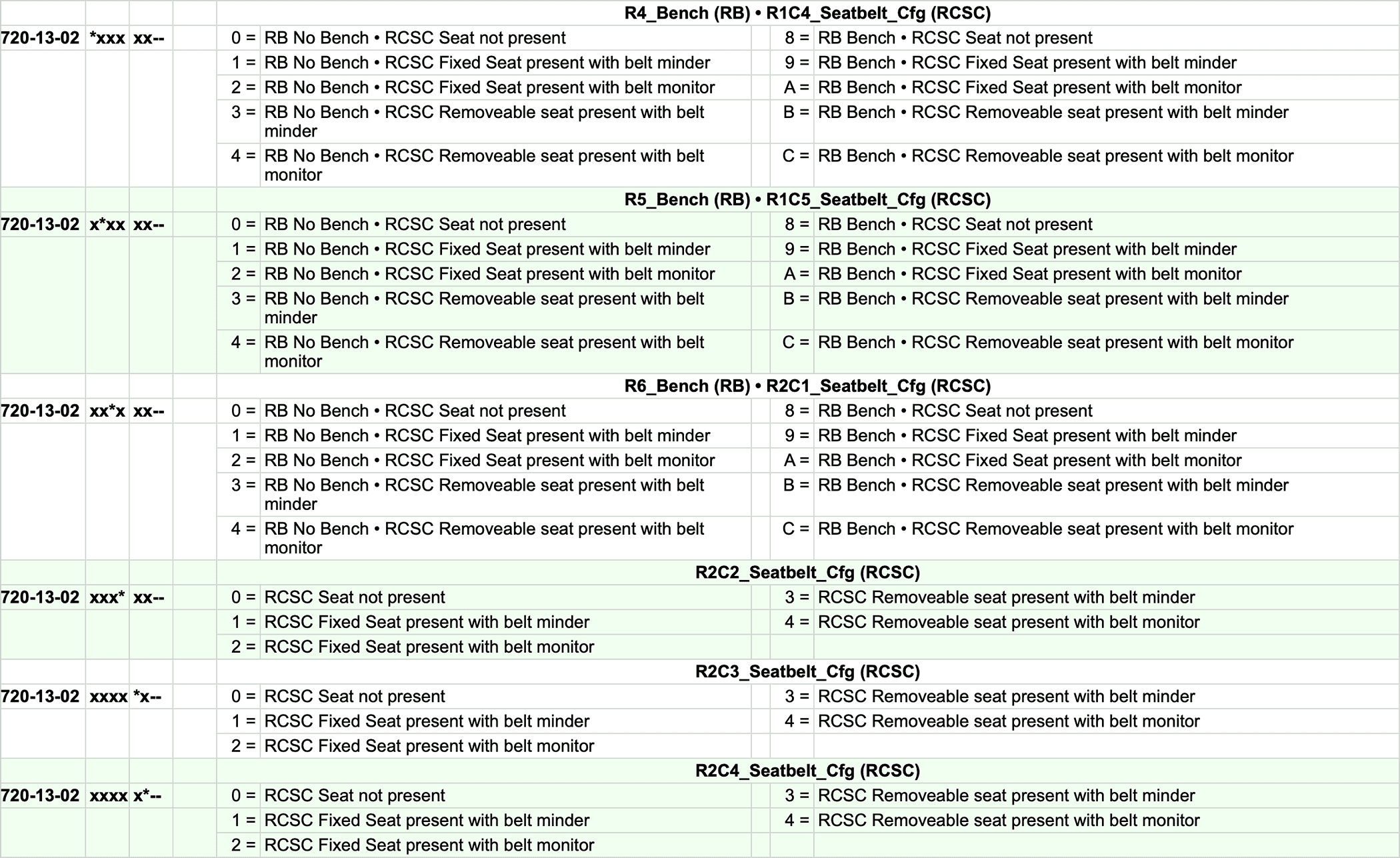
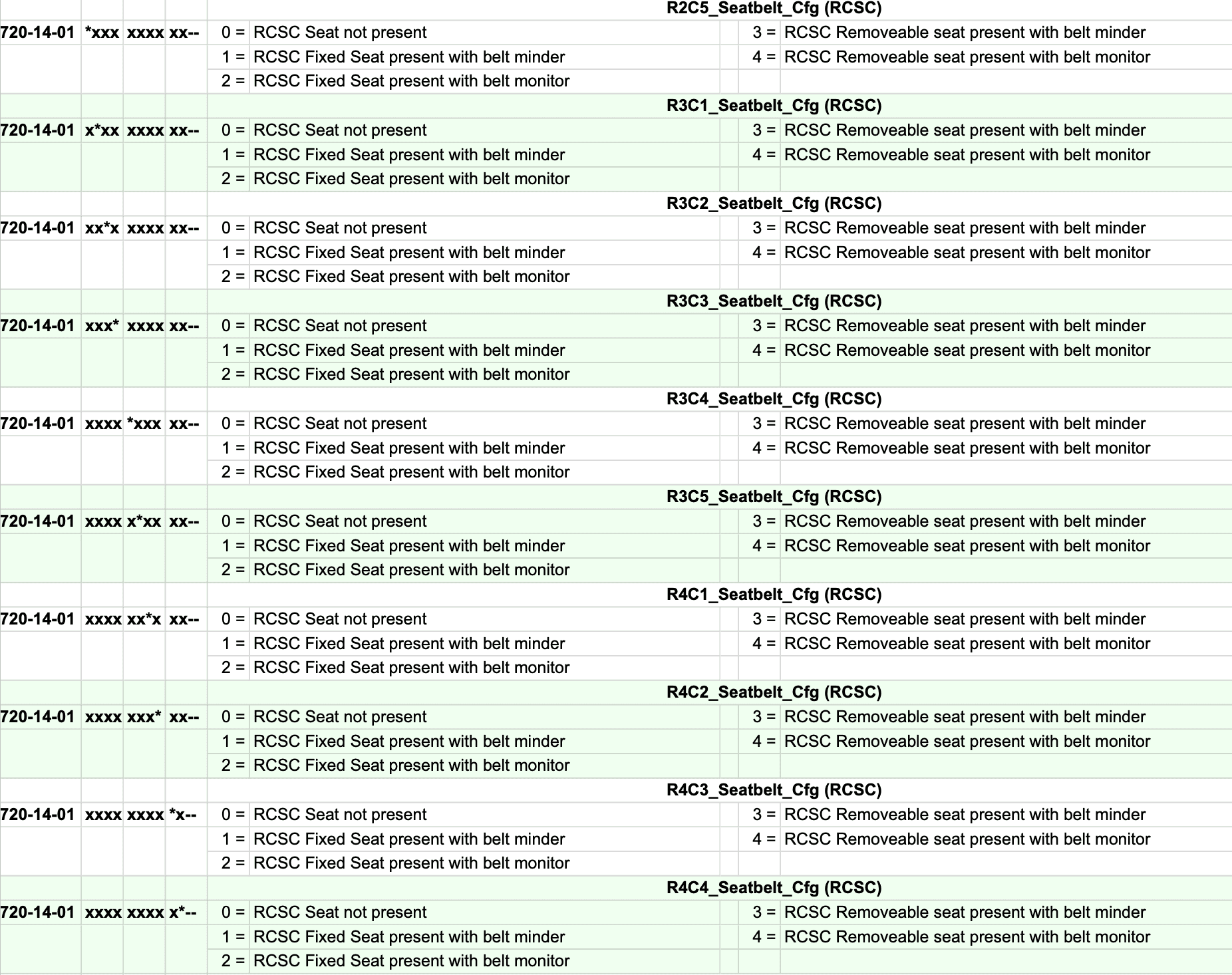
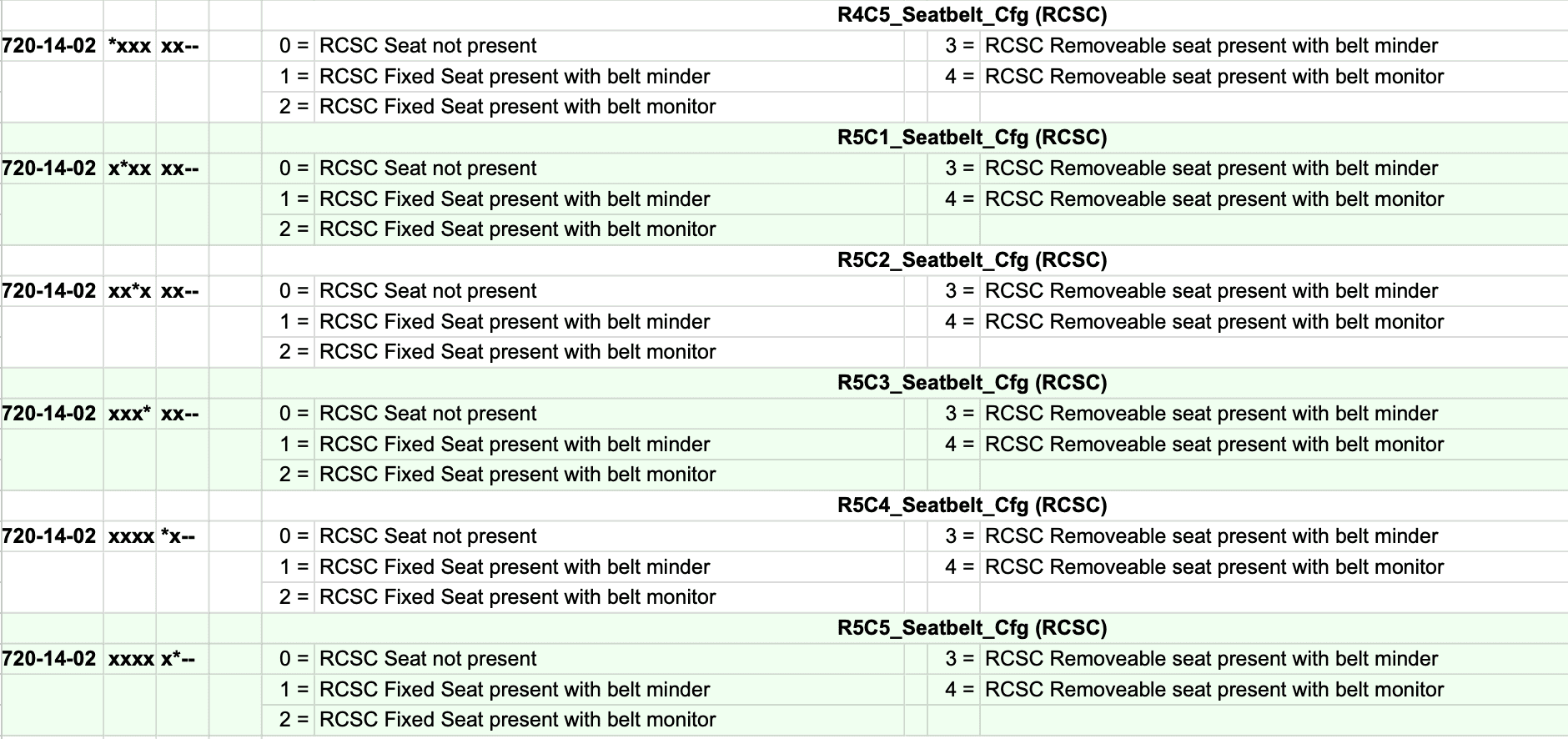
If you would like to keep the Minder (the dash light and chime) and not the Monitor (the seatbelt screen) I would suggest doing the following coding based on this diagram and my original coding in my Maverick.

720-13-01 9100 0001 8000
720-13-02 0110 1000
720-14-01 1000 0000 0000
720-14-02 All Zeros


Screenshot 2024-03-21 at 12.48.06 PM.png
Screenshot 2024-03-21 at 12.48.30 PM.png
Screenshot 2024-03-21 at 12.49.37 PM.png
Screenshot 2024-03-21 at 12.50.11 PM.png
Screenshot 2024-03-21 at 12.50.40 PM.png
Screenshot 2024-03-21 at 12.51.58 PM.png
Screenshot 2024-03-21 at 12.52.18 PM.png
So I tried the codes listed to get the minder (chime) but not the monitor (pop-up window). Using the exact numbers above brought back the dreaded monitor! I went back to all zeros and can stay there happily, but I thought I'd share my experience in case others encounter problems. I'll look closer and spread sheet. Could be related to trim, etc. I have a '23 EB Lariat Lux FX4 4K.
 

Toinky

2.0L EcoBoost
Well-known member
Joined
Nov 30, 2022
Threads
7
Messages
105
Reaction score
197
Location
California
Vehicle(s)
Toyota Tacoma
Engine
2.0L EcoBoost
So I tried the codes listed to get the minder (chime) but not the monitor (pop-up window). Using the exact numbers above brought back the dreaded monitor! I went back to all zeros and can stay there happily, but I thought I'd share my experience in case others encounter problems. I'll look closer and spread sheet. Could be related to trim, etc. I have a '23 EB Lariat Lux FX4 4K.
I just cross-referenced the codes of my as built and the spreadsheet. As EONR24 calculated, it should have worked. Maybe I entered a digit wrong, but I thought I double checked. I'll try it again tomorrow.
 
Sponsored
OP
OP
EONR24

EONR24

2.0L EcoBoost
Well-known member
First Name
Swag
Joined
Feb 26, 2024
Threads
44
Messages
1,442
Reaction score
1,655
Location
United States
Vehicle(s)
2024 Ford Maverick XL
Engine
2.0L EcoBoost
So I tried the codes listed to get the minder (chime) but not the monitor (pop-up window). Using the exact numbers above brought back the dreaded monitor! I went back to all zeros and can stay there happily, but I thought I'd share my experience in case others encounter problems. I'll look closer and spread sheet. Could be related to trim, etc. I have a '23 EB Lariat Lux FX4 4K.
Like you mentioned it could have to do with trim and other IPC codings differences. What were your original codings for those 4 lines of coding?
 

dldjtad

2.5L Hybrid
Well-known member
First Name
David
Joined
Dec 17, 2023
Threads
1
Messages
169
Reaction score
120
Location
Bartow, FL
Vehicle(s)
2023 Ford Maverick
Engine
2.5L Hybrid
Hello everyone!

I finally found the way to disable the ANNOYING Seatbelt information screen that comes on when you start the truck and stays on even after you buckle your seatbelt. Thank you to @ZOODAD over on the F250 forums for the coding information. THIS SUPER DUTY spreadsheet he put together might be useful for future MAVERICK FORScan Mods.

DISABLE SEATBELT INFORMATION SCREEN
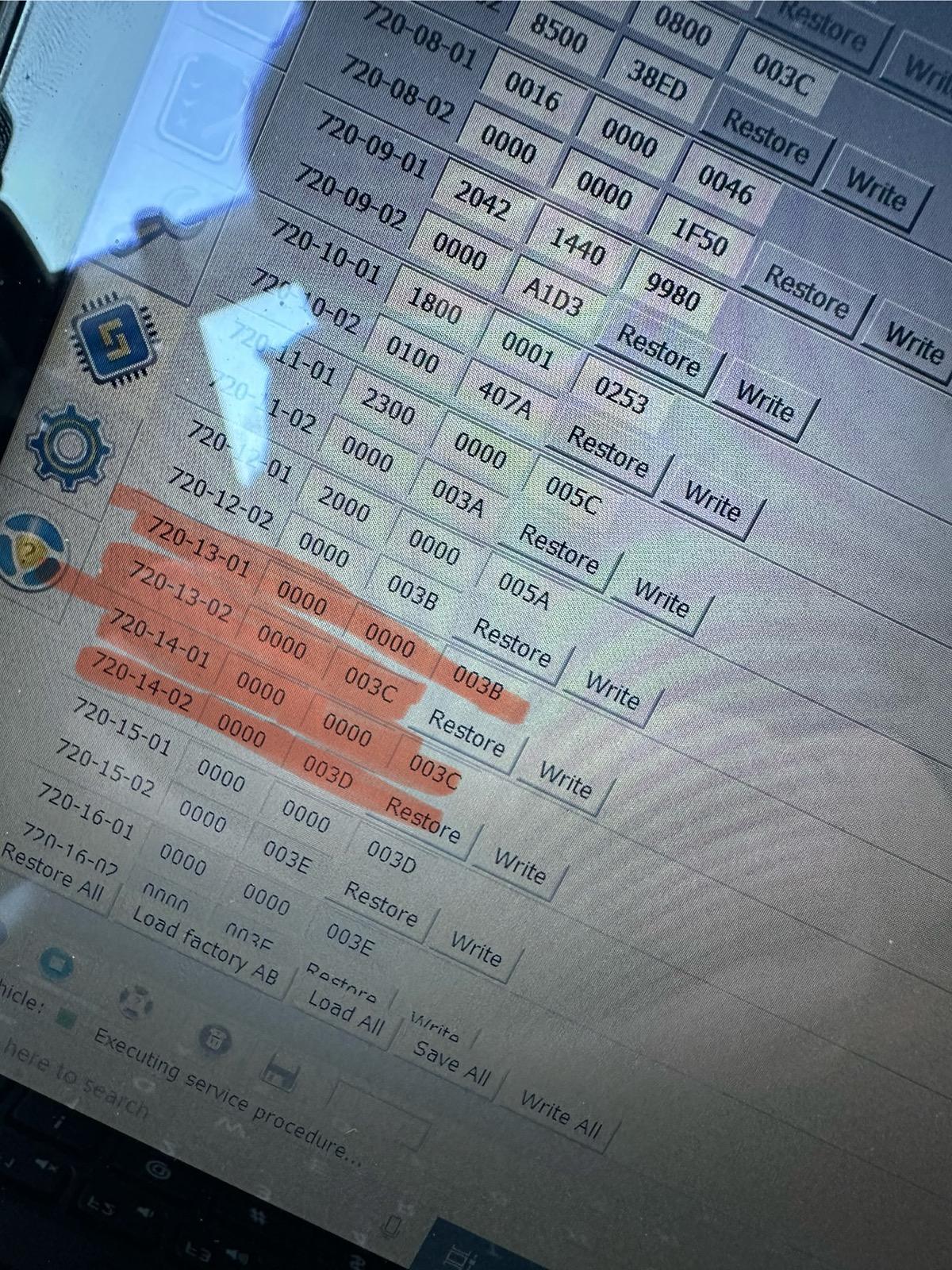
1. Open IPC AS BUILT
2. Change line 720-13-01 and 720-13-02 to ALL ZEROS. And WRITE the changes. Click yes to let Forscan correct the checksum.
3. Change line 720-14-01 and 720-14-02 to ALL ZEROS. And WRITE the changes. Click yes to let Forscan correct the checksum.

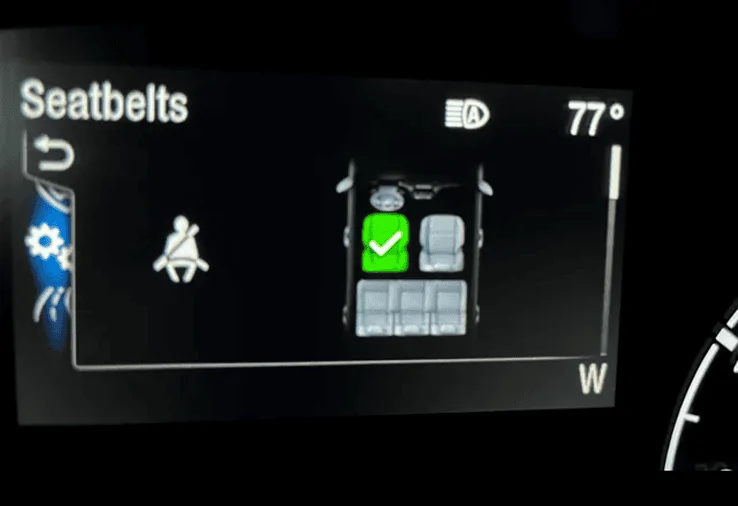
These coding changes worked for my 2024 Maverick XL AWD ECOBOOST. These changes remove the seatbelt info screen pictured below entirely and it also seems to disable the seatbelt chime too. I would love to hear from other members to see if these changes work in your Maverick! Also, I have the smaller instrument cluster. (The 4 inch Instrument Cluster)

EDIT:
If you would like to keep the Minder (the dash light and chime) and not the Monitor (the seatbelt screen) I would suggest doing the following coding based on this 2023 Maverick HEX code spreadsheet and my original coding in my Maverick. CONFIRMED WORKING by @Mavrik23

720-13-01 9100 0001 8000
720-13-02 0110 1000
720-14-01 1000 0000 0000
720-14-02 0000 0000


2ND EDIT: Here is a link to 2 more changes I just found DISABLE DOOR AND KEY CHIMES
I have found and tested two more codings that work for My 2024 Ford Maverick XL AWD ECOBOOST

DISABLE DOOR CHIMES
1. IPC AS BUILT
2. Go to 720-01-02
3. Replace the digit with a "0" as shown here

xx0x-xxxx


DISABLE KEY-IN IGNITON CHIME
1. IPC AS BUILT
2. Go to 720-01-02
3. Replace the digit with a "2" as shown here

xxxx-x2xx

FORScan coding to disable the Seatbelt Information Screen!.png


IMG_2898.jpeg
That completely worked on my 2023 Hybrid XL 2.5L. Thanks so much!
 

dldjtad

2.5L Hybrid
Well-known member
First Name
David
Joined
Dec 17, 2023
Threads
1
Messages
169
Reaction score
120
Location
Bartow, FL
Vehicle(s)
2023 Ford Maverick
Engine
2.5L Hybrid
Forscan something extra as in a scanner?
It is a software program that you download. You connect it to a specialized cable that you connect to a laptop and then to a special port under the dash of your car. Then you can do some reprogramming. Just google more about forscan to get some information on it, or simply look through these and other posts
 

Toinky

2.0L EcoBoost
Well-known member
Joined
Nov 30, 2022
Threads
7
Messages
105
Reaction score
197
Location
California
Vehicle(s)
Toyota Tacoma
Engine
2.0L EcoBoost
I just cross-referenced the codes of my as built and the spreadsheet. As EONR24 calculated, it should have worked. Maybe I entered a digit wrong, but I thought I double checked. I'll try it again tomorrow.
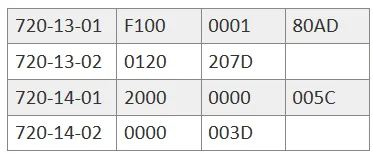
Still a no-go. According to the spreadsheet, but nag/monitor should be gone, but it's back with those numbers. I'm sure I had the numbers correct. In case it helps someone else, my As Built numbers for my '23 EB Lariat Lux FX4 4K are as follows:

Ford Maverick FINALLY, FORScan coding to disable the Seatbelt Information Screen! (CONFIRMED WORKING) 1711216203470-pu


Not that big of a deal to stick with the all zeros thing for me because I naturally snap in when I get in. Just thought it'd be nice to have the reminder for any passengers.
 
OP
OP
EONR24

EONR24

2.0L EcoBoost
Well-known member
First Name
Swag
Joined
Feb 26, 2024
Threads
44
Messages
1,442
Reaction score
1,655
Location
United States
Vehicle(s)
2024 Ford Maverick XL
Engine
2.0L EcoBoost
Still a no-go. According to the spreadsheet, but nag/monitor should be gone, but it's back with those numbers. I'm sure I had the numbers correct. In case it helps someone else, my As Built numbers for my '23 EB Lariat Lux FX4 4K are as follows:

1711216203470-pu.png


Not that big of a deal to stick with the all zeros thing for me because I naturally snap in when I get in. Just thought it'd be nice to have the reminder for any passengers.
Thanks for trying again. I will edit the beginning post to reflect that this isn't figured out yet. I really am starting to think that Livnitup spreadsheet has inaccuracies the more I go through it. I will try to see if I can figure out a coding that will work.
Sponsored


Top