Sponsored
OP
OP

Maverick2022XL

2.0L EcoBoost
Well-known member
First Name
name
Joined
Jan 13, 2022
Threads
19
Messages
1,285
Reaction score
1,268
Location
hinterlands
Vehicle(s)
2022 Ford Maverick XL, AWD, 4K tow, 2.0L EcoBoost
Engine
2.0L EcoBoost
Not sure I understand what you just said. But having been a programmer and the fact that I backed up each module before writing to it, I was willing to risk modifying the software. The fact that v.147 is the beta version, you have to assume some risk. Also I thought, just to see if disabling ABS affected my braking, I plan to try hitting the brakes in each drive mode to see if I can make it skid. When I do I'll post here. Thank you Maverick 2022XL for all your guidance.
You'll know if the braking is off, you'll either feel it in the wheels or eventually smell the pads burning if it is not working correctly. You'd also see it in the MPG being lower than should if it was braking to maintain drive conditions improperly in each mode. To test that I've run the eco mode with and without the ABS drive mode selected and noticed none of these when I did, no improper braking or difference in MPG.

As far as EPAS works in conjunction with a drive mode, for example the haul/ trailer mode it works in the following manner. When it is active it tightens up the steering so it feels like the power steering is out making it harder for the truck to drift out of a lane. In sport mode it will do the opposite and make the steering looser and more responsive. So to my original statement if you disable it as a drive mode the EPAS will still be active but in each mode it should provide the same default assist as it would in normal mode in all drive modes now. If you disable it completely in the PSCM then the power steering will work as a standard fluid only power steering pump without the electronic assist.
Sponsored
 

bravesfan10c

2.0L EcoBoost
Well-known member
First Name
Brad
Joined
Oct 8, 2021
Threads
2
Messages
55
Reaction score
78
Location
Indiana
Vehicle(s)
Hot Pepper Red XLT FX4 AWD LUX
Engine
2.0L EcoBoost
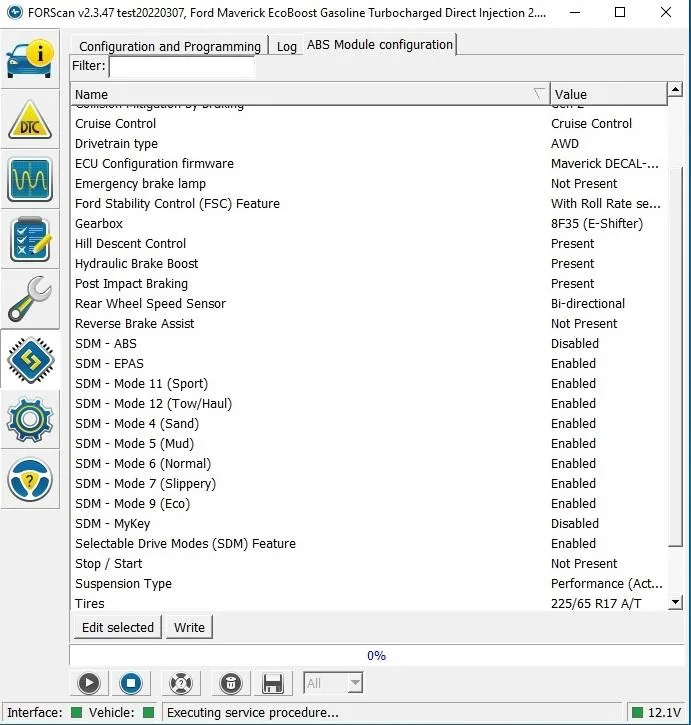
Yes, all done with Forscan. The instructions could be better. Tried once to figure it out with no success and posted here. Then someone told me you need the latest version, which ends in .147 and has specific features added for the Maverick. I had the .146 so upgraded to .147 and everything was in plain English, no spreadsheet needed and no mods to the "as built" files, which are all codes. I ended up figuring it out how to do it by trial and error. Basically you can back up each module using the "as built" files, then update the software in the module that doesn't say "as built." (example: you'll see an ABS file and another ABS AS-BUILT file). I'm attaching a screenshot showing changes in the ABS module for the drive modes. Keep in mind that when you disable "ABS" it has nothing to do with your brakes, you're just allowing a different configuration to the drive modes than what it came with from the factory. Here are the changes I made:

ABS MODULE
disabled ABS
enabled Sport, Eco modes

BCM MODULE (BODY CONTROL MODULE)
disabled BMS / Auto Start Stop system

IPC MODULE (INTEGRATED CONTROL PANEL, OR INSTRUMENT CLUSTER NAVIGATION)
disabled Auto Stop Start
disabled Chimes - Driver Belt Minder
disabled Chimes - Passenger Belt Minder
disabled Chimes - Vehicle running with door open (2-Manual Transmission)

abs changes 1.jpg


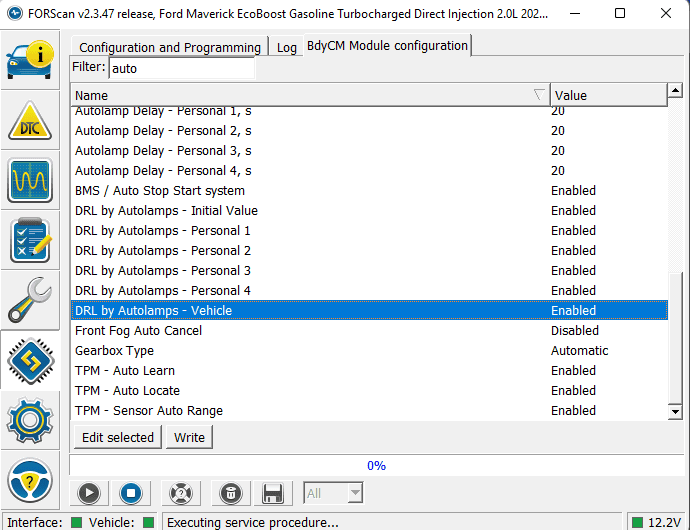
My DRL are not working. Not sure when it started. Could these changes have anything to do with it? They are enabled on my Productivity screen. There are enabled on what I can find in Forscan.

Ford Maverick ForScan mod - enable all drive modes: eco, sport, mud and snow (confirmed working) 1651258389376
 

tmoney20g

2.0L EcoBoost
Well-known member
First Name
tony
Joined
Feb 8, 2022
Threads
4
Messages
59
Reaction score
70
Location
hammonton, nj
Vehicle(s)
2022 Maverick XLT FX4/Lux/4k/CP360
Engine
2.0L EcoBoost
My DRL are not working. Not sure when it started. Could these changes have anything to do with it? They are enabled on my Productivity screen. There are enabled on what I can find in Forscan.
did they work before ? DRL's on XL/XLT are just your headlights on the lower 3rd of your headlight housing
 

bravesfan10c

2.0L EcoBoost
Well-known member
First Name
Brad
Joined
Oct 8, 2021
Threads
2
Messages
55
Reaction score
78
Location
Indiana
Vehicle(s)
Hot Pepper Red XLT FX4 AWD LUX
Engine
2.0L EcoBoost
did they work before ? DRL's on XL/XLT are just your headlights on the lower 3rd of your headlight housing

Yes, they worked before. Just not exactly sure when they stopped. I have LASFIT Switchbacks installed. Turn signals are fine. Headlights work fine. Just no DRL. They are enabled in the Vehicle settings. I guess I could put the halogens back in to test the bulbs.

The XL/XLT DRLs are not the headlight, but are in the Turn signals. They where original amber.
 

Kenny

2.0L EcoBoost
Well-known member
First Name
Kenny
Joined
Nov 5, 2021
Threads
11
Messages
188
Reaction score
163
Location
81501
Vehicle(s)
2022 Maverick XLT 2.0 Ecoboost with AWD, Tow Pkg
Engine
2.0L EcoBoost
Yes, they worked before. Just not exactly sure when they stopped. I have LASFIT Switchbacks installed. Turn signals are fine. Headlights work fine. Just no DRL. They are enabled in the Vehicle settings. I guess I could put the halogens back in to test the bulbs. The XL/XLT DRLs are not the headlight, but are in the Turn signals. They where original amber.
So you replaced the DRLs with the LASFITs? If so, maybe that could be the issue. I don't think changing drive modes in Forscan would affect your DRLs, but it's possible that other modules you may have messed with (?) could affect them. Most likely it's some other factor, not Forscan. Here are some videos by Ford on configuring DRLs through the display. I would watch them and if that doesn't fix it, try Google:


Sponsored

tmoney20g

2.0L EcoBoost
Well-known member
First Name
tony
Joined
Feb 8, 2022
Threads
4
Messages
59
Reaction score
70
Location
hammonton, nj
Vehicle(s)
2022 Maverick XLT FX4/Lux/4k/CP360
Engine
2.0L EcoBoost
Yes, they worked before. Just not exactly sure when they stopped. I have LASFIT Switchbacks installed. Turn signals are fine. Headlights work fine. Just no DRL. They are enabled in the Vehicle settings. I guess I could put the halogens back in to test the bulbs.

The XL/XLT DRLs are not the headlight, but are in the Turn signals. They where original amber.
it depends if its daytime or night time, in the daytime the XL/XLT DRL's are indeed the headlights. then at night, obviously with the photocell telling the truck its nighttime, it'll engage the full lighting package and your parking lights would be on.

Trust me, i wish the parking lights were the DRL's, but they're not. Because, just like you, i have an XLT and the lasfit's and i want the parking lights to be the DRL's, and they're not.
 

tmoney20g

2.0L EcoBoost
Well-known member
First Name
tony
Joined
Feb 8, 2022
Threads
4
Messages
59
Reaction score
70
Location
hammonton, nj
Vehicle(s)
2022 Maverick XLT FX4/Lux/4k/CP360
Engine
2.0L EcoBoost
So since I also have an XLT with the white/yellow lasfit parking lamps, i keep the DRL's set to OFF and just turn the headlight knob to 'parking lamps' when I want my white led's on.

And I just made a video, and after turning the DRL's to on, still daytime here, it doesn't appear anything happened. I wonder if the settings are active on the next restart for DRL = On, but if they're already on and you set DRL = Off, then off happens right away ? Maybe I'll go do another video since they're currently set to on....


tmoney20g

2.0L EcoBoost
Well-known member
First Name
tony
Joined
Feb 8, 2022
Threads
4
Messages
59
Reaction score
70
Location
hammonton, nj
Vehicle(s)
2022 Maverick XLT FX4/Lux/4k/CP360
Engine
2.0L EcoBoost
here's video 2 of 2, i held my hand over the photocell to get the full spectrum of settings:


tmoney20g

2.0L EcoBoost
Well-known member
First Name
tony
Joined
Feb 8, 2022
Threads
4
Messages
59
Reaction score
70
Location
hammonton, nj
Vehicle(s)
2022 Maverick XLT FX4/Lux/4k/CP360
Engine
2.0L EcoBoost
soooooo, just fired up forscan for the first time, enabled the other drive modes (eco&sport) then ventured into the lighting section. I told the drls to be the parking lights and told thr low beams to not be DRLs and voila! I got my wish, drls are now my parking lights. side note, drls are NOT active in park, they activate once in drive, that may answer @bravesfan10c issue.
 

DHouch1813

2.0L EcoBoost
Well-known member
Joined
Jan 19, 2022
Threads
5
Messages
87
Reaction score
29
Location
Richmond, Va
Vehicle(s)
22' Maverick XLT Lux, FX4 w/4k
Engine
2.0L EcoBoost
Applies to all trims w/AWD with or without an FX4 package.

This so far has been tested on an XL trim with a 2.0L gas engine, AWD w/o the FX4 package and has since been confirmed to work with the FX4 package option.

It has also been confirmed that it can be used on FWD vehicles. Performance testing still to be determined for FWD.


This assumes you know how to use Forscan. Also make sure you back up your ABS settings before doing this. If you screw it up badly a simple restore of your back up settings may not be enough. You might also have to do an ABS module reset afterwards.

There are 2 ways to go about this.

Method 1 - enable either the FX4 package or non FX4 package.

To switch between both

ABS
760-02-01
xxxx-xxxx-x*xx

For non FX4 package and eco / sport drive modes enabled change to xxxx-xxxx-x1xx
For FX4 package and mud / snow drive modes change to xxxx-xxxx-x8xx

Next you need to enable the selectable drive modes for the package you want active. See SDM section for drive mode selection.

Method 2 - This allows for all 4 modes to be usable at the same time

First you need to disable ABS as a selectable drive mode. This will bypass register 760-02-01. You can leave that setting to your vehicle's default setting.

ABS
760-04-01
xxxx-xxxx-x*xx
change * to 0 to disable the ABS drive mode selector
This now allows you to use all 4 modes.

Next you need to enable the drive modes. See SDM section.

SDM (selectable drives modes)
This is required regardless of what method you use.

shortcut code - recommended for method 2.
760-04-03
0000 0001 EB5A
This enables all 4 modes - eco, sport, mud and snow


To enable FX4 modes

FX4 package - recommended code for method 1
760-04-03
xxxx-xxx1-E1xx
This enables both mud and snow modes

xxxx-xxx1-x1xx
xxx1 = snow
x1xx = eco and sport not present

xxxx-xxxx-E1xx
Exxx = mud / ruts
x1xx = eco and sport not present

To enable non FX4 modes

non FX4 package - recommended code for method 1
760-04-03
xxxx-xxxx-6Bxx
6 = eco and sport present / no mud mode
B = eco and sport

xxxx-xxxx-63xx
6 = eco and sport present / no mud mode
3 = eco w/o sport

xxxx-xxxx-69xx
6 = eco and sport present / no mud mode
9 = sport w/o eco
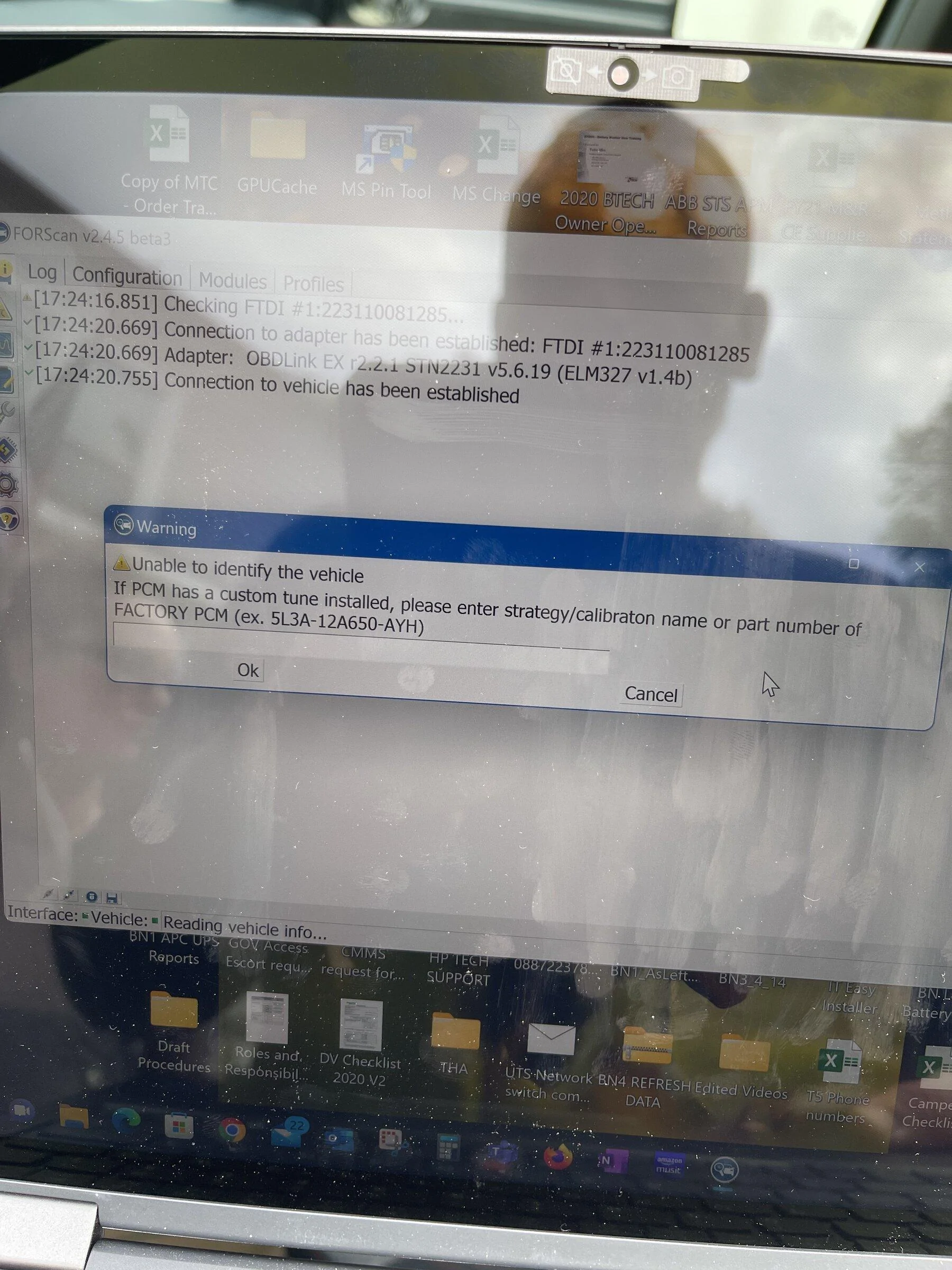
Finally got my XLT FX4 today. Went to plug up and got this screen and then the message “unable to connect. Contact developers” or something like that. I know y’all are not the developers but searching through threads on my phone sucks and laptop at work. Any recommendations? Using OBDLINK EX, get green light when plugged in. Have used in 2012 f150 before and no issues. Updated forscan still nothing. Please help if you can.

Ford Maverick ForScan mod - enable all drive modes: eco, sport, mud and snow (confirmed working) 3CFE39FE-208C-4871-8279-DA6C7466E991
 
Sponsored

Darnon

2.5L Hybrid
Well-known member
Joined
Jul 4, 2021
Threads
10
Messages
5,720
Reaction score
7,227
Location
WNY
Vehicle(s)
2022 Maverick
Engine
2.5L Hybrid
Finally got my XLT FX4 today. Went to plug up and got this screen and then the message “unable to connect. Contact developers” or something like that. I know y’all are not the developers but searching through threads on my phone sucks and laptop at work. Any recommendations? Using OBDLINK EX, get green light when plugged in. Have used in 2012 f150 before and no issues. Updated forscan still nothing. Please help if you can.
What version did you update to? I see in your picture you're running the program beta branch. Forscan's version control is kind of screwy so the latest v2.3.47 might be newer on a vehicle information basis than the beta.
 

DHouch1813

2.0L EcoBoost
Well-known member
Joined
Jan 19, 2022
Threads
5
Messages
87
Reaction score
29
Location
Richmond, Va
Vehicle(s)
22' Maverick XLT Lux, FX4 w/4k
Engine
2.0L EcoBoost
What version did you update to? I see in your picture you're running the program beta branch. Forscan's version control is kind of screwy so the latest v2.3.47 might be newer on a vehicle information basis than the beta.
Update I got it, guess it had been so long since I used the OBDLINK I had to update the software version after updating the forscan as you recommended. All good now! Thank you!
 

Attachments

Kenny

2.0L EcoBoost
Well-known member
First Name
Kenny
Joined
Nov 5, 2021
Threads
11
Messages
188
Reaction score
163
Location
81501
Vehicle(s)
2022 Maverick XLT 2.0 Ecoboost with AWD, Tow Pkg
Engine
2.0L EcoBoost
Finally got my XLT FX4 today. Went to plug up and got this screen and then the message “unable to connect. Contact developers” or something like that...Using OBDLINK EX, get green light when plugged in.
I'm no expert but also have XLT FX4 and OBDLINK EX and had the same connection issues. Tried several times and finally it connected. Don't know what I did, but tried unplugging everything, turning key off, starting the procedure over. I've connected 3x now changing things. So maybe just keep trying.
 

bravesfan10c

2.0L EcoBoost
Well-known member
First Name
Brad
Joined
Oct 8, 2021
Threads
2
Messages
55
Reaction score
78
Location
Indiana
Vehicle(s)
Hot Pepper Red XLT FX4 AWD LUX
Engine
2.0L EcoBoost
So you replaced the DRLs with the LASFITs? If so, maybe that could be the issue. I don't think changing drive modes in Forscan would affect your DRLs, but it's possible that other modules you may have messed with (?) could affect them. Most likely it's some other factor, not Forscan. Here are some videos by Ford on configuring DRLs through the display. I would watch them and if that doesn't fix it, try Google:


Thank you for all the replies. I have been on vacation in Jamaica. I made no changes and the DRL's started working with no issues. May be a heat thing with the Switchbacks, but not sure. Sitting with the key on and not moving.
 

SnyperX

Well-known member
Joined
Nov 3, 2021
Threads
18
Messages
196
Reaction score
263
Location
Wisconsin, USA
Vehicle(s)
2024 Ranger XLT Sport 2.3L
Engine
Undecided
Yes, all done with Forscan. The instructions could be better. Tried once to figure it out with no success and posted here. Then someone told me you need the latest version, which ends in .147 and has specific features added for the Maverick. I had the .146 so upgraded to .147 and everything was in plain English, no spreadsheet needed and no mods to the "as built" files, which are all codes. I ended up figuring it out how to do it by trial and error. Basically you can back up each module using the "as built" files, then update the software in the module that doesn't say "as built." (example: you'll see an ABS file and another ABS AS-BUILT file). I'm attaching a screenshot showing changes in the ABS module for the drive modes. Keep in mind that when you disable "ABS" it has nothing to do with your brakes, you're just allowing a different configuration to the drive modes than what it came with from the factory. Here are the changes I made:

ABS MODULE
disabled ABS
enabled Sport, Eco modes

BCM MODULE (BODY CONTROL MODULE)
disabled BMS / Auto Start Stop system

IPC MODULE (INTEGRATED CONTROL PANEL, OR INSTRUMENT CLUSTER NAVIGATION)
disabled Auto Stop Start
disabled Chimes - Driver Belt Minder
disabled Chimes - Passenger Belt Minder
disabled Chimes - Vehicle running with door open (2-Manual Transmission)
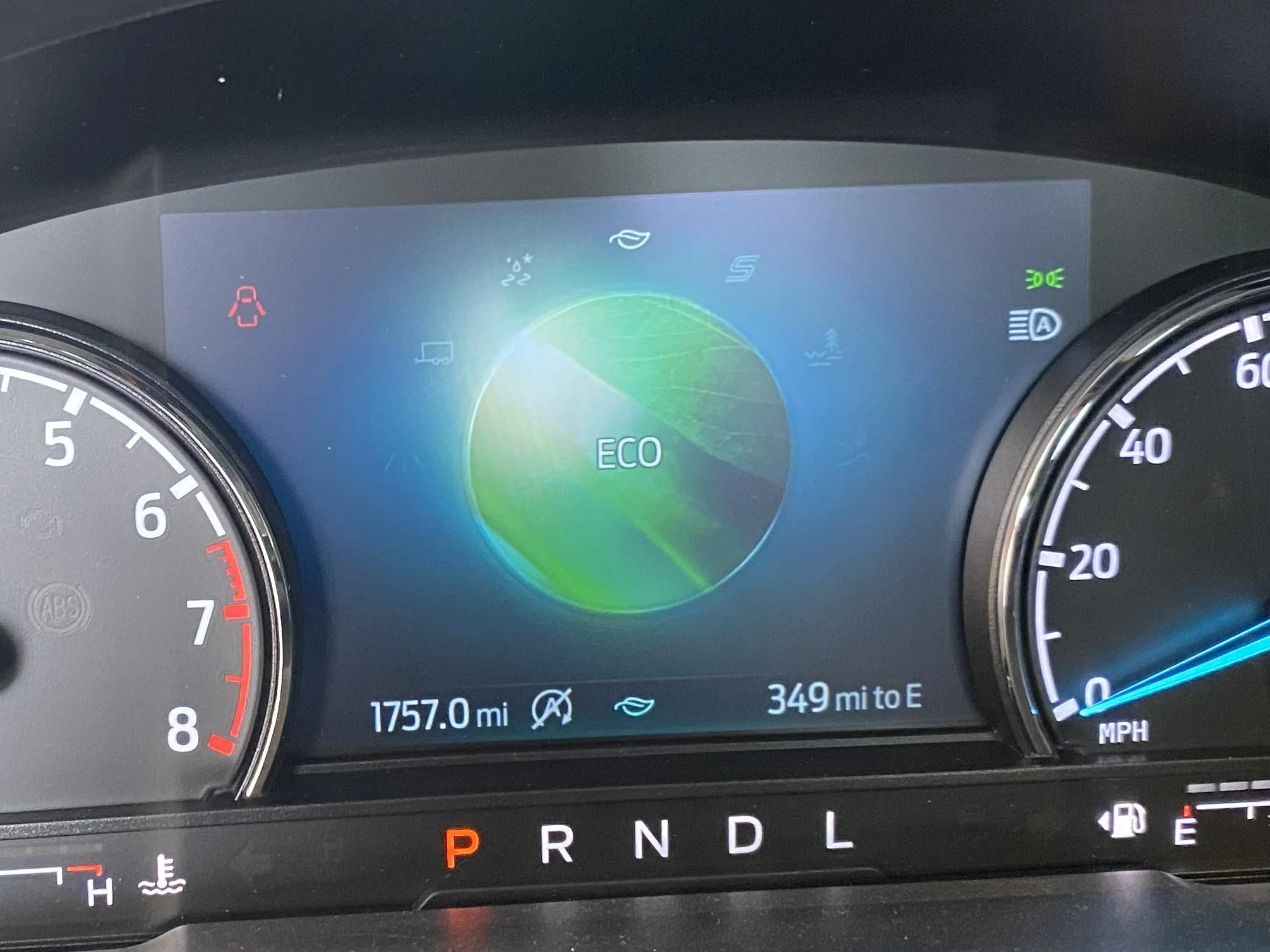
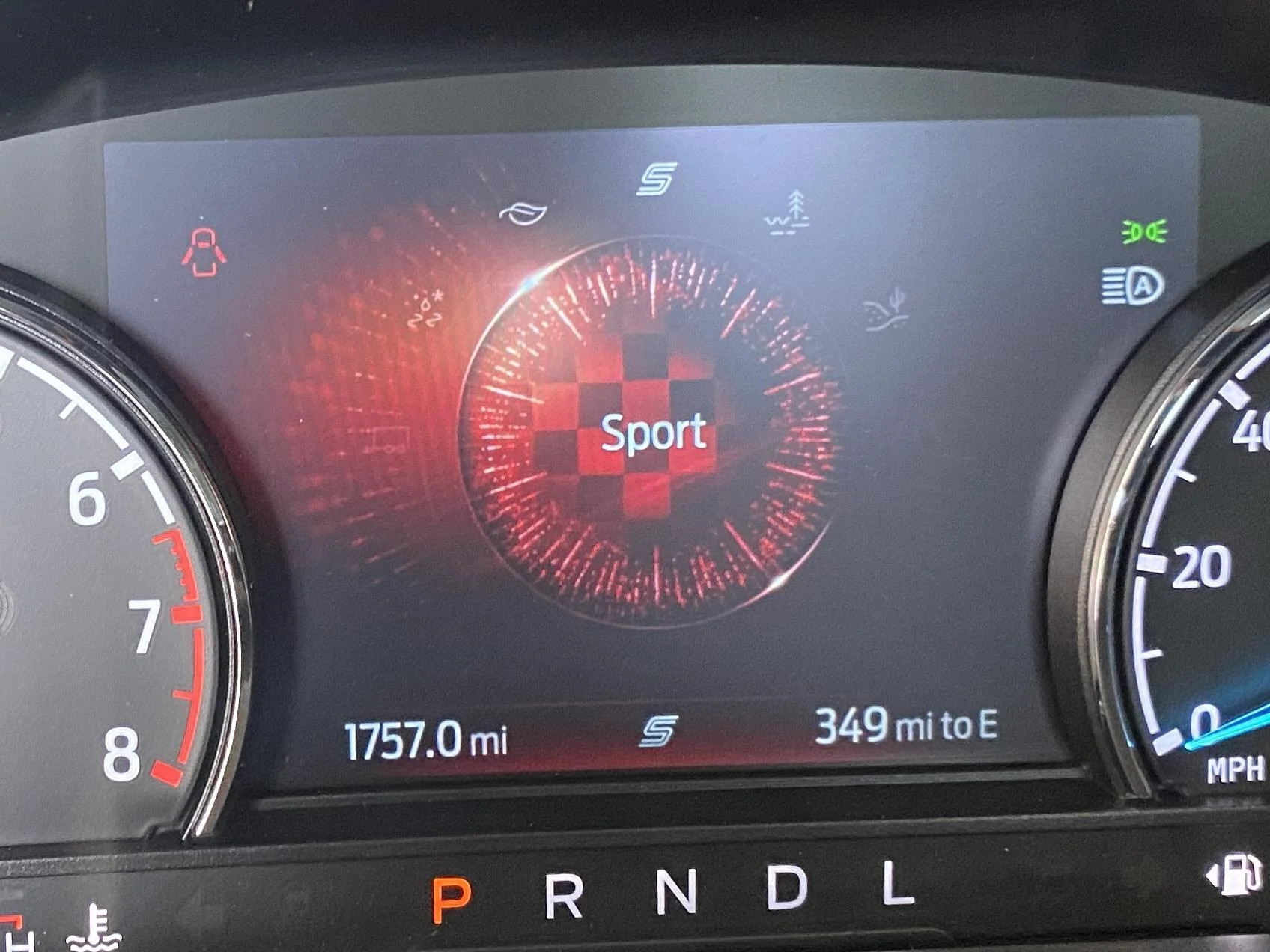
Backed up my ABS module and made the changes and seems I did it right:

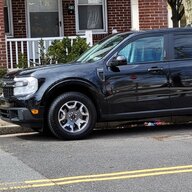
Ford Maverick ForScan mod - enable all drive modes: eco, sport, mud and snow (confirmed working) 4B11A8A6-B901-49E8-ABA1-DD93B3B49EB5_1_201_a


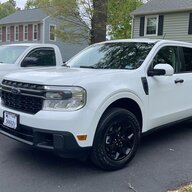
Ford Maverick ForScan mod - enable all drive modes: eco, sport, mud and snow (confirmed working) C6C41673-880E-4D9C-9BB0-61B79CC1674A_1_201_a
Sponsored


Top