
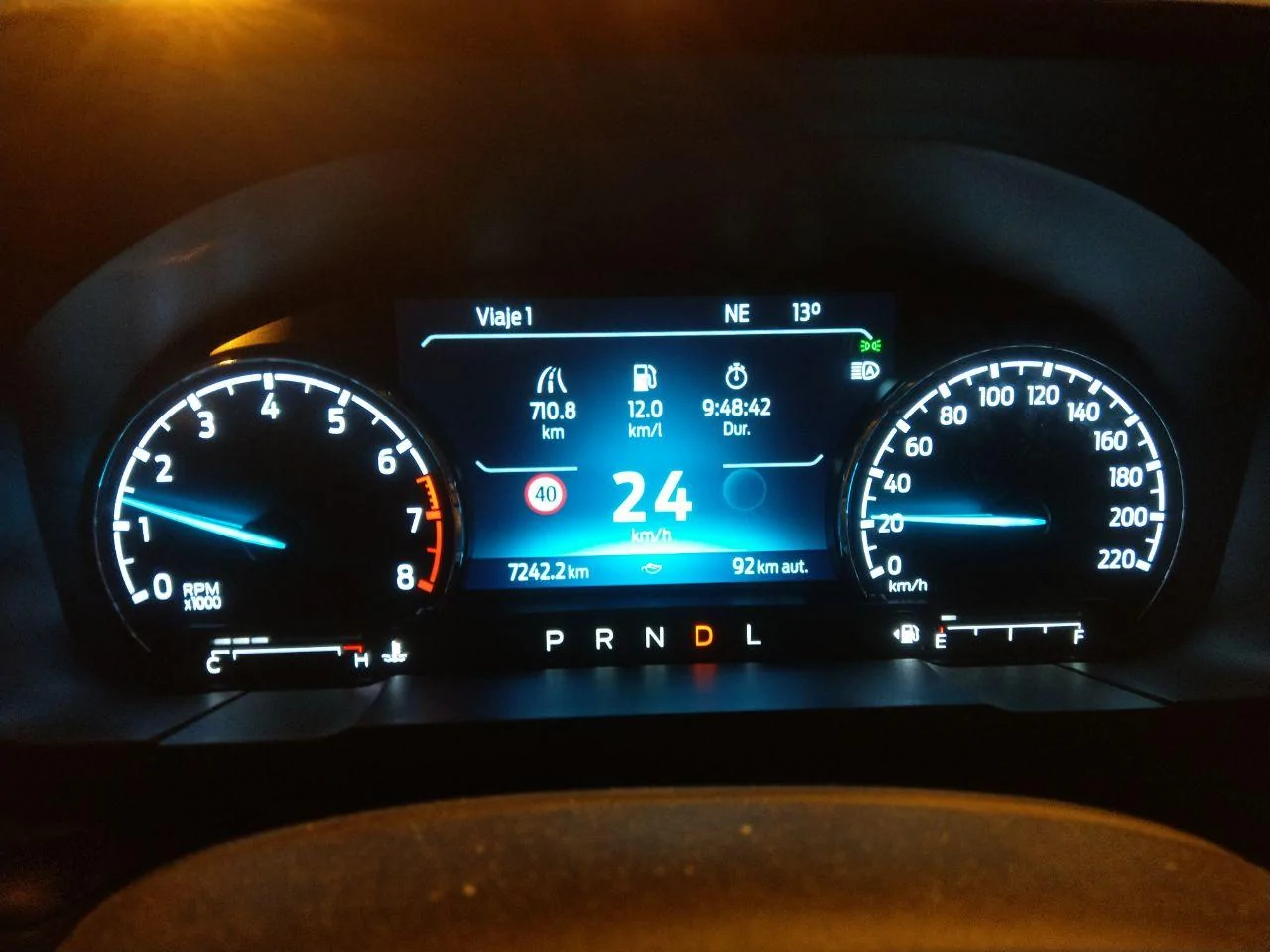
That is because your speedometer is in the center of the display.Working! But for some reason it doesn't show anything on the right side.
Sponsored
That is because your speedometer is in the center of the display.Working! But for some reason it doesn't show anything on the right side.
That is the round euro style sign you have. It seems getting them to be the rectangular US ones has been difficult. The other one is for ‘warning’ signs and would very rarely be seen (I do not recall which signs they exactly are). But that is another reason people like the rectangular style, that 2nd sign ‘blank‘ goes away.Working! But for some reason it doesn't show anything on the right side.
You've got the European style enabled. I had that issue until some wonderful individuals showed me how to get the rectangular US style sign. With that style there's only one image on left. So no blank bubble on the right.Working! But for some reason it doesn't show anything on the right side.
Hey got a quick question. So I have a 2024 Lariat Hybrid and I'm 90% sure it has nav - (I see the APIM and I have a navigation screen in the media console that shows posted speed limits). I got TSR enabled easy enough but just curious if anyone has been able to get the nav systems posted limits into the drivers cluster, to clarify TSR is detecting road signs perfectly but in areas that there are no signs it doesn't update with the nav's posted speed limit.This has been tested and will work on all models that do not have a Ford Navigation system installed. It should work on models with a Ford Navigation system but will require different settings and may also require some APIM module changes to fully integrate the Navigation sign information into the display cluster.
Tools need
Forscan software and a programming cable
Tutorial assumes you already know how to program using forscan.
Method 1 - No Ford Navigation system installed
This applies to 4 inch and 6 inch clusters, this will show the traffic speed signs as round in the 6inch clusters.
First we need to enable TSR camera function in the Image Processing Module
IPMA
706-01-01
xxxx-xxD2-xxxxx
This enables TSR in camera only mode and the sign mode being SLOIF
SLOIF = speed limit and overpass signs
Next we need to activate it in the instrument cluster
IPC
720-03-02
xxCx-xxxx-xxxx
This activates the TSR menu
Next optionally is for the speed warning menu. If you leave it default you'll get 2 tolerance options for below and above 35 MPH. If you set this it will display it as a single tolerance option.
IPC
720-10-01
xCxx xxxx xxxx
This will display it as a single option. The tolerance will flash the speed limit sign in the cluster if you are traveling that many miles or more above the posted speed limit.
Finally if you want an audible warning to going along with the tolerance setting this value will enable chimes.
IPC
720-04-01
xxxx-xx4x-xxxx
This will give an option to enable chimes in the speed warning section of the menu
Method 2 - No Ford Navigation system installed recommended for 6inch cluster screens.
Thanks to @nickn066 for pointing this out originally
This also applies to 4inch cluster screens.
This method enables Speed Sign Recognition which is a subset of TSR. It is a different menu and only applies to speed limit signs. If you have a 6 inch cluster and want the speed limit signs to be displayed as squares like in the 4inch cluster screen then use this method instead.
First we need to enable TSR camera function in the Image Processing Module there are 2 settings that will work
IPMA setting 1
706-01-01
xxxx-xxD2-xxxxx
This enables TSR in camera only mode and the sign mode being SLOIF
SLOIF = speed limit and overpass signs
IPMA setting 2
706-01-01
xxxx-xxD3-xxxxx
This enables TSR in camera only mode and the sign mode being SLIF
SLIF = speed limit signs only
It is recommended to use setting 2 here since the SSR menu in the IPC cluster only operates in SLIF mode.
Next and finally we just need to enable the Speed Sign Recognition menu in the cluster. By default it is disabled.
IPC
720-09-01
xxxx-xxxx-8xxx
This enables the Speed Sign Recognition menu.
Method 3 - Ford Navigation system installed.
writeup to follow
That is it and if you did everything correctly TSR which is undocumented on the Maverick thus far will be enabled and working correctly in the instrument cluster with no conflicts with other safety features.
The signs here are round, so that's fine. The right side never showed me anything.That is the round euro style sign you have. It seems getting them to be the rectangular US ones has been difficult. The other one is for ‘warning’ signs and would very rarely be seen (I do not recall which signs they exactly are). But that is another reason people like the rectangular style, that 2nd sign ‘blank‘ goes away.
Yes, the signs here are round. So I'll leave it like that.You've got the European style enabled. I had that issue until some wonderful individuals showed me how to get the rectangular US style sign. With that style there's only one image on left. So no blank bubble on the right.
That said, you are in Brasil, yes? Having not been, I don't know what your speed limit signs look like. Rectangular signs may be of no interest to you.
If you are interested, the following worked for my XLT FX4:
Obviously this was performed on an American model so there may be some differences other than the obvious metric units and different language.
- IPC
- Disable “Traffic Sign Recognition (TSR)”
- Enable “Speed Limit Information Function (SLIF)”
- IPMA
- Set Traffic Sign Recognition (TSR) to “SLIF”
- Set Traffic Sign Recognition Mode to “Camera Data Only”
- From there you will have to enable it in the menus of the vehicle itself.
I found this old Ford video. It only shows one thing for the other circle. Looks like it is for signs that would be on the opposite side of the road???The signs here are round, so that's fine. The right side never showed me anything.

It's for Euro no passing zone signs (the black and red cars).I found this old Ford video. It only shows one thing for the other circle. Looks like it is for signs that would be on the opposite side of the road???
Raphael...Does it recognize your signs in Brazil? I'm hoping it will recognize the signs here in Germany too!It worked! Thank you very much!!
It does, perfectlyRaphael...Does it recognize your signs in Brazil? I'm hoping it will recognize the signs here in Germany too!
This worked almost perfectly for me in my 24 Lariat Eco. TSR was already disabled, so I only had to make the three changes under it. One thing to note, I did not have a "TSR" option in my driver assist setting, it seems to be always on? The only setting there was to turn on the over speed limit indicator and then how much tolerance there was compared to the speed limit. I tried it and found the blinking signs extremely annoying, so I turned it off and now just have the speed limit signs on the dash with no "nanny." Wonder why I don't have the option to turn TSR on and off??OK folks, just did this today. Thanks to @BlackMav23 If you have the 6.5-inch cluster and use easy mode, here's what you want to do to activate speed limit sign recognition and not get the European circular signs.
If you are interested, the following worked for my XLT FX4:Enjoy!
- IPC
- Disable “Traffic Sign Recognition (TSR)” (THIS SEEMS COUNTER-INTUITIVE, BUT IF YOU ACTIVATE TRAFFIC SIGN RECOGNITION YOU'LL GET THE CIRCULAR SIGN ICONS. YOU WANT TO DISABLE IT.)
- Enable “Speed Limit Information Function (SLIF)”
- IPMA
- Set Traffic Sign Recognition (TSR) to “SLIF” (THIS IS WHERE YOU ARE TELLING THE TRUCK TO ONLY READY SPEED LIMIT SIGNS AND NOT ANY OTHER KIND OF SIGNS)
- Set Traffic Sign Recognition Mode to “Camera Data Only”
- From there you will have to enable it in the menus of the vehicle itself. (FROM THE MENU ON THE STEERING WHEEL, GO TO "SETTINGS" then "DRIVER ASSIST" and activate Traffic Sign Recognition. Again, this is counter-intuitive, because you might be thinking, he just said to DISABLE TSR. Which I did, but somehow it'll still show up in your menu and you can turn it on and enjoy the speed limit info as you drive right next to your speedometer.
Who knows? But if it's working for you don't sweat it. I also found the speed warning thing annoying and turned that off as well.This worked almost perfectly for me in my 24 Lariat Eco. TSR was already disabled, so I only had to make the three changes under it. One thing to note, I did not have a "TSR" option in my driver assist setting, it seems to be always on? The only setting there was to turn on the over speed limit indicator and then how much tolerance there was compared to the speed limit. I tried it and found the blinking signs extremely annoying, so I turned it off and now just have the speed limit signs on the dash with no "nanny." Wonder why I don't have the option to turn TSR on and off??

This is perfect...OK folks, just did this today. Thanks to @BlackMav23 If you have the 6.5-inch cluster and use easy mode, here's what you want to do to activate speed limit sign recognition and not get the European circular signs.
If you are interested, the following worked for my XLT FX4:Enjoy!
- IPC
- Disable “Traffic Sign Recognition (TSR)” (THIS SEEMS COUNTER-INTUITIVE, BUT IF YOU ACTIVATE TRAFFIC SIGN RECOGNITION YOU'LL GET THE CIRCULAR SIGN ICONS. YOU WANT TO DISABLE IT.)
- Enable “Speed Limit Information Function (SLIF)”
- IPMA
- Set Traffic Sign Recognition (TSR) to “SLIF” (THIS IS WHERE YOU ARE TELLING THE TRUCK TO ONLY READY SPEED LIMIT SIGNS AND NOT ANY OTHER KIND OF SIGNS)
- Set Traffic Sign Recognition Mode to “Camera Data Only”
- From there you will have to enable it in the menus of the vehicle itself. (FROM THE MENU ON THE STEERING WHEEL, GO TO "SETTINGS" then "DRIVER ASSIST" and activate Traffic Sign Recognition. Again, this is counter-intuitive, because you might be thinking, he just said to DISABLE TSR. Which I did, but somehow it'll still show up in your menu and you can turn it on and enjoy the speed limit info as you drive right next to your speedometer.