Sponsored
OP
OP

Maverick2022XL

2.0L EcoBoost
Well-known member
First Name
name
Joined
Jan 13, 2022
Threads
19
Messages
1,299
Reaction score
1,275
Location
hinterlands
Vehicle(s)
2022 Ford Maverick XL, AWD, 4K tow, 2.0L EcoBoost
Engine
2.0L EcoBoost
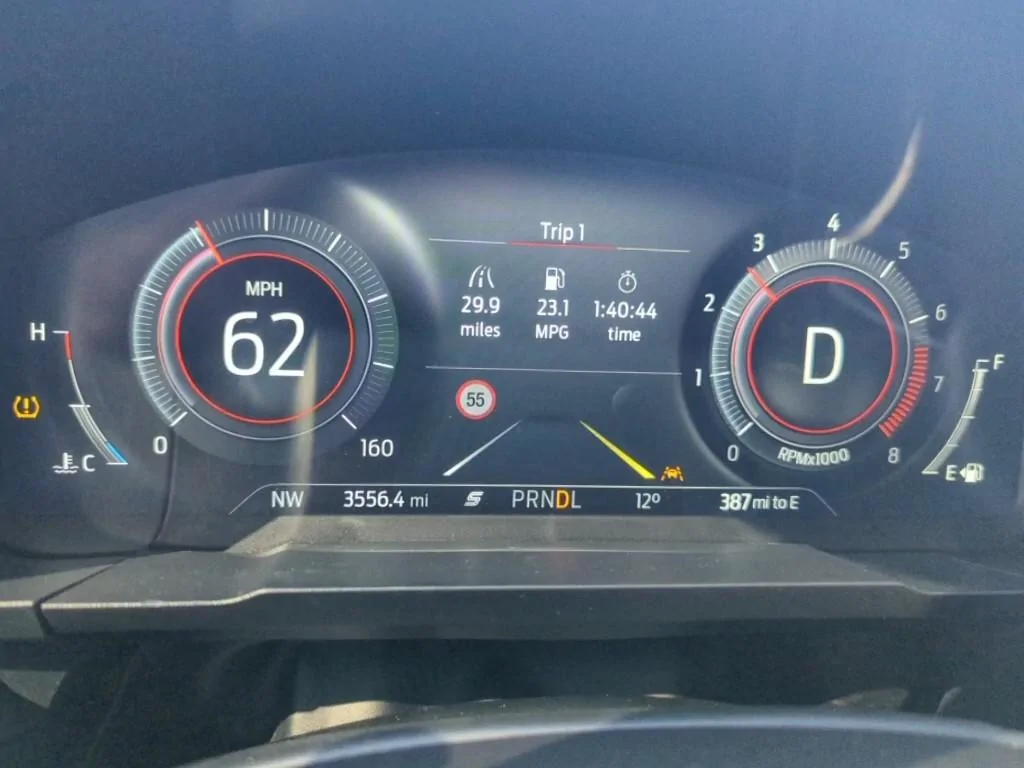
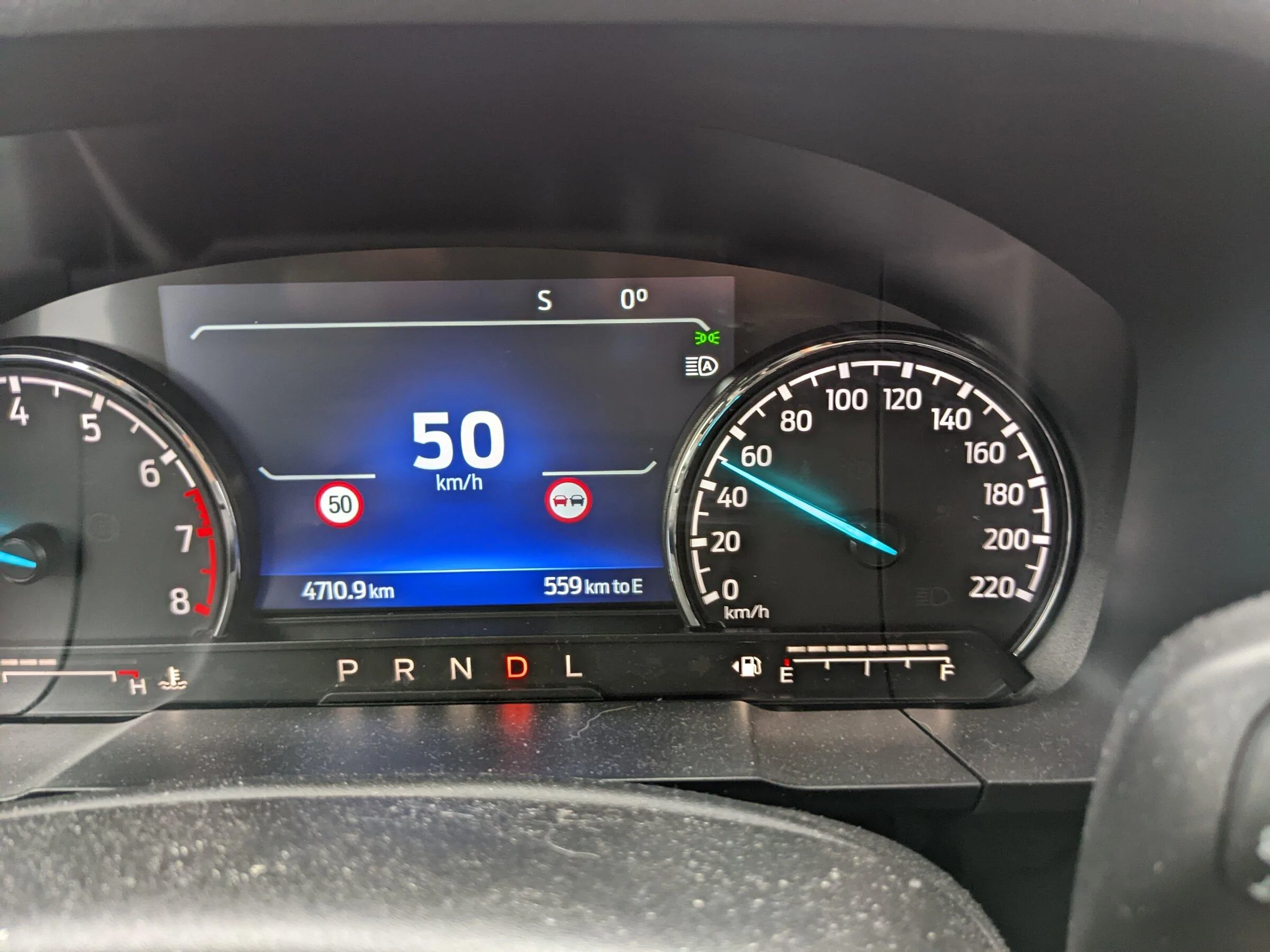
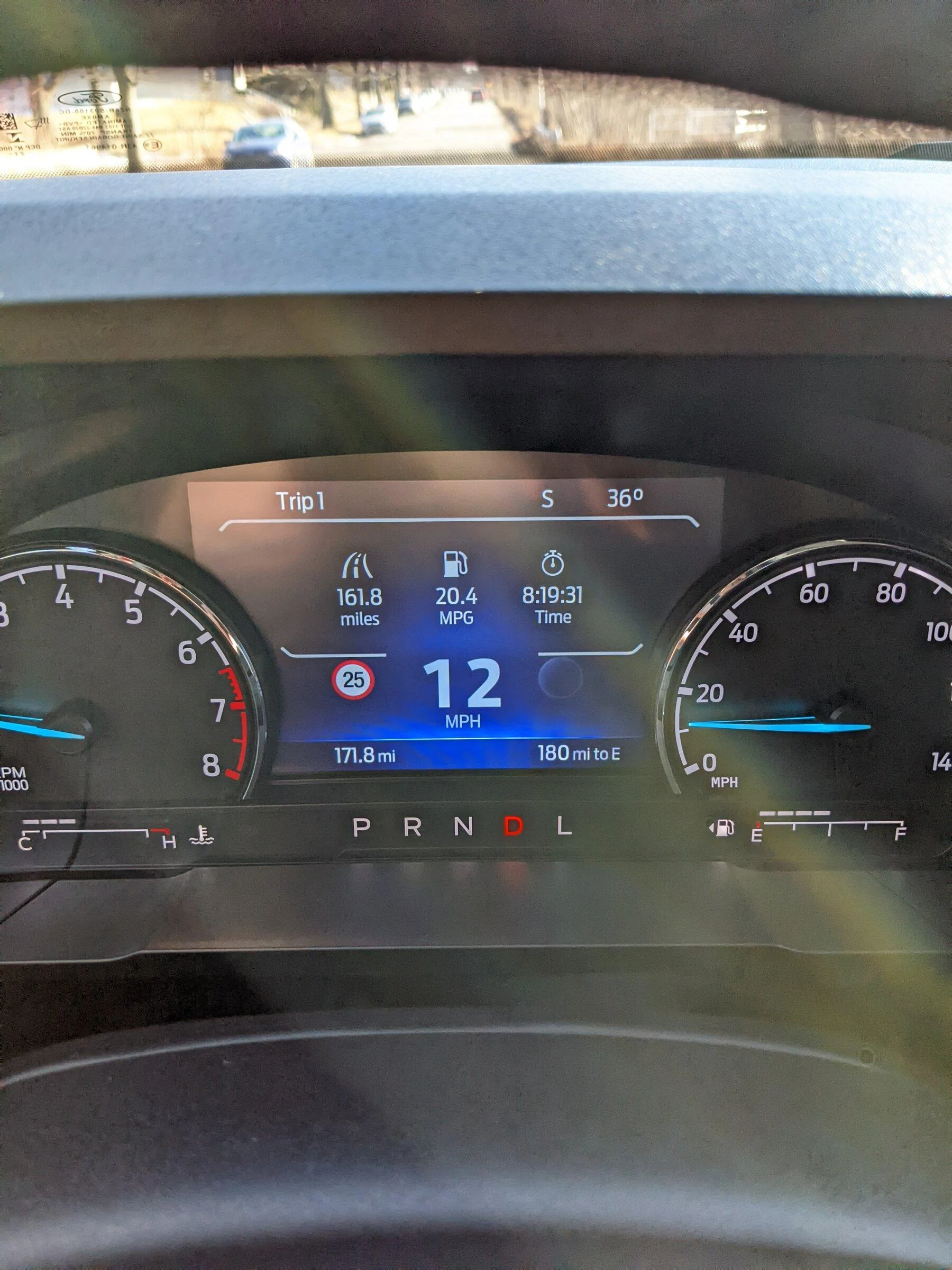
No, there is a whole lot more involved to potentially get that working. I tried to follow the same values I found on an escape thread to enable IACC but it just made an error message come up for the image processing module. I only have it reading speed limit signs and displaying them like this.
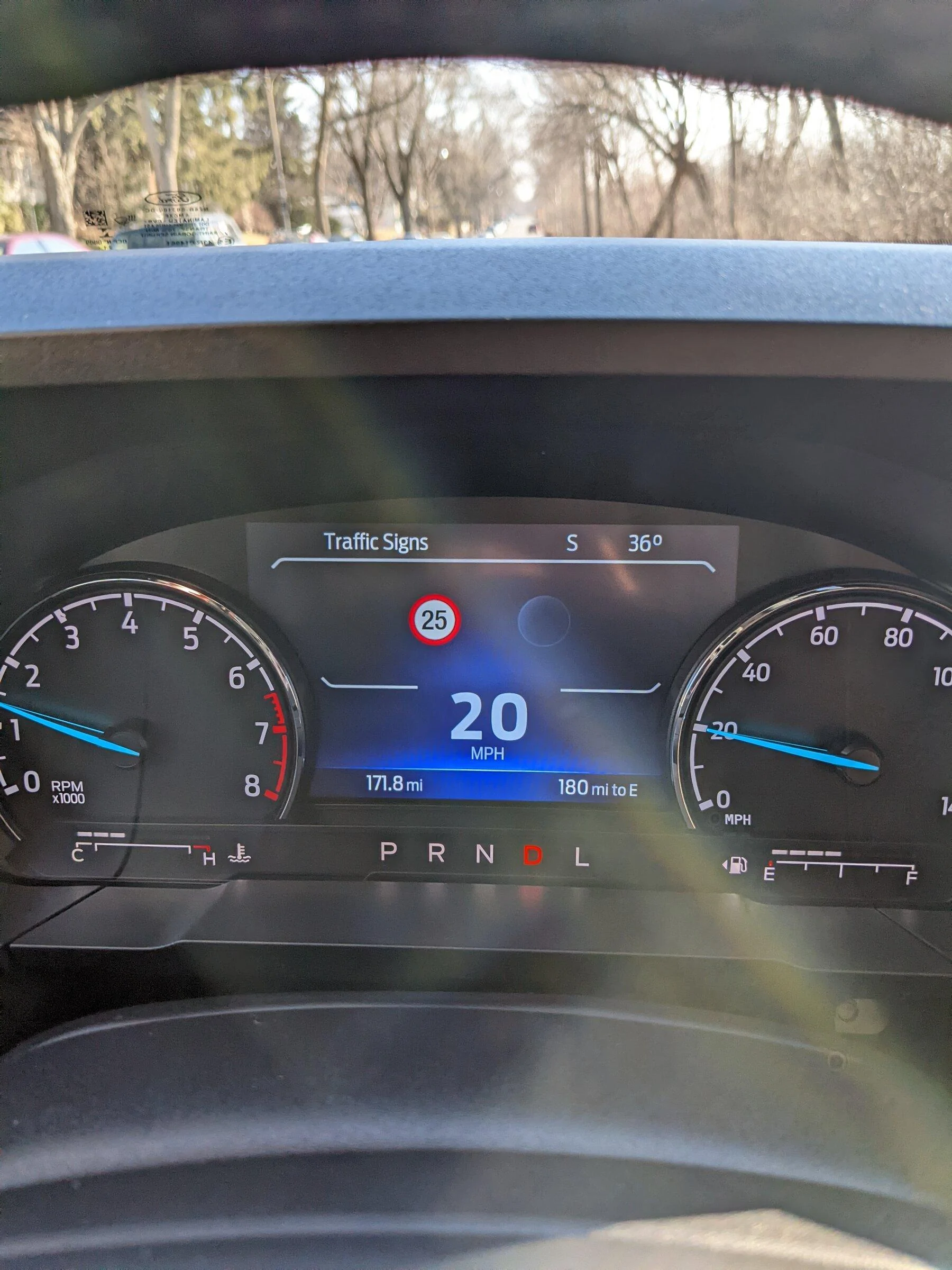
PXL_20220301_211954860.jpg


PXL_20220301_212003870.jpg
Okay so that round sign should be a 6 inch cluster specific issue. The other circle should be for do not pass signs. The codes I posted should enable both. I've never had a chance to test that though.
Sponsored

 
OP
OP

Maverick2022XL

2.0L EcoBoost
Well-known member
First Name
name
Joined
Jan 13, 2022
Threads
19
Messages
1,299
Reaction score
1,275
Location
hinterlands
Vehicle(s)
2022 Ford Maverick XL, AWD, 4K tow, 2.0L EcoBoost
Engine
2.0L EcoBoost
Here are some codes to try.

IPMA
706-04-01
default should be
0000-xxxx-xxxx
**xx-xxxx-xxxx
00= undefined other values determine what region and type of signs
try either
01 = region undefined / KPH
02 = region undefined / MPH
08 = North America / sign type undefined
09 = North America / KPH
0A = North America / MPH

Also let me now if either of the following is set to 04

706-04-01
xx**-xxxx-xxxx
or
xxxx-**xx-xxxx

if either of those ** is set to 04 that is also a country code for the vehicle and most likely how it is determining whether to set KPH or MPH when the sign recognition is enabled.
03 = USA
04 = Canada

Unless I can find an as built for a Canadian made Maverick you'll have to confirm that with your data.
If these codes work on the Maverick same as they do on other Fords, value 08 is probably the one most people would use if going between the US and Canada.
 
Last edited:
OP
OP

Maverick2022XL

2.0L EcoBoost
Well-known member
First Name
name
Joined
Jan 13, 2022
Threads
19
Messages
1,299
Reaction score
1,275
Location
hinterlands
Vehicle(s)
2022 Ford Maverick XL, AWD, 4K tow, 2.0L EcoBoost
Engine
2.0L EcoBoost
This works on my Lariat Lux as expected. I enabled the menu option and the part in the image processing module and drove past a speed limit sign to confirm. It is however displaying "UK Style" speed signs instead of US ones like someone else said. Its also showing the speed limit indicator in the chime settings menu km/h as well, so it may be related to that? I used D2 for the image processing module since I don't think I technically have nav, maybe I should try DB instead. Going from D2 to DB enables two extra bits though. Could try DA or D3 instead to see what difference those make.
That particular setting only applies to whether you are making use of the Nav system or not to display posted speed limits for roads. Leaving it on causes other issues if you don't have the Nav system installed.

The speed warning options take their values from IPMA. If it is on in the cluster that is correct for the option portion being visible.

Also see post above this for potential country codes
 
Last edited:

MustardTiger

2.0L EcoBoost
Active member
Joined
Aug 5, 2021
Threads
2
Messages
39
Reaction score
36
Location
Milwaukee
Vehicle(s)
2022 Maverick, 2001 AWD Swapped Jetta
Engine
2.0L EcoBoost
Here are some codes to try.

IPMA
706-04-01
default should be
0000-xxxx-xxxx
**xx-xxxx-xxxx
00= undefined other values determine what region and type of signs
try either
01 = region undefined / KPH
02 = region undefined / MPH
08 = North America / sign type undefined
09 = North America / KPH
0A = North America / MPH

Also let me now if either of the follow is set to 04

706-04-01
xx**-xxxx-xxxx
or
xxxx-**xx-xxxx

if either of those ** is set to 04 that is also a country code and most likely how it is determining whether to set KPH or MPH when the sign recognition is enabled.
03 = USA
04 = Canada

Unless I can find an as built for a Canadian made Maverick you'll have to confirm that with your data.
If these codes work on the Maverick same as they do on other Fords, value 08 is probably the one most people would use if going between the US and Canada.
Thanks, I will try that later today.

So the values I was trying for IACC were here in post # 9
https://www.fordescape.org/threads/speed-sign-recognition-for-2020-escape.116496/

I started with 706-01-01 and worked my way down, writing them one at a time. Interestingly, once I got to 706-04-01 the values FFFC-27XX-4X were already there even though my as-built file shows 0000-03C3-40 for that location. The module may have written those values itself after a change I made previously in the list but I didn't check beforehand. I think I changed it back to 0000-03C3-40 when I was done.
 
Last edited:

Sponsored

MustardTiger

2.0L EcoBoost
Active member
Joined
Aug 5, 2021
Threads
2
Messages
39
Reaction score
36
Location
Milwaukee
Vehicle(s)
2022 Maverick, 2001 AWD Swapped Jetta
Engine
2.0L EcoBoost
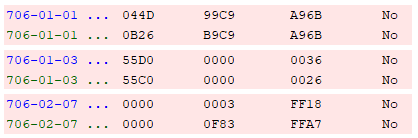
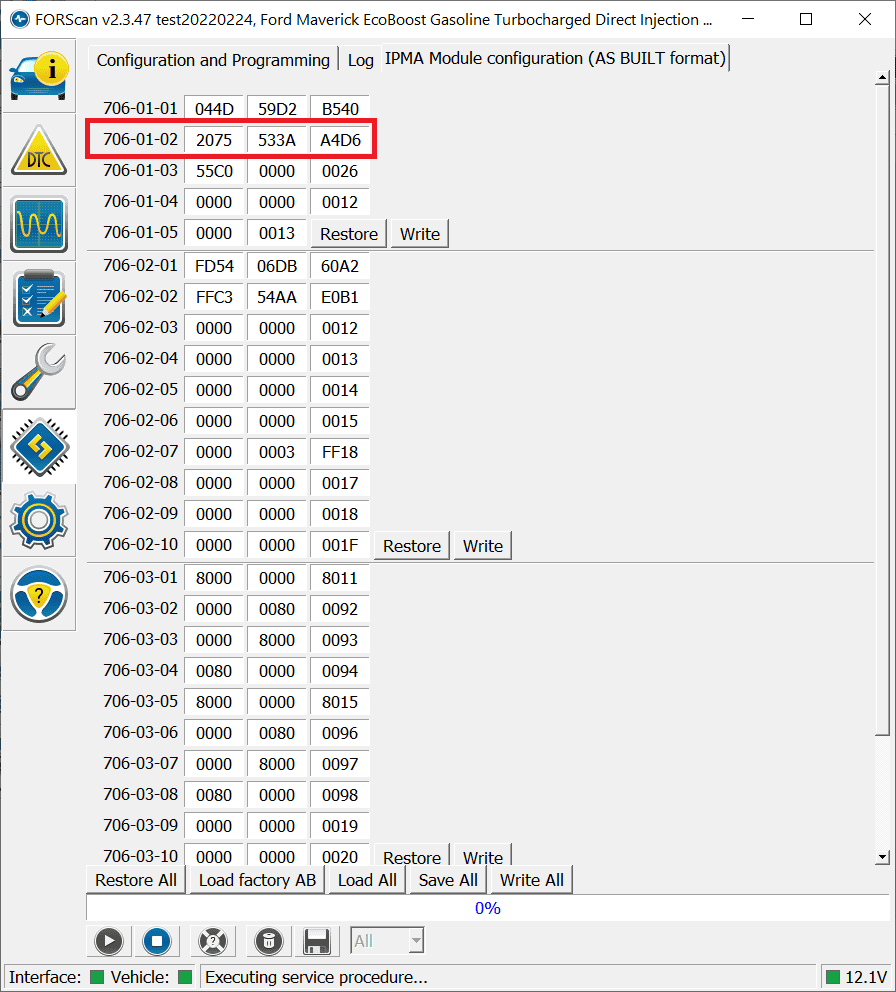
I just remembered that my wife's old Escape showed rectangular white speed limit signs, but I think it had navigation so it may have been getting them from there. It was a 2020 Escape Titanium Hybrid AWD. I looked through my old emails and found the VIN to compare. These are the only differences between my Maverick (top) and Escape (bottom) in the IPMA. 706-04-01 is the same.

Ford Maverick Traffic Sign Recognition (TSR) FORScan mod (confirmed working) TSR IPMA Mav Escape
 
Last edited:

aspect

2.0L EcoBoost
Well-known member
Joined
Nov 28, 2021
Threads
8
Messages
224
Reaction score
370
Location
BC, canada
Vehicle(s)
XLT Lux FX4 2.0 4k
Engine
2.0L EcoBoost
Just wanted to confirm I did drive past a "no passing" sign yesterday and it does work. I'm not actually sure why this is important enough for the vision system to post to the dash, but yeah.

Ford Maverick Traffic Sign Recognition (TSR) FORScan mod (confirmed working) PXL_20220302_161911710
 
OP
OP

Maverick2022XL

2.0L EcoBoost
Well-known member
First Name
name
Joined
Jan 13, 2022
Threads
19
Messages
1,299
Reaction score
1,275
Location
hinterlands
Vehicle(s)
2022 Ford Maverick XL, AWD, 4K tow, 2.0L EcoBoost
Engine
2.0L EcoBoost
Some more settings related to this since I've been doing some digging around.

For
706-01-01
xxxx-xxD2-xxxx = SLOIF (Speed Limit Overpass Information Function) aka speed limit and no passing sign recognition

xxxx-xxD3-xxxx = SLIF (Speed Limit Information Function) aka speed limit only sign recognition.

Speed limit types aka MPH or KMPH
706-01-02
xxxx-xxxx-*xxx
9 = MPH
5 = KMPH
1 = undefined
don't use 1 it will throw errors elsewhere. Also the country code overrides these settings

Country and region specific codes for a 2022 Ford Maverick
706-01-02
*xxxx-xxxx-xxxx = region
2 = North America, different values for other regions

706-01-02
xx*x-xxxx-xxx = country
7 = United States
4 = Canada
other values for other countries
 

TrippMe

2.0L EcoBoost
Well-known member
First Name
Tripp
Joined
Sep 2, 2021
Threads
13
Messages
118
Reaction score
89
Location
SoCal
Vehicle(s)
Maverick
Engine
2.0L EcoBoost
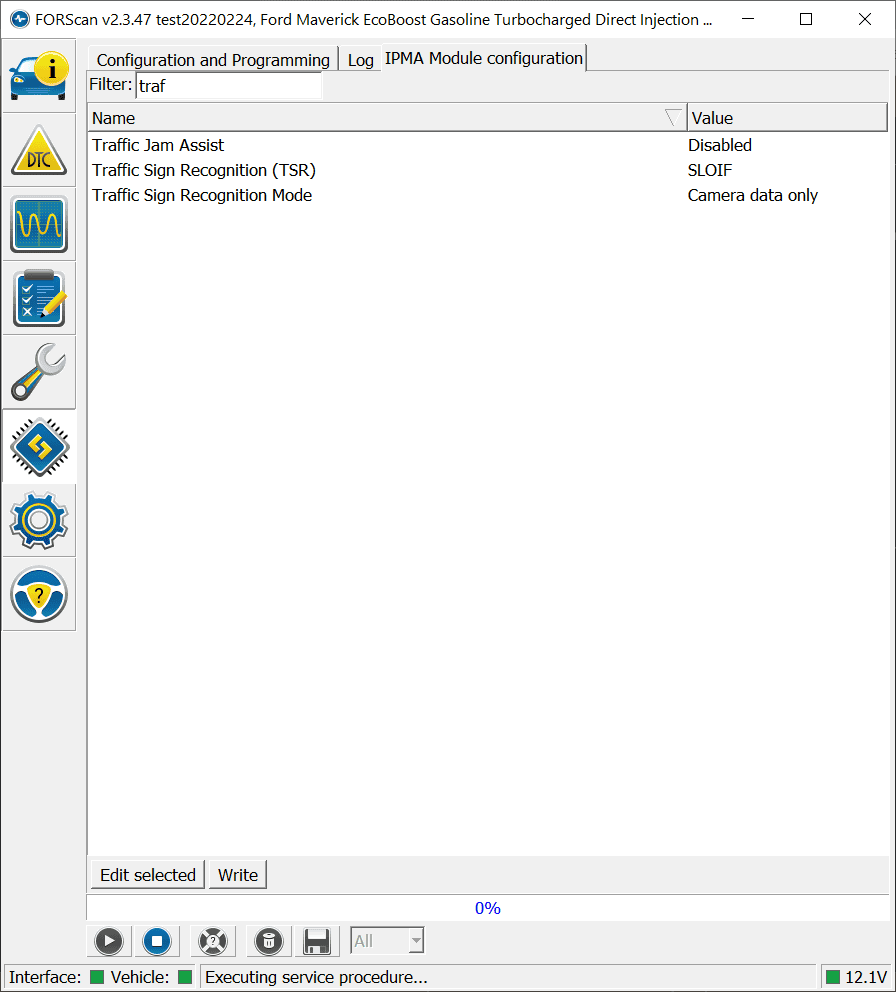
I've tried to enable it in easy mode and it shows enabled but I don't have it in my screen selector mode. Am I missing something?
Ford Maverick Traffic Sign Recognition (TSR) FORScan mod (confirmed working) traffic
Ford Maverick Traffic Sign Recognition (TSR) FORScan mod (confirmed working) Traffic-Hard
 
OP
OP

Maverick2022XL

2.0L EcoBoost
Well-known member
First Name
name
Joined
Jan 13, 2022
Threads
19
Messages
1,299
Reaction score
1,275
Location
hinterlands
Vehicle(s)
2022 Ford Maverick XL, AWD, 4K tow, 2.0L EcoBoost
Engine
2.0L EcoBoost
I've tried to enable it in easy mode and it shows enabled but I don't have it in my screen selector mode. Am I missing something?
traffic.png
Traffic-Hard.png
You also need to enable the option in your cluster.
 
Sponsored

Dogcmp6

2.0L EcoBoost
Well-known member
Joined
Aug 5, 2021
Threads
5
Messages
46
Reaction score
53
Location
WI
Vehicle(s)
22 Maverick XLT 2.0
Engine
2.0L EcoBoost
I've tried to enable it in easy mode and it shows enabled but I don't have it in my screen selector mode. Am I missing something?
traffic.png
Traffic-Hard.png
Your screen shots are only from the IPMA module, you need to go into your IPC and activate Chime - Traffic Sign Recognition, and Menu - Traffic Sign Recognition. . .if you do not have easy mode for your IPC ask forscan for the most recent test version.
 

TrippMe

2.0L EcoBoost
Well-known member
First Name
Tripp
Joined
Sep 2, 2021
Threads
13
Messages
118
Reaction score
89
Location
SoCal
Vehicle(s)
Maverick
Engine
2.0L EcoBoost
Your screen shots are only from the IPMA module, you need to go into your IPC and activate Chime - Traffic Sign Recognition, and Menu - Traffic Sign Recognition. . .if you do not have easy mode for your IPC ask forscan for the most recent test version.
I tried to enable it in the cluster and it doesn't appear there.

I haven't been in IPMA to enable chime, I'll try to do that today and see if it makes a difference.

Thanks!
 

TrippMe

2.0L EcoBoost
Well-known member
First Name
Tripp
Joined
Sep 2, 2021
Threads
13
Messages
118
Reaction score
89
Location
SoCal
Vehicle(s)
Maverick
Engine
2.0L EcoBoost
I tried to enable it in the cluster and it doesn't appear there.

I haven't been in IPMA to enable chime, I'll try to do that today and see if it makes a difference.

Thanks!
Got it all enabled. Not only after you do it in Forsan, you have to go into settings and enable it, then turn on the screen.
 

bomberxl

2.5L Hybrid
Well-known member
Joined
Feb 15, 2022
Threads
0
Messages
63
Reaction score
108
Location
TX
Vehicle(s)
Ford Maverick XL, Chrysler Pacifica Touring L
Engine
2.5L Hybrid
Awesome work. Got it working on the first try.

Perfect little mod to get acquainted with ForScan.
 

Bbot

Well-known member
First Name
Rob
Joined
Jun 8, 2021
Threads
2
Messages
186
Reaction score
180
Location
Florida
Vehicle(s)
Escape SEL
This mod will work in the standard configuration for all trims with the only possible exception being Lariats w/ Sync 3 installed. An alternate configuration will then be needed which is untested so far.

Tools need

Forscan software and a programming cable

tutorial assumes you already know how to program using forscan.

First we need to enable the TSR menu in the instrument cluster. This has been tested on the 4.2inch cluster and is untested but should work on 6inch instrument clusters.

There are 2 possible settings depending if you have trailer sway control option in the vehicle assistance.

IPC
720-03-02
xxCx-xxxx

use this to change your existing setting if you have the trailer sway control as an option.
If not try different values in place of C until you get the TSR menu and no option for trailer sway control.

edit
apparently trailer sway control is a standard feature so that is the correct setting for all trims

edit this code is needed to enable the chime alert option which makes an audible noise when you drive above the posted speed limit or set threshold to trigger a warning.
IPC
720-04-01
xxxx-xx*x-xxxx
change * to 4 to enable the chime setting

untested yet
changing * to C should also work and open up other chime settings.

Next we need to enable the image processing module to scan speed signs.

This works in 2 distinct configurations.
1a. No Sync & no nav system - tested and confirmed working
1b. Sync & no nav system - will only apply to Lariats w/Lux. package - untested

2. Sync & nav system - semi confirmed see below

Configuration 1 which most every Maverick owner will use only scans speed limit signs with the front facing camera.

Configuration 2 supplements the camera with posted speed limits from the nav system maps. This requires a different hex code than Config 1 and may also require modifications to the APIM module to fully work. This needs to be tested still.


Config 1 without Navigation system
IPMA
706-01-01
xxxx-xxD2-xxxxx

This enables the speed sign scanning processing in the image processing module

Config 2 with Navigation system
IPMA
706-01-01
xxxx-xxDB-xxxxx
This will enable the system to also use the Nav system for posted speeds.
Note if you use this on a non Sync system you get a reduced performance error message and it won't scan signs at all.

That is it and if you did everything correctly TSR which is undocumented on the Maverick thus far will be enabled and working correctly in the instrument cluster with no conflicts with other safety features.

There should also be added functionality to display the speed signs on the head units but that is not known if it will at this point and requires further testing.
There is no navagation available on the maverick.
Sponsored


Top