Sponsored

TOMV

2.5L Hybrid
Member
First Name
TOM
Joined
Dec 12, 2023
Threads
0
Messages
6
Reaction score
11
Location
PAPILLION NE
Vehicle(s)
2023 FORD MAVERICK XLT HYBRID
Engine
2.5L Hybrid
Hello everyone!

I finally found the way to disable the ANNOYING Seatbelt information screen that comes on when you start the truck and stays on even after you buckle your seatbelt. Thank you to @ZOODAD over on the F250 forums for the coding information. THIS SUPER DUTY spreadsheet he put together might be useful for future MAVERICK FORScan Mods.

DISABLE SEATBELT INFORMATION SCREEN
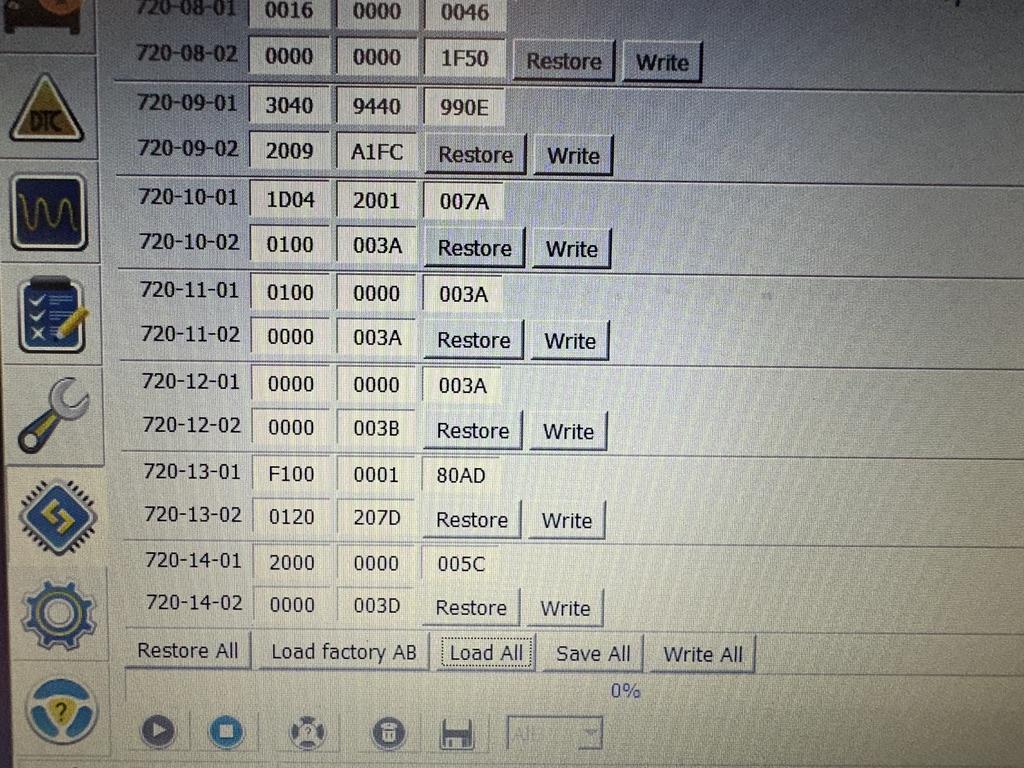
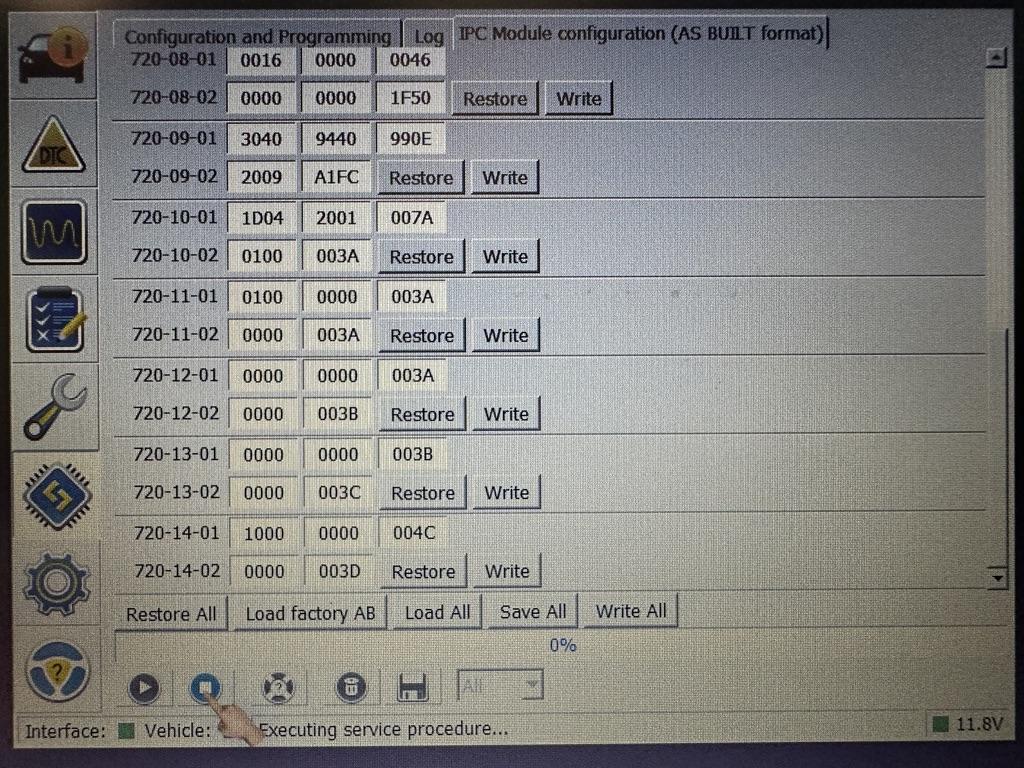
1. Open IPC AS BUILT
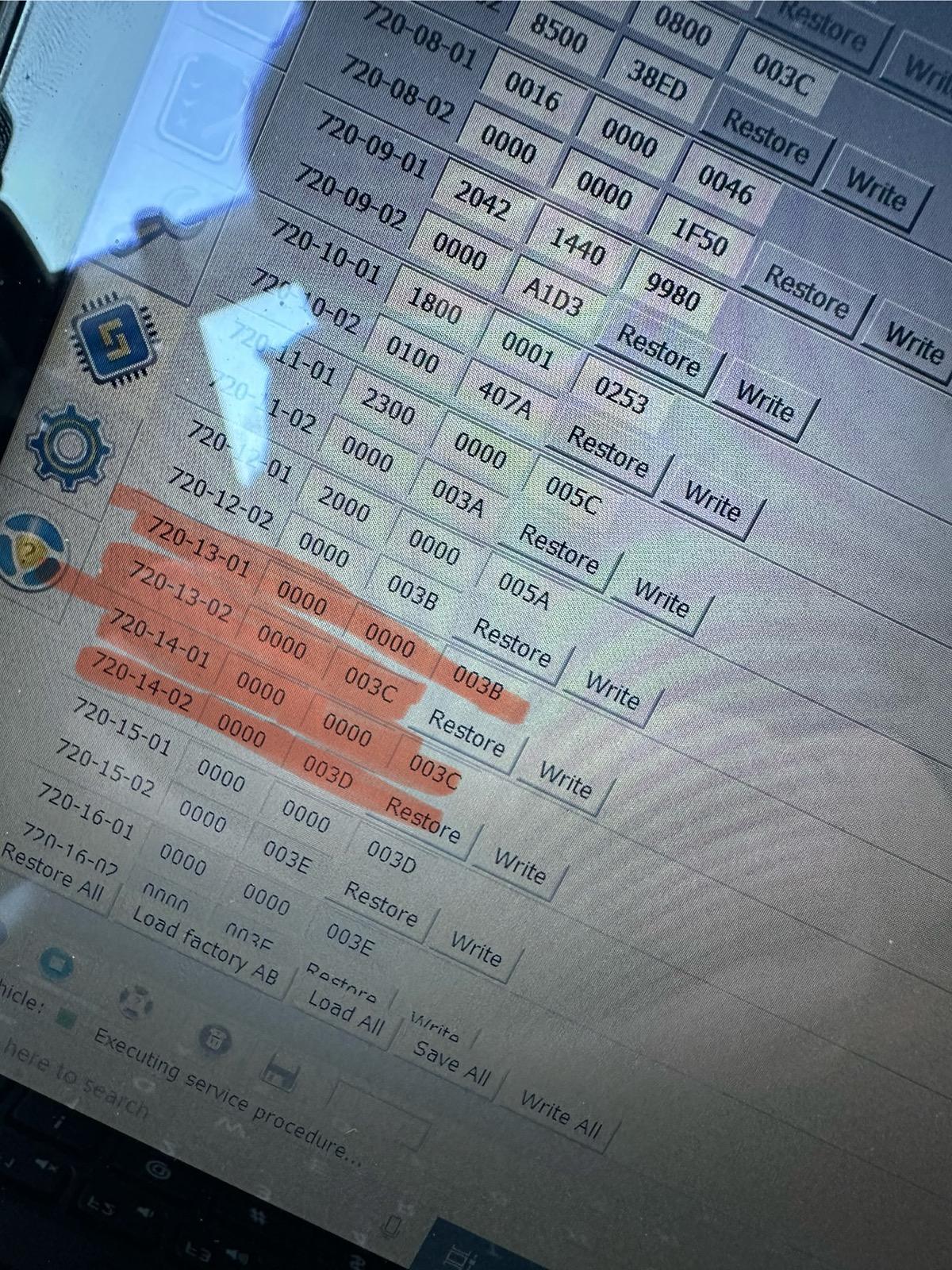
2. Change line 720-13-01 and 720-13-02 to ALL ZEROS. And WRITE the changes. Click yes to let Forscan correct the checksum.
3. Change line 720-14-01 and 720-14-02 to ALL ZEROS. And WRITE the changes. Click yes to let Forscan correct the checksum.

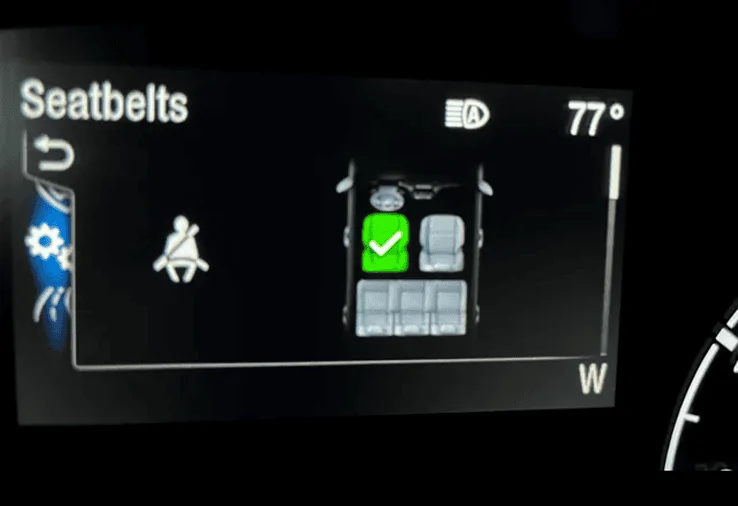
These coding changes worked for my 2024 Maverick XL AWD ECOBOOST. These changes remove the seatbelt info screen pictured below entirely and it also seems to disable the seatbelt chime too. I would love to hear from other members to see if these changes work in your Maverick! Also, I have the smaller instrument cluster. (The 4 inch Instrument Cluster)

EDIT:
If you would like to keep the Minder (the dash light and chime) and not the Monitor (the seatbelt screen) I would suggest doing the following coding based on this 2023 Maverick HEX code spreadsheet and my original coding in my Maverick. CONFIRMED WORKING by @Mavrik23

720-13-01 9100 0001 8000
720-13-02 0110 1000
720-14-01 1000 0000 0000
720-14-02 All Zeros
FORScan coding to disable the Seatbelt Information Screen!.png


IMG_2898.jpeg
Works like a charm
Thank You so much
Sponsored


surfstar

2.5L Hybrid
Well-known member
Joined
Feb 7, 2023
Threads
14
Messages
1,125
Reaction score
2,409
Location
CA
Vehicle(s)
2023 XL Hybrid
Engine
2.5L Hybrid
If you don't press ok it promptly goes away by itself.
Promptly is minutes. Its not just a few seconds, which is why so many of us are bothered by this. It should go away as soon as any seat with an occupant is buckled, but... nope!

Can't just start driving and see your screen - you have to press additional buttons. This along with not remembering the last drive mode is very annoying user experience that other makes (at least our last Toyotas) don't have. Once everyone's seatbelt is on and I'm in gear, the proper screen should be available. Nope. Gotta push OK. Want Eco? The same mode I use 99% of the time - gotta press one button, four times. Yes, we're complaining about minor things, but these are things that are easily solved via software and should be - by Ford, not owners needing to 'hack' their vehicles.

/soapbox
 

Jetlat7878$

2.5L Hybrid
Well-known member
First Name
Jim
Joined
Aug 4, 2023
Threads
8
Messages
65
Reaction score
55
Location
Woodstock GA
Vehicle(s)
2024 Maverick Lariat Blackout
Engine
2.5L Hybrid
Clubs
 
I agree, the seatbelt
Hello everyone!

I finally found the way to disable the ANNOYING Seatbelt information screen that comes on when you start the truck and stays on even after you buckle your seatbelt. Thank you to @ZOODAD over on the F250 forums for the coding information. THIS SUPER DUTY spreadsheet he put together might be useful for future MAVERICK FORScan Mods.

DISABLE SEATBELT INFORMATION SCREEN
1. Open IPC AS BUILT
2. Change line 720-13-01 and 720-13-02 to ALL ZEROS. And WRITE the changes. Click yes to let Forscan correct the checksum.
3. Change line 720-14-01 and 720-14-02 to ALL ZEROS. And WRITE the changes. Click yes to let Forscan correct the checksum.

These coding changes worked for my 2024 Maverick XL AWD ECOBOOST. These changes remove the seatbelt info screen pictured below entirely and it also seems to disable the seatbelt chime too. I would love to hear from other members to see if these changes work in your Maverick! Also, I have the smaller instrument cluster. (The 4 inch Instrument Cluster)

EDIT:
If you would like to keep the Minder (the dash light and chime) and not the Monitor (the seatbelt screen) I would suggest doing the following coding based on this 2023 Maverick HEX code spreadsheet and my original coding in my Maverick. CONFIRMED WORKING by @Mavrik23

720-13-01 9100 0001 8000
720-13-02 0110 1000
720-14-01 1000 0000 0000
720-14-02 All Zeros
FORScan coding to disable the Seatbelt Information Screen!.png


IMG_2898.jpeg
I agree, the seatbelt green arrow is fine but once you attach your seatbelt, it should go away. So annoying and driving away with that thing being there distracts from driving as you try to click the ok waiting for the arrow to disappear. Redicious. I wonder if the dealer will fix it using your suggestions?
 

TheShark

2.5L Hybrid
Well-known member
First Name
Mark
Joined
Jul 22, 2021
Threads
12
Messages
1,504
Reaction score
2,281
Location
North Carolina
Vehicle(s)
2025 Maverick Lariat AWD Hybrid, 2024 2dr Bronco Heritage Limited Edition
Engine
2.5L Hybrid
Clubs
 
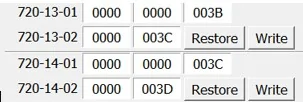
Thanks, I finally got rid of that annoying seatbelt screen. I have a '24 Lariat Tremor, I changed 720-13-01 and 720-13-02 to all zeros, when I saved it the last set of numbers changed from 80AD and 207D to 003B and 003C. It also changed 720-14-01 from 2000 0000 005C to 1000 0000 004C and 720-14-02 remained the same.
Factory:
Ford Maverick FINALLY, FORScan coding to disable the Seatbelt Information Screen! (CONFIRMED WORKING) 120692B9-1722-4507-9B70-F4741338D2F1_1_105_c


No seatbelt screen:
Ford Maverick FINALLY, FORScan coding to disable the Seatbelt Information Screen! (CONFIRMED WORKING) 520037AB-5BC5-4817-95B8-09F4D122075D_1_105_c
 
OP
OP
EONR24

EONR24

2.0L EcoBoost
Well-known member
First Name
Swag
Joined
Feb 26, 2024
Threads
44
Messages
1,442
Reaction score
1,655
Location
United States
Vehicle(s)
2024 Ford Maverick XL
Engine
2.0L EcoBoost
Thanks, I finally got rid of that annoying seatbelt screen. I have a '24 Lariat Tremor, I changed 720-13-01 and 720-13-02 to all zeros, when I saved it the last set of numbers changed from 80AD and 207D to 003B and 003C. It also changed 720-14-01 from 2000 0000 005C to 1000 0000 004C and 720-14-02 remained the same.
Factory:
120692B9-1722-4507-9B70-F4741338D2F1_1_105_c.jpeg


No seatbelt screen:
520037AB-5BC5-4817-95B8-09F4D122075D_1_105_c.jpeg
Glad to hear it's working on a Tremor too! It is interesting that forscan automatically changed the first digit in 720-14-01 from 2 to 1. According to the spreadsheets 2 keeps the seatbelt monitor on, 1 keeps the seatbelt minder on instead but it still may be unnoticeable.
 

Sponsored

TheSEARCH

2.5L Hybrid
Well-known member
First Name
Dan
Joined
Mar 22, 2022
Threads
26
Messages
1,470
Reaction score
1,310
Location
14150
Vehicle(s)
ford
Engine
2.5L Hybrid
NOT the same with hybrid . Eco probably does nothing on the 2.0. You can mostly drive one foot in Eco on the hybrid. It slows down much faster in eco mode. BIG noticeable difference. So much so I look in rear view mirror so I dont get rear ended.
 

Luthinator

2.5L Hybrid
Well-known member
First Name
Steve
Joined
Sep 4, 2023
Threads
6
Messages
228
Reaction score
175
Location
Illinois
Vehicle(s)
24' Mav. Lariat Hybrid & 23' Ford Explorer XLT+
Engine
2.5L Hybrid
Clubs
 
Hello everyone!

I finally found the way to disable the ANNOYING Seatbelt information screen that comes on when you start the truck and stays on even after you buckle your seatbelt. Thank you to @ZOODAD over on the F250 forums for the coding information. THIS SUPER DUTY spreadsheet he put together might be useful for future MAVERICK FORScan Mods.

DISABLE SEATBELT INFORMATION SCREEN
1. Open IPC AS BUILT
2. Change line 720-13-01 and 720-13-02 to ALL ZEROS. And WRITE the changes. Click yes to let Forscan correct the checksum.
3. Change line 720-14-01 and 720-14-02 to ALL ZEROS. And WRITE the changes. Click yes to let Forscan correct the checksum.

These coding changes worked for my 2024 Maverick XL AWD ECOBOOST. These changes remove the seatbelt info screen pictured below entirely and it also seems to disable the seatbelt chime too. I would love to hear from other members to see if these changes work in your Maverick! Also, I have the smaller instrument cluster. (The 4 inch Instrument Cluster)

EDIT:
If you would like to keep the Minder (the dash light and chime) and not the Monitor (the seatbelt screen) I would suggest doing the following coding based on this 2023 Maverick HEX code spreadsheet and my original coding in my Maverick. CONFIRMED WORKING by @Mavrik23

720-13-01 9100 0001 8000
720-13-02 0110 1000
720-14-01 1000 0000 0000
720-14-02 All Zeros


2ND EDIT: Here is a link to 2 more changes I just found DISABLE DOOR AND KEY CHIMES
I have found and tested two more codings that work for My 2024 Ford Maverick XL AWD ECOBOOST

DISABLE DOOR CHIMES
1. IPC AS BUILT
2. Go to 720-01-02
3. Replace the digit with a "0" as shown here

xx0x-xxxx


DISABLE KEY-IN IGNITON CHIME
1. IPC AS BUILT
2. Go to 720-01-02
3. Replace the digit with a "2" as shown here

xxxx-x2xx

FORScan coding to disable the Seatbelt Information Screen!.png


IMG_2898.jpeg
doing this tonight! thank you.
 
Sponsored

Funfishhunter

2.5L Hybrid
Well-known member
First Name
Ray
Joined
Mar 9, 2024
Threads
10
Messages
45
Reaction score
41
Location
Texas
Vehicle(s)
2024 Maverick LXT
Engine
2.5L Hybrid
Hello everyone!

I finally found the way to disable the ANNOYING Seatbelt information screen that comes on when you start the truck and stays on even after you buckle your seatbelt. Thank you to @ZOODAD over on the F250 forums for the coding information. THIS SUPER DUTY spreadsheet he put together might be useful for future MAVERICK FORScan Mods.

DISABLE SEATBELT INFORMATION SCREEN
1. Open IPC AS BUILT
2. Change line 720-13-01 and 720-13-02 to ALL ZEROS. And WRITE the changes. Click yes to let Forscan correct the checksum.
3. Change line 720-14-01 and 720-14-02 to ALL ZEROS. And WRITE the changes. Click yes to let Forscan correct the checksum.

These coding changes worked for my 2024 Maverick XL AWD ECOBOOST. These changes remove the seatbelt info screen pictured below entirely and it also seems to disable the seatbelt chime too. I would love to hear from other members to see if these changes work in your Maverick! Also, I have the smaller instrument cluster. (The 4 inch Instrument Cluster)

EDIT:
If you would like to keep the Minder (the dash light and chime) and not the Monitor (the seatbelt screen) I would suggest doing the following coding based on this 2023 Maverick HEX code spreadsheet and my original coding in my Maverick. CONFIRMED WORKING by @Mavrik23

720-13-01 9100 0001 8000
720-13-02 0110 1000
720-14-01 1000 0000 0000
720-14-02 All Zeros


2ND EDIT: Here is a link to 2 more changes I just found DISABLE DOOR AND KEY CHIMES
I have found and tested two more codings that work for My 2024 Ford Maverick XL AWD ECOBOOST

DISABLE DOOR CHIMES
1. IPC AS BUILT
2. Go to 720-01-02
3. Replace the digit with a "0" as shown here

xx0x-xxxx


DISABLE KEY-IN IGNITON CHIME
1. IPC AS BUILT
2. Go to 720-01-02
3. Replace the digit with a "2" as shown here

xxxx-x2xx

FORScan coding to disable the Seatbelt Information Screen!.png


IMG_2898.jpeg
That forescan word is offal close to another word. :)
 

CaptBanana

2.5L Hybrid
Well-known member
First Name
Joe
Joined
Sep 16, 2022
Threads
4
Messages
54
Reaction score
85
Location
Massachusetts
Vehicle(s)
'23 Lariat Lux Hybrid, '06 Chevy Cobalt
Engine
2.5L Hybrid
Clubs
 
Worked great on my '23, thank you! I second the request for getting rid of the "Ready to Drive" screen.


Top