
Sponsored

Deweyordeweynot

2.5L Hybrid
Well-known member
First Name
Dewey
Joined
May 10, 2023
Threads
32
Messages
585
Reaction score
674
Location
Macomb, MI
Vehicle(s)
2024 XLT Oxford White / 2018 Subaru Forester
Engine
2.5L Hybrid
Clubs
 
Worked as advertised on my 24 XLT hybrid. It's embarrassing how pleased I am to have eliminated the nag screen and the idiot light and the chime!
Sponsored


 

Joe Strummer

2.0L EcoBoost
Well-known member
First Name
Joe
Joined
Feb 5, 2024
Threads
9
Messages
686
Reaction score
1,599
Location
Squamish, BC
Vehicle(s)
2024 Ford Maverick XLT Tremor
Engine
2.0L EcoBoost
Clubs
 
Given the number of lawyers in the US, I'm sure there's a legal/liability reason for having you press ok (like it is recorded in the truck's black box). But good luck, there's only one way to really find out.
 
OP
OP
EONR24

EONR24

2.0L EcoBoost
Well-known member
First Name
Swag
Joined
Feb 26, 2024
Threads
44
Messages
1,442
Reaction score
1,655
Location
United States
Vehicle(s)
2024 Ford Maverick XL
Engine
2.0L EcoBoost
Given the number of lawyers in the US, I'm sure there's a legal/liability reason for having you press ok (like it is recorded in the truck's black box). But good luck, there's only one way to really find out.
In the VW and Audi community we have been coding out the seatbelt chimes for years. We would change the settings from USA to ROW (Rest of the World) and this would remove the seatbelt and door chimes. LOL.
 
Last edited:

Racin72

2.0L EcoBoost
Well-known member
First Name
Jason
Joined
Mar 5, 2024
Threads
11
Messages
47
Reaction score
27
Location
Ohio
Vehicle(s)
2024 Maverick
Engine
2.0L EcoBoost
Forscan something extra as in a scanner?
 

snowcatxx87

2.5L Hybrid
Well-known member
Joined
Oct 5, 2021
Threads
9
Messages
664
Reaction score
1,239
Location
Calgary
Vehicle(s)
1290SDR EVO / Tiger 900RP / 300cc Grom / Surron
Engine
2.5L Hybrid
Awesome, drive modes stil take their time to work for me tho - weird, one time it said "Drive mode not available" lol.

Now to get rid of Ready to Drive OK
 

Sponsored

Justin says...

2.0L EcoBoost
Well-known member
First Name
Justin
Joined
Jul 17, 2023
Threads
29
Messages
281
Reaction score
313
Location
NC
Vehicle(s)
'22 Ranger XLT
Engine
2.0L EcoBoost
So, you mentioned this info came from F250 resources. Care to elaborate? Are we making the exact same changes they make for their trucks?

Ultimately, I want to figure out a way to have a Bronco Sport instrument cluster load the Maverick startup animation and not the Bronco's. Then I could use that cluster instead of mine. (4" to 6.5" swap)
 

TNFurb

2.5L Hybrid
Well-known member
First Name
Kelly
Joined
Jul 16, 2023
Threads
16
Messages
486
Reaction score
606
Location
Nashville
Vehicle(s)
‘23 Bronco Sport OB ‘24 Mav Lariat Hybrid
Engine
2.5L Hybrid
I need to get forscan. I hate that I can NOT right away click center console button into Eco mode on my hybrid,. I have to first hit the dam steering wheel button to clear this seat belt crap till its off then I can go into Eco mode.

I bet anyone who says it doesn't bother them never go into Eco mode. Or what ever mode on 2.0.
On my lariat hybrid I can still change drive mode to eco mode even with this screen up. I find it annoying that it blocks my view, but the drive mode still cycles through.
 
OP
OP
EONR24

EONR24

2.0L EcoBoost
Well-known member
First Name
Swag
Joined
Feb 26, 2024
Threads
44
Messages
1,442
Reaction score
1,655
Location
United States
Vehicle(s)
2024 Ford Maverick XL
Engine
2.0L EcoBoost
So, you mentioned this info came from F250 resources. Care to elaborate? Are we making the exact same changes they make for their trucks?

Ultimately, I want to figure out a way to have a Bronco Sport instrument cluster load the Maverick startup animation and not the Bronco's. Then I could use that cluster instead of mine. (4" to 6.5" swap)
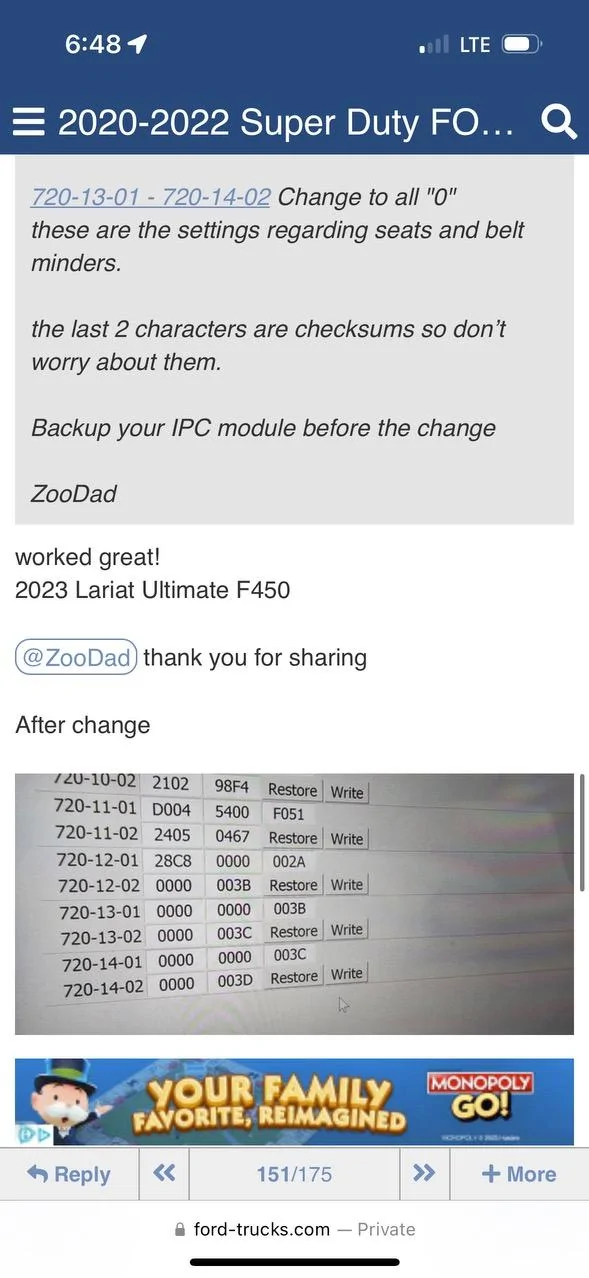
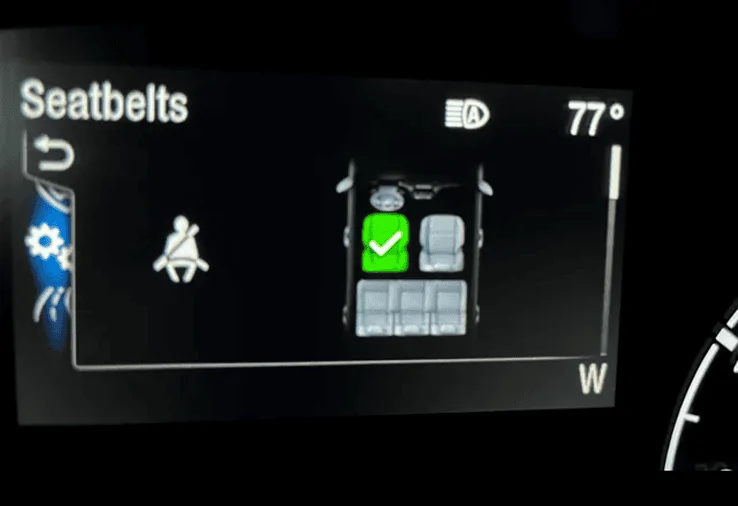
This picture is all I have from f250 forums.
Ford Maverick FINALLY, FORScan coding to disable the Seatbelt Information Screen! (CONFIRMED WORKING) IMG_2894


There should be a way to copy all of your settings from one cluster to another in FORSCAN. I can still dig into the coding to see if there is any splash screen section in the coding but I also have the 4 inch with no splash screen so I can't test it out. Maybe someone with the 6.5 inch screen can test it.
 

Bohefus

2.0L EcoBoost
Banned
Banned
First Name
Joe
Joined
Sep 11, 2023
Threads
8
Messages
331
Reaction score
263
Location
Mesa Az
Vehicle(s)
2024 Maverick Lariat BAP, 2016 Mazda 3
Engine
2.0L EcoBoost
Hello everyone!

I finally found the way to disable the ANNOYING Seatbelt information screen that comes on when you start the truck and stays on even after you buckle your seatbelt. Thank you to 2023 F250 forums for the coding information.

DISABLE SEATBELT INFORMATION SCREEN
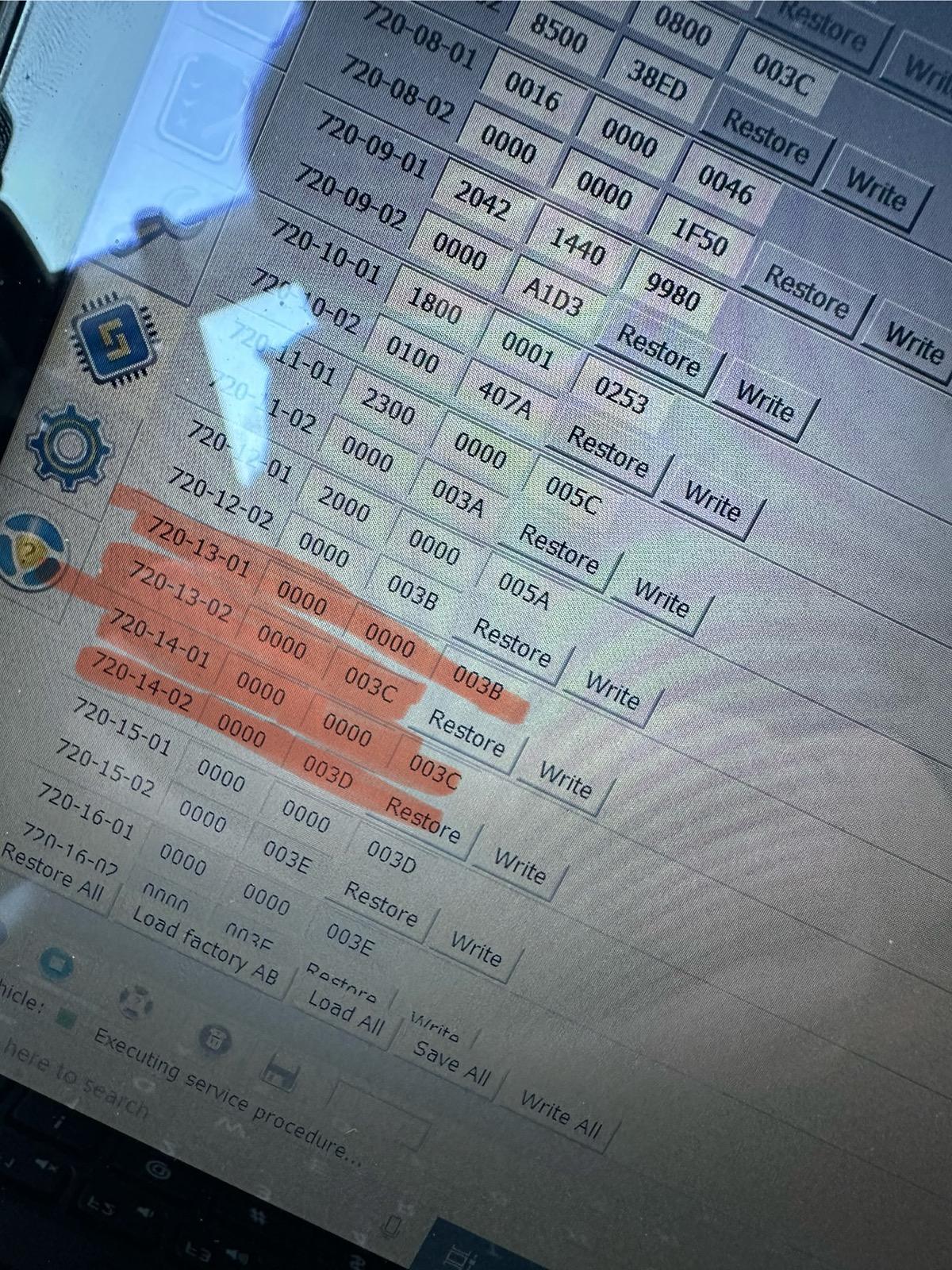
1. Open IPC AS BUILT
2. Change line 720-13-01 and 720-13-02 to ALL ZEROS. And WRITE the changes. Click yes to let Forscan correct the checksum.
3. Change line 720-14-01 and 720-14-02 to ALL ZEROS. And WRITE the changes. Click yes to let Forscan correct the checksum.

These coding changes worked for my 2024 Maverick XL AWD ECOBOOST. These changes remove the seatbelt info screen pictured below entirely and it also seems to disable the seatbelt chime too. I would love to hear from other members to see if these changes work in your Maverick! Also, I have the smaller instrument cluster. (The 4 inch Instrument Cluster)

EDIT:
If you would like to keep the Minder (the dash light and chime) and not the Monitor (the seatbelt screen) I would suggest doing the following coding based on this 2023 Maverick HEX code spreadsheet and my original coding in my Maverick.

720-13-01 9100 0001 8000
720-13-02 0110 1000
720-14-01 1000 0000 0000
720-14-02 All Zeros

FORScan coding to disable the Seatbelt Information Screen!.png


IMG_2898.jpeg
Nice job! works like a charm on my 2024 EB Lariat
 

surfstar

2.5L Hybrid
Well-known member
Joined
Feb 7, 2023
Threads
14
Messages
1,125
Reaction score
2,410
Location
CA
Vehicle(s)
2023 XL Hybrid
Engine
2.5L Hybrid
This is great. Nice work OP!
Unfortunately I have three plugs in my rear seat belt buckles and haven't got the pop up in weeks. I coulda saved $14. Darn.

I would love to get 5 blinks option though (vs 3 when you tap your turn signal) - that was easy on the 'ol VW with OBD11 or on Toyotas with Carista.
No luck so far on Fords.
 
Sponsored

TrailMaster

2.0L EcoBoost
Well-known member
Joined
Aug 28, 2023
Threads
38
Messages
912
Reaction score
1,359
Location
Western Colorado
Vehicle(s)
02 Ranger XLT 4L, Honda Valkyries (2)
Engine
2.0L EcoBoost
Given the number of lawyers in the US, I'm sure there's a legal/liability reason for having you press ok (like it is recorded in the truck's black box). But good luck, there's only one way to really find out.
If you don't press ok it promptly goes away by itself.
 

snowcatxx87

2.5L Hybrid
Well-known member
Joined
Oct 5, 2021
Threads
9
Messages
664
Reaction score
1,239
Location
Calgary
Vehicle(s)
1290SDR EVO / Tiger 900RP / 300cc Grom / Surron
Engine
2.5L Hybrid
Check this out! This is worth a try and you can always change it back if it doesn't work! This is also from the F250 Forums.
Screenshot 2024-03-22 at 12.09.46 AM.png
Good find - do you know how others are decoding these to figure out which lines do what?
 
OP
OP
EONR24

EONR24

2.0L EcoBoost
Well-known member
First Name
Swag
Joined
Feb 26, 2024
Threads
44
Messages
1,442
Reaction score
1,655
Location
United States
Vehicle(s)
2024 Ford Maverick XL
Engine
2.0L EcoBoost
Good find - do you know how others are decoding these to figure out which lines do what?
They are figured out by gathering VIN numbers, year, trim and features and this is used to decipher what each number in each code does. And ultimately trying out new codings to see if they can be accepted and work without DTCs.
 

NextTruck

2.0L EcoBoost
Well-known member
Joined
Sep 26, 2022
Threads
24
Messages
429
Reaction score
413
Location
PA
Vehicle(s)
2017 JeepGC Overland, 2010 Tahoe
Engine
2.0L EcoBoost
Clubs
 
Hello everyone!

I finally found the way to disable the ANNOYING Seatbelt information screen that comes on when you start the truck and stays on even after you buckle your seatbelt. Thank you to 2023 F250 forums for the coding information.

DISABLE SEATBELT INFORMATION SCREEN
1. Open IPC AS BUILT
2. Change line 720-13-01 and 720-13-02 to ALL ZEROS. And WRITE the changes. Click yes to let Forscan correct the checksum.
3. Change line 720-14-01 and 720-14-02 to ALL ZEROS. And WRITE the changes. Click yes to let Forscan correct the checksum.

These coding changes worked for my 2024 Maverick XL AWD ECOBOOST. These changes remove the seatbelt info screen pictured below entirely and it also seems to disable the seatbelt chime too. I would love to hear from other members to see if these changes work in your Maverick! Also, I have the smaller instrument cluster. (The 4 inch Instrument Cluster)

EDIT:
If you would like to keep the Minder (the dash light and chime) and not the Monitor (the seatbelt screen) I would suggest doing the following coding based on this 2023 Maverick HEX code spreadsheet and my original coding in my Maverick.

720-13-01 9100 0001 8000
720-13-02 0110 1000
720-14-01 1000 0000 0000
720-14-02 All Zeros

FORScan coding to disable the Seatbelt Information Screen!.png


IMG_2898.jpeg
This alone will make it worth me buying forescan. That message stays on way to long.
Sponsored


Top