
Sponsored
OP
OP
daddio211

daddio211

2.5L Hybrid
Well-known member
First Name
Eric
Joined
Jul 30, 2021
Threads
29
Messages
876
Reaction score
1,858
Location
St. George, Utah
Vehicle(s)
Hot rods
Engine
2.5L Hybrid
Clubs
 
Will it work on the Latiat?
It will, but there are a few other options to consider. You'll need to sort through a bunch of pages on the link in the initial post, there are a few different settings for the Lariat and XLT FX4 (large screen) that I didn't cover here.
Sponsored


Darnon

2.5L Hybrid
Well-known member
Joined
Jul 4, 2021
Threads
10
Messages
5,720
Reaction score
7,227
Location
WNY
Vehicle(s)
2022 Maverick
Engine
2.5L Hybrid
Thanks for the straightforward write up. I entered the first code and when I went to write it, I got a warning that the checksum didn't match. Does the Forscan software fix the checksum? Does it not matter?
It should recalculate the checksum automatically, yes.
 

Bronson

2.5L Hybrid
Member
Joined
Sep 23, 2022
Threads
0
Messages
9
Reaction score
7
Location
Michigan
Vehicle(s)
2023 Maverick XL
Engine
2.5L Hybrid
I've been using Waze to know speed limit when driving. This is a nice feature for when not using Waze on AA. Thanks.
 
OP
OP
daddio211

daddio211

2.5L Hybrid
Well-known member
First Name
Eric
Joined
Jul 30, 2021
Threads
29
Messages
876
Reaction score
1,858
Location
St. George, Utah
Vehicle(s)
Hot rods
Engine
2.5L Hybrid
Clubs
 
I've been using Waze to know speed limit when driving. This is a nice feature for when not using Waze on AA. Thanks.
I use Waze too. My eyesight can't quite read my actual speed though, LOL.
 

TyPope

2.5L Hybrid
Well-known member
First Name
Ty
Joined
Jul 20, 2022
Threads
1
Messages
328
Reaction score
364
Location
Papillion, Nebraska
Vehicle(s)
2020 Tesla Model Y, 2018 Ford F150
Engine
2.5L Hybrid
forscan.org - you'll also need a USB to OBD cable, several suggestions posted on that site.


No idea. It's not even considered an available "feature." 🤷‍♂️
You can use Forscan with an ELM327 adapter ($12 on Amazon). It's bluetooth so you don't need a cable. I used this setup to add a brake controller to my F150. I've used the ELM327 for years now. Very handy to just keep in the truck as I can use it with either my laptop or my Android phone. I don't know about Apple phones though. They seem to be locked down for some bluetooth functionality.
 

Sponsored

OP
OP
daddio211

daddio211

2.5L Hybrid
Well-known member
First Name
Eric
Joined
Jul 30, 2021
Threads
29
Messages
876
Reaction score
1,858
Location
St. George, Utah
Vehicle(s)
Hot rods
Engine
2.5L Hybrid
Clubs
 
Just did mine tonight on an XLT FX4. Thanks for the post. It works great. On my FX4 6" screen it has 2 bubbles. 1 for traffic signs and the other I'm not sure. Anyone know?
This has been covered in quite a bit of detail on the last five(?) pages of the thread I linked in the original post. The second bubble is for no passing zones and such, I think it's specific to the 6" screens. That thread covers how to modify/enable the second bubble.
 

TopGun22

2.5L Hybrid
Well-known member
First Name
TopGun
Joined
Jan 29, 2022
Threads
12
Messages
154
Reaction score
53
Location
Ontario
Vehicle(s)
SONATA GL Sport
Engine
2.5L Hybrid
The system can display two traffic signs in parallel.
You can view the status at any time using the information display.
The system displays recognizable traffic signs in four stages as follows:
  1. All new traffic signs appear brighter than the others in the display.
  2. After a predetermined time they display normally.
  3. After a predetermined distance they are greyed out.
  4. After another predetermined distance they are deleted.
Is it possible to set your own "predetermined" values with forscan ?
 

Deleted member 23340

Guest
Reading up on Forscan options I found that ALL models of the Maverick have this capability.

The "eye" (camera that detects oncoming cars for auto-dim) has other functions, including TSR. All Mavericks have this camera.

Using Forscan software and cable I enabled it easily. Here's how:

(I am surmising you know how to use Forscan. If you don't just Google or YouTube it. It's easy.)

1. Once connected choose the chip icon, then IPC Module Configuration (AS BUILT format). Find entry 720-03-02. Change the third character of the first octet to a letter C. [xxCx-xxxx]

2. Click "Write All" at the bottom of the screen and follow the screen prompts to turn ignition off/on.

3. Return to the "chip" button settings locate IPMA Module Configuration (AS BUILT format). Find 706-01-01 and change the third and fourth characters in the second octet as shown: [xxxx-xxD2-xxxxx]


4. Click "Write All" at the bottom of the screen and follow the screen prompts to turn ignition off/on.

5. On your dash display go to the "gears" icon indicating settings. Choose Driver Assistance, choose Traffic Sign Recognition and check Activate TSR.

THAT'S LITERALLY IT. You should now have working TSR indicating speed limit signs, no passing zones, etc.

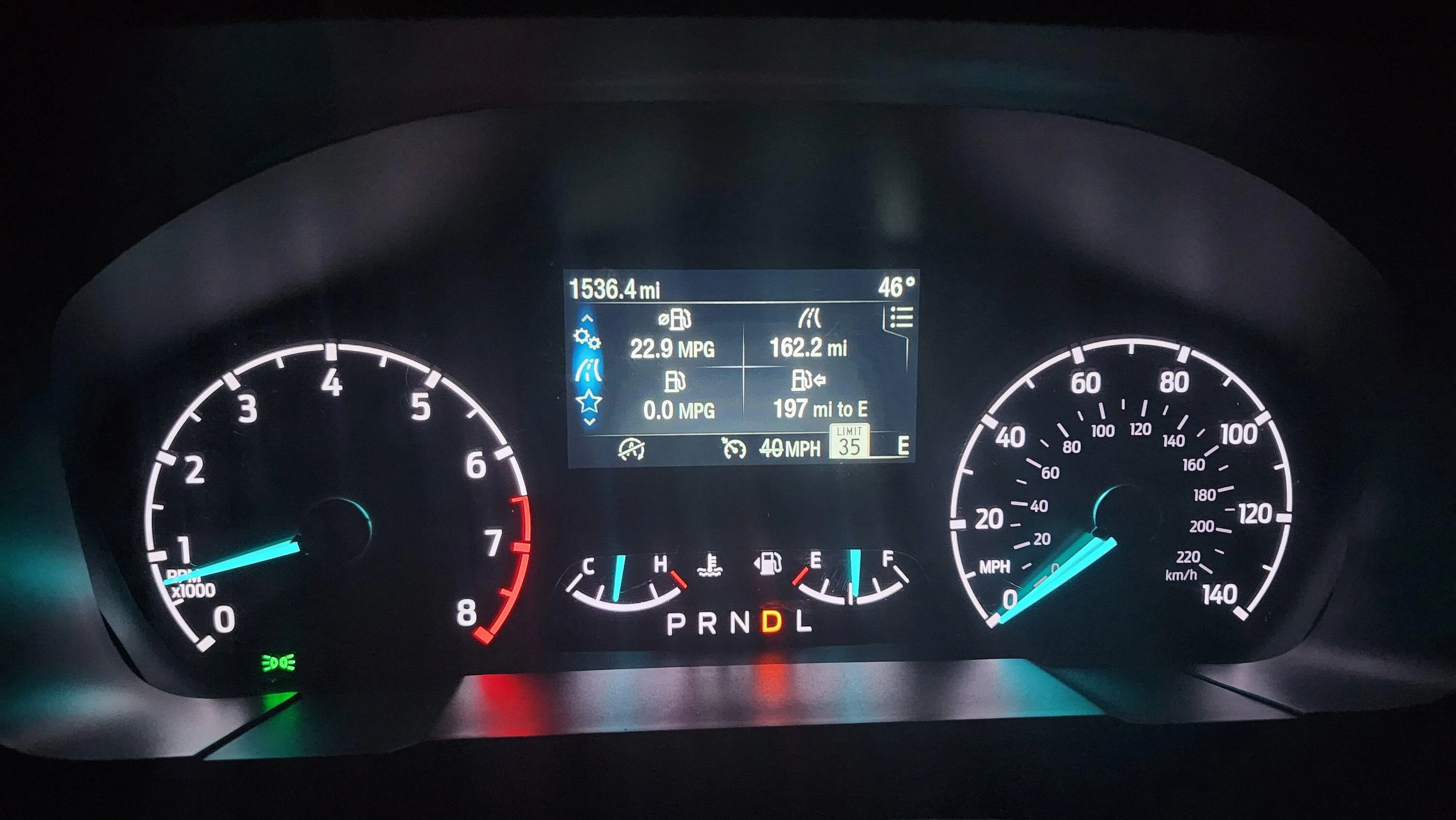
20221109_194529.jpg


I'm no expert on Forscan so I may not be able to help others troubleshoot much, but I'll try. I gained my knowledge by reading all of the (currently 18) pages of @Maverick2022XL 's thread here: https://www.mavericktruckclub.com/f...ition-tsr-forscan-mod-confirmed-working.9399/

Lots of discussion about Lariats and 6" screens so I weeded through it to find what works on the XL and XLT with the small screen. Following instructions there you can also activate other features regarding TSR.

Good luck and enjoy.
How does using forscan and modding the software affect the warranty?
 
OP
OP
daddio211

daddio211

2.5L Hybrid
Well-known member
First Name
Eric
Joined
Jul 30, 2021
Threads
29
Messages
876
Reaction score
1,858
Location
St. George, Utah
Vehicle(s)
Hot rods
Engine
2.5L Hybrid
Clubs
 
How does using forscan and modding the software affect the warranty?
Personally, I didn't really care a whole lot. Ford has been using this software for years and most dealer techs aren't going to know its NOT turned on by the factory... or care. If you're concerned, simply restore the "as built" files before going to the dealer and no one is the wiser.
 
Sponsored

Deleted member 23340

Guest
Personally, I didn't really care a whole lot. Ford has been using this software for years and most dealer techs aren't going to know its NOT turned on by the factory... or care. If you're concerned, simply restore the "as built" files before going to the dealer and no one is the wiser.
I didn't know there was a way to reset it back to the way it was. In that case I feel better. I definitely value the warranty... Not willing to come out of pocket randomly for thousands.

Still need to find out how to get this forescan program and how to use it.
 

nicobonis

2.0L EcoBoost
Well-known member
First Name
Nicolás
Joined
Oct 1, 2022
Threads
6
Messages
107
Reaction score
115
Location
Banfield - Buenos Aires - Argentina
Vehicle(s)
Ford Maverick Tremor 2025
Engine
2.0L EcoBoost
Reading up on Forscan options I found that ALL models of the Maverick have this capability.

The "eye" (camera that detects oncoming cars for auto-dim) has other functions, including TSR. All Mavericks have this camera.

Using Forscan software and cable I enabled it easily. Here's how:

(I am surmising you know how to use Forscan. If you don't just Google or YouTube it. It's easy.)

1. Once connected choose the chip icon, then IPC Module Configuration (AS BUILT format). Find entry 720-03-02. Change the third character of the first octet to a letter C. [xxCx-xxxx]

2. Click "Write All" at the bottom of the screen and follow the screen prompts to turn ignition off/on.

3. Return to the "chip" button settings locate IPMA Module Configuration (AS BUILT format). Find 706-01-01 and change the third and fourth characters in the second octet as shown: [xxxx-xxD2-xxxxx]


4. Click "Write All" at the bottom of the screen and follow the screen prompts to turn ignition off/on.

5. On your dash display go to the "gears" icon indicating settings. Choose Driver Assistance, choose Traffic Sign Recognition and check Activate TSR.

THAT'S LITERALLY IT. You should now have working TSR indicating speed limit signs, no passing zones, etc.

20221109_194529.jpg


I'm no expert on Forscan so I may not be able to help others troubleshoot much, but I'll try. I gained my knowledge by reading all of the (currently 18) pages of @Maverick2022XL 's thread here: https://www.mavericktruckclub.com/f...ition-tsr-forscan-mod-confirmed-working.9399/

Lots of discussion about Lariats and 6" screens so I weeded through it to find what works on the XL and XLT with the small screen. Following instructions there you can also activate other features regarding TSR.

Good luck and enjoy.
Hi!
I´m Nico, from Argentina, I have a Ford Maverick XLT. I enable the TSR functions (IT WORKS LIKE A CHARM!), but I DAS is not working or taking too much to trigger.
I tried to force the DAS alert doing an aggressive overtake with high DAS sensitive level, and nothing happens. I used Method 1.
any clues?.


Regards
 

Tomjoness

2.0L EcoBoost
Active member
First Name
Tj
Joined
Jan 22, 2023
Threads
2
Messages
30
Reaction score
10
Location
Florida
Vehicle(s)
2022 max xlt
Engine
2.0L EcoBoost
Service procedure interrupted plz help
 

elmo3000

2.0L EcoBoost
Active member
First Name
Elliot
Joined
Jul 13, 2023
Threads
5
Messages
27
Reaction score
59
Location
MARYLAND
Vehicle(s)
2023 FORD MAVERICK XLT FX4
Engine
2.0L EcoBoost
Clubs
 
Thanks @daddio211 ! I'll be tweaking my FX4 to
  • Enable all drive modes
  • Lane keeping assist
  • Add the TSR undocumented feature
Does yours chime when exceeding the speed limit? If not, you might take a look at this instruction -
Edit this code is needed to enable the chime alert option which makes an audible noise when you drive above the posted speed limit or set threshold to trigger a warning.​
IPC​
720-04-01​
xxxx-xx*x-xxxx​
change * to 4 to enable the chime setting​

Another forumite posted this along with your recommended changes.

Can you do lane keep assist on the XLT FX4 without copilot 360?
 
OP
OP
daddio211

daddio211

2.5L Hybrid
Well-known member
First Name
Eric
Joined
Jul 30, 2021
Threads
29
Messages
876
Reaction score
1,858
Location
St. George, Utah
Vehicle(s)
Hot rods
Engine
2.5L Hybrid
Clubs
 
Can you do lane keep assist on the XLT FX4 without copilot 360?
No, lane assist is part of CoPilot 360. You MAY be able to disable it but I don't know for sure.
Sponsored


Top