
Sponsored
OP
OP
daddio211

daddio211

2.5L Hybrid
Well-known member
First Name
Eric
Joined
Jul 30, 2021
Threads
29
Messages
876
Reaction score
1,858
Location
St. George, Utah
Vehicle(s)
Hot rods
Engine
2.5L Hybrid
Clubs
 
Thanks @daddio211 ! I'll be tweaking my FX4 to
  • Enable all drive modes
  • Lane keeping assist
  • Add the TSR undocumented feature
Does yours chime when exceeding the speed limit? If not, you might take a look at this instruction -
Edit this code is needed to enable the chime alert option which makes an audible noise when you drive above the posted speed limit or set threshold to trigger a warning.​
IPC​
720-04-01​
xxxx-xx*x-xxxx​
change * to 4 to enable the chime setting​

Another forumite posted this along with your recommended changes.
Thanks for the additional info. No, my chime is definitely turned off. I drive too fast everywhere, it just nice to know how fast I'm "supposed" to be going. 🙈
Sponsored


VBMav

2.5L Hybrid
Well-known member
First Name
Steve
Joined
Sep 4, 2021
Threads
11
Messages
109
Reaction score
197
Location
Indiana
Website
www.theveteranscheck.com
Vehicle(s)
2022 Maverick XLT; 2025 Escape PHEV
Engine
2.5L Hybrid
This link from Ford tells you a bit about it - Traffic Sign Recognition

If you happen to have a Lariat Lux with ACC then this feature should also automatically adjust your cruise control speed to match the speed limit! Speed Control
This "automatically adjust your cruise control speed" may be great in theory but my wife and her friend had another opinion of it recently. They had taken a trip to the Smoky Mountains for a few days and her friend was driving her new Mercedes sedan with this feature. They were having a problem with it because it was reading road number signs as speed limit signs also. There they were going down I-75 (yes, at 75 MPH) and came across an exit to another road that was, let's say, state road 45. Guess what, the car suddenly slowed to 45 MPH on the 70 MPH speed limit highway! Not exactly a safety feature! The friend had no idea how to turn off this feature so they spent the entire trip at varying speeds. Thank goodness they weren't on I-95!

Yes, she should have read the manual on how to turn off the automatic speed control based on road signs but she didn't know the car would do that before the trip. Yes, the system should have done a better job differentiating between speed limit and side road signs.

In any case, if you do find a way to have your Maverick system activate the "automatically adjust your cruise control speed", be sure to know how to turn it off quickly if it causes a problem.
 
Last edited:

sprubs

2.5L Hybrid
Well-known member
Joined
Jul 23, 2022
Threads
15
Messages
906
Reaction score
927
Location
New England
Vehicle(s)
Nunya
Engine
2.5L Hybrid
This "automatically adjust your cruise control speed" may be great in theory but my wife and her friend had another opinion of it recently. They had taken a trip to the Smoky Mountains for a few days and her friend was driving her new Cadillac sedan with this feature. They were having a problem with it because it was reading road number signs as speed limit signs also. There they were going down I-75 (yes, at 75 MPH) and came across an exit to another road that was, let's say, state road 45. Guess what, the car suddenly slowed to 45 MPH on the 70 MPH speed limit highway! Not exactly a safety feature! The friend had no idea how to turn off this feature so they spent the entire trip at varying speeds. Thank goodness they weren't on I-95!

Yes, she should have read the manual on how to turn off the automatic speed control based on road signs but she didn't know the car would do that before the trip. Yes, the system should have done a better job differentiating between speed limit and side road signs.

In any case, if you do find a way to have your Maverick system activate the "automatically adjust your cruise control speed", be sure to know how to turn it off quickly if it causes a problem.
that's exactly the kind of thing I read about although it didn't include a real life story of this happening. I could also see someone putting up fake speed limit signs "for the lulz" and causing an accident.
 

sprubs

2.5L Hybrid
Well-known member
Joined
Jul 23, 2022
Threads
15
Messages
906
Reaction score
927
Location
New England
Vehicle(s)
Nunya
Engine
2.5L Hybrid
This link from Ford tells you a bit about it - Traffic Sign Recognition

If you happen to have a Lariat Lux with ACC then this feature should also automatically adjust your cruise control speed to match the speed limit! Speed Control
This link from Ford tells you a bit about it - Traffic Sign Recognition

If you happen to have a Lariat Lux with ACC then this feature should also automatically adjust your cruise control speed to match the speed limit! Speed Control
thanks for the links but just an aside in general here....

these names are awful, lol!

forscan? say that out loud and what does it sound like?

and driving aids? you don't want to catch that.
 

Kcht

2.0L EcoBoost
Well-known member
First Name
Manuel
Joined
Jul 5, 2021
Threads
6
Messages
55
Reaction score
57
Location
Tamarac
Vehicle(s)
Maverick
Engine
2.0L EcoBoost
Very nice all this information.

the adapter is cheap and the software too.!!! Cool!! 😎

my question is about void the original warranty when you reprogram that in your Mavck!!!!
Thanks
 

Sponsored

GPSMan

2.5L Hybrid
Well-known member
Banned
First Name
John
Joined
Jul 28, 2022
Threads
52
Messages
4,325
Reaction score
5,340
Location
CA
Vehicle(s)
Many
Engine
2.5L Hybrid
Clubs
 
Maybe Ford did not turn it on because it was buggy, killed three beta testers, and it is not ready for release?

If it were a "feature" top trims would have it. Since no one has it, it may not be ready for prime time.

Just a thought.
 

CSmith

2.0L EcoBoost
Well-known member
First Name
CJ
Joined
Jan 6, 2022
Threads
6
Messages
574
Reaction score
627
Location
Southern Indiana
Vehicle(s)
2022 Maverick XLT FX4, 2020 F150 XLT FX4
Engine
2.0L EcoBoost
Maybe Ford did not turn it on because it was buggy, killed three beta testers, and it is not ready for release?

If it were a "feature" top trims would have it. Since no one has it, it may not be ready for prime time.

Just a thought.
It is a component of the Blue Cruise system. Since Maverick doesn't have Blue Cruise (Lariat Lux has some components) it isn't turned on in the Maverick menu but the hardware is there. I figure if it makes me aware of the speed limit it'll be value added.
 

zzbaluba

2.0L EcoBoost
Well-known member
First Name
Steve
Joined
Nov 16, 2021
Threads
0
Messages
94
Reaction score
61
Location
Olathe, Kansas
Vehicle(s)
2023 Maverick XLT Alto Blue
Engine
2.0L EcoBoost
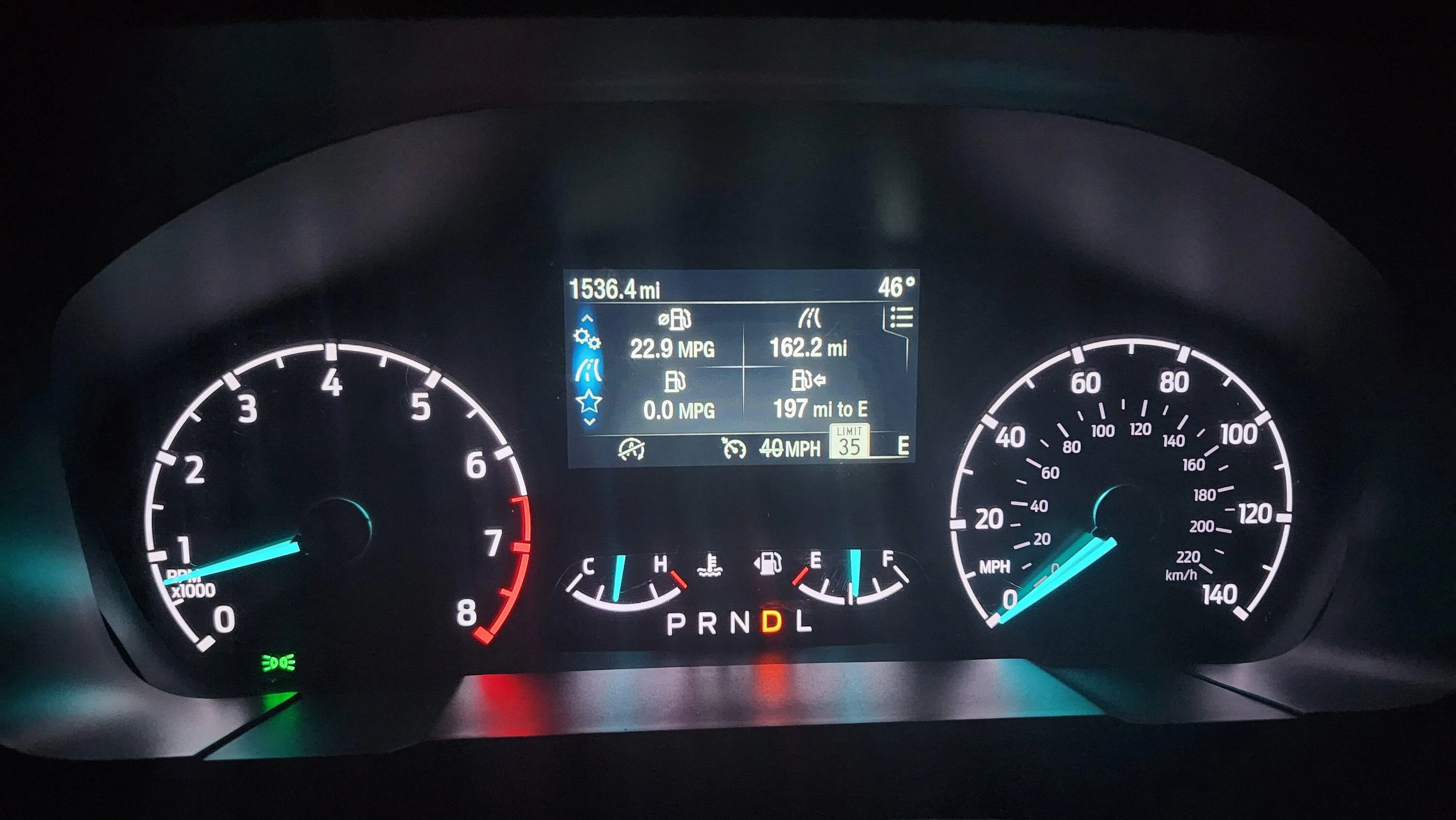
Reading up on Forscan options I found that ALL models of the Maverick have this capability.

The "eye" (camera that detects oncoming cars for auto-dim) has other functions, including TSR. All Mavericks have this camera.

Using Forscan software and cable I enabled it easily. Here's how:

(I am surmising you know how to use Forscan. If you don't just Google or YouTube it. It's easy.)

1. Once connected choose the chip icon, then IPC Module Configuration (AS BUILT format). Find entry 720-03-02. Change the third character of the first octet to a letter C. [xxCx-xxxx]

2. Click "Write All" at the bottom of the screen and follow the screen prompts to turn ignition off/on.

3. Return to the "chip" button settings locate IPMA Module Configuration (AS BUILT format). Find 706-01-01 and change the third and fourth characters in the second octet as shown: [xxxx-xxD2-xxxxx]


4. Click "Write All" at the bottom of the screen and follow the screen prompts to turn ignition off/on.

5. On your dash display go to the "gears" icon indicating settings. Choose Driver Assistance, choose Traffic Sign Recognition and check Activate TSR.

THAT'S LITERALLY IT. You should now have working TSR indicating speed limit signs, no passing zones, etc.

20221109_194529.jpg


I'm no expert on Forscan so I may not be able to help others troubleshoot much, but I'll try. I gained my knowledge by reading all of the (currently 18) pages of @Maverick2022XL 's thread here: https://www.mavericktruckclub.com/f...ition-tsr-forscan-mod-confirmed-working.9399/

Lots of discussion about Lariats and 6" screens so I weeded through it to find what works on the XL and XLT with the small screen. Following instructions there you can also activate other features regarding TSR.

Good luck and enjoy.
I can see its utility as part of the adaptive cruise control only available on the Lariat trim model. But, how is it beneficial otherwise?
 

Sembazuru

2.5L Hybrid
Well-known member
First Name
Chris
Joined
Jul 28, 2022
Threads
2
Messages
299
Reaction score
319
Location
Wilmington, de
Vehicle(s)
2023 Maverick XLT Lux Hybrid
Engine
2.5L Hybrid
It is a component of the Blue Cruise system. Since Maverick doesn't have Blue Cruise (Lariat Lux has some components) it isn't turned on in the Maverick menu but the hardware is there. I figure if it makes me aware of the speed limit it'll be value added.
I agree that it would be beneficial to me just for the awareness factor. I don't know how many times I've been tooling down a road and realized that I hadn't been paying attention to speed limit signs and wondered if I was speeding or going too slow. A dashboard indication of the last speed limit sign that my vehicle could see would help in many of those cases.

FWIW, I tend to drive at "comfortable" speeds for the road conditions and the road environment. My most recent speeding ticket was a couple years ago when I was caught doing 35 in a 20 zone before, coasting down a small hill and approaching a stop sign. The cop must have tagged me before I started slowing down for the stop. That traffic stop also taught me that the residential streets in that town are 20mph, unlike the 25mph on residential streets in all the surrounding areas...
 
Sponsored

Ribwich

2.0L EcoBoost
Well-known member
First Name
Kevin
Joined
Jun 21, 2021
Threads
3
Messages
172
Reaction score
414
Location
NH, USA
Vehicle(s)
Ford Maverick, Mitsubishi Lancer Evolution X
Engine
2.0L EcoBoost
I just enabled this and it's interesting that it shows the EU style icons on the 6" display. I did a quick drive and it picked up speed signs pretty well.
 

Dogcmp6

2.0L EcoBoost
Well-known member
Joined
Aug 5, 2021
Threads
5
Messages
46
Reaction score
53
Location
WI
Vehicle(s)
22 Maverick XLT 2.0
Engine
2.0L EcoBoost
I just enabled this and it's interesting that it shows the EU style icons on the 6" display. I did a quick drive and it picked up speed signs pretty well.

I was wondering when someone would mention this. I enabled this around a year or so when the first thread about this came up, as far as I am aware, if you have the 6 inch screen your stuck with EU signs.
 

Ribwich

2.0L EcoBoost
Well-known member
First Name
Kevin
Joined
Jun 21, 2021
Threads
3
Messages
172
Reaction score
414
Location
NH, USA
Vehicle(s)
Ford Maverick, Mitsubishi Lancer Evolution X
Engine
2.0L EcoBoost
I was wondering when someone would mention this. I enabled this around a year or so when the first thread about this came up, as far as I am aware, if you have the 6 inch screen your stuck with EU signs.
Not a big deal for me but I haven't read through all the threads on this. I didn't know if there was a way to change it.
 

Bob J

2.5L Hybrid
New member
First Name
Bob
Joined
Nov 12, 2022
Threads
1
Messages
2
Reaction score
0
Location
Ohio
Vehicle(s)
Maverick XL Hybrid
Engine
2.5L Hybrid
Thanks for the straightforward write up. I entered the first code and when I went to write it, I got a warning that the checksum didn't match. Does the Forscan software fix the checksum? Does it not matter?
 

Joe Kelly

2.0L EcoBoost
Well-known member
First Name
Joe
Joined
Jul 20, 2022
Threads
16
Messages
284
Reaction score
258
Location
St Charles, Mo
Vehicle(s)
1973 Triumph TR-6, 2009 Accord, 2017 Pacifica
Engine
2.0L EcoBoost
Reading up on Forscan options I found that ALL models of the Maverick have this capability.

The "eye" (camera that detects oncoming cars for auto-dim) has other functions, including TSR. All Mavericks have this camera.

Using Forscan software and cable I enabled it easily. Here's how:

(I am surmising you know how to use Forscan. If you don't just Google or YouTube it. It's easy.)

1. Once connected choose the chip icon, then IPC Module Configuration (AS BUILT format). Find entry 720-03-02. Change the third character of the first octet to a letter C. [xxCx-xxxx]

2. Click "Write All" at the bottom of the screen and follow the screen prompts to turn ignition off/on.

3. Return to the "chip" button settings locate IPMA Module Configuration (AS BUILT format). Find 706-01-01 and change the third and fourth characters in the second octet as shown: [xxxx-xxD2-xxxxx]


4. Click "Write All" at the bottom of the screen and follow the screen prompts to turn ignition off/on.

5. On your dash display go to the "gears" icon indicating settings. Choose Driver Assistance, choose Traffic Sign Recognition and check Activate TSR.

THAT'S LITERALLY IT. You should now have working TSR indicating speed limit signs, no passing zones, etc.

20221109_194529.jpg


I'm no expert on Forscan so I may not be able to help others troubleshoot much, but I'll try. I gained my knowledge by reading all of the (currently 18) pages of @Maverick2022XL 's thread here: https://www.mavericktruckclub.com/f...ition-tsr-forscan-mod-confirmed-working.9399/

Lots of discussion about Lariats and 6" screens so I weeded through it to find what works on the XL and XLT with the small screen. Following instructions there you can also activate other features regarding TSR.

Good luck and enjoy.
Will it work on the Latiat?
Sponsored


Top