
Thank you. Yes I did see it in the cluster and while driving I flipped through every possible menu, but got no eco coach.Did you also enable the screen in the vehicle's Instrument Cluster options menu?
Sponsored
Thank you. Yes I did see it in the cluster and while driving I flipped through every possible menu, but got no eco coach.Did you also enable the screen in the vehicle's Instrument Cluster options menu?

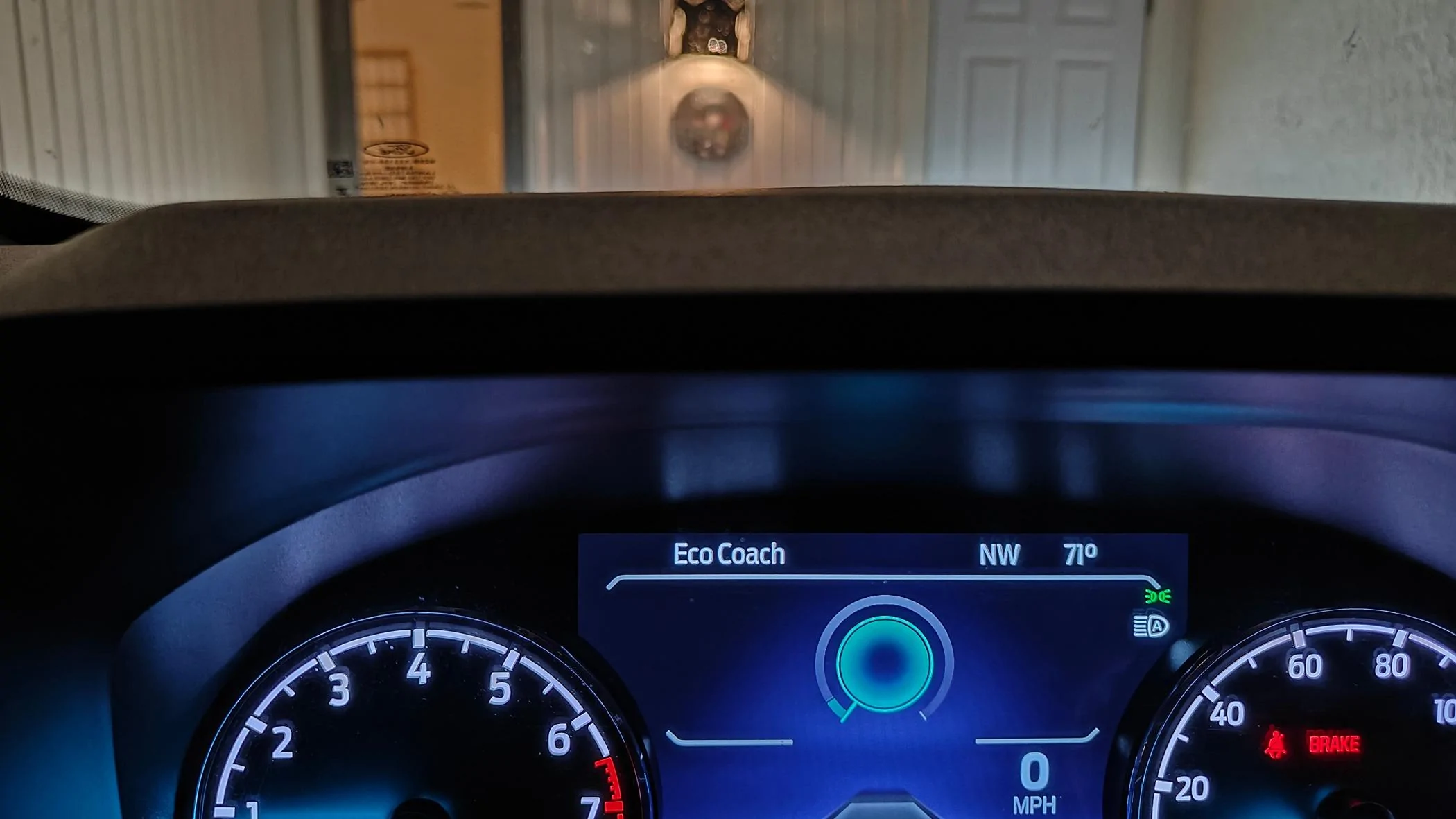
Hey I found a way you can make this eco coach screen your default MY VIEW screen. Follow the coding below and check out the picture attached.This mod has now been confirmed to work on all stock cluster types, makes and Maverick models.
The coach mode is a special custom favorite screen that is similar to the digital speedometer but also has metrics that grade how you are driving to maximize fuel economy. It works with any selectable drive mode including the FX4 package drive modes. This is a coaching feature and not an actual drive mode, it will enable even if eco drive mode is not available.
To fully activate it requires 3 changes in the IPC module.
First change is to enable eco coach mode
IPC
720-09-01
xxxx 9xxx xxxx
leave x values as default
This turns on eco coach mode. If done correctly and you also have eco drive mode, the eco drive mode will now be a small leaf with the word eco underneath it.
Next we need to enable the eco coach mode in the myview screen
720-09-02
xxx1 xxxx
leave x values as default
This turns on eco coach mode option in the myview screen. Once selected you'll get a digital speedometer with a blue and white circle around the speed. Pressing the okay button on the right steering wheel switch will give you driving metrics like acceleration and deceleration showing how efficient you are driving.
Finally there is a driver assistance option which will give you advice on how to maximize your fuel economy in the eco coach screen.
720-10-01
xxxx 2xxx xxxx
leave x values as default
This enables eco coach driver assistance option for eco advice in the driver assistance menu.
Pictures to follow of the screens.


Forscan can definitely be challenging to get set up for the first time. It's pretty easy after you've done it a few times though!. Average speed display can be turned on via the trip menu/settings and it is displayed as one of the options you can track in TRIP 1 and TRIP 2. Glad to hear your coding was successful! Check the Ultimate spreadsheet if you have not yet ! Forscan Ultimate SpreadsheetI installed the ECO Coach today as well as enabling sand & mud/ruts drive modes. Basically, I needed to do some harmless stuff to learn Forscan. Went well. But frustrating looking all over hell and gone to piece together all of the information you need to get up and running on Forscan.
Eco Coach gives the option to show the graph or data.
I also enabled Avg Speed, but I don't see it showing up anywhere.
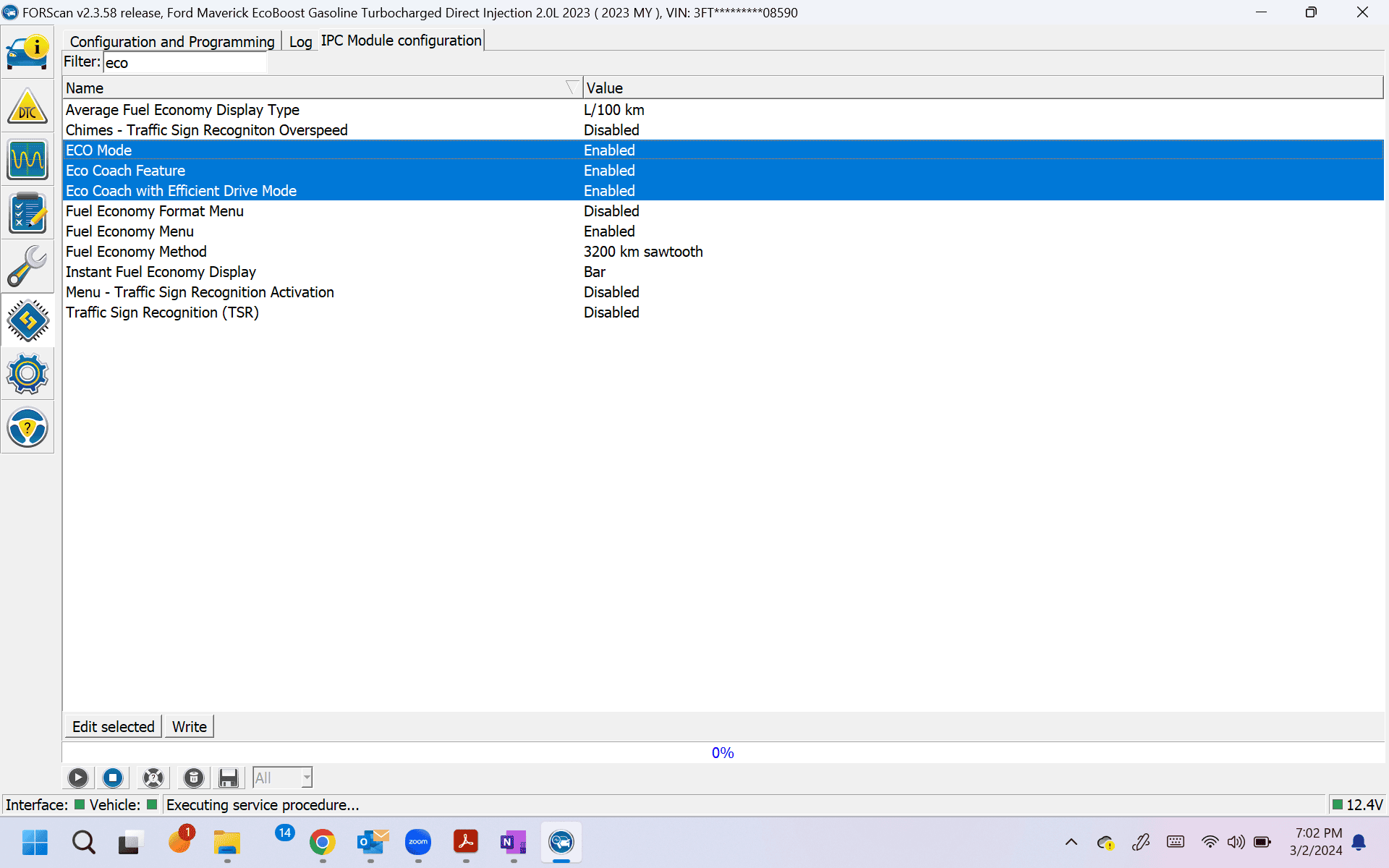
Can confirm editing EZ mode in IPC configuration (as above) works perfectly for 24 Lariat hydrid. Thanks!I just enabled ECO Coach on my '23 EB Lariat Lux (6/5" screen) using "easy" (aka English rather than hexidecimal). Open the not as-built IPC module in Forscan. Search for "eco" and you'll see three entries that in my case were disabled. I enabled those three and voila! See screenshot below.
Try doing this in the cluster. Driver Assist -> Menu -> Eco Coach -> check mark Eco AdviceSo, I've been using the eco coach, but am disappointed that I have no way to see the stats at the end of a drive. I have a hunch that it's because I can't turn a key partway off (powered on but not running) because I have a Lariat that has no key. That is, I punch the button and my truck is off, not in the accessory mode. Can anyone correct me on this? Can anyone with a Lariat see the trip stats?
@Toinky give this a try in the link below.So, I've been using the eco coach, but am disappointed that I have no way to see the stats at the end of a drive. I have a hunch that it's because I can't turn a key partway off (powered on but not running) because I have a Lariat that has no key. That is, I punch the button and my truck is off, not in the accessory mode. Can anyone correct me on this? Can anyone with a Lariat see the trip stats?
Do you mean the percentage score, or are you looking for some other info screen?So, I've been using the eco coach, but am disappointed that I have no way to see the stats at the end of a drive. I have a hunch that it's because I can't turn a key partway off (powered on but not running) because I have a Lariat that has no key. That is, I punch the button and my truck is off, not in the accessory mode. Can anyone correct me on this? Can anyone with a Lariat see the trip stats?
Sorry I'm not too clear what the actual name of the screen is, but it's summary stats of your trip when you turn off the key. Not the hybrid one, rather the eco coach one.Do you mean the percentage score, or are you looking for some other info screen?
The % score is always available by pressing OK button any time with the eco screen is up. You can toggle back and forth.
Thanks. I'll give that a shot when I get a minute.@Toinky give this a try in the link below.
https://www.mavericktruckclub.com/f...n-add-missing-display-modes.31791/post-825835