
Sponsored

Cactus Mav

2.5L Hybrid
Member
First Name
Brian
Joined
Jul 6, 2024
Threads
0
Messages
10
Reaction score
3
Location
Albuquerque
Vehicle(s)
2024 XLT Hybrid
Engine
2.5L Hybrid
Update Below

I've been following these forums for a while and got my 2023 XLT Hybrid with the Luxury package on June 28, 2023. I noticed others were enabling Traffic Sign Recognition (TSR) in their vehicles, but I was hesitant because I couldn't find anyone who had tried it with a 2023 XLT Hybrid. I saw users with 2022 Hybrids, Lariats, and XL models, but I didn't want to take the risk.

A few weeks ago, I decided to give it a shot based on other posts. I encountered an issue with an incorrect Checksum when changing the code and trying to write. I canceled the process and commented on another post where someone mentioned that this issue is normal, and you can always change it back. I also noticed discrepancies between multiple posts regarding the numbers in IPMA and IPC where it was one value in one post, and a completely different value in another post.

After more research and watching videos on Ford vehicles, I'm happy to report that I successfully enabled all TSR functionality, including the over-speed alert, using US-formatted signs, and it took less than 10 minutes. I didn't follow the recommendations in other posts, and I encountered no errors using this method.

While many forum members suggest diving into the Mavericks As-Built section, I went a different route, influenced by content on YouTube and other websites. Here's what I opted for:

While this works for me, this post is for INFORMATIONAL PURPOSES ONLY. Any changes you make are AT YOUR OWN RISK!

First and foremost, make sure to back up your AS-BUILT configuration.


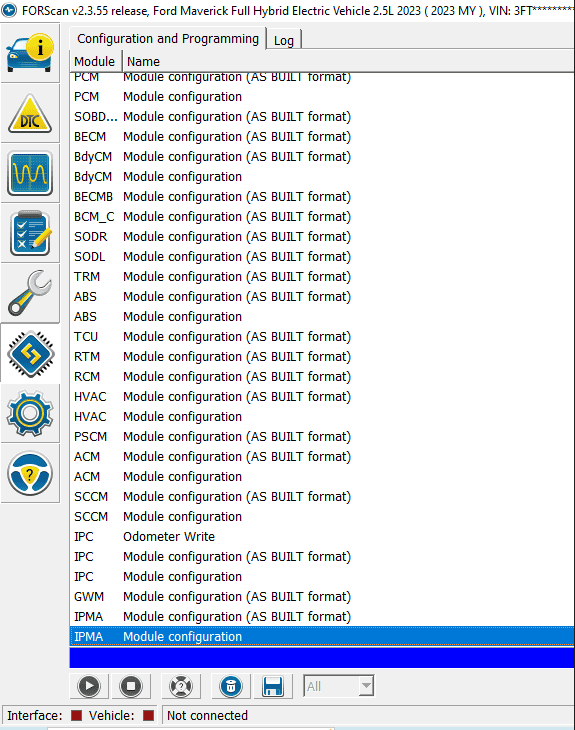
1. Scan for the Maverick Modules
1697144173672.png


2. Select the IPMA Module Configuration (Standard, NOT AS BUILT FORMAT)
3. Click the Play > icon
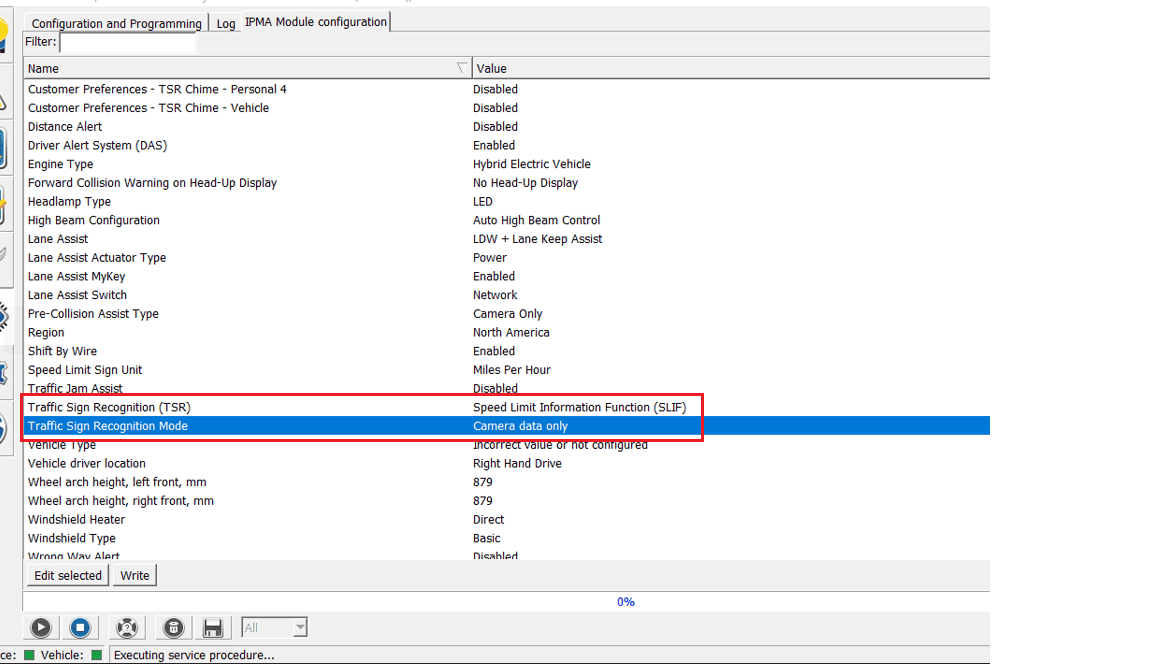
4. I changed the following items by selecting each and clicking EDIT SELECTED

Traffic Sign Recognition (TSR) from DISABLED to Speed Limit Information Function (SLIF)
Traffic Sign Recognition Mode from DISABLED to Camera Data Only
1697145680262.png


5. Click on WRITE
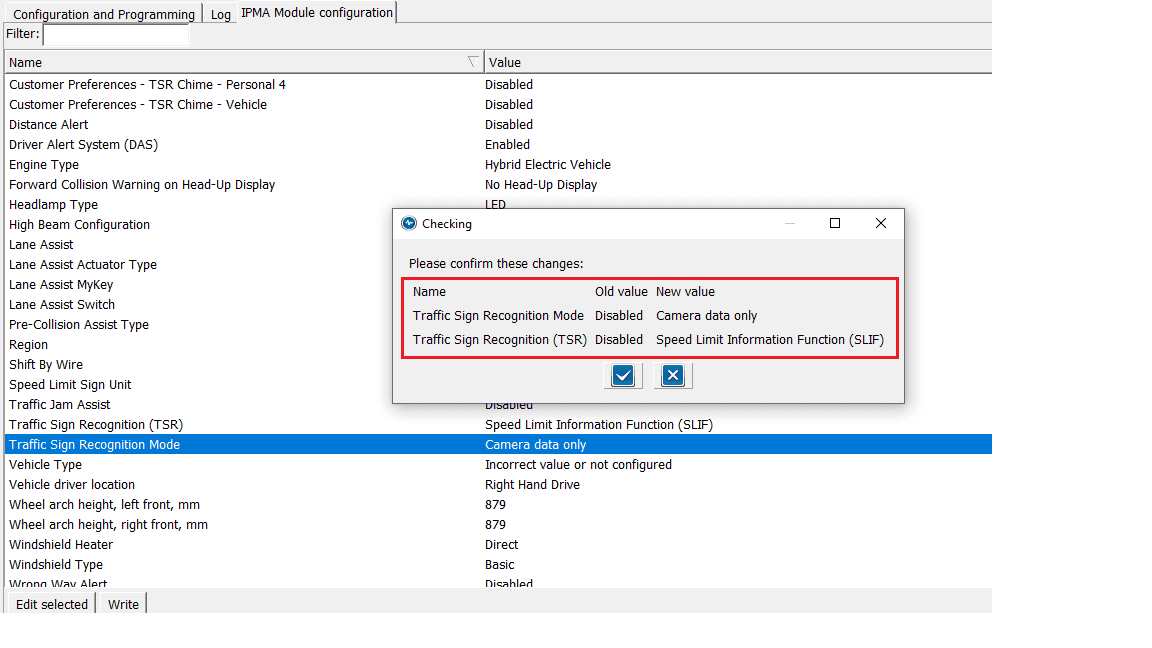
6. Verify the changes
1697145805868.png


7. Click the Checkmark and powercycle the vehicle
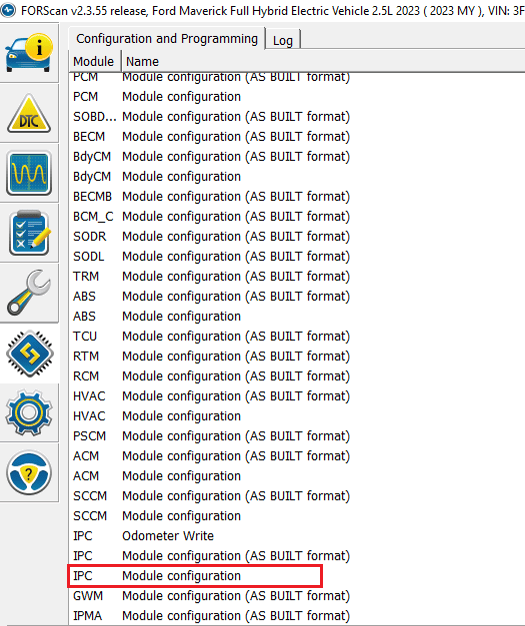
8. Reconnect Forscan and select the IPC Module Configuration (Standard, NOT AS BUILT FORMAT)
1697146963873.png


9. Click the Play > icon
10. I changed the following items by selecting each and clicking EDIT SELECTED

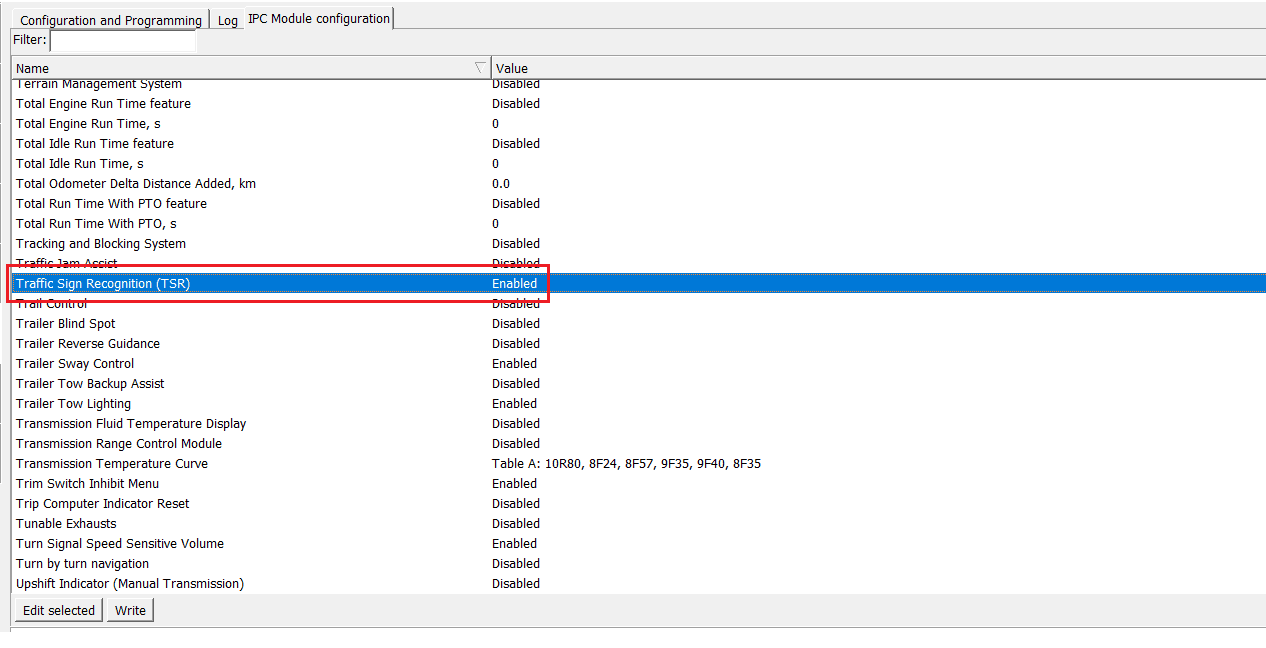
Traffic Sign Recognition (TSR) from DISABLED to ENABLED
1697145966253.png


11. Click on WRITE
12. Verify the changes
13. Click the Checkmark and powercycle the vehicle

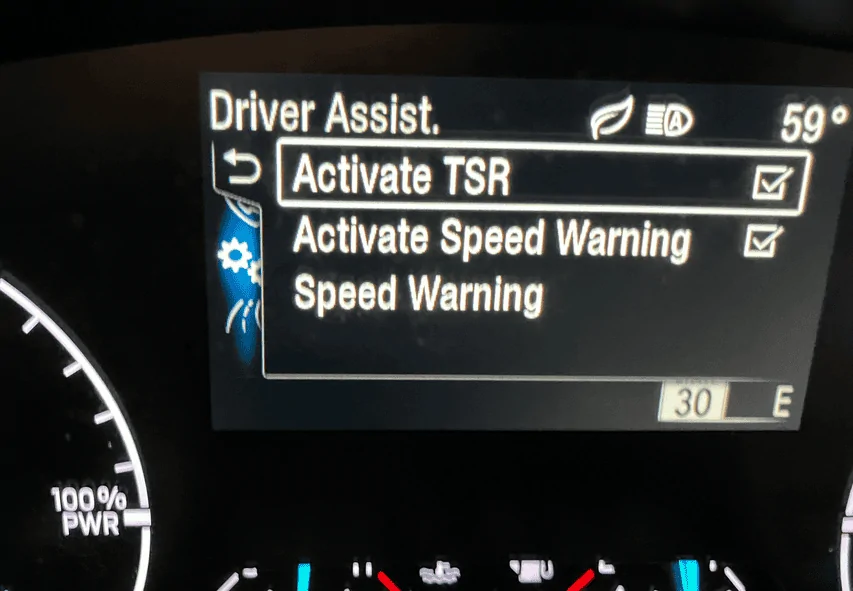
You should now be able to open the menu and should now see

Activate TSR
Activate Speed Warning
Speed Warning
1697146171537.png


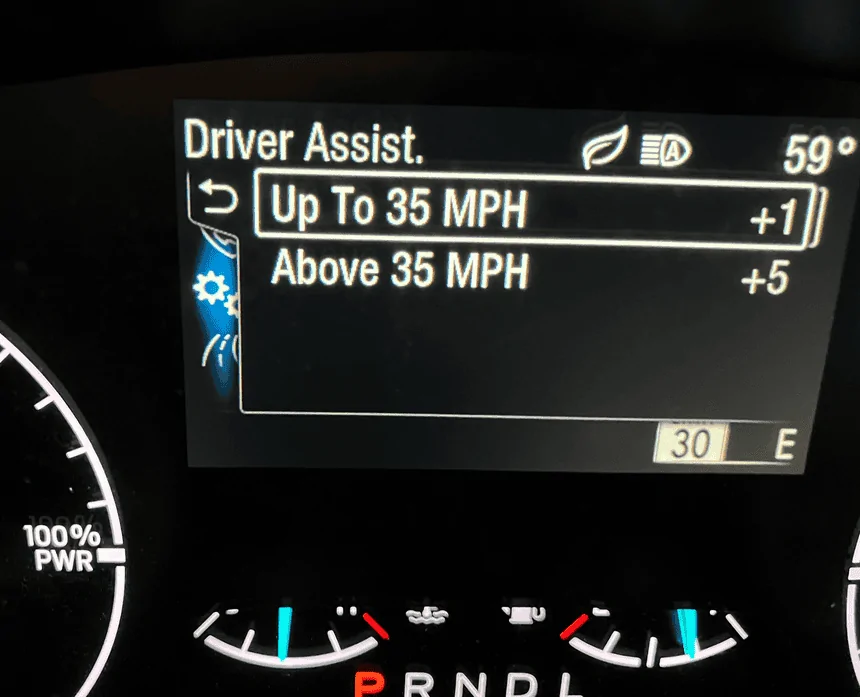
Speed warning allows you to set the speed limits to flash if you go over the set limit you configured
1697146246169.png


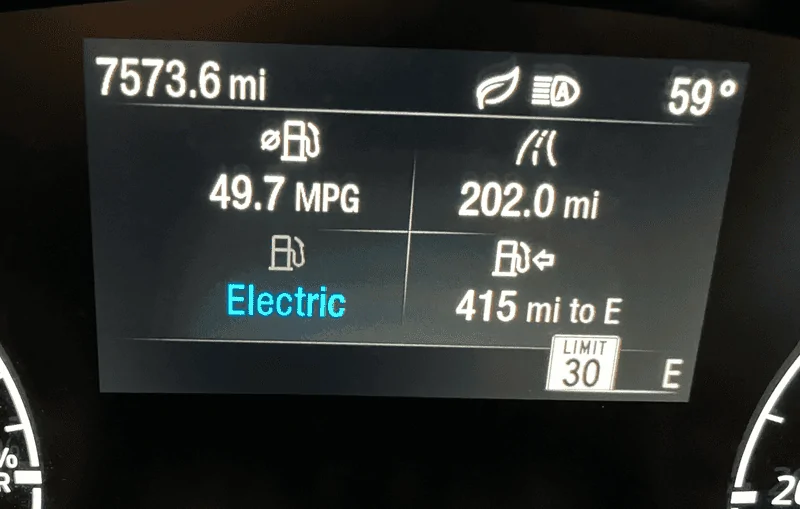
With this enabled, you should see the appropriate speed limits as the camera reads them
1697146322669.png


While I did not enable it using the other suggested methods, I can say this method works for my 2023 XLT Hybrid w/Luxury, Co-Pilot 360/Hitch. Seems to work very well based on my quick test. Recognized multiple speeds and displays them in the standard US format as I wanted.

I really prefer doing it this way because it was much easier than relying on various codes considering I don't have some sort of dictionary that identifies what each is other than what is posted in these forums. While those may be valid codes, I had 3 items I changed from DISABLED to ENABLED and can easily change them back if needed.

Again, make any changes at your own risk.


*****UPDATE 6/1/24*****


I wanted to provide an update on my 2023 XLT Hybrid. The vehicle had three open recalls and one customer satisfaction update that Ford was not notifying owners about. The dealership offered mobile service to come to my home, which is over 40 miles away, to perform the updates. The recalls were:

  • 23C41 (Turn Signal Outage Detection Failure)
  • 24S27 (The Body Control Module (BCM) was improperly calibrated and may falsely detect a current overload on one or both taillamp circuits, potentially causing one or both rear taillamps to stop functioning during a drive cycle)
  • 24C01 (The Instrument Panel Cluster (IPC) may not properly illuminate warning lights or gauges)
Additionally, there was a customer satisfaction update: 23P18 (Powertrain Control Module (PCM) Reprogramming).

I opted to perform the first three recalls but decided against 23P18 due to reports of louder engines, poor fuel economy, and concerns that it might be related to random power outages at high speeds. The dealer was fine with this decision.

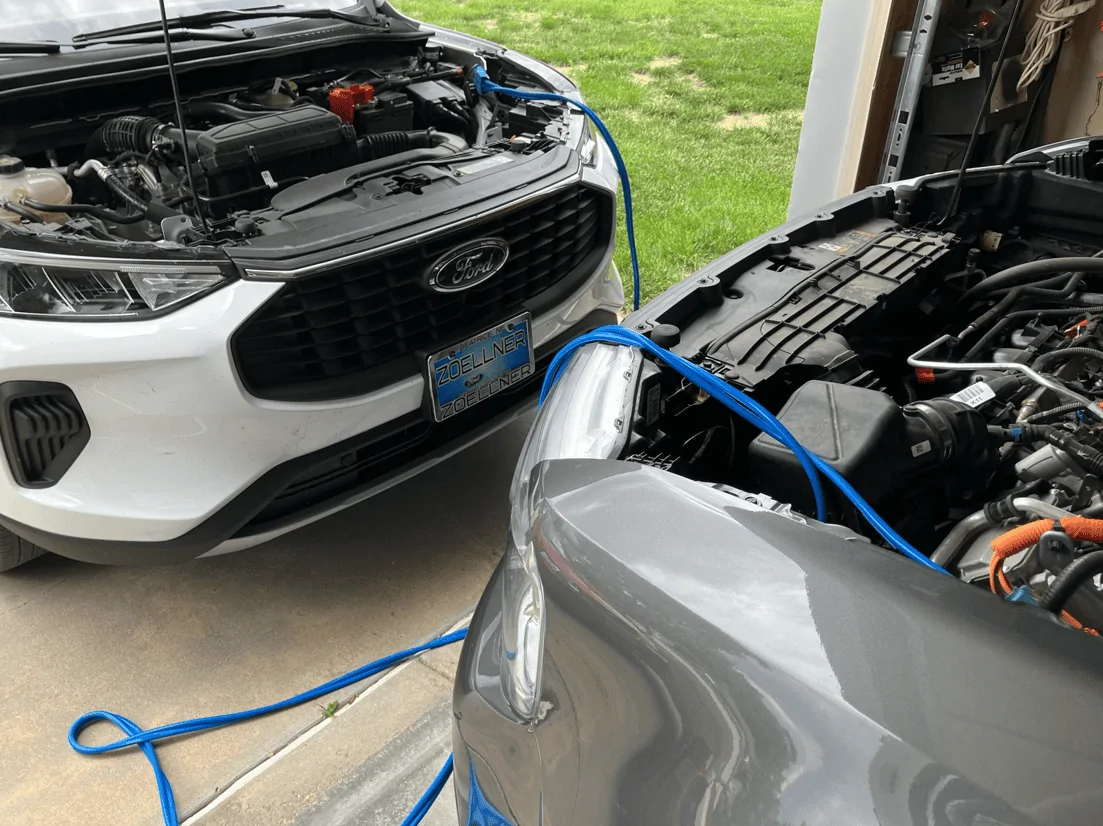
The service technician arrived at my home and parked his 2024 Escape face-to-face with my Maverick to ensure a constant power supply, preventing battery drain during the firmware updates. He explained that the update could take about an hour, during which the vehicle computer would cycle on and off multiple times. The technician seemed knowledgeable and well-trained, completing the updates without any issues. He even topped off my washer fluid and took the car for a test drive while I continued to work.

After the updates, I noticed that my Traffic Sign Recognition (TSR) had been disabled, as the firmware/software had been reset to default settings. Tonight, I went to re-enable TSR and found that the two items in Step #4 were still active. The only action required was to complete Step #10 and change TSR from DISABLED to ENABLED. After doing this and power cycling the vehicle, my menu was back with my previous settings.

I wanted to share this information because it's likely that every time you take your vehicle in for a recall and the computer is updated, you'll need to re-enable certain features. TSR is the only modification I've made to my Maverick, but other settings might be wiped as well. It's a good idea to keep track of what you’ve enabled so you can check them after an update. As always, use this information at your own risk and make a backup before making any changes. Good luck!

Couple photos of the process by Zoellner Ford of Beatrice (Tech did a good job)
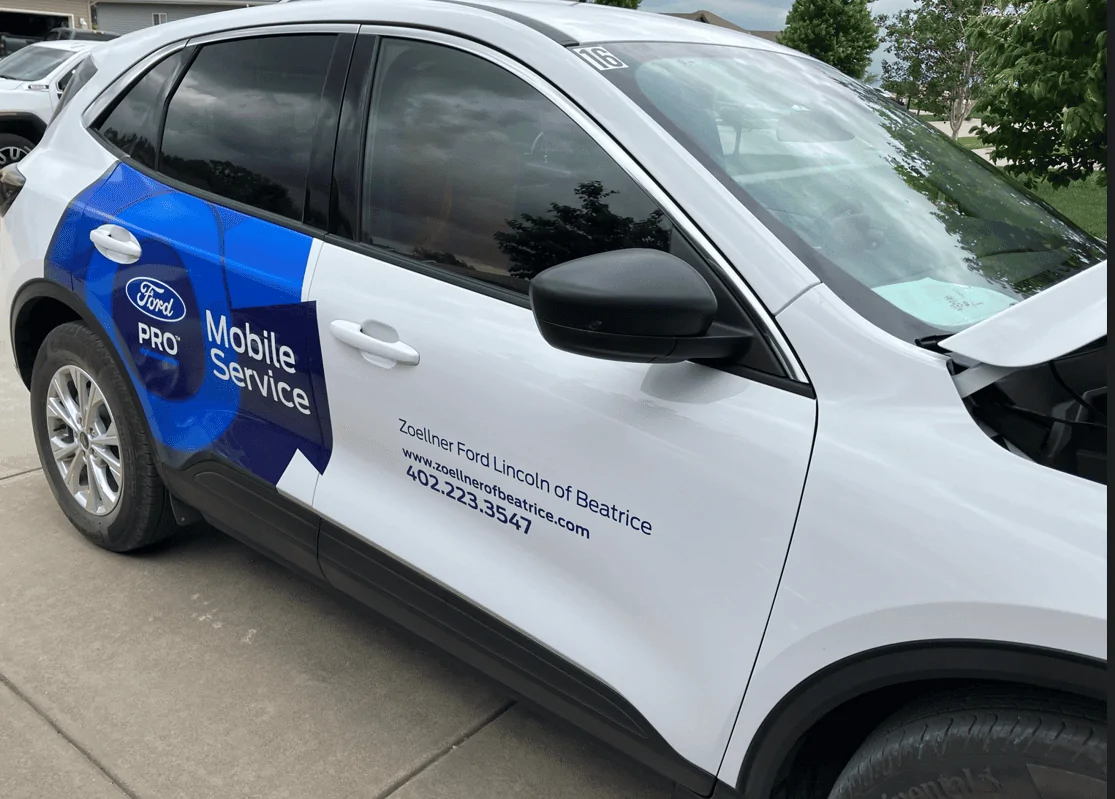
Z1.PNG


Z2.PNG


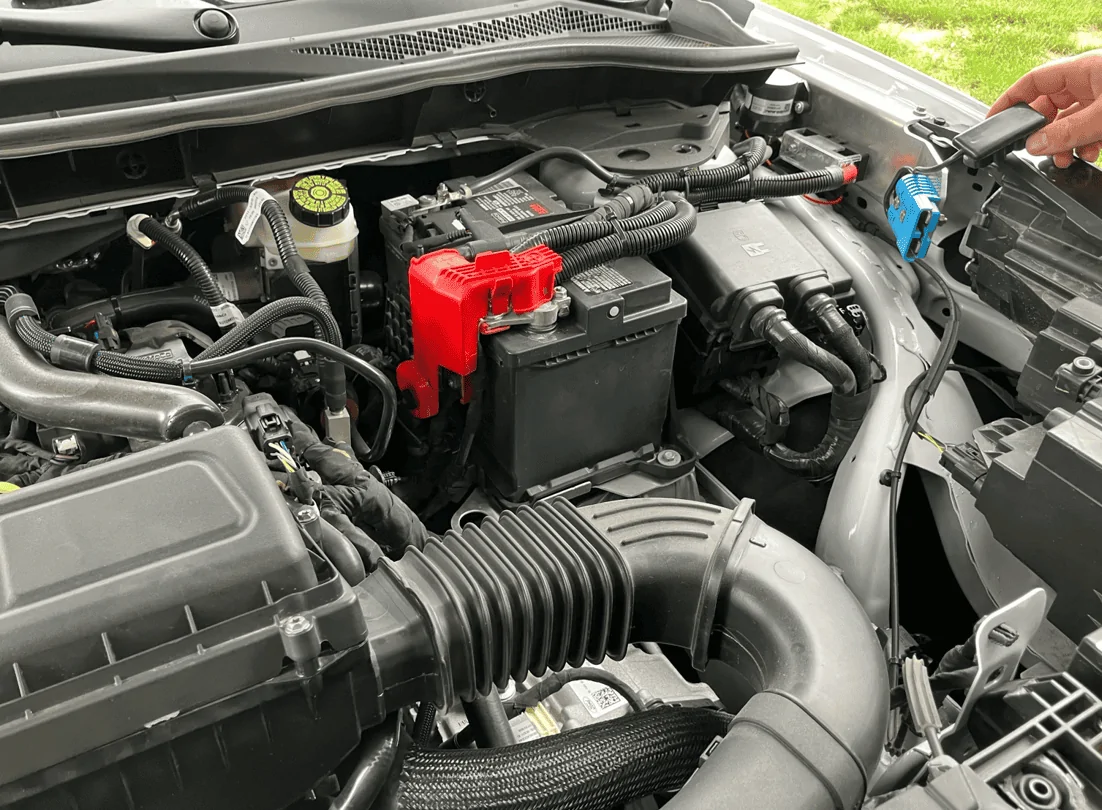
The reason for this procedure is to ensure that the Maverick's battery doesn't die during the update process. The tech explained that during updates, the power is on, systems are active, and various items are turned on and off. Connecting to another vehicle's battery ensures that the Maverick's battery remains active and charged. The Escape was running the entire time.

Additionally, some may wonder why they don't just plug directly into the battery. The tech noted that they avoid this because the battery can be overcharged. There is a regulator on the battery that determines if the vehicle goes into battery saver mode. Charging directly to the battery can bypass this regulator, leading to potential issues. While some owners use battery maintainers directly on the battery, the tech advised against this practice. I haven't used one myself, but now I know where the battery charge ports are under the hood.


Z3.PNG
Great writeup. Activated and it works great. Had previously done on my Ranger which was slightly different because it was a Lariat, and because it was a 2019 only had Euro signs.

Ford Maverick Traffic Sign Recognition (TSR) Enable via FORScan on 2023 XLT Hybrid w/Luxury [DIY Instructions] **Updated 6/1/24** 20240812_200408
Sponsored


Cactus Mav

2.5L Hybrid
Member
First Name
Brian
Joined
Jul 6, 2024
Threads
0
Messages
10
Reaction score
3
Location
Albuquerque
Vehicle(s)
2024 XLT Hybrid
Engine
2.5L Hybrid
My vehicle: 2024 hybrid Lariat [Sync 3].

My question: I see TSR displayed on the center screen only if I am in NAV screen. I looked in the Driver's Assist menu to see if I could toggle TSR on in screen in front of the driver but there was no option that I could find.

The owner's manual doesn't have a heading for TSR nor did I see any mention under Adaptive Cruise Control or Settings etc. Do you know if I must use Forescan if I want to display TSR in front of me or did I overlook or look in the wrong place to activate it from a menu? TIA!
What you see in the center display is map data, not from the camera. These can be off at times if the map is not updated.
 

Nemo

2.5L Hybrid
Well-known member
Joined
Feb 15, 2024
Threads
4
Messages
77
Reaction score
77
Location
Florida
Vehicle(s)
24 Maverick XL
Engine
2.5L Hybrid
For anyone making this change, referencing the notes in the FORScan master list - TSR MAY DELAY OR INTERFERE WITH PRE COLLISION ASSIST WARNING ON 4 INCH CLUSTERS.

I got the 4” cluster and made this change, but reverted back.
 

CroweMag55

2.0L EcoBoost
Active member
First Name
John
Joined
Jul 8, 2024
Threads
0
Messages
30
Reaction score
31
Location
Plano, TX
Vehicle(s)
'24 Maverick Lariat FX4-Black, 2010 Honda GoldWing
Engine
2.0L EcoBoost
Clubs
 
I just did the changes Jerrisn posted on my '24 XLT Lariat.. Works as offered. Just need to find where to change from EU signs to US ones.. Thanks Jerrisn!
 

Automate

2.5L Hybrid
Well-known member
Joined
Jul 21, 2021
Threads
60
Messages
1,798
Reaction score
2,135
Location
Atlanta GA, USA (ATL)
Vehicle(s)
Fusion Hybrid, Mav XL Hybrid
Engine
2.5L Hybrid
For anyone making this change, referencing the notes in the FORScan master list - TSR MAY DELAY OR INTERFERE WITH PRE COLLISION ASSIST WARNING ON 4 INCH CLUSTERS.

I got the 4” cluster and made this change, but reverted back.
I assume this only effects the display of the warning. The vehicle will still automatically apply the brakes if needed.
 

Sponsored

Nemo

2.5L Hybrid
Well-known member
Joined
Feb 15, 2024
Threads
4
Messages
77
Reaction score
77
Location
Florida
Vehicle(s)
24 Maverick XL
Engine
2.5L Hybrid
I assume this only effects the display of the warning. The vehicle will still automatically apply the brakes if needed.
Yeah, I think it was based on a single post with TSR enabled where someone was well clear of any potential collision and then the screen popped up. Probably the camera itself is handling the data and passing on a signal for the rest of the modules to act on. But who knows, if the IPC is doing the rest of the heavy lifting and showing the notification well after the event, would be disconcerting to me. Heck, if the radio screen can lag with something as simple as showing the back up camera video feed, possibly other modules are already at the top of their performance ability too. XL models are XL models, we accept that.
 
OP
OP
jerrisn

jerrisn

2.5L Hybrid
Well-known member
Joined
Oct 27, 2022
Threads
14
Messages
304
Reaction score
467
Location
NE
Vehicle(s)
2023 XLT Hybrid/2025 Explorer/2018 Volt/2011 Fusion Hybrid/08 Tundra/00 MustanGT
Engine
2.5L Hybrid
Clubs
 
For anyone making this change, referencing the notes in the FORScan master list - TSR MAY DELAY OR INTERFERE WITH PRE COLLISION ASSIST WARNING ON 4 INCH CLUSTERS.

I got the 4” cluster and made this change, but reverted back.
I have had no issues with my collision assist. It has gone off before when someone darted out of a neighborhood. Doesn't really do much in my opinion anyway.
 

Camo51

2.0L EcoBoost
Member
First Name
Rafael
Joined
Dec 26, 2024
Threads
1
Messages
22
Reaction score
8
Location
TX
Vehicle(s)
2024 Ford Maverick XLT FX4 4K-tow
Engine
2.0L EcoBoost
Clubs
 
Thanks for the write-up
 

Dad

2.5L Hybrid
Well-known member
First Name
Tom
Joined
Jan 9, 2022
Threads
58
Messages
5,307
Reaction score
5,689
Location
SoCal
Vehicle(s)
2022 Maverick, - Lariat, Hyundai Palisade
Engine
2.5L Hybrid
I have had no issues with my collision assist. It has gone off before when someone darted out of a neighborhood. Doesn't really do much in my opinion anyway.
Other than scaring the living daylights out of me.
 
OP
OP
jerrisn

jerrisn

2.5L Hybrid
Well-known member
Joined
Oct 27, 2022
Threads
14
Messages
304
Reaction score
467
Location
NE
Vehicle(s)
2023 XLT Hybrid/2025 Explorer/2018 Volt/2011 Fusion Hybrid/08 Tundra/00 MustanGT
Engine
2.5L Hybrid
Clubs
 
Other than scaring the living daylights out of me.
Exactly! The alert goes off, you get the dramatic collision animation and sound, but by then it’s usually too late to do anything meaningful. I’m not sure what the point is—unless it’s supposed to apply the brakes at some stage, but I’ve yet to see that happen.
 
Sponsored

BlueSpec1

2.5L Hybrid
Well-known member
First Name
Gene
Joined
Jul 10, 2022
Threads
3
Messages
777
Reaction score
788
Location
Texas
Vehicle(s)
23 XLT 2.5L, 22 Escape Plug In, 23 Bolt EUV
Engine
2.5L Hybrid
Collision alert went off about the same time I hit my brakes today b/c truck coming the other way suddenly did a u-turn right in front of me.
 
Last edited:
  • Like
Reactions: Dad

Dad

2.5L Hybrid
Well-known member
First Name
Tom
Joined
Jan 9, 2022
Threads
58
Messages
5,307
Reaction score
5,689
Location
SoCal
Vehicle(s)
2022 Maverick, - Lariat, Hyundai Palisade
Engine
2.5L Hybrid
Exactly! The alert goes off, you get the dramatic collision animation and sound, but by then it’s usually too late to do anything meaningful. I’m not sure what the point is—unless it’s supposed to apply the brakes at some stage, but I’ve yet to see that happen.
Yes, that was my thinking that at some point the brakes would apply automatically. Thankfully, I haven't yet had that experience. It's one of those things that you'd like to find out, but don't really want to.
 

Whitty1

2.5L Hybrid
Well-known member
First Name
Dennis
Joined
Dec 30, 2024
Threads
6
Messages
232
Reaction score
259
Location
Clover, SC
Vehicle(s)
2024 Lariet
Engine
2.5L Hybrid
Update Below

I've been following these forums for a while and got my 2023 XLT Hybrid with the Luxury package on June 28, 2023. I noticed others were enabling Traffic Sign Recognition (TSR) in their vehicles, but I was hesitant because I couldn't find anyone who had tried it with a 2023 XLT Hybrid. I saw users with 2022 Hybrids, Lariats, and XL models, but I didn't want to take the risk.

A few weeks ago, I decided to give it a shot based on other posts. I encountered an issue with an incorrect Checksum when changing the code and trying to write. I canceled the process and commented on another post where someone mentioned that this issue is normal, and you can always change it back. I also noticed discrepancies between multiple posts regarding the numbers in IPMA and IPC where it was one value in one post, and a completely different value in another post.

After more research and watching videos on Ford vehicles, I'm happy to report that I successfully enabled all TSR functionality, including the over-speed alert, using US-formatted signs, and it took less than 10 minutes. I didn't follow the recommendations in other posts, and I encountered no errors using this method.

While many forum members suggest diving into the Mavericks As-Built section, I went a different route, influenced by content on YouTube and other websites. Here's what I opted for:

While this works for me, this post is for INFORMATIONAL PURPOSES ONLY. Any changes you make are AT YOUR OWN RISK!

First and foremost, make sure to back up your AS-BUILT configuration.


1. Scan for the Maverick Modules

1697144173672.png


2. Select the IPMA Module Configuration (Standard, NOT AS BUILT FORMAT)
3. Click the Play > icon
4. I changed the following items by selecting each and clicking EDIT SELECTED

Traffic Sign Recognition (TSR) from DISABLED to Speed Limit Information Function (SLIF)
Traffic Sign Recognition Mode from DISABLED to Camera Data Only

1697145680262.png


5. Click on WRITE
6. Verify the changes

1697145805868.png


7. Click the Checkmark and powercycle the vehicle
8. Reconnect Forscan and select the IPC Module Configuration (Standard, NOT AS BUILT FORMAT)

1697146963873.png


9. Click the Play > icon
10. I changed the following items by selecting each and clicking EDIT SELECTED

Traffic Sign Recognition (TSR) from DISABLED to ENABLED

1697145966253.png


11. Click on WRITE
12. Verify the changes
13. Click the Checkmark and powercycle the vehicle

You should now be able to open the menu and should now see

Activate TSR
Activate Speed Warning
Speed Warning

1697146171537.png


Speed warning allows you to set the speed limits to flash if you go over the set limit you configured

1697146246169.png


With this enabled, you should see the appropriate speed limits as the camera reads them

1697146322669.png


While I did not enable it using the other suggested methods, I can say this method works for my 2023 XLT Hybrid w/Luxury, Co-Pilot 360/Hitch. Seems to work very well based on my quick test. Recognized multiple speeds and displays them in the standard US format as I wanted.

I really prefer doing it this way because it was much easier than relying on various codes considering I don't have some sort of dictionary that identifies what each is other than what is posted in these forums. While those may be valid codes, I had 3 items I changed from DISABLED to ENABLED and can easily change them back if needed.

Again, make any changes at your own risk.


*****UPDATE 6/1/24*****


I wanted to provide an update on my 2023 XLT Hybrid. The vehicle had three open recalls and one customer satisfaction update that Ford was not notifying owners about. The dealership offered mobile service to come to my home, which is over 40 miles away, to perform the updates. The recalls were:

  • 23C41 (Turn Signal Outage Detection Failure)
  • 24S27 (The Body Control Module (BCM) was improperly calibrated and may falsely detect a current overload on one or both taillamp circuits, potentially causing one or both rear taillamps to stop functioning during a drive cycle)
  • 24C01 (The Instrument Panel Cluster (IPC) may not properly illuminate warning lights or gauges)
Additionally, there was a customer satisfaction update: 23P18 (Powertrain Control Module (PCM) Reprogramming).

I opted to perform the first three recalls but decided against 23P18 due to reports of louder engines, poor fuel economy, and concerns that it might be related to random power outages at high speeds. The dealer was fine with this decision.

The service technician arrived at my home and parked his 2024 Escape face-to-face with my Maverick to ensure a constant power supply, preventing battery drain during the firmware updates. He explained that the update could take about an hour, during which the vehicle computer would cycle on and off multiple times. The technician seemed knowledgeable and well-trained, completing the updates without any issues. He even topped off my washer fluid and took the car for a test drive while I continued to work.

After the updates, I noticed that my Traffic Sign Recognition (TSR) had been disabled, as the firmware/software had been reset to default settings. Tonight, I went to re-enable TSR and found that the two items in Step #4 were still active. The only action required was to complete Step #10 and change TSR from DISABLED to ENABLED. After doing this and power cycling the vehicle, my menu was back with my previous settings.

I wanted to share this information because it's likely that every time you take your vehicle in for a recall and the computer is updated, you'll need to re-enable certain features. TSR is the only modification I've made to my Maverick, but other settings might be wiped as well. It's a good idea to keep track of what you’ve enabled so you can check them after an update. As always, use this information at your own risk and make a backup before making any changes. Good luck!

Couple photos of the process by Zoellner Ford of Beatrice (Tech did a good job)
Z1.PNG


Z2.PNG


The reason for this procedure is to ensure that the Maverick's battery doesn't die during the update process. The tech explained that during updates, the power is on, systems are active, and various items are turned on and off. Connecting to another vehicle's battery ensures that the Maverick's battery remains active and charged. The Escape was running the entire time.

Additionally, some may wonder why they don't just plug directly into the battery. The tech noted that they avoid this because the battery can be overcharged. There is a regulator on the battery that determines if the vehicle goes into battery saver mode. Charging directly to the battery can bypass this regulator, leading to potential issues. While some owners use battery maintainers directly on the battery, the tech advised against this practice. I haven't used one myself, but now I know where the battery charge ports are under the hood.

Z3.PNG

I have a 2024 Lariat I bought about 6 weeks ago and I would love to enable the TSR ability to i I have adaptive cruise and I don't see how enabling road signs would change what speed I have on my cruise. From what I understand, the TSR only displays the speed limit and alerts us when we go over it. I have a cable coming today from Amazon to connect my truck to my computer. I did see something that enabling this may slow down collision warnings.
 

BlueSpec1

2.5L Hybrid
Well-known member
First Name
Gene
Joined
Jul 10, 2022
Threads
3
Messages
777
Reaction score
788
Location
Texas
Vehicle(s)
23 XLT 2.5L, 22 Escape Plug In, 23 Bolt EUV
Engine
2.5L Hybrid
I have a 2024 Lariat I bought about 6 weeks ago and I would love to enable the TSR ability to i I have adaptive cruise and I don't see how enabling road signs would change what speed I have on my cruise. From what I understand, the TSR only displays the speed limit and alerts us when we go over it. I have a cable coming today from Amazon to connect my truck to my computer. I did see something that enabling this may slow down collision warnings.
IACC works with TSR
Post 61 DIY HOW TO: Install adaptive cruise control in Maverick Hybrid XLT with Luxury package
 

Whitty1

2.5L Hybrid
Well-known member
First Name
Dennis
Joined
Dec 30, 2024
Threads
6
Messages
232
Reaction score
259
Location
Clover, SC
Vehicle(s)
2024 Lariet
Engine
2.5L Hybrid


Top