
Sponsored
OP
OP
jerrisn

jerrisn

2.5L Hybrid
Well-known member
Joined
Oct 27, 2022
Threads
14
Messages
304
Reaction score
467
Location
NE
Vehicle(s)
2023 XLT Hybrid/2025 Explorer/2018 Volt/2011 Fusion Hybrid/08 Tundra/00 MustanGT
Engine
2.5L Hybrid
Clubs
 
when doing this option to enable TSR, do you have the Mav powered on fully with engine etc or just in accessory mode?
I just had the key in accessory mode. As long as the FORScan can read the vehicle.
Sponsored

 
  • Like
Reactions: Dad

dc73pdsgt

2.5L Hybrid
Well-known member
First Name
Mark
Joined
Jul 29, 2023
Threads
35
Messages
335
Reaction score
251
Location
Tucson, AZ
Vehicle(s)
2023 Ford Maverick Lariat Hybrid
Engine
2.5L Hybrid
Clubs
 
I can’t see the IPMA in my list of modules. It goes to BCM_C Body Control Module C then nothing after that. I did get a message in that said my OBD adpter was not suitable for this vehicle and some forscan options may not be available. Wonder if that’s why I’m not getting the IPMA
 

Dad

2.5L Hybrid
Well-known member
First Name
Tom
Joined
Jan 9, 2022
Threads
59
Messages
5,343
Reaction score
5,738
Location
SoCal
Vehicle(s)
2022 Maverick, - Lariat, Hyundai Palisade
Engine
2.5L Hybrid
when doing this option to enable TSR, do you have the Mav powered on fully with engine etc or just in accessory mode?
Good question.
 

dc73pdsgt

2.5L Hybrid
Well-known member
First Name
Mark
Joined
Jul 29, 2023
Threads
35
Messages
335
Reaction score
251
Location
Tucson, AZ
Vehicle(s)
2023 Ford Maverick Lariat Hybrid
Engine
2.5L Hybrid
Clubs
 
I can’t see the IPMA in my list of modules. It goes to BCM_C Body Control Module C then nothing after that. I did get a message in that said my OBD adpter was not suitable for this vehicle and some forscan options may not be available. Wonder if that’s why I’m not getting the IPMA. Anyone know if this may be the case?
 

ilikebike

2.5L Hybrid
Well-known member
Joined
Feb 7, 2023
Threads
5
Messages
681
Reaction score
1,112
Location
SoCal
Vehicle(s)
2024 Ford Maverick Lariat Hybrid HPR w/ BAP
Engine
2.5L Hybrid
I enabled this on my MY24 Lariat Hybrid and the speed shows up on the screen as a circle with a red ring around it instead of a normal traffic sign. Weird.

Anyone seen this before? Is it expected behavior or did I mess something up?


EDIT: Had to follow the instructions in this post
https://www.mavericktruckclub.com/f...od-confirmed-working.9399/page-31#post-748132

Namely, leave Traffic Sign Recognition (TSR) disabled but enable Speed Limit Information Function (SLIF)
 
Last edited:

Sponsored

SloopJB

2.0L EcoBoost
Well-known member
First Name
John
Joined
Oct 8, 2023
Threads
13
Messages
347
Reaction score
371
Location
Waxahachie, Texas
Vehicle(s)
2025 Maverick Lariat ECO/AWD White with BAP
Engine
2.0L EcoBoost
Clubs
 
I have a My24 XLT Ecoboost AWD FX4 and I have experienced the very same phenomena. With the TSR addition, I get the European style graphics. The good news is that it works fine.

Are you saying that your programming edit has yielded the American style graphic?
 

ilikebike

2.5L Hybrid
Well-known member
Joined
Feb 7, 2023
Threads
5
Messages
681
Reaction score
1,112
Location
SoCal
Vehicle(s)
2024 Ford Maverick Lariat Hybrid HPR w/ BAP
Engine
2.5L Hybrid
I have a My24 XLT Ecoboost AWD FX4 and I have experienced the very same phenomena. With the TSR addition, I get the European style graphics. The good news is that it works fine.

Are you saying that your programming edit has yielded the American style graphic?
Yes, after making the changes it changed to a normal American speed limit sign.
 

Old_Norm

2.5L Hybrid
Well-known member
First Name
Norm
Joined
Apr 12, 2023
Threads
17
Messages
411
Reaction score
563
Location
Columbus Ohio
Vehicle(s)
2023 Mustang Mach E 2023 Maverick Lariat
Engine
2.5L Hybrid
I can’t see the IPMA in my list of modules. It goes to BCM_C Body Control Module C then nothing after that. I did get a message in that said my OBD adpter was not suitable for this vehicle and some forscan options may not be available. Wonder if that’s why I’m not getting the IPMA. Anyone know if this may be the case?
I had the same problem. I switched to a recommended (Forscan.org site) OBD II reader and all the modules loaded.
 
Sponsored

Oscarcat

2.5L Hybrid
Well-known member
First Name
Eric
Joined
Sep 18, 2022
Threads
12
Messages
1,428
Reaction score
1,459
Location
Encinitas California
Vehicle(s)
'24 Lariat, Lexus NX 300, PT Cruiser 5 spd. C172P
Engine
2.5L Hybrid
I've been following these forums for a while and got my 2023 XLT Hybrid with the Luxury package on June 28, 2023. I noticed others were enabling Traffic Sign Recognition (TSR) in their vehicles, but I was hesitant because I couldn't find anyone who had tried it with a 2023 XLT Hybrid. I saw users with 2022 Hybrids, Lariats, and XL models, but I didn't want to take the risk.

A few weeks ago, I decided to give it a shot based on other posts. I encountered an issue with an incorrect Checksum when changing the code and trying to write. I canceled the process and commented on another post where someone mentioned that this issue is normal, and you can always change it back. I also noticed discrepancies between multiple posts regarding the numbers in IPMA and IPC where it was one value in one post, and a completely different value in another post.

After more research and watching videos on Ford vehicles, I'm happy to report that I successfully enabled all TSR functionality, including the over-speed alert, using US-formatted signs, and it took less than 10 minutes. I didn't follow the recommendations in other posts, and I encountered no errors using this method.

While many forum members suggest diving into the Mavericks As-Built section, I went a different route, influenced by content on YouTube and other websites. Here's what I opted for:

While this works for me, this post is for INFORMATIONAL PURPOSES ONLY. Any changes you make are AT YOUR OWN RISK!

First and foremost, make sure to back up your AS-BUILT configuration.


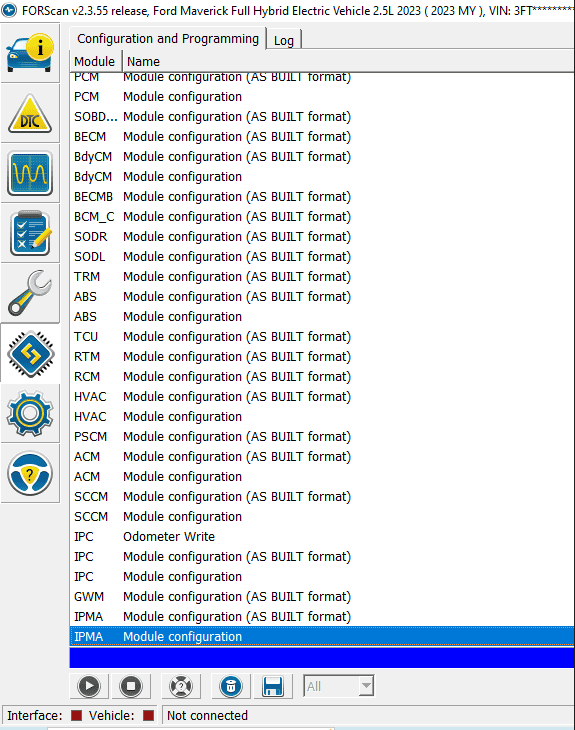
1. Scan for the Maverick Modules

1697144173672.png


2. Select the IPMA Module Configuration (Standard, NOT AS BUILT FORMAT)
3. Click the Play > icon
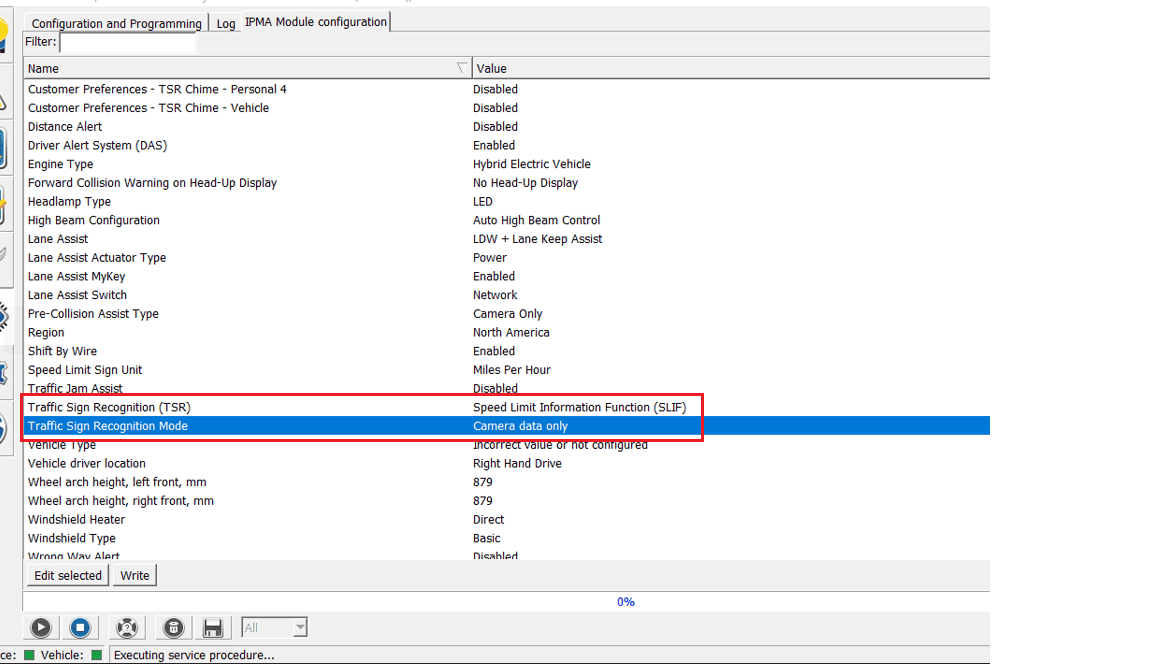
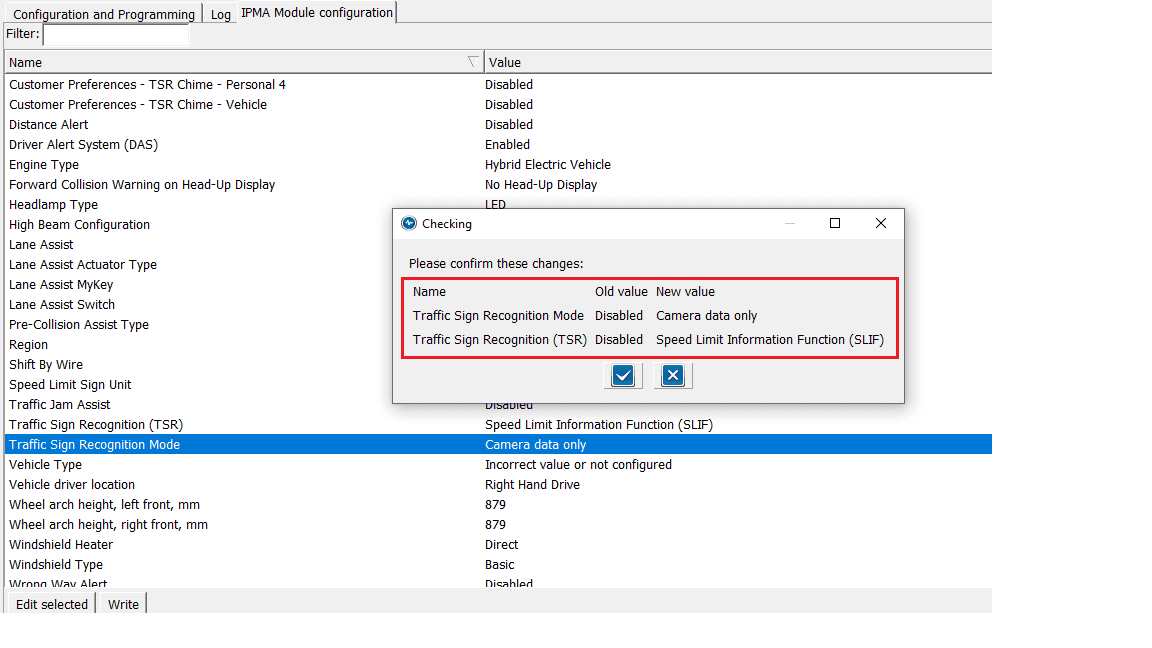
4. I changed the following items by selecting each and clicking EDIT SELECTED

Traffic Sign Recognition (TSR) from DISABLED to Speed Limit Information Function (SLIF)
Traffic Sign Recognition Mode from DISABLED to Camera Data Only

1697145680262.png


5. Click on WRITE
6. Verify the changes

1697145805868.png


7. Click the Checkmark and powercycle the vehicle
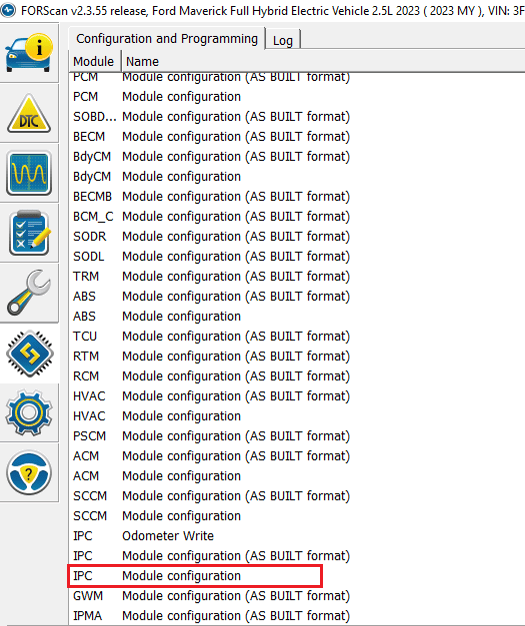
8. Reconnect Forscan and select the IPC Module Configuration (Standard, NOT AS BUILT FORMAT)

1697146963873.png


9. Click the Play > icon
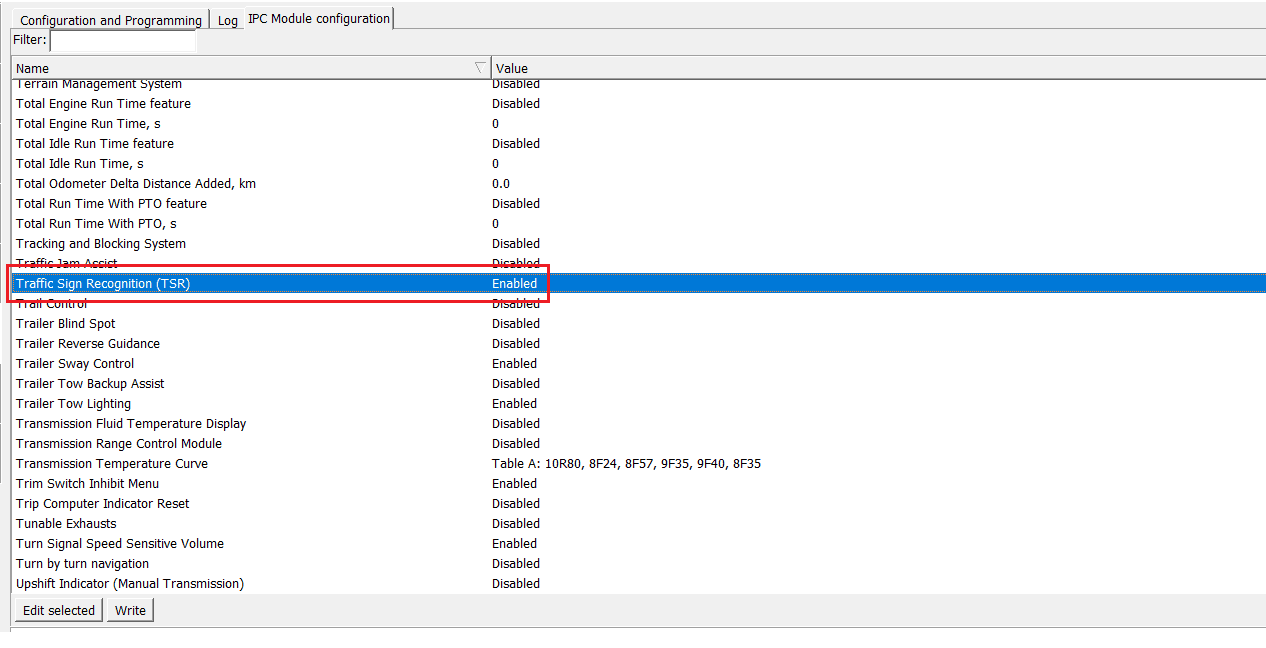
10. I changed the following items by selecting each and clicking EDIT SELECTED

Traffic Sign Recognition (TSR) from DISABLED to ENABLED

1697145966253.png


11. Click on WRITE
12. Verify the changes
13. Click the Checkmark and powercycle the vehicle

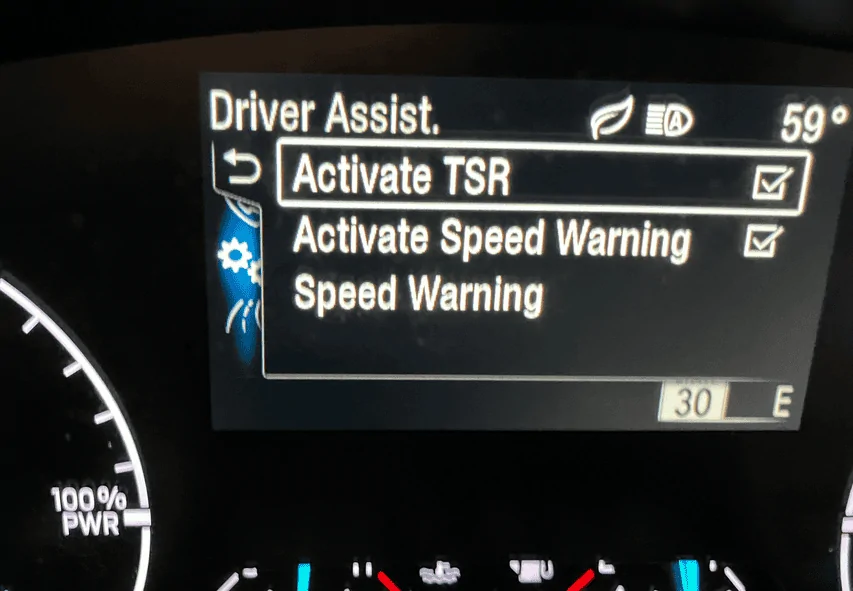
You should now be able to open the menu and should now see

Activate TSR
Activate Speed Warning
Speed Warning

1697146171537.webp


Speed warning allows you to set the speed limits to flash if you go over the set limit you configured

1697146246169.webp


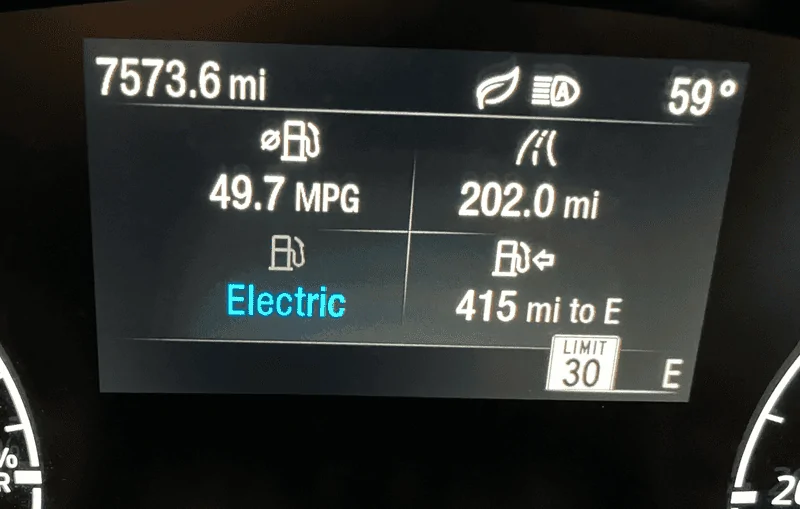
With this enabled, you should see the appropriate speed limits as the camera reads them

1697146322669.webp


While I did not enable it using the other suggested methods, I can say this method works for my 2023 XLT Hybrid w/Luxury, Co-Pilot 360/Hitch. Seems to work very well based on my quick test. Recognized multiple speeds and displays them in the standard US format as I wanted.

I really prefer doing it this way because it was much easier than relying on various codes considering I don't have some sort of dictionary that identifies what each is other than what is posted in these forums. While those may be valid codes, I had 3 items I changed from DISABLED to ENABLED and can easily change them back if needed.

Again, make any changes at your own risk.
My vehicle: 2024 hybrid Lariat [Sync 3].

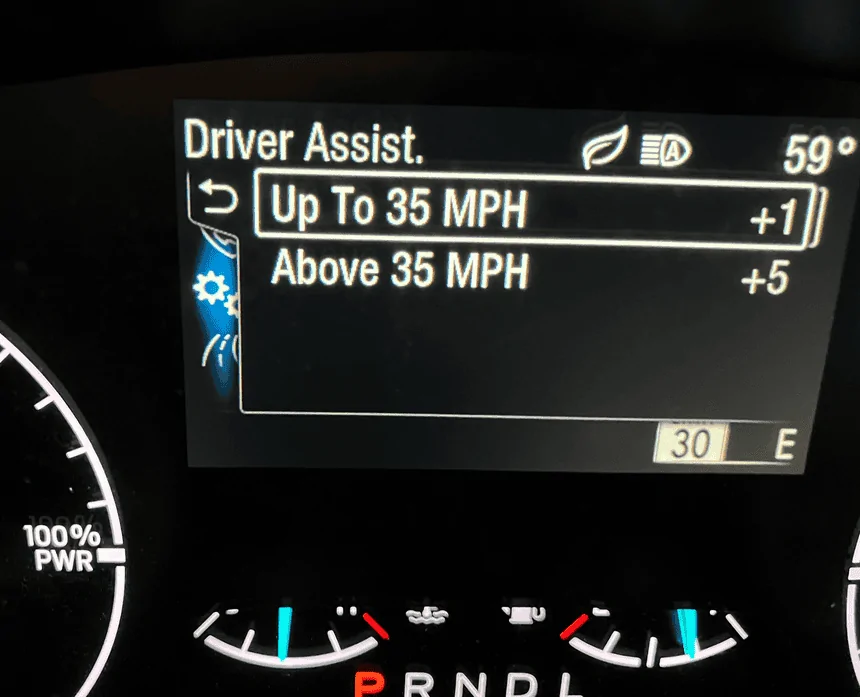
My question: I see TSR displayed on the center screen only if I am in NAV screen. I looked in the Driver's Assist menu to see if I could toggle TSR on in screen in front of the driver but there was no option that I could find.

The owner's manual doesn't have a heading for TSR nor did I see any mention under Adaptive Cruise Control or Settings etc. Do you know if I must use Forescan if I want to display TSR in front of me or did I overlook or look in the wrong place to activate it from a menu? TIA!
 
OP
OP
jerrisn

jerrisn

2.5L Hybrid
Well-known member
Joined
Oct 27, 2022
Threads
14
Messages
304
Reaction score
467
Location
NE
Vehicle(s)
2023 XLT Hybrid/2025 Explorer/2018 Volt/2011 Fusion Hybrid/08 Tundra/00 MustanGT
Engine
2.5L Hybrid
Clubs
 
My vehicle: 2024 hybrid Lariat [Sync 3].

My question: I see TSR displayed on the center screen only if I am in NAV screen. I looked in the Driver's Assist menu to see if I could toggle TSR on in screen in front of the driver but there was no option that I could find.

The owner's manual doesn't have a heading for TSR nor did I see any mention under Adaptive Cruise Control or Settings etc. Do you know if I must use Forescan if I want to display TSR in front of me or did I overlook or look in the wrong place to activate it from a menu? TIA!
It's hard to say definitively since I have an XLT and not a Lariat. However, based on what I've observed, Lariats seem to yield different results compared to XL or XLT models. For example, some notice round signs versus square ones. I'm not sure if there are other factors that would require changes. The method I posted has worked for me as demonstrated with my XLT Hybrid. Lariats may produce different outcomes, possibly due to their larger screens and potentially different setups.
 

dc73pdsgt

2.5L Hybrid
Well-known member
First Name
Mark
Joined
Jul 29, 2023
Threads
35
Messages
335
Reaction score
251
Location
Tucson, AZ
Vehicle(s)
2023 Ford Maverick Lariat Hybrid
Engine
2.5L Hybrid
Clubs
 
OK I don't get it. I bought an OBD connector that was recommended by FORscan and Im still not getting all the modules come up in configuration. I get up to the BCM_C module and that's it. Im not able to see the IPMA module (or whatever the correct one is) ANYONE have any ideas on what to do? could use a tip or two here before I return the adapter and just forget about changing things in Forscan. oh by the way Im in a 23 Lariat trim hybrid..
 

dc73pdsgt

2.5L Hybrid
Well-known member
First Name
Mark
Joined
Jul 29, 2023
Threads
35
Messages
335
Reaction score
251
Location
Tucson, AZ
Vehicle(s)
2023 Ford Maverick Lariat Hybrid
Engine
2.5L Hybrid
Clubs
 
I had the same problem. I switched to a recommended (Forscan.org site) OBD II reader and all the modules loaded.
I bought the Forscan recommended adapter and still doesn't work for me.
 

Darnon

2.5L Hybrid
Well-known member
Joined
Jul 4, 2021
Threads
10
Messages
5,721
Reaction score
7,228
Location
WNY
Vehicle(s)
2022 Maverick
Engine
2.5L Hybrid
I bought the Forscan recommended adapter and still doesn't work for me.
Don't forget to tell FORScan not to use the existing profile when connecting so it attempts to rediscover the available modules.
Sponsored


Top