Sponsored

Eldrick1

2.5L Hybrid
Well-known member
Joined
Apr 1, 2024
Threads
4
Messages
148
Reaction score
183
Location
NW Suburbs Chicago
Vehicle(s)
2024 Maverick
Engine
2.5L Hybrid
Clubs
 
Used alternate coding #3 to disable seat belt popup screen and works perfectly. Screen nags if belts undone and disappears immediately when belted. This is exactly how I want it to work. Thanks again to all who make things like this possible, and so easy for the rest of us dummies!
 
OP
OP
EONR24

EONR24

2.0L EcoBoost
Well-known member
First Name
Swag
Joined
Feb 26, 2024
Threads
44
Messages
1,442
Reaction score
1,655
Location
United States
Vehicle(s)
2024 Ford Maverick XL
Engine
2.0L EcoBoost
Used alternate coding #3 to disable seat belt popup screen and works perfectly. Screen nags if belts undone and disappears immediately when belted. This is exactly how I want it to work. Thanks again to all who make things like this possible, and so easy for the rest of us dummies!
This is how it should come from the factory I think! and no problem! Thanks for your comment!
 

Keller5158

2.5L Hybrid
New member
Joined
May 3, 2024
Threads
0
Messages
1
Reaction score
2
Location
Usa
Vehicle(s)
2024 Lariat hybrid
Engine
2.5L Hybrid
Has anyone figured out how to get the belt light only? So far managed:

No belt monitor
No belt minder
No belt chime
No belt light

Belt monitor
No belt minder
No belt chime
Belt light

No belt monitor
Belt minder
Belt chime
Belt light

I'm trying for:

No belt monitor
No belt minder
No belt chime
Belt light

So far the strangest is having the belt screen appear, but remain blank.
2024 Lariat hybrid
 
OP
OP
EONR24

EONR24

2.0L EcoBoost
Well-known member
First Name
Swag
Joined
Feb 26, 2024
Threads
44
Messages
1,442
Reaction score
1,655
Location
United States
Vehicle(s)
2024 Ford Maverick XL
Engine
2.0L EcoBoost
Has anyone figured out how to get the belt light only? So far managed:

No belt monitor
No belt minder
No belt chime
No belt light

Belt monitor
No belt minder
No belt chime
Belt light

No belt monitor
Belt minder
Belt chime
Belt light

I'm trying for:

No belt monitor
No belt minder
No belt chime
Belt light

So far the strangest is having the belt screen appear, but remain blank.
2024 Lariat hybrid
let me see if I can figure it out if there's a way
 

Sponsored

Toddman45

2.0L EcoBoost
Well-known member
First Name
Todd
Joined
May 21, 2024
Threads
27
Messages
1,995
Reaction score
2,787
Location
St. Louis, MO
Vehicle(s)
24' Ford Maverick XLT, 19' Ford Explorer Limited, 14' Chevy Equinox
Engine
2.0L EcoBoost
Can this be done in EZ Mode? Tia
 
OP
OP
EONR24

EONR24

2.0L EcoBoost
Well-known member
First Name
Swag
Joined
Feb 26, 2024
Threads
44
Messages
1,442
Reaction score
1,655
Location
United States
Vehicle(s)
2024 Ford Maverick XL
Engine
2.0L EcoBoost
bump for the new owners
 

C'ville

2.0L EcoBoost
Member
First Name
Eli
Joined
Jan 24, 2024
Threads
1
Messages
19
Reaction score
19
Location
Charlottesville, VA
Vehicle(s)
Ford Maverick Tremor
Engine
2.0L EcoBoost
Hello everyone!

EDIT: CHECK OUT MY OFFICIAL FORSCAN MAVERICK SPREADSHEET HERE!

I finally found the way to disable the ANNOYING Seatbelt information screen that comes on when you start the truck and stays on even after you buckle your seatbelt. Thank you to @ZOODAD over on the F250 forums for the coding information. THIS SUPER DUTY spreadsheet he put together might be useful for future MAVERICK FORScan Mods. THIS IS CONFIRMED TO WORK FOR ALL 2022-2024 MAVERICK TRIMS!

DISABLE SEATBELT INFORMATION SCREEN
1. Open IPC AS BUILT
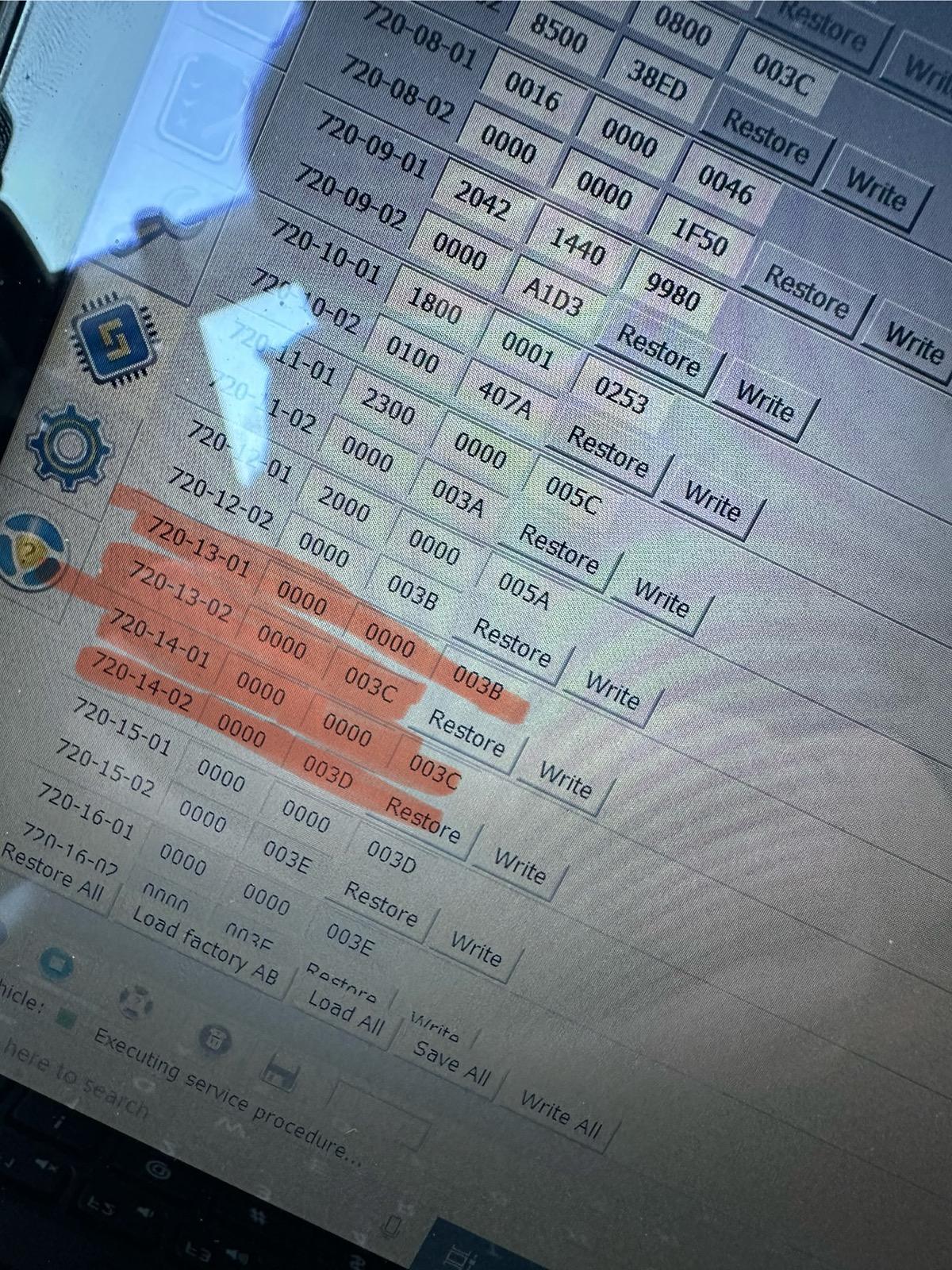
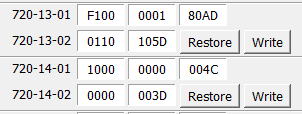
2. Change line 720-13-01 and 720-13-02 to ALL ZEROS. And WRITE the changes. Click yes to let Forscan correct the checksum.
3. Change line 720-14-01 and 720-14-02 to ALL ZEROS. And WRITE the changes. Click yes to let Forscan correct the checksum.

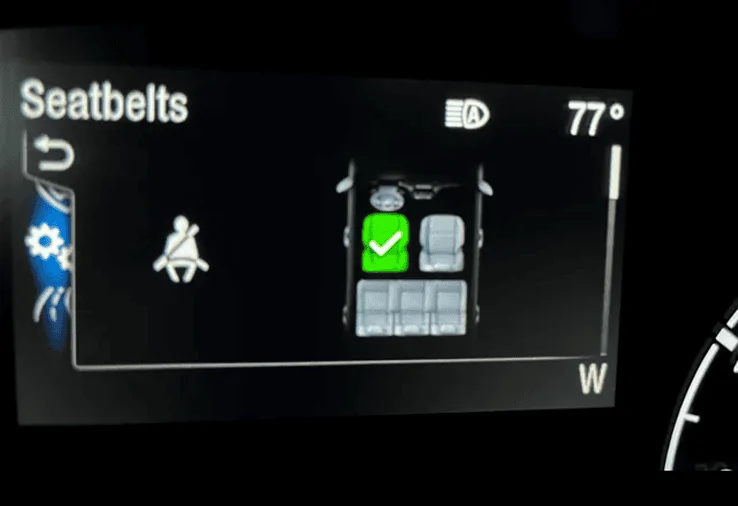
These changes remove the seatbelt info screen pictured below entirely and it also disables the seatbelt chime too. I would love to hear from other members to see if these changes work in your Maverick! Tested on my 2024 Maverick XL AWD ECOBOOST with the smaller instrument cluster. (The 4 inch Instrument Cluster)


EDIT: ALTERNATIVE CODINGS to keep the seatbelt minder (chime and dash light) but disable the seatbelt monitor (information screen) are linked HERE , HERE and HERE !

ALSO, Here is a link to 2 more changes that DISABLE DOOR AND KEY CHIMES and I went ahead and listed them below! I have successfully tested both of these coding changes!
Let me know if these codings work for your Mavericks out there!

DISABLE DOOR CHIMES
1. IPC AS BUILT
2. Go to 720-01-02
3. Replace the third digit with a "0" as shown here

xx0x-xxxx

4. Write the changes and let Forscan correct the checksum

DISABLE KEY-IN IGNITON CHIME
1. IPC AS BUILT
2. Go to 720-01-02
3. Replace the sixth digit with a "2" as shown here

xxxx-x2xx

4. Write the changes and let Forscan correct the checksum


FORScan coding to disable the Seatbelt Information Screen!.webp


IMG_2898.jpeg
Screenshot 2024-03-24 at 1.14.40 AM.webp
Screenshot 2024-03-24 at 1.14.58 AM.webp
I just tried this on my 2024 Maverick XLT Tremor. The chime turned off but the seatbelt screen wanting the ok was still there. I had previously followed the directions from the manual to turn off the chime but it never worked. Forscan did work for that.
 

Dignam

2.5L Hybrid
Well-known member
Joined
Jan 19, 2023
Threads
3
Messages
243
Reaction score
367
Location
Madison, WI
Vehicle(s)
'25 Maverick Lariat
Engine
2.5L Hybrid
Works for mine. I changed the as built values from page one of this thread. If you only change only the first group of values, you'll still get the dialog prompt with 'OK' button, just with no info on it. The 2nd group of values will disable that dialog altogether (along with chime and light). Thanks, OP!
 
Sponsored
OP
OP
EONR24

EONR24

2.0L EcoBoost
Well-known member
First Name
Swag
Joined
Feb 26, 2024
Threads
44
Messages
1,442
Reaction score
1,655
Location
United States
Vehicle(s)
2024 Ford Maverick XL
Engine
2.0L EcoBoost
I just tried this on my 2024 Maverick XLT Tremor. The chime turned off but the seatbelt screen wanting the ok was still there. I had previously followed the directions from the manual to turn off the chime but it never worked. Forscan did work for that.
Zero out those 4 lines of codings completely. It will work.
 

Toddman45

2.0L EcoBoost
Well-known member
First Name
Todd
Joined
May 21, 2024
Threads
27
Messages
1,995
Reaction score
2,787
Location
St. Louis, MO
Vehicle(s)
24' Ford Maverick XLT, 19' Ford Explorer Limited, 14' Chevy Equinox
Engine
2.0L EcoBoost
Omg, it worked. Thank you, thank you, and thank you very much.
 

NM Bob

2.0L EcoBoost
Active member
First Name
Bob
Joined
Nov 18, 2024
Threads
1
Messages
40
Reaction score
34
Location
Las Cruces, NM
Vehicle(s)
2024 Ford Maverick Lariat
Engine
2.0L EcoBoost
Clubs
 
Hello everyone!

EDIT: CHECK OUT MY OFFICIAL FORSCAN MAVERICK SPREADSHEET HERE!

I finally found the way to disable the ANNOYING Seatbelt information screen that comes on when you start the truck and stays on even after you buckle your seatbelt. Thank you to @ZOODAD over on the F250 forums for the coding information. THIS SUPER DUTY spreadsheet he put together might be useful for future MAVERICK FORScan Mods. THIS IS CONFIRMED TO WORK FOR ALL 2022-2024 MAVERICK TRIMS!

DISABLE SEATBELT INFORMATION SCREEN
1. Open IPC AS BUILT
2. Change line 720-13-01 and 720-13-02 to ALL ZEROS. And WRITE the changes. Click yes to let Forscan correct the checksum.
3. Change line 720-14-01 and 720-14-02 to ALL ZEROS. And WRITE the changes. Click yes to let Forscan correct the checksum.

These changes remove the seatbelt info screen pictured below entirely and it also disables the seatbelt chime too. I would love to hear from other members to see if these changes work in your Maverick! Tested on my 2024 Maverick XL AWD ECOBOOST with the smaller instrument cluster. (The 4 inch Instrument Cluster)


EDIT: ALTERNATIVE CODINGS to keep the seatbelt minder (chime and dash light) but disable the seatbelt monitor (information screen) are linked HERE , HERE and HERE !

ALSO, Here is a link to 2 more changes that DISABLE DOOR AND KEY CHIMES and I went ahead and listed them below! I have successfully tested both of these coding changes!
Let me know if these codings work for your Mavericks out there!

DISABLE DOOR CHIMES
1. IPC AS BUILT
2. Go to 720-01-02
3. Replace the third digit with a "0" as shown here

xx0x-xxxx

4. Write the changes and let Forscan correct the checksum

DISABLE KEY-IN IGNITON CHIME
1. IPC AS BUILT
2. Go to 720-01-02
3. Replace the sixth digit with a "2" as shown here

xxxx-x2xx

4. Write the changes and let Forscan correct the checksum


FORScan coding to disable the Seatbelt Information Screen!.webp


IMG_2898.jpeg
Screenshot 2024-03-24 at 1.14.40 AM.webp
Screenshot 2024-03-24 at 1.14.58 AM.webp
Hello everyone!

EDIT: CHECK OUT MY OFFICIAL FORSCAN MAVERICK SPREADSHEET HERE!

I finally found the way to disable the ANNOYING Seatbelt information screen that comes on when you start the truck and stays on even after you buckle your seatbelt. Thank you to @ZOODAD over on the F250 forums for the coding information. THIS SUPER DUTY spreadsheet he put together might be useful for future MAVERICK FORScan Mods. THIS IS CONFIRMED TO WORK FOR ALL 2022-2024 MAVERICK TRIMS!

DISABLE SEATBELT INFORMATION SCREEN
1. Open IPC AS BUILT
2. Change line 720-13-01 and 720-13-02 to ALL ZEROS. And WRITE the changes. Click yes to let Forscan correct the checksum.
3. Change line 720-14-01 and 720-14-02 to ALL ZEROS. And WRITE the changes. Click yes to let Forscan correct the checksum.

These changes remove the seatbelt info screen pictured below entirely and it also disables the seatbelt chime too. I would love to hear from other members to see if these changes work in your Maverick! Tested on my 2024 Maverick XL AWD ECOBOOST with the smaller instrument cluster. (The 4 inch Instrument Cluster)


EDIT: ALTERNATIVE CODINGS to keep the seatbelt minder (chime and dash light) but disable the seatbelt monitor (information screen) are linked HERE , HERE and HERE !

ALSO, Here is a link to 2 more changes that DISABLE DOOR AND KEY CHIMES and I went ahead and listed them below! I have successfully tested both of these coding changes!
Let me know if these codings work for your Mavericks out there!

DISABLE DOOR CHIMES
1. IPC AS BUILT
2. Go to 720-01-02
3. Replace the third digit with a "0" as shown here

xx0x-xxxx

4. Write the changes and let Forscan correct the checksum

DISABLE KEY-IN IGNITON CHIME
1. IPC AS BUILT
2. Go to 720-01-02
3. Replace the sixth digit with a "2" as shown here

xxxx-x2xx

4. Write the changes and let Forscan correct the checksum


FORScan coding to disable the Seatbelt Information Screen!.png


IMG_2898.jpeg
Screenshot 2024-03-24 at 1.14.40 AM.png
Screenshot 2024-03-24 at 1.14.58 AM.png
OK, dumb question... Is the 720-13-01 and 720-13-02 change for the screen and the 720-14-01 and 720-14-02 for the chime or are they both necessary to change the screen??
 

NM Bob

2.0L EcoBoost
Active member
First Name
Bob
Joined
Nov 18, 2024
Threads
1
Messages
40
Reaction score
34
Location
Las Cruces, NM
Vehicle(s)
2024 Ford Maverick Lariat
Engine
2.0L EcoBoost
Clubs
 
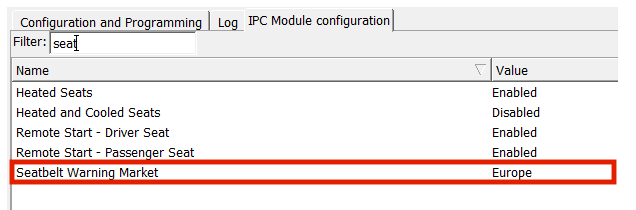
This is what's working for me. '24 XLT Hybrid.

No message if driver is clicked in. Pops up if not.
Goes away immediately when clicked if message is showing.
Indicator should still work for all seats.

Screenshot 2024-03-24 134245.png


I changed this so that it won't ding at me at startup.

Screenshot 2024-03-24 134633.png
Big thanks for this one! I used these codes on my 24 Lariat EcoBoost and it worked perfectly. My main complaint it was that it took forever for the screen to go away unless you clicked ok. But like you I always wear my belt so as soon as I buckle it the screen disappears. While I was at it I also disabled the double honk when getting out of the running truck with the fob in my pocket. That was soooo annoying! Also I installed the bypass module to keep the engine running when at a stop light. I think the truck is now just about perfect!!
Sponsored


Top