Sponsored

inline_five

2.5L Hybrid
Well-known member
Joined
Jun 15, 2023
Threads
32
Messages
1,173
Reaction score
1,634
Location
-
Vehicle(s)
2023 Hybrid XLT
Engine
2.5L Hybrid
This is the first thread that made me think "maybe I do want to mess with that forscan thing."
First thing I did with Forscan was disable all the seatbelt warnings and disable all the chimes when opening the door, inserting the key, and starting. Complete quiet. It's great to customize stuff to your liking.

I recently added adaptive cruise control and lane centering to my XLT, $650 in parts vs $8000 option on the lariat.
Sponsored

 

jerrisn

2.5L Hybrid
Well-known member
Joined
Oct 27, 2022
Threads
14
Messages
304
Reaction score
467
Location
NE
Vehicle(s)
2023 XLT Hybrid/2025 Explorer/2018 Volt/2011 Fusion Hybrid/08 Tundra/00 MustanGT
Engine
2.5L Hybrid
Clubs
 
First thing I did with Forscan was disable all the seatbelt warnings and disable all the chimes when opening the door, inserting the key, and starting. Complete quiet. It's great to customize stuff to your liking.

I recently added adaptive cruise control and lane centering to my XLT, $650 in parts vs $8000 option on the lariat.
What part numbers are needed? I have an 2023 XLT Hybrid.
 

Whitty1

2.5L Hybrid
Well-known member
First Name
Dennis
Joined
Dec 30, 2024
Threads
6
Messages
232
Reaction score
259
Location
Clover, SC
Vehicle(s)
2024 Lariet
Engine
2.5L Hybrid
OK folks, just did this today. Thanks to @BlackMav23 If you have the 6.5-inch cluster and use easy mode, here's what you want to do to activate speed limit sign recognition and not get the European circular signs.

If you are interested, the following worked for my XLT FX4:​
  • IPC
    • Disable “Traffic Sign Recognition (TSR)” (THIS SEEMS COUNTER-INTUITIVE, BUT IF YOU ACTIVATE TRAFFIC SIGN RECOGNITION YOU'LL GET THE CIRCULAR SIGN ICONS. YOU WANT TO DISABLE IT.)
      • Enable “Speed Limit Information Function (SLIF)”
  • IPMA
    • Set Traffic Sign Recognition (TSR) to “SLIF” (THIS IS WHERE YOU ARE TELLING THE TRUCK TO ONLY READY SPEED LIMIT SIGNS AND NOT ANY OTHER KIND OF SIGNS)
      • Set Traffic Sign Recognition Mode to “Camera Data Only”
    • From there you will have to enable it in the menus of the vehicle itself. (FROM THE MENU ON THE STEERING WHEEL, GO TO "SETTINGS" then "DRIVER ASSIST" and activate Traffic Sign Recognition. Again, this is counter-intuitive, because you might be thinking, he just said to DISABLE TSR. Which I did, but somehow it'll still show up in your menu and you can turn it on and enjoy the speed limit info as you drive right next to your speedometer.
Enjoy!

I just tried this on my 24 Lariet with a 4" screen and disabling TSR in the IPC settings totally disabled my TSR display, so I put it back to get the speed limit in the round circles. I would prefer it to be displayed in a rectangle speed limit but maybe the smaller screen doesn't have the room to allow that.
 

camcdono

2.5L Hybrid
Member
First Name
Connor
Joined
Feb 25, 2025
Threads
2
Messages
12
Reaction score
6
Location
Michigan
Vehicle(s)
2025 Ford Maverick XTL
Engine
2.5L Hybrid
Clubs
 
has anyone tested this on the 2025 ford mav?
 

Sponsored

camcdono

2.5L Hybrid
Member
First Name
Connor
Joined
Feb 25, 2025
Threads
2
Messages
12
Reaction score
6
Location
Michigan
Vehicle(s)
2025 Ford Maverick XTL
Engine
2.5L Hybrid
Clubs
 
OK folks, just did this today. Thanks to @BlackMav23 If you have the 6.5-inch cluster and use easy mode, here's what you want to do to activate speed limit sign recognition and not get the European circular signs.

If you are interested, the following worked for my XLT FX4:​
  • IPC
    • Disable “Traffic Sign Recognition (TSR)” (THIS SEEMS COUNTER-INTUITIVE, BUT IF YOU ACTIVATE TRAFFIC SIGN RECOGNITION YOU'LL GET THE CIRCULAR SIGN ICONS. YOU WANT TO DISABLE IT.)
      • Enable “Speed Limit Information Function (SLIF)”
  • IPMA
    • Set Traffic Sign Recognition (TSR) to “SLIF” (THIS IS WHERE YOU ARE TELLING THE TRUCK TO ONLY READY SPEED LIMIT SIGNS AND NOT ANY OTHER KIND OF SIGNS)
      • Set Traffic Sign Recognition Mode to “Camera Data Only”
    • From there you will have to enable it in the menus of the vehicle itself. (FROM THE MENU ON THE STEERING WHEEL, GO TO "SETTINGS" then "DRIVER ASSIST" and activate Traffic Sign Recognition. Again, this is counter-intuitive, because you might be thinking, he just said to DISABLE TSR. Which I did, but somehow it'll still show up in your menu and you can turn it on and enjoy the speed limit info as you drive right next to your speedometer.
Enjoy!
update, can confirm this worked on my 2025 ford mav

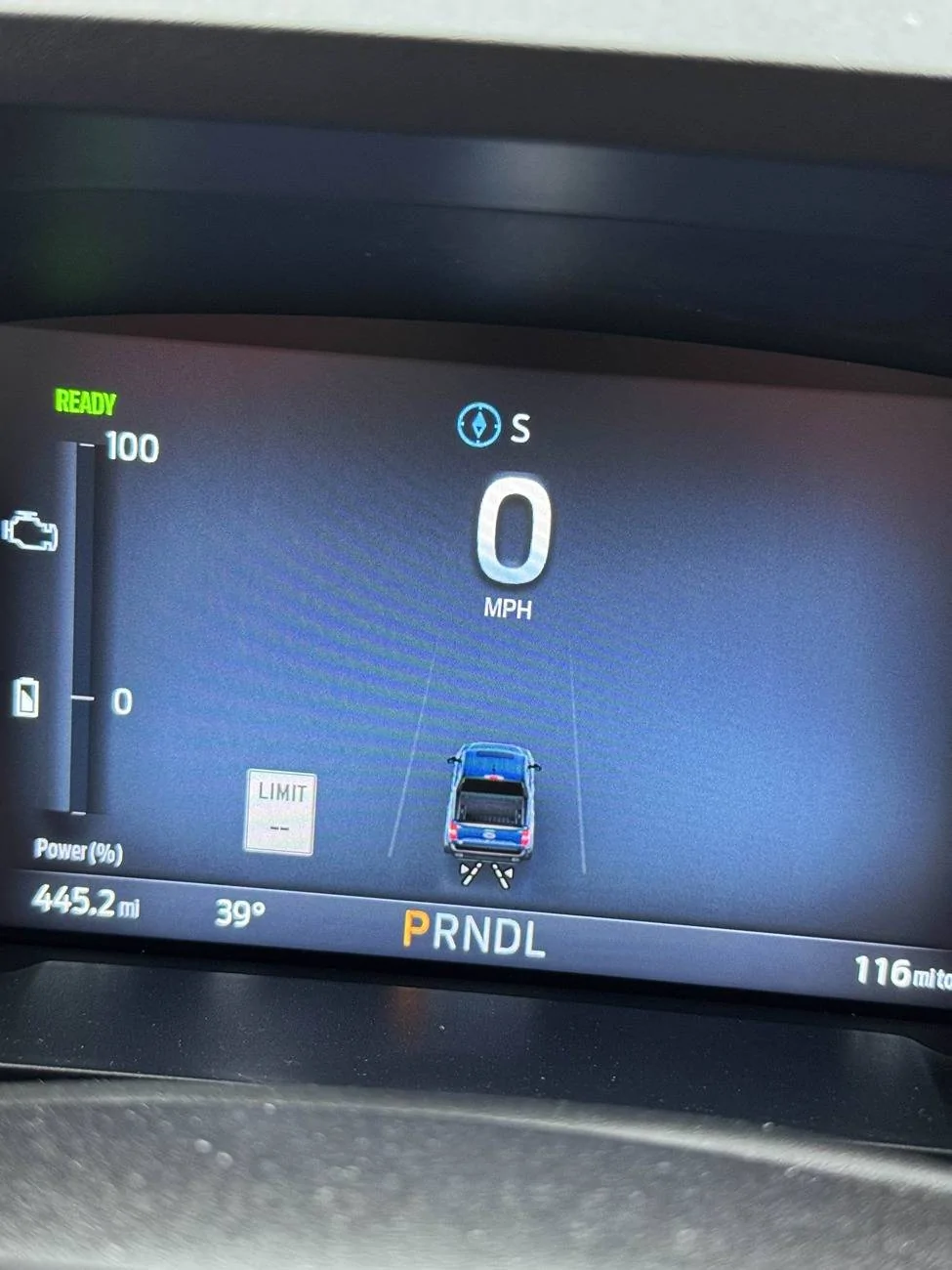
Ford Maverick Traffic Sign Recognition (TSR) FORScan mod (confirmed working) IMG_8014
 

uga

2.5L Hybrid
Well-known member
Joined
Jan 9, 2022
Threads
17
Messages
608
Reaction score
792
Location
SE USA
Vehicle(s)
2026 Ford Maverick XLT
Engine
2.5L Hybrid
Its not quite the same as a 2024. My 2025 XLT Hybrid does not blink and no way to enable chime or 5mph, 10 mph etc. over.

Anyone have a solution/advice ?
 

Bigcanoe

Well-known member
Joined
Oct 17, 2021
Threads
10
Messages
78
Reaction score
106
Location
Moncure, nc
Vehicle(s)
2025 Maverick XLT, 2022 Toyota Rav4 Hybrid
Engine
Undecided
I enabled this on my 2025 XLT, it works, but the numbers on the sign go back to double dash (--) after about a mile or so. I was just wondering if that is normal for this functionality.
 

Gullzway

2.5L Hybrid
Well-known member
Joined
Dec 17, 2021
Threads
25
Messages
2,040
Reaction score
2,437
Location
OK
Vehicle(s)
1968 Ford Mustang Fastback
Engine
2.5L Hybrid
I enabled this on my 2025 XLT, it works, but the numbers on the sign go back to double dash (--) after about a mile or so. I was just wondering if that is normal for this functionality.
Mine has never done that.
2022 Maverick Lariat.
 

uga

2.5L Hybrid
Well-known member
Joined
Jan 9, 2022
Threads
17
Messages
608
Reaction score
792
Location
SE USA
Vehicle(s)
2026 Ford Maverick XLT
Engine
2.5L Hybrid
Definitely a 2025 thing, no chime, blanks out after approx 1 mile from the last sign.

Any assistance would be appreciated.................................
 
Sponsored

inline_five

2.5L Hybrid
Well-known member
Joined
Jun 15, 2023
Threads
32
Messages
1,173
Reaction score
1,634
Location
-
Vehicle(s)
2023 Hybrid XLT
Engine
2.5L Hybrid
Instead of camera only option try looking into syncing with the nav, doesn't the 2025 come with maps pre installed in sync 4?
 

uga

2.5L Hybrid
Well-known member
Joined
Jan 9, 2022
Threads
17
Messages
608
Reaction score
792
Location
SE USA
Vehicle(s)
2026 Ford Maverick XLT
Engine
2.5L Hybrid
I have a 2025 Hybrid XLT, no nav
 

Bigcanoe

Well-known member
Joined
Oct 17, 2021
Threads
10
Messages
78
Reaction score
106
Location
Moncure, nc
Vehicle(s)
2025 Maverick XLT, 2022 Toyota Rav4 Hybrid
Engine
Undecided
Not sure actually. I have navigation as an option on my instrument cluster, so I guess it’s built in. I can try a different setting when I get a chance.
 

uga

2.5L Hybrid
Well-known member
Joined
Jan 9, 2022
Threads
17
Messages
608
Reaction score
792
Location
SE USA
Vehicle(s)
2026 Ford Maverick XLT
Engine
2.5L Hybrid
Please do and Thanks !
 

Mabcim

2.0L EcoBoost
Well-known member
First Name
Mark
Joined
Oct 4, 2021
Threads
3
Messages
1,229
Reaction score
1,094
Location
Rochester, NY
Vehicle(s)
25 Maverick Lariat 2.0 AWD; 23 Escape ST Line Select 2.0 AWD
Engine
2.0L EcoBoost
Clubs
 
I have a 25 Lariat, so I have Nav. I have seen my speed sign go to double dashes at times. On my 22 Lariat, where I had to use Forscan to turn on Traffic sign, I never saw double dashes. So it has to be just how Sync 4 does things vs Sync 3.
Sponsored


Top