
Sponsored

mar.neumann

2.5L Hybrid
Member
First Name
Marcelo
Joined
Nov 21, 2024
Threads
0
Messages
13
Reaction score
9
Location
Brasil
Vehicle(s)
Maverick Hybrid Lariat 2024
Engine
2.5L Hybrid
I would like to leave my contribution here!

First of all, I would like to thank @EONR24 for all his efforts in the excellent spreadsheet, and for making himself available in several topics to help members with Forscan. I would also like to thank everyone who contributed in some way with the posts and topics.

This was my wish: to get into the truck, turn it on, hear the chimes and see the seat belt light and monitor on the cluster. Then, as soon as I buckled my seat belt, everything would disappear, including the graphic monitor on the cluster.

However, none of the tests I did worked that way for me. YES, I tested all the methods that were suggested here in this topic and also in other related topics on this forum. None of them worked 100%... In all the attempts I made, the Monitor would remain displayed on the screen for approximately 1 minute, even after buckling the seatbelts. It would only disappear after 1 minute, or after pressing OK.

UNTIL I DECIDED TO TRY IT OUT... lol

So, I'll give you some tips for anyone who wants it to work like mine:
- Belt monitor ON (disappears as soon as you buckle your seatbelt)
- Belt minder ON (OFF as soon as you buckle your seatbelt)
- Belt chime ON (OFF as soon as you buckle your seatbelt)
- Belt light ON (OFF as soon as you buckle your seatbelt)
*Please note that there will only be warnings if someone is sitting in the seat, activating the pressure/weight sensor. In other words, if only the driver gets in, the warnings will be ON and everything disappears as soon as driver buckle the seatbelts.

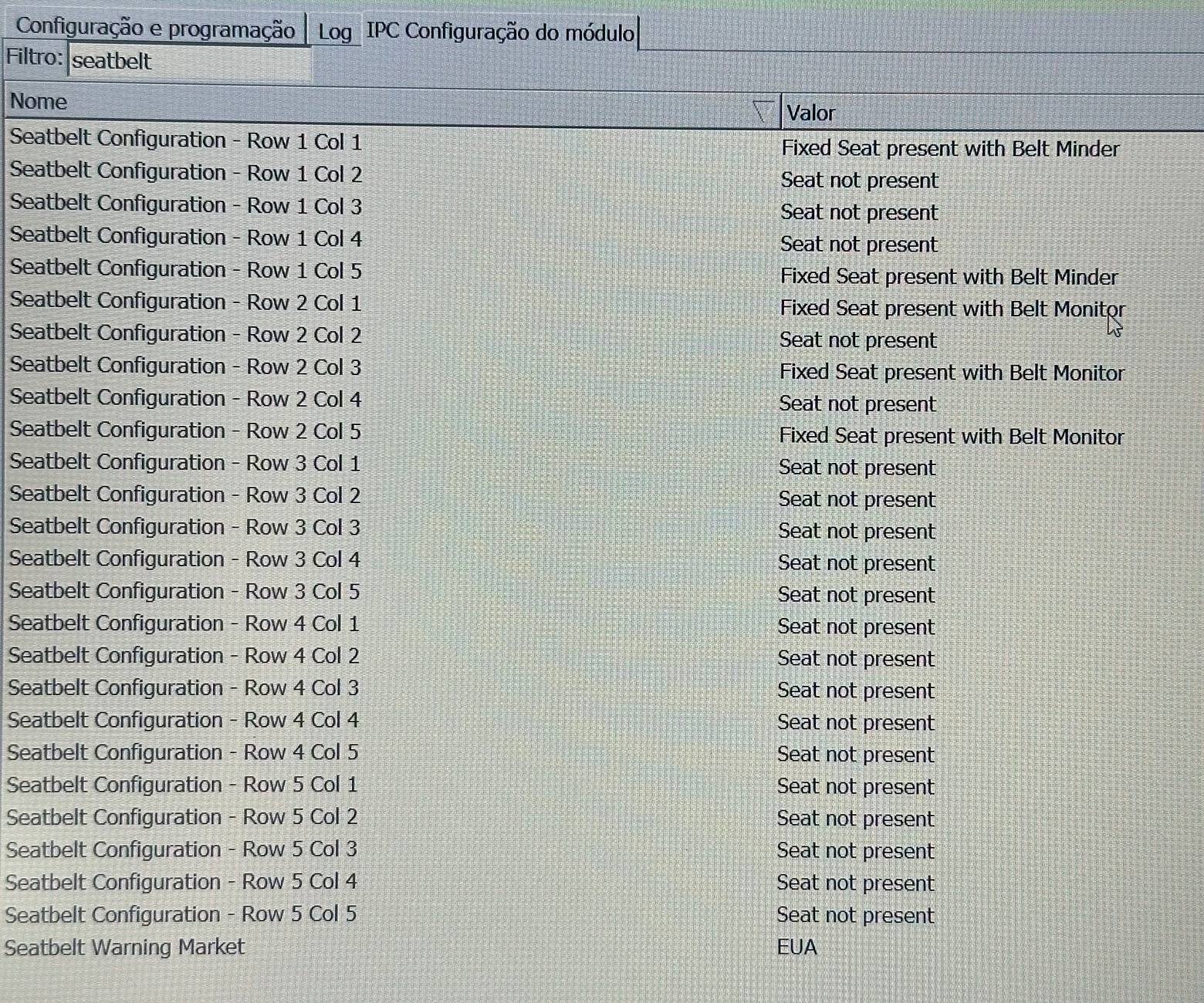
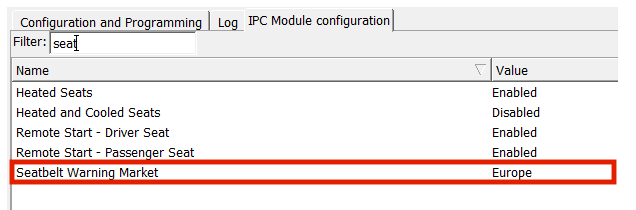
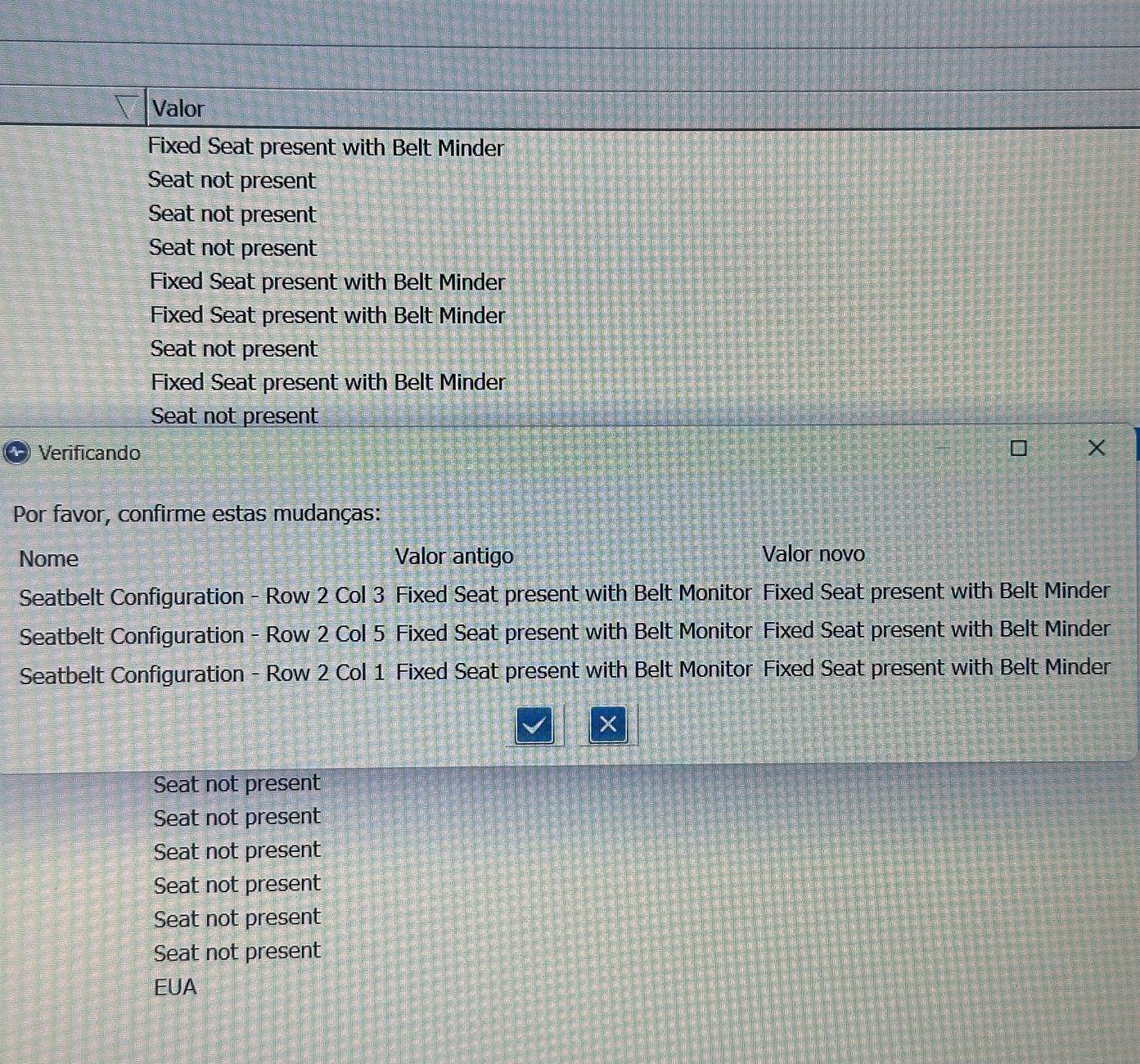
Go to the IPC module (non as built), look for "Seatbelt Configuration - Row ... Col ..." and do the following (photo attached):
- R1C1 "Fixed Seat present with Belt MINDER". (driver's seat)
- R1C5 "Fixed Seat present with Belt MINDER". (passenger seat)
- R2C1 "Fixed Seat present with Belt MONITOR". (left rear seat)
- R2C3 "Fixed Seat present with Belt MONITOR". (middle rear seat)
- R2C5 "Fixed Seat present with Belt MONITOR". (right rear seat)

Even the alternative as-built options from @EONR24 spreadsheet made the change to all seats, except for R2C3. And because of that, it didn't work as I wanted. I tracked the change to the R2C3 seat in the as-built coding, but no code for that seat was present in the IPC (even after changing only that seat, the codes didn't change in the IPC).

PS.: I have a child car seat in the R2C1 and R2C5. So I don't know if it interfered for me, I don't think so, because the weight of the seat is too little to activate the seat pressure sensor. For child car seats, I don't use the seat belt, just the isofix.

Everything works, wonderful!

MAVERICK LARIAT HYBRID 2024, SYNC 2.5, CLUSTER 6.5", BRAZIL.
Ford Maverick FINALLY, FORScan coding to disable the Seatbelt Information Screen! (CONFIRMED WORKING) IMG_3338


Ford Maverick FINALLY, FORScan coding to disable the Seatbelt Information Screen! (CONFIRMED WORKING) IMG_3337
Sponsored


kxpqzt

2.5L Hybrid
Active member
First Name
Kxp
Joined
Aug 2, 2024
Threads
2
Messages
28
Reaction score
39
Location
46075
Vehicle(s)
2025 XLT
Engine
2.5L Hybrid
As a complete newbie to Ford, Mavericks, and esp. forscan: are these likely to work the same for 2025 models? I just brought mine home today and vlinker will arrive tomorrow.
 

Toddman45

2.0L EcoBoost
Well-known member
First Name
Todd
Joined
May 21, 2024
Threads
27
Messages
1,984
Reaction score
2,778
Location
St. Louis, MO
Vehicle(s)
24' Ford Maverick XLT, 19' Ford Explorer Limited, 14' Chevy Equinox
Engine
2.0L EcoBoost
As a complete newbie to Ford, Mavericks, and esp. forscan: are these likely to work the same for 2025 models? I just brought mine home today and vlinker will arrive tomorrow.
Coding may be different if you change the as built data but easy mode should be fairly the same.
 
Last edited:

FreedomPenguin

2.5L Hybrid
Well-known member
Joined
Dec 23, 2024
Threads
14
Messages
1,008
Reaction score
1,133
Location
Dayton
Vehicle(s)
25
Engine
2.5L Hybrid
Coding may be different if you change the ass built data but easy mode should be fairly the same.
As a complete newbie to Ford, Mavericks, and esp. forscan: are these likely to work the same for 2025 models? I just brought mine home today and vlinker will arrive tomorrow.
Hopefully forscan isn’t locked out at first. Sometimes brands do this but I doubt it for this stuff forscan probably already has it enabled functionally w new systems
 

Justin says...

2.0L EcoBoost
Well-known member
First Name
Justin
Joined
Jul 17, 2023
Threads
29
Messages
281
Reaction score
313
Location
NC
Vehicle(s)
'22 Ranger XLT
Engine
2.0L EcoBoost
For people who have swapped to the lariat clusters, is there a way to code out the "push button to start" popup message everytime I get in?
 

Sponsored

TruckPrius

2.5L Hybrid
Well-known member
Joined
Nov 8, 2023
Threads
6
Messages
167
Reaction score
186
Location
Home
Vehicle(s)
'23 Maverick Lariat Lux CP360 Assist
Engine
2.5L Hybrid
This is what's working for me. '24 XLT Hybrid.

No message if driver is clicked in. Pops up if not.
Goes away immediately when clicked if message is showing.
Indicator should still work for all seats.

Screenshot 2024-03-24 134245.png


I changed this so that it won't ding at me at startup.

Screenshot 2024-03-24 134633.png
Thank you, this worked great, first time messing with non-easy mode :eek:
 

FreedomPenguin

2.5L Hybrid
Well-known member
Joined
Dec 23, 2024
Threads
14
Messages
1,008
Reaction score
1,133
Location
Dayton
Vehicle(s)
25
Engine
2.5L Hybrid
Will my dealer do this for me ? I don't even know how to get Forscan or get to it ?
what page in my manual is it on ?
2024 2.0L AWD lariat.
Will It STAY disabled after I shut down ?
I have never met a dealer who will willingly disable any safety features.

you’ll hsve to do on your own
 

Jpalmer1

2.5L Hybrid
Well-known member
First Name
Joe
Joined
Aug 3, 2024
Threads
10
Messages
109
Reaction score
61
Location
Dallas, TX
Vehicle(s)
2025 Lariat Hybrid AWD
Engine
2.5L Hybrid
As a complete newbie to Ford, Mavericks, and esp. forscan: are these likely to work the same for 2025 models? I just brought mine home today and vlinker will arrive tomorrow.
Any 2025’s done this yet? I’m also a 2025 Hybrid Lariat AWD owner FORScan newb awaiting the required guidance. Thanks for this important post (for my stress level)!
 

Jpalmer1

2.5L Hybrid
Well-known member
First Name
Joe
Joined
Aug 3, 2024
Threads
10
Messages
109
Reaction score
61
Location
Dallas, TX
Vehicle(s)
2025 Lariat Hybrid AWD
Engine
2.5L Hybrid
let me see if I can figure it out if there's a way
EONR24, did you or anyone else ever figure out “Keller’s Dream” of everything off except the light? That would be my ideal scenario too. Thank you so much for all the work you’ve put into this for the Mav Community!
 

paneubert

2.5L Hybrid
Well-known member
Joined
Jan 17, 2022
Threads
34
Messages
2,866
Reaction score
4,834
Location
Seattle
Vehicle(s)
2025 Hybrid XLT/4K/AWD/CoPilot/Eruption Green
Engine
2.5L Hybrid
Any 2025’s done this yet? I’m also a 2025 Hybrid Lariat AWD owner FORScan newb awaiting the required guidance. Thanks for this important post (for my stress level)!
I got the same coding that works for 2022-2024 to work on my 2025. I used the "all zeros" method.
 
Sponsored

kxpqzt

2.5L Hybrid
Active member
First Name
Kxp
Joined
Aug 2, 2024
Threads
2
Messages
28
Reaction score
39
Location
46075
Vehicle(s)
2025 XLT
Engine
2.5L Hybrid
Any 2025’s done this yet? I’m also a 2025 Hybrid Lariat AWD owner FORScan newb awaiting the required guidance. Thanks for this important post (for my stress level)!
Yes works just fine. There's a thread with the latest beta to download and results of testing on 2025s.

Also make sure you're backing up everything before making any changes. I keep a list going on my copy of the master excel sheet with the date, what values I changed, results, etc. Make one change a time so if something goes awry you can identify the culprit.
 

Jpalmer1

2.5L Hybrid
Well-known member
First Name
Joe
Joined
Aug 3, 2024
Threads
10
Messages
109
Reaction score
61
Location
Dallas, TX
Vehicle(s)
2025 Lariat Hybrid AWD
Engine
2.5L Hybrid
Yes works just fine. There's a thread with the latest beta to download and results of testing on 2025s.

Also make sure you're backing up everything before making any changes. I keep a list going on my copy of the master excel sheet with the date, what values I changed, results, etc. Make one change a time so if something goes awry you can identify the culprit.
Thank You, kxpqzt, paneubert, and eonr24 . . y’all Rock!
 

Jpalmer1

2.5L Hybrid
Well-known member
First Name
Joe
Joined
Aug 3, 2024
Threads
10
Messages
109
Reaction score
61
Location
Dallas, TX
Vehicle(s)
2025 Lariat Hybrid AWD
Engine
2.5L Hybrid
Has anyone figured out how to get the belt light only? So far managed:

No belt monitor
No belt minder
No belt chime
No belt light

Belt monitor
No belt minder
No belt chime
Belt light

No belt monitor
Belt minder
Belt chime
Belt light

I'm trying for:

No belt monitor
No belt minder
No belt chime
Belt light

So far the strangest is having the belt screen appear, but remain blank.
2024 Lariat hybrid
Keller, did you ever get this figured out?

No belt monitor
No belt minder
No belt chime
Belt light

That is ideally what I want also on my 2025 Lariat Hybrid AWD. Thanks.
 

Jpalmer1

2.5L Hybrid
Well-known member
First Name
Joe
Joined
Aug 3, 2024
Threads
10
Messages
109
Reaction score
61
Location
Dallas, TX
Vehicle(s)
2025 Lariat Hybrid AWD
Engine
2.5L Hybrid
For anyone in this thread still preferring to simply get the OM Procedure to work rather than using Forscan . . I finally figured it out as my OBDII cable was shipping . . Just ignore steps 1. and 2. In the OM . .


CORRECTED Instructions from the owner's manual of my 2025 Lariat Hybtid AWD:

Make sure that:
• You set the parking brake.
• The transmission is in park (P).
• The ignition is off.
• You close all vehicle doors.
• You unfasten the driver and front
passenger seatbelts.

1. Start the engine.

2. Wait a short period of time until the
seatbelt warning light switches off.
After Step 2, wait an additional five
seconds before proceeding with Step
3.
Once you start Step 3, complete the
procedure within 30 seconds.

3. For the seating position you are
switching off, fasten then unfasten the
seatbelt four times at a moderate
speed, ending in the unfastened state.
After each unfasten, the seatbelt
warning light switches on and off with
each fasten.

4. The seatbelt warning light flashes for
confirmation.

So, I ignored steps 1 & 2 in the OM and it worked.
 

Mabcim

2.0L EcoBoost
Well-known member
First Name
Mark
Joined
Oct 4, 2021
Threads
3
Messages
1,228
Reaction score
1,089
Location
Rochester, NY
Vehicle(s)
25 Maverick Lariat 2.0 AWD; 23 Escape ST Line Select 2.0 AWD
Engine
2.0L EcoBoost
Clubs
 
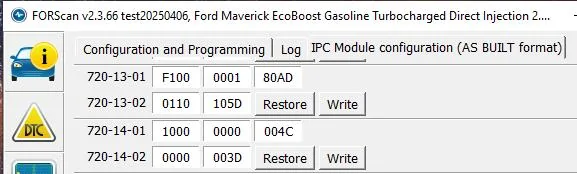
If you would like to keep the Minder (the dash light and chime) and not the Monitor (the seatbelt screen) I would suggest doing the following coding based on this diagram and my original coding in my Maverick.

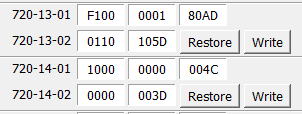
720-13-01 9100 0001 8000
720-13-02 0110 1000
720-14-01 1000 0000 0000
720-14-02 All Zeros
This is what's working for me. '24 XLT Hybrid.

No message if driver is clicked in. Pops up if not.
Goes away immediately when clicked if message is showing.
Indicator should still work for all seats.

Screenshot 2024-03-24 134245.png
I want to thank you both. I just wanted the screen to go away once the belts are buckled, and now it does. So I can confirm this works on a '25.
Mine looks like @GotMojo. Just changed 3 of the 2s to 1s.
Ford Maverick FINALLY, FORScan coding to disable the Seatbelt Information Screen! (CONFIRMED WORKING) seatbelt
Sponsored


Top