
Sponsored

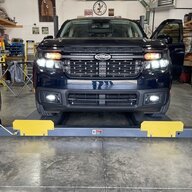
Diode Dynamics fog lights

OP
OP
Lgoodso

Lgoodso

2.5L Hybrid
Active member
First Name
Larry
Joined
Apr 2, 2023
Threads
2
Messages
33
Reaction score
57
Location
Drummonds,Tn
Vehicle(s)
2015ford f250 ,2023Ford maverick 53&57chevy truck
Engine
2.5L Hybrid
Which OBDII do I need so I can connect my laptop?
I used OBD Link Ex, it’s designed for Forscan and Ford vehicles.
Sponsored


Jose A

2.5L Hybrid
Active member
First Name
Jose
Joined
Apr 19, 2025
Threads
1
Messages
42
Reaction score
27
Location
California
Vehicle(s)
2024 Maverick XLT Hybrid
Engine
2.5L Hybrid
Which OBDII do I need so I can connect my laptop?
I ordered and received the OBDII connector the other day. How difficult is it to get to the BCM? Do you have video or photo of you getting to it? I'm sure I can YouTube it but just asking since I'll follow your instructions on installing the DD fog lights.
 

Tbone289

2.0L EcoBoost
Well-known member
First Name
Terry
Joined
Jul 18, 2024
Threads
0
Messages
1,981
Reaction score
3,351
Location
MO
Vehicle(s)
'24 Mav FX4, '12 Focus SE Sport, '01 Focus ZX3, '00 Jeep XJ, '67 Bronco
Engine
2.0L EcoBoost
For those of you using the Ford switch... How are you wiring the amber backlight?

I was thinking of wiring the backlight circuit to the parking lights either up front or at the BCM, but wanted your input first. Thanks.
 

MaverickDragon

2.5L Hybrid
Well-known member
First Name
Gary
Joined
Nov 9, 2025
Threads
4
Messages
1,131
Reaction score
1,833
Location
Grand Canyon, AZ
Vehicle(s)
2025 Maverick XL Hybrid AWD 4K Tow Package
Engine
2.5L Hybrid
@Lgoodso
Nice install.
I wish I had your garage!
 

Sponsored

OP
OP
Lgoodso

Lgoodso

2.5L Hybrid
Active member
First Name
Larry
Joined
Apr 2, 2023
Threads
2
Messages
33
Reaction score
57
Location
Drummonds,Tn
Vehicle(s)
2015ford f250 ,2023Ford maverick 53&57chevy truck
Engine
2.5L Hybrid
I ordered and received the OBDII connector the other day. How difficult is it to get to the BCM? Do you have video or photo of you getting to it? I'm sure I can YouTube it but just asking since I'll follow your instructions on installing the DD fog lights.
It’s on the passenger side toe board real easy to get to.
 

CNJFF

2.5L Hybrid
Well-known member
Joined
Jul 14, 2025
Threads
3
Messages
207
Reaction score
351
Location
NJ
Vehicle(s)
Maverick
Engine
2.5L Hybrid
Clubs
 
I ordered and received the OBDII connector the other day. How difficult is it to get to the BCM? Do you have video or photo of you getting to it? I'm sure I can YouTube it but just asking since I'll follow your instructions on installing the DD fog lights.
Under the passenger dash pull out the floor mat and there is a rectangular plastic cover against the firewall. Grab both sides near the top and give it a good yank. Use the crease lines in the carpet to align it back when done.
 

Jose A

2.5L Hybrid
Active member
First Name
Jose
Joined
Apr 19, 2025
Threads
1
Messages
42
Reaction score
27
Location
California
Vehicle(s)
2024 Maverick XLT Hybrid
Engine
2.5L Hybrid
Under the passenger dash pull out the floor mat and there is a rectangular plastic cover against the firewall. Grab both sides near the top and give it a good yank. Use the crease lines in the carpet to align it back when done.
Ok. Thanks. I’ll take a look tomorrow morning to see what you’re referring to
 

wafflenator

2.5L Hybrid
Member
Joined
Oct 9, 2024
Threads
1
Messages
21
Reaction score
11
Location
Denver, CO, USA
Vehicle(s)
2022 AB Lariat Hybrid
Engine
2.5L Hybrid
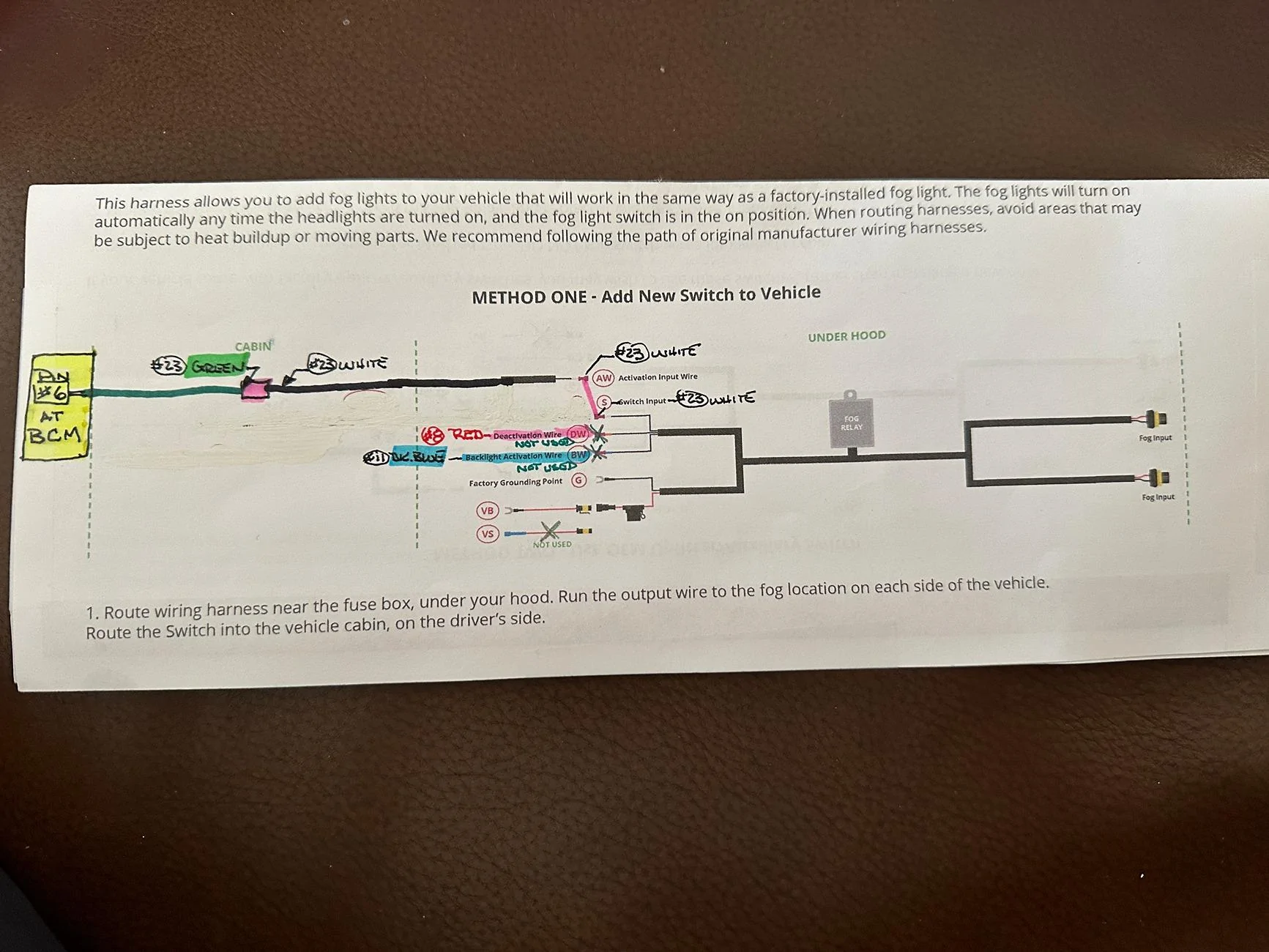
Hi again all! I got my lights installed today and thought I wired everything up according to my understanding from the write-up, but now the fog lights stay on all the time. I drew the diagram attached and this is how I have wired things. The BCM #6 pin is wired to the "S" Switch Input Wire on the DD wiring harness. The "VB" Positive Wire is connected to the batt/post under the hood. The "G" Ground is connected to the factory ground wire under the hood. I did not connect the "DW" deactivation wire or the "BW" Backlight wires to anything, as I didn't want the running backlights when fogs are off. I made and saved all the of the FORscan changes as described as well and the fog light dash indicator does show when the fog light button is pushed on the F-150 hyrbid headlight switch. Do you see anything I may have missed or hooked up wrong?

Additionally, I tried disconnected the "VB" Positive wire while leaving the "G" ground and "S"-->BCM #6 wire connected, and this results in the fog lights not turning on at all under any condition. Any and all help is most appreciate!

IMG_3621.webp
Hi all, was hoping to get a little help/sanity check. I've added in my Diode Dynamics lights, and I'm running into something similar to this and not sure what's up/am losing my mind a bit. This was a good sanity check since it matches what I'm doing (except for the blue wire for backlight as I'm using that.

Blue wire is working as expected, I've got the backlight on like I want. I've got all the Forscan changes applied, with ignition on to make sure no shenanigans with the module not writing would happen.

When I plug the white switch to the green wire hooked up to pin 6 or 7, the lights turn on at all times, regardless of fog button or vehicle on. I'm attaching photos to spot check that I'm not missing things, but it looks right from the wiring diagram and another user's photo in this thread.

The DD relay should be working fine, since I know the lights worked properly with the DD instructions to piggyback off of the headlight power. I know it's going to be something limited to my switch setup, but I feel like I've gone back to check it too many times now, and not sure what I'm missing.


EDIT: I figured it out. Elsewhere I saw to set Right/Left Front Fog Lamp Usage to power supply. Changing that to "fog lamps only" fixed this. :facepalm:
 
Last edited:

svallee87

2.0L EcoBoost
New member
First Name
Steve
Joined
Dec 29, 2024
Threads
1
Messages
4
Reaction score
2
Location
DFW
Vehicle(s)
2024 Ford Maverick XLT AWD
Engine
2.0L EcoBoost
Clubs
 
Merry Christmas everyone. I’m looking for the rubber plug/knockout that the white wire for the kit is being ran through. I’ve already pinned the bcm connector and programmed with forscan, ran a jumper from green to white outside the vehicle to verify. For the life of me I’m not able to see where I can run it out into the engine compartment. Thank you in advance
 
Sponsored

Carlitos_92

2.0L EcoBoost
Well-known member
Joined
Mar 24, 2024
Threads
4
Messages
2,252
Reaction score
4,577
Location
Texas
Vehicle(s)
2023 Area 51 XLT EB AWD Lux FX4
Engine
2.0L EcoBoost
Clubs
 
Merry Christmas everyone. I’m looking for the rubber plug/knockout that the white wire for the kit is being ran through. I’ve already pinned the bcm connector and programmed with forscan, ran a jumper from green to white outside the vehicle to verify. For the life of me I’m not able to see where I can run it out into the engine compartment. Thank you in advance
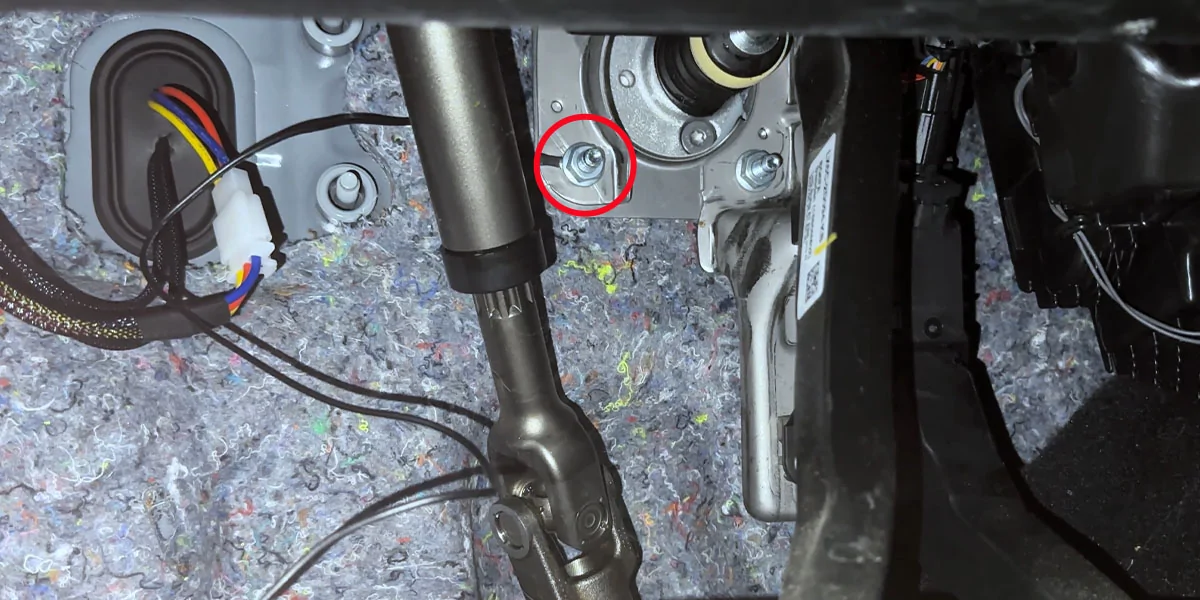
Straight from the DD instructions... Brake pedal and steering linkage visible in photo. Should be something similar on the BCM side if that is your preference.

Ford Maverick Diode Dynamics fog lights 1766689144358-c9
 

Jose A

2.5L Hybrid
Active member
First Name
Jose
Joined
Apr 19, 2025
Threads
1
Messages
42
Reaction score
27
Location
California
Vehicle(s)
2024 Maverick XLT Hybrid
Engine
2.5L Hybrid
I assisted Larry with the fog light wiring change today for the Diode Dynamic fog light kit. It was initially installed per the instructions received from Diode Dynamic. The toggle switch was wired and placed under the dash. The F-150 headlight switch, (part number in the first post), was installed, but did not allow us to enable the fog light indicator on the dash or be able to use the push button on the head light switch to turn on the fog lights because the power was not being provided by BCM. He was able to find the correct pins and location of BCM connector through researching other posts that are currently active. He ordered two wires with the correct connector pin, (part number in first post), to add to the BCM connector to power the fog lights. Today he wanted to find the way to connect the BCM to the existing Diode Dynamic wiring harness. The wiring changes were minimal. The toggle switch was removed along with the two existing wires connected to it that ran to the switch input line and the passenger side headlight wire harness. The remaining Diode Dynamics wiring harness was left in place. This was convenient because the front grill of the truck did not need to be removed to complete this wiring change. The two pins, pin 6 and 7, at the BCM are power wires for the fog lights. One is for the left fog light and the other is for the right fog light. We only had to add one wire at the BCM connector because we did not remove the Diode Dynamics wiring harness. This allowed the one power wire to apply power to both fog lights through the Diode Dynamics wiring harness. The new wire from the BCM was connected to the switch input wire that had been connected to one side of the toggle switch that was removed. That completed the wiring changes for his fog light install today.

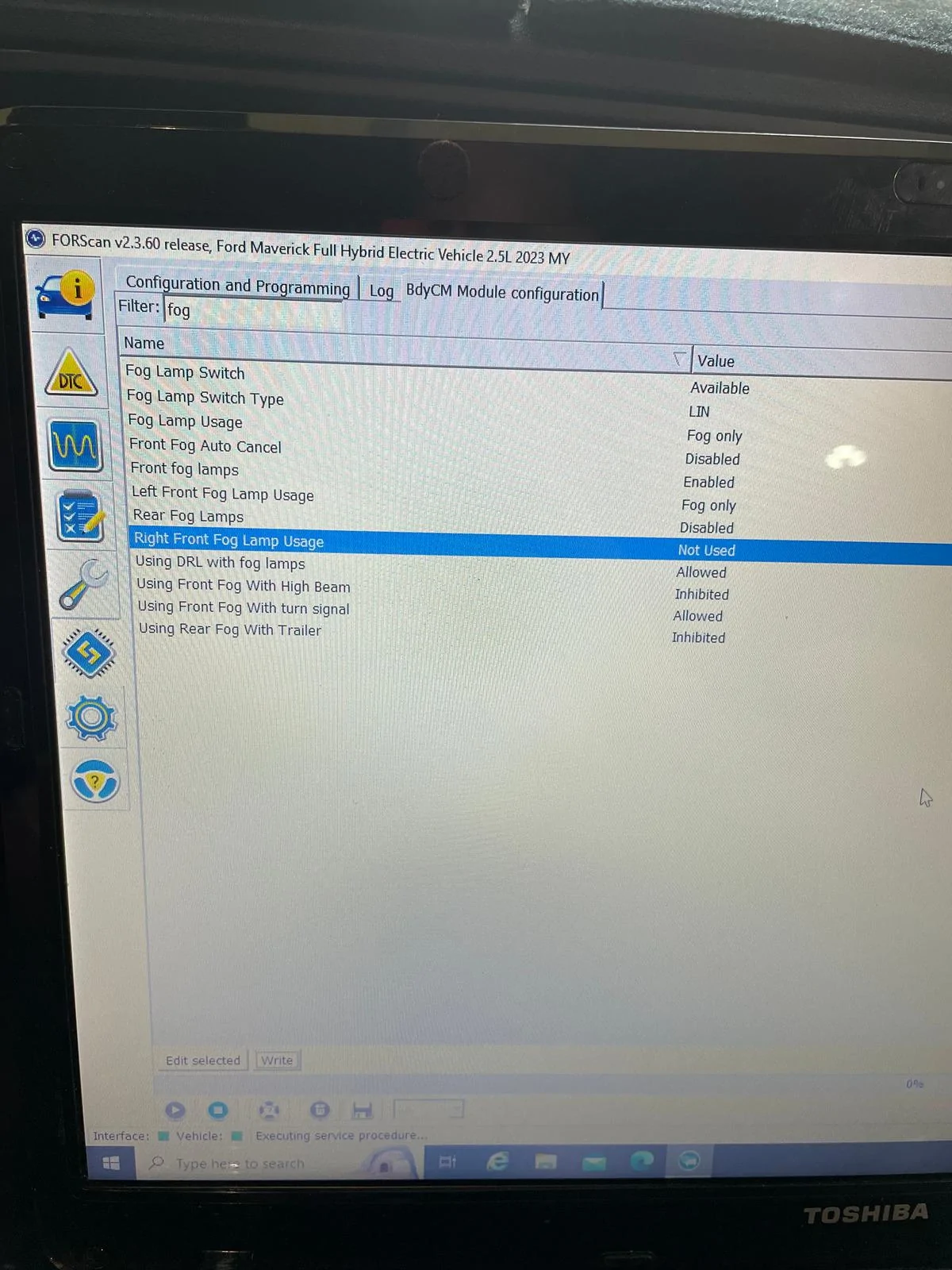
We moved on to the Forscan changes that allow for the fog light dash indicator to work. Two modules are involed in the required changes for his 2023 Ford Maverick XLT. I will list them separately.

IPC Module
Front Fog Lamps (default is disabled) - Change to enabled

BCM Module
Fog Lamp Usage - Fog Only
Front fog lamps - (default is disabled) - Enabled
Fog Lamp Switch (default is not available) - Available
Fog Lamp Switch Type (default is hardwire) - LIN
*Left Front Fog Lamp Usage (default is not used) - Fog only (providing power from the BCM)
*Right Front Fog Lamp Usage - Not Used (We only needed one power input since the Diode Dynamic wiring harness was ran to both fog lamps.)

*We initially used both the left and right option becasue we could not remember which pin we chose to use to send power to the fog lights from the BCM. After we tested that everything worked, we disabled the pin that we did not install a wire into during the wiring change.

The fog light indicator is now working and he can use the push button on the F-150 headlight switch to turn them on or off. The fog lights automatically turn off when the high beams are turned on. The amber back lighting is working correctly. The Diode Dynamic fog lights, custom wiring and F-150 headlight switch give his truck a factory feel.

BCM.webp


IPC.jpg
 

Jose A

2.5L Hybrid
Active member
First Name
Jose
Joined
Apr 19, 2025
Threads
1
Messages
42
Reaction score
27
Location
California
Vehicle(s)
2024 Maverick XLT Hybrid
Engine
2.5L Hybrid
So I just installed the fog lights but did not install the toggle switch or the harness. I bought the F150 fog light switch but I'm confused on where to install the green terminal wire. I know the wire goes to BCM #6 but where do I put the other end? I would assume it goes to the fog light switch. Am I correct or where do I put it?
 

Carlitos_92

2.0L EcoBoost
Well-known member
Joined
Mar 24, 2024
Threads
4
Messages
2,252
Reaction score
4,577
Location
Texas
Vehicle(s)
2023 Area 51 XLT EB AWD Lux FX4
Engine
2.0L EcoBoost
Clubs
 
So I just installed the fog lights but did not install the toggle switch or the harness. I bought the F150 fog light switch but I'm confused on where to install the green terminal wire. I know the wire goes to BCM #6 but where do I put the other end? I would assume it goes to the fog light switch. Am I correct or where do I put it?
The way most people have been wiring it, that BCM wire is the actual 12VDC+ power for the light(s). The LED fog lights are a small enough load that the BCM will power them. After programming with Forscan, all the F-150 switch does is digitally tell the BCM to send power out that new wire.
 

Jose A

2.5L Hybrid
Active member
First Name
Jose
Joined
Apr 19, 2025
Threads
1
Messages
42
Reaction score
27
Location
California
Vehicle(s)
2024 Maverick XLT Hybrid
Engine
2.5L Hybrid
Can you show me where to connect the end of the green wire coming out of the BCM? I had to do the install per DD instructions for the lights to come on. I made the changes in ForScan but it didn't work. There doesn't seem to be any power coming from pin #6 when checked with voltmeter.
Sponsored


Top