

- First Name
- David
- Joined
- Dec 17, 2023
- Threads
- 1
- Messages
- 169
- Reaction score
- 120
- Location
- Bartow, FL
- Vehicle(s)
- 2023 Ford Maverick
- Engine
- 2.5L Hybrid
Did not work on my 2023 XL hybrid
Sponsored

I was looking at this earlier today. The video states to change the letter B to the number 3, but instead of a B, mine had the number 8 so I chickened out and just left it alone.This video is awesome. Has anyone confirmed this working yet? The seatbelt screen sucks and blocks all of my road trip data once I put the car in park and take off my seatbelt. And even if you plug your seatbelt back in the screen can not be cleared because the ok button will no longer disappear at that point. Thanks for posting.


‘C’mon man’, you don't want to be the guinea pig? Ha! I don't blame you. When I get back from training next month I will give it a try and report back. Thanks for the post.I was looking at this earlier today. The video states to change the letter B to the number 3, but instead of a B, mine had the number 8 so I chickened out and just left it alone.
100% agree with you. Not sure why this forum is flooded with people who think the number of actions needed to drive the dang truck is okay. It is not a rocket ship... why do we need a start sequence?I agree with others...
- OK
- Selected auto stop off
- select OK
- Select drive mode 4 presses
There is no reason to have to click ok, it's bad UX design, inefficient, and actually makes a person look away from the road more. Auto industry has a really bad habit of letting lawyers create the most epic UX Fails. Often creating new safety issues vs alleviate them.
While we're at it, tack on the lack of keeping certain setting like auto start persistent.
Can't wait for people to report for scan working with 2024.
Did you buckle the rear center one?
Prob not.
The startup sequence is one thing, but this is ridiculous.This video is awesome. Has anyone confirmed this working yet? The seatbelt screen sucks and blocks all of my road trip data once I put the car in park and take off my seatbelt. And even if you plug your seatbelt back in the screen can not be cleared because the ok button will no longer disappear at that point. Thanks for posting.
Unfortunately some people would rather come on here and sling mud vs providing any sort of actual support.For the love of god, stop posting. This thread is in the "Programming" section of the forum. You have added exactly 0 help to this thread with your dumb posts.
This does not work on '22 XLT - errors out. Without using easy mode, how do people find these values to change?

1000% Everyone in the truck is belting up. I want Eco mode. Have to select it EVERY time the truck is started. Seat belt message is beyond pedantic.Dear Friend,
But the problem is merely the annoying message. I will still use the seatbelts; I only want the chime reminder. However, waiting a minute or pressing 'Ok' is TOO annoying while you are selecting driving modes.
Regards!

I WILL DEF TRY THIS!!!!!!!!!!!!!!!!Hello everyone!
I finally found the way to disable the ANNOYING Seatbelt information screen that comes on when you start the truck and stays on even after you buckle your seatbelt. Thank you to 2023 F250 forums for the coding information.
DISABLE SEATBELT INFORMATION SCREEN
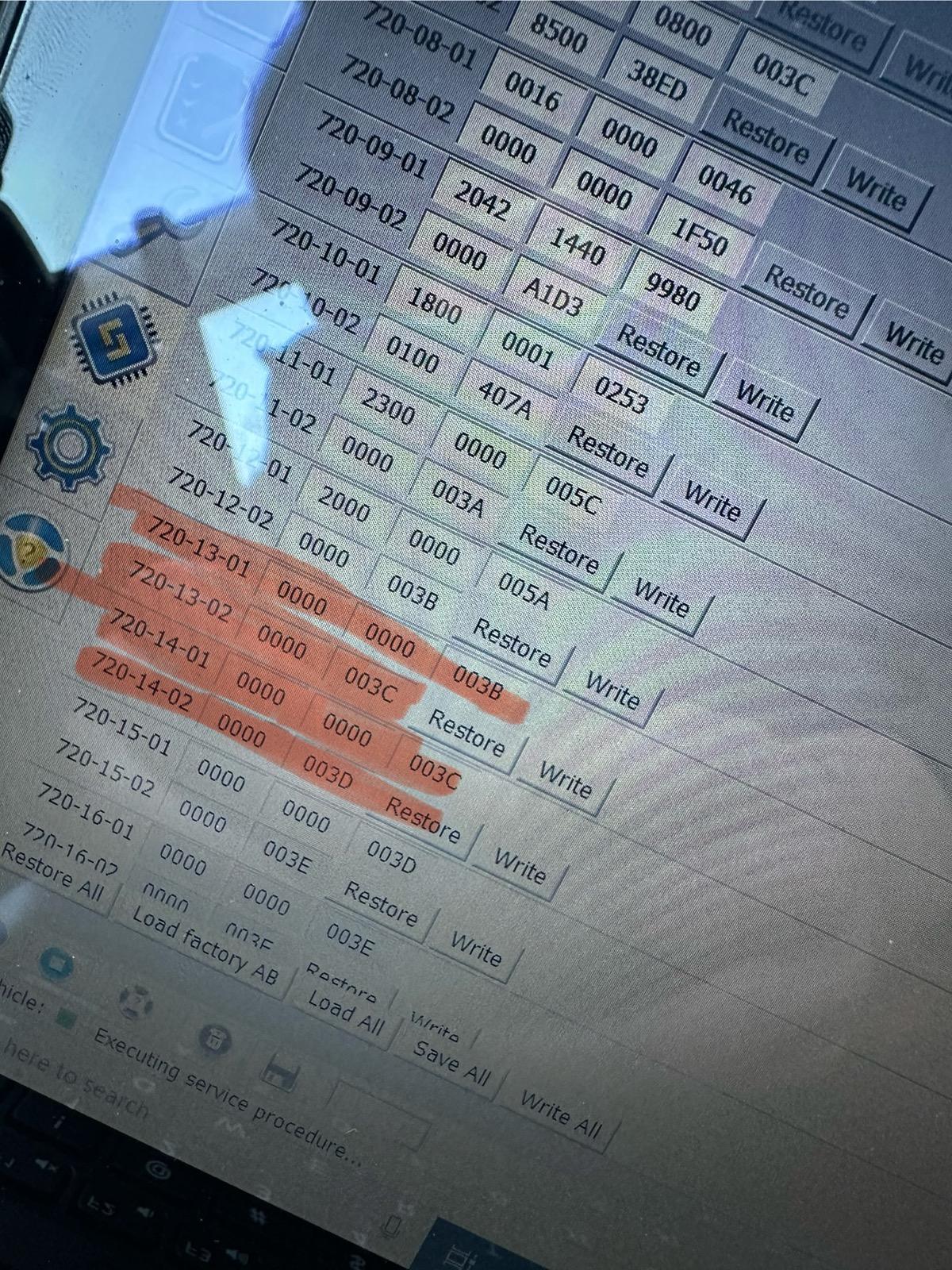
1. Open IPC AS BUILT
2. Change line 720-13-01 and 720-13-02 to ALL ZEROS. And WRITE the changes. Click yes to let Forscan correct the checksum.
3. Change line 720-14-01 and 720-14-02 to ALL ZEROS. And WRITE the changes. Click yes to let Forscan correct the checksum.
These coding changes worked for my 2024 Maverick XL AWD ECOBOOST. These changes remove the seatbelt information screen entirely and also seemed to disable the seatbelt chime all together. I would love to hear from other members to see if these changes work in your Maverick! Also, I have the smaller instrument cluster. (The 4 inch Instrument Cluster)
Why?Sport mode?
For me; three every time to Slippery for all my in city driving.
I’d rather do my Forscan mod and delete it all together. What if you have rear passengers? Also on the 2024s the screen does NOT disappear after you put on your belt on. It stays on for 1 full minute after unless you click ok, which it won’t let you click ok in some situations.Just lock the rear seatbelts. When you put the drivers belt on, the screen will disappear.





