
Sponsored

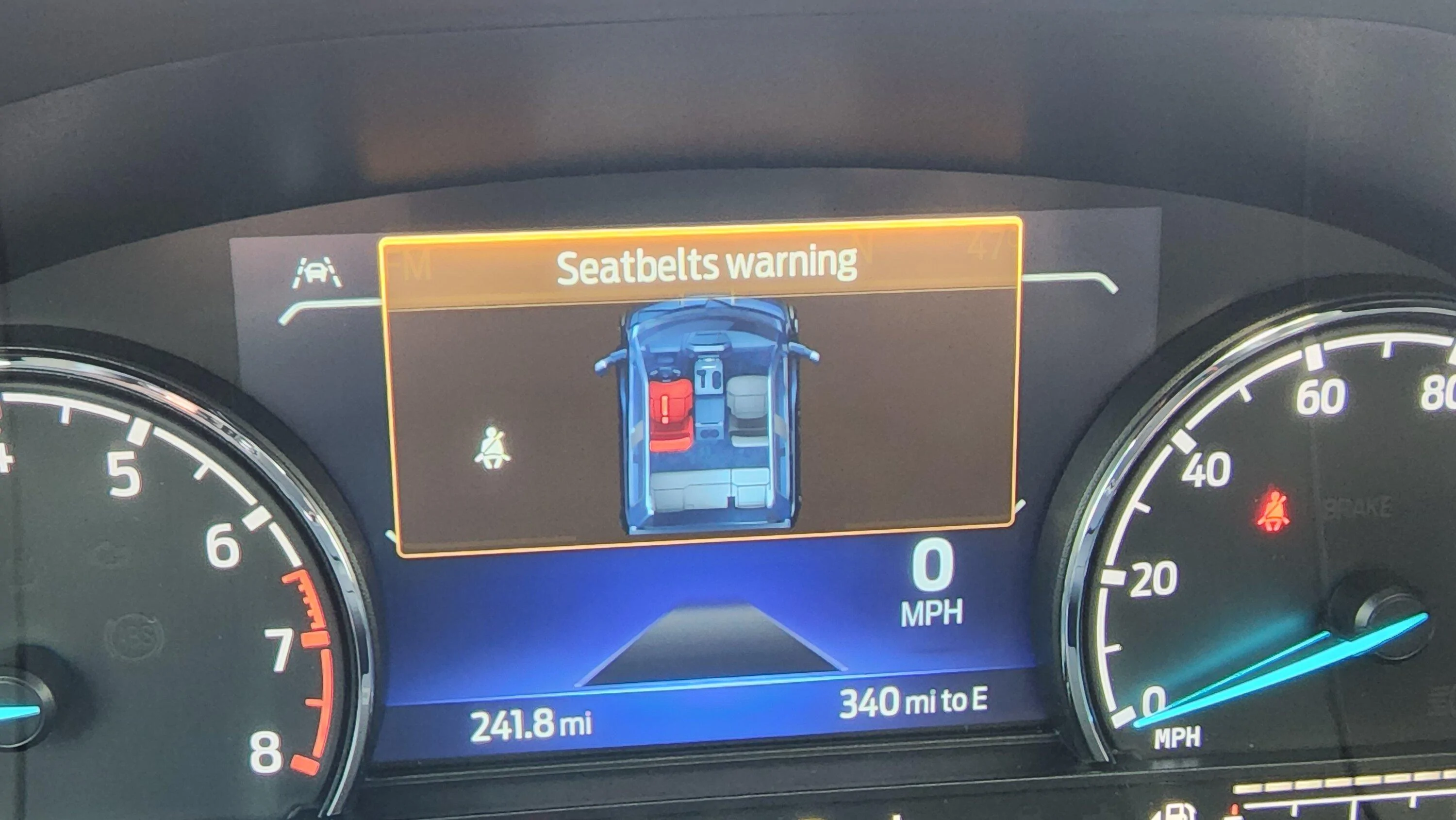
Seatbelt warning screen...any way to remove?????????

Hkak45

2.0L EcoBoost
Well-known member
First Name
K
Joined
Dec 7, 2020
Threads
11
Messages
212
Reaction score
235
Location
Cody, WY
Vehicle(s)
2022 Maverick Ecoboost
Engine
2.0L EcoBoost
So it seems there is no way to not have to click OK on the screen, even if buckled, on XL or XLT with the small dash screen. does anyone know if there is any forscan option to deactivate this silly screen?
Sponsored

 

hdave

2.5L Hybrid
Well-known member
Joined
Jul 24, 2023
Threads
22
Messages
643
Reaction score
739
Location
Toronto, Canada
Vehicle(s)
'23 Alto Blue Maverick XLT
Engine
2.5L Hybrid
yeah the seatbelt thing is annoying af, so is "ready to drive".
both useless OK clicks
 

Bob The Builder

2.0L EcoBoost
Well-known member
First Name
Butch
Joined
Dec 2, 2021
Threads
54
Messages
2,605
Reaction score
4,908
Location
Vermont
Vehicle(s)
2020 Jeep Cherokee ** 2023 Mav FX/4
Engine
2.0L EcoBoost
It is. Lariats and FX4s/Tremors have the larger productivity screen IPC which has an option to disable the seatbelt screen.
Thank you! Finally, after 3 pages a reply that makes sense is posted. Thank you!
 

Jimmyland

2.0L EcoBoost
Well-known member
First Name
Jim
Joined
May 31, 2023
Threads
2
Messages
205
Reaction score
202
Location
Pennsauken, NJ
Vehicle(s)
2023 Ford Maverick
Engine
2.0L EcoBoost
Clubs
 
The stupid screen in between the gauges that comes up EVERY time I start my Tremor is SOOOO Annoying. I can't find where or how to turn it off. I've seen the chime removal in the Manual, but can't find anything for this screen.
20230120_113926.jpg
You can turn off rear seat alert in the steering wheel menus. By hitting OK on steering wheel should clear that annoying screen for you.
 
OP
OP
Mikekel

Mikekel

2.0L EcoBoost
Member
First Name
Mike
Joined
Jan 16, 2023
Threads
1
Messages
5
Reaction score
5
Location
Central Jersey
Vehicle(s)
2023 Maverick XLT Tremor (Avalanche)
Engine
2.0L EcoBoost
Yes, I can hit the ok and the screen goes away. But it comes back the next time i start the truck. There is no where in the steering wheel menus to disable even though I have a Tremor XLT with the larger screen.
 

Sponsored

budpalumbo

2.0L EcoBoost
Well-known member
Joined
May 30, 2023
Threads
15
Messages
75
Reaction score
93
Location
ohio
Vehicle(s)
many
Engine
2.0L EcoBoost
Just adding in: XLT lux, fx4, 4k 8/23 build. Can't make that screen go away. I don't mind the red person light or the chime, I just want that screen gone too. Can't seem to find anything in forscan either, but it also doesn't look like I can get into any safety system modules. I see those warnings generated from outside the cluster on German stuff, don't know how Ford does it. I've also never had a car that told you in the owners manual how to get rid of a seat belt reminder. I've done it in cars, but it has always required a dealer level scanner and coding changes.

I have a feeling that like with many things maverick, running changes during production and the previous note about poor seat belt warning systems needing changed has made that screen a "feature".
 

Derwood

2.5L Hybrid
Well-known member
First Name
Derwood
Joined
Jul 26, 2023
Threads
37
Messages
538
Reaction score
690
Location
Canada
Vehicle(s)
Buick and Kia
Engine
2.5L Hybrid
Following. Would also like to know how to get rid of this
I see the warning every time I get in and I rarely forget my seatbelt but don't mind the added reminder myself. Just click on on your dash pop ups and you're good to go!
 

RZ2O16

2.0L EcoBoost
Well-known member
First Name
Robert
Joined
Sep 11, 2022
Threads
19
Messages
145
Reaction score
85
Location
Southside Chicago
Vehicle(s)
2016 Honda Pilot EX & 2020 Subaru Outback Premium
Engine
2.0L EcoBoost
Clubs
 
The stupid screen in between the gauges that comes up EVERY time I start my Tremor is SOOOO Annoying. I can't find where or how to turn it off. I've seen the chime removal in the Manual, but can't find anything for this screen.
20230120_113926.jpg
Try sending it to the dealer so they can see & fix what's wrong.
 

Last Truck Ever

2.5L Hybrid
Well-known member
Joined
May 23, 2022
Threads
28
Messages
973
Reaction score
2,095
Location
Alabama
Vehicle(s)
2023 Hybrid Maverick XLT
Engine
2.5L Hybrid
Clubs
 
I'm struggling to understand why this is such an issue for people. I get in, the ok to drive and seatbelt thing come up, I back out of the driveway and next time I glance at the dash both are gone. No need to press ok, just ignore, they go away on their own. So....? What's the big hangup?

 

billbillw

2.0L EcoBoost
Well-known member
First Name
Bill
Joined
Sep 15, 2022
Threads
2
Messages
752
Reaction score
800
Location
Metro Atlanta
Vehicle(s)
'23 Maverick Lariat FX4
Engine
2.0L EcoBoost
I don't mind seeing the screen, I just wish it would go away quicker. If all occupied seats are buckled, it should go away within 5 seconds. I have noticed the dang thing on after I've backed out my long driveway and driven almost all the way down my side street to the main road. That's 30-45 seconds. The ready to drive goes away in a couple seconds, the Parking Brake Off goes away in a couple seconds. Why not the seatbelt?
 
Sponsored

TheWizziard

2.5L Hybrid
Well-known member
Joined
Jul 14, 2022
Threads
3
Messages
1,051
Reaction score
1,116
Location
Texas-RGV
Vehicle(s)
2023 Maverick XLT Oxford White
Engine
2.5L Hybrid
I'm struggling to understand why this is such an issue for people. I get in, the ok to drive and seatbelt thing come up, I back out of the driveway and next time I glance at the dash both are gone. No need to press ok, just ignore, they go away on their own. So....? What's the big hangup?
Same here. I haven't pushed the "OK" siense the first week with the truck. I just ignore it and it goes off by it's self.
 

MavChris

2.0L EcoBoost
Well-known member
First Name
Chris
Joined
Jan 15, 2023
Threads
8
Messages
190
Reaction score
237
Location
Macomb Michigan
Vehicle(s)
23 Maverick XLT, 22 Bronco Sport, 19 Flex SEL
Engine
2.0L EcoBoost
I keep the backseat seatbelts buckled and all I have to do is fasten my seatbelt and screen goes away on its own instantly. The front passenger seatbelt does not have to be buckled for this to work. Saves the step of hitting OK or letting the screen go off after a certain amount of time.
 
Last edited:

2020 GT500

2.0L EcoBoost
Well-known member
Joined
Mar 19, 2022
Threads
31
Messages
386
Reaction score
370
Location
Somewhere
Vehicle(s)
Twuckee
Engine
2.0L EcoBoost
My 22 eco xl does not do this since I have all the unused belts fastened. I do that to stop them from flopping around.
 

MaverickEVwouldBeNice

2.5L Hybrid
Well-known member
First Name
Mike
Joined
Jul 5, 2023
Threads
1
Messages
194
Reaction score
181
Location
Earth - Northern Hemisphere - North America - USA
Vehicle(s)
2023 Mav Hyb/lux
Engine
2.5L Hybrid
Clubs
 
I'm struggling to understand why this is such an issue for people. I get in, the ok to drive and seatbelt thing come up, I back out of the driveway and next time I glance at the dash both are gone. No need to press ok, just ignore, they go away on their own. So....? What's the big hangup?
I've gone almost a minute before the thing finally went away. It is distracting, irrelevant, and useless. I don't want it to pop up, I want to see if I am driving electric or via ICE.

That being said, I've seen a couple of tips on this and other threads that I will try tomorrow morning.
 

PlantMan

2.0L EcoBoost
Well-known member
First Name
Mike
Joined
Jan 3, 2022
Threads
1
Messages
410
Reaction score
564
Location
Berwyn Heights, Maryland
Vehicle(s)
2017 F-250 4WD crew 8' bed; 2022 Maverick XL AWD
Engine
2.0L EcoBoost
My suggestion: just ignore it. You'll get so used to it you won't even notice it and it does go away. Unless you're launching your truck 5 milliseconds after sitting down and starting it, what's the rush?
Sponsored


Top