
Sponsored

Bj517

2.5L Hybrid
Well-known member
Joined
Oct 13, 2021
Threads
18
Messages
692
Reaction score
1,174
Location
Nc
Vehicle(s)
Lariat
Engine
2.5L Hybrid
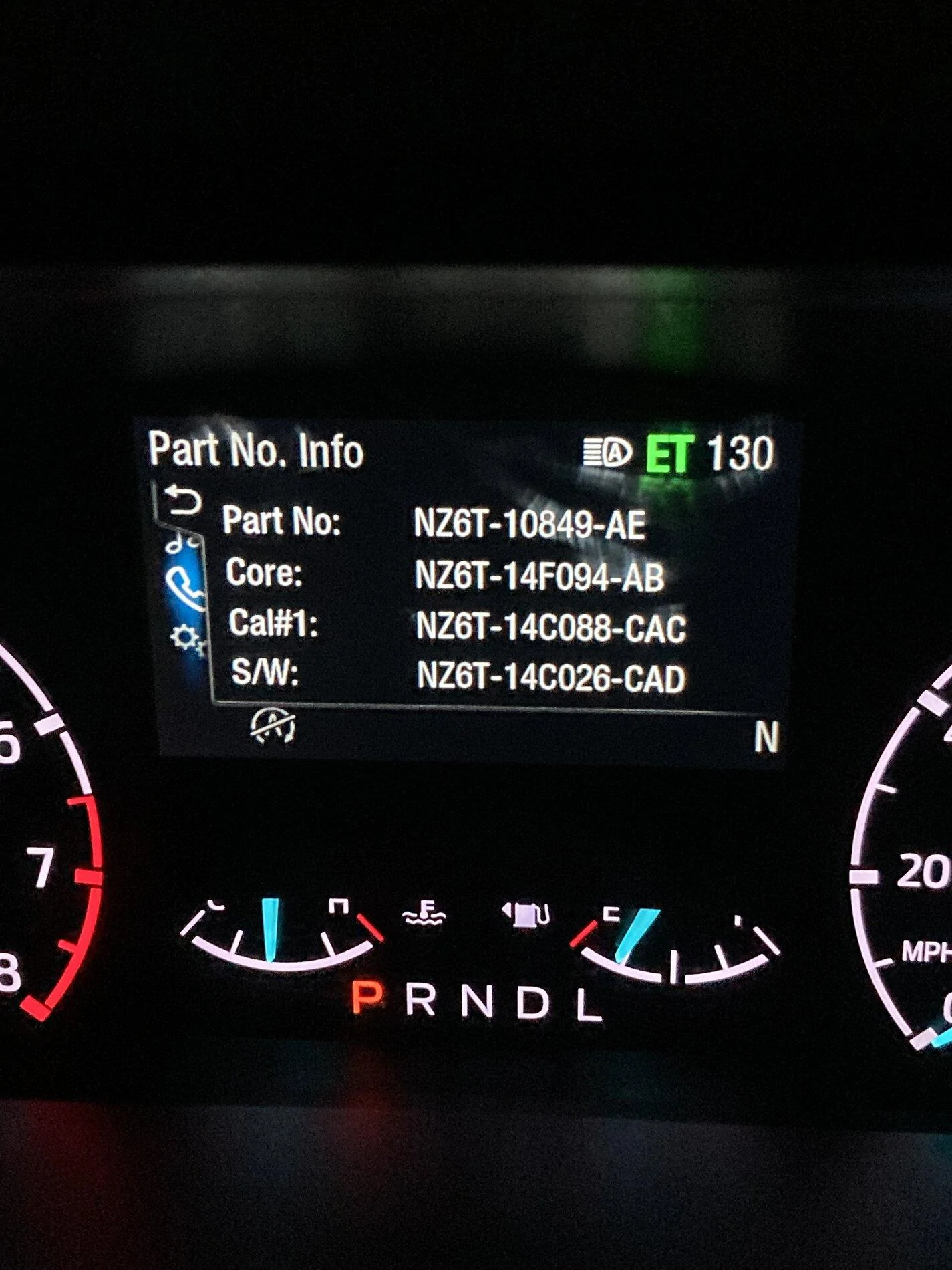
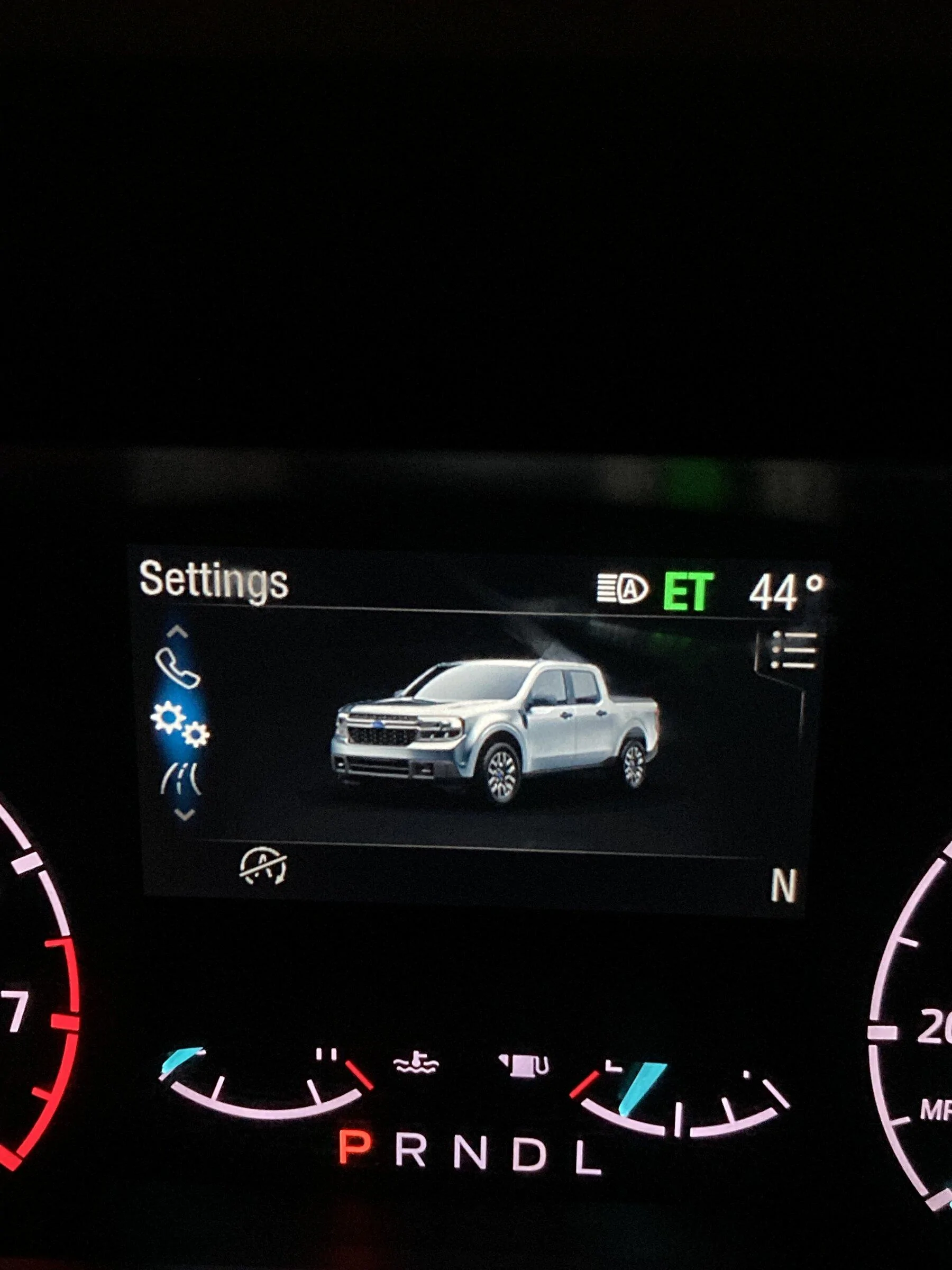
I just discovered an engineering test mode when you enter your vehicle hold down the ok button on your steering wheel and start your engine at the same time and hold the ok till the green ET appears on your center screen (dashboard) … you may need to have the driver seat belt on and lock the door (fob) in order to work.. what I’m surprise is the built date is about two weeks earlier then what Ford email me ??!! And do anyone know what is all that data means??
Just stumbling across this thread. Interesting data in there. What's the "build date" field in your engineering mode? I have a "Man Date", but it's at "120930". Can't imagine December 9, 2030 (or September 12, 2030) is right...
Sponsored


cannon

2.0L EcoBoost
Well-known member
First Name
mark
Joined
Dec 24, 2021
Threads
4
Messages
309
Reaction score
501
Location
oregon
Vehicle(s)
2022 Maverick XL awd
Engine
2.0L EcoBoost
Ok how about part no..
CED74AE5-6233-4E3D-8F3E-ED557AC87E97.jpeg
The top "part #" is actually the engineering # for the instrument cluster itself. I couldn't decode the others, likely components associated with the cluster.
 

bdaniel230

2.0L EcoBoost
Well-known member
First Name
Daniel
Joined
Jan 21, 2022
Threads
1
Messages
372
Reaction score
228
Location
Middleton, Id
Vehicle(s)
2022 Ford Maverick XLT -Hot Chili Red - 4k Tow Fx4
Engine
2.0L EcoBoost
Ok how about part no..
CED74AE5-6233-4E3D-8F3E-ED557AC87E97.jpeg
That is the part number for a Maverick Instrument cluster panel
NZ6T is for the generic prefix for Maverick 10849 is the instrument cluster and I believe AE is the date it was manufactured but I am not sure on that one
 

Dman

2.5L Hybrid
Well-known member
First Name
Darrell
Joined
Jul 6, 2021
Threads
9
Messages
67
Reaction score
128
Location
San Gabriel, Texas
Vehicle(s)
2017 Corolla,1990 Silverado,1949 GMC,1949 Harley
Engine
2.5L Hybrid
I know this is an older post, but I was wondering if engineering test mode can be turned on for a (non-luxury) XLT. I tried to follow these directions, but no success.
 

Dman

2.5L Hybrid
Well-known member
First Name
Darrell
Joined
Jul 6, 2021
Threads
9
Messages
67
Reaction score
128
Location
San Gabriel, Texas
Vehicle(s)
2017 Corolla,1990 Silverado,1949 GMC,1949 Harley
Engine
2.5L Hybrid
I just figured it out on my non-luxury XLT:
Doesn't matter if the door is open or closed or the seat belt is fastened or not... Just as long as the OK button on the steering wheel is held firmly before the key is inserted and turned to the ON position (2 clicks), but not to the START position (3 clicks). Release the OK button as soon as the green ET is lit at the top right of the center gauge display just left of the temperature. (If you hold the OK button too long the green ET disappears.) Then use the Ok and MENU buttons to explore.

I had trouble the first few times I tried it because I think either I might not have fully depressed the OK button and holding it down completely or I might have been accidentally bumping the START position on the key... Just tried again a couple times and it worked.

Interesting info, but the only thing to change is the AFE Bias Factor. I won't try to adjust mine, even if it is a little bit optimistic on fuel use... that little lie just makes me feel better 😁
 

Sponsored

Maverick is life

2.5L Hybrid
New member
First Name
Joe
Joined
Mar 5, 2023
Threads
0
Messages
1
Reaction score
0
Location
t5s1t6
Vehicle(s)
2022 Xl Maverick
Engine
2.5L Hybrid
The XL Model works!! Just Hold down the OK button then turn the key to the auxiliary mode keep on holding the ok button till it displays a green “ET” on the dash. Just press the menu button the button with the 3 lines and cycle the modes.
 

7Litre

2.5L Hybrid
Well-known member
First Name
Robin
Joined
Oct 25, 2021
Threads
12
Messages
260
Reaction score
260
Location
Maine
Vehicle(s)
2020 Sonata Hybrid, 2023 Maverick XLT Hybrid
Engine
2.5L Hybrid
It's probably in the "no-brainer" category, but you have to have your foot on the brake as well.

I'm going to get ET up today and get the TACHO screen up on my drive down 95. I'm curious where it will be using different modes, especially sport mode during acceleration.
 

Tom 71 Maverick 24

2.0L EcoBoost
Well-known member
First Name
Tom
Joined
May 29, 2024
Threads
5
Messages
673
Reaction score
865
Location
Northeast Ohio
Vehicle(s)
2024 Maverick Lariat FX4, 4K tow
Engine
2.0L EcoBoost
Rejuvenating the thread again!

The last time I was able to get into Engineering Mode was with my F-150. I went for the same purpose - to adjust the MPG to more closely match my actual calculated.

If it's like my F-150 was, then being set to 1000 = 100%. If you're reading, say, 5% high, you can tweak it downward to 950 and it should calculate 95% of what it was showing in future use.

I set mine to 970. It might not be quite enough but if I'm 2/10 of an MPG either way, I think that's really good. The trick worked well on the old truck. I never found the mode on my Escape (though I'm suspiciously thinking that the process to get there is the same).

Anyway, we'll see what it does.
 

mikehailwood

2.5L Hybrid
Well-known member
First Name
Mike
Joined
Nov 25, 2021
Threads
7
Messages
45
Reaction score
8
Location
63123
Vehicle(s)
2001 Ford Ranger
Engine
2.5L Hybrid
Well a friend at work owns a Focus RS and mention me about a engineering test mode on most of Ford vehicles. A least most of access is using the ok button and ignition. I Google to see if anyone have done this and being an owner of the rare Maverick .. My discovery on what combinations and being the first to post about it!!
36F2A1BB-083B-4EE4-BB1D-473CC4A9F145.jpeg
I've tried to do this numerous times. Only once did I get the green ET to appear and it just flashed and went away. 2024 Hybrid XLT. Any ideas?
Sponsored


Top