
Sponsored

App Update Kills Remote Features..

MCIAD

2.0L EcoBoost
Well-known member
First Name
Michael
Joined
Mar 8, 2024
Threads
14
Messages
97
Reaction score
96
Location
Ventura County, California
Vehicle(s)
2023 Ford Maverick Lariat
Engine
2.0L EcoBoost
I updated the Ford app yesterday on my iPhone 16Pro, ios26.5, to v6.13.0 and it killed all my remote options. Cannot lock, unlock, or start my Maverick via the home or watch. I’ve tried resetting everything and still no joy.

Anyone else?
Sponsored


SafetyGuy

2.5L Hybrid
Well-known member
First Name
Andy
Joined
May 1, 2025
Threads
9
Messages
896
Reaction score
1,599
Location
Manitoba
Vehicle(s)
2025 Maverick Lariat Hybrid 4K AWD
Engine
2.5L Hybrid
I updated the Ford app yesterday on my iPhone 16Pro, ios26.5, to v6.13.0 and it killed all my remote options. Cannot lock, unlock, or start my Maverick via the home or watch. I’ve tried resetting everything and still no joy.

Anyone else?
Good day

Do the other options on the app work, like updating your truck location if you move it, does it update and show current mileage...update tire pressures etc? This would indicate you are still paired to the truck but maybe do a complete reset?

It defeats the purpose of the app...maybe they shat the bed on this version so maybe delete and reinstall? I imagine you have done that already.

Do you need to ensure that the app is still set for your truck or do you need to pair it to your truck again?

I do not have an Apple device so just spit-balling...

Good luck,

Andy
 
OP
OP
MCIAD

MCIAD

2.0L EcoBoost
Well-known member
First Name
Michael
Joined
Mar 8, 2024
Threads
14
Messages
97
Reaction score
96
Location
Ventura County, California
Vehicle(s)
2023 Ford Maverick Lariat
Engine
2.0L EcoBoost
After a bit more investigation - and thanks for mentioning location as I had not checked that - it turns out that while the app said my Maverick was connected, it was not. No location, any info was from yesterday prior to the update. So I went nuclear.

I uninstalled the app, disconnected the Maverick from the account, reset my system to factory, the added all back again. I’m still waiting for the watch app to reinstall, but everything works again from the phone app. Quite a bit of work for something that was working great until an update.

Kind of how things go, right,,,
 

Dad

2.5L Hybrid
Well-known member
First Name
Tom
Joined
Jan 9, 2022
Threads
58
Messages
5,307
Reaction score
5,689
Location
SoCal
Vehicle(s)
2022 Maverick, - Lariat, Hyundai Palisade
Engine
2.5L Hybrid
After a bit more investigation - and thanks for mentioning location as I had not checked that - it turns out that while the app said my Maverick was connected, it was not. No location, any info was from yesterday prior to the update. So I went nuclear.

I uninstalled the app, disconnected the Maverick from the account, reset my system to factory, the added all back again. I’m still waiting for the watch app to reinstall, but everything works again from the phone app. Quite a bit of work for something that was working great until an update.

Kind of how things go, right,,,
Thank goodness for the forum . . . right?
 

Dad

2.5L Hybrid
Well-known member
First Name
Tom
Joined
Jan 9, 2022
Threads
58
Messages
5,307
Reaction score
5,689
Location
SoCal
Vehicle(s)
2022 Maverick, - Lariat, Hyundai Palisade
Engine
2.5L Hybrid
Good day

Do the other options on the app work, like updating your truck location if you move it, does it update and show current mileage...update tire pressures etc? This would indicate you are still paired to the truck but maybe do a complete reset?

It defeats the purpose of the app...maybe they shat the bed on this version so maybe delete and reinstall? I imagine you have done that already.

Do you need to ensure that the app is still set for your truck or do you need to pair it to your truck again?

I do not have an Apple device so just spit-balling...

Good luck,

Andy
You just saved a member a lot of frustration and wondering "what the hell?". Thanks for being a good member.
 

Sponsored

HeyBales

2.5L Hybrid
Well-known member
First Name
Mike
Joined
May 3, 2024
Threads
4
Messages
4,827
Reaction score
4,375
Location
KC Metro area
Vehicle(s)
2005 Toyota RAV4, 2024 XLT Hybrid
Engine
2.5L Hybrid
I'll suggest that since it was an app update - only that side likely needed to be logged out of and back in to.

I'm sure the truck which has no knowledge of you using the app, had no problem.
Reporting up to Ford's servers like normal.

But your app wasn't talking to the Ford servers.
If Log out/in didn't do it - then uninstall/install app.
 

Glen Baker LLC

2.5L Hybrid
Well-known member
Joined
May 29, 2024
Threads
29
Messages
7,139
Reaction score
11,946
Location
Central Nevada & Utah
Vehicle(s)
Maverick XLT Hybrid
Engine
2.5L Hybrid
I updated the Ford app yesterday on my iPhone 16Pro, ios26.5, to v6.13.0 and it killed all my remote options. Cannot lock, unlock, or start my Maverick via the home or watch. I’ve tried resetting everything and still no joy.

Anyone else?
After a bit more investigation - and thanks for mentioning location as I had not checked that - it turns out that while the app said my Maverick was connected, it was not. No location, any info was from yesterday prior to the update. So I went nuclear.

I uninstalled the app, disconnected the Maverick from the account, reset my system to factory, the added all back again. I’m still waiting for the watch app to reinstall, but everything works again from the phone app. Quite a bit of work for something that was working great until an update.

Kind of how things go, right,,,
With the help of @SafetyGuy I'm glad you were able to resolve the problem.
I can't tell you, how much I hate when something tells me. I have to upgrade otherwise it won't work.
One of the reasons I don't miss my phone being tethered/connected to my truck.
 
Last edited:

SafetyGuy

2.5L Hybrid
Well-known member
First Name
Andy
Joined
May 1, 2025
Threads
9
Messages
896
Reaction score
1,599
Location
Manitoba
Vehicle(s)
2025 Maverick Lariat Hybrid 4K AWD
Engine
2.5L Hybrid
After a bit more investigation - and thanks for mentioning location as I had not checked that - it turns out that while the app said my Maverick was connected, it was not. No location, any info was from yesterday prior to the update. So I went nuclear.

I uninstalled the app, disconnected the Maverick from the account, reset my system to factory, the added all back again. I’m still waiting for the watch app to reinstall, but everything works again from the phone app. Quite a bit of work for something that was working great until an update.

Kind of how things go, right,,,
Good day, @MCIAD

I understand going nuclear happens, but for me that means I am not operating at an optimal level. ;-)

I am a retired RCAF Aircraft Tech so have learned my best troubleshooting is done when I think over the system, how it operated previously and what is it doing now...and what may cause the unwanted change.

Then I do a bit of research (always lots to read over, here on MTC!) and then look over options and go for the most logical low-hanging fruit and eliminate options one at a time where possible.

I do this when time is available as I want to know what and maybe even why there was a change/failure.

I am happy to hear you got your connectivity issue sorted out, as it sounds like it is part of your normal routine to use the app, and we don't like to be forced to change due to external forces.

Now I can get back to checking my truck for changes to its 12 volt charging profile that I noticed after my dealer appt yesterday.

Between my cigar lighter voltage indicator in the cab and my trusty little voltage tester I can see a fun time ahead, but I am glad to see my 12 volt resting voltage this am is 12.8 volts...wonderful to see, as I was...concerned. I dont like change as well. :cool:

I will be looking at the work order again to see whay they did...or at least entered on the paperwork.

Have a peaceful and pleasant day,

Andy
 

SafetyGuy

2.5L Hybrid
Well-known member
First Name
Andy
Joined
May 1, 2025
Threads
9
Messages
896
Reaction score
1,599
Location
Manitoba
Vehicle(s)
2025 Maverick Lariat Hybrid 4K AWD
Engine
2.5L Hybrid
You just saved a member a lot of frustration and wondering "what the hell?". Thanks for being a good member.
Good day @Dad

Thank you for your kind words, I appreciate it!

I enjoy aiding others where I can, and have also been the recipient of lots of help here as well, so just helping keep the good-vibes rolling.

Have a good one,

Andy
 
Sponsored

Tech Tye

2.5L Hybrid
Well-known member
First Name
Ken
Joined
Oct 10, 2023
Threads
4
Messages
208
Reaction score
173
Location
Kentucky
Vehicle(s)
2023 Maverick
Engine
2.5L Hybrid
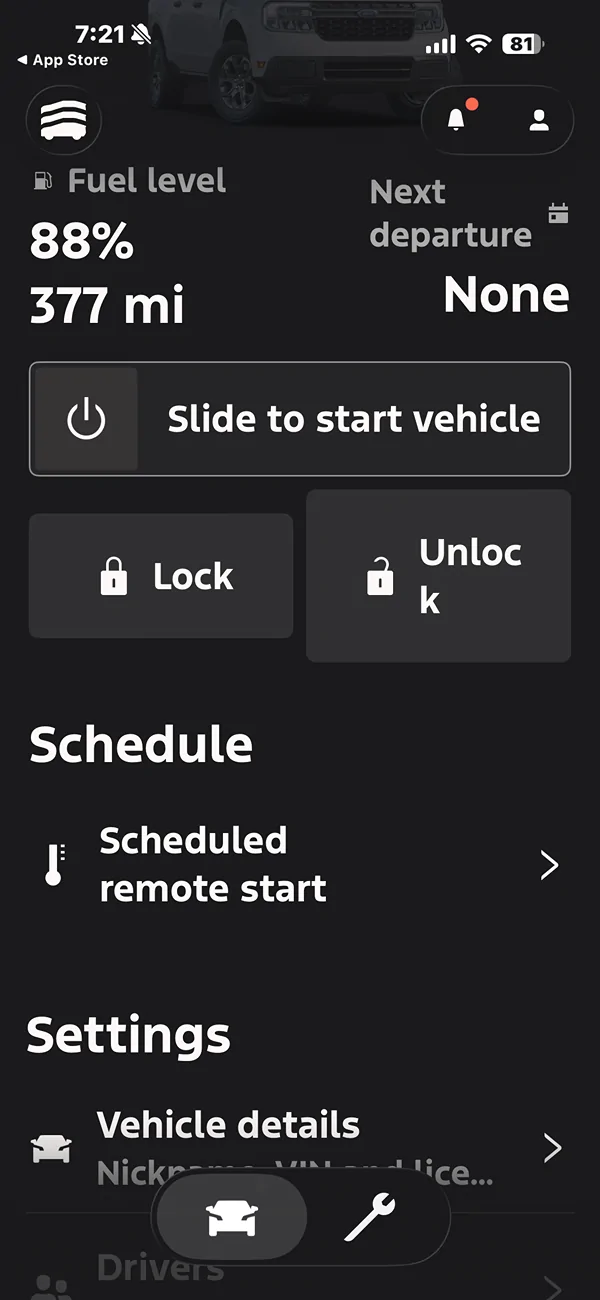
Just updated mine to see what would happen. Updated just fine except the unlock icon is goofy

Ford Maverick App Update Kills Remote Features.. IMG_9124
 

Dad

2.5L Hybrid
Well-known member
First Name
Tom
Joined
Jan 9, 2022
Threads
58
Messages
5,307
Reaction score
5,689
Location
SoCal
Vehicle(s)
2022 Maverick, - Lariat, Hyundai Palisade
Engine
2.5L Hybrid
Good day @Dad

Thank you for your kind words, I appreciate it!

I enjoy aiding others where I can, and have also been the recipient of lots of help here as well, so just helping keep the good-vibes rolling.

Have a good one,

Andy
That's how it's supposed to work! Well done!
 

nbmav

2.5L Hybrid
Well-known member
First Name
Kevin
Joined
May 6, 2025
Threads
5
Messages
197
Reaction score
228
Location
North Bend, WA
Vehicle(s)
2026 Lariat
Engine
2.5L Hybrid
Mine on my iPhone must have updated by itself last night and it was completely confused. It didn't seem to realize that it was disconnected and log out wouldn't acknowledge that I logged out. Then after quitting the app and relaunching it, it prompted me to log in and all is good again. Lazy software developers clearly not testing the basic use cases (ex SW dev).
Sponsored


Top