
Sponsored

Old_Norm

2.5L Hybrid
Well-known member
First Name
Norm
Joined
Apr 12, 2023
Threads
17
Messages
411
Reaction score
563
Location
Columbus Ohio
Vehicle(s)
2023 Mustang Mach E 2023 Maverick Lariat
Engine
2.5L Hybrid
I’m using the newest version of Forscan which is version 2.3.59
So am I. But every time I try and change the Animation Type to ST the write quits at 99%. My truck is a 23 Lariat Lux. Perhaps that's the reason.
Sponsored


EONR24

2.0L EcoBoost
Well-known member
First Name
Swag
Joined
Feb 26, 2024
Threads
44
Messages
1,442
Reaction score
1,655
Location
United States
Vehicle(s)
2024 Ford Maverick XL
Engine
2.0L EcoBoost
So am I. But every time I try and change the Animation Type to ST the write quits at 99%. My truck is a 23 Lariat Lux. Perhaps that's the reason.
Hmmmm. Are you able to write other codes just fine? Take a picture or a few of all modules in your ACM in easy mode. I will see how they compare to mine.
 

EONR24

2.0L EcoBoost
Well-known member
First Name
Swag
Joined
Feb 26, 2024
Threads
44
Messages
1,442
Reaction score
1,655
Location
United States
Vehicle(s)
2024 Ford Maverick XL
Engine
2.0L EcoBoost
So am I. But every time I try and change the Animation Type to ST the write quits at 99%. My truck is a 23 Lariat Lux. Perhaps that's the reason.
Sometimes for scan can act weird too so I would definitely unplug everything, close Forscan and try it again. And see if it does the same thing.
 

EONR24

2.0L EcoBoost
Well-known member
First Name
Swag
Joined
Feb 26, 2024
Threads
44
Messages
1,442
Reaction score
1,655
Location
United States
Vehicle(s)
2024 Ford Maverick XL
Engine
2.0L EcoBoost
So am I. But every time I try and change the Animation Type to ST the write quits at 99%. My truck is a 23 Lariat Lux. Perhaps that's the reason.
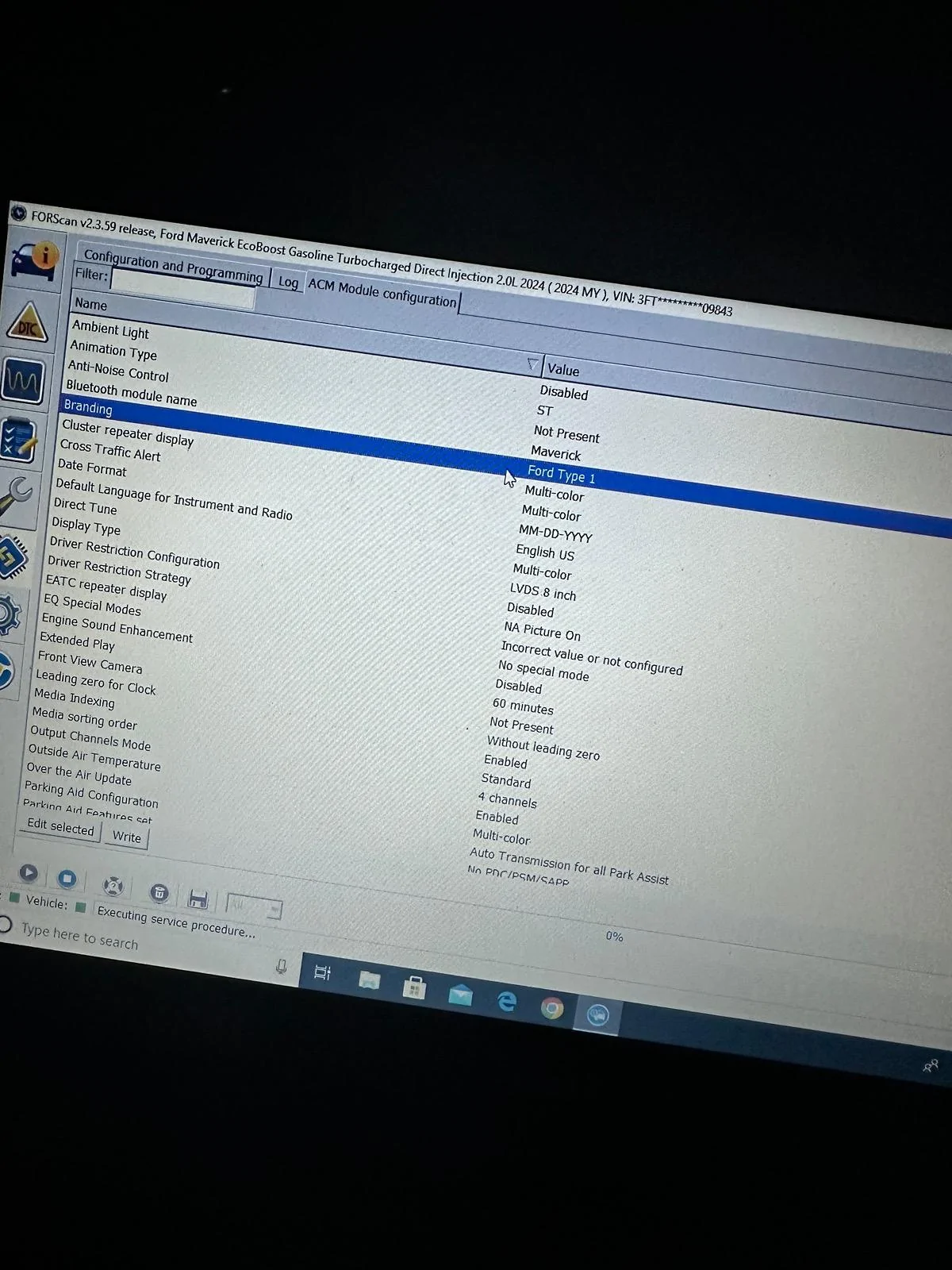
Here is a picture of most of my ACM module. It could be another setting is different and is preventing that from writing. I do also have “Driver restriction disabled”. It could be a Forscan, cable, or computer issue too. It could just be a bug and will work if tried again. And also it could be our differences in trim or even model year that is affecting it.
Ford Maverick Forscan Ideas for Dummies (Things You Can Do Using Easy Mode) IMG_2800
 

Old_Norm

2.5L Hybrid
Well-known member
First Name
Norm
Joined
Apr 12, 2023
Threads
17
Messages
411
Reaction score
563
Location
Columbus Ohio
Vehicle(s)
2023 Mustang Mach E 2023 Maverick Lariat
Engine
2.5L Hybrid
Here is a picture of most of my ACM module. It could be another setting is different and is preventing that from writing. I do also have “Driver restriction disabled”. It could be a Forscan, cable, or computer issue too. It could just be a bug and will work if tried again. And also it could be our differences in trim or even model year that is affecting it.
IMG_2800.jpeg
Thanks! I have been able to enable Traffic Sign Recognition and disable double horn honk. I'll compare your code with mine.
 

Sponsored

bear15

2.5L Hybrid
Well-known member
Joined
Mar 18, 2023
Threads
11
Messages
45
Reaction score
15
Location
Brazil
Vehicle(s)
Ford
Engine
2.5L Hybrid
Thank you! My Forscan Holy Grail is enabling Eco Mode as default.
Did you lose the other mode options? Is there a link or youtube link to show how this is done using the Forscan? I am very new at this. Thanks for any help.
 

Old_Norm

2.5L Hybrid
Well-known member
First Name
Norm
Joined
Apr 12, 2023
Threads
17
Messages
411
Reaction score
563
Location
Columbus Ohio
Vehicle(s)
2023 Mustang Mach E 2023 Maverick Lariat
Engine
2.5L Hybrid
Did you lose the other mode options? Is there a link or youtube link to show how this is done using the Forscan? I am very new at this. Thanks for any help.
So far, there is no method that I'm aware for changing the default driving mode (when you first start the vehicle) in the Maverick. I have all of the driving modes. I only want the truck to start in ECO Mode. It seems silly to me that in a Hybrid truck, presumably designed with economy in mind, you have to hit a button several times to get into ECO Mode.
 

Old_Norm

2.5L Hybrid
Well-known member
First Name
Norm
Joined
Apr 12, 2023
Threads
17
Messages
411
Reaction score
563
Location
Columbus Ohio
Vehicle(s)
2023 Mustang Mach E 2023 Maverick Lariat
Engine
2.5L Hybrid
Hmmmm. Are you able to write other codes just fine? Take a picture or a few of all modules in your ACM in easy mode. I will see how they compare to mine.
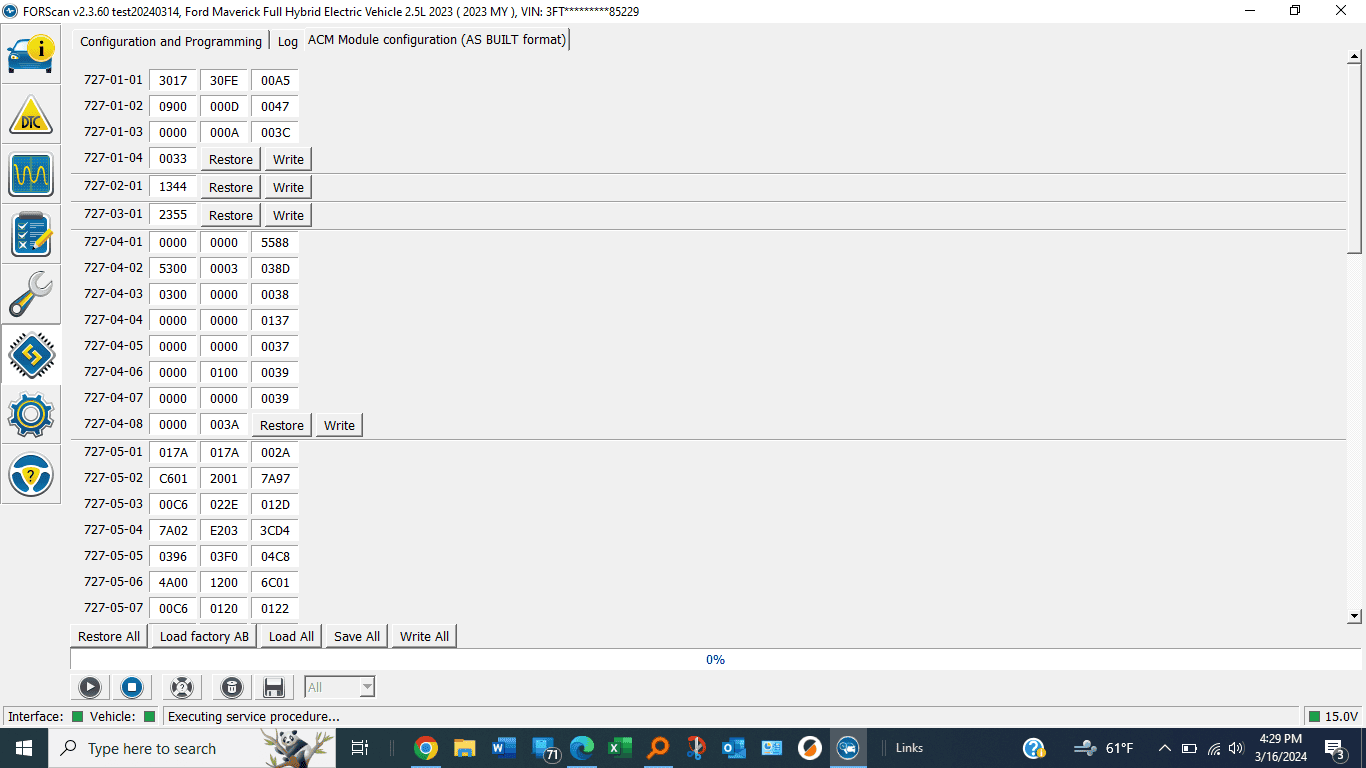
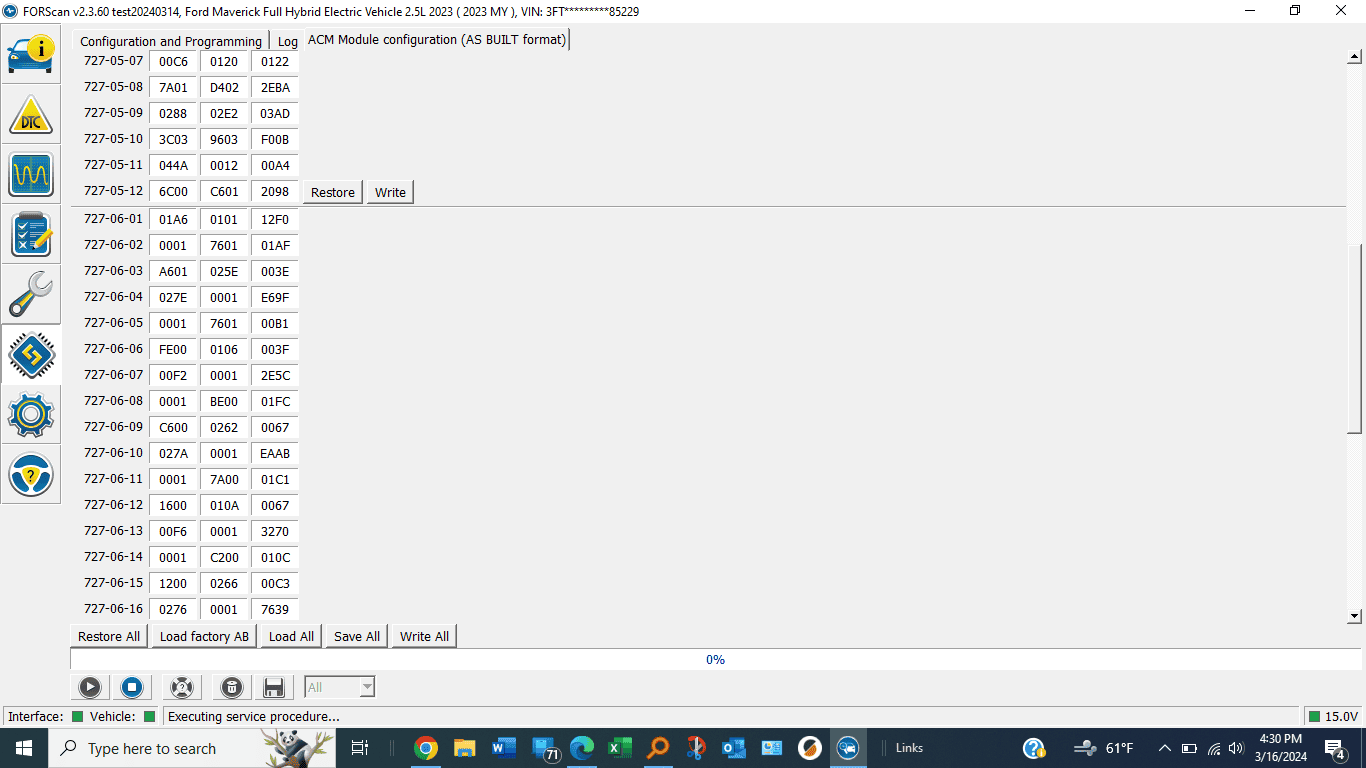
Thanks Ian, I changed mine to match yours (from the picture you posted). If it's not too much trouble could you compare my AS Built ACM settings to yours?

Ford Maverick Forscan Ideas for Dummies (Things You Can Do Using Easy Mode) ACM 1


Ford Maverick Forscan Ideas for Dummies (Things You Can Do Using Easy Mode) ACM 2
 

EONR24

2.0L EcoBoost
Well-known member
First Name
Swag
Joined
Feb 26, 2024
Threads
44
Messages
1,442
Reaction score
1,655
Location
United States
Vehicle(s)
2024 Ford Maverick XL
Engine
2.0L EcoBoost
Thanks Ian, I changed mine to match yours (from the picture you posted). If it's not too much trouble could you compare my AS Built ACM settings to yours?

ACM 1.png


ACM 2.png
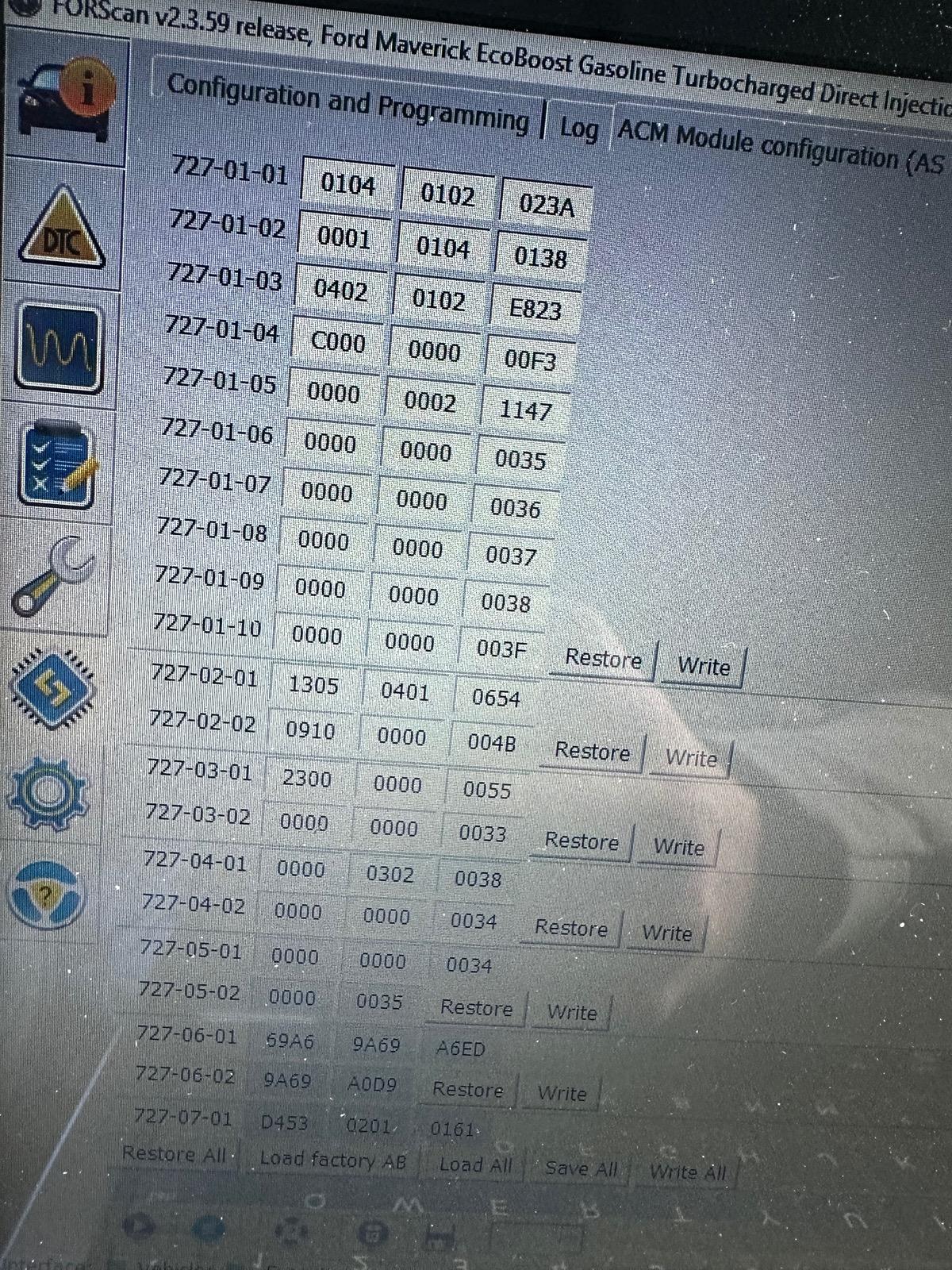
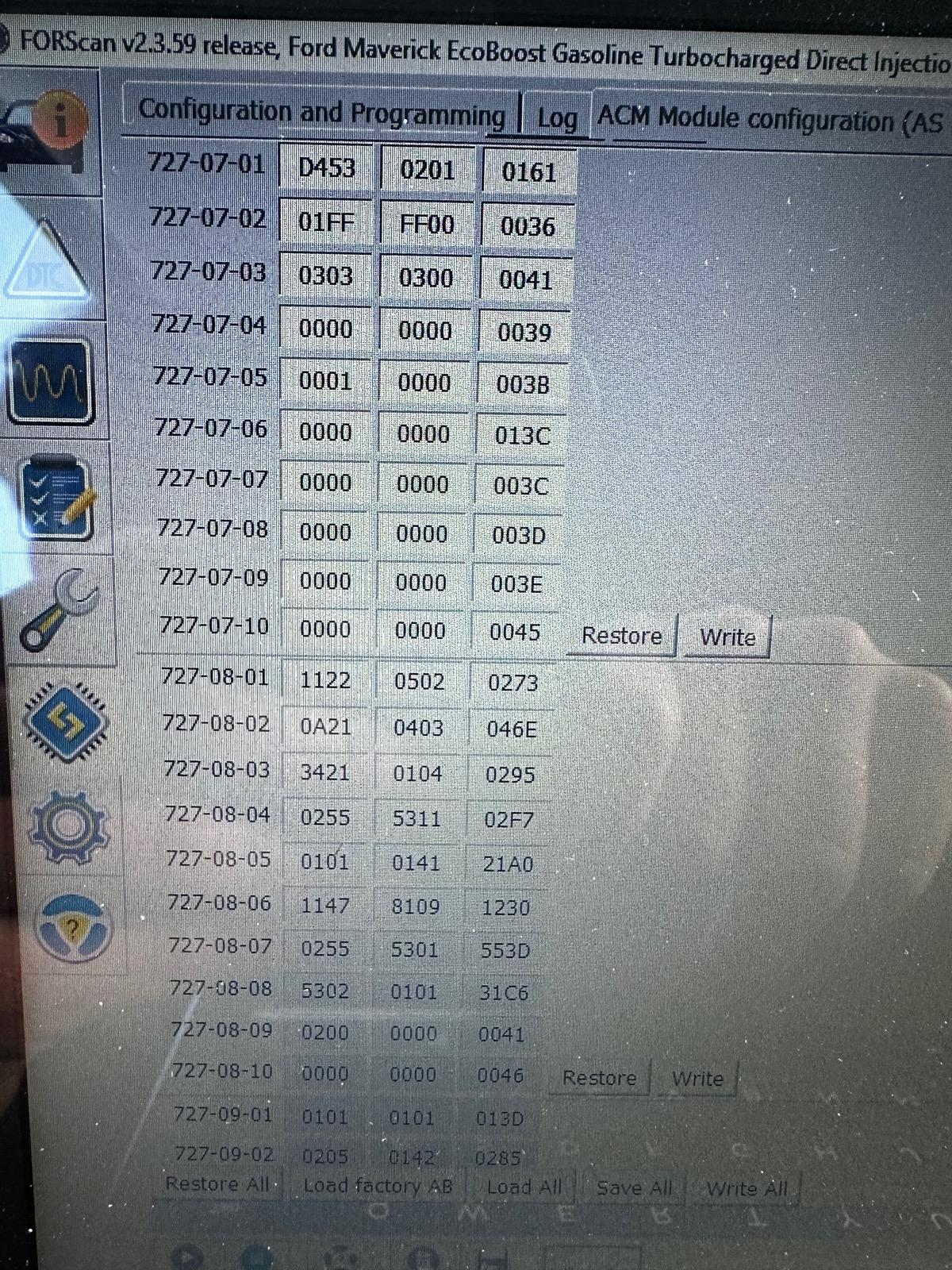
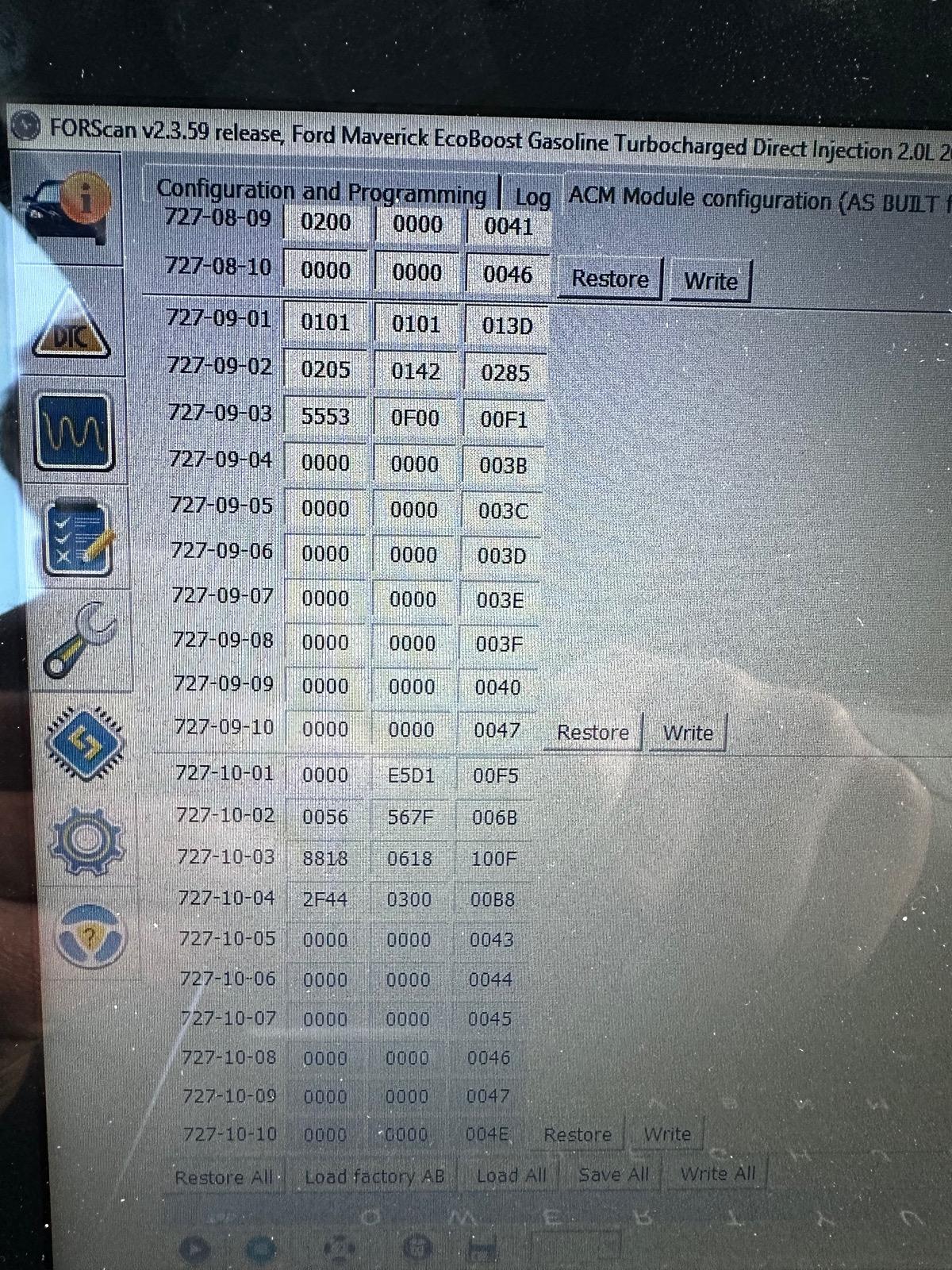
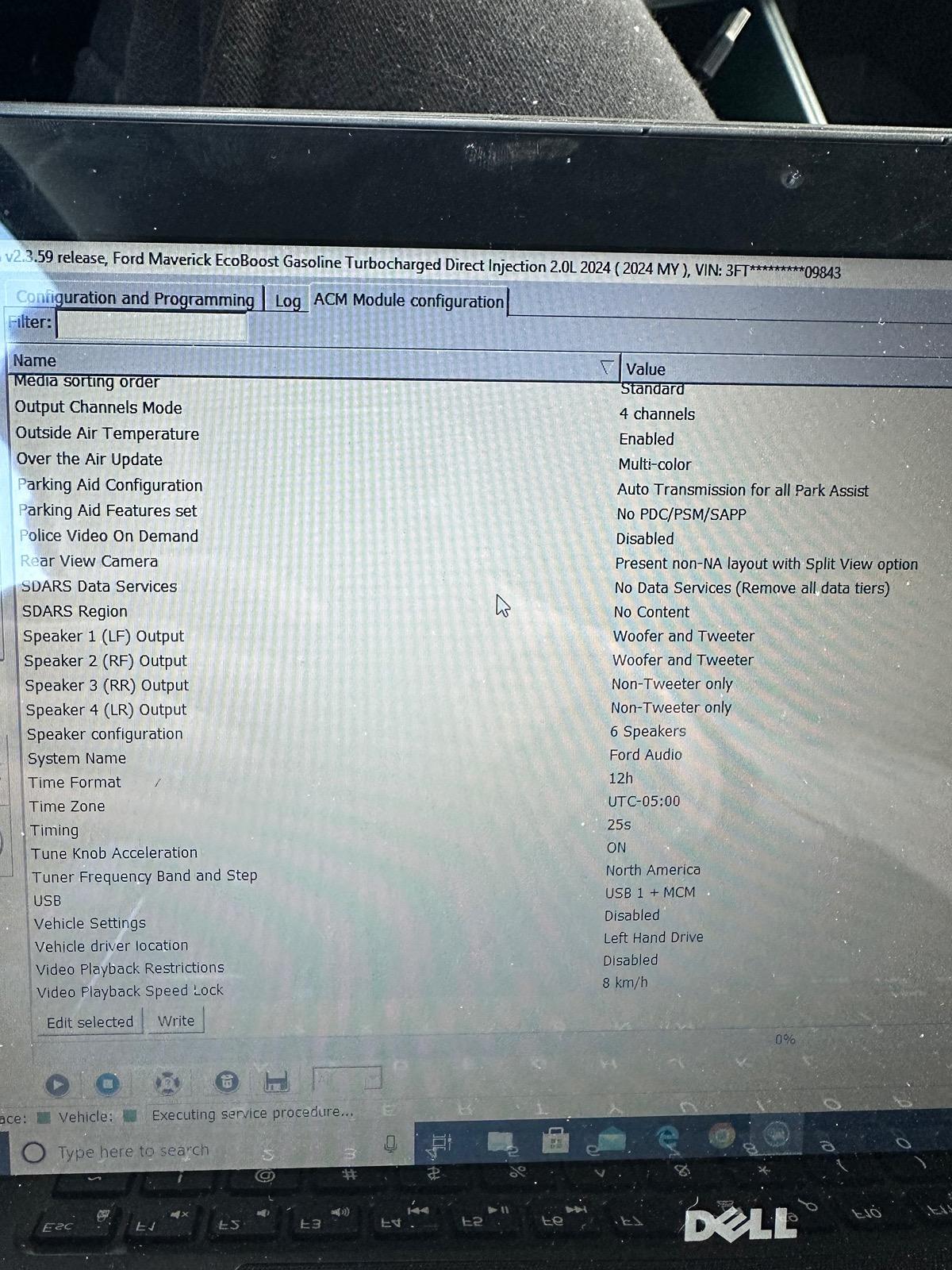
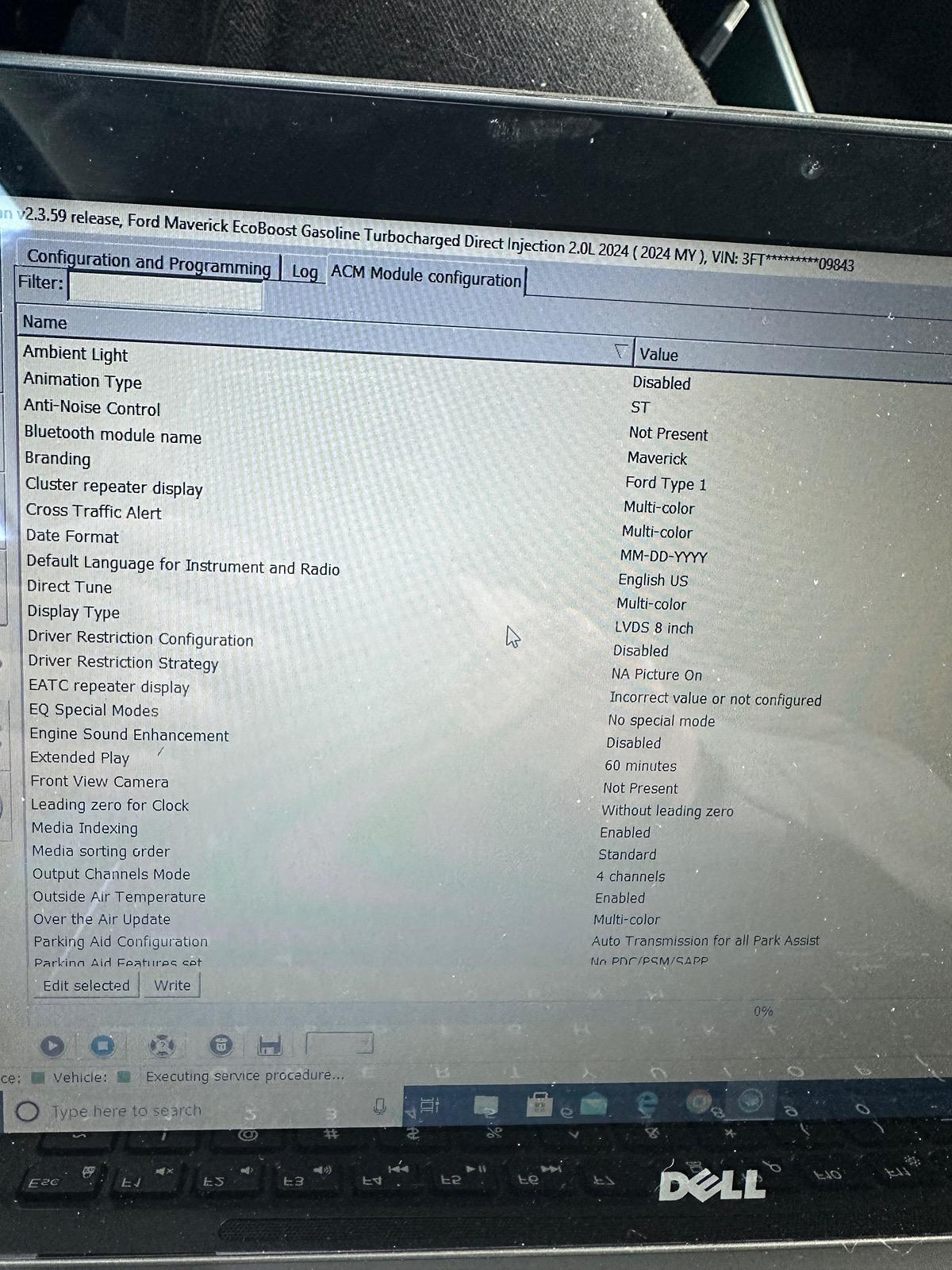
Just checked and your as built codes are 100% different than mine. They are completely different and that kind of stumps me. It makes me think the 2024s coding is a lot different for some reason. I took pictures of all my ACM settings the as built and the easy mode.
Ford Maverick Forscan Ideas for Dummies (Things You Can Do Using Easy Mode) IMG_2835
Ford Maverick Forscan Ideas for Dummies (Things You Can Do Using Easy Mode) IMG_2836
Ford Maverick Forscan Ideas for Dummies (Things You Can Do Using Easy Mode) IMG_2837
Ford Maverick Forscan Ideas for Dummies (Things You Can Do Using Easy Mode) IMG_2838
Ford Maverick Forscan Ideas for Dummies (Things You Can Do Using Easy Mode) IMG_2839
 

EONR24

2.0L EcoBoost
Well-known member
First Name
Swag
Joined
Feb 26, 2024
Threads
44
Messages
1,442
Reaction score
1,655
Location
United States
Vehicle(s)
2024 Ford Maverick XL
Engine
2.0L EcoBoost
If anyone else can try the animation type change to ST in the ACM module and can provide their year and drivetrain that would be awesome. just helps to narrow down what vehicles it may not work on. It worked on my 2024 Maverick XL ecoboost awd.
 
Last edited:
Sponsored

EONR24

2.0L EcoBoost
Well-known member
First Name
Swag
Joined
Feb 26, 2024
Threads
44
Messages
1,442
Reaction score
1,655
Location
United States
Vehicle(s)
2024 Ford Maverick XL
Engine
2.0L EcoBoost
There is lots of useful information on MTC about using Forscan to make interesting and useful changes to the computer modules in our trucks. This post is not about using Forscan software or programming devices--you can find that information as a sticky in the Forscan forum.

This post is for those who don't speak hexadecimal* or are otherwise hesitant to change as-built codes (or for anyone who wants to make a quick change). I have compiled several changes you can make using "easy" (not as-built) mode. Instead of selecting a module through an as-built entry, look below it and there will be a module with the same name, but not as-built (not in all cases). Connect to that module. It's the same module, just named and accessed differently. The difference is that entries are in plain English [mostly]. Be sure to write the changes. Before doing any of these changes back up your as-built modules. Use at your own risk, of course, but these changes have all done well for me. I've included links in MTC for where more information can be found on these Forscan edits.
[*I know changing as-built modules does not require actually understanding hexadecimal--it's a figure of speech.]

Enable Traffic Sign Recognition (TSR)
IPMA:
Traffic Sign Recognition (TSR) - Speed Limit Information Function (SLIF)
Traffic Sign Recognition Mode - Camera data only
IPC:
Traffic Sign Recognition (TSR) - Disabled - Counterintuitive but important
Speed Limit Information Function (SLIF) - Enabled [if disabled you get European sign symbols]
https://www.mavericktruckclub.com/f...orscan-mod-confirmed-working.9399/post-748132

Adding Drive Modes
1. Enter ABS module and search for SDM
2. For SDM - ABS disable it
3. Depending which package you have installed enable the following if any say disabled
SDM - Mode 11 (Sport)
SDM - Mode 4 (Sand)
SDM - Mode 5 (Mud)
SDM - Mode 9 (Eco)
4. Check the DTC codes to see if you threw one
https://www.mavericktruckclub.com/f...-and-snow-confirmed-working.10229/post-211182

Stop being locked out of functions due to being in motion
ACM
Driver Restriction Configuration - Disabled
https://www.mavericktruckclub.com/forum/threads/for-your-safety-blah-blah-blah.35866/post-690772

"Disable" Key Fob Panic Button
No 2 press option on Mavs (that I can find; available on other Ford vehicles)
BCM (BdyCM)
Panic Alarm Mode - Lights Only
https://www.mavericktruckclub.com/forum/threads/disable-panic-alarm.21229/

Disable double honk when exiting running vehicle
BCM (BdyCM)
Double Honk on Leaving Cabine [sic] - Disabled
https://www.mavericktruckclub.com/forum/threads/disabling-double-horn-chirp.9208/post-555900

Enable ECO Coach (indicators about improving fuel economy)
IPC
Enable:
ECO Mode
Eco Coach Feature
Eco Coach with Efficient Drive Mode
https://www.mavericktruckclub.com/forum/threads/forscan-mod-–-enable-eco-coach-mode.25533/post-777948

All Windows Up/Down with Press and Hold Fob Button (Lariat only)
Enable:
BCM (BdyCM)
Global Close Initial
Global Close Vehicle
Global Open Initial
Global Open Vehicle
Global Window Close w Remote
Global Window Open w Remote
DDM
Global Window Close
PDM
Global Window Close
https://www.mavericktruckclub.com/f...nfirmed-working-lariat-only.11092/post-758399

I created this thread to help others not have to cull through all the various threads and posts with lots of replies and superfluous information. Please feel free to add to this list of Forscan edits, but it would be good to stay true to the attempt to include only instructions for easy mode.

===Addendum===
Adjust Heated Steering Wheel Temperature (if equipped)
SCCM
Change value to desired degree in Celsius
https://www.mavericktruckclub.com/f...-you-can-do-using-easy-mode.44179/post-780569

Adjust Heated Seats L/R Temperature (if equipped)
HVAC
Change value to desired degree in Celsius
[I haven't actually done this one; I have no need. However, it seems obvious that it would work.]

Enable Radio ST Animation
1. ACM
2. Under “Animation Type” change Standard Ford to ST.
https://www.mavericktruckclub.com/f...-you-can-do-using-easy-mode.44179/post-785360
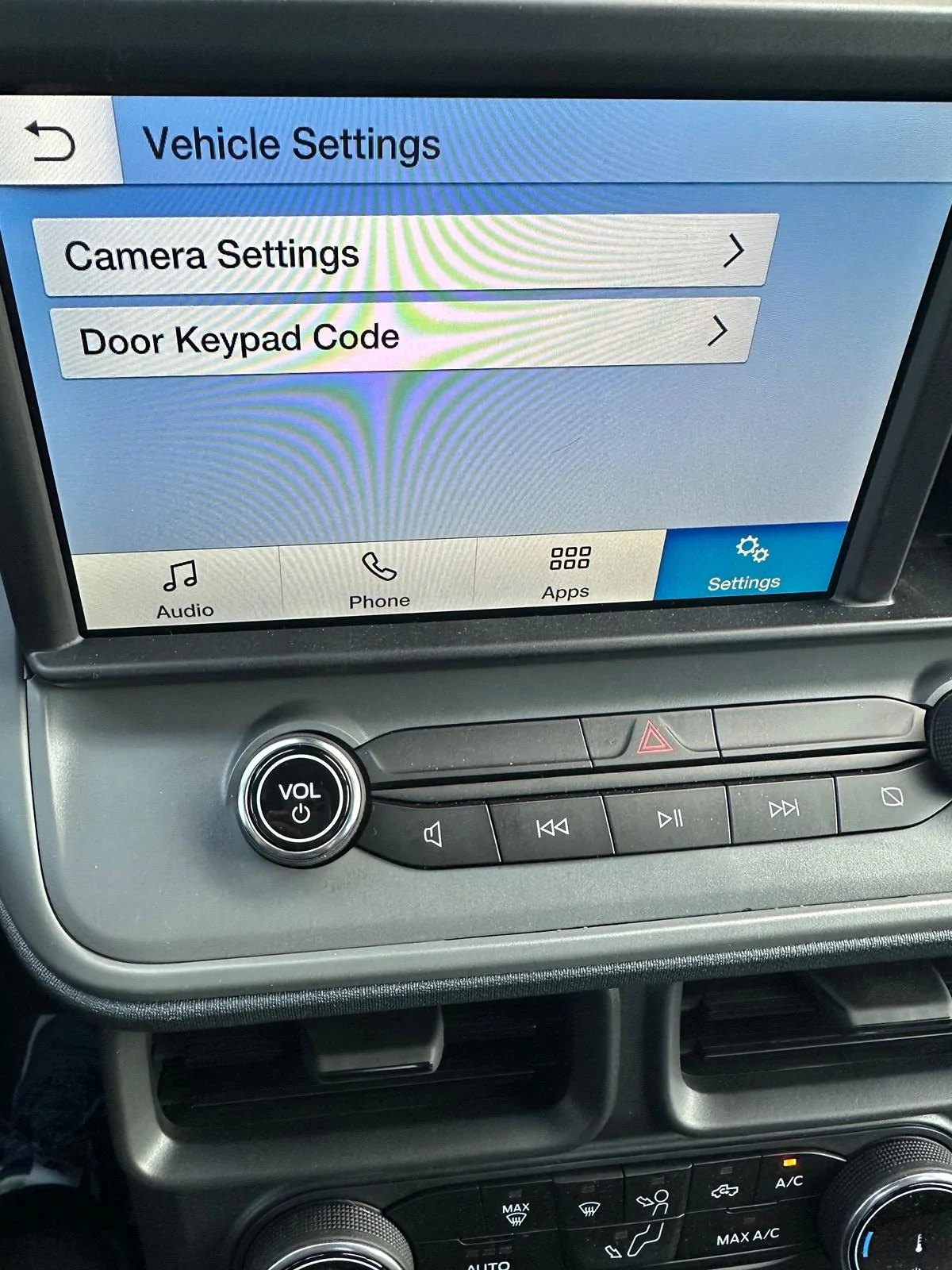
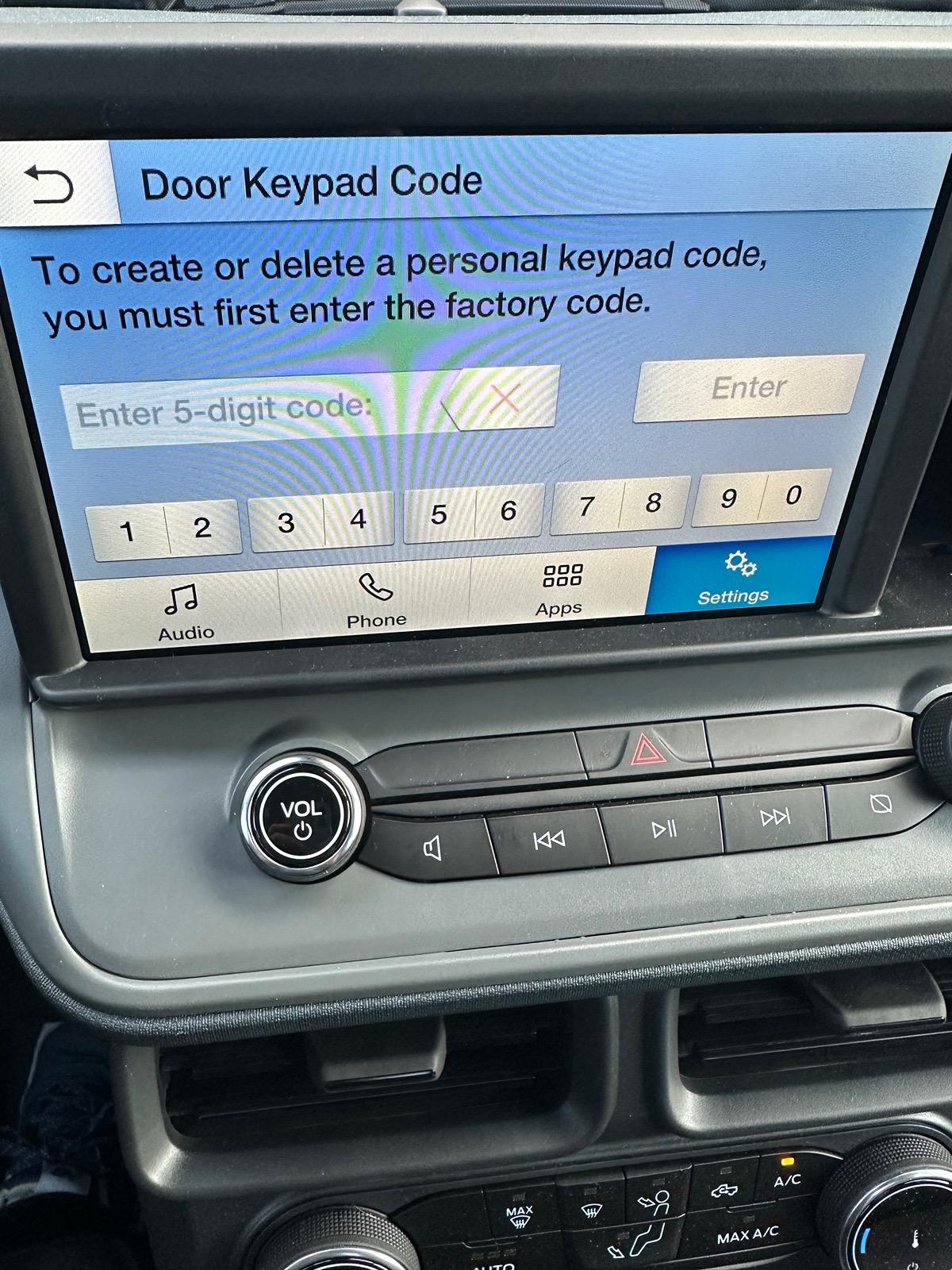
I found another ACM tweak but I am not sure it would be useful to anyone but I was able to add this menu to the vehicle settings in the radio. I don’t know if this menu is already in some mavericks or not.

Enable Door Keypad Code Menu
1. ACM
2. Enable “Vehicle Settings”
Ford Maverick Forscan Ideas for Dummies (Things You Can Do Using Easy Mode) IMG_2841
Ford Maverick Forscan Ideas for Dummies (Things You Can Do Using Easy Mode) IMG_2842
 

Iakona

2.0L EcoBoost
Well-known member
First Name
Jason
Joined
Jan 30, 2022
Threads
4
Messages
108
Reaction score
76
Location
Elgin, North Dakota
Vehicle(s)
2023 Maverick Tremor
Engine
2.0L EcoBoost
Enabling TSR is a journey unto its own lol. Depends on the truck model and screen. I did hours of fiddling around and I still couldn’t figure it out. Eventually someone discovered that it works on xlt fx4 6” screens only if the TSR menu screen is disabled. Counterintuitive, but that’s what works.
I've got it working flawlessly in both of my Mavericks and with the US style signs.
 

Jeff D.

2.0L EcoBoost
Well-known member
First Name
Jeff
Joined
Oct 22, 2023
Threads
17
Messages
641
Reaction score
736
Location
Duluth, MN.
Vehicle(s)
'24 Maverick Lariat & '25 Chevy Equinox LT
Engine
2.0L EcoBoost
I found another ACM tweak but I am not sure it would be useful to anyone but I was able to add this menu to the vehicle settings in the radio. I don’t know if this menu is already in some mavericks or not.

Enable Door Keypad Code Menu
1. ACM
2. Enable “Vehicle Settings”
IMG_2841.jpeg
IMG_2842.jpeg
Interesting! My guess is this would only work with a factory installed keypad, since it asks for the factory code? Or would this work with the stick on battery powered version that is available for the Maverick from the dealer?
 

EONR24

2.0L EcoBoost
Well-known member
First Name
Swag
Joined
Feb 26, 2024
Threads
44
Messages
1,442
Reaction score
1,655
Location
United States
Vehicle(s)
2024 Ford Maverick XL
Engine
2.0L EcoBoost
Interesting! My guess is this would only work with a factory installed keypad, since it asks for the factory code? Or would this work with the stick on battery powered version that is available for the Maverick from the dealer?
That’s my question as well. It would be nice if it worked with the battery powered one that is available.
Sponsored


Top