Sponsored

vandeda2024

2.5L Hybrid
Well-known member
Joined
Jul 19, 2024
Threads
6
Messages
211
Reaction score
284
Location
US
Vehicle(s)
2025 XL Hybrid, AWD, 4K
Engine
2.5L Hybrid
To jpalmer1's point, the owners manual seems to indicate you can turn the reminder off, but it must be done manually for each seating position. From the 2025 manual:

Switching the Seatbelt Reminder On and Off

Ford Maverick FINALLY, FORScan coding to disable the Seatbelt Information Screen! (CONFIRMED WORKING) {filename}
WARNING: While the system allows you to deactivate it, this system is designed to improve your chances of being safely belted and surviving an accident. We recommend you leave the system activated for yourself and others who may use the vehicle.
Note: The driver and front passenger warnings switch off independently. When you perform this procedure for one seating position and the other seat is occupied, fasten the other seat.
Read Steps 1 - 4 before proceeding with the programming procedure.
Make sure that:
  • You set the parking brake.
  • The transmission is in park (P).
  • The ignition is off.
  • You close all vehicle doors.
  • You unfasten the driver and front passenger seatbelts.
  1. Start the engine.
  1. Wait a short period of time until the seatbelt warning light switches off. After Step 2, wait an additional five seconds before proceeding with Step 3. Once you start Step 3, complete the procedure within 30 seconds.
  1. For the seating position you are switching off, fasten then unfasten the seatbelt four times at a moderate speed, ending in the unfastened state. After each unfasten, the seatbelt warning light switches on and off with each fasten.
  1. The seatbelt warning light flashes for confirmation.
This switches the feature off for that seating position if it is currently on.
This switches the feature on for that seating position if it is currently off.
Sponsored
 

Jpalmer1

2.5L Hybrid
Well-known member
First Name
Joe
Joined
Aug 3, 2024
Threads
10
Messages
109
Reaction score
61
Location
Dallas, TX
Vehicle(s)
2025 Lariat Hybrid AWD
Engine
2.5L Hybrid
This is what's working for me. '24 XLT Hybrid.

No message if driver is clicked in. Pops up if not.
Goes away immediately when clicked if message is showing.
Indicator should still work for all seats.

Ford Maverick FINALLY, FORScan coding to disable the Seatbelt Information Screen! (CONFIRMED WORKING) {filename}


I changed this so that it won't ding at me at startup.

Ford Maverick FINALLY, FORScan coding to disable the Seatbelt Information Screen! (CONFIRMED WORKING) {filename}
GotMojo . . thank you. I was able to make the module code changes, but I can't seem to find that "Seatbelt Warning Market" anywhere? In fact, can't seem to find that "IPC Module configuration" tab . . any hints where I will find that?
 

Mabcim

2.0L EcoBoost
Well-known member
First Name
Mark
Joined
Oct 4, 2021
Threads
3
Messages
1,229
Reaction score
1,094
Location
Rochester, NY
Vehicle(s)
25 Maverick Lariat 2.0 AWD; 23 Escape ST Line Select 2.0 AWD
Engine
2.0L EcoBoost
Clubs
 
GotMojo . . thank you. I was able to make the module code changes, but I can't seem to find that "Seatbelt Warning Market" anywhere? In fact, can't seem to find that "IPC Module configuration" tab . . any hints where I will find that?
On the screen where you picked the As Built version of IPC, pick the non-As Built IPC. That is ‘easy mode”. If you look through the spreadsheet for IPC, you can find the seat belt market in there as well; I don’t recall the exact number/location, but I found it when I was playing with mine a couple weeks ago.
 

84convertablegt

2.5L Hybrid
Well-known member
First Name
Aaron
Joined
May 6, 2025
Threads
2
Messages
50
Reaction score
70
Location
Ohio
Vehicle(s)
2025 Maverick XLT AWD Hybrid
Engine
2.5L Hybrid
Works on 2025 XLT hybrid. Thank you
 

HotRod Junkie

2.0L EcoBoost
Well-known member
First Name
Jerry
Joined
Apr 11, 2025
Threads
0
Messages
65
Reaction score
82
Location
Mansfield , TX
Vehicle(s)
2024 Maverick XLT
Engine
2.0L EcoBoost
Clubs
 
@EONR24

Thanks a ton for all the info for this seatbelt nag and all the other Forscan info. 👍🏻👍🏻👍🏻

Everything listed has worked perfectly as of today for me. That includes the other mods in the other threads as well

24’ XLT Ecoboost
 

Sponsored

chiko

2.5L Hybrid
Well-known member
First Name
Eric
Joined
Mar 21, 2025
Threads
20
Messages
158
Reaction score
90
Location
Hampton, VA
Vehicle(s)
2024 Maverick
Engine
2.5L Hybrid
GotMojo . . thank you. I was able to make the module code changes, but I can't seem to find that "Seatbelt Warning Market" anywhere? In fact, can't seem to find that "IPC Module configuration" tab . . any hints where I will find that?
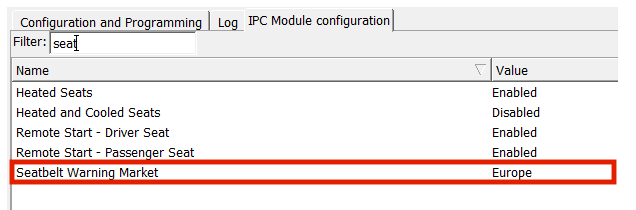
Based on my testing so far. And I like the Eutope setting vs USA. The Europe Warning Market delays warnings until about 12 MPH when the doors auto lock. Less than that, no thing happens. No Chimes, No Popups RED or GREEN. As best I recall, if you exceed 12 MPH and get a RED popup, the GREEN popup still lingers until timeout, rather than clear immediately, but that is my fuzzy memory from a couple days ago. My contemporaneous notes also say that the EUROPE mode changes the TRIP 1 monitor from INSTANT MPG (default for USA) to Distance to Empty (default for EUROPE) but you can change that setting independent of the Warning Market. DTE does not seem to make much sense for a hybrid so I set it back to INSTANT MPG (I forget where, probably a menu rather than forscan).

It is a singular setting in the IPC module, not as set of settngs across individuals codes.
Livinitup spreadsheet says its 720-01-02 last bit for the SWM. A bit complicated but EUROPE is ECE and USA is FMVSS or something like that. My trackpad is acting weird but those are the only two choices for the Market.
 
Last edited:

tptools

2.0L EcoBoost
Member
First Name
Steve
Joined
Nov 18, 2025
Threads
1
Messages
10
Reaction score
2
Location
noaxs321
Vehicle(s)
2024 Ford Maverick Lariat
Engine
2.0L EcoBoost
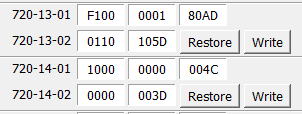
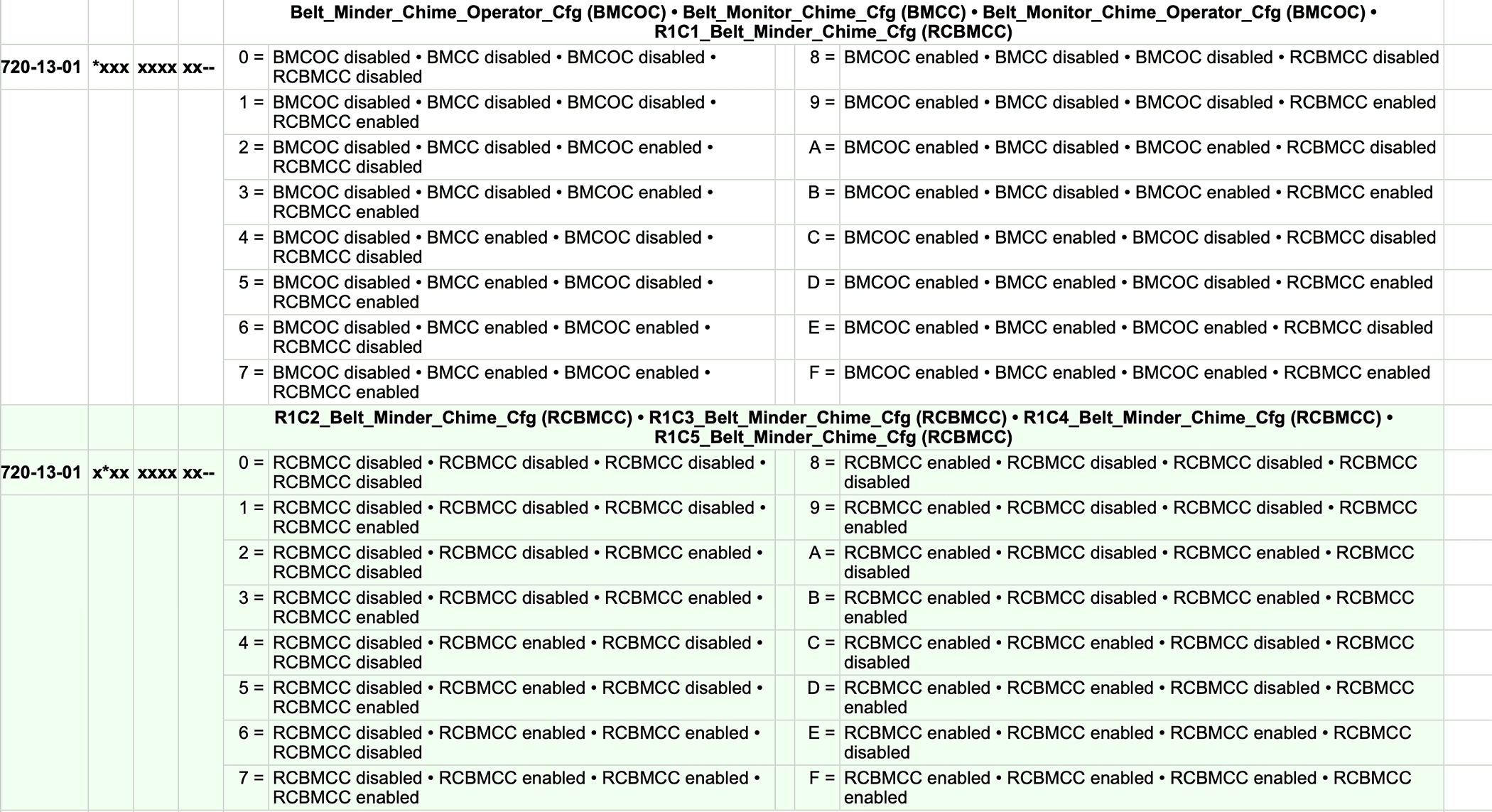
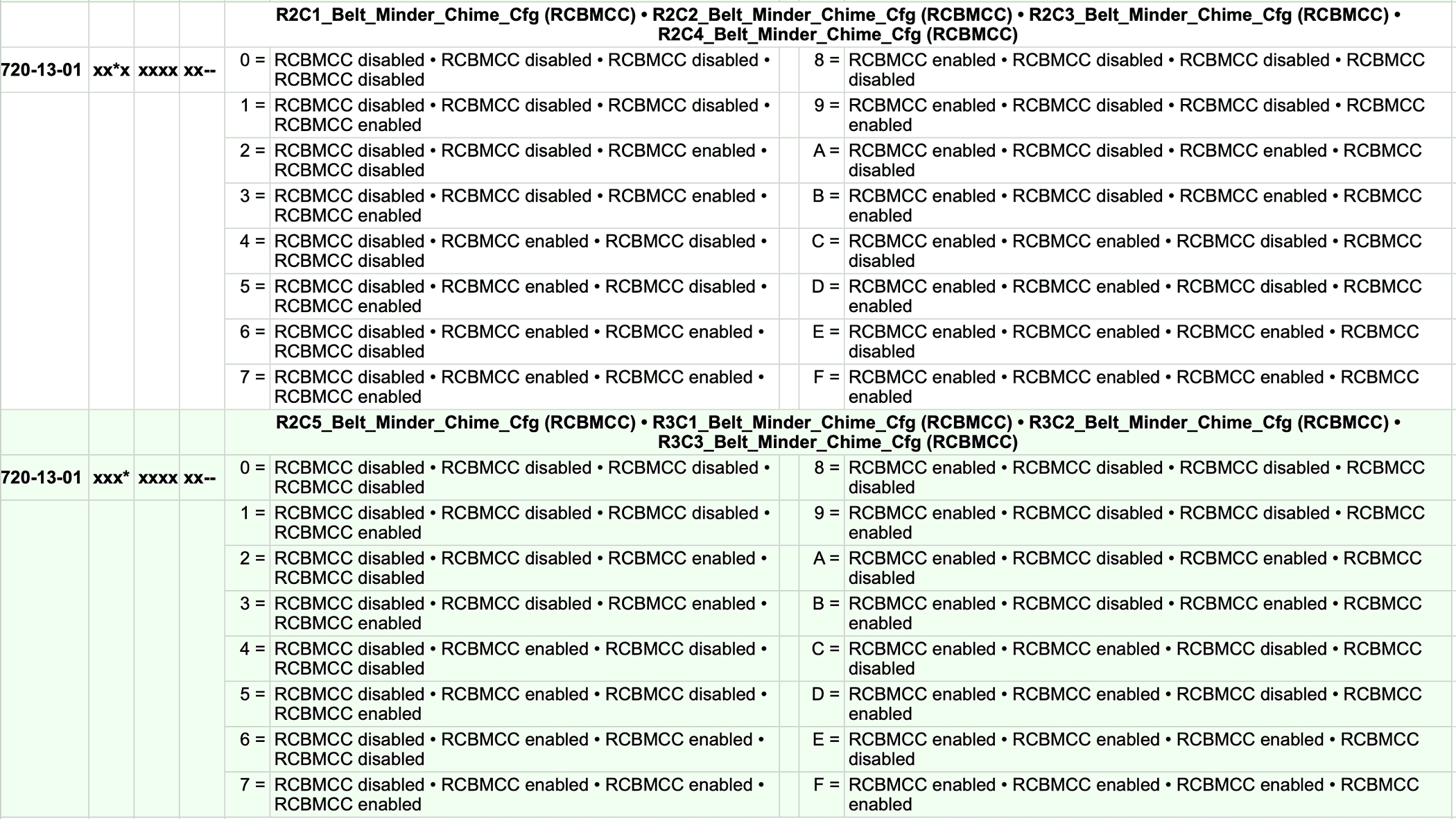
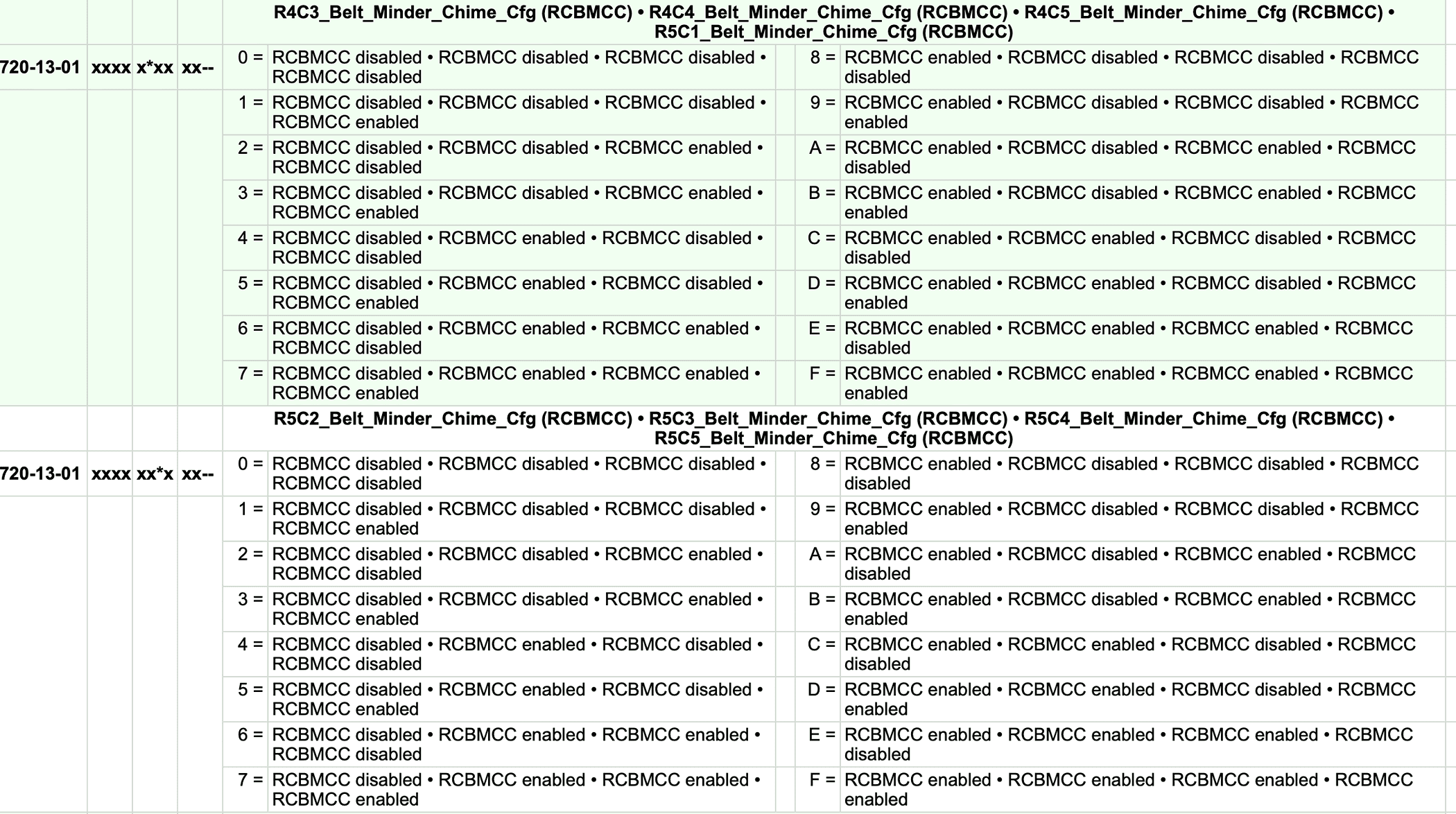
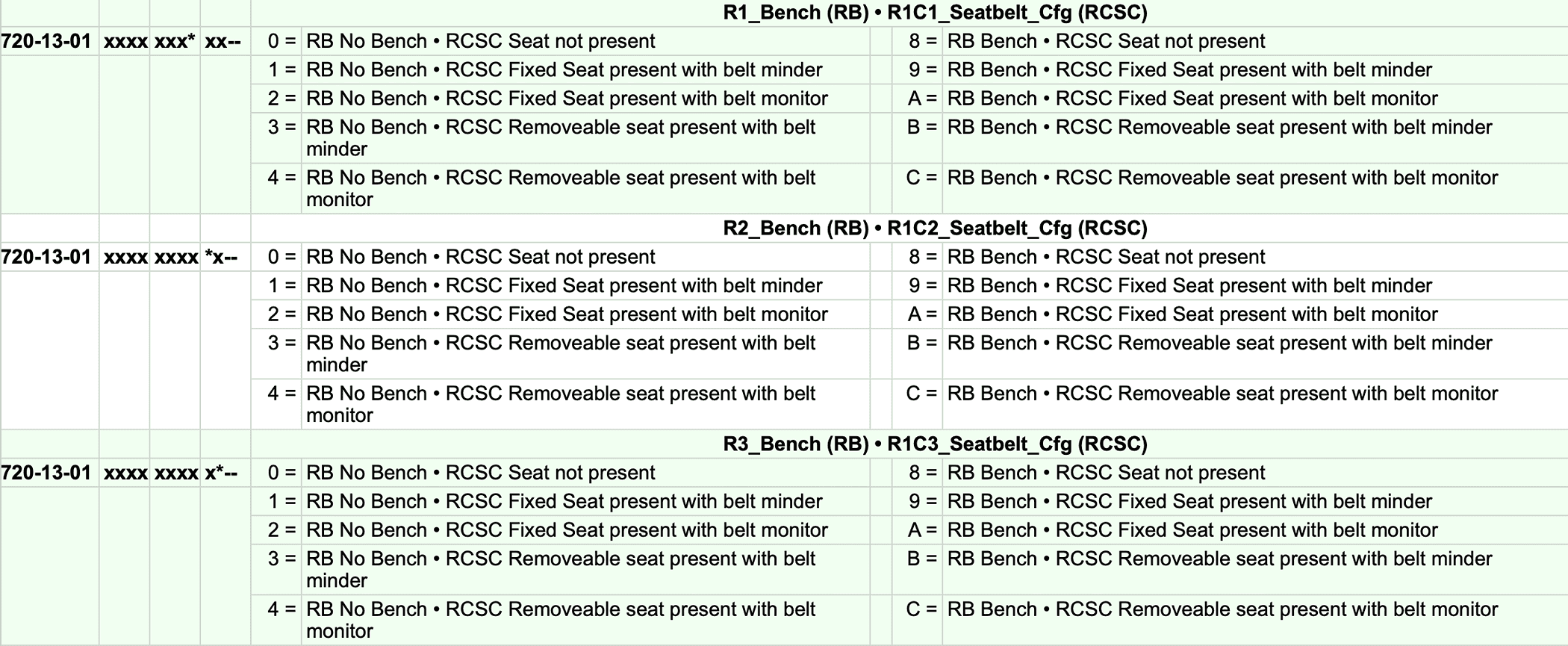
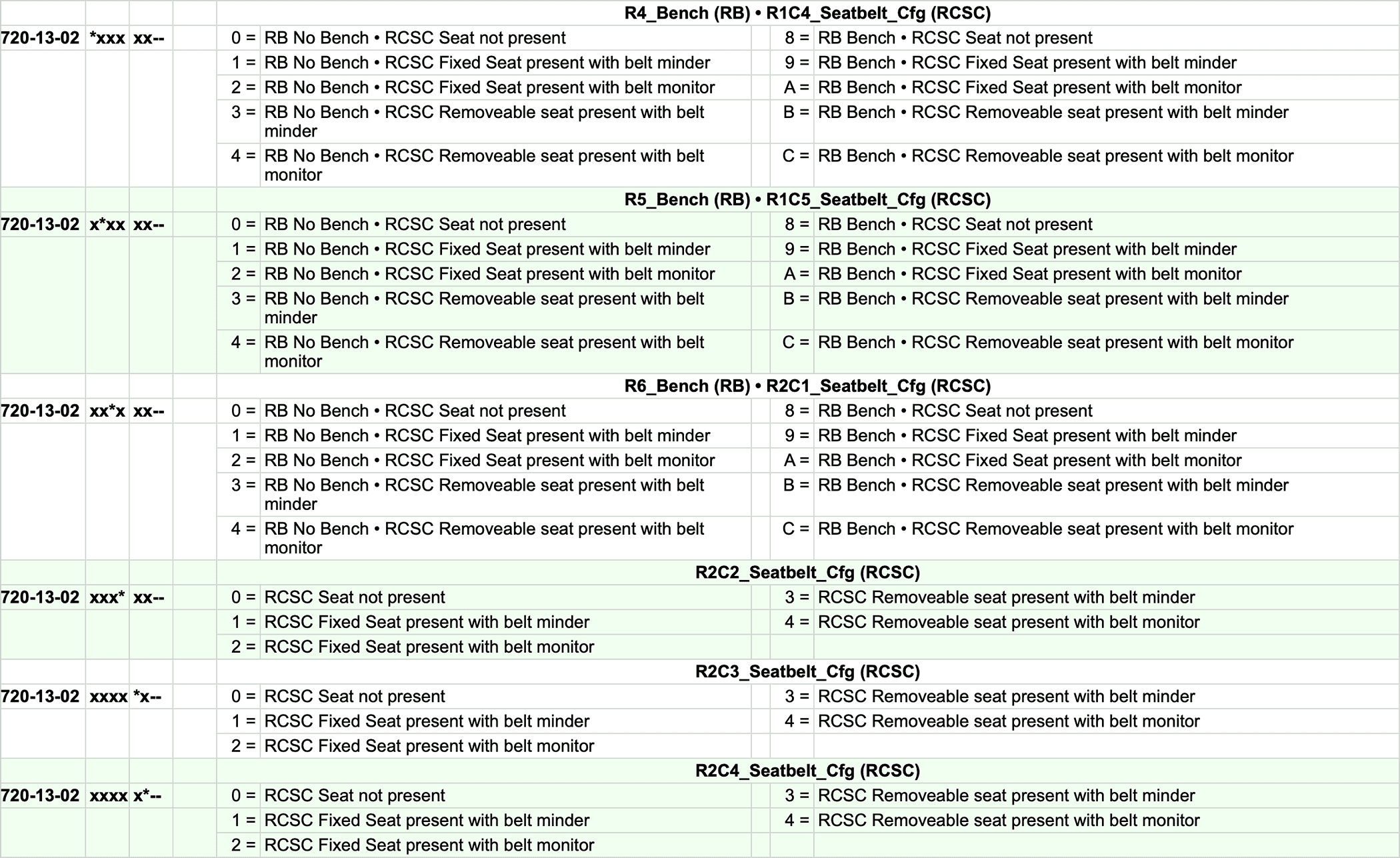
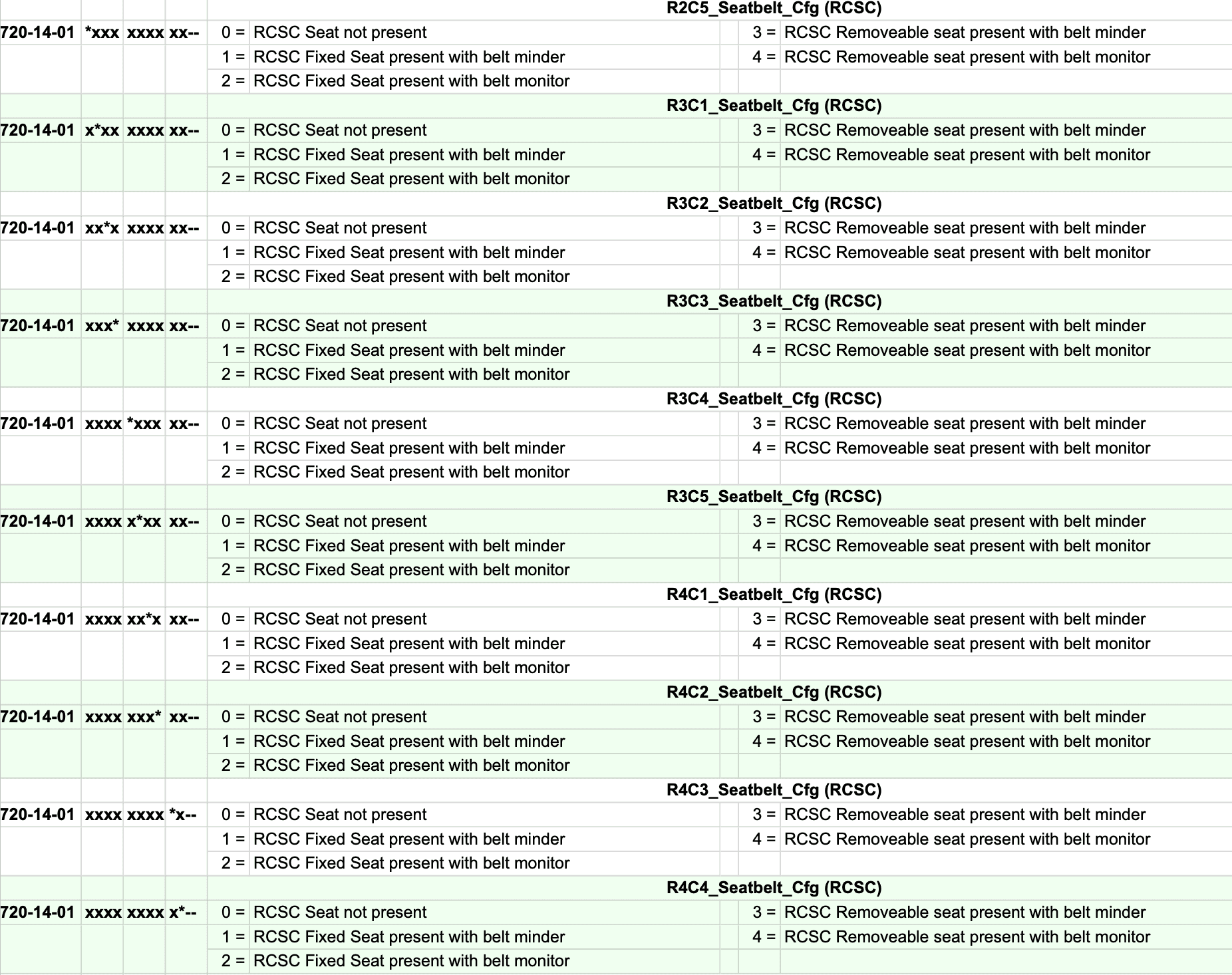
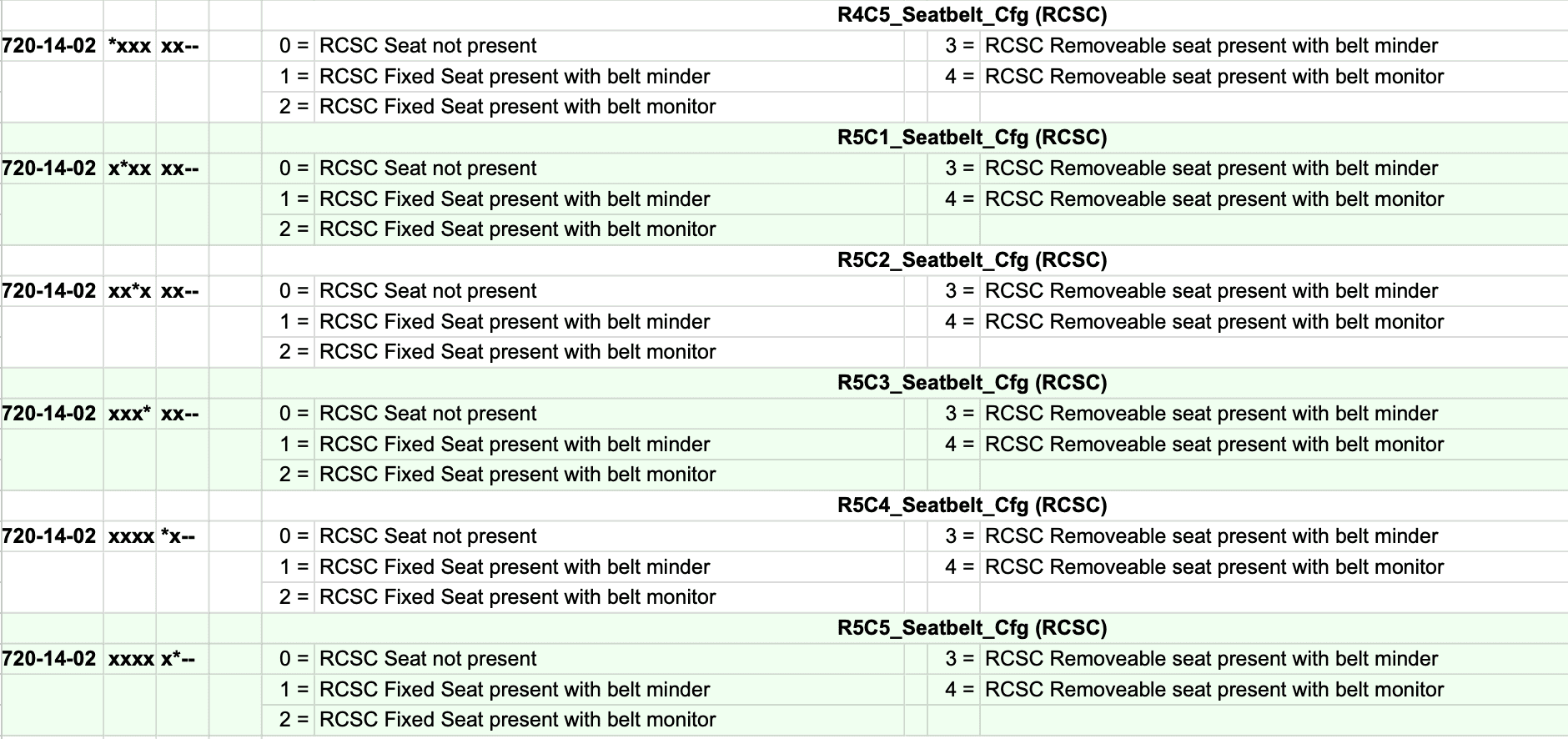
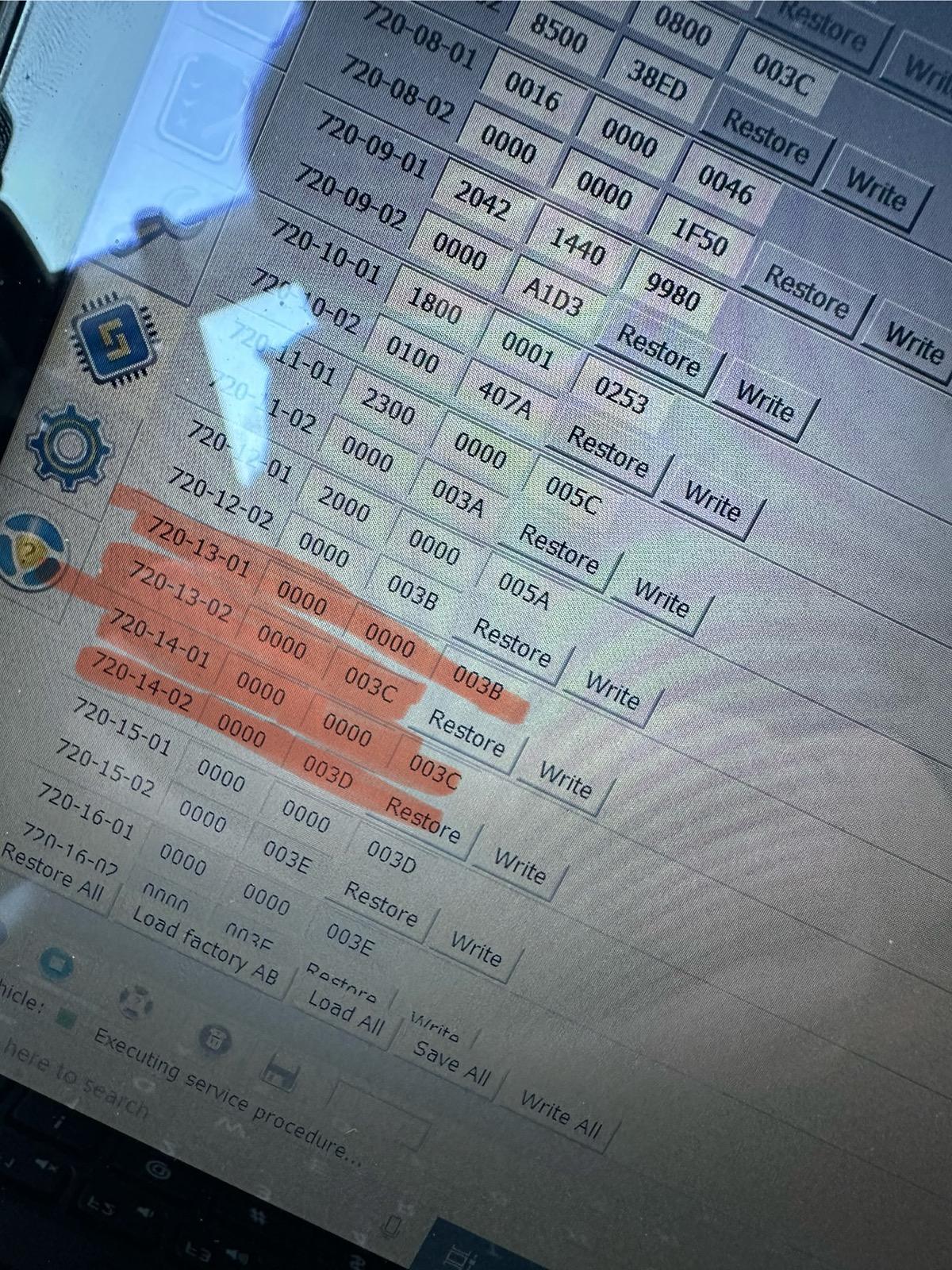
If you would like to keep the Minder (the dash light This just takes away the seating pic graphics within the box. chime) and not the Monitor (the seatbelt screen) I would suggest doing the following coding based on this diagram and my original coding in my Maverick.

720-13-01 9100 0001 8000
720-13-02 0110 1000
720-14-01 1000 0000 0000
720-14-02 All Zeros


Ford Maverick FINALLY, FORScan coding to disable the Seatbelt Information Screen! (CONFIRMED WORKING) {filename}
I
If you would like to keep the Minder (the dash light and chime) and not the Monitor (the seatbelt screen) I would suggest doing the following coding based on this diagram and my original coding in my Maverick.

720-13-01 9100 0001 8000
720-13-02 0110 1000
720-14-01 1000 0000 0000
720-14-02 All Zeros


Ford Maverick FINALLY, FORScan coding to disable the Seatbelt Information Screen! (CONFIRMED WORKING) {filename}
If you would like to keep the Minder (the dash light and chime) and not the Monitor (the seatbelt screen) I would suggest doing the following coding based on this diagram and my original coding in my Maverick.

720-13-01 9100 0001 8000
720-13-02 0110 1000
720-14-01 1000 0000 0000
720-14-02 All Zeros


Ford Maverick FINALLY, FORScan coding to disable the Seatbelt Information Screen! (CONFIRMED WORKING) {filename}
Hello everyone!

EDIT: CHECK OUT MY OFFICIAL FORSCAN MAVERICK SPREADSHEET HERE!

I finally found the way to disable the ANNOYING Seatbelt information screen that comes on when you start the truck and stays on even after you buckle your seatbelt. Thank you to @ZOODAD over on the F250 forums for the coding information. THIS SUPER DUTY spreadsheet he put together might be useful for future MAVERICK FORScan Mods. THIS IS CONFIRMED TO WORK FOR ALL 2022-2024 MAVERICK TRIMS!

DISABLE SEATBELT INFORMATION SCREEN
1. Open IPC AS BUILT
2. Change line 720-13-01 and 720-13-02 to ALL ZEROS. And WRITE the changes. Click yes to let Forscan correct the checksum.
3. Change line 720-14-01 and 720-14-02 to ALL ZEROS. And WRITE the changes. Click yes to let Forscan correct the checksum.

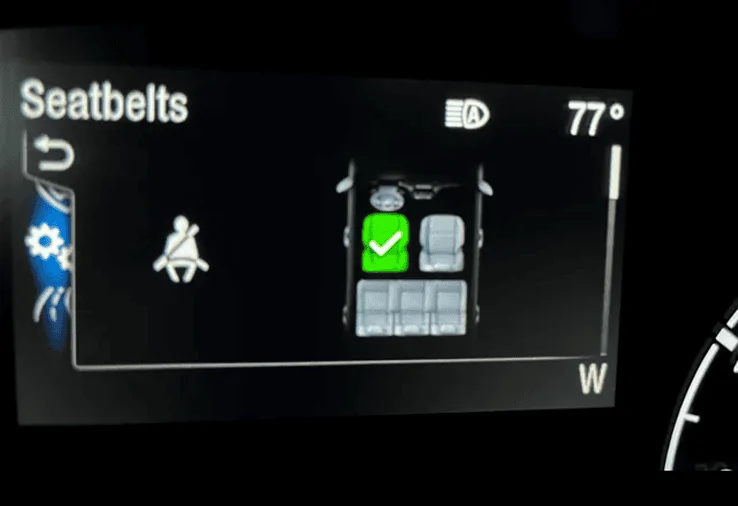
These changes remove the seatbelt info screen pictured below entirely and it also disables the seatbelt chime too. I would love to hear from other members to see if these changes work in your Maverick! Tested on my 2024 Maverick XL AWD ECOBOOST with the smaller instrument cluster. (The 4 inch Instrument Cluster)


EDIT: ALTERNATIVE CODINGS to keep the seatbelt minder (chime and dash light) but disable the seatbelt monitor (information screen) are linked HERE , HERE and HERE !

ALSO, Here is a link to 2 more changes that DISABLE DOOR AND KEY CHIMES and I went ahead and listed them below! I have successfully tested both of these coding changes!
Let me know if these codings work for your Mavericks out there!

DISABLE DOOR CHIMES
1. IPC AS BUILT
2. Go to 720-01-02
3. Replace the third digit with a "0" as shown here

xx0x-xxxx

4. Write the changes and let Forscan correct the checksum

DISABLE KEY-IN IGNITON CHIME
1. IPC AS BUILT
2. Go to 720-01-02
3. Replace the sixth digit with a "2" as shown here

xxxx-x2xx

4. Write the changes and let Forscan correct the checksum


Ford Maverick FINALLY, FORScan coding to disable the Seatbelt Information Screen! (CONFIRMED WORKING) {filename}


Ford Maverick FINALLY, FORScan coding to disable the Seatbelt Information Screen! (CONFIRMED WORKING) {filename}
I can confirm that your 3 links for “ ALTERNATIVE CODINGS to keep the seatbelt minder (chime and dash light) but disable the seatbelt monitor (information screen) “ DO NOT WORK on a 2024 Maverick Lariat 2.0l eco boost. Followed to the letter and this just takes away the seating pic graphics within the box, but the display itself remains along with the ok button graphic.
Hello everyone!

EDIT: CHECK OUT MY OFFICIAL FORSCAN MAVERICK SPREADSHEET HERE!

I finally found the way to disable the ANNOYING Seatbelt information screen that comes on when you start the truck and stays on even after you buckle your seatbelt. Thank you to @ZOODAD over on the F250 forums for the coding information. THIS SUPER DUTY spreadsheet he put together might be useful for future MAVERICK FORScan Mods. THIS IS CONFIRMED TO WORK FOR ALL 2022-2024 MAVERICK TRIMS!

DISABLE SEATBELT INFORMATION SCREEN
1. Open IPC AS BUILT
2. Change line 720-13-01 and 720-13-02 to ALL ZEROS. And WRITE the changes. Click yes to let Forscan correct the checksum.
3. Change line 720-14-01 and 720-14-02 to ALL ZEROS. And WRITE the changes. Click yes to let Forscan correct the checksum.

These changes remove the seatbelt info screen pictured below entirely and it also disables the seatbelt chime too. I would love to hear from other members to see if these changes work in your Maverick! Tested on my 2024 Maverick XL AWD ECOBOOST with the smaller instrument cluster. (The 4 inch Instrument Cluster)


EDIT: ALTERNATIVE CODINGS to keep the seatbelt minder (chime and dash light) but disable the seatbelt monitor (information screen) are linked HERE , HERE and HERE !

ALSO, Here is a link to 2 more changes that DISABLE DOOR AND KEY CHIMES and I went ahead and listed them below! I have successfully tested both of these coding changes!
Let me know if these codings work for your Mavericks out there!

DISABLE DOOR CHIMES
1. IPC AS BUILT
2. Go to 720-01-02
3. Replace the third digit with a "0" as shown here

xx0x-xxxx

4. Write the changes and let Forscan correct the checksum

DISABLE KEY-IN IGNITON CHIME
1. IPC AS BUILT
2. Go to 720-01-02
3. Replace the sixth digit with a "2" as shown here

xxxx-x2xx

4. Write the changes and let Forscan correct the checksum


Ford Maverick FINALLY, FORScan coding to disable the Seatbelt Information Screen! (CONFIRMED WORKING) {filename}


Ford Maverick FINALLY, FORScan coding to disable the Seatbelt Information Screen! (CONFIRMED WORKING) {filename}
I can confirm that your 3 links for “ ALTERNATIVE CODINGS to keep the seatbelt minder (chime and dash light) but disable the seatbelt monitor (information screen) “ DO NOT WORK on a 2024 Maverick Lariat 2.0l eco boost. Followed to the letter and this just takes away the seating pic graphics within the box, but the display itself remains along with the ok button graphic.
 

tptools

2.0L EcoBoost
Member
First Name
Steve
Joined
Nov 18, 2025
Threads
1
Messages
10
Reaction score
2
Location
noaxs321
Vehicle(s)
2024 Ford Maverick Lariat
Engine
2.0L EcoBoost
If you would like to keep the Minder (the dash light and chime) and not the Monitor (the seatbelt screen) I would suggest doing the following coding based on this diagram and my original coding in my Maverick.

720-13-01 9100 0001 8000
720-13-02 0110 1000
720-14-01 1000 0000 0000
720-14-02 All Zeros


Ford Maverick FINALLY, FORScan coding to disable the Seatbelt Information Screen! (CONFIRMED WORKING) {filename}
The information section is still under vehicle settings and still shows everything including the TPMS. The only thing it doesn’t show is seatbelt! Thank you to everyone for confirming this works! So far it has worked for every Maverick year and trim!
I can confirm that your 3 links for “ ALTERNATIVE CODINGS to keep the seatbelt minder (chime and dash light) but disable the seatbelt monitor (information screen) “ DO NOT WORK on a 2024 Maverick Lariat 2.0l eco boost. Followed to the letter and this just takes away the seating pic graphics within the box, but the display itself remains along with the ok button graphic.
 

tptools

2.0L EcoBoost
Member
First Name
Steve
Joined
Nov 18, 2025
Threads
1
Messages
10
Reaction score
2
Location
noaxs321
Vehicle(s)
2024 Ford Maverick Lariat
Engine
2.0L EcoBoost
Just verified that it works on my 2024 Lariat hybrid. Thank you for posting.
Interesting.. As I just verified it DOES NOT work in my 2024 Lariat 2.9l eco. Still get the minder box with ok button, but only the seat graphics are removed.
 

tptools

2.0L EcoBoost
Member
First Name
Steve
Joined
Nov 18, 2025
Threads
1
Messages
10
Reaction score
2
Location
noaxs321
Vehicle(s)
2024 Ford Maverick Lariat
Engine
2.0L EcoBoost
I can’t understand your comment. Right now i am working on an optional change that will keep the chime and the seatbelt dash light but still disable the seatbelt information screen. Not sure if it’s possible yet.
So far to date it does Not seem possible.
 
Sponsored

chiko

2.5L Hybrid
Well-known member
First Name
Eric
Joined
Mar 21, 2025
Threads
20
Messages
158
Reaction score
90
Location
Hampton, VA
Vehicle(s)
2024 Maverick
Engine
2.5L Hybrid
On the screen where you picked the As Built version of IPC, pick the non-As Built IPC. That is ‘easy mode”. If you look through the spreadsheet for IPC, you can find the seat belt market in there as well; I don’t recall the exact number/location, but I found it when I was playing with mine a couple weeks ago.
It is in the IPC module. You can set a filter near the top left corner of ForScan and it will only show seatbelt stuff. Your choices are 0 for USA and 1 for Europe. I had an unexpected side-effect when I changed mine in that the Trip Screen showed Distance to Empty instead of what it did before (which I dont recall) but I was able to set it back using the normal menu.

If you search for "slithy" you will find my post with some more details.
 

tptools

2.0L EcoBoost
Member
First Name
Steve
Joined
Nov 18, 2025
Threads
1
Messages
10
Reaction score
2
Location
noaxs321
Vehicle(s)
2024 Ford Maverick Lariat
Engine
2.0L EcoBoost
I can’t understand your comment. Right now i am working on an optional change that will keep the chime and the seatbelt dash light but still disable the seatbelt information screen. Not sure if it’s possible yet.
I guess I don’t understand, because it was supposedly already possible according to several previous posts you made and having 3 links to a particular Alternative method to keep the chime and red light but get rid of the “check screen display”. This is not possible at this time, even when following your other posts and links for the instructions to do so.
Still waiting for a working solution to completely remove the seatbelt information screen and NOTHING ELSE.
 

Phil1349

2.5L Hybrid
Member
Joined
Dec 2, 2025
Threads
0
Messages
5
Reaction score
1
Location
US
Vehicle(s)
2025 Lariat
Engine
2.5L Hybrid
I picked up a 2025 Lariat Hybrid two weeks ago. I can confirm that I am UNABLE to write anything to the IPC Module in EZ mode or AS BUILT. Using latest version of FORScan. Attempted the Seatbelt Menu / Chime change as well as the Frost alert.

I was able to write to the BCM, DDM, PDM. Have not tried anything else yet.
 

tptools

2.0L EcoBoost
Member
First Name
Steve
Joined
Nov 18, 2025
Threads
1
Messages
10
Reaction score
2
Location
noaxs321
Vehicle(s)
2024 Ford Maverick Lariat
Engine
2.0L EcoBoost
Hello everyone!

EDIT: CHECK OUT MY OFFICIAL FORSCAN MAVERICK SPREADSHEET HERE!

I finally found the way to disable the ANNOYING Seatbelt information screen that comes on when you start the truck and stays on even after you buckle your seatbelt. Thank you to @ZOODAD over on the F250 forums for the coding information. THIS SUPER DUTY spreadsheet he put together might be useful for future MAVERICK FORScan Mods. THIS IS CONFIRMED TO WORK FOR ALL 2022-2024 MAVERICK TRIMS!

DISABLE SEATBELT INFORMATION SCREEN
1. Open IPC AS BUILT
2. Change line 720-13-01 and 720-13-02 to ALL ZEROS. And WRITE the changes. Click yes to let Forscan correct the checksum.
3. Change line 720-14-01 and 720-14-02 to ALL ZEROS. And WRITE the changes. Click yes to let Forscan correct the checksum.

These changes remove the seatbelt info screen pictured below entirely and it also disables the seatbelt chime too. I would love to hear from other members to see if these changes work in your Maverick! Tested on my 2024 Maverick XL AWD ECOBOOST with the smaller instrument cluster. (The 4 inch Instrument Cluster)


EDIT: ALTERNATIVE CODINGS to keep the seatbelt minder (chime and dash light) but disable the seatbelt monitor (information screen) are linked HERE , HERE and HERE !

ALSO, Here is a link to 2 more changes that DISABLE DOOR AND KEY CHIMES and I went ahead and listed them below! I have successfully tested both of these coding changes!
Let me know if these codings work for your Mavericks out there!

DISABLE DOOR CHIMES
1. IPC AS BUILT
2. Go to 720-01-02
3. Replace the third digit with a "0" as shown here

xx0x-xxxx

4. Write the changes and let Forscan correct the checksum

DISABLE KEY-IN IGNITON CHIME
1. IPC AS BUILT
2. Go to 720-01-02
3. Replace the sixth digit with a "2" as shown here

xxxx-x2xx

4. Write the changes and let Forscan correct the checksum


Ford Maverick FINALLY, FORScan coding to disable the Seatbelt Information Screen! (CONFIRMED WORKING) {filename}


Ford Maverick FINALLY, FORScan coding to disable the Seatbelt Information Screen! (CONFIRMED WORKING) {filename}
The “Alternative methods” showing here do not work as stated.
 

Mabcim

2.0L EcoBoost
Well-known member
First Name
Mark
Joined
Oct 4, 2021
Threads
3
Messages
1,229
Reaction score
1,094
Location
Rochester, NY
Vehicle(s)
25 Maverick Lariat 2.0 AWD; 23 Escape ST Line Select 2.0 AWD
Engine
2.0L EcoBoost
Clubs
 
I picked up a 2025 Lariat Hybrid two weeks ago. I can confirm that I am UNABLE to write anything to the IPC Module in EZ mode or AS BUILT. Using latest version of FORScan. Attempted the Seatbelt Menu / Chime change as well as the Frost alert.

I was able to write to the BCM, DDM, PDM. Have not tried anything else yet.
Just to confirm, you submitted for the Extended License? You can get a free one that lasts a couple months.
Sponsored


Top