
- First Name
- Mark
- Joined
- Oct 4, 2021
- Threads
- 3
- Messages
- 1,252
- Reaction score
- 1,127
- Location
- Rochester, NY
- Vehicle(s)
- 25 Maverick Lariat 2.0 AWD; 23 Escape ST Line Select 2.0 AWD
- Engine
- 2.0L EcoBoost
- Thread starter
- #1
Welcome to my DIY Auto Start/Stop disable and defaulting to a Drive Mode project!
[Edit 4/13/25: For my ‘25 I removed everything to do with the Drive Mode. The traction button is now in the drive mode’s place, so I didn’t want my board connected to that. In the Arduino code, I just set all the defines relate to it to indicate the feature was not there. Everything else is the same.]
I know there are other ways of doing some of this, but I wanted a DIY project for multiple reasons.
I realized there are other ways of doing this, and I will touch on why I choose to not use them, I'm hoping we can keep this thread focused on this project and a friendly conversation.
First, I will digress a little. Besides this project, I also wanted to install a Ford auto dimming mirror and homelink garage opener. I wanted to make a harness for that as well, and not just tap into the factory harness. Since that project also needed similar connectors and wires, I was able to buy everything for both projects at once. I already had the mirror and homelink before I even got my Maverick, and before the Cheap Auto Dimming Mirror thread got started. Eventually, I'll write a post about the mirror and homelink project.
Edit 5/28/23: DIY - Garage Opener and Ford Auto Dimming Mirror | MaverickTruckClub - 2022+ Ford Maverick Pickup Forum, News, Owners, Discussions
Okay, back to this project.
There is the $100 Auto Start Stop Eliminator. It plugs into the ODBII port. That means it is on the CAN Bus doing something to make the change, but I didn't know what. People do use it and like it, so you could use that instead if all you want is to disable Auto Start/Stop. I did not want to spend the $100 to get just Auto Start/Stop disable and have something that I didn't know how it was working. BTW - All the parts for both of my projects, minus the mirror and homelink, were less than $100.
There is a wire at the battery you can disconnect, that disables Auto Start/Stop. Again, people have done it and it seems to work for them. I have seen posts where it doesn't work exactly the same as just pressing Auto Start/Stop button, which I can agree with since disconnecting the wire makes the vehicle think your battery is too low to do Auto Start/Stop. I believe it may impact how the vehicle tries to charge the battery. Either way, it is not a good thing to have disconnected if you go in for service.
There is a way in ForScan to disable Auto Start/Stop. Many people are happy with that. That seems to light up the circled 'A' on the instrument cluster, indicating Auto Start/Stop is not available. Like it does while the vehicle is warming up and not ready to do it yet. I do not see that light when I press the button to disable Auto Start/Stop. So, like the battery wire disconnect option, I'm not sure what else could behave differently.
Bottom-line, I wanted something that acts the same as if I pressed the Auto Start/Stop button. And the engineer in me figured there had to be a way to create a circuit to 'press the button' for me.
Then came along the following 'Default Eco-Mode with this DIY Module' thread from @CubanRedneck
https://www.mavericktruckclub.com/forum/threads/default-to-eco-mode-with-this-diy-module.17805/
This inspired me since he gave good details on how to take apart the center console and did the legwork on the buttons. He used some relays and mentioned how it could maybe be done with solid state components. Since I was going to do that for Auto Start/Stop disable, I figured I would help the community and add a way to set the default Drive Mode to my project.
What I didn't realize was all the issues around powering my circuit. This is mostly around the typically used Fuse 3 being powered when the vehicle is remote started and that you cannot change Drive Modes then. I have detailed my findings in my attached project document.
I also wanted to go a step further and make it so you could change the settings whenever you want to, without re-programming the circuit or changing code. I make use of the vehicle buttons themselves to allow you to change the settings. So, if you were towing for a couple days, you could default to Tow/Haul, then go back to Normal or Eco or whatever your favorite Drive Mode is. The other advantage is that you can have it put things back to factory settings, for those times you go in for service.
I have created this project, so it is flexible for your needs. You do not need to implement all the circuits; you can do just the ones you want. For example, if you just want to do Auto Start/Stop or just Drive Mode, you can. If you do not want to be able to change the settings whenever, then you don't have to. You can also use whichever power you want, Fuse 3 (remote started power) or Fuse 6 (fully started power). All you have to do is tweak a couple of program settings. I have fully described how to do this in my document and code.
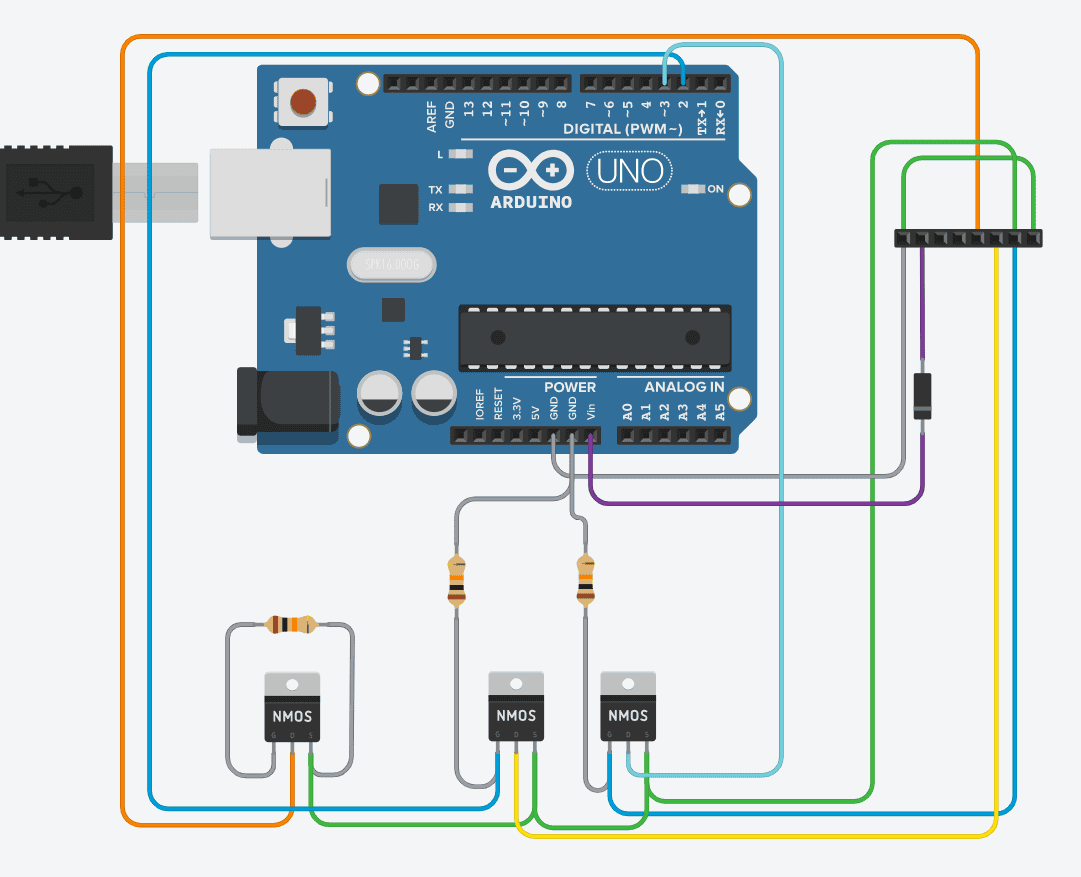
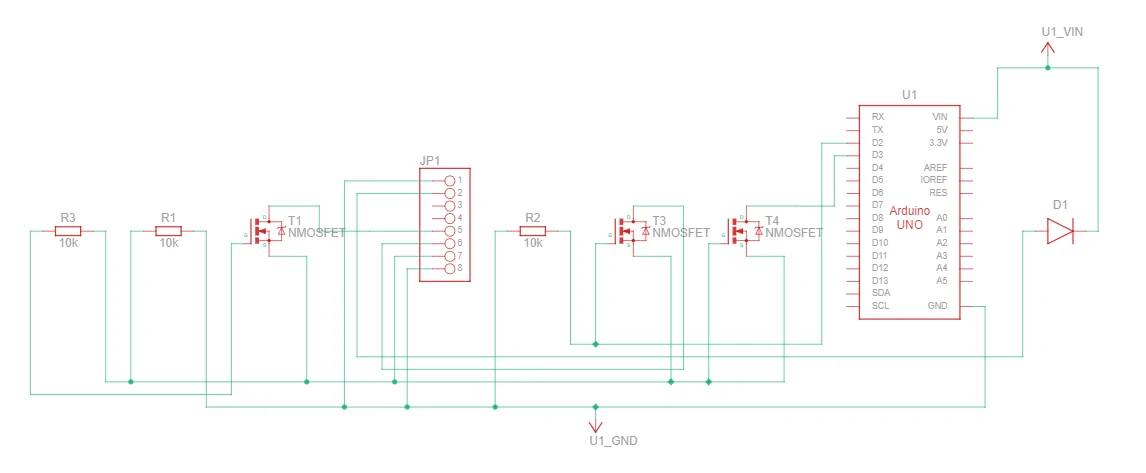
At high-level, I am using an Arduino and circuitry. Nothing is stored in the vehicle, just the Arduino. The Arduino simulates you pressing the button. I created a wiring harness to go between the Auto Start/Stop & Driver Mode button module and the factory harness. You could just tap off the factory harness if you want to. I ended up using Fuse 3 because a normal fuse tap does not fit in Fuse 6; which added a lot more time to this project, but helped make it more flexible for you.
My attached document goes through everything from the how I figured out the connectors, to what to purchase, to where to purchase, to creating the wiring harness, to schematic, to layouts of the different options, to actual pictures; everything you need to know!
I have done a lot of testing but realize this is buyer beware. No warranty expressed or written. Use it at your own risk. With that out of the way, if you have any questions let me know.
NOTE: to use the Arduino code you will have rename the attached file by deleting the ".txt" extension, or just copy the contents of the file into your Arduino project file
Edit (6/9/23):
Here is another option:
https://www.mavericktruckclub.com/f...o-mode-with-this-diy-module.17805/post-575236
Here is a way to restrict options via Forscan: https://www.mavericktruckclub.com/forum/threads/set-your-preferred-drive-mode-w-forscan.32702/
Edit (7/22/23):
Link to video for first item in my 6/9/23 edit:
https://www.mavericktruckclub.com/f...-default-mode-install-video-and-review.34591/
Edit (9/29/23):
A thread how to possible do this with just Forscan:
https://www.mavericktruckclub.com/f...nd-confirmed-admin-warning-no-trolling.37694/
Edit (2/1/24):
This plus into the switches, where I plug mine in, was originally made for Focus MK4, but another member uses it in his Maverick:
https://www.mavericktruckclub.com/forum/threads/auto-stop-which-one.42637/post-754989
Ones I talked about above:
- There is the $100 Auto Start Stop Eliminator.
- There is a wire at the battery you can disconnect.
[Edit 4/13/25: For my ‘25 I removed everything to do with the Drive Mode. The traction button is now in the drive mode’s place, so I didn’t want my board connected to that. In the Arduino code, I just set all the defines relate to it to indicate the feature was not there. Everything else is the same.]
I know there are other ways of doing some of this, but I wanted a DIY project for multiple reasons.
I realized there are other ways of doing this, and I will touch on why I choose to not use them, I'm hoping we can keep this thread focused on this project and a friendly conversation.
First, I will digress a little. Besides this project, I also wanted to install a Ford auto dimming mirror and homelink garage opener. I wanted to make a harness for that as well, and not just tap into the factory harness. Since that project also needed similar connectors and wires, I was able to buy everything for both projects at once. I already had the mirror and homelink before I even got my Maverick, and before the Cheap Auto Dimming Mirror thread got started. Eventually, I'll write a post about the mirror and homelink project.
Edit 5/28/23: DIY - Garage Opener and Ford Auto Dimming Mirror | MaverickTruckClub - 2022+ Ford Maverick Pickup Forum, News, Owners, Discussions
Okay, back to this project.
There is the $100 Auto Start Stop Eliminator. It plugs into the ODBII port. That means it is on the CAN Bus doing something to make the change, but I didn't know what. People do use it and like it, so you could use that instead if all you want is to disable Auto Start/Stop. I did not want to spend the $100 to get just Auto Start/Stop disable and have something that I didn't know how it was working. BTW - All the parts for both of my projects, minus the mirror and homelink, were less than $100.
There is a wire at the battery you can disconnect, that disables Auto Start/Stop. Again, people have done it and it seems to work for them. I have seen posts where it doesn't work exactly the same as just pressing Auto Start/Stop button, which I can agree with since disconnecting the wire makes the vehicle think your battery is too low to do Auto Start/Stop. I believe it may impact how the vehicle tries to charge the battery. Either way, it is not a good thing to have disconnected if you go in for service.
There is a way in ForScan to disable Auto Start/Stop. Many people are happy with that. That seems to light up the circled 'A' on the instrument cluster, indicating Auto Start/Stop is not available. Like it does while the vehicle is warming up and not ready to do it yet. I do not see that light when I press the button to disable Auto Start/Stop. So, like the battery wire disconnect option, I'm not sure what else could behave differently.
Bottom-line, I wanted something that acts the same as if I pressed the Auto Start/Stop button. And the engineer in me figured there had to be a way to create a circuit to 'press the button' for me.
Then came along the following 'Default Eco-Mode with this DIY Module' thread from @CubanRedneck
https://www.mavericktruckclub.com/forum/threads/default-to-eco-mode-with-this-diy-module.17805/
This inspired me since he gave good details on how to take apart the center console and did the legwork on the buttons. He used some relays and mentioned how it could maybe be done with solid state components. Since I was going to do that for Auto Start/Stop disable, I figured I would help the community and add a way to set the default Drive Mode to my project.
What I didn't realize was all the issues around powering my circuit. This is mostly around the typically used Fuse 3 being powered when the vehicle is remote started and that you cannot change Drive Modes then. I have detailed my findings in my attached project document.
I also wanted to go a step further and make it so you could change the settings whenever you want to, without re-programming the circuit or changing code. I make use of the vehicle buttons themselves to allow you to change the settings. So, if you were towing for a couple days, you could default to Tow/Haul, then go back to Normal or Eco or whatever your favorite Drive Mode is. The other advantage is that you can have it put things back to factory settings, for those times you go in for service.
I have created this project, so it is flexible for your needs. You do not need to implement all the circuits; you can do just the ones you want. For example, if you just want to do Auto Start/Stop or just Drive Mode, you can. If you do not want to be able to change the settings whenever, then you don't have to. You can also use whichever power you want, Fuse 3 (remote started power) or Fuse 6 (fully started power). All you have to do is tweak a couple of program settings. I have fully described how to do this in my document and code.
At high-level, I am using an Arduino and circuitry. Nothing is stored in the vehicle, just the Arduino. The Arduino simulates you pressing the button. I created a wiring harness to go between the Auto Start/Stop & Driver Mode button module and the factory harness. You could just tap off the factory harness if you want to. I ended up using Fuse 3 because a normal fuse tap does not fit in Fuse 6; which added a lot more time to this project, but helped make it more flexible for you.
My attached document goes through everything from the how I figured out the connectors, to what to purchase, to where to purchase, to creating the wiring harness, to schematic, to layouts of the different options, to actual pictures; everything you need to know!
I have done a lot of testing but realize this is buyer beware. No warranty expressed or written. Use it at your own risk. With that out of the way, if you have any questions let me know.
NOTE: to use the Arduino code you will have rename the attached file by deleting the ".txt" extension, or just copy the contents of the file into your Arduino project file
Edit (6/9/23):
Here is another option:
https://www.mavericktruckclub.com/f...o-mode-with-this-diy-module.17805/post-575236
Here is a way to restrict options via Forscan: https://www.mavericktruckclub.com/forum/threads/set-your-preferred-drive-mode-w-forscan.32702/
Edit (7/22/23):
Link to video for first item in my 6/9/23 edit:
https://www.mavericktruckclub.com/f...-default-mode-install-video-and-review.34591/
Edit (9/29/23):
A thread how to possible do this with just Forscan:
https://www.mavericktruckclub.com/f...nd-confirmed-admin-warning-no-trolling.37694/
Edit (2/1/24):
This plus into the switches, where I plug mine in, was originally made for Focus MK4, but another member uses it in his Maverick:
https://www.mavericktruckclub.com/forum/threads/auto-stop-which-one.42637/post-754989
Ones I talked about above:
- There is the $100 Auto Start Stop Eliminator.
- There is a wire at the battery you can disconnect.
Sponsored
Attachments
-
4 MB Views: 1,169
-
49.9 KB Views: 597
Last edited: