
Sponsored
Forscan Ideas for Dummies (Things You Can Do Using Easy Mode)


Where’s this located? And does it still work after shutdown?Auto start/stop is another one that’s easy, click on disable if you’re inclined.
Great stuff. I will have to get brave and do a couple of them.
I have a question about disabling the running engine double-beep upon door close. When we drive to the mailbox and get out, I've been leaving the door ajar to prevent the beeps.
If I were to disable that and then proceed to forget that I left my Hybrid "running" when I get home, how long would it stay running?
I have a question about disabling the running engine double-beep upon door close. When we drive to the mailbox and get out, I've been leaving the door ajar to prevent the beeps.
If I were to disable that and then proceed to forget that I left my Hybrid "running" when I get home, how long would it stay running?
- First Name
- Stuart
- Joined
- Mar 22, 2022
- Threads
- 29
- Messages
- 1,740
- Reaction score
- 1,727
- Location
- Dallas South
- Vehicle(s)
- 2004 Avalon
- Engine
- 2.5L Hybrid
For Hybrids, is there a way to display engine and/or Electric motor RPM's?There is lots of useful information on MTC about using Forscan to make interesting and useful changes to the computer modules in our trucks. This post is not about using Forscan software or programming devices--you can find that information as a sticky in the Forscan forum.
This post is for those who don't speak hexadecimal* or are otherwise hesitant to change as-built codes (or for anyone who wants to make a quick change). I have compiled several changes you can make using "easy" (not as-built) mode. Instead of selecting a module through an as-built entry, look below it and there will be a module with the same name, but not as-built (not in all cases). Connect to that module. It's the same module, just named and accessed differently. The difference is that entries are in plain English [mostly]. Be sure to write the changes. Before doing any of these changes back up your as-built modules. Use at your own risk, of course, but these changes have all done well for me. I've included links in MTC for where more information can be found on these Forscan edits.
[*I know changing as-built modules does not require actually understanding hexadecimal--it's a figure of speech.]
Enable Traffic Sign Recognition (TSR)
IPMA:
Traffic Sign Recognition (TSR) - Speed Limit Information Function (SLIF)
Traffic Sign Recognition Mode - Camera data only
IPC:
Traffic Sign Recognition (TSR) - Disabled - Counterintuitive but important
Speed Limit Information Function (SLIF) - Enabled [if disabled you get European sign symbols]
https://www.mavericktruckclub.com/f...orscan-mod-confirmed-working.9399/post-748132
Adding Drive Modes
1. Enter ABS module and search for SDM
2. For SDM - ABS disable it
3. Depending which package you have installed enable the following if any say disabled
SDM - Mode 11 (Sport)
SDM - Mode 4 (Sand)
SDM - Mode 5 (Mud)
SDM - Mode 9 (Eco)
4. Check the DTC codes to see if you threw one
https://www.mavericktruckclub.com/f...-and-snow-confirmed-working.10229/post-211182
Stop being locked out of functions due to being in motion
ACM
Driver Restriction Configuration - Disabled
https://www.mavericktruckclub.com/forum/threads/for-your-safety-blah-blah-blah.35866/post-690772
"Disable" Key Fob Panic Button
No 2 press option on Mavs (that I can find; available on other Ford vehicles)
BCM (BdyCM)
Panic Alarm Mode - Lights Only
https://www.mavericktruckclub.com/forum/threads/disable-panic-alarm.21229/
Disable double honk when exiting running vehicle
BCM (BdyCM)
Double Honk on Leaving Cabine [sic] - Disabled
https://www.mavericktruckclub.com/forum/threads/disabling-double-horn-chirp.9208/post-555900
Enable ECO Coach (indicators about improving fuel economy)
IPC
Enable:
ECO Mode
Eco Coach Feature
Eco Coach with Efficient Drive Mode
https://www.mavericktruckclub.com/forum/threads/forscan-mod-–-enable-eco-coach-mode.25533/post-777948
All Windows Up/Down with Press and Hold Fob Button (Lariat only)
Enable:
BCM (BdyCM)
Global Close Initial
Global Close Vehicle
Global Open Initial
Global Open Vehicle
Global Window Close w Remote
Global Window Open w Remote
DDM
Global Window Close
PDM
Global Window Close
https://www.mavericktruckclub.com/f...nfirmed-working-lariat-only.11092/post-758399
I created this thread to help others not have to cull through all the various threads and posts with lots of replies and superfluous information. Please feel free to add to this list of Forscan edits, but it would be good to stay true to the attempt to include only instructions for easy mode.
- First Name
- Brian
- Joined
- Aug 17, 2023
- Threads
- 19
- Messages
- 883
- Reaction score
- 1,285
- Location
- Lakeside,ca.
- Vehicle(s)
- 2023 maverick tremor/2023 maverick hybrid lariat
- Engine
- 2.0L EcoBoost
Good post, prime collection
Sponsored
- Joined
- Jun 30, 2023
- Threads
- 13
- Messages
- 46
- Reaction score
- 37
- Location
- Joliet, IL
- Vehicle(s)
- 2023 Ford Maverick XL
- Engine
- 2.0L EcoBoost
Does it only restore the low bass or does it affect other things as well?Great post, I bet A LOT of people will be happy to see this one. As mentioned, many folks aren't comfortable playing with the hexadecimal settings.
Setting the factory EQ to flat is another good one for those of us playing with the audio. It is under the ACM setting. I believe it is listed as "EQ Special Modes". The factory radio cuts low bass drastically, and this will restore that part of the signal that is missing. It isn't really necessary for factory speakers, but critical if you're installing a legitimate sub.

Has anyone gotten this to work where the windows actually go up? I've done this on my Maverick and can get the windows to go down, but cannot get them to all go up.All Windows Up/Down with Press and Hold Fob Button (Lariat only)
Enable:
BCM (BdyCM)
Global Close Initial
Global Close Vehicle
Global Open Initial
Global Open Vehicle
Global Window Close w Remote
Global Window Open w Remote
DDM
Global Window Close
PDM
Global Window Close
https://www.mavericktruckclub.com/f...nfirmed-working-lariat-only.11092/post-758399
I created this thread to help others not have to cull through all the various threads and posts with lots of replies and superfluous information. Please feel free to add to this list of Forscan edits, but it would be good to stay true to the attempt to include only instructions for easy mode.
How? Have you actually done this? Everyone just says "disable it" but no one can ever provide an explanation on which module(s) need to be updated with what, because I've disabled it in all the available modules, and I ended up getting the plug-in kit to disable the Auto Start/Stop.Auto start/stop is another one that’s easy, click on disable if you’re inclined.
Not gonna happen with FORScan, you'll need a tune.What I want is to disable the Speed limiter


- First Name
- John
- Joined
- Oct 8, 2023
- Threads
- 13
- Messages
- 347
- Reaction score
- 371
- Location
- Waxahachie, Texas
- Vehicle(s)
- 2025 Maverick Lariat ECO/AWD White with BAP
- Engine
- 2.0L EcoBoost
I followed most of the suggestions, however ran into a problem when adding the traffic sign recognition (TSR). In the IPC module, I do not have a SLIF option, only TSR. When TSR is disabled, there is not any display; when it is enabled, I get European Traffic symbols.There is lots of useful information on MTC about using Forscan to make interesting and useful changes to the computer modules in our trucks. This post is not about using Forscan software or programming devices--you can find that information as a sticky in the Forscan forum.
This post is for those who don't speak hexadecimal* or are otherwise hesitant to change as-built codes (or for anyone who wants to make a quick change). I have compiled several changes you can make using "easy" (not as-built) mode. Instead of selecting a module through an as-built entry, look below it and there will be a module with the same name, but not as-built (not in all cases). Connect to that module. It's the same module, just named and accessed differently. The difference is that entries are in plain English [mostly]. Be sure to write the changes. Before doing any of these changes back up your as-built modules. Use at your own risk, of course, but these changes have all done well for me. I've included links in MTC for where more information can be found on these Forscan edits.
[*I know changing as-built modules does not require actually understanding hexadecimal--it's a figure of speech.]
Enable Traffic Sign Recognition (TSR)
IPMA:
Traffic Sign Recognition (TSR) - Speed Limit Information Function (SLIF)
Traffic Sign Recognition Mode - Camera data only
IPC:
Traffic Sign Recognition (TSR) - Disabled - Counterintuitive but important
Speed Limit Information Function (SLIF) - Enabled [if disabled you get European sign symbols]
https://www.mavericktruckclub.com/f...orscan-mod-confirmed-working.9399/post-748132
Adding Drive Modes
1. Enter ABS module and search for SDM
2. For SDM - ABS disable it
3. Depending which package you have installed enable the following if any say disabled
SDM - Mode 11 (Sport)
SDM - Mode 4 (Sand)
SDM - Mode 5 (Mud)
SDM - Mode 9 (Eco)
4. Check the DTC codes to see if you threw one
https://www.mavericktruckclub.com/f...-and-snow-confirmed-working.10229/post-211182
Stop being locked out of functions due to being in motion
ACM
Driver Restriction Configuration - Disabled
https://www.mavericktruckclub.com/forum/threads/for-your-safety-blah-blah-blah.35866/post-690772
"Disable" Key Fob Panic Button
No 2 press option on Mavs (that I can find; available on other Ford vehicles)
BCM (BdyCM)
Panic Alarm Mode - Lights Only
https://www.mavericktruckclub.com/forum/threads/disable-panic-alarm.21229/
Disable double honk when exiting running vehicle
BCM (BdyCM)
Double Honk on Leaving Cabine [sic] - Disabled
https://www.mavericktruckclub.com/forum/threads/disabling-double-horn-chirp.9208/post-555900
Enable ECO Coach (indicators about improving fuel economy)
IPC
Enable:
ECO Mode
Eco Coach Feature
Eco Coach with Efficient Drive Mode
https://www.mavericktruckclub.com/forum/threads/forscan-mod-–-enable-eco-coach-mode.25533/post-777948
All Windows Up/Down with Press and Hold Fob Button (Lariat only)
Enable:
BCM (BdyCM)
Global Close Initial
Global Close Vehicle
Global Open Initial
Global Open Vehicle
Global Window Close w Remote
Global Window Open w Remote
DDM
Global Window Close
PDM
Global Window Close
https://www.mavericktruckclub.com/f...nfirmed-working-lariat-only.11092/post-758399
I created this thread to help others not have to cull through all the various threads and posts with lots of replies and superfluous information. Please feel free to add to this list of Forscan edits, but it would be good to stay true to the attempt to include only instructions for easy mode.
In the IPMA Module, my settings are:
TSR set to SLIF
TSR Mode set to camera data only
The attached pictures show my situation. I don’t know how to get the US roadsign symbols.
I drive 2024 Ecoboost FX4 AWD
Am I doing anything wrong?
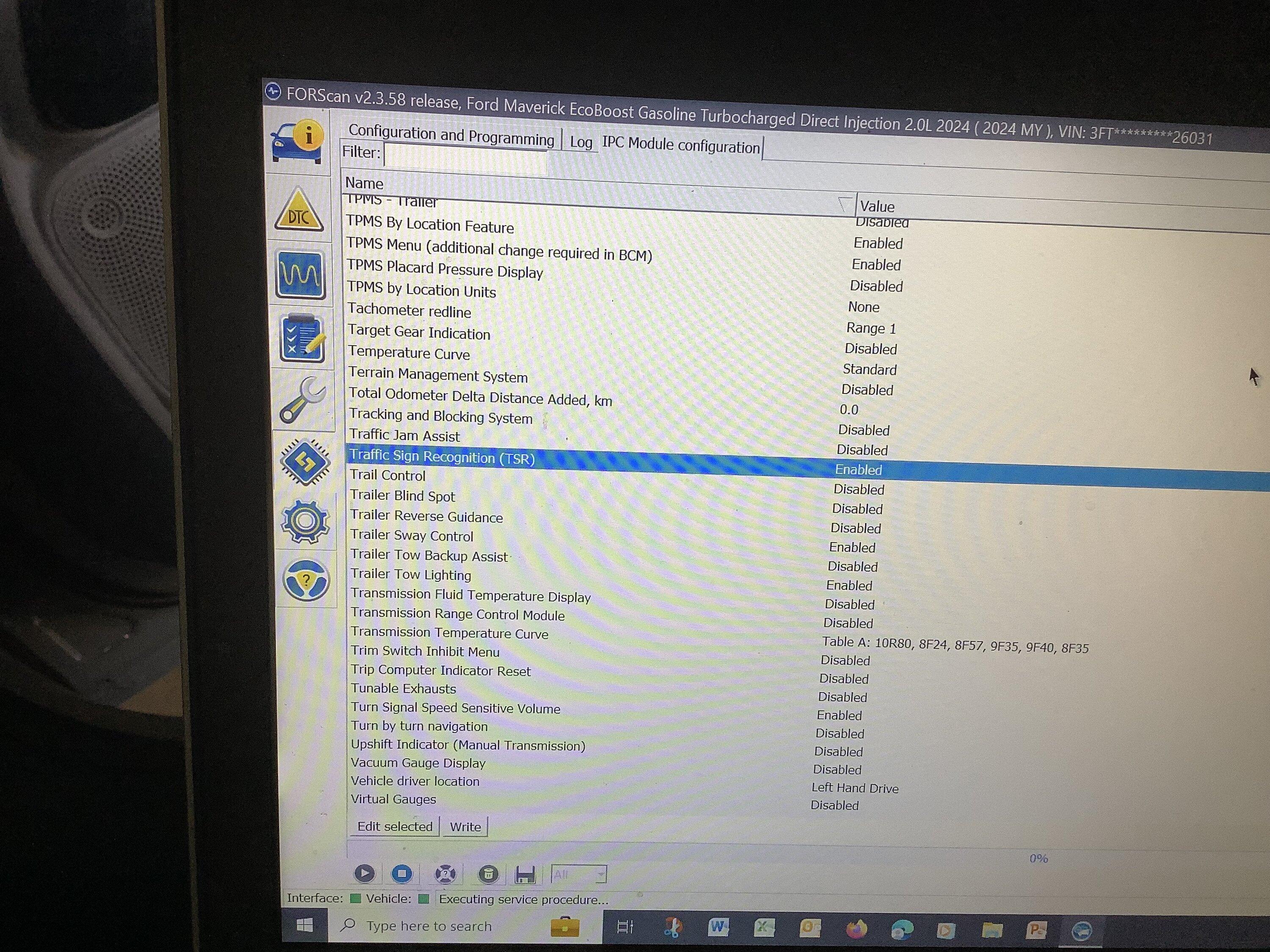
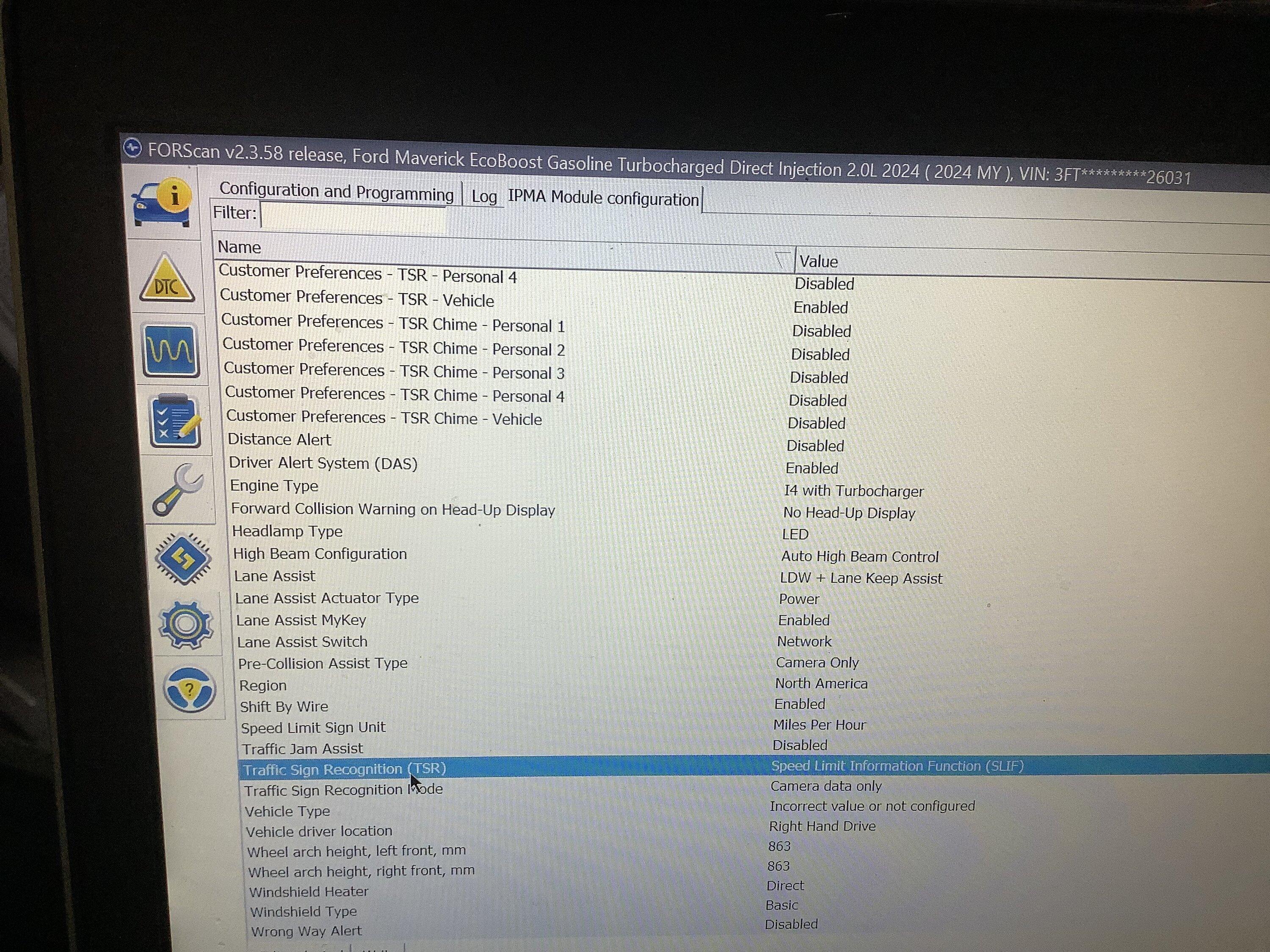
I'm no expert but I think you're supposed to have "Traffic Sign Recognition (TSR) disabled for it to work, I know, its counterintuitive. Somebody correct me if I'm wrong.I followed most of the suggestions, however ran into a problem when adding the traffic sign recognition (TSR). In the IPC module, I do not have a SLIF option, only TSR. When TSR is disabled, there is not any display; when it is enabled, I get European Traffic symbols.
In the IPMA Module, my settings are:
TSR set to SLIF
TSR Mode set to camera data only
The attached pictures show my situation. I don’t know how to get the US roadsign symbols.
I drive 2024 Ecoboost FX4 AWD
Am I doing anything wrong?
Sponsored
Thanks, my next projectThere is lots of useful information on MTC about using Forscan to make interesting and useful changes to the computer modules in our trucks. This post is not about using Forscan software or programming devices--you can find that information as a sticky in the Forscan forum.
This post is for those who don't speak hexadecimal* or are otherwise hesitant to change as-built codes (or for anyone who wants to make a quick change). I have compiled several changes you can make using "easy" (not as-built) mode. Instead of selecting a module through an as-built entry, look below it and there will be a module with the same name, but not as-built (not in all cases). Connect to that module. It's the same module, just named and accessed differently. The difference is that entries are in plain English [mostly]. Be sure to write the changes. Before doing any of these changes back up your as-built modules. Use at your own risk, of course, but these changes have all done well for me. I've included links in MTC for where more information can be found on these Forscan edits.
[*I know changing as-built modules does not require actually understanding hexadecimal--it's a figure of speech.]
Enable Traffic Sign Recognition (TSR)
IPMA:
Traffic Sign Recognition (TSR) - Speed Limit Information Function (SLIF)
Traffic Sign Recognition Mode - Camera data only
IPC:
Traffic Sign Recognition (TSR) - Disabled - Counterintuitive but important
Speed Limit Information Function (SLIF) - Enabled [if disabled you get European sign symbols]
https://www.mavericktruckclub.com/f...orscan-mod-confirmed-working.9399/post-748132
Adding Drive Modes
1. Enter ABS module and search for SDM
2. For SDM - ABS disable it
3. Depending which package you have installed enable the following if any say disabled
SDM - Mode 11 (Sport)
SDM - Mode 4 (Sand)
SDM - Mode 5 (Mud)
SDM - Mode 9 (Eco)
4. Check the DTC codes to see if you threw one
https://www.mavericktruckclub.com/f...-and-snow-confirmed-working.10229/post-211182
Stop being locked out of functions due to being in motion
ACM
Driver Restriction Configuration - Disabled
https://www.mavericktruckclub.com/forum/threads/for-your-safety-blah-blah-blah.35866/post-690772
"Disable" Key Fob Panic Button
No 2 press option on Mavs (that I can find; available on other Ford vehicles)
BCM (BdyCM)
Panic Alarm Mode - Lights Only
https://www.mavericktruckclub.com/forum/threads/disable-panic-alarm.21229/
Disable double honk when exiting running vehicle
BCM (BdyCM)
Double Honk on Leaving Cabine [sic] - Disabled
https://www.mavericktruckclub.com/forum/threads/disabling-double-horn-chirp.9208/post-555900
Enable ECO Coach (indicators about improving fuel economy)
IPC
Enable:
ECO Mode
Eco Coach Feature
Eco Coach with Efficient Drive Mode
https://www.mavericktruckclub.com/forum/threads/forscan-mod-–-enable-eco-coach-mode.25533/post-777948
All Windows Up/Down with Press and Hold Fob Button (Lariat only)
Enable:
BCM (BdyCM)
Global Close Initial
Global Close Vehicle
Global Open Initial
Global Open Vehicle
Global Window Close w Remote
Global Window Open w Remote
DDM
Global Window Close
PDM
Global Window Close
https://www.mavericktruckclub.com/f...nfirmed-working-lariat-only.11092/post-758399
I created this thread to help others not have to cull through all the various threads and posts with lots of replies and superfluous information. Please feel free to add to this list of Forscan edits, but it would be good to stay true to the attempt to include only instructions for easy mode.
- First Name
- John
- Joined
- Oct 8, 2023
- Threads
- 13
- Messages
- 347
- Reaction score
- 371
- Location
- Waxahachie, Texas
- Vehicle(s)
- 2025 Maverick Lariat ECO/AWD White with BAP
- Engine
- 2.0L EcoBoost
I missing a function that others seem to have. I have tried every combination of settings. Right now it is working well, but displaying the traffic sign speed in the European style. I can live with that if I need toI'm no expert but I think you're supposed to have "Traffic Sign Recognition (TSR) disabled for it to work, I know, its counterintuitive. Somebody correct me if I'm wrong.
- Joined
- Nov 30, 2022
- Threads
- 7
- Messages
- 105
- Reaction score
- 199
- Location
- California
- Vehicle(s)
- Toyota Tacoma
- Engine
- 2.0L EcoBoost
- Thread starter
- #28
I tried to find info on this using easy mode, but I can't. There is info on doing so with the as-built method here:Auto start/stop is another one that’s easy, click on disable if you’re inclined.
https://www.mavericktruckclub.com/f...orscan-update-did-not-work-😞.9667/post-704023
- Joined
- Nov 30, 2022
- Threads
- 7
- Messages
- 105
- Reaction score
- 199
- Location
- California
- Vehicle(s)
- Toyota Tacoma
- Engine
- 2.0L EcoBoost
- Thread starter
- #29
I have gotten all of the ones I listed in #1 to work, including the all windows up. You must have a Lariat and enable the feature in the PDM and DDM (passenger and driver door modules) as spelled out in #1. If you do have a Lariat and it doesn't work, then maybe it needs to Lariat Lux. The window switches need to have the "one press up" feature.Has anyone gotten this to work where the windows actually go up? I've done this on my Maverick and can get the windows to go down, but cannot get them to all go up.
- First Name
- Wes
- Joined
- May 29, 2023
- Threads
- 12
- Messages
- 213
- Reaction score
- 336
- Location
- Clarion, PA
- Vehicle(s)
- 2023 Maverick XLT EB
- Engine
- 2.0L EcoBoost
I just installed a digital cluster. I guess It’s possible that a/s/s was programmed into my as built stuff before I bought it. I went in with forscan and disabled it, but maybe it was already disabled in the as builts. I had not driven the truck after the cluster install… from the sounds of the comments that must be what happened. In any event, with my original cluster I did disable a/s/s in the as builts, was pretty easy. Chances of messing anything up are pretty low. Just make sure your battery is fully charged, and back up the as built modules first. And now with forscan, that is optional since the program can grab your as built stuff directly off the motorcraft site your vin.I tried to find info on this using easy mode, but I can't. There is info on doing so with the as-built method here:
https://www.mavericktruckclub.com/forum/threads/disabled-auto-start-stop-with-forscan-update-did-not-work-.9667/post-704023
Sponsored
Similar threads
- Replies
- 6
- Views
- 381


- Replies
- 20
- Views
- 8,686