
Sponsored

GPSMan

2.5L Hybrid
Well-known member
Banned
First Name
John
Joined
Jul 28, 2022
Threads
52
Messages
4,325
Reaction score
5,340
Location
CA
Vehicle(s)
Many
Engine
2.5L Hybrid
Clubs
 
"I love you man."

But you're still not getting my Bud Light.

Anyone remember those commercials?

Great thread.
Great ideas.
Great information.
Great work.

Two thumbs up!

👍🏻👍🏻
Sponsored


palmtreefrb

2.5L Hybrid
Well-known member
First Name
Rick
Joined
Jul 15, 2022
Threads
8
Messages
139
Reaction score
214
Location
SoCal
Vehicle(s)
F150 FX2, Maverick Lariat Hybrid
Engine
2.5L Hybrid
Welcome to my DIY Auto Start/Stop disable and defaulting to a Drive Mode project!

I know there are other ways of doing some of this, but I wanted a DIY project for multiple reasons.

I realized there are other ways of doing this, and I will touch on why I choose to not use them, I'm hoping we can keep this thread focused on this project and a friendly conversation.

First, I will digress a little. Besides this project, I also wanted to install a Ford auto dimming mirror and homelink garage opener. I wanted to make a harness for that as well, and not just tap into the factory harness. Since that project also needed similar connectors and wires, I was able to buy everything for both projects at once. I already had the mirror and homelink before I even got my Maverick, and before the Cheap Auto Dimming Mirror thread got started. Eventually, I'll write a post about the mirror and homelink project.

Okay, back to this project.

There is the $100 Auto Start Stop Eliminator. It plugs into the ODBII port. That means it is on the CAN Bus doing something to make the change, but I didn't know what. People do use it and like it, so you could use that instead if all you want is to disable Auto Start/Stop. I did not want to spend the $100 to get just Auto Start/Stop disable and have something that I didn't know how it was working. BTW - All the parts for both of my projects, minus the mirror and homelink, were less than $100.

There is a wire at the battery you can disconnect, that disables Auto Start/Stop. Again, people have done it and it seems to work for them. I have seen posts where it doesn't work exactly the same as just pressing Auto Start/Stop button, which I can agree with since disconnecting the wire makes the vehicle think your battery is too low to do Auto Start/Stop. I believe it may impact how the vehicle tries to charge the battery. Either way, it is not a good thing to have disconnected if you go in for service.

There is a way in ForScan to disable Auto Start/Stop. Many people are happy with that. That seems to light up the circled 'A' on the instrument cluster, indicating Auto Start/Stop is not available. Like it does while the vehicle is warming up and not ready to do it yet. I do not see that light when I press the button to disable Auto Start/Stop. So, like the battery wire disconnect option, I'm not sure what else could behave differently.

Bottom-line, I wanted something that acts the same as if I pressed the Auto Start/Stop button. And the engineer in me figured there had to be a way to create a circuit to 'press the button' for me.

Then came along the following 'Default Eco-Mode with this DIY Module' thread from @CubanRedneck
https://www.mavericktruckclub.com/forum/threads/default-to-eco-mode-with-this-diy-module.17805/
This inspired me since he gave good details on how to take apart the center console and did the legwork on the buttons. He used some relays and mentioned how it could maybe be done with solid state components. Since I was going to do that for Auto Start/Stop disable, I figured I would help the community and add a way to set the default Drive Mode to my project.

What I didn't realize was all the issues around powering my circuit. This is mostly around the typically used Fuse 3 being powered when the vehicle is remote started and that you cannot change Drive Modes then. I have detailed my findings in my attached project document.

I also wanted to go a step further and make it so you could change the settings whenever you want to, without re-programming the circuit or changing code. I make use of the vehicle buttons themselves to allow you to change the settings. So, if you were towing for a couple days, you could default to Tow/Haul, then go back to Normal or Eco or whatever your favorite Drive Mode is. The other advantage is that you can have it put things back to factory settings, for those times you go in for service.

I have created this project, so it is flexible for your needs. You do not need to implement all the circuits; you can do just the ones you want. For example, if you just want to do Auto Start/Stop or just Drive Mode, you can. If you do not want to be able to change the settings whenever, then you don't have to. You can also use whichever power you want, Fuse 3 (remote started power) or Fuse 6 (fully started power). All you have to do is tweak a couple of program settings. I have fully described how to do this in my document and code.

At high-level, I am using an Arduino and circuitry. Nothing is stored in the vehicle, just the Arduino. The Arduino simulates you pressing the button. I created a wiring harness to go between the Auto Start/Stop & Driver Mode button module and the factory harness. You could just tap off the factory harness if you want to. I ended up using Fuse 3 because a normal fuse tap does not fit in Fuse 6; which added a lot more time to this project, but helped make it more flexible for you.

My attached document goes through everything from the how I figured out the connectors, to what to purchase, to where to purchase, to creating the wiring harness, to schematic, to layouts of the different options, to actual pictures; everything you need to know!

I have done a lot of testing but realize this is buyer beware. No warranty expressed or written. Use it at your own risk. With that out of the way, if you have any questions let me know.

NOTE: to use the Arduino code you will have rename the attached file by deleting the ".txt" extension, or just copy the contents of the file into your Arduino project file
Awesome job, the detail in your documentation is on point. Are you a technical writer?
With the assumption that this is open source. Would you consider uploading this project to GitHub? Github is a great way to manage collaboration, source control and documentation.
 
OP
OP
Mabcim

Mabcim

2.0L EcoBoost
Well-known member
First Name
Mark
Joined
Oct 4, 2021
Threads
3
Messages
1,229
Reaction score
1,094
Location
Rochester, NY
Vehicle(s)
25 Maverick Lariat 2.0 AWD; 23 Escape ST Line Select 2.0 AWD
Engine
2.0L EcoBoost
Clubs
 
Awesome job, the detail in your documentation is on point. Are you a technical writer?
With the assumption that this is open source. Would you consider uploading this project to GitHub? Github is a great way to manage collaboration, source control and documentation.
Thank you.
Not a technical writer, but an engineer that has written many design docs and helped tech writers create docs.
It is Open Source. It’s just one code file. Not a GitHub user, not sure how many people look there. Maybe something I can do at some point.
 
Last edited:
OP
OP
Mabcim

Mabcim

2.0L EcoBoost
Well-known member
First Name
Mark
Joined
Oct 4, 2021
Threads
3
Messages
1,229
Reaction score
1,094
Location
Rochester, NY
Vehicle(s)
25 Maverick Lariat 2.0 AWD; 23 Escape ST Line Select 2.0 AWD
Engine
2.0L EcoBoost
Clubs
 
Module tucked away nicely in the fuse compartment:
Nice to see more details. You have a lot of good stuff. You might want to start a thread for yours, so your solution gets it‘s proper due.
 
OP
OP
Mabcim

Mabcim

2.0L EcoBoost
Well-known member
First Name
Mark
Joined
Oct 4, 2021
Threads
3
Messages
1,229
Reaction score
1,094
Location
Rochester, NY
Vehicle(s)
25 Maverick Lariat 2.0 AWD; 23 Escape ST Line Select 2.0 AWD
Engine
2.0L EcoBoost
Clubs
 
Yes actually sorry to hijack yours. If you would like I can delete my posts and post elsewhere.
Totally up to you. Just figured yours certainly deserves a thread; you did good work.
 

Sponsored

Command1

2.0L EcoBoost
Active member
First Name
Steve
Joined
Apr 8, 2023
Threads
1
Messages
29
Reaction score
38
Location
Wisconsin
Vehicle(s)
2023 Ford Maverick
Engine
2.0L EcoBoost
P I have a auto start stop disabler brand new I would sell you for $50. Decided not to use it on my truck
Do you still have the auto stop start disabler.
 

BlueSpec1

2.5L Hybrid
Well-known member
First Name
Gene
Joined
Jul 10, 2022
Threads
3
Messages
779
Reaction score
796
Location
Texas
Vehicle(s)
23 XLT 2.5L, 22 Escape Plug In, 23 Bolt EUV
Engine
2.5L Hybrid
My attached document goes through everything from the how I figured out the connectors, to what to purchase, to where to purchase, to creating the wiring harness, to schematic, to layouts of the different options, to actual pictures; everything you need to know!
Enjoyed the flexibility in the code, the details in the schematic, and especially the code comments.
The documentation in process controllers, PLCs, etc was always appreciated by us field techs.

The Auto/Stop Start detection from the PWM to the status light is cool.
And why do they do it that way, to trigger logic in the assembly or just because why not?

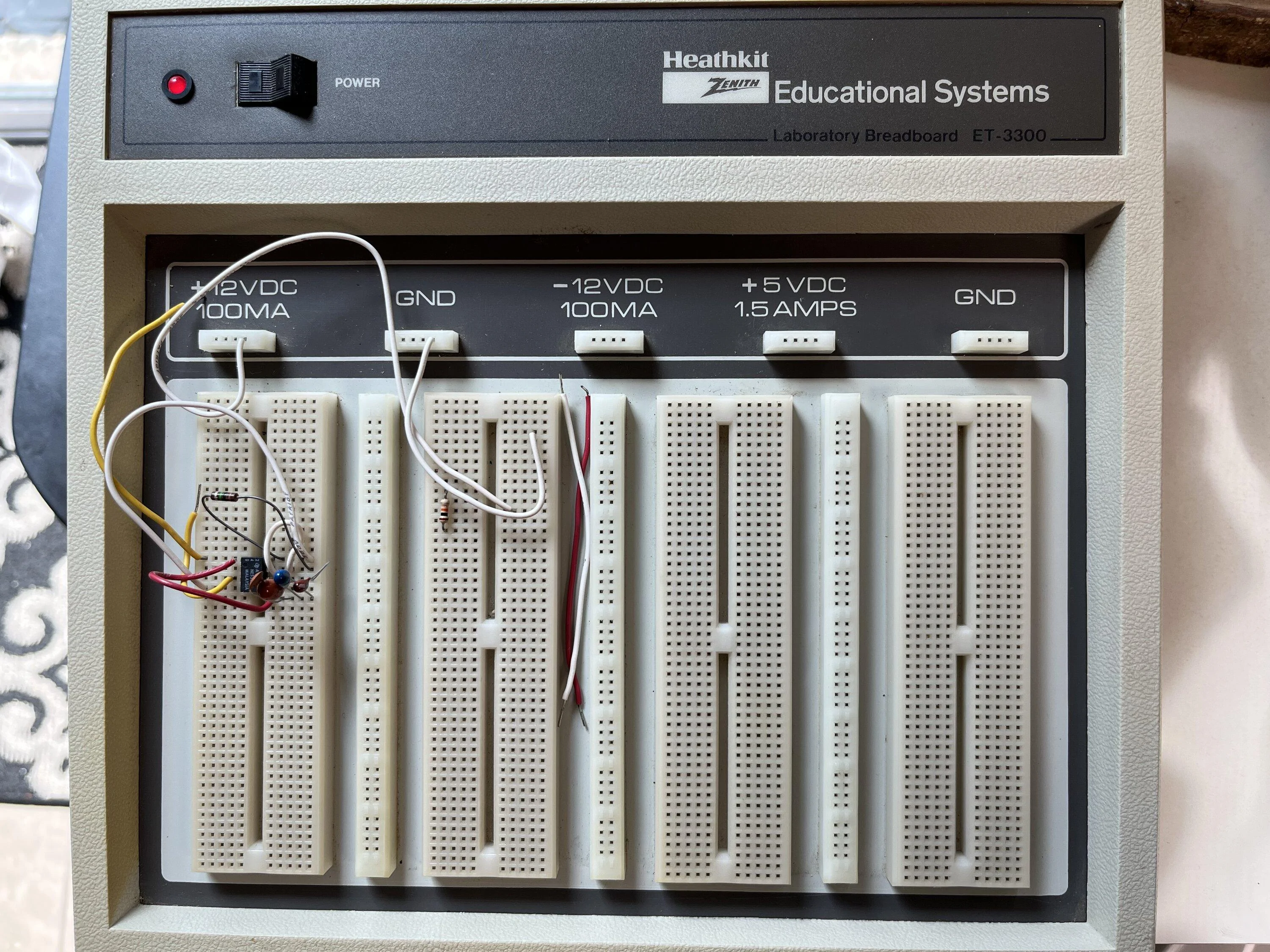
I hadn't though of breadboarding in years, found my old Heathkit with a NE555P in it from last time I used it.
I played with tubes, discrete, TTL, CMOS before microcontrollers took hold.
Ford Maverick DIY - Disable Auto Start / Stop + Default to a Drive Mode (MY ‘25 update) Heathkit ET-3300 Breadboard - IMG_1269
 

Telemachus

2.5L Hybrid
Well-known member
First Name
Jason
Joined
Jan 10, 2022
Threads
12
Messages
849
Reaction score
710
Location
SoCal
Vehicle(s)
XL EB (sold), XLT Hybrid
Engine
2.5L Hybrid
I have noticed that an extra button push is required when the car first starts to get past some internal barrier (I wait 7 seconds to select the mode). Cuban seemed to think it was the seatbelt screen, but if I toggle the car on, off, and on again, the extra push is no longer needed (even if the seat belt screen is still up). Have you noticed that same?

Test this by turning on the car and waiting for your module to change the mode. Then turn the car off (you can even open and shut the door and lock it to simulate getting out, then unlock and open and close to simulate getting in). Restart the car. You will see that the correct mode is overpasses by 1.

Takes several minutes of being off for it to work as intended.

BTW, I am half way through your code. Brilliant idea to read the LED light. I'm hoping we can find another signal that the barrier requiring this extra push has passed. Maybe it just needs more of a time delay (30 sec?)
 
Last edited:

rivermaverick

2.5L Hybrid
Well-known member
First Name
John
Joined
Jan 4, 2023
Threads
24
Messages
331
Reaction score
398
Location
Fort Mohave AZ
Vehicle(s)
Ford Maverick, Ford Fusion (UK), MEV Sonic7
Engine
2.5L Hybrid
This may be a silly question but why do you want to disabled the auto stop/start? I always used to switch off when stopped, love that the car now does it automatically.
 

Telemachus

2.5L Hybrid
Well-known member
First Name
Jason
Joined
Jan 10, 2022
Threads
12
Messages
849
Reaction score
710
Location
SoCal
Vehicle(s)
XL EB (sold), XLT Hybrid
Engine
2.5L Hybrid
This may be a silly question but why do you want to disabled the auto stop/start? I always used to switch off when stopped, love that the car now does it automatically.
Air Conditioning is abysmal when the engine is off, for one.
 
Sponsored

Aherpa

2.5L Hybrid
Well-known member
Joined
Nov 17, 2021
Threads
38
Messages
916
Reaction score
1,267
Location
Iowa
Vehicle(s)
Edge, Maverick Lariat Hybrid
Engine
2.5L Hybrid
Welcome to my DIY Auto Start/Stop disable and defaulting to a Drive Mode project!

I know there are other ways of doing some of this, but I wanted a DIY project for multiple reasons.

I realized there are other ways of doing this, and I will touch on why I choose to not use them, I'm hoping we can keep this thread focused on this project and a friendly conversation.

First, I will digress a little. Besides this project, I also wanted to install a Ford auto dimming mirror and homelink garage opener. I wanted to make a harness for that as well, and not just tap into the factory harness. Since that project also needed similar connectors and wires, I was able to buy everything for both projects at once. I already had the mirror and homelink before I even got my Maverick, and before the Cheap Auto Dimming Mirror thread got started. Eventually, I'll write a post about the mirror and homelink project.

Okay, back to this project.

There is the $100 Auto Start Stop Eliminator. It plugs into the ODBII port. That means it is on the CAN Bus doing something to make the change, but I didn't know what. People do use it and like it, so you could use that instead if all you want is to disable Auto Start/Stop. I did not want to spend the $100 to get just Auto Start/Stop disable and have something that I didn't know how it was working. BTW - All the parts for both of my projects, minus the mirror and homelink, were less than $100.

There is a wire at the battery you can disconnect, that disables Auto Start/Stop. Again, people have done it and it seems to work for them. I have seen posts where it doesn't work exactly the same as just pressing Auto Start/Stop button, which I can agree with since disconnecting the wire makes the vehicle think your battery is too low to do Auto Start/Stop. I believe it may impact how the vehicle tries to charge the battery. Either way, it is not a good thing to have disconnected if you go in for service.

There is a way in ForScan to disable Auto Start/Stop. Many people are happy with that. That seems to light up the circled 'A' on the instrument cluster, indicating Auto Start/Stop is not available. Like it does while the vehicle is warming up and not ready to do it yet. I do not see that light when I press the button to disable Auto Start/Stop. So, like the battery wire disconnect option, I'm not sure what else could behave differently.

Bottom-line, I wanted something that acts the same as if I pressed the Auto Start/Stop button. And the engineer in me figured there had to be a way to create a circuit to 'press the button' for me.

Then came along the following 'Default Eco-Mode with this DIY Module' thread from @CubanRedneck
https://www.mavericktruckclub.com/forum/threads/default-to-eco-mode-with-this-diy-module.17805/
This inspired me since he gave good details on how to take apart the center console and did the legwork on the buttons. He used some relays and mentioned how it could maybe be done with solid state components. Since I was going to do that for Auto Start/Stop disable, I figured I would help the community and add a way to set the default Drive Mode to my project.

What I didn't realize was all the issues around powering my circuit. This is mostly around the typically used Fuse 3 being powered when the vehicle is remote started and that you cannot change Drive Modes then. I have detailed my findings in my attached project document.

I also wanted to go a step further and make it so you could change the settings whenever you want to, without re-programming the circuit or changing code. I make use of the vehicle buttons themselves to allow you to change the settings. So, if you were towing for a couple days, you could default to Tow/Haul, then go back to Normal or Eco or whatever your favorite Drive Mode is. The other advantage is that you can have it put things back to factory settings, for those times you go in for service.

I have created this project, so it is flexible for your needs. You do not need to implement all the circuits; you can do just the ones you want. For example, if you just want to do Auto Start/Stop or just Drive Mode, you can. If you do not want to be able to change the settings whenever, then you don't have to. You can also use whichever power you want, Fuse 3 (remote started power) or Fuse 6 (fully started power). All you have to do is tweak a couple of program settings. I have fully described how to do this in my document and code.

At high-level, I am using an Arduino and circuitry. Nothing is stored in the vehicle, just the Arduino. The Arduino simulates you pressing the button. I created a wiring harness to go between the Auto Start/Stop & Driver Mode button module and the factory harness. You could just tap off the factory harness if you want to. I ended up using Fuse 3 because a normal fuse tap does not fit in Fuse 6; which added a lot more time to this project, but helped make it more flexible for you.

My attached document goes through everything from the how I figured out the connectors, to what to purchase, to where to purchase, to creating the wiring harness, to schematic, to layouts of the different options, to actual pictures; everything you need to know!

I have done a lot of testing but realize this is buyer beware. No warranty expressed or written. Use it at your own risk. With that out of the way, if you have any questions let me know.

NOTE: to use the Arduino code you will have rename the attached file by deleting the ".txt" extension, or just copy the contents of the file into your Arduino project file
Maybe if enough owners complain to Ford, they would create a new 'setting' that would set the default drive mode. It would be great if it was like the climate controls, heated mirrors and other settings that 'remember' how they were when the truck was shutoff and just startup the same and be included in a update. (Just in case Ford reads this. :))
 

rivermaverick

2.5L Hybrid
Well-known member
First Name
John
Joined
Jan 4, 2023
Threads
24
Messages
331
Reaction score
398
Location
Fort Mohave AZ
Vehicle(s)
Ford Maverick, Ford Fusion (UK), MEV Sonic7
Engine
2.5L Hybrid
Air Conditioning is abysmal when the engine is off, for one.
The engine will start as soon as it needs the AC (over 100 it doesn't shut off on my EcoSport), the hybrid AC runs of the 400volt battery.
 
OP
OP
Mabcim

Mabcim

2.0L EcoBoost
Well-known member
First Name
Mark
Joined
Oct 4, 2021
Threads
3
Messages
1,229
Reaction score
1,094
Location
Rochester, NY
Vehicle(s)
25 Maverick Lariat 2.0 AWD; 23 Escape ST Line Select 2.0 AWD
Engine
2.0L EcoBoost
Clubs
 
Enjoyed the flexibility in the code, the details in the schematic, and especially the code comments.
The documentation in process controllers, PLCs, etc was always appreciated by us field techs.
Thank you

The Auto/Stop Start detection from the PWM to the status light is cool.
And why do they do it that way, to trigger logic in the assembly or just because why not?
Originally I was going to use it to determine if Auto S/S was disabled or not. Then when I decided to add the Drive Mode functionality and ran into the issue with Fuse 3, I re-purposed it. Now I can disable Auto S/S, when just remote started, and wait for the Auto S/S light to be On; telling the code the cad is actually fully On. Then I can turn the light back Off. It was a trick to get around Fuse 3, but not needed if Fuse 6 is used.
 
OP
OP
Mabcim

Mabcim

2.0L EcoBoost
Well-known member
First Name
Mark
Joined
Oct 4, 2021
Threads
3
Messages
1,229
Reaction score
1,094
Location
Rochester, NY
Vehicle(s)
25 Maverick Lariat 2.0 AWD; 23 Escape ST Line Select 2.0 AWD
Engine
2.0L EcoBoost
Clubs
 
I have noticed that an extra button push is required when the car first starts to get past some internal barrier (I wait 7 seconds to select the mode). Cuban seemed to think it was the seatbelt screen, but if I toggle the car on, off, and on again, the extra push is no longer needed (even if the seat belt screen is still up). Have you noticed that same?
I saw his thing about the extra press. However, I never experienced that in all of my testing. If I leave any messages on there, I can see it changing the modes behind them.
In my code I do wait a second before I change anything, maybe that is why? Or maybe because I have a Lariat? Or maybe I didn’t do the exact same test.

BTW, I am half way through your code. Brilliant idea to read the LED light.
Thanks. I like it. 😉

I'm hoping we can find another signal that the barrier requiring this extra push has passed. Maybe it just needs more of a time delay (30 sec?)
At least with the code, it is easy to have it add an extra press. Just to know the conditions for doing it. To be honest, I was glad I didn’t have to figure that out; ran into enough issues as it was 😄
 
OP
OP
Mabcim

Mabcim

2.0L EcoBoost
Well-known member
First Name
Mark
Joined
Oct 4, 2021
Threads
3
Messages
1,229
Reaction score
1,094
Location
Rochester, NY
Vehicle(s)
25 Maverick Lariat 2.0 AWD; 23 Escape ST Line Select 2.0 AWD
Engine
2.0L EcoBoost
Clubs
 
This may be a silly question but why do you want to disabled the auto stop/start? I always used to switch off when stopped, love that the car now does it automatically.
I have the Ecoboost. I feel it takes ‘too’ long to start. If I need to get out the way, move quickly, it doesn’t react fast enough. HVAC fan changes a little. And I’m old school, and don’t the idea of what it is doing to the battery.
Sponsored


Top