Sponsored

I know my Maverick has a radio, somewhere, but where?

MakinDoForNow

2.5L Hybrid
Well-known member
First Name
James
Joined
Sep 24, 2021
Threads
2
Messages
8,429
Reaction score
5,994
Location
Texas
Vehicle(s)
2022 Maverick
Engine
2.5L Hybrid
LOL This is a new one, SOMEWHERE it says audio?
Radio is a subset of audio signals which includes digital formats which a radio cannot recieve plus other formats!
Per Wikipedia:

Radio broadcasting is the broadcasting of audio (sound), sometimes with related metadata, by radio waves to radio receivers belonging to a public audience. In terrestrial radio broadcasting the radio waves are broadcast by a land-based radio station, while in satellite radio the radio waves are broadcast by a satellite in Earth orbit. To receive the content the listener must have a broadcast radio receiver (radio). Stations are often affiliated with a radio network that provides content in a common radio format, either in broadcast syndication or simulcast, or both. The encoding of a radio broadcast depends on whether it uses an analog or digital signal. Analog radio broadcasts use one of two types of radio wave modulation: amplitude modulation for AM radio, or frequency modulation for FM radio. Newer, digital radio stations transmit in several different digital audio standards, such as DAB (Digital Audio Broadcasting), HD radio, or DRM (Digital Radio Mondiale).
Sponsored
 

BOB225DUSTER

2.0L EcoBoost
Well-known member
First Name
Robert
Joined
Feb 8, 2024
Threads
5
Messages
70
Reaction score
71
Location
06770
Vehicle(s)
2024 xlt atlas blue
Engine
2.0L EcoBoost
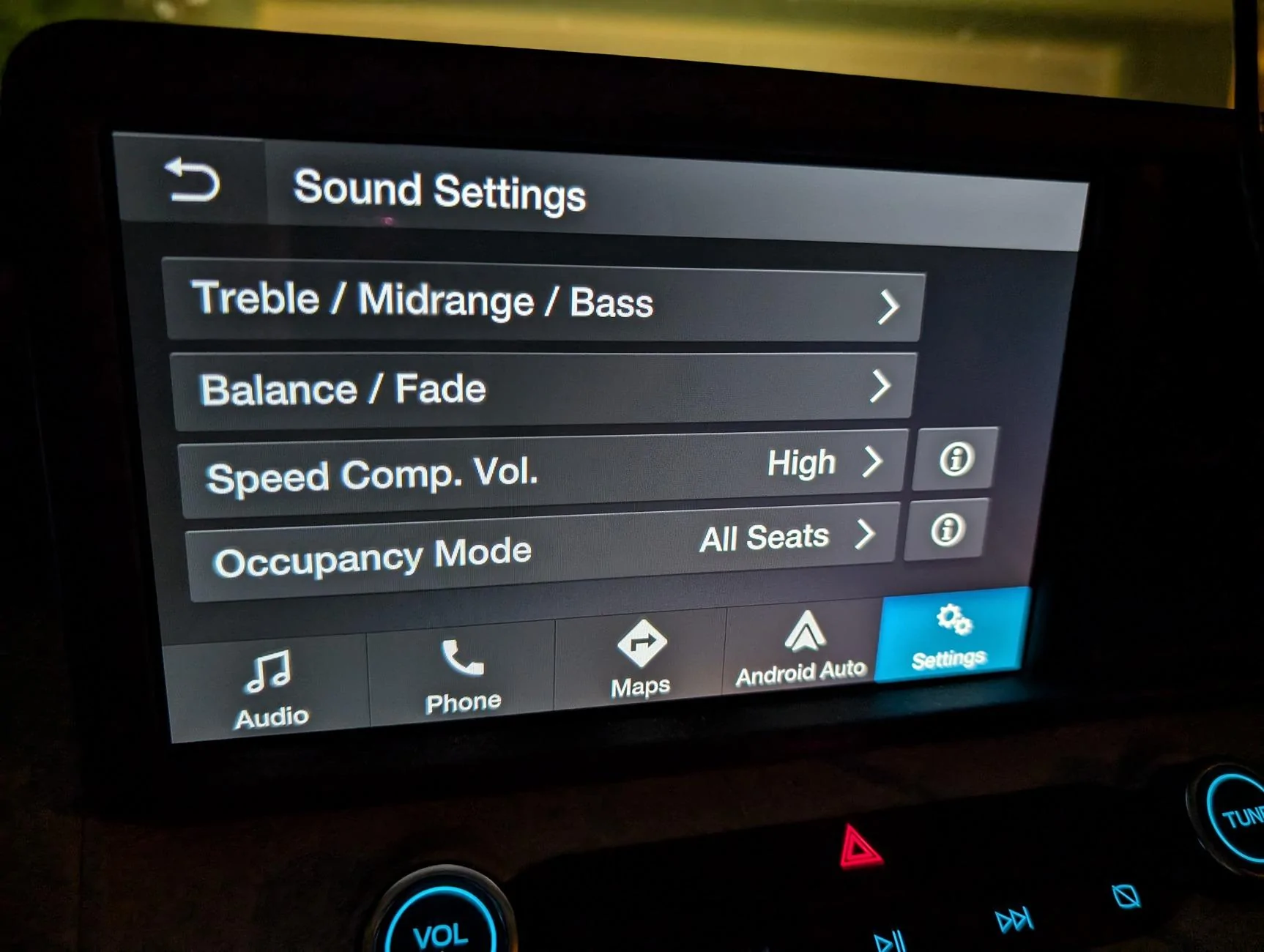
OK, that takes me to this screen. So of course I tried the button on the top left of the screen to go back. Nothing. Then tried the same button on the steering wheel. Nothing. Then I hit the Audio button on bottom left of that screen. That worked.

Am I that old or is that a really bizarre way to find a radio? Must have been designed by someone on LSD.
no3.jpg
Not sure how you use your phone but this is how I overcame the issue when wanting the factory radio over say the phones media.
1) unless I need to access the phone -ie maps for a trip - I keep it plugged into the usb on the back of the center console for charging purposes. Will now charge but need step 2 also
2) In settings I just go to bluetooth and turn it off. Phone will now not connect wireless. Radio
will function now with out defaulting to phone.
3) If I need my phone -say for directions - I plug it into the front usb , turn the phone on and hit start on my maps app. You will then need to go thru the motions , hit speaker icon by the physical volume knob, next screen will appear-like you show in picture- hit the audio button lower left corner. Radio will play and maps will also run and give directions while radio plays ( will cut off radio when it gives directions)
4) If I want to use my external cd player ( yes I have one ) or music files on a flashdrive - I simple plug that into the usb go into settings and turn back on the bluetooth which enables wireless use of the phone - for say maps in my case. You don't need to re-pair up the phone again either. Bluetooth is a setting on or off . I can now run maps and listen to music how I want.

It's a bit of a pain but once I got used to it I found better control of how I run my tech.
90 percent of the time I just want to charge my phone and listen to the radio so steps 1 & 2
 

Gray Goose

2.0L EcoBoost
Well-known member
First Name
RG
Joined
Jul 14, 2023
Threads
21
Messages
1,036
Reaction score
1,822
Location
Wissota
Vehicle(s)
Maverick XL 2024, Escape 2012, GMC Terrain 2017
Engine
2.0L EcoBoost
Clubs
 
The kind of obvious option is to not plug in your phone ;)
That's what I do. I can still remember how to get to all the places I drive without GPS. My playlist is on a USB drive. No need to plug in the phone. BTW I build computers for a hobby. Kind of like sparing siblings, sometimes it's best that each computer stays in its own space. :sneaky:
 

ripperAZ

2.5L Hybrid
Well-known member
Joined
Sep 19, 2022
Threads
4
Messages
321
Reaction score
329
Location
AZ
Vehicle(s)
2022 Mustang MachE 2021 Genesis G90 2032 Mav
Engine
2.5L Hybrid
RTFM
Read the F$cling Manual

Physical button on Dash and the Ford icon in CarPlay returns you to the Ford screen
LOL. Don’t feel bad it took me three months to find out the steering wheel tilted and telescopeDon’t feel bad it took me three months to find out the steering wheel tilted and telescoped. It’s under the steering wheel.
 

Sponsored

mspmms

2.5L Hybrid
Well-known member
First Name
'MERICA 😎 A gulf is named after it.
Joined
Nov 9, 2021
Threads
5
Messages
7,387
Reaction score
17,370
Location
U.S.A. Indianapolis, Indiana (Downtown Indy)
Vehicle(s)
2022 XL Ford Maverick 🇺🇸
Engine
2.5L Hybrid
Clubs
 
Physical button on Dash and the Ford icon in CarPlay returns you to the Ford screen
LOL. Don’t feel bad it took me three months to find out the steering wheel tilted and telescopeDon’t feel bad it took me three months to find out the steering wheel tilted and telescoped. It’s under the steering wheel.
🤔 Seems you also found a (unknown) repeat button.
 

ripperAZ

2.5L Hybrid
Well-known member
Joined
Sep 19, 2022
Threads
4
Messages
321
Reaction score
329
Location
AZ
Vehicle(s)
2022 Mustang MachE 2021 Genesis G90 2032 Mav
Engine
2.5L Hybrid
🤔 Seems you also found an (unknown) repeat button.
Yeah. Siri ate the IOS beta 18 update so she does that now and she also doesn’t let me open my text. She’s a crazy woman. hoping for a new version soon.
 

mspmms

2.5L Hybrid
Well-known member
First Name
'MERICA 😎 A gulf is named after it.
Joined
Nov 9, 2021
Threads
5
Messages
7,387
Reaction score
17,370
Location
U.S.A. Indianapolis, Indiana (Downtown Indy)
Vehicle(s)
2022 XL Ford Maverick 🇺🇸
Engine
2.5L Hybrid
Clubs
 
Yeah. Siri ate the IOS beta 18 update so she does that now and she also doesn’t let me open my text. She’s a crazy woman. hoping for a new version soon.
Musta been all that shrimp.

Ford Maverick I know my Maverick has a radio, somewhere, but where? 1720458464364-7k
 

RobN

2.5L Hybrid
Well-known member
Joined
Oct 7, 2022
Threads
1
Messages
145
Reaction score
181
Location
OR
Vehicle(s)
2023 Maverick XLT Hybrid
Engine
2.5L Hybrid
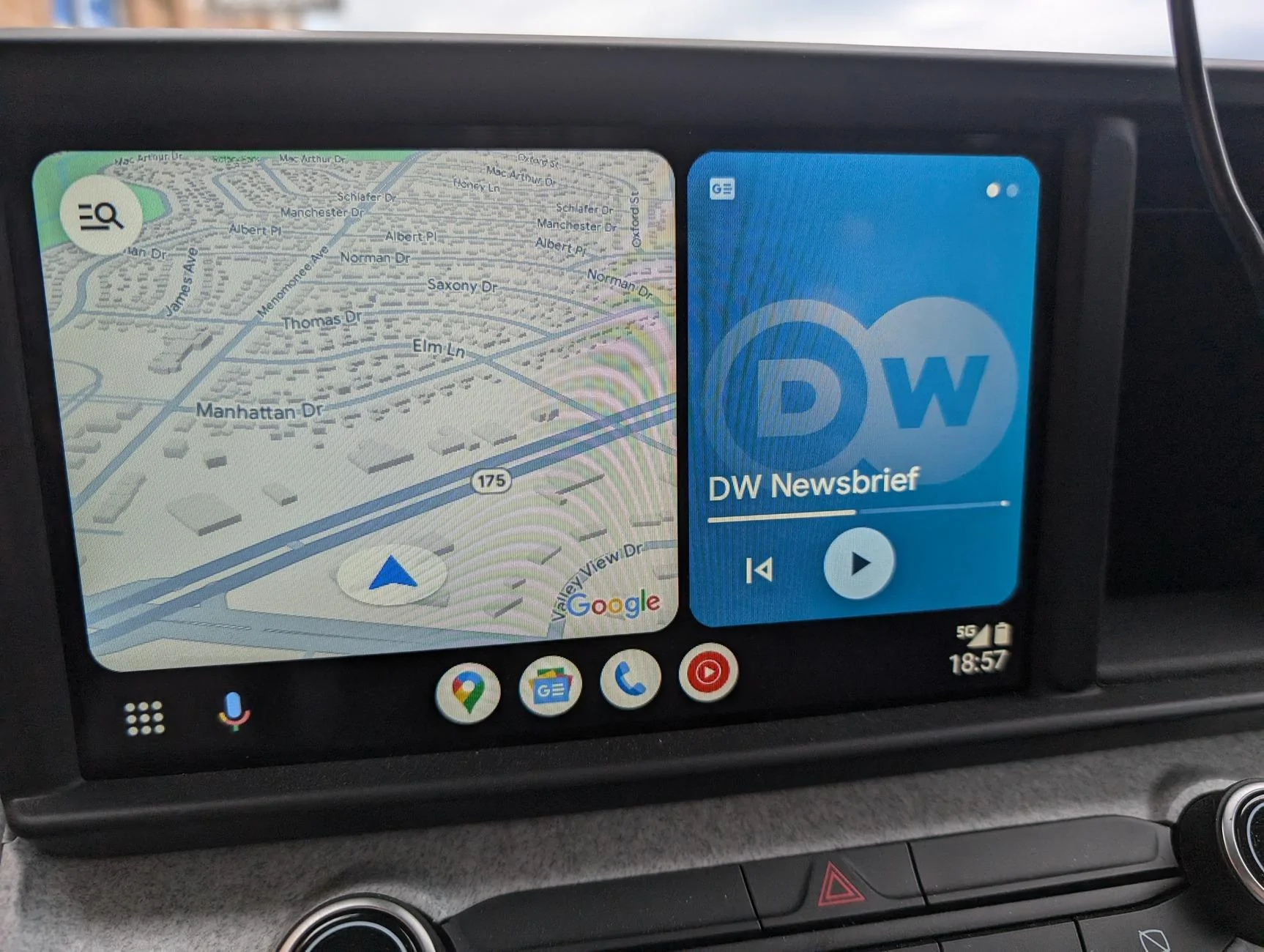
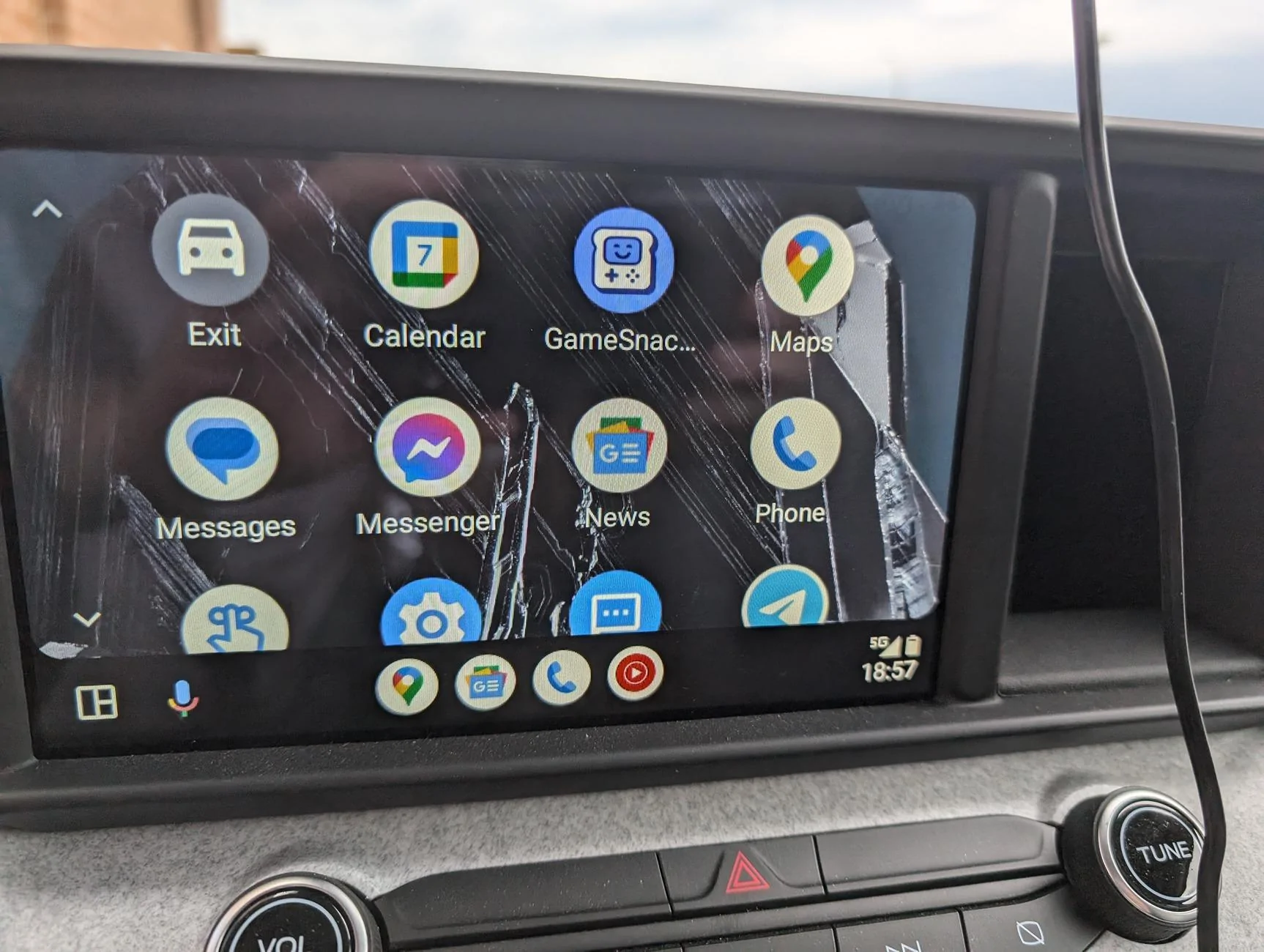
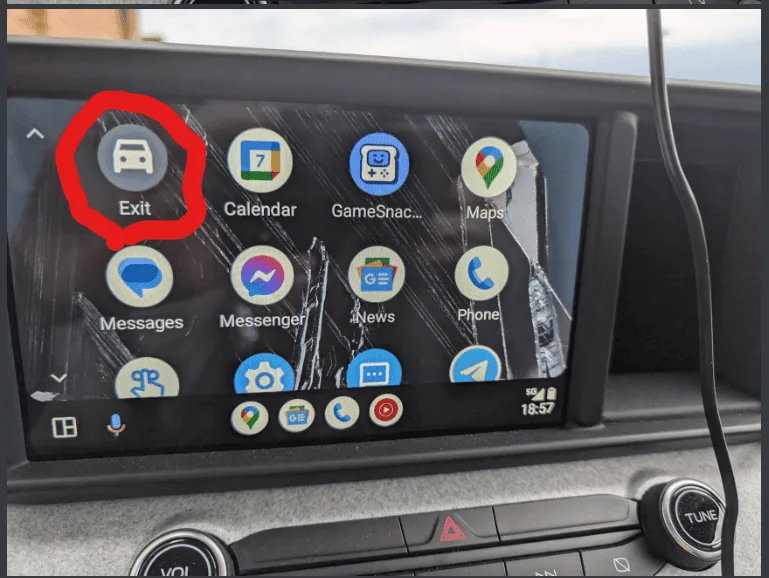
Press that Exit button in the top-left (may be in a different location if you use the Android Auto app on your phone to rearrange the order of apps - personally, I put it near the bottom, and hide the GameSnacks app) to leave Android Auto on the display and be back at the default for the vehicle. That will generally take you straight to the radio - it's like not plugging in your phone at all.

If you want both the radio and Android Auto running at the same time...well, I've never wanted that, so I haven't tried it.
 
Sponsored
OP
OP
dlhort1955

dlhort1955

2.0L EcoBoost
Well-known member
First Name
Dave
Joined
Nov 17, 2023
Threads
30
Messages
489
Reaction score
494
Location
Milwaukee
Vehicle(s)
Maverick FX4
Engine
2.0L EcoBoost
RTFM
Read the F$cling Manual

Physical button on Dash and the Ford icon in CarPlay returns you to the Ford screen
LOL. Don’t feel bad it took me three months to find out the steering wheel tilted and telescopeDon’t feel bad it took me three months to find out the steering wheel tilted and telescoped. It’s under the steering wheel.
When I picked up my truck the 1 and only salesman was busy selling a truck to another EMPLOYEE. I dealt with the finance manager who knew very little, so I had no training on how the car worked. Then the car was delivered by 2 guys who were retired, and knew where the key went.

I have found a couple of radio stations that are apps, and I have not been able to add those apps to the screen. My impression is that only Ford can decide which apps appear on AA. It would be nice to select your own radio stations that have an app and not have to listen to local crap, especially when you get to northern WI and radio stations are few and far between, not to mention playing some of the most god awful music that us city folk do not listen to.
 

Sarah Davis

2.0L EcoBoost
Well-known member
First Name
Sarah
Joined
Jan 6, 2023
Threads
9
Messages
185
Reaction score
411
Location
salina, Ks
Vehicle(s)
2019 Fusion, 2017 Cmax
Engine
2.0L EcoBoost
When I picked up my truck the 1 and only salesman was busy selling a truck to another EMPLOYEE. I dealt with the finance manager who knew very little, so I had no training on how the car worked. Then the car was delivered by 2 guys who were retired, and knew where the key went.

I have found a couple of radio stations that are apps, and I have not been able to add those apps to the screen. My impression is that only Ford can decide which apps appear on AA. It would be nice to select your own radio stations that have an app and not have to listen to local crap, especially when you get to northern WI and radio stations are few and far between, not to mention playing some of the most god awful music that us city folk do not listen to.
you will need to go to android auto in your phone to change which apps show on your screen.
Heres a few videos that may help:
https://studio.youtube.com/video/HZQybQDj3e4/edit
https://studio.youtube.com/video/F1dlbfrSfcw/edit
 
Last edited:
OP
OP
dlhort1955

dlhort1955

2.0L EcoBoost
Well-known member
First Name
Dave
Joined
Nov 17, 2023
Threads
30
Messages
489
Reaction score
494
Location
Milwaukee
Vehicle(s)
Maverick FX4
Engine
2.0L EcoBoost
you will need to go to android auto in your phone to change which apps show on your screen.
Heres a few videos that may help:
https://studio.youtube.com/video/HZQybQDj3e4/edit
https://studio.youtube.com/video/F1dlbfrSfcw/edit
Thank you Sarah. I cannot access these videos on my phone or my laptop. I do not know what it means when it is studio.youtube.com . Normally it is just youtube.com. I would bet that is the issue. And why does it have edit at the end?
Sponsored

 
Last edited:


Top