


OMG! It worked! You have provided the solution to the biggest complaint I've had with my Maverick since I bought it. You are my savior! THANK YOU!!!!!!!
Sponsored
OMG! It worked! You have provided the solution to the biggest complaint I've had with my Maverick since I bought it. You are my savior! THANK YOU!!!!!!!

I am sooo jealous!OMG! It worked! You have provided the solution to the biggest complaint I've had with my Maverick since I bought it. You are my savior! THANK YOU!!!!!!!
I'm with you, brother. I could have gunked up my phone with all my music, but I prefer to use my thumb drive for music and use my phone as a phone. My choice, without Big Brother oversight and lawmaker mandates. Just in time, too, for my 3 hr drive this morning. Awesome! Thank you again.Lol. I'm glad I found that solution. I know a lot of people use Pandora or whatever, but I like to pick what I wanna hear when I wanna hear it! It's my music and I want it now!

Toward the bottom I found the 2023 maverick spreadsheet. The ACM as-built line was there. I assume all the others were as well, but can't confirm.did you find anything more than the TCU module at that link? All I see is TCU

I practically gave a step by step back a few pages. Its all in this thread. Buy the vLinker, get a 2month license from FORscan, get er done. No excuse now. Is one of the easiest mods I've ever done.Is there another post about this with details. I have been meaning to send Ford a n email about this motion disable nonsense. So if I buy a OBD scanner I can disable this crap?
As far as legality all Ford would have to do is put a safety notice at the beginning of the screen boot up the way my Garmin GPS units are. When they boot up there is screen that states it is dangerous to type while driving or something to that effect and then I have to hit the ok button. Ford could do similar. I swear I wont buy another car with the motion block nonsense on it. Drove down to Maryland in September and I had to wait until I pulled into a rest stop to change to another album. GRRRRRRRRR!!!
I don't even show an APIM module.... Am I missing something?SkeeterB,
I recall reading in a F150 forum that the trick for the Sync 3 units might be to say you are in a different region. Not sure what settings you are seeing in the APIM module.
Maybe this thread can give you some insight?
https://www.f150forum.com/f30/browse-usb-while-driving-457573/
I mean because the change you posted didn't work for me. I was wanting to try the NAV in motion.ACM - Audio Control Module
I don't even show an APIM module.... Am I missing something?
I ordered the FORSCAN recommended USB cable adapter and sent back the cheap ELM327 to see what happens.
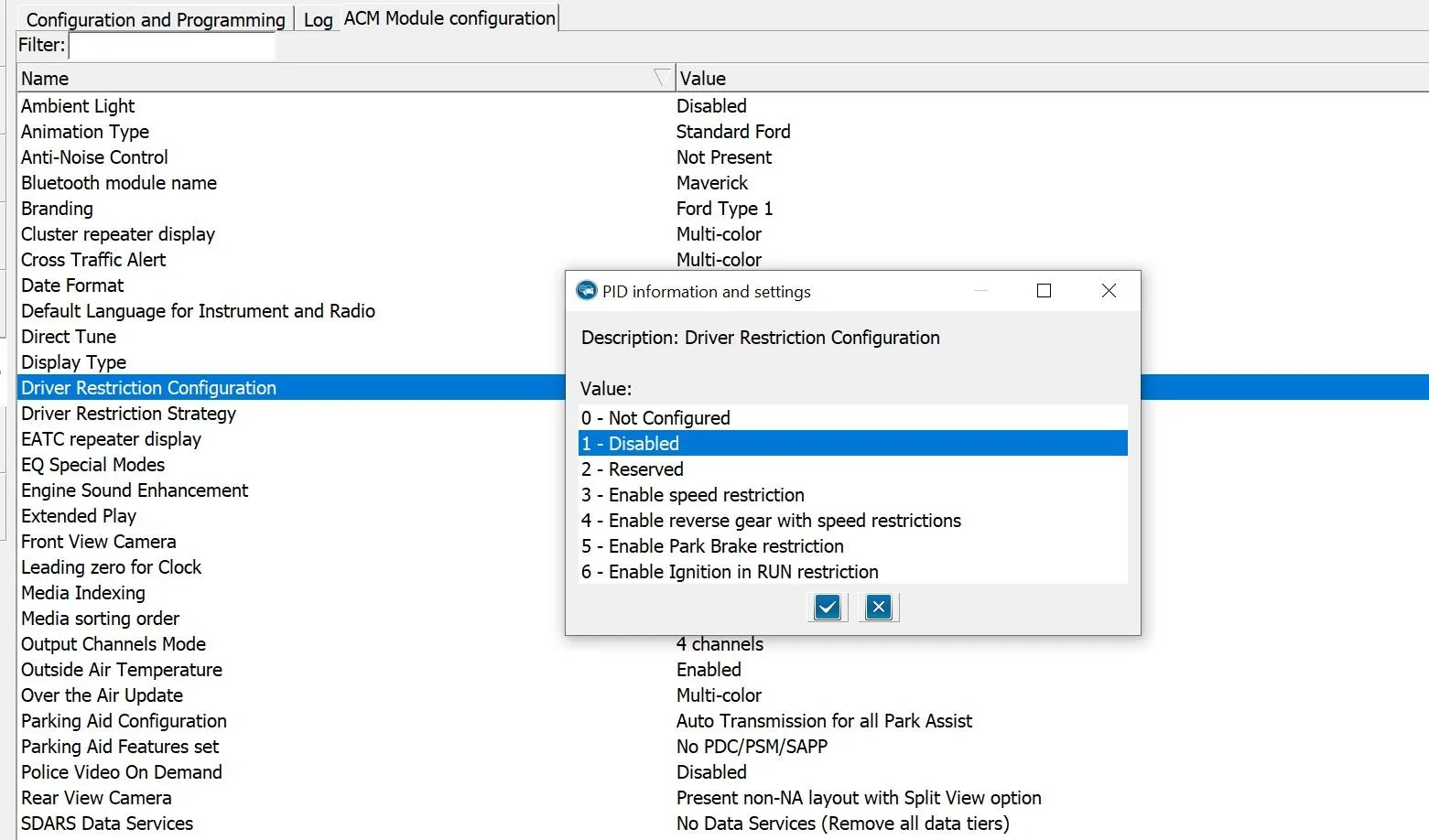
That was specific advice for SkeeterB who has a Lariat Lux with the B&O/Sync3 audio. Which version do you have? If you have an XL, XLT or a non-Lux Lariat, then you do not have an APIM module. You only have the ACM and the fix is as simple as mentioned above in two posts I mentioned above.I mean because the change you posted didn't work for me. I was wanting to try the NAV in motion.
I have a 23 Lariat with 360 with B and O. I don't really know what LUX is. I do have navigation.That was specific advice for SkeeterB who has a Lariat Lux with the B&O/Sync3 audio. Which version do you have? If you have an XL, XLT or a non-Lux Lariat, then you do not have an APIM module. You only have the ACM and the fix is as simple as mentioned above in two posts I mentioned above.
Thus far, nobody with a Maverick Sync3 has figured out how to remove the nanny. I suspect it will be soon as a few of these guys start experimenting.
If you have a non-B&O system, maybe you didn't actually write the value to the module? Did you go back and check to see if the change to 1-Disabled and didn't go back to 3-Enable Speed Restriction?





