Sponsored

Jimmac

2.0L EcoBoost
Member
First Name
James
Joined
Dec 17, 2024
Threads
0
Messages
15
Reaction score
7
Location
Northern California
Vehicle(s)
2024 Maverick Lariat
Engine
2.0L EcoBoost
Many people have complained about the removal of physical buttons. I don't like it either, but you can at least change your temperature set point using voice commands. This will certainly work better when using AUTO climate mode, and if you are a diehard button-pushing 'manual' climate mode adherent, you'll probably not be happy with even this. (Suggestion: just use auto. It is smarter than you think.)

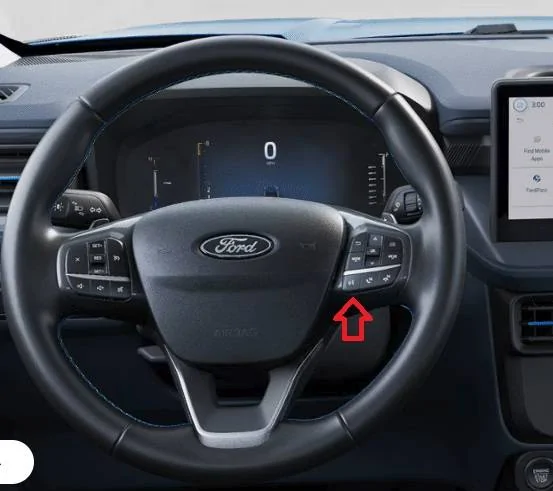
The owner's manual tells you to push the assistant button on the right side of the steering wheel, or you can set it up for a wake word/phrase. (I believe the default is "OK Ford".)

Here is a list of commands. These are NOT in the manual, however, you can ask the system to list commands. Why Ford did not put these in the manual... I honestly do not know. Navigation commands will require connected navigation. Lariat, Tremor and Lobo have connected navigation and a 1 year subscription, then you'll have to pay for the built-in nav features. I would not be surprised if the charger questions fail, since Mavericks are not PHEV or BEV, but I haven't confirmed this.


Audio
  • AM <530–1710>
  • FM <87.9–107.9>
  • Bluetooth® Audio
  • SiriusXM® with 360L <0–233>
  • SiriusXM with 360L <channel name>
  • USB
Climate (if equipped)
  • Climate list of commands
  • Climate set temperature <# degrees>
Mobile Apps
  • List mobile apps
  • Find new apps
  • <App name>
  • <App name> Help
Navigation
  • Cancel route
  • Destination <home/work/favorites/previous destination>
  • Detour
  • Find <an address/POI/intersection>
  • Help
  • Show <3D/North up/heading up>
  • Show <traffic/weather map/5-day forecast/fuel prices>
  • Show route
  • Voice guidance on/off
Phone
  • Call <name>
  • Call <name> <on cell/at home/at work>
  • Dial <number>
  • Listen to message
  • Pair phone
Simple Commands
  • Cancel
  • Go back
  • Help
  • List of commands
  • Next page/previous page (scrolls through voice lists only)
Vehicle Expert
  • Call Roadside Assistance
  • Find a charge location
  • What is hill start assist?
  • What can I do with MyKey®?
  • Where are my USB ports?
  • Where can I find a charge station?
  • What’s my odometer reading?
  • What is my oil level?

Screenshot 2024-12-26 130838.jpg
The nature of printing books is that there is a significant delay before the next revision gets printed. You book may not have these doesn't mean the next guys doesn't. In any case you download a PDF of the latest version from ford.com👍
Sponsored


lm126027

2.0L EcoBoost
Well-known member
First Name
Larry
Joined
Nov 26, 2023
Threads
9
Messages
521
Reaction score
433
Location
Central MA
Vehicle(s)
2024 EB
Engine
2.0L EcoBoost
Clubs
 
I only have sync3 in my 24 Mav Lariat, but agree that auto is great. In my Escape, kept it at 67/68, however in my new Mav have to set heat at 63/64 for some reason. Also, center dash vents do not completely close... When car reaches temp setting and heat shuts down, cold air leaks thru the vents. As someone on here suggested, when that happens, I have to hit the recycle BUTTON.. lol..
 

greycat

2.5L Hybrid
Active member
First Name
Tom
Joined
Oct 30, 2021
Threads
2
Messages
38
Reaction score
104
Location
syracuse
Vehicle(s)
maverick
Engine
2.5L Hybrid
Forget "MyKey".
I want "YOURKey"...
 

Gullzway

2.5L Hybrid
Well-known member
Joined
Dec 17, 2021
Threads
25
Messages
2,040
Reaction score
2,437
Location
OK
Vehicle(s)
1968 Ford Mustang Fastback
Engine
2.5L Hybrid
Many people have complained about the removal of physical buttons. I don't like it either, but you can at least change your temperature set point using voice commands. This will certainly work better when using AUTO climate mode, and if you are a diehard button-pushing 'manual' climate mode adherent, you'll probably not be happy with even this. (Suggestion: just use auto. It is smarter than you think.)

The owner's manual tells you to push the assistant button on the right side of the steering wheel, or you can set it up for a wake word/phrase. (I believe the default is "OK Ford".)

Here is a list of commands. These are NOT in the manual, however, you can ask the system to list commands. Why Ford did not put these in the manual... I honestly do not know. Navigation commands will require connected navigation. Lariat, Tremor and Lobo have connected navigation and a 1 year subscription, then you'll have to pay for the built-in nav features. I would not be surprised if the charger questions fail, since Mavericks are not PHEV or BEV, but I haven't confirmed this.


Audio
  • AM <530–1710>
  • FM <87.9–107.9>
  • Bluetooth® Audio
  • SiriusXM® with 360L <0–233>
  • SiriusXM with 360L <channel name>
  • USB
Climate (if equipped)
  • Climate list of commands
  • Climate set temperature <# degrees>
Mobile Apps
  • List mobile apps
  • Find new apps
  • <App name>
  • <App name> Help
Navigation
  • Cancel route
  • Destination <home/work/favorites/previous destination>
  • Detour
  • Find <an address/POI/intersection>
  • Help
  • Show <3D/North up/heading up>
  • Show <traffic/weather map/5-day forecast/fuel prices>
  • Show route
  • Voice guidance on/off
Phone
  • Call <name>
  • Call <name> <on cell/at home/at work>
  • Dial <number>
  • Listen to message
  • Pair phone
Simple Commands
  • Cancel
  • Go back
  • Help
  • List of commands
  • Next page/previous page (scrolls through voice lists only)
Vehicle Expert
  • Call Roadside Assistance
  • Find a charge location
  • What is hill start assist?
  • What can I do with MyKey®?
  • Where are my USB ports?
  • Where can I find a charge station?
  • What’s my odometer reading?
  • What is my oil level?

Screenshot 2024-12-26 130838.jpg
How does any of that work when using Android Auto or Carplay?
In my 2022 the Ford Voice commands only work if NOT connected to a phone with AA or Carplay?
 

Packer Bill

2.0L EcoBoost
Well-known member
First Name
Bill
Joined
Jun 21, 2021
Threads
10
Messages
1,929
Reaction score
2,587
Location
South Dakota
Vehicle(s)
2019 Mazda CX-5, 2025 Ford Maverick
Engine
2.0L EcoBoost
Has anyone with a MY 25 Maverick tried using Alexa yet? I am curious to see if Alexa is better than the Ford Assistant, especially with climate controls.
 

Sponsored

OP
OP
colinl

colinl

2.0L EcoBoost
Well-known member
First Name
Colin
Joined
Jun 21, 2022
Threads
32
Messages
5,440
Reaction score
6,179
Location
ICT
Vehicle(s)
'22 Maverick Lariat AWD, '22 Bronco OBX 2-Door
Engine
2.0L EcoBoost
Clubs
 
How does any of that work when using Android Auto or Carplay?
In my 2022 the Ford Voice commands only work if NOT connected to a phone with AA or Carplay?
if it's like my Bronco, which is a decent assumption but not 100% sure to be correct, the steering wheel button can do either Ford assist, or smartphone assistant (Siri or Hey Google).

whichever you don't get when you push the button you'll have to access via voice activation prompt such as Okay Ford, Hey Siri, or Hey Google.
 

Gullzway

2.5L Hybrid
Well-known member
Joined
Dec 17, 2021
Threads
25
Messages
2,040
Reaction score
2,437
Location
OK
Vehicle(s)
1968 Ford Mustang Fastback
Engine
2.5L Hybrid
if it's like my Bronco, which is a decent assumption but not 100% sure to be correct, the steering wheel button can do either Ford assist, or smartphone assistant (Siri or Hey Google).

whichever you don't get when you push the button you'll have to access via voice activation prompt such as Okay Ford, Hey Siri, or Hey Google.
So are you saying the 2025s will be different than the current Maverick?
Because there's no way to interact with the Ford voice prompt when I have Android auto connected. The voice prompt button activates either Google or Siri, I've only had it activate Ford when there's no phone connected.
I guess unless I want to disconnect my phone every time I want to use it.

I actually wouldn't mind being able to change the station or Sirius radio with voice prompt, but I found no way to do it when you're using Android auto or carplay.
 
Last edited:
OP
OP
colinl

colinl

2.0L EcoBoost
Well-known member
First Name
Colin
Joined
Jun 21, 2022
Threads
32
Messages
5,440
Reaction score
6,179
Location
ICT
Vehicle(s)
'22 Maverick Lariat AWD, '22 Bronco OBX 2-Door
Engine
2.0L EcoBoost
Clubs
 
So are you saying the 2025s will be different than the current Maverick?
my bronco does. you push the button and you have the Ford prompt. you then have to say hey google which I find unhelpful, because my smartphone will already answer if I say 'hey google' while it's unlocked.

I am not sure if it's configurable to work the way the 22-24 maverick does, if a person preferred it that way. I can't see that the '25 Maverick owners manual gives that information, either, but I might have missed it.
 

Packer Bill

2.0L EcoBoost
Well-known member
First Name
Bill
Joined
Jun 21, 2021
Threads
10
Messages
1,929
Reaction score
2,587
Location
South Dakota
Vehicle(s)
2019 Mazda CX-5, 2025 Ford Maverick
Engine
2.0L EcoBoost
The MY25 Lariat (not sure of the other trims) has built in Alexa (22-24 does not). I am looking forward to testing this.
 
Sponsored
OP
OP
colinl

colinl

2.0L EcoBoost
Well-known member
First Name
Colin
Joined
Jun 21, 2022
Threads
32
Messages
5,440
Reaction score
6,179
Location
ICT
Vehicle(s)
'22 Maverick Lariat AWD, '22 Bronco OBX 2-Door
Engine
2.0L EcoBoost
Clubs
 
The MY25 Lariat (not sure of the other trims) has built in Alexa (22-24 does not). I am looking forward to testing this.
If you're using Alexa already for smarthome things and creating shopping lists, I think it could be useful. Instead of using a routine to announce you're coming home and turn on the lights, you can ask Alexa to do it.

If you're thinking you want Alexa to help with navigation or anything else happening while driving, I think you'll find that just using Hey Google / Gemini or Siri will be more effective.
 

cyberdog

2.5L Hybrid
Well-known member
First Name
Ray
Joined
Oct 15, 2021
Threads
5
Messages
663
Reaction score
785
Location
08084
Vehicle(s)
2023 Maverick Lariat Hybrid
Engine
2.5L Hybrid
Nearly all of the voice commands are present under Sync3 with the 22-24 models. Use them all the time, although twisting the temperature knobs are more intuitive than using the speech button. Not having had the built-in voice commands in 45 years of driving, even Sync3 was a huge upgrade for me.

The 360 camera & AWD would be the primary attraction to the 25 for me.
 

Scott Asheville

2.0L EcoBoost
Well-known member
First Name
Scott
Joined
Oct 4, 2021
Threads
79
Messages
2,334
Reaction score
5,498
Location
Asheville, NC
Vehicle(s)
2022 AWD XLT ECO LUX CP360 HPR
Engine
2.0L EcoBoost
Driver: "Set temperature to 73 degrees".
Sync4: "Understood. Ramming car in front now."
 

Gullzway

2.5L Hybrid
Well-known member
Joined
Dec 17, 2021
Threads
25
Messages
2,040
Reaction score
2,437
Location
OK
Vehicle(s)
1968 Ford Mustang Fastback
Engine
2.5L Hybrid
Nearly all of the voice commands are present under Sync3 with the 22-24 models. Use them all the time, although twisting the temperature knobs are more intuitive than using the speech button. Not having had the built-in voice commands in 45 years of driving, even Sync3 was a huge upgrade for me.

The 360 camera & AWD would be the primary attraction to the 25 for me.
Have you tried them while using Android Auto/Carplay? I don't believe you can.
I use Android Auto 100% of the time so this is a bit disappointing/useless.

" When Android Auto is running, your SYNC 3 voice commands will be disabled, and you will only be able to use Google Assistant functions. "
"Sync 3 voice control disabled in CarPlay: When CarPlay is active, the Sync 3 voice recognition system is disabled."
 

pa4ul

2.0L EcoBoost
Well-known member
First Name
John
Joined
Mar 7, 2025
Threads
6
Messages
114
Reaction score
160
Location
Earth but a small spot in texas to be exact
Vehicle(s)
1973 Ford F-100/2025 Maverick Lobo/2015 Mercedes CLA Sport Plus
Engine
2.0L EcoBoost
Clubs
 
Have you tried them while using Android Auto/Carplay? I don't believe you can.
I use Android Auto 100% of the time so this is a bit disappointing/useless.

" When Android Auto is running, your SYNC 3 voice commands will be disabled, and you will only be able to use Google Assistant functions. "
"Sync 3 voice control disabled in CarPlay: When CarPlay is active, the Sync 3 voice recognition system is disabled."
I read updates to phones are coming for android auto that will allow control of AC controls via voice recognition. apparently other small upgrades are coming but i cannot recall what they were. Im still trying to find a way to get my MYQ garage door to open from the truck using voice.
Sponsored


Top