
Sponsored

Traffic sign recognition on an XLT FX4

generalmgr

2.0L EcoBoost
Well-known member
First Name
Wes
Joined
May 29, 2023
Threads
12
Messages
213
Reaction score
336
Location
Clarion, PA
Vehicle(s)
2023 Maverick XLT EB
Engine
2.0L EcoBoost
Clubs
 
Hoping someone has a solution.

I’ve read every article I can find, watched every video available. Many were very helpful, thanks to all who take the time to help others learn the tricks.

I’ve had no issues programming all drive modes, eco coach, and turned off the a/s/s.

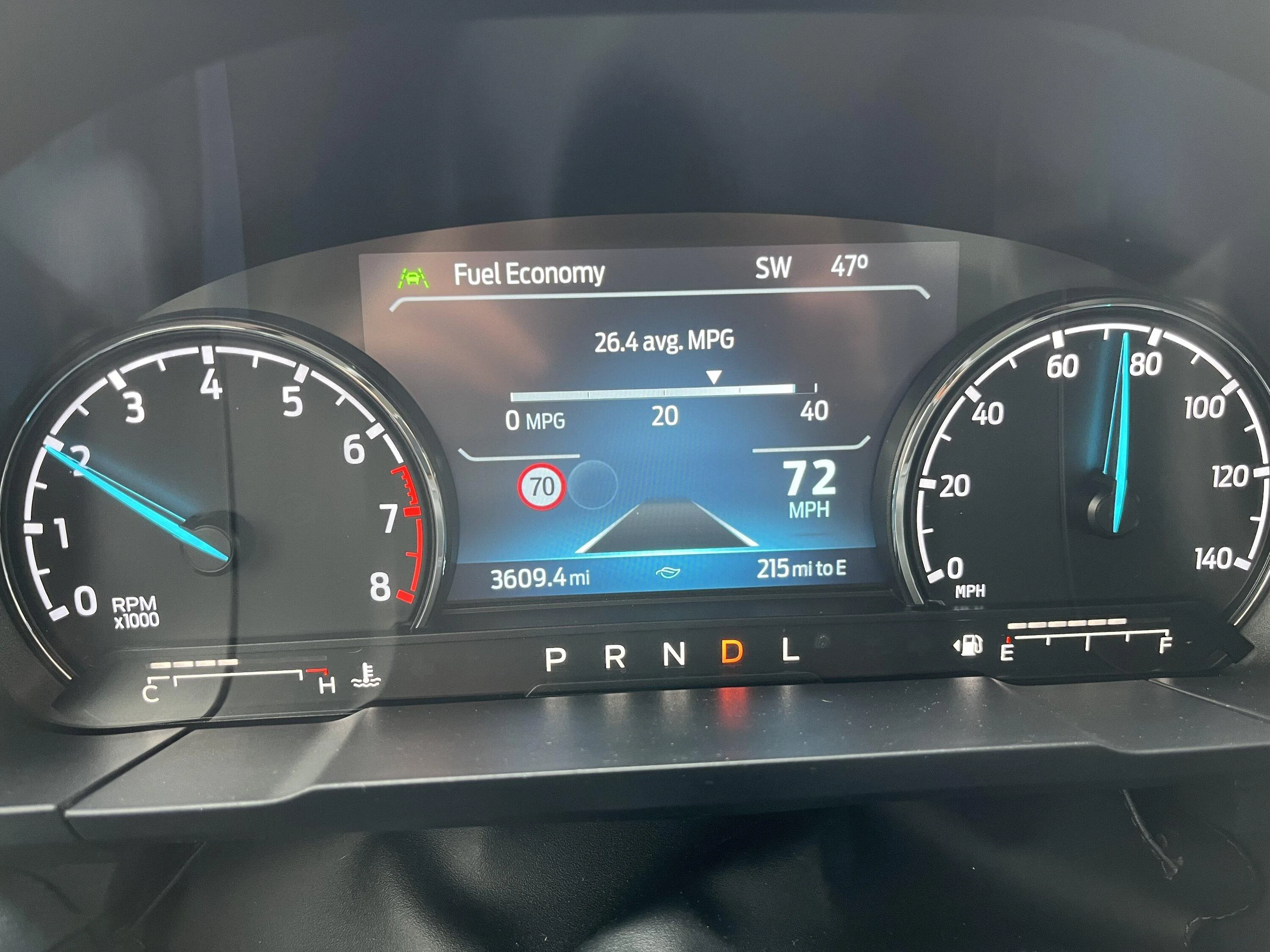
The one thing I can’t get the way I want it is the TSR. I can get it to display two circles , the speed limit shows up in the left circle. The circle on the right is blank. I have never been able to get the rectangle traffic sign to display.

I have tried every suggestion on this forum, to no avail. I have reset the modules back to stock, and started from scratch, at least twice, with every different suggestion.

I even tried messing with things a bit on my own. Still nothing.

Right now, I have it set so the circle speed limit shows on the left, and a blank circle is on the right. That’s better than nothing, I guess.

Has anyone with my configuration been able to get the rectangular speed limit signs to display?

Mine is a 2023 XLT FX4 Lux CP 360 4k tow with the bigger cluster screen.

Thanks
Sponsored

 
Last edited:
Mabcim

2.0L EcoBoost
Well-known member
First Name
Mark
Joined
Oct 4, 2021
Threads
3
Messages
1,229
Reaction score
1,094
Location
Rochester, NY
Vehicle(s)
25 Maverick Lariat 2.0 AWD; 23 Escape ST Line Select 2.0 AWD
Engine
2.0L EcoBoost
Clubs
 
I am very close to yours, no FX4 (see my signature). You didn’t indicate if XLT or Lariat, I am a Lariat, which has the bigger cluster like a XLT FX4.
I have square speed signs.

I did just these two settings:

IPMA 706-01-01 xxxx-xxD3-xxxxx
(I had a C9 where the D3 went)

IPC 720-09-01 xxxx-xxxx-8xxx
(I had a 1 where the 8 went)

In the ’Traffic Sign Recognition’ menu, I unchecked the ‘Active speed warning’, did not like it flashing at me.
 
OP
OP
generalmgr

generalmgr

2.0L EcoBoost
Well-known member
First Name
Wes
Joined
May 29, 2023
Threads
12
Messages
213
Reaction score
336
Location
Clarion, PA
Vehicle(s)
2023 Maverick XLT EB
Engine
2.0L EcoBoost
Clubs
 
I am very close to yours, no FX4 (see my signature). You didn’t indicate if XLT or Lariat, I am a Lariat, which has the bigger cluster like a XLT FX4.
I have square speed signs.

I did just these two settings:

IPMA 706-01-01 xxxx-xxD3-xxxxx
(I had a C9 where the D3 went)

IPC 720-09-01 xxxx-xxxx-8xxx
(I had a 1 where the 8 went)

In the ’Traffic Sign Recognition’ menu, I unchecked the ‘Active speed warning’, did not like it flashing at me.
Thanks the the reply. I saw your earlier post and did try that method. Actually, I think that’s what I have it set at right now. Weird that it works on your screen on not mine, you’d think the programming would be essentially identical even with the different models.
 

Mabcim

2.0L EcoBoost
Well-known member
First Name
Mark
Joined
Oct 4, 2021
Threads
3
Messages
1,229
Reaction score
1,094
Location
Rochester, NY
Vehicle(s)
25 Maverick Lariat 2.0 AWD; 23 Escape ST Line Select 2.0 AWD
Engine
2.0L EcoBoost
Clubs
 
Thanks the the reply. I saw your earlier post and did try that method. Actually, I think that’s what I have it set at right now. Weird that it works on your screen on not mine, you’d think the programming would be essentially identical even with the different models.
Yeah, it should be. That other thread did have it grouped by screen.
Did your previous values match what mine had?

When you reset back to stock, did you do all modules you have ever changed, just some of them? If only some, it might be worth a test to go back to completely stock, then try just the TSR stuff. Maybe there Is another module, or setting, you changed but didn’t realize, especially if you had tried any of the Easy settings. I realize that would reset the drive modes, but you can put that back after the TSR.

I have not done any drive mode changes, maybe there is some interaction with turning off the ABS to get those to work?
 
Last edited:
OP
OP
generalmgr

generalmgr

2.0L EcoBoost
Well-known member
First Name
Wes
Joined
May 29, 2023
Threads
12
Messages
213
Reaction score
336
Location
Clarion, PA
Vehicle(s)
2023 Maverick XLT EB
Engine
2.0L EcoBoost
Clubs
 
Yeah, it should be. That other thread did have it grouped by screen.
Did your previous values match what mine had?

When you reset back to stock, did you do all modules you have ever changed, just some of them? If only some, it might be worth a test to go back to completely stock, then try just the TSR stuff. Maybe there Is another module, or setting, you changed but didn’t realize, especially if you had tried any of the Easy settings. I realize that would reset the drive modes, but you can put that back after the TSR.

I have not done any drive mode changes, maybe there is some interaction with turning off the ABS to get those to work?
Great minds think alike lol. That is exactly what I tried, resetting everything back to stock…and just doing the tsr only, but no bueno. Here’s what mine looks like:
Ford Maverick Traffic sign recognition on an XLT FX4 IMG_0889
No idea what’s supposed to be in that second circle. It is always blank.
 

Sponsored

Mabcim

2.0L EcoBoost
Well-known member
First Name
Mark
Joined
Oct 4, 2021
Threads
3
Messages
1,229
Reaction score
1,094
Location
Rochester, NY
Vehicle(s)
25 Maverick Lariat 2.0 AWD; 23 Escape ST Line Select 2.0 AWD
Engine
2.0L EcoBoost
Clubs
 
Great minds think alike lol. That is exactly what I tried, resetting everything back to stock…and just doing the tsr only, but no bueno. Here’s what mine looks like:
IMG_0889.jpeg
No idea what’s supposed to be in that second circle. It is always blank.
That stinks that you went that route and it didn’t work.
The second circle is for warning/hazard signs, I believe.
 

Samcat13

2.5L Hybrid
Well-known member
First Name
Gerald
Joined
May 17, 2022
Threads
3
Messages
340
Reaction score
224
Location
The Villages Fla.
Vehicle(s)
Maverick Lariat '24'
Engine
2.5L Hybrid
Clubs
 
I am very close to yours, no FX4 (see my signature). You didn’t indicate if XLT or Lariat, I am a Lariat, which has the bigger cluster like a XLT FX4.
I have square speed signs.

I did just these two settings:

IPMA 706-01-01 xxxx-xxD3-xxxxx
(I had a C9 where the D3 went)

IPC 720-09-01 xxxx-xxxx-8xxx
(I had a 1 where the 8 went)

In the ’Traffic Sign Recognition’ menu, I unchecked the ‘Active speed warning’, did not like it flashing at me.
He has an XLT which may make a different.
 

jerrisn

2.5L Hybrid
Well-known member
Joined
Oct 27, 2022
Threads
14
Messages
304
Reaction score
467
Location
NE
Vehicle(s)
2023 XLT Hybrid/2025 Explorer/2018 Volt/2011 Fusion Hybrid/08 Tundra/00 MustanGT
Engine
2.5L Hybrid
Clubs
 
Hoping someone has a solution.

I’ve read every article I can find, watched every video available. Many were very helpful, thanks to all who take the time to help others learn the tricks.

I’ve had no issues programming all drive modes, eco coach, and turned off the a/s/s.

The one thing I can’t get the way I want it is the TSR. I can get it to display two circles , the speed limit shows up in the left circle. The circle on the right is blank. I have never been able to get the rectangle traffic sign to display.

I have tried every suggestion on this forum, to no avail. I have reset the modules back to stock, and started from scratch, at least twice, with every different suggestion.

I even tried messing with things a bit on my own. Still nothing.

Right now, I have it set so the circle speed limit shows on the left, and a blank circle is on the right. That’s better than nothing, I guess.

Has anyone with my configuration been able to get the rectangular speed limit signs to display?

Mine is a 2023 XLT FX4 Lux CP 360 4k tow with the bigger cluster screen.

Thanks
This is what I did on my 23 XLT Hybrid w/CoPilot 360/Lux and it works perfect. Here is a link to my post of how I got TSR to work.

https://www.mavericktruckclub.com/f...3-xlt-hybrid-w-luxury-diy-instructions.38227/
 
OP
OP
generalmgr

generalmgr

2.0L EcoBoost
Well-known member
First Name
Wes
Joined
May 29, 2023
Threads
12
Messages
213
Reaction score
336
Location
Clarion, PA
Vehicle(s)
2023 Maverick XLT EB
Engine
2.0L EcoBoost
Clubs
 
This is what I did on my 23 XLT Hybrid w/CoPilot 360/Lux and it works perfect. Here is a link to my post of how I got TSR to work.

https://www.mavericktruckclub.com/f...3-xlt-hybrid-w-luxury-diy-instructions.38227/
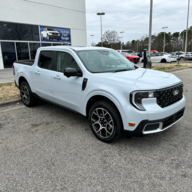
Appreciate the heads up. I have an FX4, which has the 6” screen. I saw your post and it was the first one I tried. 😊 It enables the TSR, but with the circles. I messed with it for a couple hours this morning again, same result. Frustrating to know it’s in there somewhere, but I can’t find it.
 

jerrisn

2.5L Hybrid
Well-known member
Joined
Oct 27, 2022
Threads
14
Messages
304
Reaction score
467
Location
NE
Vehicle(s)
2023 XLT Hybrid/2025 Explorer/2018 Volt/2011 Fusion Hybrid/08 Tundra/00 MustanGT
Engine
2.5L Hybrid
Clubs
 
There might be a difference between the 4" and 6" cluster, though I'm not sure why. The only option I didn't enable was the Speed and Overhead signs. Those three settings worked for me. Unfortunately, I don't have any other suggestions. Good luck!
 
Sponsored

TheShark

2.5L Hybrid
Well-known member
First Name
Mark
Joined
Jul 22, 2021
Threads
12
Messages
1,504
Reaction score
2,281
Location
North Carolina
Vehicle(s)
2025 Maverick Lariat AWD Hybrid, 2024 2dr Bronco Heritage Limited Edition
Engine
2.5L Hybrid
Clubs
 
Appreciate the heads up. I have an FX4, which has the 6” screen. I saw your post and it was the first one I tried. 😊 It enables the TSR, but with the circles. I messed with it for a couple hours this morning again, same result. Frustrating to know it’s in there somewhere, but I can’t find it.
Same results for me got the round ones, still works though. I too have a XLT FX4 so perhaps as jerrisn said, it might has something to do with the different screens.
 

HolyCarp

2.0L EcoBoost
Well-known member
Joined
Sep 24, 2022
Threads
3
Messages
169
Reaction score
272
Location
DFW, TX
Vehicle(s)
2023 Cactus Gray XLT Eco AWD FX4 4K
Engine
2.0L EcoBoost
Clubs
 
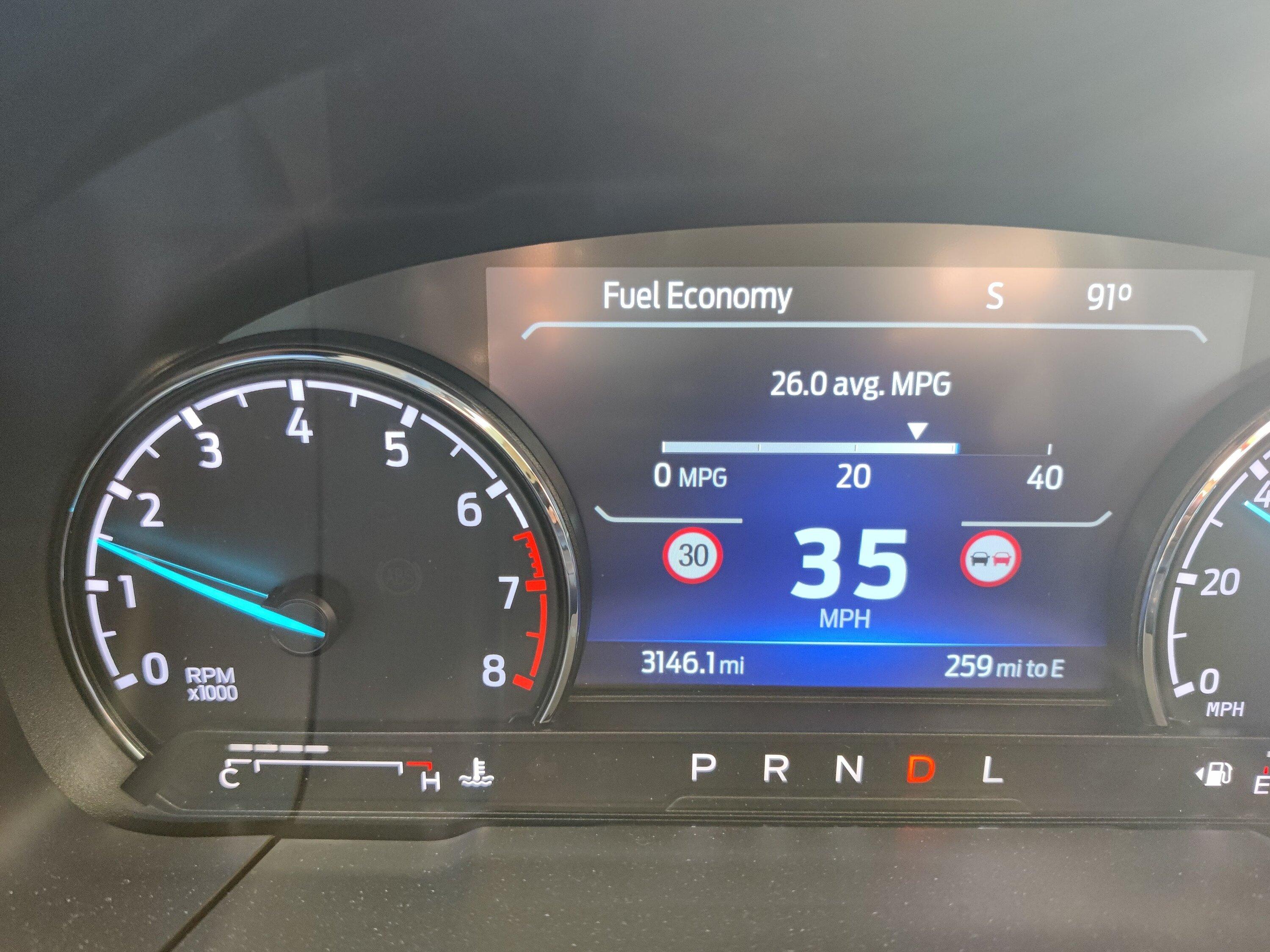
Here's the only thing I've ever seen in the right bubble on my Mav:
Ford Maverick Traffic sign recognition on an XLT FX4 IMG_20231020_171509
 

TheShark

2.5L Hybrid
Well-known member
First Name
Mark
Joined
Jul 22, 2021
Threads
12
Messages
1,504
Reaction score
2,281
Location
North Carolina
Vehicle(s)
2025 Maverick Lariat AWD Hybrid, 2024 2dr Bronco Heritage Limited Edition
Engine
2.5L Hybrid
Clubs
 
Here's the only thing I've ever seen in the right bubble on my Mav:
IMG_20231020_171509.jpg
That's interesting, the two circles I get are next to one another and only the one on the left ever displays anything, the speed limit. What is displaying on the right?
 

HolyCarp

2.0L EcoBoost
Well-known member
Joined
Sep 24, 2022
Threads
3
Messages
169
Reaction score
272
Location
DFW, TX
Vehicle(s)
2023 Cactus Gray XLT Eco AWD FX4 4K
Engine
2.0L EcoBoost
Clubs
 
That's interesting, the two circles I get are next to one another and only the one on the left ever displays anything, the speed limit. What is displaying on the right?
I believe it's the European symbol for "Do Not Pass".
 
OP
OP
generalmgr

generalmgr

2.0L EcoBoost
Well-known member
First Name
Wes
Joined
May 29, 2023
Threads
12
Messages
213
Reaction score
336
Location
Clarion, PA
Vehicle(s)
2023 Maverick XLT EB
Engine
2.0L EcoBoost
Clubs
 
That's interesting, the two circles I get are next to one another and only the one on the left ever displays anything, the speed limit. What is displaying on the right?
When I enabled TSR using some of the as built suggestions found here, I too get both circles on the left. When I use jerrisn’s method, I get one in each side, but only after putting everything else back to stock.
Sponsored


Top