

Sponsored

FAIL. Throwing in the towel. CPLAY2Air for XLT/XL.

ReddWulf

2.0L EcoBoost
Well-known member
First Name
Lee
Joined
Jul 22, 2021
Threads
18
Messages
391
Reaction score
688
Location
San Diego, California
Vehicle(s)
Maverick Tremor, Harley Road King Classic
Engine
2.0L EcoBoost
I know there's a few other threads about CPlay2Air - but I'm hoping to compile just troubleshooting info here. Wanted to verify if this is how far others are getting as well, or if you are seeing something different. Seems to work fine with the Lariat/Synch setup but not with Ford Connected Touch system (XLT/XL).

Have swapped some emails with CPlay2Air support and they said their engineering team is still working on the 2022 vehicles. Have spent a bit of time trying to work out the connection issue, but so far no joy. I'll also share what else I get from CPlay2Air if I get any more responses.

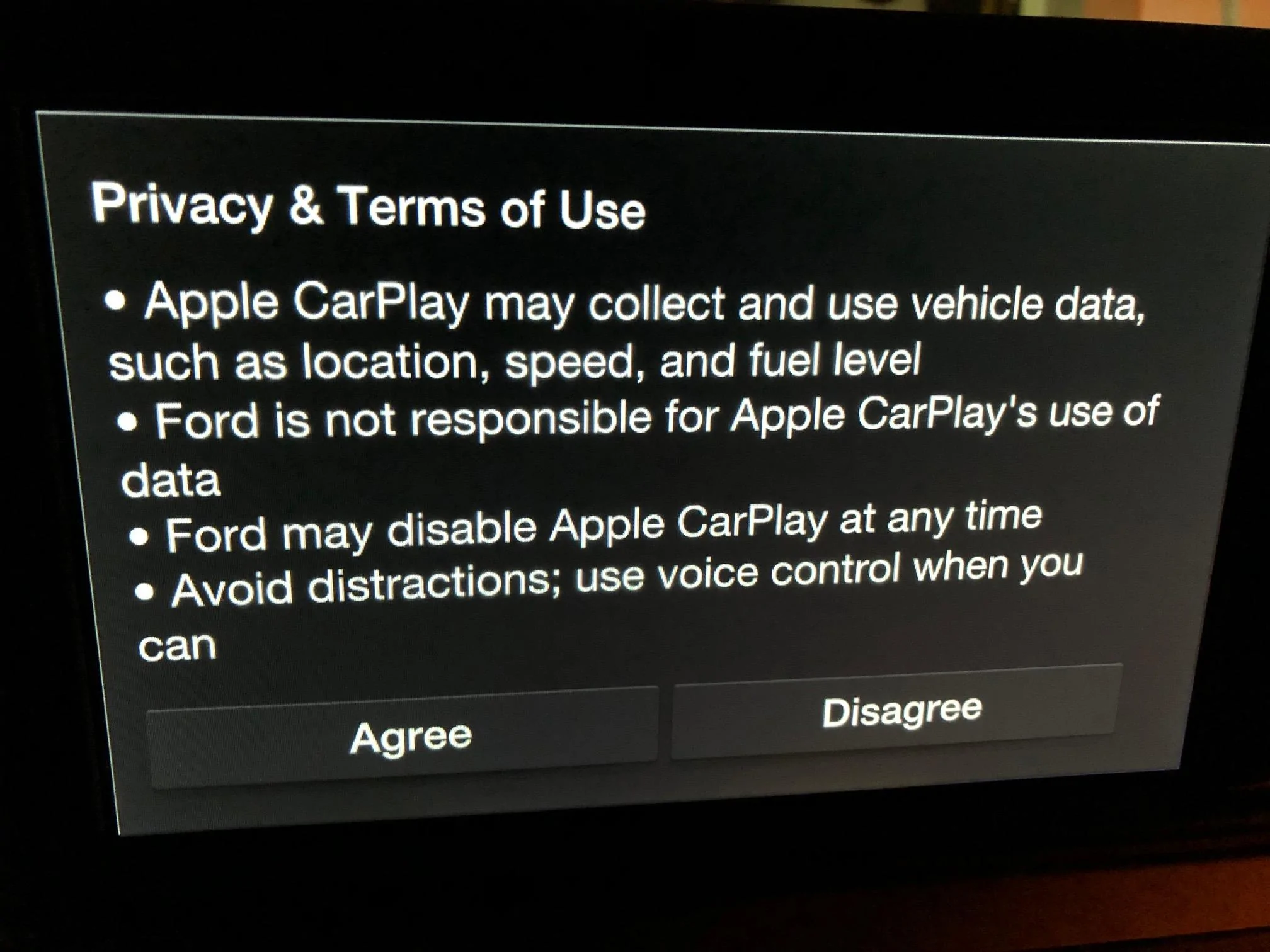
When connecting the CPlay2Air adapter it recognizes it as a CarPlay device because it brings these two screens up - same if you plugged in a wired connection:
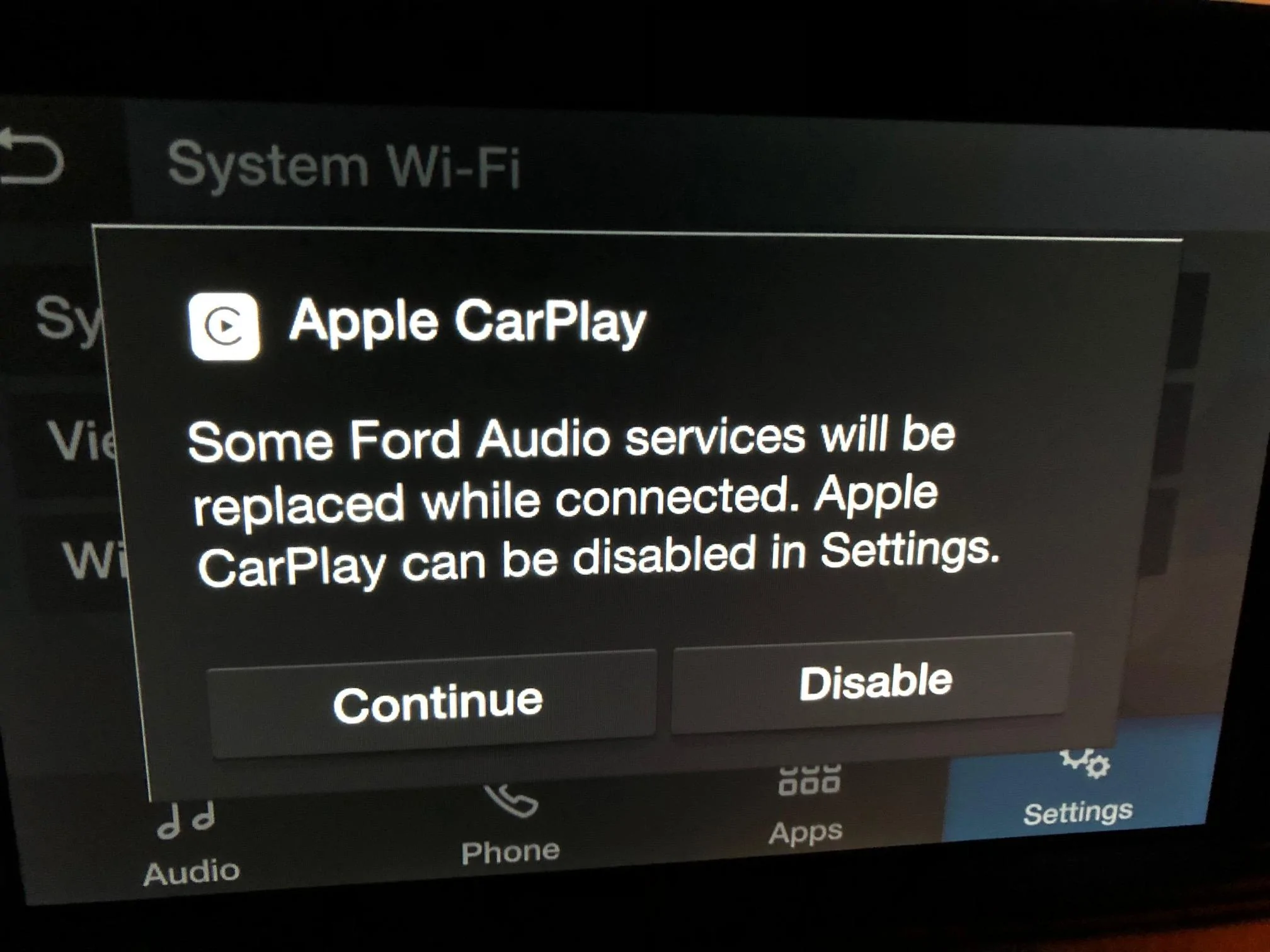
Ford Maverick FAIL. Throwing in the towel.  CPLAY2Air for XLT/XL. IMG_9249

Ford Maverick FAIL. Throwing in the towel.  CPLAY2Air for XLT/XL. IMG_9250


When the CPlay2Air adapter is connected to the it brings up the attached prompts just like it does for Wired CarPlay. However, Wired CarPlay brings up CarPlay after responding to the 2 prompts, but with the Cplay2Air adapter it does not load CarPlay or setup screen afterwards. I am never prompted to connect pair to my phone via Bluetooth and the Cplay2Air and the light on the Cplay2Air adapter stays red. After the first prompt I choose “CONTINUE” and the second prompt I respond “AGREE” just like the Wired CarPlay.

Promising that since you get these two CarPlay prompt screens I'm pretty sure there will eventually be a way to bring up CarPlay afterwards (hopefully).
Sponsored

 

shizelbs

2.0L EcoBoost
Well-known member
Joined
Oct 9, 2021
Threads
9
Messages
181
Reaction score
167
Location
Seattle
Vehicle(s)
Maverick XL
Engine
2.0L EcoBoost
Clubs
 
Thanks for emailing them and posting this. I would love to be able to use it again.
 

Cubican

2.5L Hybrid
Well-known member
First Name
Pedro
Joined
Jul 8, 2021
Threads
53
Messages
898
Reaction score
1,686
Location
Texas
Vehicle(s)
Ridgeline, viper, c8
Engine
2.5L Hybrid
Ok I have an lx and the adapter work for me perfect, I just plug it in and it brogh up the connecting screen and then the car play scree, I wonder if you need to disconnect the ford app first I dont have the tracking service on the ford app connected. I also had an Ottocast and on that one i had the same problems as you.
 

tomahawk72

2.0L EcoBoost
Well-known member
First Name
Travis
Joined
Dec 1, 2021
Threads
8
Messages
561
Reaction score
548
Location
Westbrook, Maine
Vehicle(s)
22 Maverick XLT
Engine
2.0L EcoBoost
Does the maverick come with a cable for Apple Car Play?
 

Sponsored

OP
OP
ReddWulf

ReddWulf

2.0L EcoBoost
Well-known member
First Name
Lee
Joined
Jul 22, 2021
Threads
18
Messages
391
Reaction score
688
Location
San Diego, California
Vehicle(s)
Maverick Tremor, Harley Road King Classic
Engine
2.0L EcoBoost
Ok I have an lx and the adapter work for me perfect, I just plug it in and it brogh up the connecting screen and then the car play scree, I wonder if you need to disconnect the ford app first I dont have the tracking service on the ford app connected. I also had an Ottocast and on that one i had the same problems as you.
Interesting thought about the Ford App....to clarify, is "lx" meaning the XLT Lux package? Thought it might have been "XL" but your profile has XLT. So you never activated your FordPass/Modem with you truck? I think if I could get the connecting screen up it will work....but it seems to hang up right there as with the wired connection it loads right after that.
 

Cubican

2.5L Hybrid
Well-known member
First Name
Pedro
Joined
Jul 8, 2021
Threads
53
Messages
898
Reaction score
1,686
Location
Texas
Vehicle(s)
Ridgeline, viper, c8
Engine
2.5L Hybrid
Interesting thought about the Ford App....to clarify, is "lx" meaning the XLT Lux package? Thought it might have been "XL" but your profile has XLT. So you never activated your FordPass/Modem with you truck? I think if I could get the connecting screen up it will work....but it seems to hang up right there as with the wired connection it loads right after that.
I meant xl base model I have another truck on order and that’s xlt on the ford app there is an option to not track your truck location the app is active
 

shizelbs

2.0L EcoBoost
Well-known member
Joined
Oct 9, 2021
Threads
9
Messages
181
Reaction score
167
Location
Seattle
Vehicle(s)
Maverick XL
Engine
2.0L EcoBoost
Clubs
 
Ok I have an lx and the adapter work for me perfect, I just plug it in and it brogh up the connecting screen and then the car play scree, I wonder if you need to disconnect the ford app first I dont have the tracking service on the ford app connected. I also had an Ottocast and on that one i had the same problems as you.
I was never able to get my wireless adapter to function before OR after activating Ford Pass. I'd love it someone else could confirm this.
 

Cubican

2.5L Hybrid
Well-known member
First Name
Pedro
Joined
Jul 8, 2021
Threads
53
Messages
898
Reaction score
1,686
Location
Texas
Vehicle(s)
Ridgeline, viper, c8
Engine
2.5L Hybrid
On my adapter it was in my other car for few years, I wonder if it need to be paired up to your phone on another car before trying it on the mav
 
OP
OP
ReddWulf

ReddWulf

2.0L EcoBoost
Well-known member
First Name
Lee
Joined
Jul 22, 2021
Threads
18
Messages
391
Reaction score
688
Location
San Diego, California
Vehicle(s)
Maverick Tremor, Harley Road King Classic
Engine
2.0L EcoBoost
On my adapter it was in my other car for few years, I wonder if it need to be paired up to your phone on another car before trying it on the mav
Yes, I think you may be correct. I feel like if you can get it paired to your phone it will work....but currently no way to get it to pair as it hangs up right before that step. It starts to load CarPlay then cannot find the phone.
 
Sponsored
OP
OP
ReddWulf

ReddWulf

2.0L EcoBoost
Well-known member
First Name
Lee
Joined
Jul 22, 2021
Threads
18
Messages
391
Reaction score
688
Location
San Diego, California
Vehicle(s)
Maverick Tremor, Harley Road King Classic
Engine
2.0L EcoBoost
Response from Cplay2Air support....not much more than they are still working on it. I'm going to try pairing the phone via another link and then putting it in the Maverick to test out @Cubican discovery that an already paired unit works fine.

Thanks for the information, Lee.
As mentioned, the test is still ongoing with 2022 car models so this could be the reason why it doesn't work.
You can try updating the firmware of the adapter but it's not a guarantee that the issue will be fixed either. You may wait until we support your car or return the adapter for a refund on or before January 23.
Here is the latest manual update available which is the 2021.08.30 system version.

Update instructions:
1.Please download the firmware update file from here:

  1. Please save update firmware file on USB flash drive (Flash drive format must be FAT32)
    NOTE: In case the file has no extension, kindly put it in this .img
  2. Plug the flash drive into the CPLAY2air adapter.
  3. Plug CPLAY2air to the USB power charger/wall charger for your iPhone. Please don’t use the USB port of the car or computer!!
  4. Please wait 2-3 minutes, until the flashing light becomes solid
  5. Please unplug the adapter from the USB charger and remove the USB flash drive from the adapter.
  6. Please now plug the product into the USB port of the car.
  7. Please wait until the new window appears on the vehicle's screen.
  8. Connect your phone to the Bluetooth network which is shown on the screen.
  9. Wait for the new interface to appear on the screen.
Very Important note: Do not attempt to connect the adapter to your computer's or laptop's USB port. These ports are made to transfer data and will just interrupt the update process and brick the device. If you have Type C port, kindly use a converter.

Let me know once this is done and update us, please.

Thank you!
 
OP
OP
ReddWulf

ReddWulf

2.0L EcoBoost
Well-known member
First Name
Lee
Joined
Jul 22, 2021
Threads
18
Messages
391
Reaction score
688
Location
San Diego, California
Vehicle(s)
Maverick Tremor, Harley Road King Classic
Engine
2.0L EcoBoost
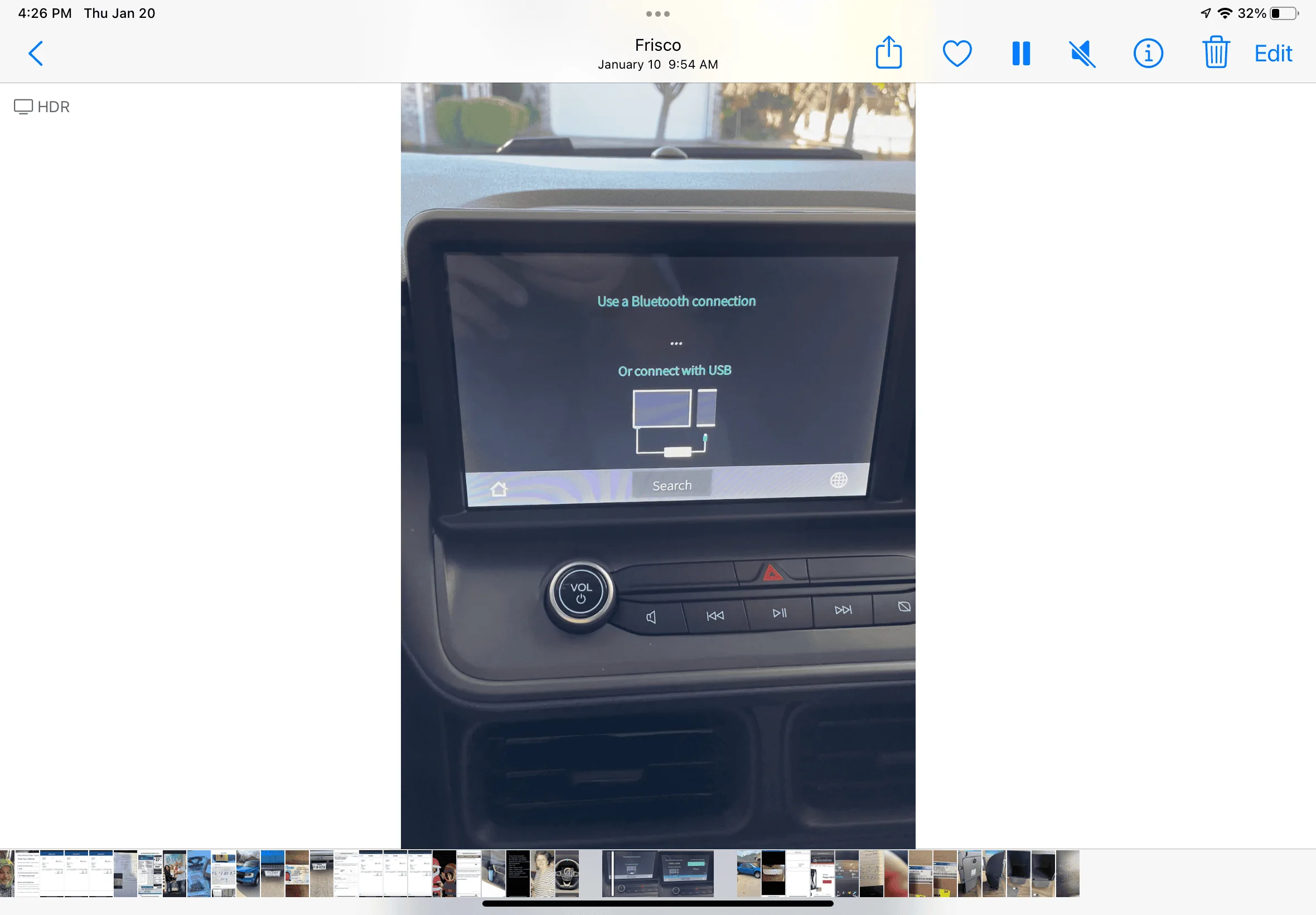
Update: Well, my neighbor let me try the CPlay2Air to the CarPlay in his car and it worked perfectly (he actually wants one now too 😆 ). Paired right up with my phone and CarPlay easy as can be, so have eliminated any dongle problems. Also loaded latest firmware from support link, but no change, same behavior. I also disabled all FordPass Connect, WiFi, and started fresh but still at the same stopping point after the prompt screens. Think CPlay2Air is going to need a firmware update for this to work with the new Ford Connect Touch system as there is no way to manually start CarPlay.
 

1st E

Member
Joined
Jan 7, 2022
Threads
0
Messages
22
Reaction score
25
Location
The Lake
Vehicle(s)
2022 Ford Maverick
Update: Well, my neighbor let me try the CPlay2Air to the CarPlay in his car and it worked perfectly (he actually wants one now too 😆 ). Paired right up with my phone and CarPlay easy as can be, so have eliminated any dongle problems. Also loaded latest firmware from support link, but no change, same behavior. I also disabled all FordPass Connect, WiFi, and started fresh but still at the same stopping point after the prompt screens. Think CPlay2Air is going to need a firmware update for this to work with the new Ford Connect Touch system as there is no way to manually start CarPlay.
I also purchased 1 of these but have zero luck pairing it to use in my Lariat Maverick.
 

Cubican

2.5L Hybrid
Well-known member
First Name
Pedro
Joined
Jul 8, 2021
Threads
53
Messages
898
Reaction score
1,686
Location
Texas
Vehicle(s)
Ridgeline, viper, c8
Engine
2.5L Hybrid
I must be one off the lucky ones is working great for me I did notice that my I phone had an upgrade that included connectivity solutions I can’t get the vid to download but here’s a pic
Ford Maverick FAIL. Throwing in the towel.  CPLAY2Air for XLT/XL. 4BC04961-D081-425D-B130-6CE32E60828E
 
OP
OP
ReddWulf

ReddWulf

2.0L EcoBoost
Well-known member
First Name
Lee
Joined
Jul 22, 2021
Threads
18
Messages
391
Reaction score
688
Location
San Diego, California
Vehicle(s)
Maverick Tremor, Harley Road King Classic
Engine
2.0L EcoBoost
The key is getting to that connection screen to be able to link iPhone/Maverick/CPlay2Air together. I'd love to see that screen. It stops just when it should go to that point. If nothing else, it still gives me hope we'll all get there eventually. Interesting point about the connectivity options.
Sponsored


Top
