Sponsored

Kicker Key 200.4 tuning for Hybrid XLT non B&O system

outothswrld

2.5L Hybrid
Member
First Name
Jose
Joined
Sep 27, 2025
Threads
2
Messages
18
Reaction score
21
Location
Long Beach, CA
Vehicle(s)
Maverick XLT
Engine
2.5L Hybrid
Howdy,

Looking for any helpful tips on tuning or getting better sound out of my set up. Specifically the front stage.

Focal ASE 165 6.5in components with passive crossovers- front
Kicker Key 200.4 - non bi-amp mode
Focal ACX 100 4in coaxials- rear
Kicker Hideaway HS10 subwoofer- behind rear seat.
Kicker KEYLOC- connected to subwoofer

Its worth mentioning that the sound is night and day compared to the stock set up. Clean sound and plenty loud. My one problem I can’t quite figure out is how to better blend the tweeters (or maybe the mids). If I leave the radio EQ settings to neutral or “0” for bass, mid and treble it’s quite harsh. So I take the mid down a few notches and it sounds better but not quite enough. Still a little unsatisfying. However, if I remove too much mid it sounds unbalanced.

Initially the bass was quite muddy too, which is why I added the KEYLOC which helped clean up the bass perfectly.

I’ve rerun the setup on both Key 200.4 and KEYLOC to see if it made any difference, but the only thing Ive noticed is that it now seems louder. I used to be able to go up to volume 22/23 comfortably without distortion in the front, but now 20 seems like is the max. Which is fine because I usually listen right around volume 14-16.

The installer that did the initial work left the gains on the Key 200.4 set to minimum, which I tried adjusting but I actually found the sound quality deteriorated a bit so I just left them at the minimum setting. I’ve also tried both Spotify lossless audio and Apple Music lossless. Here, I did notice a big improvement. It sounds pretty damn good whenever lossless audio is playing (from either service), but mediocre when it’s not.

Is the media quality my only issue is there something else I can do to improve the sound on the front stage? I’ve considered running the Key 200.4 in bi-amp mode but have avoided it due to the work of rewiring everything. I am also considering running ForScan to remove the factory EQ. Any help or tips are appreciated!
Sponsored


 

Carlitos_92

2.0L EcoBoost
Well-known member
Joined
Mar 24, 2024
Threads
4
Messages
2,276
Reaction score
4,608
Location
Texas
Vehicle(s)
2023 Area 51 XLT EB AWD Lux FX4
Engine
2.0L EcoBoost
Clubs
 
Hmmm. I have a very similar setup except Kicker speakers and no Keyloc on the HS10. No issues with the front at all. Some things to try:
  • Definitely use Forscan to set the EQ to flat. In theory the Key 200.4 will compensate for it, but IMHO you’re making it harder for the DSP to do its job if the Ford source is already being manipulated.
  • Both gain controls on my 200.4 are well above the minimum setting. Something seems off on yours. Maybe if you flatten the EQ and redo the DSP setup one more time you can revisit that.
  • How are the crossovers on the 200.4 and the HS10 set? I have both mine set to 60 Hz and think it sounds the best, but unless you are looking at spectral analysis, it is mostly personal preference. Fiddling with those might’ve helped the muddiness, but it also depends on how the HS10 is wired up. The signals for my HS10 are tapped off of the rear channels using a PAC harness. I am also putting bass blockers on my rear channels (between the 200.4 and the speakers) because the 4” drivers can’t take 50w of full-range signal, no matter what the 200.4’s high-pass is set to.
  • Do the Focal component crossovers have any tweeter-level adjustments? My Kickers do, and I can definitely make the dash tweeters harsh by setting their level too high on the crossovers.
  • I have noticed a huge difference in sound quality depending on how much the source is compressed. Sirius XM (streamed via CarPlay) and FM radio sound horrible compared to my own 256 kbps MP3 library on CarPlay. This wasn’t nearly as noticeable with the crappy OEM sound setup. Welcome the world of decent stereos lol.
  • Are you getting good stereo separation up front? Is it possible a front speaker is wired out of phase? How were the dash tweeters fed - do you know?
  • What do the rest of your tone control settings look like? I’m able to set the treble at about 75% (if you consider the whole slider 0-100), the midrange at about 50, and the bass at maybe 60. I have played with combinations +/- 20% on each and still fiddle with it here and there, but there is zero harshness.
  • I am assuming you’re using the Kicker pink noise WAV file when you’re doing the 200.4 setup?
That's about all I can think of off the bat. I would definitely start with the Forscan, rerun the DSP, and revisit the gain and crossover settings one more time.
 
Last edited:
OP
OP

outothswrld

2.5L Hybrid
Member
First Name
Jose
Joined
Sep 27, 2025
Threads
2
Messages
18
Reaction score
21
Location
Long Beach, CA
Vehicle(s)
Maverick XLT
Engine
2.5L Hybrid
Thanks so much for your reply. Appreciate the time and effort.

The crossovers on the Key 200.4 are set to 80hz as recommended by the manufacturer and installer. I briefly ran them at 60 Hz and liked the sound too, but then once the subwoofer was installed it seemed to have too much overlap and the bass from the subwoofer appeared to get lost. The crossover on the HS10 is set to 75-80ish Hz. I say that because there are no numbers on the dial besides the minimum and maximum. I may try setting the Key crossover to 60Hz again and adjust the HS10 accordingly.

Unfortunately this set of tweeter crossovers does not have selectable adjustments. That was one of the first things I checked.

The sound separation is quite good actually. I haven’t tested for polarity but just listening to it, it doesn’t appear to be. Everything sounds tight and together. For what its worth, I had read somewhere that Focal apparently swaps the polarity on the tweeter crossovers to correct for phase shifts introduced by the crossover network.

I tried checking how the tweeters were originally fed but couldn’t find the connection points. My Key 200.4 sits in a cavity underneath the center console, below the transmission rotary dial. I would probably have to remove more panels to truly trace all the wiring.
I found the right tweeter crossover underneath the dash behind the glove box, but couldn’t find the other one on the left. They weren’t plugged in using using an adapter harness though, so my guess is they ran new wiring directly to Key.

On the radio EQ, based on your scale I have both treble and bass at 50 and mid at around 35-40. I have not gone higher than the mid point since I have read when adjusting the EQ it’s best practice to remove, never add to preserve audio quality and prevent distortion.

Yes, I used the .WAV pink noise file from Kicker’s website to EQ the Key. I ran it from a USB stick to ensure best accuracy.

The only other thing I can think of is if the engine is somehow skewing the calibration process? I ran the calibration with the ignition on to avoid battery drain since I have a Hybrid. Its off for most of the setup but it turned on once or twice during the process.

I will try two things and report back.

1. Set crossover to 60Hz on the Key and adjust the HS10 accordingly.
2. Rerun the Key calibration with the microphone facing forward vs. up.

Thanks again!
 

Maverick_Dad

2.0L EcoBoost
Well-known member
First Name
Austin
Joined
Jul 25, 2025
Threads
13
Messages
229
Reaction score
520
Location
St. Louis
Vehicle(s)
2023 Maverick XLT
Engine
2.0L EcoBoost
I'll chime in since I have a similar setup. The front sound stage sounded immensely better when I wired my Key200.4 in Bi-amp mode on just the front speakers. I set the fader to slightly forward, and I run my bass at 3 clicks to the right to help the HS10. I tapped my HS10 just off the front speaker signals. I haven't switched the eq to flat with Forscan yet though. My gain is set at mid for both amps on the Key200.4 and almost maxed out on the HS10. I have both set at 80hz, but I notice some higher notes coming thru the sub, so I might try switching them both to 60hz. Overall though my setup is pretty clean until I crank it over 20. I've always seen people try the pink noise tuning a few times before getting the sound they desire, so that may be a good start.

I might look at adding the Keyloc for the HS10 too, it sounds pretty decent but can be a little muddy at times. It probably helps the sub amp work less hard as well.
 
OP
OP

outothswrld

2.5L Hybrid
Member
First Name
Jose
Joined
Sep 27, 2025
Threads
2
Messages
18
Reaction score
21
Location
Long Beach, CA
Vehicle(s)
Maverick XLT
Engine
2.5L Hybrid
I'll chime in since I have a similar setup. The front sound stage sounded immensely better when I wired my Key200.4 in Bi-amp mode on just the front speakers. I set the fader to slightly forward, and I run my bass at 3 clicks to the right to help the HS10. I tapped my HS10 just off the front speaker signals. I haven't switched the eq to flat with Forscan yet though. My gain is set at mid for both amps on the Key200.4 and almost maxed out on the HS10. I have both set at 80hz, but I notice some higher notes coming thru the sub, so I might try switching them both to 60hz. Overall though my setup is pretty clean until I crank it over 20. I've always seen people try the pink noise tuning a few times before getting the sound they desire, so that may be a good start.

I might look at adding the Keyloc for the HS10 too, it sounds pretty decent but can be a little muddy at times. It probably helps the sub amp work less hard as well.
Thanks for your reply. I have heard bi-amping with the Key is the way to go due to the higher slope on the crossover and the higher crossover point. I may end up doing that, but trying to avoid additional work and expenses if possible. I forgot to mention In the original post that my HS10 is tapped into the front speaker signals BEFORE it connects to the Key. It then branches off to the KEYLOC, which then feeds the HS10. I highly recommend the KEYLOC for the HS10. However, if you’re going to do the ForScan EQ delete, you may want to hold off since the KEYLOC essentially restores a flat EQ as well. Not sure if it does any other corrections, but man does the bass sound clean and tight. Just like with the Key you can toggle the button and hear the difference between before and after.
 

Sponsored

Carlitos_92

2.0L EcoBoost
Well-known member
Joined
Mar 24, 2024
Threads
4
Messages
2,276
Reaction score
4,608
Location
Texas
Vehicle(s)
2023 Area 51 XLT EB AWD Lux FX4
Engine
2.0L EcoBoost
Clubs
 
Thanks so much for your reply. Appreciate the time and effort.

The crossovers on the Key 200.4 are set to 80hz as recommended by the manufacturer and installer. I briefly ran them at 60 Hz and liked the sound too, but then once the subwoofer was installed it seemed to have too much overlap and the bass from the subwoofer appeared to get lost. The crossover on the HS10 is set to 75-80ish Hz. I say that because there are no numbers on the dial besides the minimum and maximum. I may try setting the Key crossover to 60Hz again and adjust the HS10 accordingly.

Unfortunately this set of tweeter crossovers does not have selectable adjustments. That was one of the first things I checked.

The sound separation is quite good actually. I haven’t tested for polarity but just listening to it, it doesn’t appear to be. Everything sounds tight and together. For what its worth, I had read somewhere that Focal apparently swaps the polarity on the tweeter crossovers to correct for phase shifts introduced by the crossover network.

I tried checking how the tweeters were originally fed but couldn’t find the connection points. My Key 200.4 sits in a cavity underneath the center console, below the transmission rotary dial. I would probably have to remove more panels to truly trace all the wiring.
I found the right tweeter crossover underneath the dash behind the glove box, but couldn’t find the other one on the left. They weren’t plugged in using using an adapter harness though, so my guess is they ran new wiring directly to Key.

On the radio EQ, based on your scale I have both treble and bass at 50 and mid at around 35-40. I have not gone higher than the mid point since I have read when adjusting the EQ it’s best practice to remove, never add to preserve audio quality and prevent distortion.

Yes, I used the .WAV pink noise file from Kicker’s website to EQ the Key. I ran it from a USB stick to ensure best accuracy.

The only other thing I can think of is if the engine is somehow skewing the calibration process? I ran the calibration with the ignition on to avoid battery drain since I have a Hybrid. Its off for most of the setup but it turned on once or twice during the process.

I will try two things and report back.

1. Set crossover to 60Hz on the Key and adjust the HS10 accordingly.
2. Rerun the Key calibration with the microphone facing forward vs. up.

Thanks again!
Sounds like a good plan. I would definitely run the 200.4 calibration in the accessory key position so there is zero noise. If you are worried about battery drain, you could always hook up a charger, but even in a hybrid you should be fine for the few minutes the setup takes place.

FYI the reason I asked about how the tweeters are wired is because the stock tweeters are fed from the door speakers, so in order to split things up - like when coming out of a two-way crossover - you'd either have to run new wires to the dash (which is what I did), or intercept the OEM wires between the doors and dash locations. It sounds like your installer knew what they were doing, but there are plenty out there that are making it up as they go.

I have both set at 80hz, but I notice some higher notes coming thru the sub, so I might try switching them both to 60hz.
Funny that we are coming up with similar results. Since we are approaching it with different EQ settings, my guess is that there is some nasty resonance in the cab of these trucks that is exacerbated when the HS10 crossover is set at 80 or above. Whatever it is, I am not a fan, but it's always subjective anyway.
 

squirlz

2.5L Hybrid
Well-known member
Joined
Apr 23, 2024
Threads
5
Messages
116
Reaction score
123
Location
Madison, WI
Vehicle(s)
2025 Maverick XLT Hybrid AWD
Engine
2.5L Hybrid
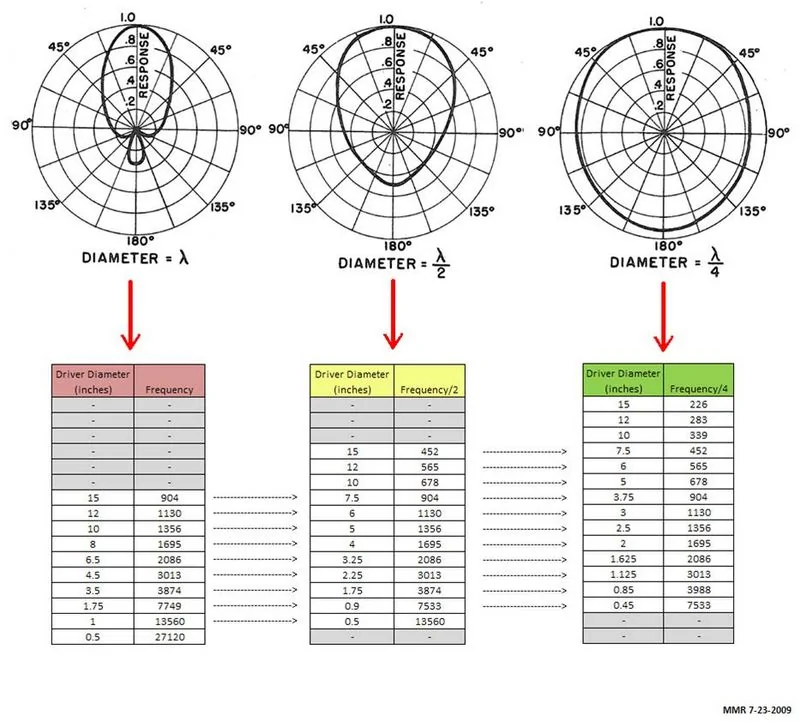
The core of the issue is that a 6.5" speaker will start to beam below the x-over point. You are loosing a lot of mid range information. Looking at the diagram below, beaming has an affect at ~1100 Hz, I would guess your tweeter x-over is close to 2500 Hz, which is well into beaming. What you hear is a roll off of those frequencies and with the tweeter in the dash pointing at the glass you get a boost in those frequencies. The closer the speakers are together the better they will match up. One thing you could try is to reverse the polarity of the tweeter to see if that helps, it could bring them more "in time" and could cause less cancellation in the x-over range.

I wonder if Coax in the front door would have a better result. Without time alignment the image would be lower, but you would get a more cohesive sound.

Ford Maverick Kicker Key 200.4 tuning for Hybrid XLT non B&O system beaming_chart2
 
OP
OP

outothswrld

2.5L Hybrid
Member
First Name
Jose
Joined
Sep 27, 2025
Threads
2
Messages
18
Reaction score
21
Location
Long Beach, CA
Vehicle(s)
Maverick XLT
Engine
2.5L Hybrid
Update

Finally got around to testing things. I tried the easiest thing first which was to re-calibrate the Key with the microphone facing forward on the head rest (approximately where my ears sit). What a difference! As soon as I started playing music I noticed an immediate difference. The harshness was gone! :eek: Everything was so well blended. I sat there listening to various genres at varying volume levels for a good 15-20 I minutes just to make sure and they ALL sounded so good! I even sat in the back seat to check the rear sound. Very satisfied with the results. Here are a few other tweaks I made before calibrating.

1. I turned off the road noise volume compensation on the head unit. Think I forgot the first time.
2. I also enabled radio detect on the Key. Don’t think I need it, but I read somewhere that could help with the gain issue I was having since the high level input may be providing “too much” voltage. I know, doesn’t make sense to me, but I tried it out. It might have done something because I can go higher on the volume 22-24 before it‘s too loud for me. Gains are still at minimum though.
3. I ran the calibration with just the accessory power to avoid engine noise.

Final thoughts, if you have Maverick with the non B&O system and install a Kicker Key 200.4 run the calibration with the microphone facing the dash. It will provide a well blended and balanced front sound stage
 
OP
OP

outothswrld

2.5L Hybrid
Member
First Name
Jose
Joined
Sep 27, 2025
Threads
2
Messages
18
Reaction score
21
Location
Long Beach, CA
Vehicle(s)
Maverick XLT
Engine
2.5L Hybrid
The core of the issue is that a 6.5" speaker will start to beam below the x-over point. You are loosing a lot of mid range information. Looking at the diagram below, beaming has an affect at ~1100 Hz, I would guess your tweeter x-over is close to 2500 Hz, which is well into beaming. What you hear is a roll off of those frequencies and with the tweeter in the dash pointing at the glass you get a boost in those frequencies. The closer the speakers are together the better they will match up. One thing you could try is to reverse the polarity of the tweeter to see if that helps, it could bring them more "in time" and could cause less cancellation in the x-over range.

I wonder if Coax in the front door would have a better result. Without time alignment the image would be lower, but you would get a more cohesive sound.

beaming_chart2.webp
Thanks for the info and reply. I have some understanding of this and it makes total sense. This might be the reason why running the Key in Bi-amp mode produces better results. It ups the tweeter crossover to 3200 Hz and increases the db slope from -12 to -24, thereby limiting the beaming effect.

As for the polarity, I read that Focal (and other reputable speaker manufacturers) already take this into consideration and swap the polarity on the tweeters. Any tweeter beyond 6 inches of the mid woofer is recommended to swap polarity. However, since I didn’t do the initial install, I really can’t say other than what I hear. After recalibrating with the microphone in a new position I am quite satisfied with the sound. The tweeters no longer overpower the mids and even the time alignment seems better. Thanks again!
 
OP
OP

outothswrld

2.5L Hybrid
Member
First Name
Jose
Joined
Sep 27, 2025
Threads
2
Messages
18
Reaction score
21
Location
Long Beach, CA
Vehicle(s)
Maverick XLT
Engine
2.5L Hybrid
Update 6/14/26
I finally had some time to trace all the wiring. I found the tweeters are the only speakers connected to the passive crossovers, the midwoofers were left off and in fact the midwoofer wiring was just snipped 😒 This probably explains why my sound is so harsh/bright, they’re playing full range and overlapping with the tweeters. I plan to buy some replacement crossovers and install them myself. However, judging from all the posts and videos I’ve seen, wiring them can be a pain in the butt. If anybody has a good write up with pictures or a video please let me know. Would be greatly appreciated.
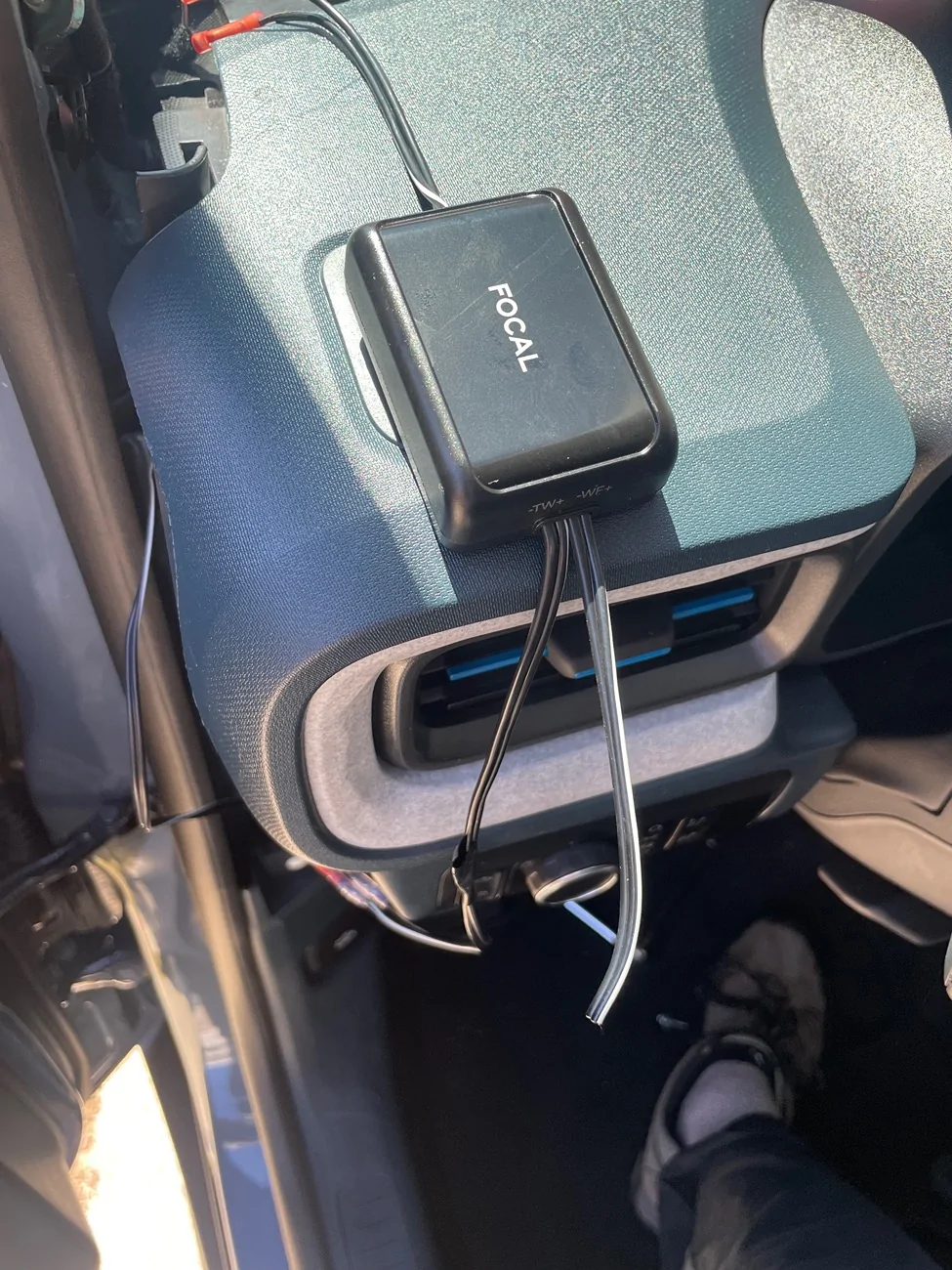
Other observations, a few panels were damaged during the initial install. Found multiple broken twisted/clips. The left tweeter grill would no longer sit flush (and the tweeter was not seated properly and off axis) and the rear right speaker cover was sagging. To make matters worse the fit on the rear speakers is snug due the large magnet of the focal acx 100s so I ended up replacing both covers. Found some on ebay in good condition for decent price. The new cover went right on and stays put but I have to fiddle some more with the speaker to try to get it sit flush. Crutchfield says it doesn’t fit, but one other user said he got his to fit without issue.

Lesson learned, if you want something done right you have to do it yourself. I’m a novice with car audio but I am handy and willing to learn and fortunately have the time and money to do it. Sites like this and youtube are life savers and make most tasks DIY capable.
 
Sponsored

Carlitos_92

2.0L EcoBoost
Well-known member
Joined
Mar 24, 2024
Threads
4
Messages
2,276
Reaction score
4,608
Location
Texas
Vehicle(s)
2023 Area 51 XLT EB AWD Lux FX4
Engine
2.0L EcoBoost
Clubs
 
Man, glad you got it figured out, but sorry your installer sucked.

I don't have any pics of my crossover install, but I can tell you I stuck them to the back of my glovebox using VHB tape. That way I can adjust them if I need to, but honestly that is unlikely now that I have everything set up the way I want.

I'm actually curious how your fronts are wired up now... Is the 200.4 feeding both the tweeters and the mids? I am really at a loss as to wtf those guys thought they were doing.

Anyhoo, this thread of mine has a crude wiring diagram in the first post. You can kindof see how I wired up my 200.4 there: 200.4 > crossover > PAC harness to the OEM door wiring, plus new wires to the dash tweeters.
 
OP
OP

outothswrld

2.5L Hybrid
Member
First Name
Jose
Joined
Sep 27, 2025
Threads
2
Messages
18
Reaction score
21
Location
Long Beach, CA
Vehicle(s)
Maverick XLT
Engine
2.5L Hybrid
Man, glad you got it figured out, but sorry your installer sucked.

I don't have any pics of my crossover install, but I can tell you I stuck them to the back of my glovebox using VHB tape. That way I can adjust them if I need to, but honestly that is unlikely now that I have everything set up the way I want.

I'm actually curious how your fronts are wired up now... Is the 200.4 feeding both the tweeters and the mids? I am really at a loss as to wtf those guys thought they were doing.

Anyhoo, this thread of mine has a crude wiring diagram in the first post. You can kindof see how I wired up my 200.4 there: 200.4 > crossover > PAC harness to the OEM door wiring, plus new wires to the dash tweeters.
I’ll need to go back and look again. I didn’t play close enough attention but I know for sure one of the input wires on the crossover was snipped. I could only assume it was the midwoofer that they snipped since the tweeters are working well and the voice coils haven’t blown. The midwoofers are working too but I hear too much upper midrange in general. Hence, why I think they left the midwoofers disconnected from the crossover. This would make sense since the speaker can play full range, but without the crossover connected the midwoofer will clash with the tweeter above 3000 hz.
 
OP
OP

outothswrld

2.5L Hybrid
Member
First Name
Jose
Joined
Sep 27, 2025
Threads
2
Messages
18
Reaction score
21
Location
Long Beach, CA
Vehicle(s)
Maverick XLT
Engine
2.5L Hybrid
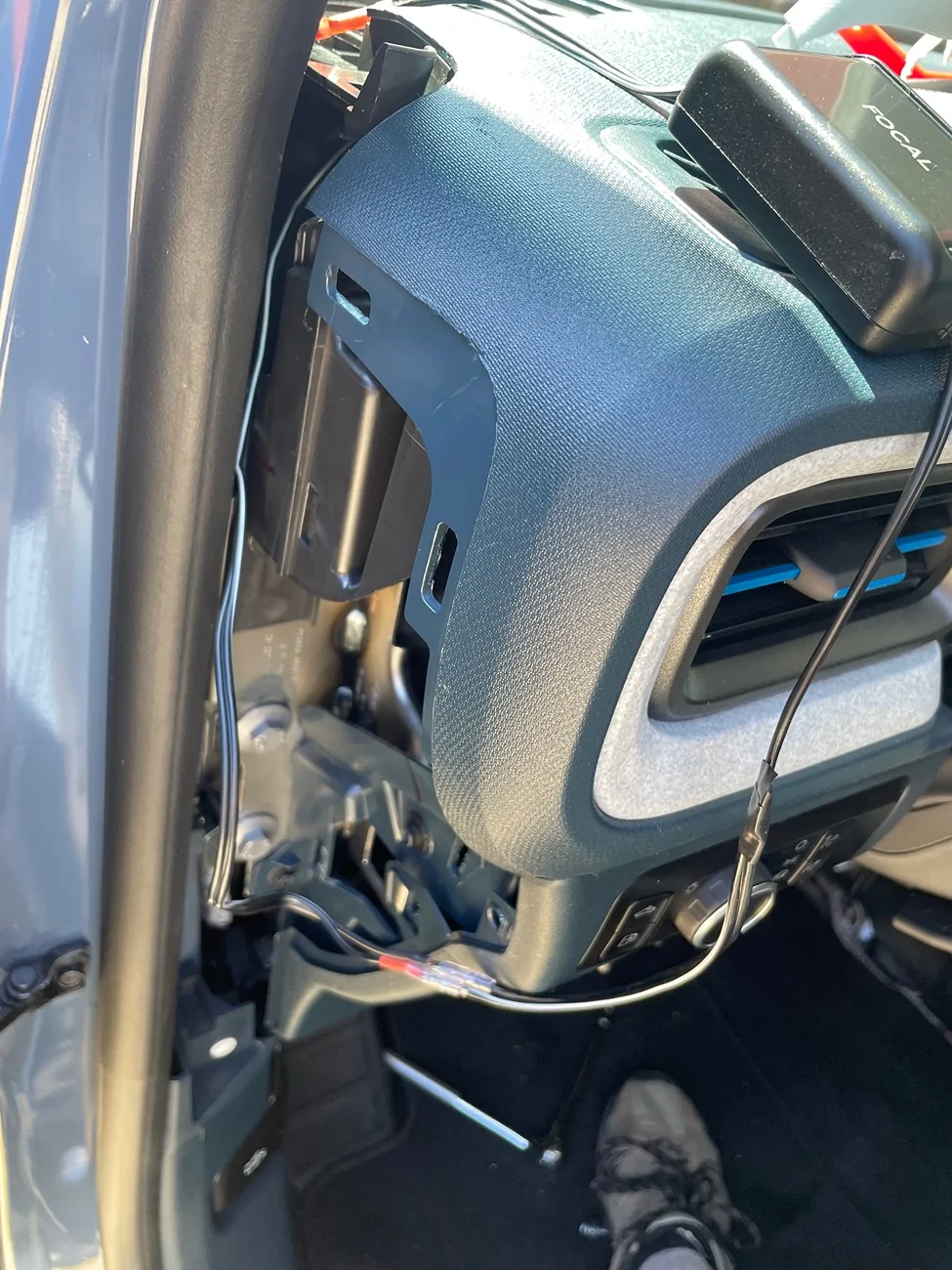
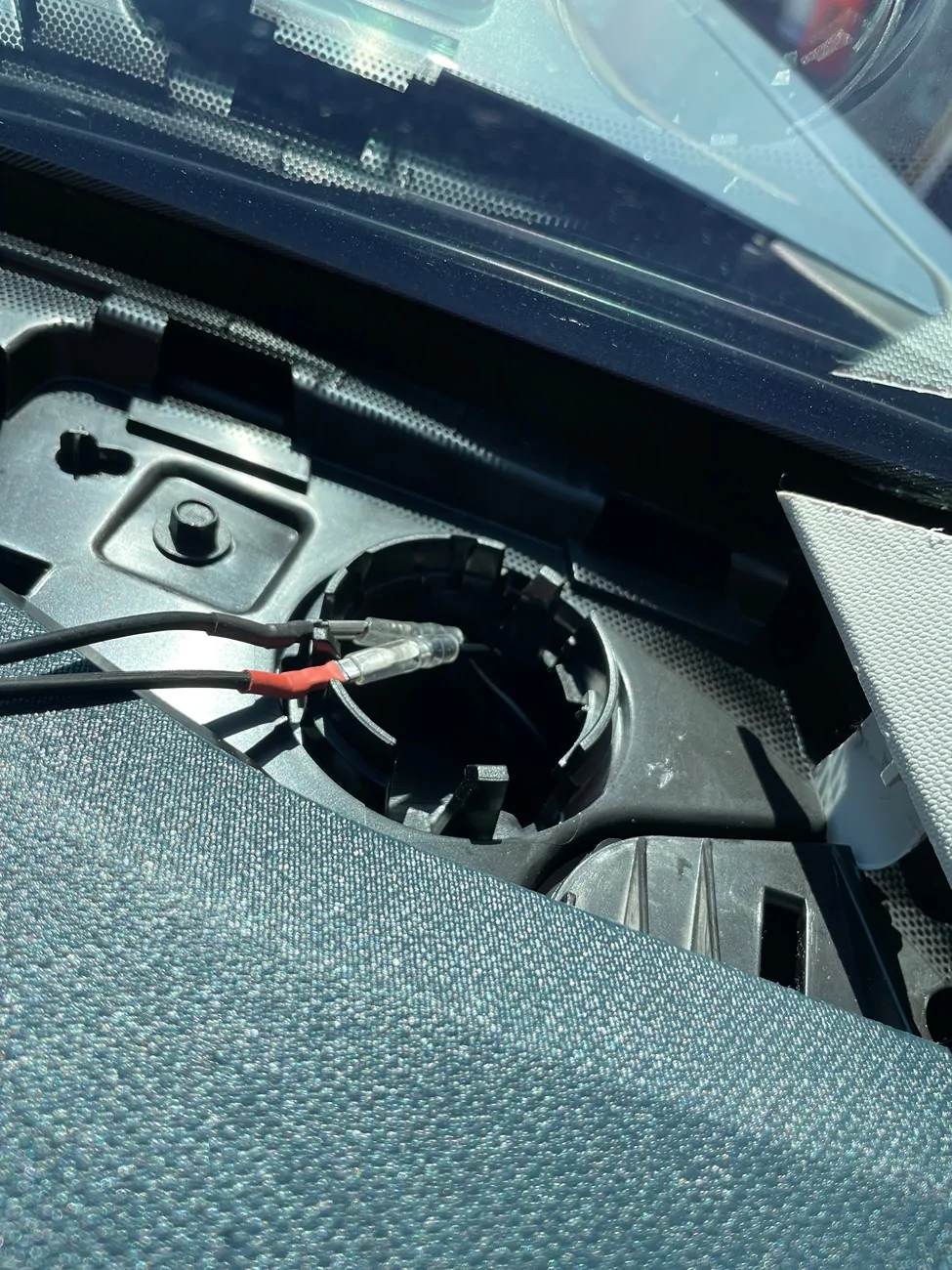
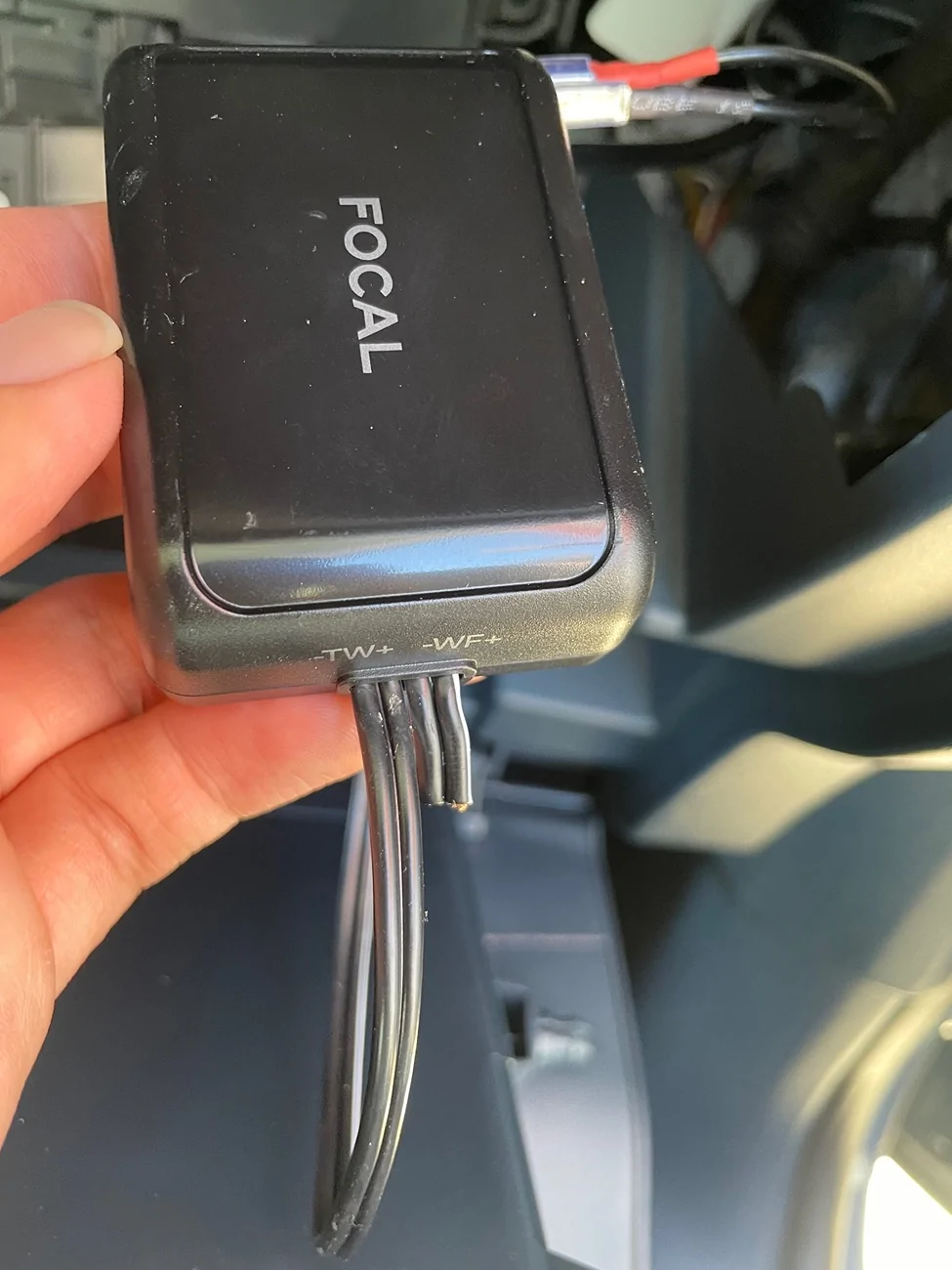
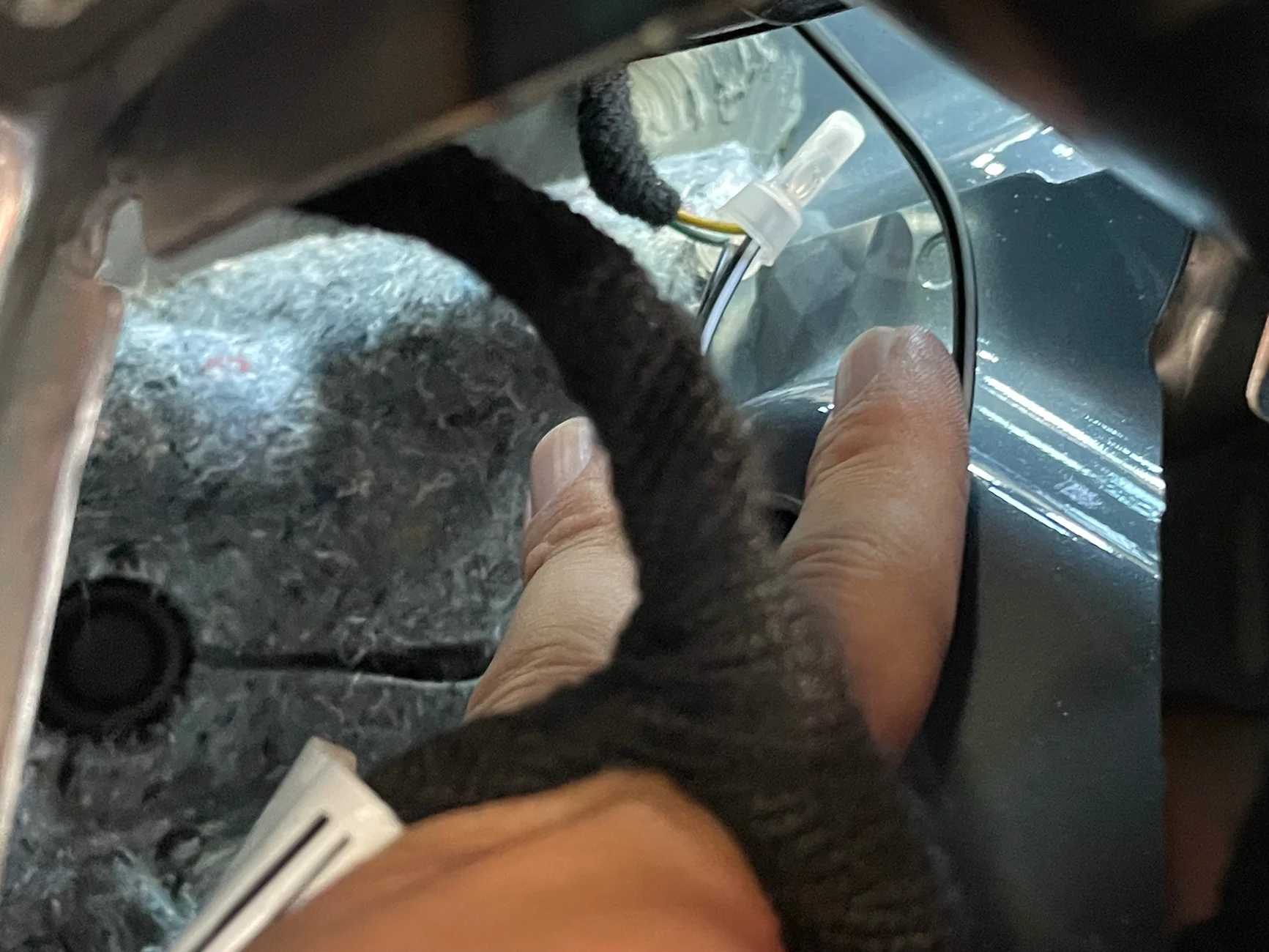
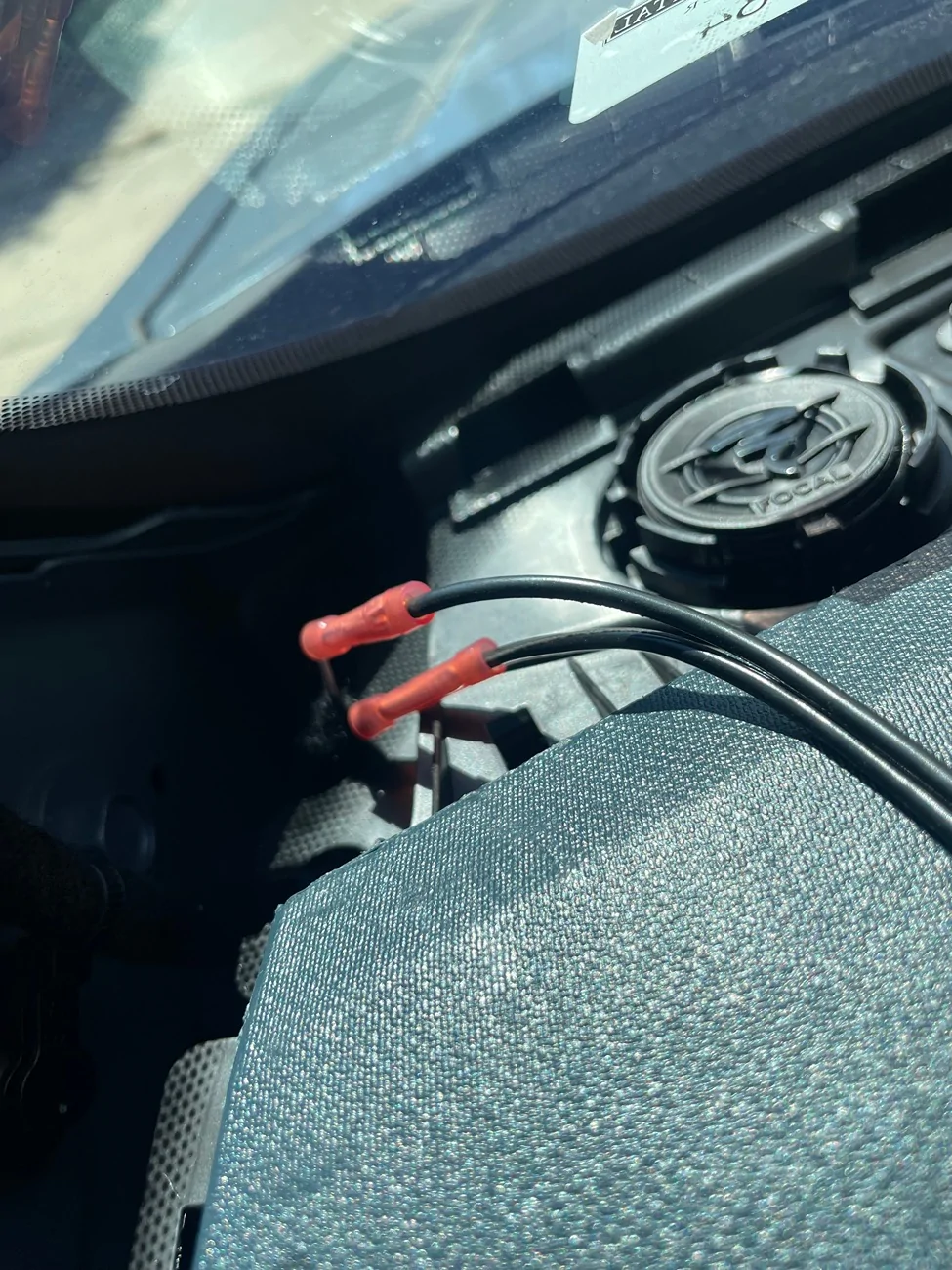
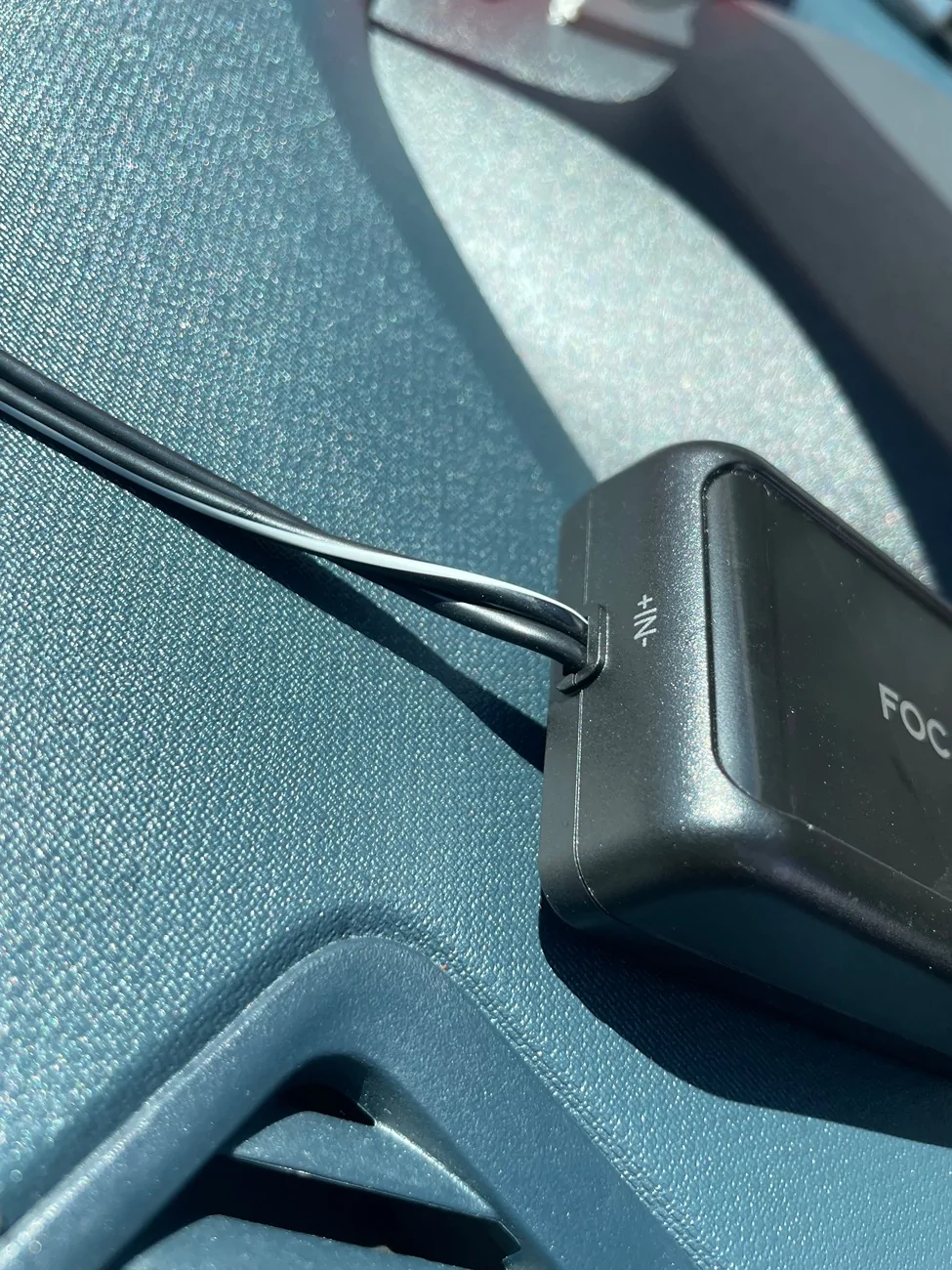
Went back in today and decided to take pictures in hopes of getting further guidance.

Ford Maverick Kicker Key 200.4 tuning for Hybrid XLT non B&O system IMG_1453

This shows the connection point with the original wiring harness.

Ford Maverick Kicker Key 200.4 tuning for Hybrid XLT non B&O system IMG_1454

Here is that connection leading into the crossover.

Ford Maverick Kicker Key 200.4 tuning for Hybrid XLT non B&O system IMG_1455

Here is a better view of all the wiring. As you can see the midwoofer output was cut so the midwoofer is full range. No wonder it sounds harsh. Probably messing with the kicker key too 🤦‍♂️

Ford Maverick Kicker Key 200.4 tuning for Hybrid XLT non B&O system IMG_1456

Here is the tweeter output leading back to the tweeter.

Ford Maverick Kicker Key 200.4 tuning for Hybrid XLT non B&O system IMG_1461

Here is the passenger side.

Ford Maverick Kicker Key 200.4 tuning for Hybrid XLT non B&O system IMG_1458

Woofer output snipped 😒

Ford Maverick Kicker Key 200.4 tuning for Hybrid XLT non B&O system IMG_1462

Connection with the factory wire (passenger tweeter)

In order to correct the issue I will need to undo the tweeter connections and route them to the front door speakers instead, and then run new wire from the key 200.4 to the tweeter side of the crossovers, correct? If so what do I do with the factory tweeter wiring? Do i just cap it?
 

Maverick123

2.5L Hybrid
Well-known member
Joined
Mar 24, 2025
Threads
35
Messages
903
Reaction score
1,598
Location
Canada
Vehicle(s)
Waiting
Engine
2.5L Hybrid
Maybe I'm misunderstanding your situation but, if you're going to be redoing the wiring anyhow, wouldn't you be better off just running separate wiring from the Key 200.4 to your tweets and woofers, bypassing the Focal crossovers and running your Key in bi-amp mode?
 
OP
OP

outothswrld

2.5L Hybrid
Member
First Name
Jose
Joined
Sep 27, 2025
Threads
2
Messages
18
Reaction score
21
Location
Long Beach, CA
Vehicle(s)
Maverick XLT
Engine
2.5L Hybrid
Maybe I'm misunderstanding your situation but, if you're going to be redoing the wiring anyhow, wouldn't you be better off just running separate wiring from the Key 200.4 to your tweets and woofers, bypassing the Focal crossovers and running your Key in bi-amp mode?
It would definitely be better (and easier) but I am trying to avoid using bi-amp mode because I want to keep the key200.4 in 4 channel mode. I already paid to upgrade the rear speakers (might as well get the most out of them), and the rear back up sensors and cross traffic alarms are linked to the rear speakers too. I don’t want to run them off head unit power since those speakers have a low sensitivity rating and will lose volume with the alarms. Had I known this I never would have upgraded the rear speakers to begin with 🤷‍♂️

Anywho, I might just take the doors off and run the wiring from the crossover through the boot and to the speaker as this post demonstrates. Seems like the quickest solution at this point. Thanks for the reply👍
Sponsored


Top