Sponsored

USB issue

Kate K

Member
First Name
Kate
Joined
Nov 16, 2024
Threads
5
Messages
9
Reaction score
7
Location
NY
Vehicle(s)
2024 Maverick XLT
Engine
Undecided
On the audio screen of my 2024 Maverick XLT a banner along the top keeps popping on and off: “inserted USB device isn't responding”. It did this when I did have a device plugged in (phone charger) and is doing it when nothing is plugged in. It seems to do it randomly; it’ll go for half an hour without doing it, and then do it non stop for the next 10 minutes. Any ideas how to stop this, short of taking it in to the dealer? I’ve had the truck since November.
Sponsored

 

ShadowBlack XL440

2.5L Hybrid
Well-known member
First Name
Robert
Joined
Jan 21, 2022
Threads
12
Messages
1,025
Reaction score
1,305
Location
Northern Ohio
Vehicle(s)
Non-Ford, not enought room to list..........
Engine
2.5L Hybrid
On the audio screen of my 2024 Maverick XLT a banner along the top keeps popping on and off: “inserted USB device isn't responding”. It did this when I did have a device plugged in (phone charger) and is doing it when nothing is plugged in. It seems to do it randomly; it’ll go for half an hour without doing it, and then do it non stop for the next 10 minutes. Any ideas how to stop this, short of taking it in to the dealer? I’ve had the truck since November.
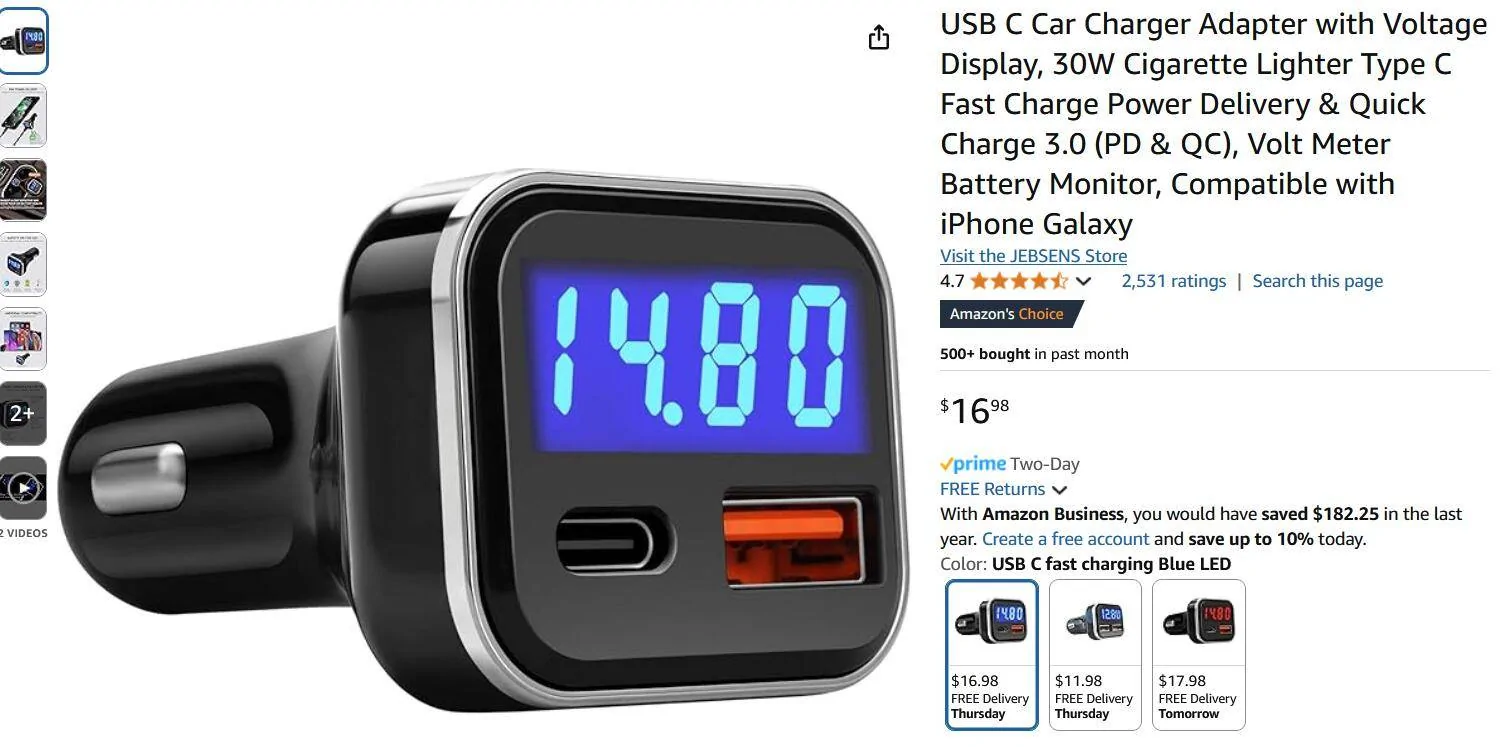
Maybe try one of these and power your phone charger from the cigarette lighter. I think trying to use both factory USB ports at the same time may cause the conflict. Plus you can monitor the failing 12v battery issue. Could be the USB drive too.

https://www.amazon.com/dp/B08N4WKJMT?ref_=ppx_hzsearch_conn_dt_b_fed_asin_title_10&th=1

Ford Maverick USB issue 1740512914557-pl
 

PeteBerner

2.5L Hybrid
Well-known member
First Name
Pete
Joined
Feb 17, 2025
Threads
25
Messages
106
Reaction score
241
Location
Colorado
Vehicle(s)
24' XL Hybrid
Engine
2.5L Hybrid
You can try a couple of things -
plug a USB thumb drive in, let the system try to access it, and see if it clears the message, then remove the drive after you turn off the truck; or you can plug a phone into the port and see if that clears it. Do you leave the charger cord plugged in all the time? It shouldn't cause a problem (it's like having a USB cord attached to your laptop all the time), but the Ford system might not like having a cord plugged in with nothing actually attached (like a phone)

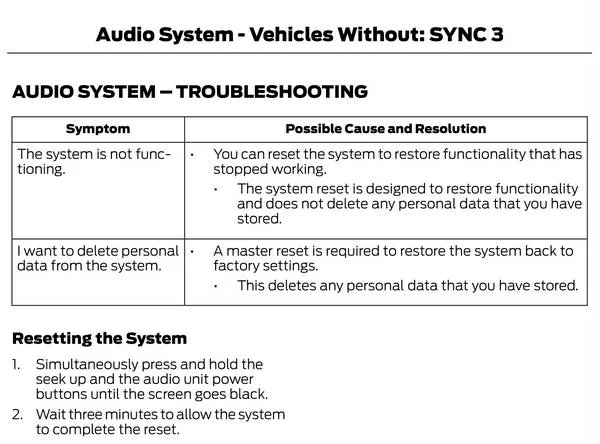
Also can do a reset -

Ford Maverick USB issue audio
 

Carlitos_92

2.0L EcoBoost
Well-known member
Joined
Mar 24, 2024
Threads
4
Messages
2,251
Reaction score
4,572
Location
Texas
Vehicle(s)
2023 Area 51 XLT EB AWD Lux FX4
Engine
2.0L EcoBoost
Clubs
 
On the audio screen of my 2024 Maverick XLT a banner along the top keeps popping on and off: “inserted USB device isn't responding”. It did this when I did have a device plugged in (phone charger) and is doing it when nothing is plugged in. It seems to do it randomly; it’ll go for half an hour without doing it, and then do it non stop for the next 10 minutes. Any ideas how to stop this, short of taking it in to the dealer? I’ve had the truck since November.
My XLT does this every once and a while. The only thing that is ever plugged into it is an iPhone via its cable. It shouldn't show that message if there is nothing connected. Sounds like your system is hung up; recommend doing a reset per @PeteBerner's suggestion.

I think trying to use both factory USB ports at the same time may cause the conflict. Plus you can monitor the failing 12v battery issue. Could be the USB drive too.
We can rule out using both ports at once; my system sometimes does this with only one iPhone connected.

You can try a couple of things -
plug a USB thumb drive in, let the system try to access it, and see if it clears the message, then remove the drive after you turn off the truck; or you can plug a phone into the port and see if that clears it. Do you leave the charger cord plugged in all the time? It shouldn't cause a problem (it's like having a USB cord attached to your laptop all the time), but the Ford system might not like having a cord plugged in with nothing actually attached (like a phone)

Also can do a reset -
The reset is a good first try at resolving this. I have gotten the message myself, but only when a device is plugged in, or when plugged in and then removed... With my iPhone, simply connecting/reconnecting the cable is not enough to stop the message; it takes an ignition on/off cycle.

Leaving just a cord plugged in should not be an issue and has never caused the symptoms for me by itself.
 

HeyBales

2.5L Hybrid
Well-known member
First Name
Mike
Joined
May 3, 2024
Threads
4
Messages
4,832
Reaction score
4,380
Location
KC Metro area
Vehicle(s)
2005 Toyota RAV4, 2024 XLT Hybrid
Engine
2.5L Hybrid
Usually that means it did not get a response back from the phone that it is power-only connection.
So watch your phone for some notice about perhaps what USB mode you want to use.
Truck will recheck again.

Actually I think my last drive the truck gave up eventually and turned off power, when I failed to notice the phone asking what I wanted to do with the USB connection.
That was annoying to discover later, thought it would be all charged up.

Oh - some of those cheaper power port adapters, like the one I got which wasn't the cheapest, won't supply enough amps to win the battle against screen/GPS/cell on constantly.
So while it nicely told me the below 1A it was willing to supply at 15.2 V, it never got to the 2.4 it supposedly could do.
Hence the reason why I switched to the truck USB port.
 

Sponsored

Dad

2.5L Hybrid
Well-known member
First Name
Tom
Joined
Jan 9, 2022
Threads
58
Messages
5,307
Reaction score
5,690
Location
SoCal
Vehicle(s)
2022 Maverick, - Lariat, Hyundai Palisade
Engine
2.5L Hybrid
All of the responses here are great suggestions. I'd like to add one more and that is it might have to do with the charging cable. I'd use a new, working usb cable and see if that's the cause of your problem.
 

Kenv24

2.5L Hybrid
Well-known member
First Name
Ken
Joined
Mar 21, 2024
Threads
1
Messages
895
Reaction score
1,372
Location
Texas
Vehicle(s)
2024 XLT
Engine
2.5L Hybrid
All of the responses here are great suggestions. I'd like to add one more and that is it might have to do with the charging cable. I'd use a new, working usb cable and see if that's the cause of your problem.
This......I had this error when I first got my XLT in August. I was using a USB A for my I-phone 11. Once I got my new Iphone 16 and switched to the USB -C.....It went away.
 

Dad

2.5L Hybrid
Well-known member
First Name
Tom
Joined
Jan 9, 2022
Threads
58
Messages
5,307
Reaction score
5,690
Location
SoCal
Vehicle(s)
2022 Maverick, - Lariat, Hyundai Palisade
Engine
2.5L Hybrid
This......I had this error when I first got my XLT in August. I was using a USB A for my I-phone 11. Once I got my new Iphone 16 and switched to the USB -C.....It went away.
Who would have thought? Glad to hear that cleared up your issue.
 
OP
OP

Kate K

Member
First Name
Kate
Joined
Nov 16, 2024
Threads
5
Messages
9
Reaction score
7
Location
NY
Vehicle(s)
2024 Maverick XLT
Engine
Undecided
Thank you everyone for your suggestions. Just a follow up- I have used the USB A port that is below the radio on the left as well as the cigarette lighter plug on the right side. I had been leaving the cords in, but stopped, thinking that might be the problem. The cords aren’t new but are in good condition. I believe I will try the reset. I’d just like to note that I was surprised that a number of other people had the same problem- seems like it’s a glitch that shouldn’t be happening and Ford should be addressing it…?
 

Carlitos_92

2.0L EcoBoost
Well-known member
Joined
Mar 24, 2024
Threads
4
Messages
2,251
Reaction score
4,572
Location
Texas
Vehicle(s)
2023 Area 51 XLT EB AWD Lux FX4
Engine
2.0L EcoBoost
Clubs
 
...seems like it’s a glitch that shouldn’t be happening and Ford should be addressing it…?
100% correct on the first part. Good luck on the second part. :D
Sponsored


Top