Sponsored

USB flash drive - sorting files

bcooke

2.5L Hybrid
Active member
First Name
Bill
Joined
Dec 2, 2024
Threads
2
Messages
25
Reaction score
31
Location
!$#va051XYN@
Vehicle(s)
2025 Maverick
Engine
2.5L Hybrid
2025 hybrid XLT FWD.
I have searched the forum and could not find an answer, so I'm asking for help.
I have a USB flash drive with over 120 songs,
downloaded from CD's.
Each album is a sub folder, with the songs in the order they are on the CD.
When I play the flash drive, on my aftermarket radio in my old Volvo, it plays in the order they are on the flash drive.
In the Maverick, it wants to alphabetically sort them by the songs titles, across all albums.
In the past I have tried to sort audiobooks so they play correctly, but could not make it happen.
Yeah I know you will call me a dinosaur, but life is too short to hassle BS like this.


I asking if the sorting sequence can be changed in Forscan?

I'm so disappointed in the design, and cumbersome use of the display, I've looked into hidden audio systems or a complete aftermarket audio system.
Yes, I still like CD's for their easy use.

Any help is appreciated!

Frustrated in Virginia!
Sponsored
 

El Kabong

2.5L Hybrid
Well-known member
Joined
Apr 1, 2026
Threads
10
Messages
178
Reaction score
330
Location
Carnation, WA
Vehicle(s)
2026 Maverick Lariat Hybrid AWD, 2017 VW Golf Wolfsburg
Engine
2.5L Hybrid
How did you rip the files? Did the software you were using "tag" them with the correct metadata?
 

Sponsored

MakinDoForNow

2.5L Hybrid
Well-known member
First Name
James
Joined
Sep 24, 2021
Threads
2
Messages
8,429
Reaction score
5,994
Location
Texas
Vehicle(s)
2022 Maverick
Engine
2.5L Hybrid
2025 hybrid XLT FWD.
I have searched the forum and could not find an answer, so I'm asking for help.
I have a USB flash drive with over 120 songs,
downloaded from CD's.
Each album is a sub folder, with the songs in the order they are on the CD.
When I play the flash drive, on my aftermarket radio in my old Volvo, it plays in the order they are on the flash drive.
In the Maverick, it wants to alphabetically sort them by the songs titles, across all albums.
In the past I have tried to sort audiobooks so they play correctly, but could not make it happen.
Yeah I know you will call me a dinosaur, but life is too short to hassle BS like this.


I asking if the sorting sequence can be changed in Forscan?

I'm so disappointed in the design, and cumbersome use of the display, I've looked into hidden audio systems or a complete aftermarket audio system.
Yes, I still like CD's for their easy use.

Any help is appreciated!

Frustrated in Virginia!
Can you label each folder 01,02,03,.... Then say play 02, etc
Maybe need to format USB as XFAT??
 

HeyBales

2.5L Hybrid
Well-known member
First Name
Mike
Joined
May 3, 2024
Threads
4
Messages
4,827
Reaction score
4,374
Location
KC Metro area
Vehicle(s)
2005 Toyota RAV4, 2024 XLT Hybrid
Engine
2.5L Hybrid
Sadly as you clearly commented - it's indexing the song titles - never mind the folder names, or order they are put on the drive.
That used to be a thing, when the reader looked at the true DOS structure of the files, and Windows would copy them off in alpha order so they actually landed that way. You could fool those systems by making them land differently without messing with names. Sounds like Volvo was doing this.

Unless you want to rename each song with a leading number, and do that thru each album - I'm doubting Forscan has a way, but maybe.

The other option since you said you like to deal with as CD's - view by Albums - go into each album to play that one - back out, into another, ect.

I am curious - does the 25MY show it indexing each time you start?
24MY non-Sync does.
Video above a comment almost made it sound like the Sync systems only index once, or he meant something else.
 
Last edited:
OP
OP
bcooke

bcooke

2.5L Hybrid
Active member
First Name
Bill
Joined
Dec 2, 2024
Threads
2
Messages
25
Reaction score
31
Location
!$#va051XYN@
Vehicle(s)
2025 Maverick
Engine
2.5L Hybrid
Sadly as you clearly commented - it's indexing the song titles - never mind the folder names, or order they are put on the drive.
That used to be a thing, when the reader looked at the true DOS structure of the files, and Windows would copy them off in alpha order so they actually landed that way. You could fool those systems by making them land differently without messing with names. Sounds like Volvo was doing this.

Unless you want to rename each song with a leading number, and do that thru each album - I'm doubting Forscan has a way, but maybe.

The other option since you said you like to deal with as CD's - view by Albums - go into each album to play that one - back out, into another, ect.

Not Volvo, but aftermarket Alpine.
I tried my best to put The Stand audiobook on several flashdrives. Impossible for me.
31 CD's I think it was to 4 flashdrives. I don't remember was size they were. I know there are some devices with a max on flash drive size.

And yes, I tried 001, 002, 003... and aaa, aab, aac,... and it was sorting in a lot I could not change.
When I get home I will check the flash drive to see how its formatted.

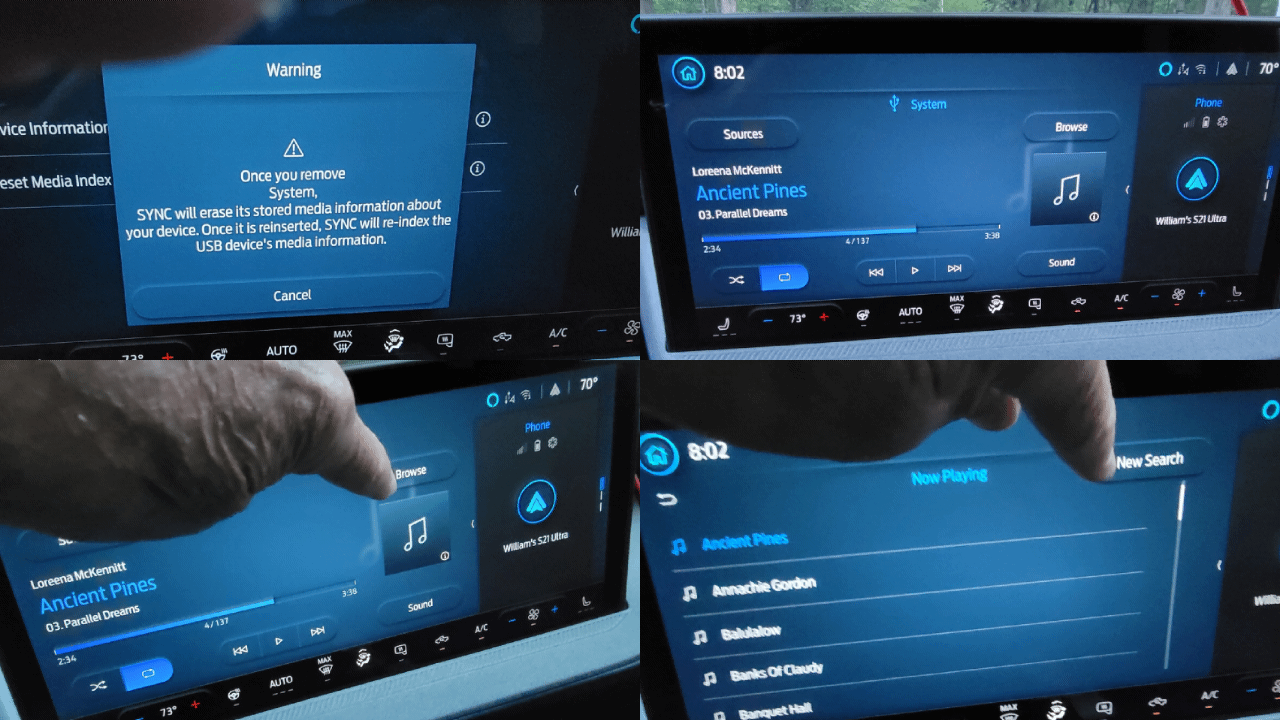
I saw someone post to go into settings and clear the way the drive was synced.
I got nervous and backed out when the warning came up!

I will check that when I get home.
Thank you all for the effort!
Bill
 

MakinDoForNow

2.5L Hybrid
Well-known member
First Name
James
Joined
Sep 24, 2021
Threads
2
Messages
8,429
Reaction score
5,994
Location
Texas
Vehicle(s)
2022 Maverick
Engine
2.5L Hybrid
Not Volvo, but aftermarket Alpine.I tried my best to put The Stand audiobook on several flashdrives. Impossible for me.31 CD's I think it was to 4 flashdrives. I don't remember was size they were. I know there are some devices with a max on flash drive size.And yes, I tried 001, 002, 003... and aaa, aab, aac,... and it was sorting in a lot I could not change.When I get home I will check the flash drive to see how its formatted.I saw someone post to go into settings and clear the way the drive was synced.I got nervous and backed out when the warning came up!I will check that when I get home.Thank you all for the effort!Bill
I don't bother with USB This is AI hints. Subject to it's flaws, of course.Note that USB cannot be password protected (presumably so index can be written and not have to be recreated unless an update or modification has been done which should change a last written to date is different, don't know as I haven't coded here). Also the song can be written anywhere on the drive with each of several indexes pointing to the location of the tune on the drive. Note that exfat is the preferred format for sync 4 everything else may or may not be optimal if they work at all.

For the 2025 Ford Maverick with SYNC 4, USB drives for media (MP3) or software updates should ideally be formatted to exFAT or FAT32. A capacity between 16GB and 32GB is recommended, and the drive must be empty. SYNC 4 supports USB 2.0 or 3.0 drives for playing audio formats like MP3, WMA, WAV, and AAC.
https://www.youtube.com/watch?v=8R5iIVhNrtk&t=62
  • Best Format: exFAT is generally preferred for modern SYNC 4 systems, though FAT32 is often used for compatibility.
  • Media Playback: The system can index up to 15,000 songs and supports USB 2.0/3.0 drives formatted to FAT32 or exFAT.
  • Update Method: If performing a manual software update, ensure the drive is formatted correctly (usually exFAT) and that files are extracted directly to the root directory.
https://www.youtube.com/watch?v=8R5iIVhNrtk&t=62
 
OP
OP
bcooke

bcooke

2.5L Hybrid
Active member
First Name
Bill
Joined
Dec 2, 2024
Threads
2
Messages
25
Reaction score
31
Location
!$#va051XYN@
Vehicle(s)
2025 Maverick
Engine
2.5L Hybrid
Not Volvo, but aftermarket Alpine.
I tried my best to put The Stand audiobook on several flashdrives. Impossible for me.
31 CD's I think it was to 4 flashdrives. I don't remember was size they were. I know there are some devices with a max on flash drive size.

And yes, I tried 001, 002, 003... and aaa, aab, aac,... and it was sorting in a lot I could not change.
When I get home I will check the flash drive to see how its formatted.

I saw someone post to go into settings and clear the way the drive was synced.
I got nervous and backed out when the warning came up!

I will check that when I get home.
Thank you all for the effort!
Bill

The flash drive in question was formatted as FAT32.
I copied that and pasted it unto an EXFAT formatted flash drive. It was still the same.
Someone suggested to go into search on the flash drive under settings.
I did and was able to do an one time sort.
Many choices to choose and I picked albums.
It worked, but the songs are still sorted alphabetical.

Its better than before!

And I did try to delete the sync from the flash drive. I came to the warning message again,
but it appears it's dead end. The only thing I could select was cancel!

But I am hardheaded and will keep searching for an aftermarket radio solution that works.

Thanks again for the help!

Ford Maverick USB flash drive - sorting files 20260504_203402
 
Sponsored

Hcopter

2.5L Hybrid
Well-known member
First Name
Mike
Joined
Sep 16, 2022
Threads
6
Messages
191
Reaction score
349
Location
KS
Vehicle(s)
1996 Ranger, 2023 Maverick Lariat, Hybrid
Engine
2.5L Hybrid
When you added numbers to try changing the order, were you adding them to the file name or song title in file details?

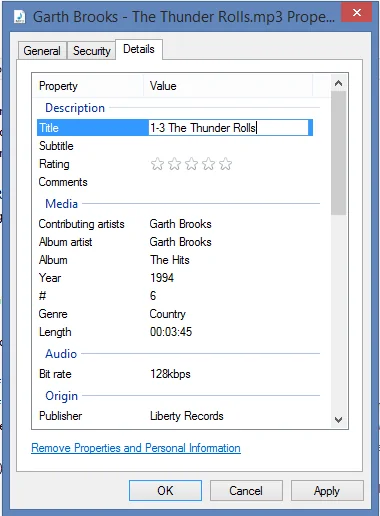
I think the system uses the title found in the file properties to sort/display by. If you right click the file in Windows and select properties, then choose the Details tab, you can edit the title by adding 1-1, 1-2, 1-3 etc. before each title in an album, then 2-1, 2-2, 2-3 etc. to the songs in the next album, and hopefully it will sort by those numbers.

Example of the Properties dialog:

Ford Maverick USB flash drive - sorting files 1777892360961-24
 

El Kabong

2.5L Hybrid
Well-known member
Joined
Apr 1, 2026
Threads
10
Messages
178
Reaction score
330
Location
Carnation, WA
Vehicle(s)
2026 Maverick Lariat Hybrid AWD, 2017 VW Golf Wolfsburg
Engine
2.5L Hybrid
When you added numbers to try changing the order, were you adding them to the file name or song title in file details?

I think the system uses the title found in the file properties to sort/display by. If you right click the file in Windows and select properties, then choose the Details tab, you can edit the title by adding 1-1, 1-2, 1-3 etc. before each title in an album, then 2-1, 2-2, 2-3 etc. to the songs in the next album, and hopefully it will sort by those numbers.

Example of the Properties dialog:

1777892360961-24.webp
This is what I meant when I was asking:
How did you rip the files? Did the software you were using "tag" them with the correct metadata?
The software used to convert from CD to MP3 normally lets you "tag" the files with the correct properties by looking this data up.
 

MakinDoForNow

2.5L Hybrid
Well-known member
First Name
James
Joined
Sep 24, 2021
Threads
2
Messages
8,429
Reaction score
5,994
Location
Texas
Vehicle(s)
2022 Maverick
Engine
2.5L Hybrid
The flash drive in question was formatted as FAT32.
I copied that and pasted it unto an EXFAT formatted flash drive. It was still the same.
Someone suggested to go into search on the flash drive under settings.
I did and was able to do an one time sort.
Many choices to choose and I picked albums.
It worked, but the songs are still sorted alphabetical.

Its better than before!

And I did try to delete the sync from the flash drive. I came to the warning message again,
but it appears it's dead end. The only thing I could select was cancel!

But I am hardheaded and will keep searching for an aftermarket radio solution that works.

Thanks again for the help!

20260504_203402.gif
Maybe edit the meta data standardizing artist name to be identical not "The Willie Nelson", etc but "Willie Nelson". Name any group of songs to "My Album One", "My Album Two", etc... (can meta be edited to allow multiple album declarations in one copy of song or would song have to be saved once for each album you want it to play in?). You could possibly save 20-30 copies of artist playing same song in different performances either by being in same album or naming Meta data artist appropriately "Nelson Austin one", "Nelson Austin Two", "Nelson Austin 1966", whatever.
 

StarBug

2.5L Hybrid
Well-known member
Joined
Oct 21, 2025
Threads
3
Messages
104
Reaction score
154
Location
67202
Vehicle(s)
2025 Hybrid Lariat
Engine
2.5L Hybrid
If changing the file names did not change the sort order then it is using the “tag” metadata. Did you try changing that in different ways? Also do the songs have the album name set in the tags/metadata?

I have a MY25. I’ve never tried playing songs from USB, but I’ll try it and report back my findings if you are still interested.
 

Carlitos_92

2.0L EcoBoost
Well-known member
Joined
Mar 24, 2024
Threads
4
Messages
2,250
Reaction score
4,560
Location
Texas
Vehicle(s)
2023 Area 51 XLT EB AWD Lux FX4
Engine
2.0L EcoBoost
Clubs
 
2025 hybrid XLT FWD.
I have searched the forum and could not find an answer, so I'm asking for help.
I have a USB flash drive with over 120 songs,
downloaded from CD's.
Each album is a sub folder, with the songs in the order they are on the CD.
When I play the flash drive, on my aftermarket radio in my old Volvo, it plays in the order they are on the flash drive.
In the Maverick, it wants to alphabetically sort them by the songs titles, across all albums.
In the past I have tried to sort audiobooks so they play correctly, but could not make it happen.
Yeah I know you will call me a dinosaur, but life is too short to hassle BS like this.


I asking if the sorting sequence can be changed in Forscan?

I'm so disappointed in the design, and cumbersome use of the display, I've looked into hidden audio systems or a complete aftermarket audio system.
Yes, I still like CD's for their easy use.

Any help is appreciated!

Frustrated in Virginia!
The only thing I know that you can do in Forscan related to this is to turn off the truck's ability to index the files. I am not sure if that will get you what you want, or if it will cause the USB to not even show up. The setting is easily reversible, so it may be worth a shot.

The "indexing" is especially annoying on my truck because it prevents CarPlay from connecting. I'll eventually tweak that setting myself, but luckily this is a once-a-month annoyance for now.
Sponsored


Top