Sponsored

Sirius XM options

wjg

2.5L Hybrid
Well-known member
First Name
William
Joined
Aug 13, 2021
Threads
1
Messages
222
Reaction score
522
Location
Michigan
Vehicle(s)
Mustang, Maverick
Engine
2.5L Hybrid
So if you are listening using cell service it would be similar to using Spotify?
Jon
Spotify, Pandora, Amazon Music etc. As long as you have cell service and can use your phone as a hot spot, they all work quite well. Same for Sirius XM.
 

GAMav

2.5L Hybrid
Member
First Name
Brian
Joined
Jun 14, 2021
Threads
0
Messages
18
Reaction score
38
Location
Georgia
Vehicle(s)
Toyota Sienna, Ford Maverick
Engine
2.5L Hybrid
Yes you can and remember the mav has a built in modem so for $200 a year you have unlimited data to stream Sirius XM, my wife had SiriusXM in her car and we use it with Alexa in the house and plan on the same in the truck
If you use AT&T Cellular, they offer a product , Harman Spark that is a mobile hotspot plus many other useful features. Plugs in to you OBD port so it gives you useful info about your vehicle plus location and geofencing. Verizon's version of this is Hum. Both are about $15/month. If you have teenagers driving, both of these are "no brainers" if only for the peace of mind they offer.
 

Falcon first

2.5L Hybrid
Well-known member
First Name
Scott
Joined
Jul 31, 2021
Threads
4
Messages
242
Reaction score
405
Location
Columbia, SC
Vehicle(s)
BMW X3, BMW M235 coupe
Engine
2.5L Hybrid
If you stream SiriusXM it uses 112 MB per hour, I’ve actually read other places that quote a lot less less than that more like 56. I only stream maybe 5-8 hours a week and use 1.5 to 2 GB’s per month. I have two BMW’s with SiriusXM radios and my plan has streaming. You can negotiate with SiriusXM, last time my renewal came up I threatened to drop one and they gave me a special rate. Many people on the BMW sites have negotiated better rates. I used to have the small portable car radio in a Mini and even those can give spotty service .
 

Sponsored

uh50

2.0L EcoBoost
Well-known member
First Name
Howard
Joined
Oct 4, 2021
Threads
30
Messages
1,236
Reaction score
1,395
Location
Brookhaven Lake O' the Pines, Texas
Website
www.hchaney.com
Vehicle(s)
2022 Maverick XL, VB, 2.0 EB
Engine
2.0L EcoBoost
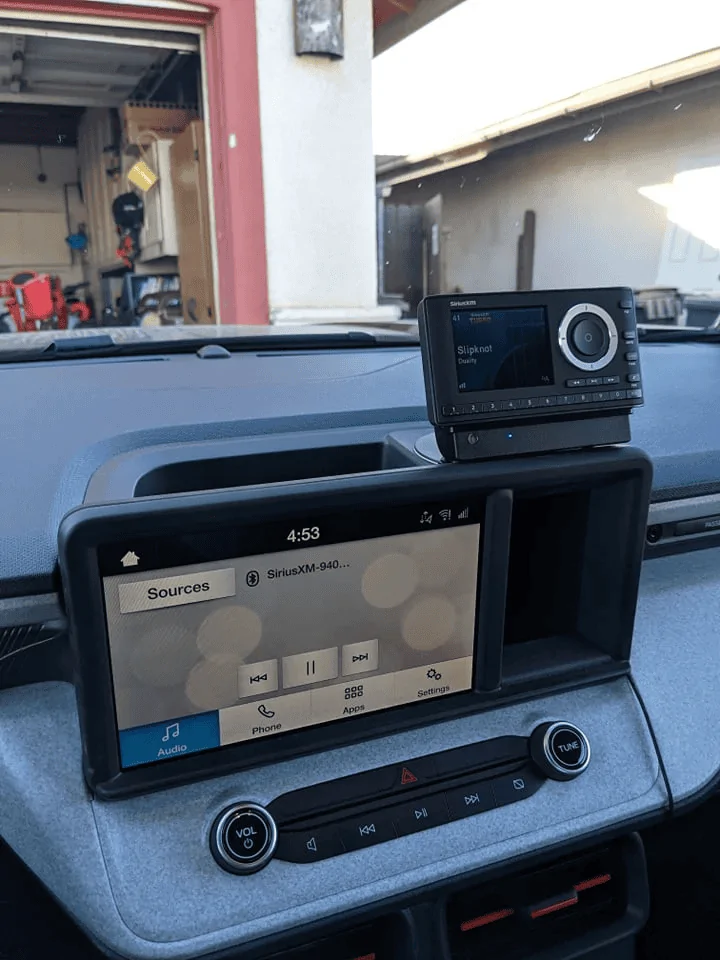
Here is a link to a post by an XLT owner about adding SiriusXM. Not sure I like the location of the SiriusXM receiver. I like the idea of a module to add under the dash...just need to confirm it works with the Ford Connect 8" Radio.


Ford Maverick Sirius XM options 1634747409016
 

uh50

2.0L EcoBoost
Well-known member
First Name
Howard
Joined
Oct 4, 2021
Threads
30
Messages
1,236
Reaction score
1,395
Location
Brookhaven Lake O' the Pines, Texas
Website
www.hchaney.com
Vehicle(s)
2022 Maverick XL, VB, 2.0 EB
Engine
2.0L EcoBoost
Here's is something I posted in another forum answering a specific question. But it better goes here.

BMCGC said:
Doesn't XM need Sync to work? I'm not aware of any Ford with XM unless it also has Sync.

If adding a Sync module requires a BCM swap or activation, how will you work around that?

I would really like Sync.
No, XM does not need sync in order to work, but without it you will not have voice control. Although, I understand that through CarPlay you can use the voice control button on the steering wheel to access SiriusXM through your iPhone. Same for Android.

There are a number of ways to add SiriusXM to the XL. If the audio input through the USB doesn't allow control of a SiriusXM module, then there are other options. There are SiriusXM radios that have FM inline or broadcast input. Depending on where you live and the number of FM stations in your area, whether you want to go this route. I suggest extensive research.

The SiriusXM Tour 360 is intriguing and has voice control, with bluetood, FM, or aux input. The reviews for this radio are certainly mixed, so if anyone considers buying it, make sure you do so from an outlet that allows free returns. Here is a link for research. https://shop.siriusxm.com/radios/vehicle/?intcmp=SHOP-HP-PROMO1. The drawback for these satellite radios is that that all come with a separate screen to add somewhere on the dash. If you like one of these then they can be purchased other places cheaper...Crutchfield has a $50 rebate on the Tour 360. The Commander is a low cost option.

I would like to be able to control siriusXM with the regular audio controls but I assume that capability is a ways off. So, I'm seriously considering adding the Tour 360 and trying it's various output features. I'm hope the bluetooth output works best. The module hides behind the dash and the screen I plan on putting where the 12V outlet is located and direct wire to the power circuit. I will add 12V outlets in front of the storage bin on the console using the circuits at the rear of the console. You can control it with voice by punching the voice button on the Tour 360 screen. A remote control can be purchased for about $10.00.

There are modules that also work with the USB input or a 1/8" mini stereo to USB adapter. As far as I know these have not been test with the XL radio.

If you are patient, the aftermarket parts manufacturers will find several solutions for the XL that might be better.

Here is a photo of Tour 360 output formats. By the way, it is 4.7" Wide x 2.9" high x .7" deep without the vehicle doc.

Ford Maverick Sirius XM options 1634747409016


Here is a question about Ford Pass on the Best Buy website.

Q: Questionwill it work with Ford pass
Asked 11 months ago by rodmar2.

  • A:Answer Yes, this radio will work with your vehicle using either a Bluetooth, Aux-In or FM channel preset. We recommend Geek Squad installation for optimal performance and an integrated look.
    Answered 9 months ago by SiriusXMProductExpert
Here is a photo of the remote control which clearly shows a microphone for voice access.

Ford Maverick Sirius XM options 1634747409016


Hope all this stuff is helpful.
 

Evil2ltr

Well-known member
First Name
Kevin
Joined
Oct 22, 2021
Threads
9
Messages
312
Reaction score
393
Location
Asheville, NC
Vehicle(s)
2022 Alto Blue Maverick XLT AWD
Begs the issue... why in the world does a $31k vehicle (my sticker) not have Sirus XM!
 

propp2531

2.0L EcoBoost
Well-known member
Joined
Aug 23, 2021
Threads
4
Messages
142
Reaction score
296
Location
Philadelphia
Vehicle(s)
Maverick XLT FX-4
Engine
2.0L EcoBoost
I was talking to the guys at infotainment.com and they said they have a ACM that can replace the current one and enable Sirius. It’s $499 though. They have f150 kits I’ve seen people on YouTube install and it works but I don’t know if they figured out the Maverick yet. I also haven’t decided if I want to be the Guinea pig on this
 
Sponsored

vezpa

2.0L EcoBoost
Well-known member
First Name
EMG
Joined
Jun 27, 2021
Threads
44
Messages
745
Reaction score
1,565
Location
IL/IN border
Vehicle(s)
Too many to list.
Engine
2.0L EcoBoost
Buy the Vais Technology GSR-FD02 Adapter with SiriusXM magnetic antenna from Crutchfield. Attach the antenna to the roof and thread the antenna wire through the center high mounted stop light to the interior. Some filing may be required to reattached the light cover. Fold down the read seat and fish out the wire from the CHMSL area and run it to the radio area. Attach the Vais adopter someplace under the dash and connect it to the inside fuse box, and connect the antenna wire to the Vais adapter. Then connect a USB cable to the Maverick USB input and to the Vais adapter. Select USB input on the Maverick audio system. Viola, Sirius XM radio controlled from the Maverick touchscreen.
I can 100% confirm that this kit DOES NOT WORK in the Maverick with base radio because it does not have genuine SYNC 3. The USB is NOT recognized by our Maverick with this adapter and it repeatedly asks you to disconnect the USB because it is NOT compatible.

I have a package to return tomorrow...

.
 

James D

2.5L Hybrid
Well-known member
First Name
James
Joined
Nov 13, 2021
Threads
2
Messages
494
Reaction score
387
Location
Utah
Vehicle(s)
Volkswagon
Engine
2.5L Hybrid
Currently have a Sirius subscription In my 2012 F150. Awaiting my XLT which I realize doesn't have a Sirius capable radio. I have read a few threads with solutions being Bluetooth and smart phones. I dont have unlimited data and have spotty cell service here in GA. Questions is, does anybody have experience with a decent "portable" XM receiver. I dont want to dig Into the dashboard or have a wire and antenna hanging out the window. I would consider getting a new audio system installed professionally but from the looks of the radio on the XLT seems like they would have to cut up the dash as that am\fm looks very thin??
9 years of Serius must have cost you a lot! It is a dying technology like OnStar. Use your phone for Spotify. Plug a flash drive into the USB if you are out of cell service. No kits, no add ons, no install.
 

vezpa

2.0L EcoBoost
Well-known member
First Name
EMG
Joined
Jun 27, 2021
Threads
44
Messages
745
Reaction score
1,565
Location
IL/IN border
Vehicle(s)
Too many to list.
Engine
2.0L EcoBoost
Serius is a dying technology. Use your phone for Spotify. Plug a flash drive into the USB if you are out of cell service.
I use a flash drive as well, but I have had SIRIUS and I enjoy listening to it for $5 a month. I will use Bluetooth and my phone to listen to it in the Maverick until the aftermarket makes an adapter to work with our Mavericks to allow us to control it with the factory radio. I don't like the add-on sirius radios.
.
 

KenT

2.5L Hybrid
Well-known member
First Name
Ken
Joined
Sep 12, 2021
Threads
7
Messages
179
Reaction score
138
Location
UT
Vehicle(s)
2018 Honda CRV
Engine
2.5L Hybrid
I can 100% confirm that this kit DOES NOT WORK in the Maverick with base radio because it does not have genuine SYNC 3. The USB is NOT recognized by our Maverick with this adapter and it repeatedly asks you to disconnect the USB because it is NOT compatible.

I have a package to return tomorrow...

.
Thank you for that information. Guess I will listen to SiriusXM through Apple Car Play then.
I wonder what Ford was trying to accomplish by spending money to develop a less capable infotainment system than the one they already had for the base model Escape just for the Maverick. Maybe they foreseen the chip shortage.
 

uh50

2.0L EcoBoost
Well-known member
First Name
Howard
Joined
Oct 4, 2021
Threads
30
Messages
1,236
Reaction score
1,395
Location
Brookhaven Lake O' the Pines, Texas
Website
www.hchaney.com
Vehicle(s)
2022 Maverick XL, VB, 2.0 EB
Engine
2.0L EcoBoost
SiriusXM update:

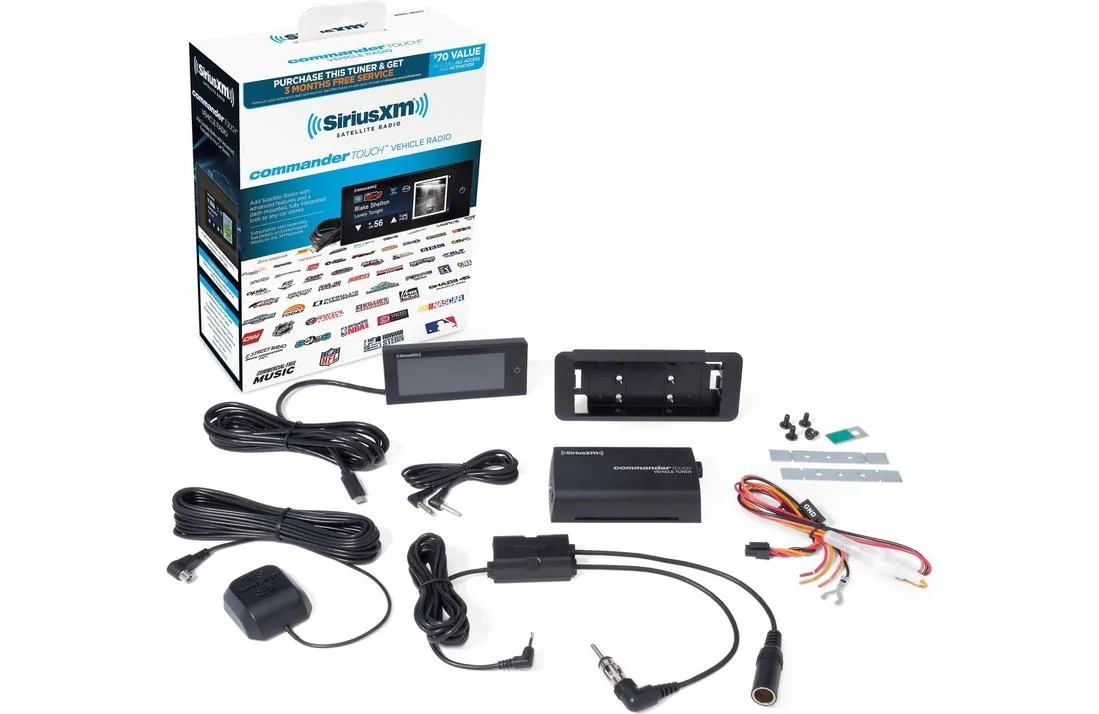
I received the Commander Touch kit earlier in the week. Thursday afternoon late I installed the antenna on the roof between the shark fin and near the top of the back window. My research on routing took about 30 minutes and then the installation about 30 minutes, not counting the time it took for me to realize my knees took a beating getting in and out of the bed. Had to go get a kitchen ladder—what can I say, I'm 75 years old. But I still love to do things like this.

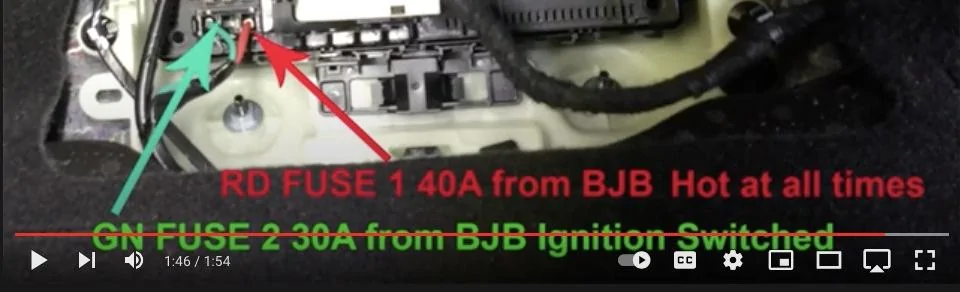
Yesterday (Saturday 17th), I wired in the tune module to the fuse panel located at the top right floorboard. Easy access even for my old arthritic body.


Ford Maverick Sirius XM options 1639858116613-jpeg


Ford Maverick Sirius XM options 1639855860559-jpeg


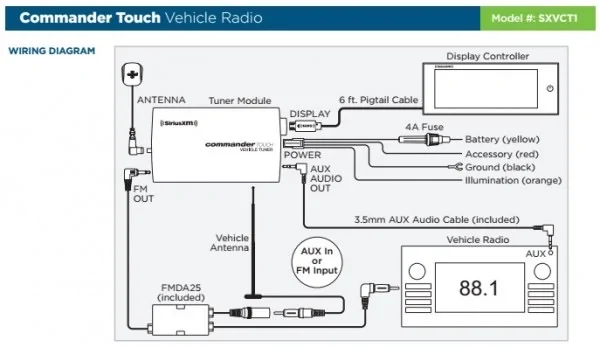
Connected the illumination wire and the accessory wire to the green accessory wire at the bottom of the fuse box. The fused yellow battery wire I connected to the red wire feeding the fuse box from the battery. It's hot at all times. I connected the ground wire to the bolt and nut conveniently located just below the accessory and battery wired connection.


Ford Maverick Sirius XM options 1639856086806-jpeg


I then connected the FM module wire, the satellite antenna, display connection, power connection, and the aux cable to the tuner module.

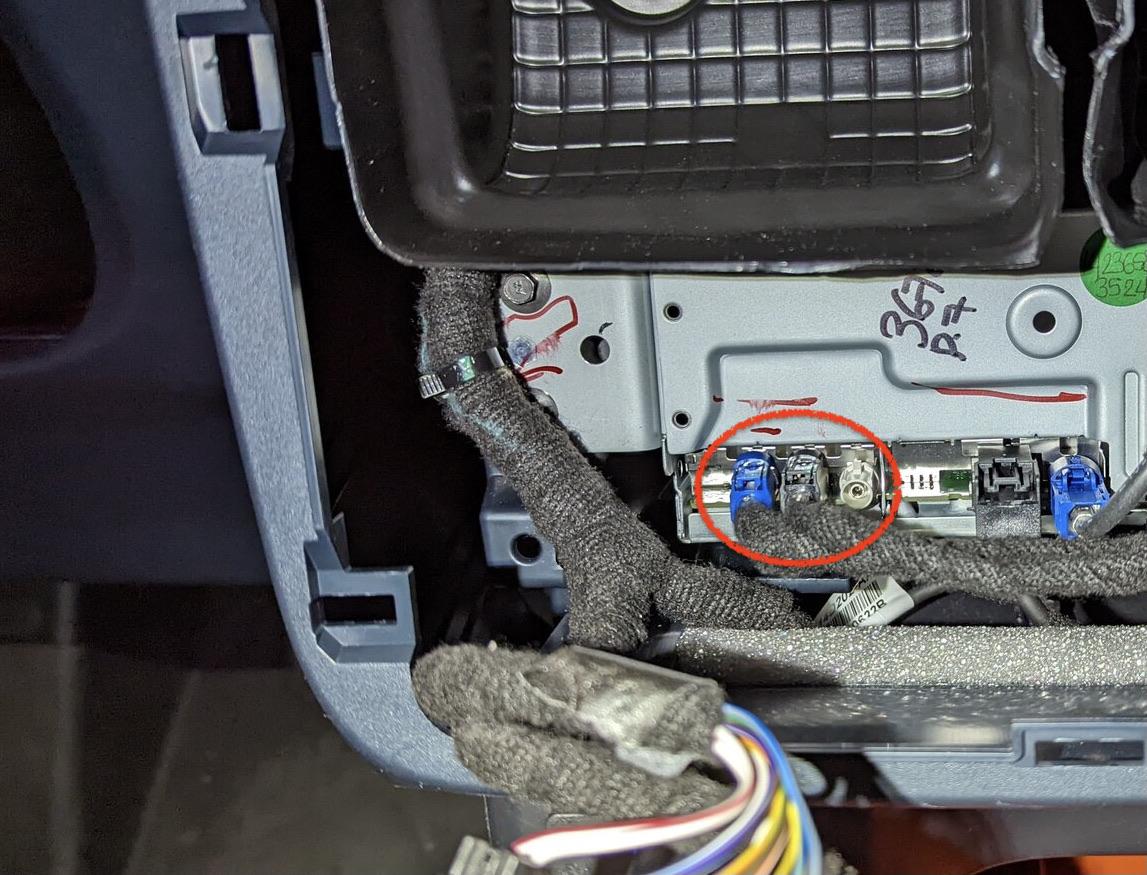
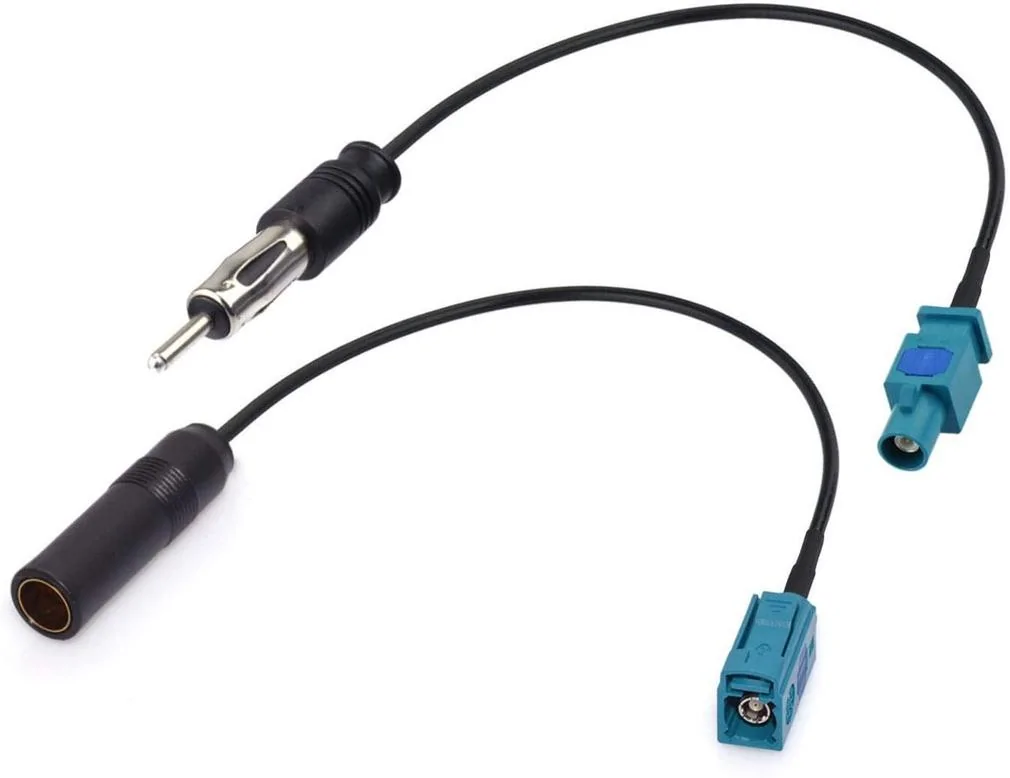
While trying to connect the FMDA25 module I discovered I needed Fakra Z Male & Female adapters to transition to the Ford antenna connection. The FM antenna connection is the blue one shown in the photo below.


Ford Maverick Sirius XM options 1639856835177-jpe


Note: the black connector farthest right, next to the blue connection on the right in the above photo is the USB input to the Radio. I did not find a 3.5 mm auxiliary input on the radio, but then I did not take it complete out. If I feel like it when I'm installing the FM antenna adapters, I'll slide it out to check. No photos I've seen of the APIM shows an 3.5 mm stereo auxiliary input.

So I ordered the adapters shown below from Amazon at .


Ford Maverick Sirius XM options 1639856915421-jpeg


These are universal type Fakra connectors and will fit several manufacturers various types. I based my order on the following rating from an Amazon customer.

Customer Review
A MUST HAVE FOR A SRIUS RADIO INSTALLED IN A FORD PRODUCT
By Amazon Customer on April 23, 2021
This is a must have for Sirius Onyx radio when used in the FM mode in a Ford vehicle. When I first installed the unit as a stand alone system, there was always static interference. I the[n] bought a Sirius FM adapter [FMDA25] and when I went to install it, I found that Ford uses proprietary connectors on the antenna and radio. So I found this kit, and these adapters make the system work perfectly. KUDOS.

The adapters are due in Monday afternoon. I'll get back to installing those Tuesday and finish finding where I want to locate the touch screen.

I mentioned in an earlier post I purchased a bluetooth transmitter which I could not get to pair without it kicking my phone off bluetooth. So, that blew that idea. I also ordered two adapters for aux. output to USB-C. 1) Saramonic 3.5mm Male TRS to USB-C Stereo or Mono Microphone and Audio Adapter Cable 9" (22.86cm) (SR-C2001), and 2) Saramonic SR-C2003 Female 3.5mm TRS Microphone Adapter Cable to USB Type-C Connector Dongle - Compatible with Samsung Galaxy, HTC, iPad Pro Smartphones and Tablets - USB C to 3.5mm Audio Adapter.

WARNING: Neither aux. to USB-C adapter worked like they are advertised and the Ford Radio would not recognize them as compatible. They were supposed to be two way conversion. There are analog aux. output to digital USB-C adapters I'm reasonably sure would work but they are around $100, so I'm not going to test them.

I discovered one other thing that I missed during my research of the various SiriusXM radios. The FM output for the Commander Touch is only through the FM Direct Module (FMDA25). The tuner module does not broadcast localized over the air FM signals.

I did play with the Commander Touch screen module and it is bright and easy to use. Even though the footprint is 4.1" x 1.5" it is easier to read than I thought when I ordered it. The touch screen lagged a little reacting to a touch, but it was not too disconcerting. I understand there is an update available from SiriusXM we can download to a mini USB key and install on the screen which improves touch performance.

The Radio module is an easy access behind the panel with the center AC vents in the console. It just snaps in and out, again easy. The tray/cubby behind the 8" screen was more difficult to remove. The back clips released easily bu the two front clips were stubborn and I was afraid to stress it too much. I finally got it out. I never did get the bezel off the screen it being held by something near the center bottom. I'll research it more in case I need to get it off. I guess the APIM is behind the Radio module shown in the photo above. At this point I don't see a reason to remove it to get access to the APIM. We'll see. I probably fiddled with this install 2 hours—because I was enjoying myself.

After I found the FM Module would not work without the two Fakra antenna adapters, I buttoned everything back up and reinstalled my old 2003/2005 XACT XM Radio.

I'll add to this post when I get the Fakra antenna adapters installed and everything working.
Sponsored


Top