Sponsored

Information wanted for cruise control

gdm32570

2.0L EcoBoost
Member
First Name
Greg
Joined
Aug 30, 2025
Threads
2
Messages
10
Reaction score
6
Location
Milton Florida
Vehicle(s)
2024 Ford Maverick
Engine
2.0L EcoBoost
How do I keep the cruise control from kicking off when there is a vehicle in front of me, also is there a way to stop the driver needs to rest alerts that pop up?
Sponsored


 

HeyBales

2.5L Hybrid
Well-known member
First Name
Mike
Joined
May 3, 2024
Threads
4
Messages
4,917
Reaction score
4,500
Location
KC Metro area
Vehicle(s)
2005 Toyota RAV4, 2024 XLT Hybrid
Engine
2.5L Hybrid
No messages on instrument cluster when it disengages (or you mean it really turns off)?

Are you talking about adaptive cruise control, or normal?
Sounds like adaptive since normal has no deactivate because of a vehicle in front.

Check your manual too - if no print version due to used vehicle - it's online and useful to have on phone either web version or PDF.
If used truck - was it in wreck?

SWITCHING FROM ADAPTIVE CRUISE CONTROL TO CRUISE CONTROL

Ford Maverick Information wanted for cruise control {filename}
WARNING: Normal cruise control will not brake when your vehicle is approaching slower vehicles. Always be aware of which mode you have selected and apply the brakes when necessary.
Use the instrument cluster display to select the following:
  1. Select Settings.
  2. Select Driver Assistance.
  3. Select Cruise Control.
  4. Select Normal.
Ford Maverick Information wanted for cruise control {filename}
The cruise control indicator replaces the adaptive cruise control indicator if you select normal cruise control.The gap setting does not display, and the system does not respond to lead vehicles. Automatic braking remains active to maintain set speed. The system remembers the last setting when you start your vehicle.
 

mapnerd

2.0L EcoBoost
Well-known member
Joined
Aug 25, 2025
Threads
3
Messages
78
Reaction score
98
Location
Florida
Vehicle(s)
2024 Maverick Lariat Tremor
Engine
2.0L EcoBoost
I think OP is talking about ACC. ACC which I use frequently attempts to keep the vehicle rolling rather than coming to a complete stop. If it does come to a complete stop however because traffic is at a standstill, then after a few second of sitting still, maybe 3-6, message will display on the cluster “STOPPED”. Once this message is displayed, ACC will not move the vehicle again until you press the accelerator and hold it until you see the vehicle icon display in the distance indicator. Once the vehicle icon displays on the vehicle indicator, ACC is active again and you can remove your foot from the accelerator.

There’s no setting in to change this behavior (at least not one that I have found). I also find it slightly annoying and run into this pretty much every time I use it because I find that ACC brakes too aggressively for my liking (likely because of radar distance limitations) so I apply the brake on my own for a softer stop, which in turn cancels ACC. The few times I have allowed ACC to apply the brake and bring me to a stop, I’ve encountered this message. At this point I’ve resigned to accept the limitations of the system. It’s still a great little convenience feature even with all these limitations.

There might be something you can change using Forscan, but given the nature of ACC, what it does and how it works, it is not something I would recommend monkeying with.
 

tciotti2003

2.0L EcoBoost
Well-known member
First Name
Tony
Joined
Feb 24, 2024
Threads
14
Messages
310
Reaction score
358
Location
Arizona
Vehicle(s)
2022 Lariat
Engine
2.0L EcoBoost
Clubs
 
I think OP is talking about ACC. ACC which I use frequently attempts to keep the vehicle rolling rather than coming to a complete stop. If it does come to a complete stop however because traffic is at a standstill, then after a few second of sitting still, maybe 3-6, message will display on the cluster “STOPPED”. Once this message is displayed, ACC will not move the vehicle again until you press the accelerator and hold it until you see the vehicle icon display in the distance indicator. Once the vehicle icon displays on the vehicle indicator, ACC is active again and you can remove your foot from the accelerator.

There’s no setting in to change this behavior (at least not one that I have found). I also find it slightly annoying and run into this pretty much every time I use it because I find that ACC brakes too aggressively for my liking (likely because of radar distance limitations) so I apply the brake on my own for a softer stop, which in turn cancels ACC. The few times I have allowed ACC to apply the brake and bring me to a stop, I’ve encountered this message. At this point I’ve resigned to accept the limitations of the system. It’s still a great little convenience feature even with all these limitations.

There might be something you can change using Forscan, but given the nature of ACC, what it does and how it works, it is not something I would recommend monkeying with.
Actually, unless things have changed with ACC since 2022, you can press the resume button for ACC to startin
 

Maverick123

2.5L Hybrid
Well-known member
Joined
Mar 24, 2025
Threads
35
Messages
893
Reaction score
1,564
Location
Canada
Vehicle(s)
Waiting
Engine
2.5L Hybrid
There must be some algorithm that decides if the ACC stays active or not but I haven't figured it out

Last week I hit a few traffic jams and in one of them (about 20 minutes long) the ACC stayed active the whole time, I didn't have to hit the resume button or touch the steering wheel once the whole time even though it was stop and go

Then in another similar jam later on, it wouldn't stay active I had to move the steering wheel and hit resume once in a while. Weird.

Still, the combination of hybrid + ACC + lane keeping really helps me stay sane in traffic. Especially the fact that the engine isn't idling away the whole time while we're creeping at 0.25 MPH and I can just let 'the robot' follow the car ahead until traffic clears up
 

Sponsored

commadorebob

2.0L EcoBoost
Well-known member
First Name
Bob
Joined
Sep 17, 2022
Threads
62
Messages
4,953
Reaction score
10,544
Location
Alabama
Vehicle(s)
2025 Expedition Max Platinum; 2023 Maverick Lariat
Engine
2.0L EcoBoost
How do I keep the cruise control from kicking off when there is a vehicle in front of me, also is there a way to stop the driver needs to rest alerts that pop up?
The 'driver needs to rest" alerts only pop up if the truck senses you are constantly drifting. In the nearly five plus years I've driven a Ford with ACC, I've never seen that alert.
 

mapnerd

2.0L EcoBoost
Well-known member
Joined
Aug 25, 2025
Threads
3
Messages
78
Reaction score
98
Location
Florida
Vehicle(s)
2024 Maverick Lariat Tremor
Engine
2.0L EcoBoost
Actually, unless things have changed with ACC since 2022, you can press the resume button for ACC to startin
I've not tried pressing resume from a standstill once the ACC disengages. Will give that a shot. Great tip if it works!
 

HeyBales

2.5L Hybrid
Well-known member
First Name
Mike
Joined
May 3, 2024
Threads
4
Messages
4,917
Reaction score
4,500
Location
KC Metro area
Vehicle(s)
2005 Toyota RAV4, 2024 XLT Hybrid
Engine
2.5L Hybrid
There must be some algorithm that decides if the ACC stays active or not but I haven't figured it out

Last week I hit a few traffic jams and in one of them (about 20 minutes long) the ACC stayed active the whole time, I didn't have to hit the resume button or touch the steering wheel once the whole time even though it was stop and go

Then in another similar jam later on, it wouldn't stay active I had to move the steering wheel and hit resume once in a while. Weird.

Still, the combination of hybrid + ACC + lane keeping really helps me stay sane in traffic. Especially the fact that the engine isn't idling away the whole time while we're creeping at 0.25 MPH and I can just let 'the robot' follow the car ahead until traffic clears up
Perhaps the 3 min was reached?
Or you have auto-hold on, were on an incline, so the EPB was used too?

ADAPTIVE CRUISE CONTROL AUTOMATIC CANCELLATION

The system may cancel if:
  • The tires lose traction.
  • You apply the parking brake.
The system may cancel and set the parking brake if:
  • You unbuckle the seatbelt and open the driver door after adaptive cruise control stops your vehicle.
  • Adaptive cruise control holds your vehicle at a stop continuously for more than three minutes.
The system may deactivate or prevent activating when requested if:
  • The vehicle has a blocked sensor.
  • The brake temperature is too high.
  • There is a failure in the system or a related system.
 

mapnerd

2.0L EcoBoost
Well-known member
Joined
Aug 25, 2025
Threads
3
Messages
78
Reaction score
98
Location
Florida
Vehicle(s)
2024 Maverick Lariat Tremor
Engine
2.0L EcoBoost
Adaptive cruise control holds your vehicle at a stop continuously for more than three minutes.
It's more like 3 seconds for mine
 

HeyBales

2.5L Hybrid
Well-known member
First Name
Mike
Joined
May 3, 2024
Threads
4
Messages
4,917
Reaction score
4,500
Location
KC Metro area
Vehicle(s)
2005 Toyota RAV4, 2024 XLT Hybrid
Engine
2.5L Hybrid
It's more like 3 seconds for mine
That's why I wonder if Auto-Hold being enabled matters, and inclines around.
That combo would throw the EPB on, and according to manual disable the ACC.
 
Sponsored

Maverick123

2.5L Hybrid
Well-known member
Joined
Mar 24, 2025
Threads
35
Messages
893
Reaction score
1,564
Location
Canada
Vehicle(s)
Waiting
Engine
2.5L Hybrid
Perhaps the 3 min was reached?
Or you have auto-hold on, were on an incline, so the EPB was used too?
None of that. It just worked in one jam, then didn't work the same in the next one. Who knows ...

In the 1st jam there was a message in the dash, I forget the exact wording but it was similar to "no need to press RES, the ACC will resume automatically"
 

tciotti2003

2.0L EcoBoost
Well-known member
First Name
Tony
Joined
Feb 24, 2024
Threads
14
Messages
310
Reaction score
358
Location
Arizona
Vehicle(s)
2022 Lariat
Engine
2.0L EcoBoost
Clubs
 
I've not tried pressing resume from a standstill once the ACC disengages. Will give that a shot. Great tip if it works!
Great! I just happened to try it 1 day when I was using ACC while surface street driving..Actually, just playing to learn...Anyways, came up on a light behind traffic and thought it would automatically engage but it didn't so I pressed on the gas and ACC took back over..Came up to the next stop and just pressed the res button and took right off...
 

dochawk

2.5L Hybrid
Well-known member
First Name
doc
Joined
Jul 17, 2024
Threads
34
Messages
1,691
Reaction score
1,584
Location
Las Vegas
Vehicle(s)
hybrid '25 lariat, 4 classic Cadillacs, Miata, mustang gt convertible
Engine
2.5L Hybrid
Clubs
 
The 'driver needs to rest" alerts only pop up if the truck senses you are constantly drifting.
I've seen it come on within a few minutes of starting the vehicle.

If that was the reason, the message should have been "AAC needs stronger glasses as it can't tell the difference between painted lines and concrete showing through. !

:rolleyes:
 

Glen Baker LLC

2.5L Hybrid
Well-known member
Joined
May 29, 2024
Threads
30
Messages
7,304
Reaction score
12,262
Location
Central Nevada & Utah
Vehicle(s)
Maverick XLT Hybrid
Engine
2.5L Hybrid
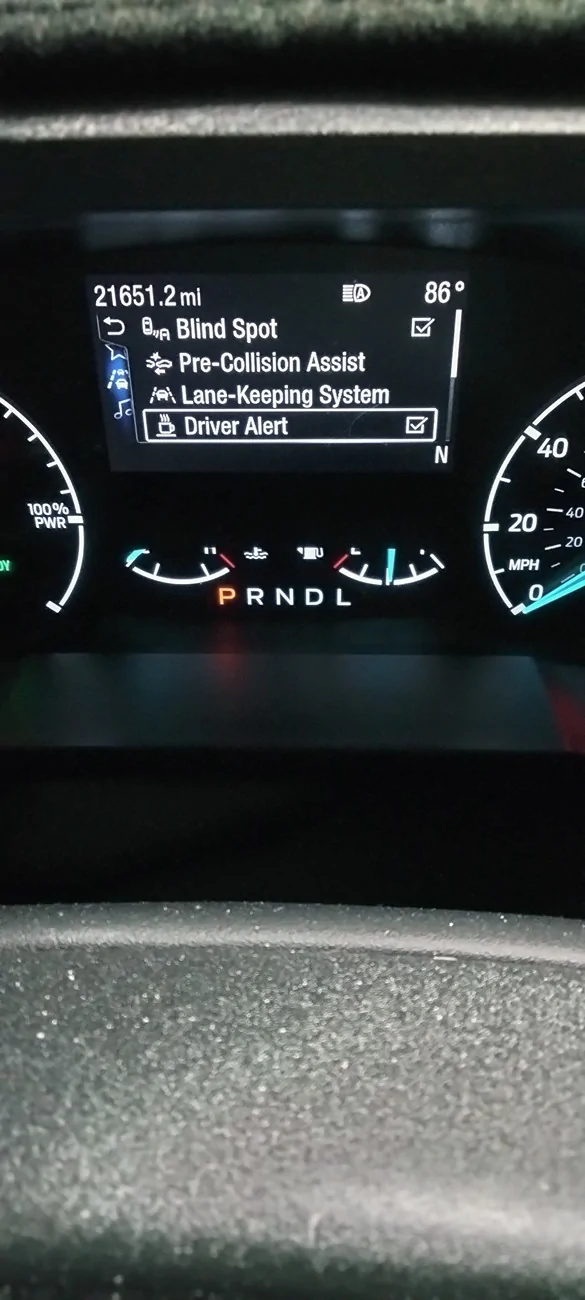
How do I keep the cruise control from kicking off when there is a vehicle in front of me, also is there a way to stop the driver needs to rest alerts that pop up?
You should be able to toggle driver alert off.
Ford Maverick Information wanted for cruise control IMG20250902200101
 

inline_five

2.5L Hybrid
Well-known member
Joined
Jun 15, 2023
Threads
32
Messages
1,170
Reaction score
1,632
Location
-
Vehicle(s)
2023 Hybrid XLT
Engine
2.5L Hybrid
For anyone with a lariat and ACC, does it aggressively brake while in traffic when a vehicle pops out in front of you? Even in slippery mode the braking is intense, and then if that vehicle moves across the lane and into another quickly afterwards the Maverick will almost floor it to regain its lost speed.

It's super annoying, and I'm thinking of trying the Comma.AI box to see if it's any better.
Sponsored


Top