
Sponsored

LSchicago

2.5L Hybrid
Well-known member
First Name
Lloyd
Joined
Jul 19, 2022
Threads
83
Messages
4,029
Reaction score
5,226
Location
IL
Vehicle(s)
2018 Mustang GT, 99 E150 Clb Wgn, 23 Mav XL Hybrid
Engine
2.5L Hybrid
Clubs
 
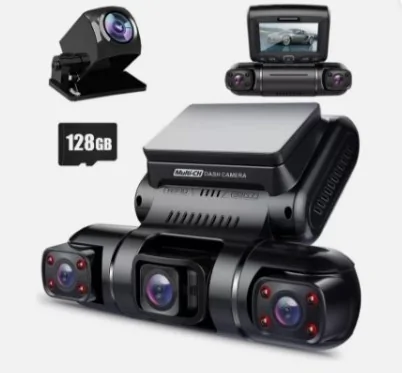
I have a Pruveeo D90 4 channel. Only use 3 cameras now though. Front, Driver/center and far passenger/right views. Very good when doing Rideshare. I have it tucked up behind the mirror, and very little hangs down. I use the 3M mount instead of the suction. 128G card.
Ford Maverick Dashcams: What's on your Maverick windshield? Screenshot_8-8-2024_134455_www.ebay.com
Sponsored

 
Last edited:
bikemendel

2.0L EcoBoost
Member
First Name
Mike
Joined
Dec 10, 2023
Threads
3
Messages
21
Reaction score
105
Location
Wisconsin, USA
Vehicle(s)
2024 Maverick XLT FX4
Engine
2.0L EcoBoost
Using the Garmin 47. Wanted to get a mini for the rear but never got around to it.

The garmin app is terrible. I haven’t needed to get footage yet but the amount of time it takes for videos to load will make me skip the process and just pull the SD card out and pop it into a computer.

All of the extra “features” aren’t great either. The “event detection” goes off every time I remote start my truck at any sensitivity and I don’t particularly care for signing up for their cloud service so that Garmin can sell my videos to China…

That said, video clarity is more than good enough to just use it as a dash cam without an app.
 

RSM

2.0L EcoBoost
Well-known member
First Name
Sean
Joined
Sep 16, 2022
Threads
3
Messages
107
Reaction score
143
Location
Ontario Canada
Vehicle(s)
2023 Maverick, 2012 Focus
Engine
2.0L EcoBoost
Clubs
 
Viofo A139 Pro 2Ch, front and back, hard wired
 

Sponsored

Blinky

2.0L EcoBoost
Well-known member
Joined
Nov 25, 2023
Threads
7
Messages
544
Reaction score
732
Location
Alberta, Canada
Vehicle(s)
2024 Maverick, 1991 Toyota Dyna
Engine
2.0L EcoBoost
Viofo A119 Mini 2
It's small, reasonably priced and has GPS. The video looks decent.
It is oversensitive however, there are a few fairly gentle bumps on my commute that cause it to trigger an event and save a video. It's pretty obnoxious, especially considering how undramatic the bumps are (think small to moderate tarline at 35mph) so I may look into adjusting the sensitivity.
 

glpuckett

2.5L Hybrid
Well-known member
First Name
Gary
Joined
Jul 29, 2021
Threads
2
Messages
151
Reaction score
262
Location
ID
Vehicle(s)
2022 Maverick FE Rapid Red 2.5L Hybrid
Engine
2.5L Hybrid
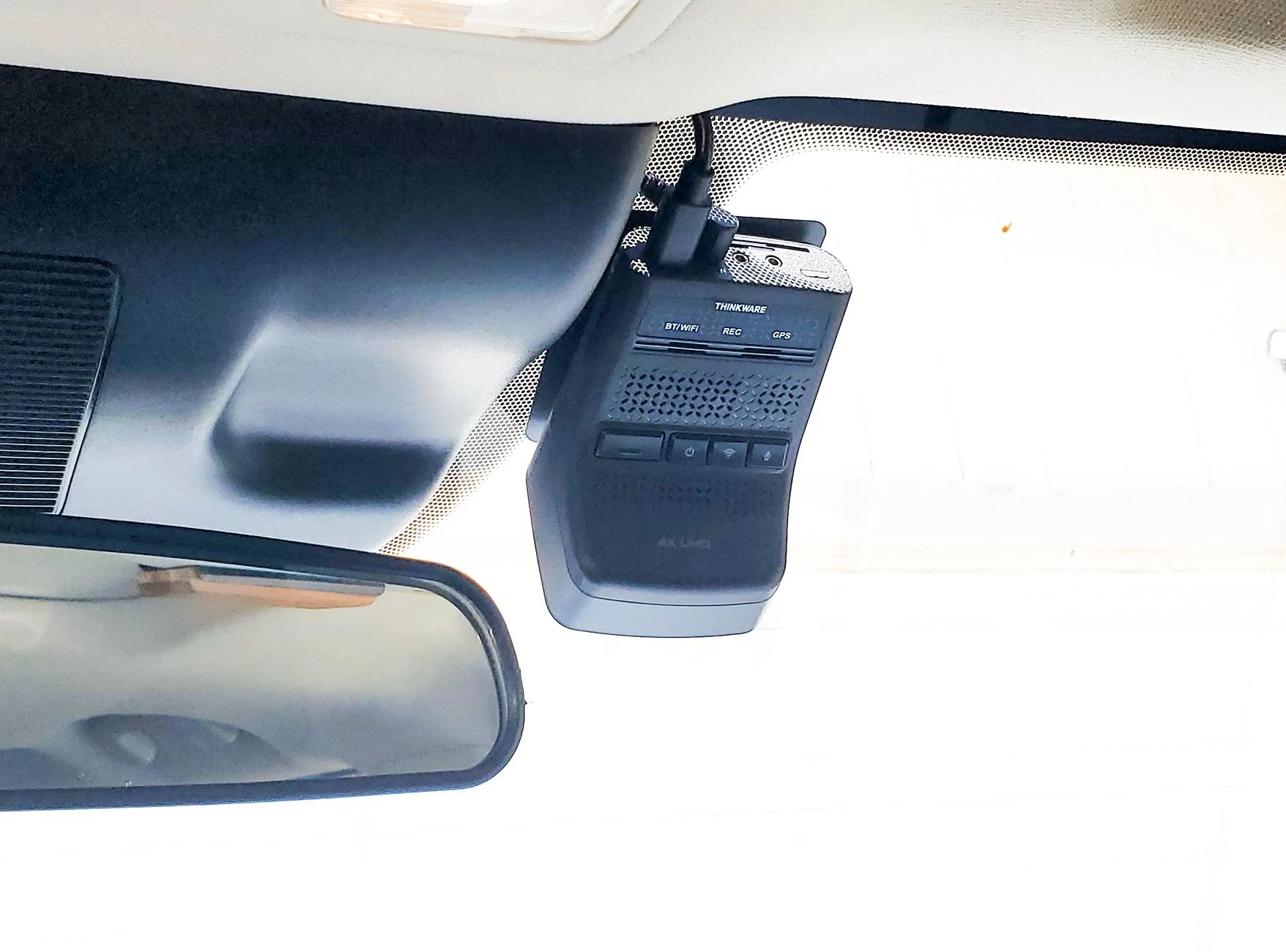
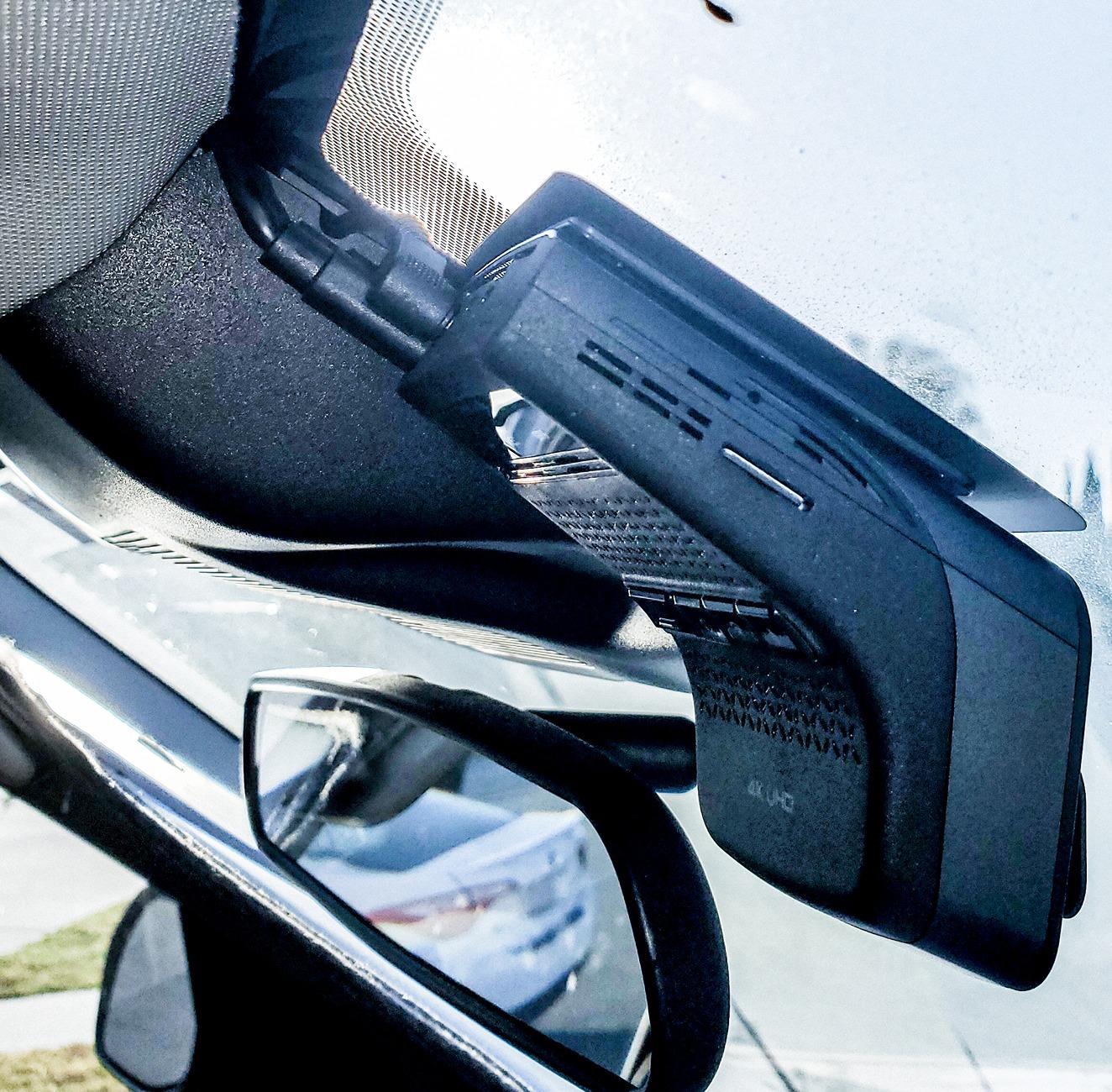
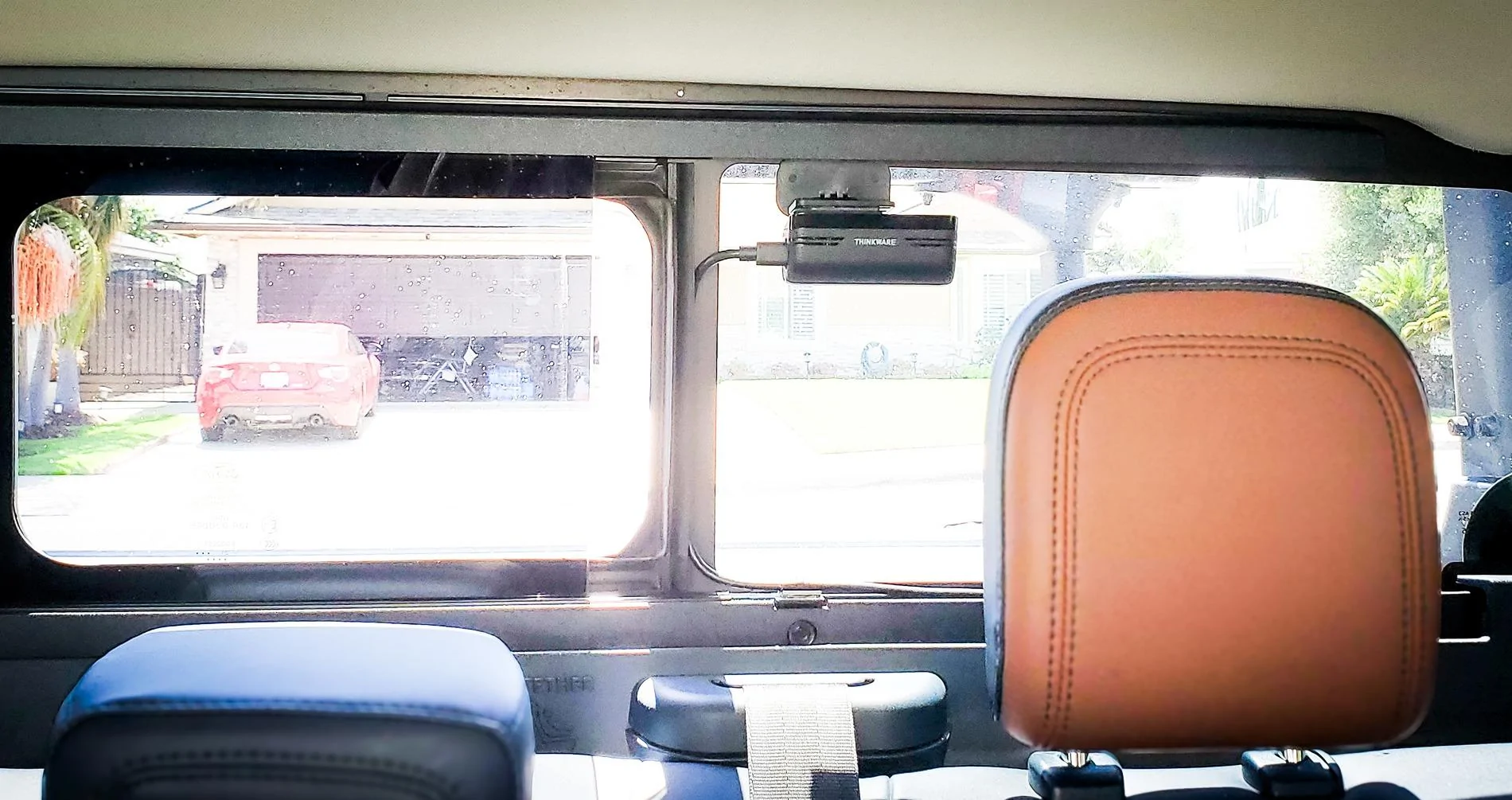
I also spent a long time trying to decide on this important accessory! After a lot of researching, I finally decided to go with Thinkware U3000 2CH 4K Front, 2K Rear. For me I prioritized parking mode protection and efficiency first, then looked at the other things. I performed the install myself (easy) & although it came with the ODBII cable connection, I cut it off and wired directly into the fuse box. This was also suggested by the Thinkware technician due to some compatibility issues with Ford or the Maverick don't remember which or both.
Mounting the rear camera wasn't hard but I did have to use a "Rear Camera Holder"
Amazon.com: Rear Camera Holder Rear Window Bracket for Most Rear Camera Dash Cam AZDOME PG02S PG17 PG18S PG19X M550 M01 Pro Car Rear Cam for REDTIGER F7N, CHORTAU, Kingslim, Z-Edge : Electronics
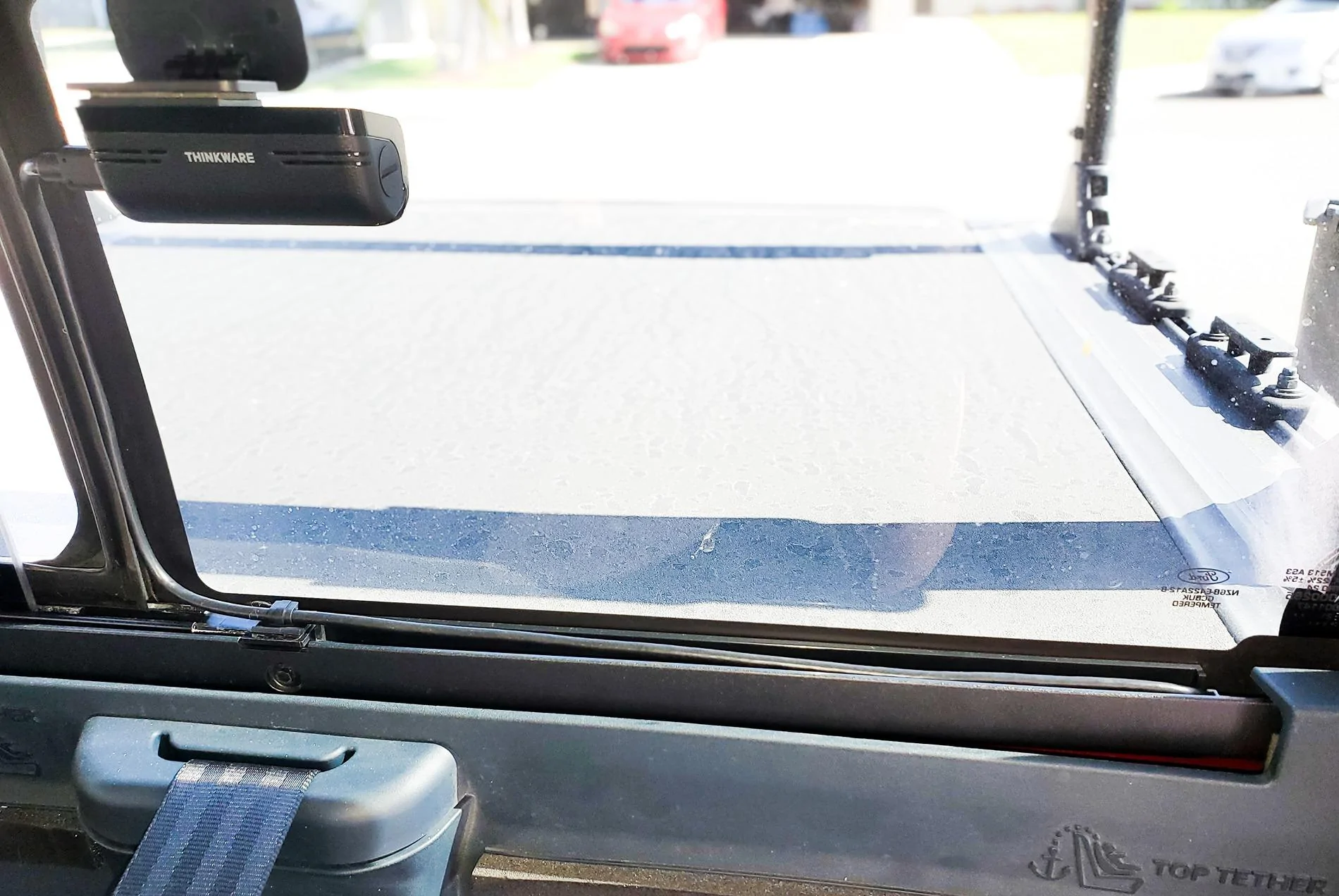
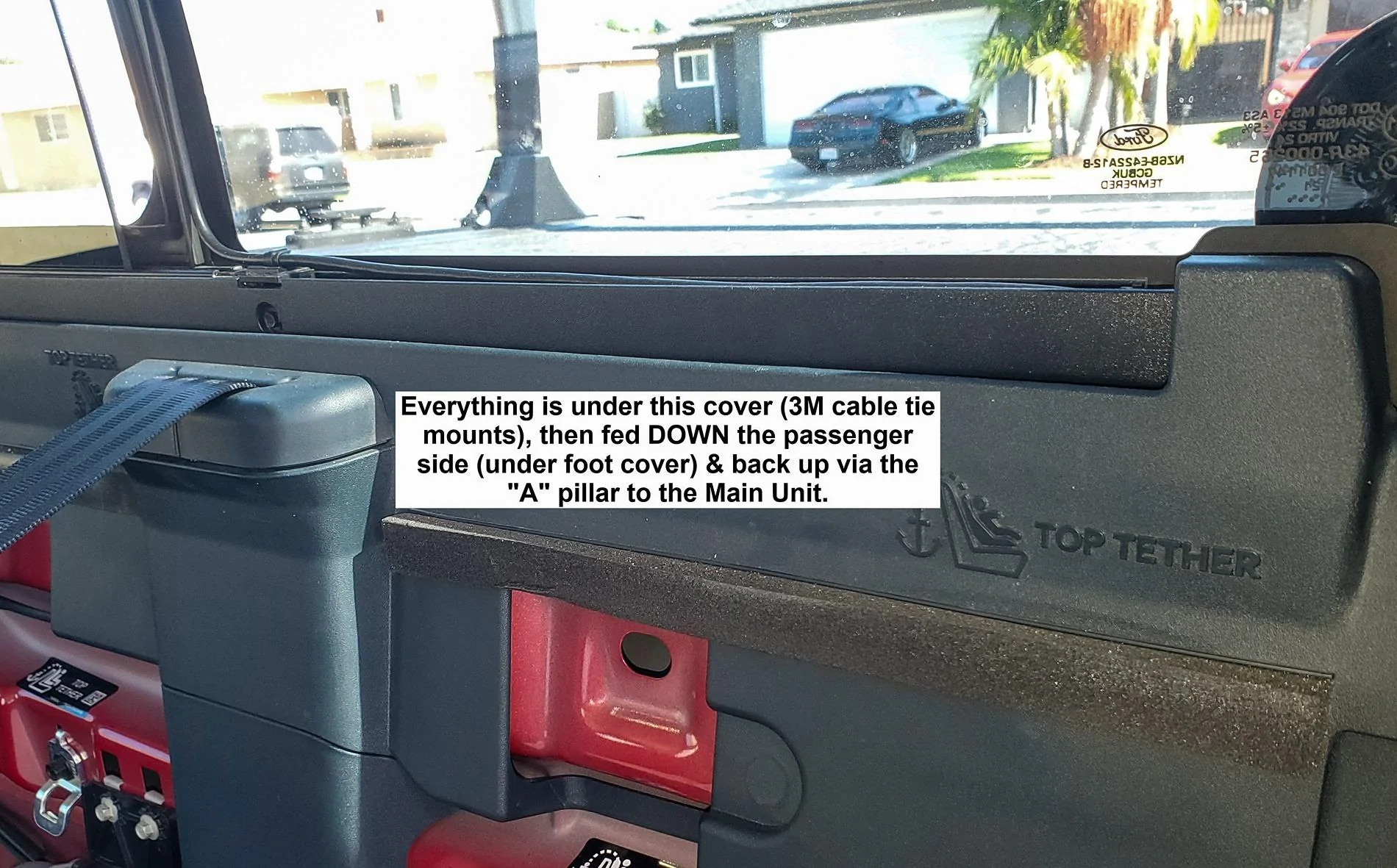
b/c the radar needs to be pointing out the window you need to make or buy an adapter for a vertical rear window (it was cheap $8). You can see from my pics that I routed the cable down my sliding window track (window opens to the left). This is the ONLY portion of exposed cable the rest is hidden behind cover or in protected tracks on the passenger side. It was helpful having a "Cable pulling Fish Tape Kit".

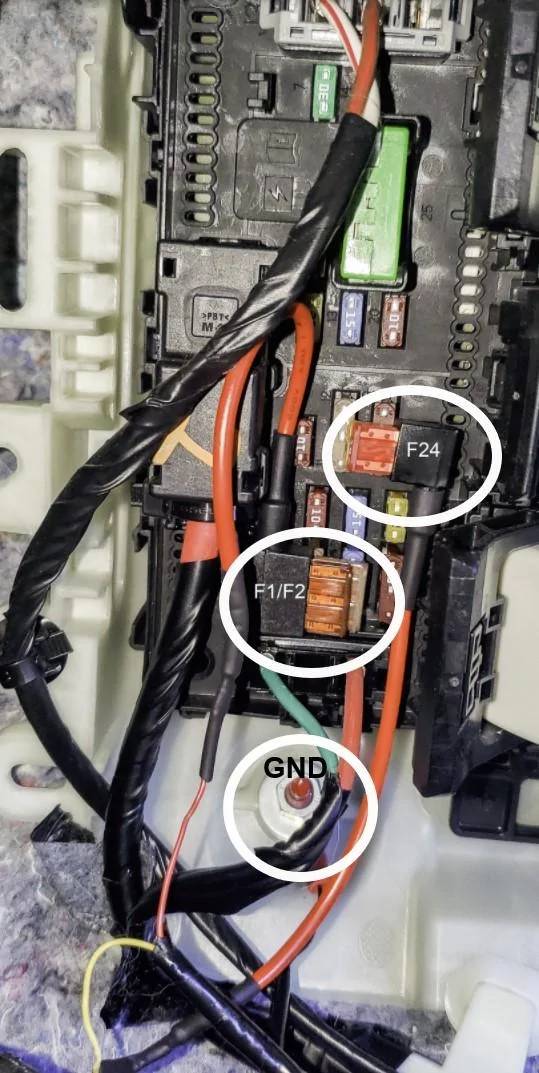
Once you've done the research the wiring is very easy / straightforward. I used Fuse-taps on un-used fuses just to simplify / eliminate technical issues in the future. For me I used:
Not used (Spare) - F1/F2 (5A) Switched
Not used (Spare) - F24 (20A) Hot All Time
Ground I used the mounting screw at the bottom.

I've been using my Thinkware U3K for over a month and haven't had any issues. I have left my truck unused for 2-3 days at a time and the battery has been just fine. The system does have a battery monitor so it will make the necessary adjustments to maintain its parking mode functions.

Ford Maverick Dashcams: What's on your Maverick windshield? Thinkware U3000 mounted


Ford Maverick Dashcams: What's on your Maverick windshield? Main Unit Cable routin


Ford Maverick Dashcams: What's on your Maverick windshield? Rear Camera Vi


Ford Maverick Dashcams: What's on your Maverick windshield? Rear mount & cabl


Ford Maverick Dashcams: What's on your Maverick windshield? hiding cables


Ford Maverick Dashcams: What's on your Maverick windshield? Thinkware wiring
 

junyamada

2.5L Hybrid
Well-known member
First Name
Jun
Joined
Mar 6, 2024
Threads
3
Messages
59
Reaction score
20
Location
California
Vehicle(s)
Maverick XL Hybrid MY24
Engine
2.5L Hybrid
I also spent a long time trying to decide on this important accessory! After a lot of researching, I finally decided to go with Thinkware U3000 2CH 4K Front, 2K Rear. For me I prioritized parking mode protection and efficiency first, then looked at the other things. I performed the install myself (easy) & although it came with the ODBII cable connection, I cut it off and wired directly into the fuse box. This was also suggested by the Thinkware technician due to some compatibility issues with Ford or the Maverick don't remember which or both.
Mounting the rear camera wasn't hard but I did have to use a "Rear Camera Holder"
Amazon.com: Rear Camera Holder Rear Window Bracket for Most Rear Camera Dash Cam AZDOME PG02S PG17 PG18S PG19X M550 M01 Pro Car Rear Cam for REDTIGER F7N, CHORTAU, Kingslim, Z-Edge : Electronics
b/c the radar needs to be pointing out the window you need to make or buy an adapter for a vertical rear window (it was cheap $8). You can see from my pics that I routed the cable down my sliding window track (window opens to the left). This is the ONLY portion of exposed cable the rest is hidden behind cover or in protected tracks on the passenger side. It was helpful having a "Cable pulling Fish Tape Kit".

Once you've done the research the wiring is very easy / straightforward. I used Fuse-taps on un-used fuses just to simplify / eliminate technical issues in the future. For me I used:
Not used (Spare) - F1/F2 (5A) Switched
Not used (Spare) - F24 (20A) Hot All Time
Ground I used the mounting screw at the bottom.

I've been using my Thinkware U3K for over a month and haven't had any issues. I have left my truck unused for 2-3 days at a time and the battery has been just fine. The system does have a battery monitor so it will make the necessary adjustments to maintain its parking mode functions.

Thinkware U3000 mounted.jpg


Main Unit Cable routing.jpg


Rear Camera View.jpg


Rear mount & cable.jpg


hiding cables.jpg


Thinkware wiring.jpg
The U3000 was one of my options though I was expecting more from their video quality. How’s the video quality for you?

Also, does it have features like speed camera alert? Or when the car in front of you moves from a stop?

Thanks for the unused fuse locations, I just tapped mine after testing random fuses. I’ll move mine to those two.
 

Gvmumbral

2.5L Hybrid
Well-known member
First Name
Gerardo
Joined
Dec 8, 2021
Threads
11
Messages
267
Reaction score
214
Location
Pasadena, CA
Vehicle(s)
Honda Element
Engine
2.5L Hybrid
Clubs
 
Wolfbox 900.
Works great and i can see when i have my topper loaded.
 

glpuckett

2.5L Hybrid
Well-known member
First Name
Gary
Joined
Jul 29, 2021
Threads
2
Messages
151
Reaction score
262
Location
ID
Vehicle(s)
2022 Maverick FE Rapid Red 2.5L Hybrid
Engine
2.5L Hybrid
The U3000 was one of my options though I was expecting more from their video quality. How’s the video quality for you?

Also, does it have features like speed camera alert? Or when the car in front of you moves from a stop?

Thanks for the unused fuse locations, I just tapped mine after testing random fuses. I’ll move mine to those two.
Hi Jun,
Yes, I believe that it does have those options, but I disabled them / don't use them for now. I get tired of hearing all the extra beeps & sounds... besides I have the Lariat 1st Edition w/ Deluxe package, so it has many of the driving/safety features already. Personally, I think the video quality is very good, but I haven't performed any real tests or comparisons. Remember, the front camera is 4K, but the rear is 2K. Most of the Dash Cam review sites I watched didn't really complain or knock the quality, but they did give the parking mode the highest ratings.
 
Sponsored

junyamada

2.5L Hybrid
Well-known member
First Name
Jun
Joined
Mar 6, 2024
Threads
3
Messages
59
Reaction score
20
Location
California
Vehicle(s)
Maverick XL Hybrid MY24
Engine
2.5L Hybrid
Hi Jun,
Yes, I believe that it does have those options, but I disabled them / don't use them for now. I get tired of hearing all the extra beeps & sounds... besides I have the Lariat 1st Edition w/ Deluxe package, so it has many of the driving/safety features already. Personally, I think the video quality is very good, but I haven't performed any real tests or comparisons. Remember, the front camera is 4K, but the rear is 2K. Most of the Dash Cam review sites I watched didn't really complain or knock the quality, but they did give the parking mode the highest ratings.
Thanks! Yeah, the parking mode was one of the features I was after with the U3000.

Their plate capture while moving was rated not so good. The best one currently for the plate capture that I saw from the video was the Vantrue N4 Pro and the Viofo line.

But Vantrue’s parking mode is really bad while Viofo is ok.

Hopefully Thinkware releases an upgrade model some time in the future.
 

CroweMag55

2.0L EcoBoost
Active member
First Name
John
Joined
Jul 8, 2024
Threads
0
Messages
30
Reaction score
31
Location
Plano, TX
Vehicle(s)
'24 Maverick Lariat FX4-Black, 2010 Honda GoldWing
Engine
2.0L EcoBoost
Clubs
 

glpuckett

2.5L Hybrid
Well-known member
First Name
Gary
Joined
Jul 29, 2021
Threads
2
Messages
151
Reaction score
262
Location
ID
Vehicle(s)
2022 Maverick FE Rapid Red 2.5L Hybrid
Engine
2.5L Hybrid
Thanks! Yeah, the parking mode was one of the features I was after with the U3000.

Their plate capture while moving was rated not so good. The best one currently for the plate capture that I saw from the video was the Vantrue N4 Pro and the Viofo line.

But Vantrue’s parking mode is really bad while Viofo is ok.

Hopefully Thinkware releases an upgrade model some time in the future.
So, Jun you made me curious about vid / capture quality. If anyone else has input, please share.

I will get right to the end. In my simple test it all depends on what video playback you are using & to a small degree what image capture as well.

I have (3) playback programs currently available to me.
1. Thinkware PC Viewer = Best use: Quick review of captured videos, it does have zoom in video playback.
2. Windows Media Player = Best use: Not much difference, no in-player zoom, but maybe a bit brighter.
3. Cyberlink Power Director = Best use: Much better Quality, Smoother / tighter Controls, in video playback zoom, and built in image capture. I purchased many years ago (I keep updated)

Image / capture Software.
1. Windows Snipping Tool = Best use: Everyday simple & easy to use, but not the best Quality.
2. Cyberlink Pwr Dir = Best use: Built into the video program & so far yields much better images.
3. Adobe Lightroom = Best use: I use this with my Canon images, but I don't know if it can "Screen Capture"
4. Adobe Photoshop 2024 = Best use: I use with my Canon images, and same don't know if it can "Screen Capture"

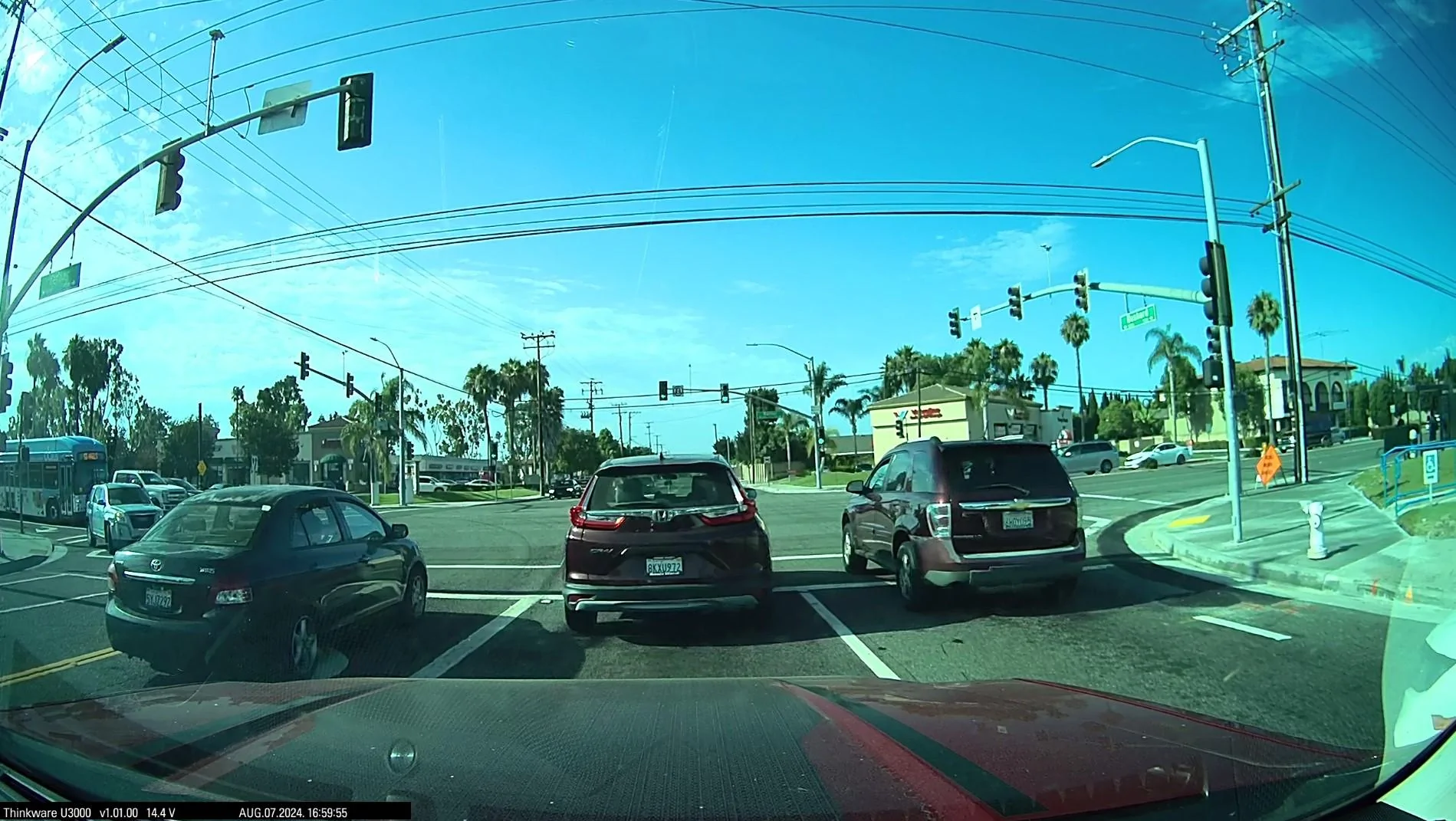
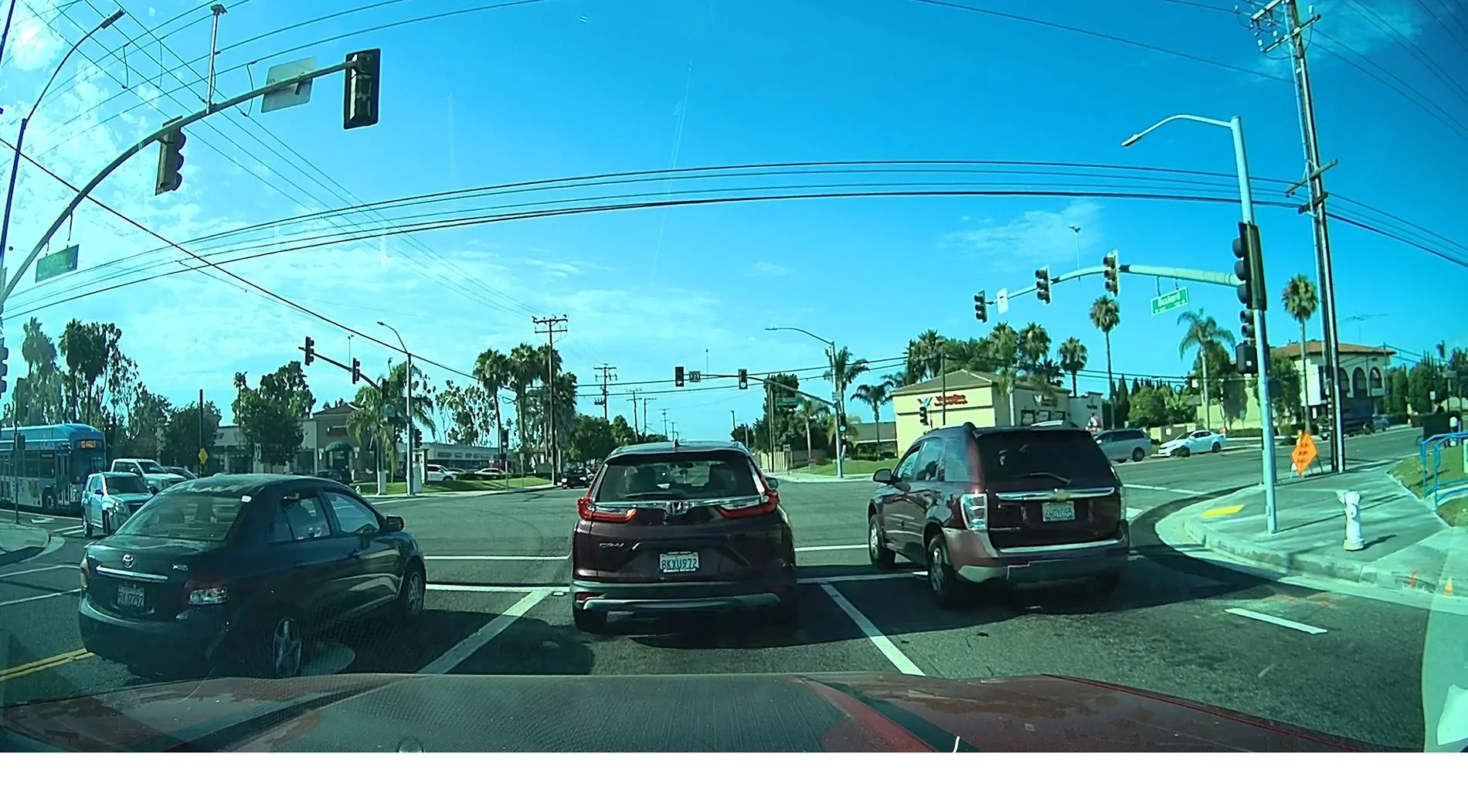
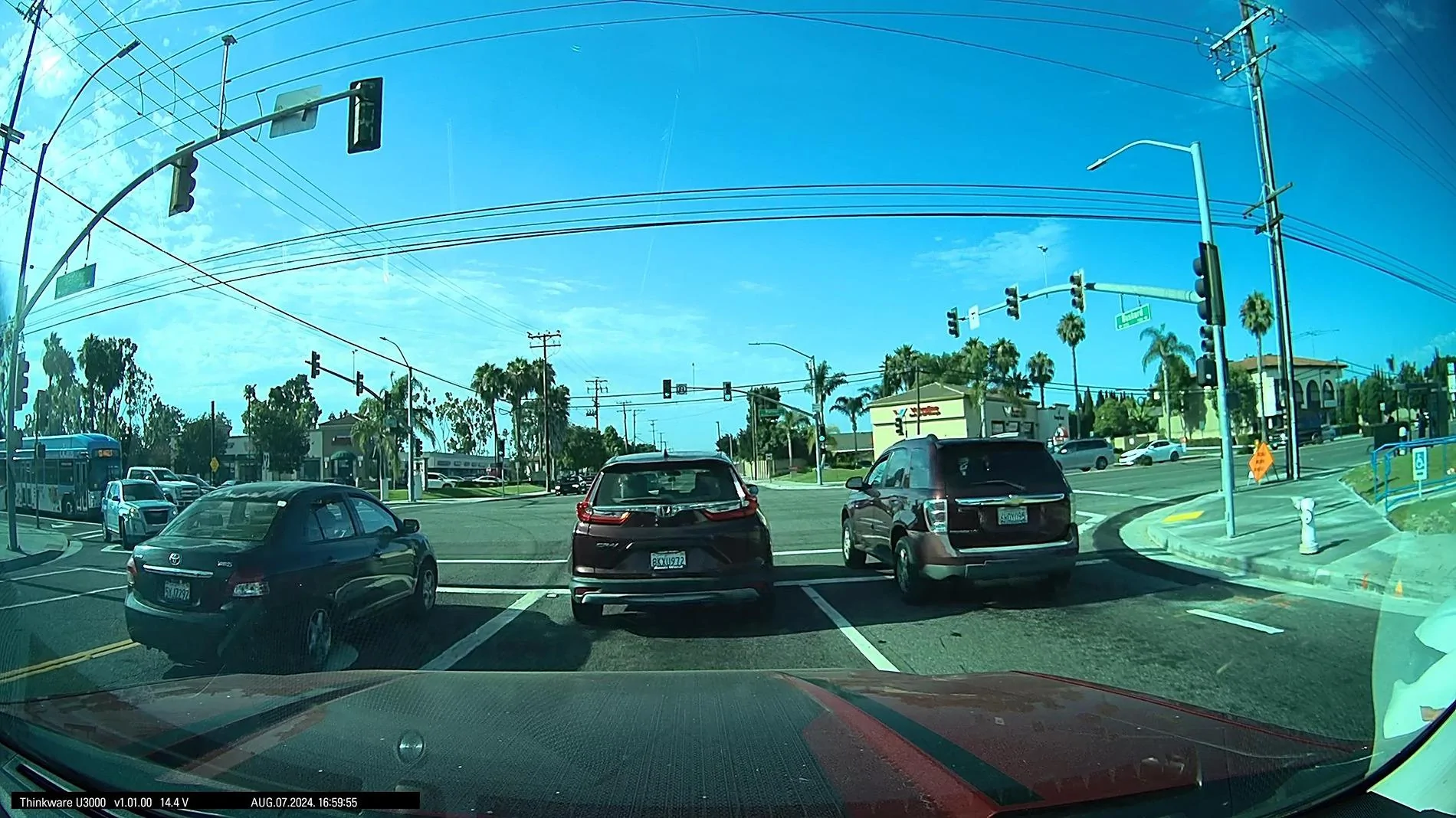
The following images are taken a couple of days ago. I captured as the light turned green & all 3 cars started moving at different speeds (slow to quicker - L to R). Each video player was paused & then I screen captured using Snipping Tool...Cyberlink has its own built-in image capture, which was used. When viewing images on my PC / zooming in Cyberlink was noticeably better and easier to read License Plates.

1. Cyberlink Power Director 2024
2. Thinkware Windows PC Viewer
3. Windows 11 Media Player

I would now love to hear how others reviewed / compared the quality differences between Dash Cam Units.

Ford Maverick Dashcams: What's on your Maverick windshield? 8_7_24 16-59-55 Cyberlink PowerDirector


Ford Maverick Dashcams: What's on your Maverick windshield? Screenshot 2024-08-09 133849 Thinkware PC Viewer


Ford Maverick Dashcams: What's on your Maverick windshield? Screenshot 2024-08-09 140801 Windows Media Player
 

junyamada

2.5L Hybrid
Well-known member
First Name
Jun
Joined
Mar 6, 2024
Threads
3
Messages
59
Reaction score
20
Location
California
Vehicle(s)
Maverick XL Hybrid MY24
Engine
2.5L Hybrid
So, Jun you made me curious about vid / capture quality. If anyone else has input, please share.

I will get right to the end. In my simple test it all depends on what video playback you are using & to a small degree what image capture as well.

I have (3) playback programs currently available to me.
1. Thinkware PC Viewer = Best use: Quick review of captured videos, it does have zoom in video playback.
2. Windows Media Player = Best use: Not much difference, no in-player zoom, but maybe a bit brighter.
3. Cyberlink Power Director = Best use: Much better Quality, Smoother / tighter Controls, in video playback zoom, and built in image capture. I purchased many years ago (I keep updated)

Image / capture Software.
1. Windows Snipping Tool = Best use: Everyday simple & easy to use, but not the best Quality.
2. Cyberlink Pwr Dir = Best use: Built into the video program & so far yields much better images.
3. Adobe Lightroom = Best use: I use this with my Canon images, but I don't know if it can "Screen Capture"
4. Adobe Photoshop 2024 = Best use: I use with my Canon images, and same don't know if it can "Screen Capture"

The following images are taken a couple of days ago. I captured as the light turned green & all 3 cars started moving at different speeds (slow to quicker - L to R). Each video player was paused & then I screen captured using Snipping Tool...Cyberlink has its own built-in image capture, which was used. When viewing images on my PC / zooming in Cyberlink was noticeably better and easier to read License Plates.

1. Cyberlink Power Director 2024
2. Thinkware Windows PC Viewer
3. Windows 11 Media Player

I would now love to hear how others reviewed / compared the quality differences between Dash Cam Units.

8_7_24 16-59-55 Cyberlink PowerDirector.jpg


Screenshot 2024-08-09 133849 Thinkware PC Viewer.jpg


Screenshot 2024-08-09 140801 Windows Media Player.jpg
Non moving captures are actually great.

I actually based my reply coming from this video:


My mistake, the U3000 is still good but the N4 Pro had the best implementation for license plate captures for moving cars.

I did not do a test on this personally. Just basing my thoughts from the video I saw.
 

glpuckett

2.5L Hybrid
Well-known member
First Name
Gary
Joined
Jul 29, 2021
Threads
2
Messages
151
Reaction score
262
Location
ID
Vehicle(s)
2022 Maverick FE Rapid Red 2.5L Hybrid
Engine
2.5L Hybrid
Non moving captures are actually great.

I actually based my reply coming from this video:


My mistake, the U3000 is still good but the N4 Pro had the best implementation for license plate captures for moving cars.

I did not do a test on this personally. Just basing my thoughts from the video I saw.
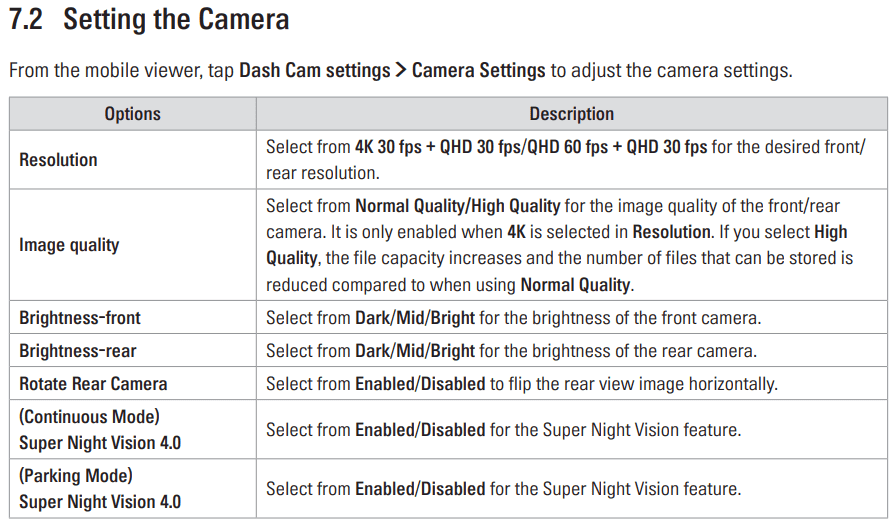
I totally agree. That is my question NOW. Did they use whatever built in vid/capture software that came with each unit, which means, they are mostly comparing S/W packages & maybe not the Dash Cam. If they are using the same S/W for the comparison, then that's fair. However, now we get into the camera settings (see image below for U3K settings). I'm just learning so I'm still messing with this.

Ford Maverick Dashcams: What's on your Maverick windshield? 1723252625418-zy


For me I was checking to see if the Thinkware PC Viewer was the BEST option to use or not. It turns out in my opinion / situation that my Cyberlink provides better quality, clarity and image capture capabilities than the bundled software. Now I'm 95% confident that when a quality recording / image is necessary (Insurance, police, etc...) this unit will most likely work just great. I'm not disregarding the Thinkware PC Viewer b/c it will work far better for reviewing an SD card full of front/back vids.

As far as moving vehicles I'm in agreement with you. It seems to be challenging, but I don't know what scenario the acceptable criteria are for comparison. How fast (delta), same or opposite direction, Sun elevation / direction, etc...

My final thoughts, it's like your car insurance you have it and hope you never have to use it! I've only used my insurance (1) time in 50 years of driving in SoCal. The only time I've had a car break-in was at night in my driveway & because of that, that is why "Parking Mode" & a security system is important to me. The driving mode is important to only show that it wasn't my fault! Car insurance doesn't even offer discounts for having a Dash Cam. That is telling all in itself...don't you think? Anyway, I've been in the technology business my entire life, so whatever we buy will be outdated in 18-24 months.
Sponsored


Top