Sponsored

junyamada

2.5L Hybrid
Well-known member
First Name
Jun
Joined
Mar 6, 2024
Threads
3
Messages
59
Reaction score
20
Location
California
Vehicle(s)
Maverick XL Hybrid MY24
Engine
2.5L Hybrid
FineVue GX1000. I couldn’t pass it up for $50.
 

Montana

2.0L EcoBoost
Banned
Banned
Joined
Jun 13, 2023
Threads
24
Messages
4,094
Reaction score
6,347
Location
USA
Vehicle(s)
.
Engine
2.0L EcoBoost
A Viofo A139. I'm sure there are newer ones out by now.

At the time it was reasonably priced, and I got multiples for family vehicles.

There are so many. The best advice I can give is to check out BlackBoxMyCar.com for deals and their testing results. It's amazing how much of these dashcams are the same internals. But it really depends on your needs. Parking mode, 2 or 3 way (2 way should be minimum) etc etc. Lots of options out there. I wouldn't pay over a couple hundred for a dashcam and I probably wouldn't pay under $100 for a knock off that has not had it's capacitors tested properly. A

lso, skip the OBDII advice. Keep that port open. Your dashcam does no good when it's unplugged and getting serviced is definitely somewhere I want my dashcam recording as much as possible (which means battery packs).
 

Mr Pibb

2.5L Hybrid
Well-known member
Joined
May 11, 2024
Threads
1
Messages
450
Reaction score
448
Location
Vegas
Vehicle(s)
2024 Lariat
Engine
2.5L Hybrid
A Viofo A139. I'm sure there are newer ones out by now.

At the time it was reasonably priced, and I got multiples for family vehicles.

There are so many. The best advice I can give is to check out BlackBoxMyCar.com for deals and their testing results. It's amazing how much of these dashcams are the same internals. But it really depends on your needs. Parking mode, 2 or 3 way (2 way should be minimum) etc etc. Lots of options out there. I wouldn't pay over a couple hundred for a dashcam and I probably wouldn't pay under $100 for a knock off that has not had it's capacitors tested properly. A

lso, skip the OBDII advice. Keep that port open. Your dashcam does no good when it's unplugged and getting serviced is definitely somewhere I want my dashcam recording as much as possible (which means battery packs).
The ford accessories version uses and ODBII plug and play harness, so the port itself is open. You unmount the port from under the dash and add your cable which gives you the new front of the port to remount.
 

REMUB40

2.5L Hybrid
Well-known member
First Name
Brian
Joined
Sep 20, 2022
Threads
20
Messages
336
Reaction score
349
Location
Fredericksburg, VA
Vehicle(s)
2018 Honda CRV
Engine
2.5L Hybrid
Clubs
 

Sponsored

dusty1787

2.0L EcoBoost
Well-known member
First Name
Dustin
Joined
Sep 22, 2022
Threads
24
Messages
329
Reaction score
488
Location
Wisconsin
Vehicle(s)
2023 Maverick EB Lariat
Engine
2.0L EcoBoost
Clubs
 
A bewildering variety of dashcams out there and I'm thinking of getting one...so I figure, why not ask youse what your go-to unit is?

If the link works, I ended up using my Ford points on this one... Dashcam with Rear Facing Camera Bundle | Accessories.Ford.com . (If link doesnt work the SKU: VHL3Z19G490K ) It came with everything included to wire it up to the OBD port for power. Has parking modes and wifi connection. The app it uses seems good and not "cheap" if that makes sense. I believe you can adjust the sensitivity for "impacts" because if I hit a pothole or rough train track crossing it will beep at me indicating it is recording (thinks a crash happened).

I honestly think it took me longer to run the wires to be out of sight than it did to wire it into the OBD port. Took maybe 15 min to wire it to the port and like 30min to run the wires where I was happy with them. There was a bunch of extra cable to try and hide was harder than it seems. It also gives you like a pigtail to plug into the port which then also allows you to still be able to use the OBD port. As in I have my camera plugged into the OBD port at all times, and I can plug the forscan OBD controller in and still be able to "talk" to the vehicle and make changes without having to unplug the camera, plug in forscan, unplug forscan, plug camera back in...or anything like that.

I placed mine above the rearview mirror, and then the rear camera just behind the driver rear passenger headrest. I placed them where I did to make hiding the wires the easiest as it was very close to the trim pieces. Overall I am very happy with the quality of the camera and it talks to me every time I start the mav indicating if it recorded any events during the night.
 

AUTiger83

2.0L EcoBoost
Well-known member
First Name
Phil
Joined
Jul 30, 2021
Threads
2
Messages
116
Reaction score
237
Location
Florida
Vehicle(s)
2024 Ecoboost Lariat, FX4, 4k Tow, Azure Gray.
Engine
2.0L EcoBoost

Mavapa

2.0L EcoBoost
Well-known member
First Name
Mark
Joined
Dec 15, 2021
Threads
7
Messages
52
Reaction score
72
Location
Rome ga
Vehicle(s)
Subaru Outback
Engine
2.0L EcoBoost
Georgia law seems to prohibit mounting anything on the windshield except behind the rear view mirror. Is that where most of you are mounting your cameras?
 

Darklyter

2.0L EcoBoost
Well-known member
Joined
Oct 25, 2021
Threads
9
Messages
175
Reaction score
227
Location
FL
Vehicle(s)
XL, like me lol
Engine
2.0L EcoBoost
Clubs
 
An older Garmin nüviCam™ LMTHD that I had on my previous Dodge Dakota. It has wireless rear backup cam as well but I don't use it since my Mav has one that's good enough. I am considering a rear facing cam though.
 

TimeOutside

2.5L Hybrid
Well-known member
First Name
Andrew
Joined
Dec 12, 2021
Threads
28
Messages
127
Reaction score
86
Location
Hollister, MO
Vehicle(s)
Maverick Lariat
Engine
2.5L Hybrid
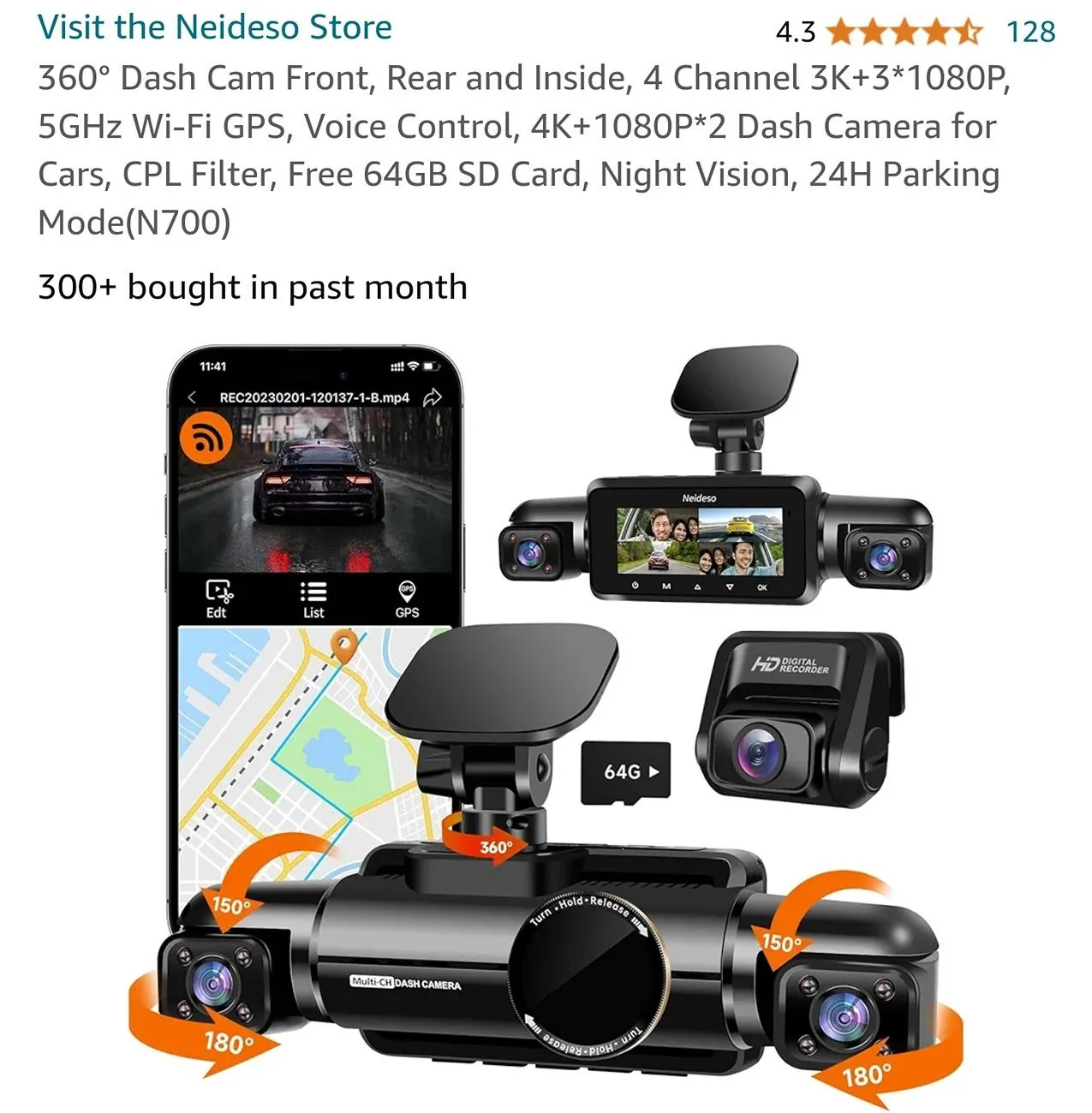
I purchased the Neideso 360 off Amazon. I've been quite happy with it. After having been in an accident last week, in our other vehicle, I'm glad for having a dashcam in it. The other party cannot deny it was totally their fault. I have it wired into continuous power, so I can take advantage of its "parking" features when the vehicle is off.

Ford Maverick Dashcams: What's on your Maverick windshield? Screenshot_20240808_081809_Amazon Shopping
 
Sponsored
OP
OP
Deweyordeweynot

Deweyordeweynot

2.5L Hybrid
Well-known member
First Name
Dewey
Joined
May 10, 2023
Threads
32
Messages
585
Reaction score
674
Location
Macomb, MI
Vehicle(s)
2024 XLT Oxford White / 2018 Subaru Forester
Engine
2.5L Hybrid
Clubs
 
A Viofo A139. I'm sure there are newer ones out by now.

At the time it was reasonably priced, and I got multiples for family vehicles.

There are so many. The best advice I can give is to check out BlackBoxMyCar.com for deals and their testing results. It's amazing how much of these dashcams are the same internals. But it really depends on your needs. Parking mode, 2 or 3 way (2 way should be minimum) etc etc. Lots of options out there. I wouldn't pay over a couple hundred for a dashcam and I probably wouldn't pay under $100 for a knock off that has not had it's capacitors tested properly. A

lso, skip the OBDII advice. Keep that port open. Your dashcam does no good when it's unplugged and getting serviced is definitely somewhere I want my dashcam recording as much as possible (which means battery packs).
Thanks! I checked out Blackbox and it was helpful, though it's hard for me to completely trust a review site that also sells a related product...but good info just the same.

I'm not a fan of using the OBDII port for anything else but Forscan, so we agree there.
I'm leaning towards the Viofo series.
 

pgtogo84bsxy

2.5L Hybrid
Member
First Name
Paul
Joined
Jun 28, 2024
Threads
1
Messages
9
Reaction score
4
Location
SF Bay Area
Vehicle(s)
2023 RAV4 Hybrid XSE, 2024 Maverick Hybrid Lariat
Engine
2.5L Hybrid
If the link works, I ended up using my Ford points on this one... Dashcam with Rear Facing Camera Bundle | Accessories.Ford.com . (If link doesnt work the SKU: VHL3Z19G490K ) It came with everything included to wire it up to the OBD port for power. Has parking modes and wifi connection. The app it uses seems good and not "cheap" if that makes sense. I believe you can adjust the sensitivity for "impacts" because if I hit a pothole or rough train track crossing it will beep at me indicating it is recording (thinks a crash happened).

I honestly think it took me longer to run the wires to be out of sight than it did to wire it into the OBD port. Took maybe 15 min to wire it to the port and like 30min to run the wires where I was happy with them. There was a bunch of extra cable to try and hide was harder than it seems. It also gives you like a pigtail to plug into the port which then also allows you to still be able to use the OBD port. As in I have my camera plugged into the OBD port at all times, and I can plug the forscan OBD controller in and still be able to "talk" to the vehicle and make changes without having to unplug the camera, plug in forscan, unplug forscan, plug camera back in...or anything like that.

I placed mine above the rearview mirror, and then the rear camera just behind the driver rear passenger headrest. I placed them where I did to make hiding the wires the easiest as it was very close to the trim pieces. Overall I am very happy with the quality of the camera and it talks to me every time I start the mav indicating if it recorded any events during the night.
Can you post a picture? I’m curious to see how the wires are hidden. My Maverick is being built next month and this is one of the cameras I’m looking at. The photos on Ford’s accessory site doesn’t show how the h wires are hidden. Thank you.
 

Kyleshorette

2.0L EcoBoost
Member
First Name
Kyle
Joined
Jun 27, 2024
Threads
5
Messages
7
Reaction score
13
Location
New Jersey
Vehicle(s)
2024 ford maverick xl awd
Engine
2.0L EcoBoost
Mangoal 4K Dash Cam fit for Ford 1th Gen Maverick 2022-2024, XL XLT Lariat, Integrated OEM Look, UHD 2160P Video, Built-in WiFi, G-Sensor, Loop Recording, Easy to Install, Free App and 128GB Card
https://a.co/d/iAKE2c5
 

Hot Runr Guy

2.0L EcoBoost
Well-known member
First Name
Terry
Joined
Apr 27, 2021
Threads
101
Messages
4,223
Reaction score
7,830
Location
West Chicago, IL
Vehicle(s)
2024 Edge SEL, 2024 Lariat Tremor
Engine
2.0L EcoBoost
Clubs
 

dusty1787

2.0L EcoBoost
Well-known member
First Name
Dustin
Joined
Sep 22, 2022
Threads
24
Messages
329
Reaction score
488
Location
Wisconsin
Vehicle(s)
2023 Maverick EB Lariat
Engine
2.0L EcoBoost
Clubs
 
Can you post a picture? I’m curious to see how the wires are hidden. My Maverick is being built next month and this is one of the cameras I’m looking at. The photos on Ford’s accessory site doesn’t show how the h wires are hidden. Thank you.
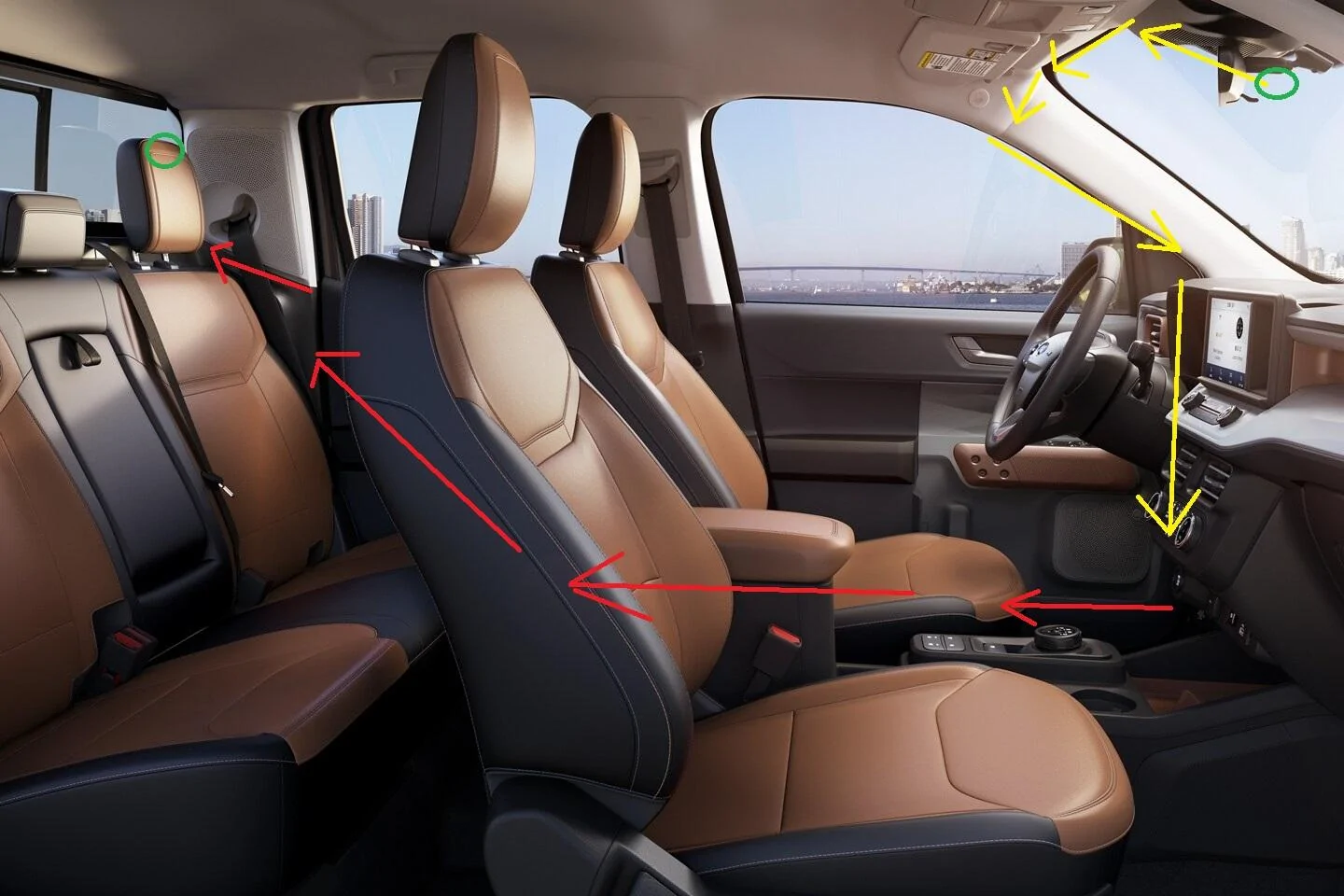
I can try and take some photos later(at work and found some quick stock photos I will attempt to draw out how I did it). NOTE: this is may not be the best path or anything, but it worked for me and was fairly simple. On the trim pieces... if I did not need to actually completely remove the pieces, I did not. If I could pry them up and get the cables under and them be secure, that is what I did.

I have a set of plastic trim removal tools that I used (mainly used the slightly hooked one).. and pried up(or down) the pieces to get the cables under. To start I placed the cameras about where I wanted them, and then ran the cords back to the OBD port location.

For the headliner where it meets the windshield just a bit is where I pried the headliner...enough to push cables under (both the power to main camera cable, and the cable to rear camera)...and pushed the cables into that space.

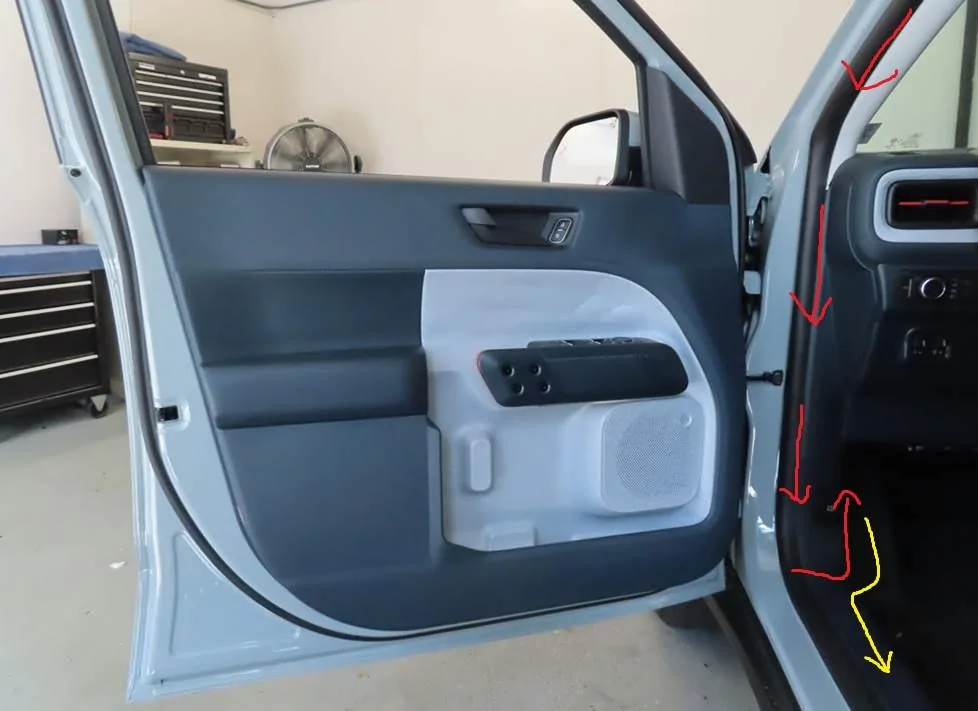
Then I worked it toward the drivers door and ran it behind the trim/weatherstripping down to the footwell where then I went up/under to where the OBD port is. (I ran it along the front? side of the door frame...where the door hinges open and closed from).

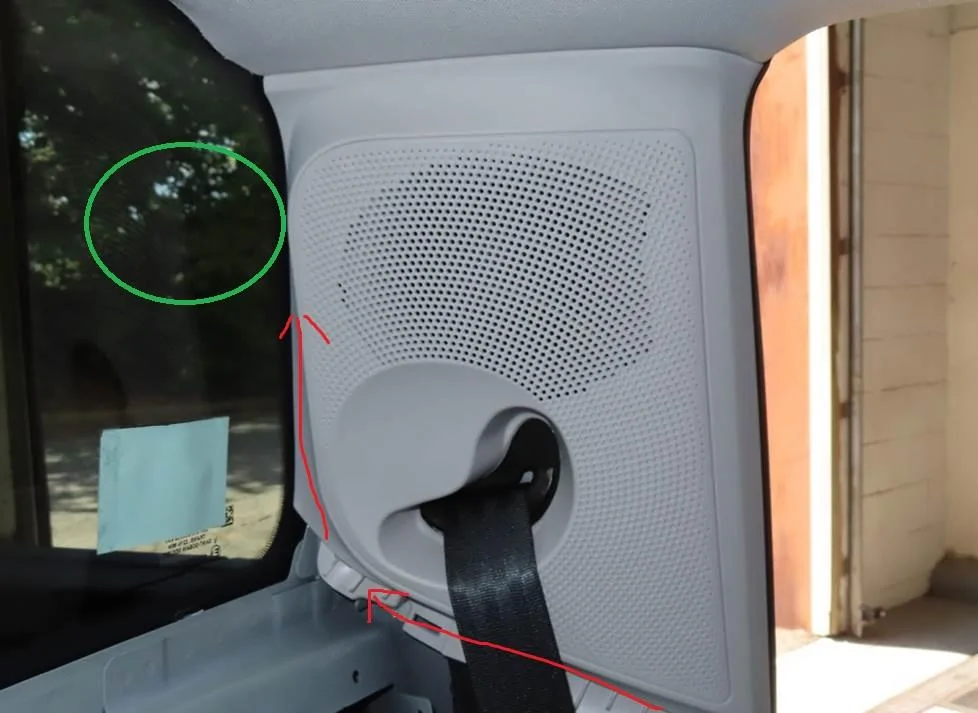
After getting the power cord all squared away with length and extras, I then continued the rear camera cable back to the drivers door along the bottom of the door frame where I popped out the trim pieces (i think called sill plate?)...and ran it along floor sill plates of the drivers door, then under the pillar trim piece, along drivers rear sill plate, then up the trim pieces of the rear driver side seat to the back window.


First Photo: The first one shows the green circles where I placed the cameras. the yellow line is for the front camera cable route I did. Under the headliner towards door, then down the door frame to the OBD port. Red line showing where I ran it to the rear camera (in a vague / rough drawing)

Second Photo: showing the trim piece and weatherstripping that I ran the cable up under. There is also a piece near the floor where I turned the cable inwards and then back up to the OBD port.

Third Photo: shows the rear camera location in green, along with where I ran my cable to.

Again, how you route it is all your own, but the path I took worked for me because I am not super OCD about cable management or anything. I wanted a balance between ease and not needing to disassemble and possibly break clips or anything. I will try and take photos again later, but seeing the cables are hidden, not sure how useful they will be.

Ford Maverick Dashcams: What's on your Maverick windshield? windshield to door - rough diagram


Ford Maverick Dashcams: What's on your Maverick windshield? door location - rough diagram


Ford Maverick Dashcams: What's on your Maverick windshield? Rear Pillar - rough diagram
Sponsored


Top