
Sponsored

Copilot 360 - Is there a way to turn it on

dlhort1955

2.0L EcoBoost
Well-known member
First Name
Dave
Joined
Nov 17, 2023
Threads
30
Messages
489
Reaction score
494
Location
Milwaukee
Vehicle(s)
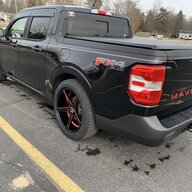
Maverick FX4
Engine
2.0L EcoBoost
The build sheet states I have Copilot 360. I have seen no evidence that it is turned on. Car just drives like my old car. Is there some place I have to go to turn it on? Can I turn on parts of it or is it just on or off? Thank you.
Sponsored

 

ATXTACOS

2.0L EcoBoost
Well-known member
First Name
James
Joined
Jan 15, 2023
Threads
3
Messages
137
Reaction score
129
Location
Austin
Vehicle(s)
2024 Lariat HPR FX4/4K tow 2018 Ford Edge Titanium 2013 Mustang GT, track pack,
Engine
2.0L EcoBoost
Clubs
 
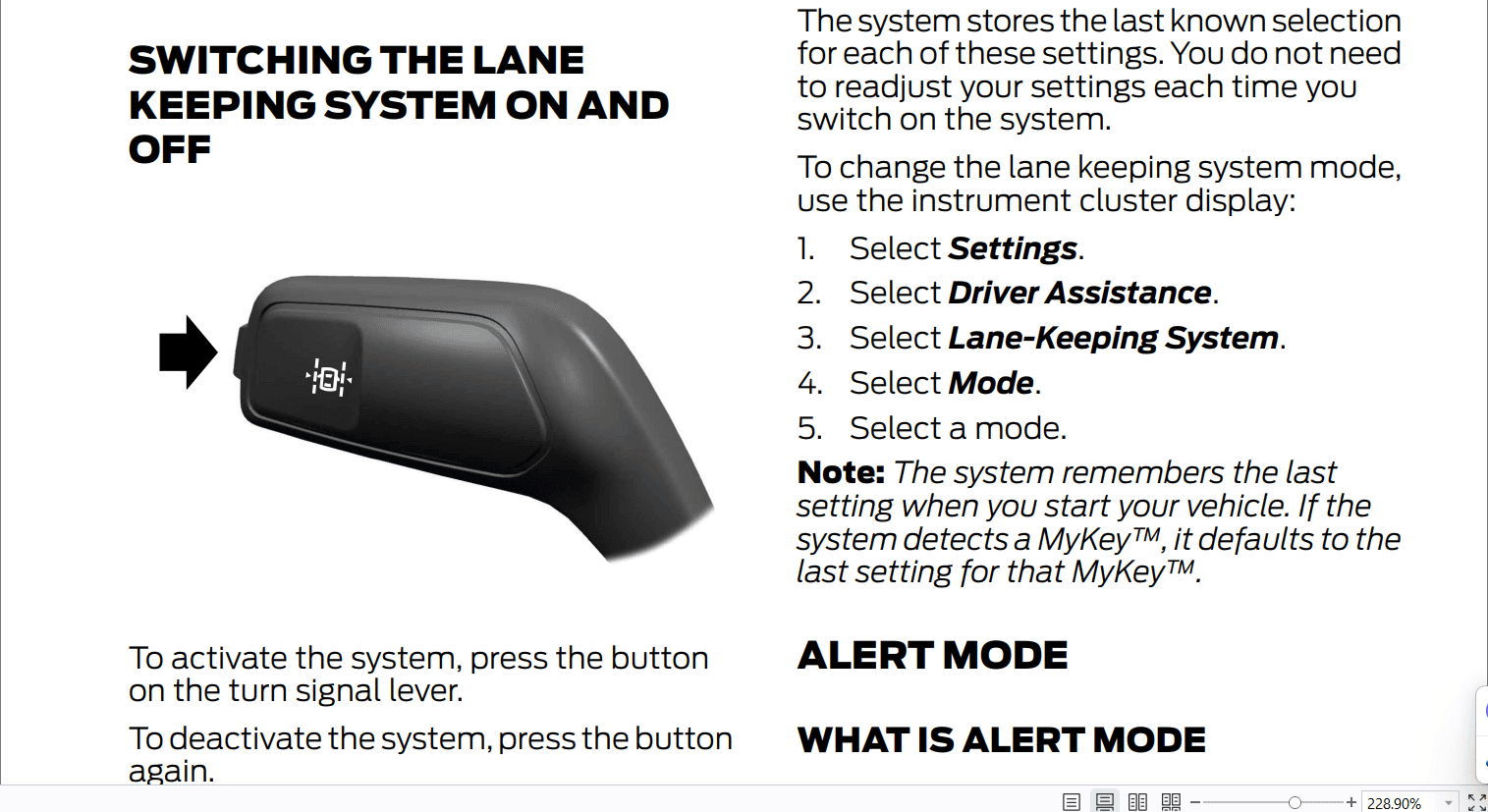
Little button on the end of the left-hand Stalk.
 
Last edited:

cyberdog

2.5L Hybrid
Well-known member
First Name
Ray
Joined
Oct 15, 2021
Threads
5
Messages
663
Reaction score
785
Location
08084
Vehicle(s)
2023 Maverick Lariat Hybrid
Engine
2.5L Hybrid
As ATXTACOS indicated, there's a small button on the turn signal stalk. Depending on the screen you've selected on the dash, you'll get different indicators. One shows lane departure, for instance, which will turn green at ~40 mph, if you have Co-Pilot 360 Assist as well (depending upon trim) you'll have other features that turn on.
 

Sponsored

BradnChristine

2.5L Hybrid
Well-known member
First Name
Brad
Joined
Nov 3, 2021
Threads
43
Messages
2,463
Reaction score
3,077
Location
Wyoming
Vehicle(s)
'23 Maverick Lariat Hybrid (towed); '25 Ranger Lariat; '15 C-Max; '20 Transit RV
Engine
2.5L Hybrid

cclark

2.0L EcoBoost
Well-known member
First Name
Curtis
Joined
Aug 23, 2023
Threads
0
Messages
199
Reaction score
416
Location
Virginia
Vehicle(s)
2020 Escape, 2023 Maverick XLT, CG, Eco, 4K
Engine
2.0L EcoBoost
Clubs
 
He meant stalk...the button is on the end of your turn signal stalk. (Blame spell check)
 

fossil

2.0L EcoBoost
Well-known member
First Name
ernie
Joined
Aug 23, 2020
Threads
48
Messages
3,432
Reaction score
5,792
Location
ohio
Vehicle(s)
95 SVT Cobra Mustang, HPR Lariat Tremor
Engine
2.0L EcoBoost
The build sheet states I have Copilot 360. I have seen no evidence that it is turned on. Car just drives like my old car. Is there some place I have to go to turn it on? Can I turn on parts of it or is it just on or off? Thank you.
knowing what trim level you own and the actual 360 features you are interested in would help get more precise answers. :)
 

Scott Asheville

2.0L EcoBoost
Well-known member
First Name
Scott
Joined
Oct 4, 2021
Threads
79
Messages
2,332
Reaction score
5,492
Location
Asheville, NC
Vehicle(s)
2022 AWD XLT ECO LUX CP360 HPR
Engine
2.0L EcoBoost
Also, be aware there are sensitivity settings on the main screen.
 
Sponsored

ShadowChas

2.0L EcoBoost
Well-known member
First Name
Chuck
Joined
Nov 13, 2021
Threads
6
Messages
652
Reaction score
792
Location
Michigan
Vehicle(s)
2022 Ford Maverick XLT FX4
Engine
2.0L EcoBoost
It is an XLT AWD FX4
So that’s also the light in your side mirrors when vehicles are close & beeping noise in reverse (b.l.i.s.) as well as the “vibration” for close to your lane it doesn’t actually steer like the copilot assist package
 

Uncle Ed

2.5L Hybrid
Well-known member
Joined
Nov 1, 2021
Threads
2
Messages
264
Reaction score
339
Location
Georgia
Vehicle(s)
1968 Camaro, 2017 Toyota Highlander, 2024 Maverick hybrid
Engine
2.5L Hybrid
So that’s also the light in your side mirrors when vehicles are close & beeping noise in reverse (b.l.i.s.) as well as the “vibration” for close to your lane it doesn’t actually steer like the copilot assist package
Cp360 on my xl will give the steering wheel a nudge to keep it in the lane.
 

FabMav

2.5L Hybrid
Well-known member
First Name
JR
Joined
Nov 7, 2021
Threads
22
Messages
275
Reaction score
292
Location
CA
Vehicle(s)
XL
Engine
2.5L Hybrid
Clubs
 
The steering will will nudge to help keep it in the lane only if you chose the highest sensitivity using the dash screen option.
 

Ozarkbeard

Well-known member
Joined
May 22, 2022
Threads
14
Messages
4,344
Reaction score
5,477
Location
.
Vehicle(s)
.
Engine
Undecided
It is an XLT AWD FX4
AFAIK, the button on the end of the turn signal stalk only toggles the Lane Keep assist. CP360 features (including LaneKeep) can be configured in the truck's Driver Assistance Menu, in the steering wheel Menu options.

The various CP360 options are 'splained in the User Manual that came with the truck. Or grab a Zoomable/Searchable pdf copy for your PC here> https://www.ford.com/support/owner-manuals
 

Eagle11

2.5L Hybrid
Well-known member
Joined
Aug 6, 2021
Threads
18
Messages
1,982
Reaction score
1,693
Location
Valley of the Sun
Vehicle(s)
'07 Boxster S, 2018 BMW M5, Ducati's, Suzuki's
Engine
2.5L Hybrid
Clubs
 
The build sheet states I have Copilot 360. I have seen no evidence that it is turned on. Car just drives like my old car. Is there some place I have to go to turn it on? Can I turn on parts of it or is it just on or off? Thank you.
So you haven't read the manual in which will tell you how to do it
Sponsored


Top