Sponsored

Audio Off Error - No Sound, No Volume Control

rugedraw

Well-known member
First Name
Javier
Joined
Jan 21, 2026
Threads
0
Messages
52
Reaction score
52
Location
Miami, FL
Vehicle(s)
2021 Ford F150; 2023 Bronco Sport Badlands; 1991 Mustang 5.0 coupe.
Engine
Undecided
No - not on mine. It's also been dry out where I live and its been in garage. It was just working on Sunday no issue.
In your case, I see nothing helpful with the codes it is reporting to the cloud.

However, in the case of @crbalch it is very obvious that something is wrong. You have several modules with active faults citing lost comms between the APIM, IPC, DSP and the wireless charging module.

Ford Maverick Audio Off Error - No Sound, No Volume Control 1775682083230-qh


Going through the code history, I do see the codes going from stored back to active. See below from 4/3. When the codes end in 08, they are stored codes. So at 12pm that day, the codes were active and the next time you drove it at 1:27pm, they changed to stored and no longer active. However, as of this morning, the codes end in 0A/0B which means they are active.
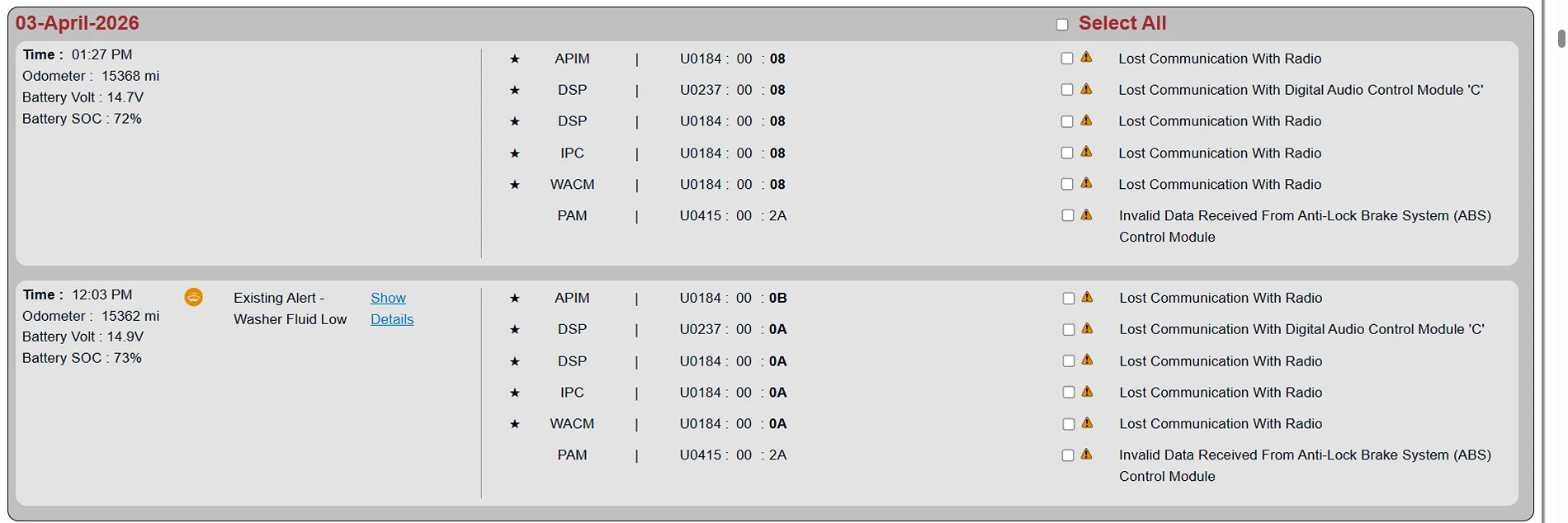
Ford Maverick Audio Off Error - No Sound, No Volume Control 1775682231237-2t


While this is a clear red flag that something is wrong, I cannot tell from looking at this where the issue is. It could be a bad fuse, or a loosely seated fuse/relay that is causing the intermitent issue. It could be a bad APIM. Unfortunately, these things can be impossible to diagnose remotely.
Sponsored

 

rugedraw

Well-known member
First Name
Javier
Joined
Jan 21, 2026
Threads
0
Messages
52
Reaction score
52
Location
Miami, FL
Vehicle(s)
2021 Ford F150; 2023 Bronco Sport Badlands; 1991 Mustang 5.0 coupe.
Engine
Undecided
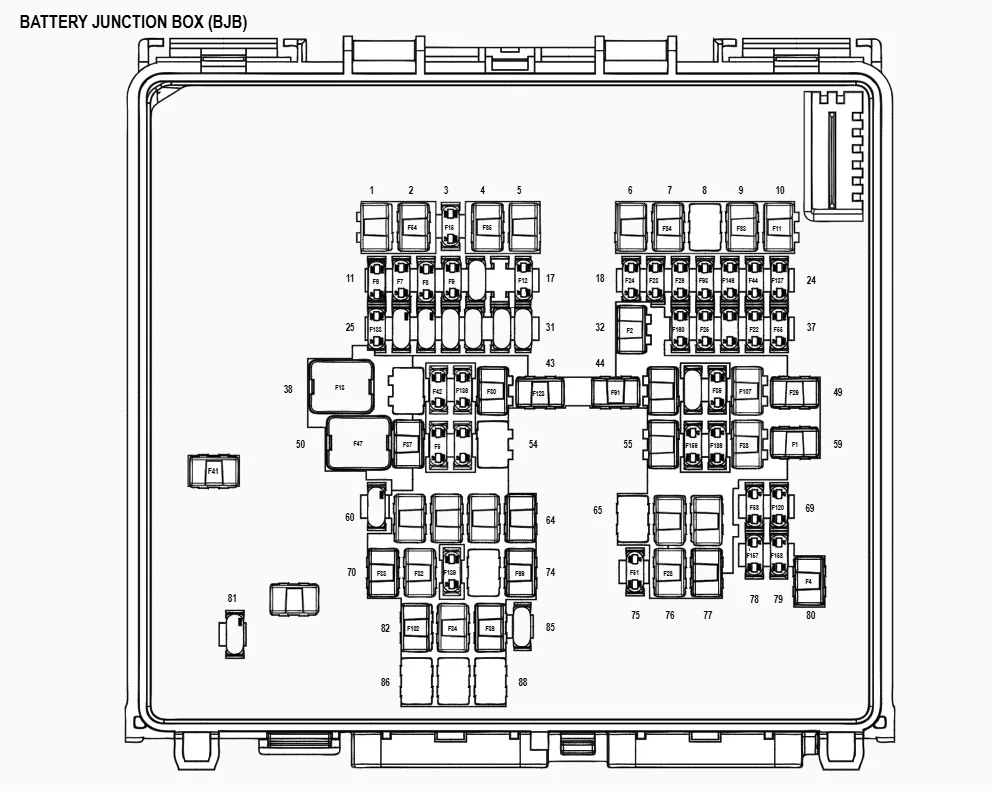
In the BJB (battery junction box) below:


Ford Maverick Audio Off Error - No Sound, No Volume Control 1775682710384-fn


Check these fuses #24 and #41 for the DSP:
Ford Maverick Audio Off Error - No Sound, No Volume Control 1775682780786-m9


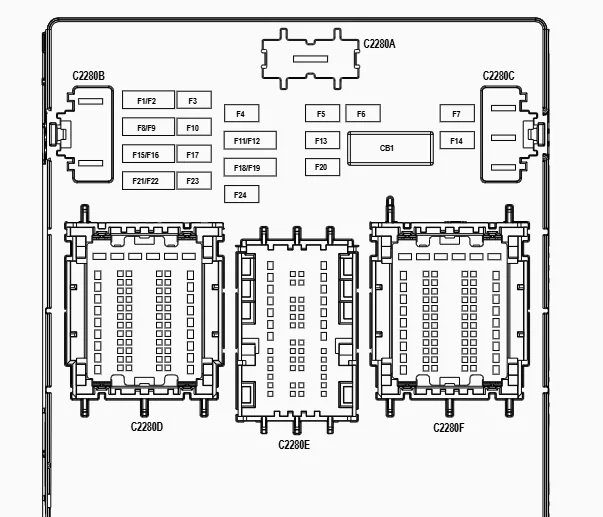
In the BCM below:


Ford Maverick Audio Off Error - No Sound, No Volume Control 1775682811686-s0


Check fuse #17 & #18 for the radio and WACM and also #23 for the ACM.

Ford Maverick Audio Off Error - No Sound, No Volume Control 1775682872953-mj

Ford Maverick Audio Off Error - No Sound, No Volume Control 1775682921552-bs
 
OP
OP
crbalch

crbalch

2.0L EcoBoost
Well-known member
Joined
Nov 6, 2022
Threads
6
Messages
118
Reaction score
281
Location
Illinois
Vehicle(s)
2023 Maverick Lariat Tremor
Engine
2.0L EcoBoost
In the BJB (battery junction box) below:


1775682710384-fn.webp


Check these fuses #24 and #41 for the DSP:
1775682780786-m9.webp


In the BCM below:


1775682811686-s0.webp


Check fuse #17 & #18 for the radio and WACM and also #23 for the ACM.

1775682872953-mj.webp

1775682921552-bs.webp
thank you for the help! I will get some new fuses to see if that helps
 

rugedraw

Well-known member
First Name
Javier
Joined
Jan 21, 2026
Threads
0
Messages
52
Reaction score
52
Location
Miami, FL
Vehicle(s)
2021 Ford F150; 2023 Bronco Sport Badlands; 1991 Mustang 5.0 coupe.
Engine
Undecided
thank you for the help! I will get some new fuses to see if that helps
I would just check the existing fuses first. Maybe one of them just isn't seated properly. If you do find one that is blown, then you know what to do first. If none of them are blown and they are all seated properly, then you may have a hardware issue.

Edit: I didn't check to see if your truck has a DSP or not. If you have the base sound system, there will not be a DSP and there is no need to check the fuse in the BJB.
 

HeyBales

2.5L Hybrid
Well-known member
First Name
Mike
Joined
May 3, 2024
Threads
4
Messages
4,827
Reaction score
4,375
Location
KC Metro area
Vehicle(s)
2005 Toyota RAV4, 2024 XLT Hybrid
Engine
2.5L Hybrid
Not getting an error just not able to click or operate any audio at least for me. My luck if it starts working, it will be when I have to take it in on Monday. I also messaged rugedraw to see if they are able to locate the error. Would be cool to see at least what might be going on before I go in.
These errors don't set the money light.

See my post above about error found in specific module - no MIL.

This also means you need a scanner (I used Forscan Lite) that can read modules and their errors - not just general OBD errors reported to main module.
 

Sponsored

Heffthelegend

2.0L EcoBoost
Member
First Name
Nathan
Joined
Dec 28, 2022
Threads
0
Messages
23
Reaction score
15
Location
Indiana
Vehicle(s)
Maverick Lariat
Engine
2.0L EcoBoost
These errors don't set the money light.

See my post above about error found in specific module - no MIL.

This also means you need a scanner (I used Forscan Lite) that can read modules and their errors - not just general OBD errors reported to main module.
I’m going to go pick up my buddies cable tonight and try to get it connected. Once I get the software and connected what would I be looking for with the software once hooked up? I’m pretty technically savvy fwiw.
 

rugedraw

Well-known member
First Name
Javier
Joined
Jan 21, 2026
Threads
0
Messages
52
Reaction score
52
Location
Miami, FL
Vehicle(s)
2021 Ford F150; 2023 Bronco Sport Badlands; 1991 Mustang 5.0 coupe.
Engine
Undecided
I’m going to go pick up my buddies cable tonight and try to get it connected. Once I get the software and connected what would I be looking for with the software once hooked up? I’m pretty technically savvy fwiw.
FORScan or a code reader would show you the same codes I sent you. It won't hurt to plug it in and dig around, though.

Did you do something to your truck maybe 40 minutes ago or so? Maybe a battery disconnect?
 

Heffthelegend

2.0L EcoBoost
Member
First Name
Nathan
Joined
Dec 28, 2022
Threads
0
Messages
23
Reaction score
15
Location
Indiana
Vehicle(s)
Maverick Lariat
Engine
2.0L EcoBoost
FORScan or a code reader would show you the same codes I sent you. It won't hurt to plug it in and dig around, though.

Did you do something to your truck maybe 40 minutes ago or so? Maybe a battery disconnect?
I did pop all of the fuses you mentioned in previous post to make sure all of them looked okay. They were fine, but assuming the disconnects of those triggered something?
 

rugedraw

Well-known member
First Name
Javier
Joined
Jan 21, 2026
Threads
0
Messages
52
Reaction score
52
Location
Miami, FL
Vehicle(s)
2021 Ford F150; 2023 Bronco Sport Badlands; 1991 Mustang 5.0 coupe.
Engine
Undecided
I did pop all of the fuses you mentioned in previous post to make sure all of them looked okay. They were fine, but assuming the disconnects of those triggered something?
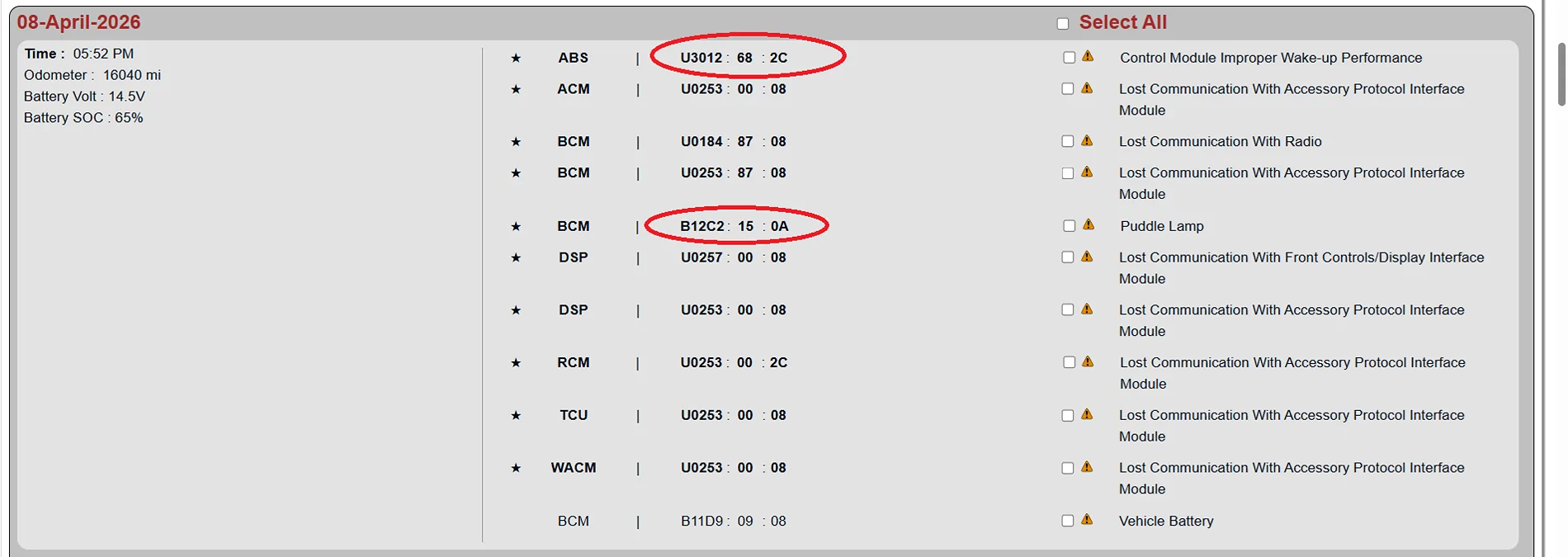
Yea, it did, so don't freak out when you pull the codes. All of these lost comms codes were due to the fuse pulls. They are all stored codes now. The only active faults are in the ABS (that code was there before and could be due to a module needing an update or possible your 12v battery being bad or just needs a charge since SoC is being reported at 66%) and the BCM code indicating a possible burnt out puddle lamp bulb. The PAM code that was there before is now gone and the RCM code is new, but will probably go away too since it was triggered by the fuse pull. In your case, there are no relevant codes that I can connect to your issue which is very strange. Without codes to point you in the right direction, idk where to begin to look in your case, but checking the fuses was a good idea, imo.

Ford Maverick Audio Off Error - No Sound, No Volume Control Untitled
 

Heffthelegend

2.0L EcoBoost
Member
First Name
Nathan
Joined
Dec 28, 2022
Threads
0
Messages
23
Reaction score
15
Location
Indiana
Vehicle(s)
Maverick Lariat
Engine
2.0L EcoBoost
Yea, it did, so don't freak out when you pull the codes. All of these lost comms codes were due to the fuse pulls. They are all stored codes now. The only active faults are in the ABS (that code was there before and could be due to a module needing an update or possible your 12v battery being bad or just needs a charge since SoC is being reported at 66%) and the BCM code indicating a possible burnt out puddle lamp bulb. The PAM code that was there before is now gone and the RCM code is new, but will probably go away too since it was triggered by the fuse pull. In your case, there are no relevant codes that I can connect to your issue which is very strange. Without codes to point you in the right direction, idk where to begin to look in your case, but checking the fuses was a good idea, imo.

Untitled.webp
This is pretty slick that you can do this. I do have the cable now and I can indeed see all of these things now too. Stupid head unit.
I’ve seen many people changing codes in the forums, is that supported to be able to change these? Won’t void any warranties I’m assuming? I’m not planning on changing anything but just curious. And can ford see that those are changed?

I’d love to be able to force a manual firmware/software update of the same sync 3 software 3.4 to maybe see if that would trigger something to start working again but I can’t find a way to download the files for it on fords website. (Using flash drive). I saw on fords site that it was updated on April 6th, not sure if that was the root of the issue or not. And I don’t honestly know if it updated then or that was just its last check-in on update.
 
Sponsored

rugedraw

Well-known member
First Name
Javier
Joined
Jan 21, 2026
Threads
0
Messages
52
Reaction score
52
Location
Miami, FL
Vehicle(s)
2021 Ford F150; 2023 Bronco Sport Badlands; 1991 Mustang 5.0 coupe.
Engine
Undecided
This is pretty slick that you can do this. I do have the cable now and I can indeed see all of these things now too. Stupid head unit.
I’ve seen many people changing codes in the forums, is that supported to be able to change these? Won’t void any warranties I’m assuming? I’m not planning on changing anything but just curious. And can ford see that those are changed?

I’d love to be able to force a manual firmware/software update of the same sync 3 software 3.4 to maybe see if that would trigger something to start working again but I can’t find a way to download the files for it on fords website. (Using flash drive). I saw on fords site that it was updated on April 6th, not sure if that was the root of the issue or not. And I don’t honestly know if it updated then or that was just its last check-in on update.
Yes, forscan will allow you to make config changes within the modules to enable/disable certain things and behaviors, but that won't help with your issue.

Both you and the OP are on the latest Sync 3 software already. I already checked that. You cannot write firmware to the APIM anyway. The APIM can only be updated via a USB whether it is sync 3 or 4. The only difference is sync 4 APIM cannot be updated by the owner by getting the files from the Ford website..... it can only be done with FDRS or an OTA.
 

rugedraw

Well-known member
First Name
Javier
Joined
Jan 21, 2026
Threads
0
Messages
52
Reaction score
52
Location
Miami, FL
Vehicle(s)
2021 Ford F150; 2023 Bronco Sport Badlands; 1991 Mustang 5.0 coupe.
Engine
Undecided
Can Ford see the FORScan changes? An engineer within Ford could if they were looking for it. They have access to things dealer and owners don't have access to. I've never seen what they use..... I've only heard of it. From my understanding, what they use is like if FDRS and FORScan had a baby and fed it steroids. I do not know its full capability, but I have seen at least one case on the F150 forum where a Ford engineer called out the owner for using FORScan trying to fix something. It will not violate warranty unless they can prove whatever you did caused the issue in which case, said issue would not be covered but warranty remains intact.
 
Last edited:

Heffthelegend

2.0L EcoBoost
Member
First Name
Nathan
Joined
Dec 28, 2022
Threads
0
Messages
23
Reaction score
15
Location
Indiana
Vehicle(s)
Maverick Lariat
Engine
2.0L EcoBoost
Yes, forscan will allow you to make config changes within the modules to enable/disable certain things and behaviors, but that won't help with your issue.

Both you and the OP are on the latest Sync 3 software already. I already checked that. You cannot write firmware to the APIM anyway. The APIM can only be updated via a USB whether it is sync 3 or 4. The only difference is sync 4 APIM cannot be updated by the owner by getting the files from the Ford website..... it can only be done with FDRS or an OTA.
With it being sync 3 and capable of being updated via usb/hdd with image, is it possible to force it to install the same update again? I am an IT guy by day, and in past at least for IT equipment I’ve had to redo firmware updates over the top because something went sideways. Not sure if this has the same capability or not.

also do those for scan config changes void warranty or anything if they are modified? As I mentioned I’m not planning on doing it but just pure curiosity. Thanks again!
 

rugedraw

Well-known member
First Name
Javier
Joined
Jan 21, 2026
Threads
0
Messages
52
Reaction score
52
Location
Miami, FL
Vehicle(s)
2021 Ford F150; 2023 Bronco Sport Badlands; 1991 Mustang 5.0 coupe.
Engine
Undecided
With it being sync 3 and capable of being updated via usb/hdd with image, is it possible to force it to install the same update again? I am an IT guy by day, and in past at least for IT equipment I’ve had to redo firmware updates over the top because something went sideways. Not sure if this has the same capability or not.

also do those for scan config changes void warranty or anything if they are modified? As I mentioned I’m not planning on doing it but just pure curiosity. Thanks again!
Hmmmm. Good question. I'm sure a reflash can be done, but without FDRS, I'm not sure how you would obtain the files and more importantly, the manifest file for the USB reflash. The thing is if it was a bad install, the issue would have been going on since the apim was updated and not now randomly after the fact.

Second part of your question answered above.
 

Heffthelegend

2.0L EcoBoost
Member
First Name
Nathan
Joined
Dec 28, 2022
Threads
0
Messages
23
Reaction score
15
Location
Indiana
Vehicle(s)
Maverick Lariat
Engine
2.0L EcoBoost
Hmmmm. Good question. I'm sure a reflash can be done, but without FDRS, I'm not sure how you would obtain the files and more importantly, the manifest file for the USB reflash. The thing is if it was a bad install, the issue would have been going on since the apim was updated and not now randomly after the fact.

Second part of your question answered above.
I completely missed that post - Thank you for the info. Yeah I would think this update has been on there for some time since it looks like this update came out in 2024, so I am kind of doubtful that initiating the same firmware update would fix if Ford is able to do that. I mean it would be worth a shot if it's going in anyhow. Maybe I could convince them to replace the whole thing if it needs replaced with the sync 4 version and a larger screen from one of the newer models :cool: (haha right).

Also for the battery alert that shows up, it could just be that I dont drive it very often too perhaps. I have been told in the past I need to drive it more because it goes into deep sleep or something because I don't drive it enough. That message hasn't popped up in some time though. I wfh, and it doesn't usually go on long drives beyond the random trips to grocery/hardware stores.

No idea what that puddle lamp is either, but not really concerned. hopefully they will see all of these codes and check it all out. Also hoping the ABS thing isn't anything to be worried about.

I guess I will see what happens Monday. I will report back though that way if it happens to more people, it will at least show up on a google search in the future for someone else.
Sponsored


Top