Sponsored

Sad_Mav

2.0L EcoBoost
Active member
First Name
Ken
Joined
Dec 4, 2025
Threads
3
Messages
25
Reaction score
31
Location
Massachusetts
Vehicle(s)
2025 Maverick XL AWD
Engine
2.0L EcoBoost
I used Forscan to disable Auto/Stop Start on my 2025 Maverick.
I'm Mircrosoft Certified Professional, HP Expert and an A+ Certified PC tech. I'm also a bit OCD so I tried to take detailed notes.
Here's a copy of my notes; I can't say they are perfect but I believe they should be helpful.

Download and install Forscan for Windows on your laptop.

Obtain a FREE Forscan license *2 month Trial

Connect OBDLinkEX to OBD port under driver’s side dash then connect it to laptop

*OBDLinkEX LED should be Green

Open FORScan on PC

Turn Ignition ON. *NOT Start

Click ā€˜Connect to Vehicle’ icon on FORScan. *A Warning pop-up will appear, click OK

FORScan will show a list of Saved Vehicles or start a scan for a new vehicle

At end of scan will be prompted to ā€˜Save Vehicle’ if new

Click on ā€˜Configuration & Programming’ icon, below the Wrench icon.

FORScan will show ALL modules in both ā€˜AS BUILT’ MODE and ā€˜EASY’ MODE

Go to PSCM [Power Steering Control Module] > AS BUILT > ā€˜Run Service Procedure’ *Warning Pop-Up

FORScan will display all PSCM modules in hexadecimal format *Don’t change anything!

At bottom of screen choose: SAVE ALL > .abt file > Destination > Save > then STOP SERVICE PROCEDURE
*You now have a back-up of all original default settings in the PSCM modules if it needs to be restored.

Leave ā€˜As Built’ mode and go to ā€˜Easy Mode’ by clicking the ā€˜Configuration & Program’ TAB

Click the Easy Mode ā€˜PSCM' module > Run Service

Scroll and find the Auto Stop/Start entry

Should be 3 Choices Disable | Enabled with Angle Inhibitor | Enabled without Angle Inhibitor

Select DISABLE then click on the Checkmark

Will now show as DISABLED but must click on the WRITE button to complete configuration!!!

A pop-up will appear when you click on WRITE to confirm your choice, click Checkmark to confirm

Pop-Up should appear after writing:

ā€˜BLOCK PROGRAMMED SUCCESSFULLY’

ā€˜Please cycle ignition OFF then back ON’
… DON’T click OK on the Pop Up yet!

Cycle ignition OFF then back ON then click OK

Programming is now completed.

Click the ā€˜STOP SERVICE PROCEDURE’ icon. *Square Stop icon

DONE

Confirm that everything is working as it should.

Auto Stop/Start should be OFF and STAY off without pushing button. :clap:
Sponsored


Glen Baker LLC

2.5L Hybrid
Well-known member
Joined
May 29, 2024
Threads
29
Messages
7,213
Reaction score
12,086
Location
Central Nevada & Utah
Vehicle(s)
Maverick XLT Hybrid
Engine
2.5L Hybrid
Wow 😲
Will that disarm all the nukes too??


😁
Thank you for posting.šŸ¤
I do not foresee FORScan in my future.
 
Last edited:

Sponsored

Carlitos_92

2.0L EcoBoost
Well-known member
Joined
Mar 24, 2024
Threads
4
Messages
2,255
Reaction score
4,584
Location
Texas
Vehicle(s)
2023 Area 51 XLT EB AWD Lux FX4
Engine
2.0L EcoBoost
Clubs
 

Outforawalk

2.5L Hybrid
Active member
First Name
David
Joined
Nov 16, 2025
Threads
6
Messages
31
Reaction score
43
Location
Hurricane UT
Vehicle(s)
Velocity Blue 2025 Ford Maverick XL Hybrid Setup for towing behind MH
Engine
2.5L Hybrid
Can this forscan thing turn off the auto lock feature at 12 miles per hour I have a 2025 hybid XL
 

Maverick77

2.0L EcoBoost
Well-known member
First Name
Randy
Joined
Mar 10, 2026
Threads
4
Messages
56
Reaction score
65
Location
Dodgeville Wis.
Vehicle(s)
2026 Maverick Lariat
Engine
2.0L EcoBoost
Thanks for the info. Wish GM has something similar to Forscan. I used Forscan several times on my previous F-150 to disable annoying TPMS bogus warnings, and disabled daytime running lights that used the low beams.
 
Sponsored

Red Pepper Maverick

2.0L EcoBoost
Well-known member
First Name
Robert
Joined
May 17, 2024
Threads
0
Messages
92
Reaction score
121
Location
Louisville, KY
Vehicle(s)
2025 Maverick Tremor
Engine
2.0L EcoBoost
Clubs
 
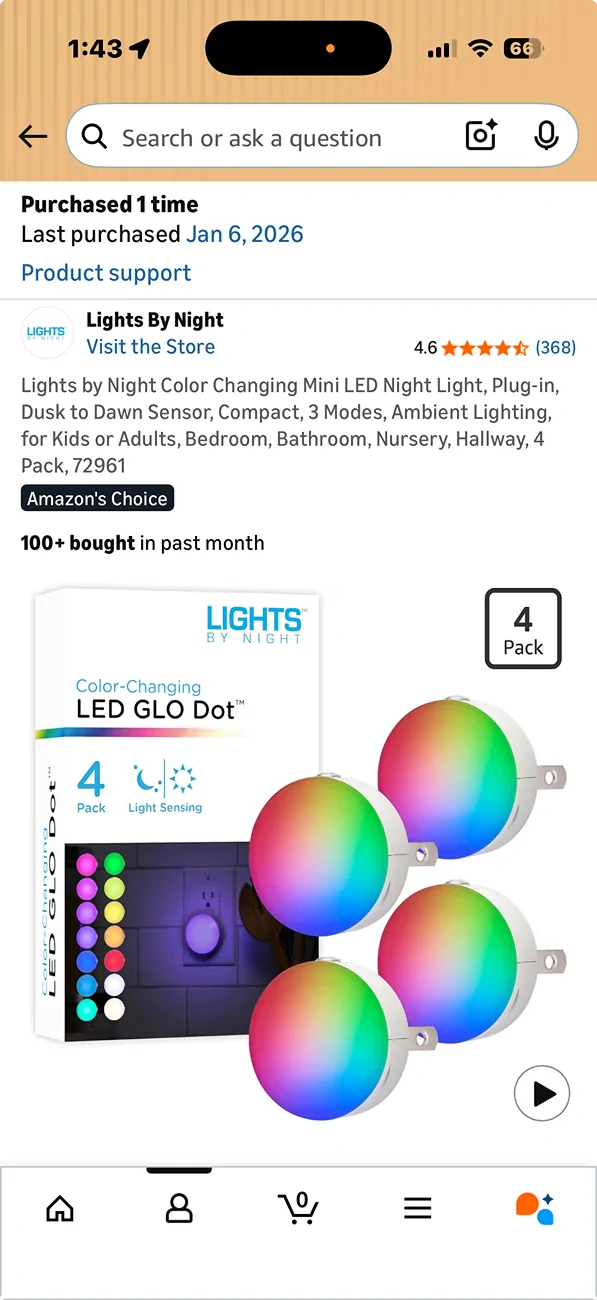
`I had a 2019 Ford Ranger that I owned for 5 years. The whole time I had it I kept a night light plugged into the AC plug in the passenger area. With the light plugged in the S/S was disabled for the entire time I owned it. I now have a 2025 Maverick and I do the same with the night light plugged into the AC outlet in the passenger area. That keeps S/S disabled as well. I've unplugged the light and the S/S will shut the engine off at stop lights. The night light thing has worked for me on two vehicles. The only explanation I have is the computers see a drain on the AC system with the night light and prevent it from shutting the engine off. You need to put tape over the sensor on the light so it will always be lite when the engine is running. Night lights are fairly cheap, other methods not so much.
 

Meagdog

2.0L EcoBoost
Active member
First Name
Andrew
Joined
Feb 19, 2025
Threads
1
Messages
26
Reaction score
26
Location
Kansas city
Vehicle(s)
2024 maverick lariat fx4
Engine
2.0L EcoBoost
I used Forscan to disable Auto/Stop Start on my 2025 Maverick.
I'm Mircrosoft Certified Professional, HP Expert and an A+ Certified PC tech. I'm also a bit OCD so I tried to take detailed notes.
Here's a copy of my notes; I can't say they are perfect but I believe they should be helpful.

Download and install Forscan for Windows on your laptop.

Obtain a FREE Forscan license *2 month Trial

Connect OBDLinkEX to OBD port under driver’s side dash then connect it to laptop

*OBDLinkEX LED should be Green

Open FORScan on PC

Turn Ignition ON. *NOT Start

Click ā€˜Connect to Vehicle’ icon on FORScan. *A Warning pop-up will appear, click OK

FORScan will show a list of Saved Vehicles or start a scan for a new vehicle

At end of scan will be prompted to ā€˜Save Vehicle’ if new

Click on ā€˜Configuration & Programming’ icon, below the Wrench icon.

FORScan will show ALL modules in both ā€˜AS BUILT’ MODE and ā€˜EASY’ MODE

Go to PSCM [Power Steering Control Module] > AS BUILT > ā€˜Run Service Procedure’ *Warning Pop-Up

FORScan will display all PSCM modules in hexadecimal format *Don’t change anything!

At bottom of screen choose: SAVE ALL > .abt file > Destination > Save > then STOP SERVICE PROCEDURE
*You now have a back-up of all original default settings in the PSCM modules if it needs to be restored.

Leave ā€˜As Built’ mode and go to ā€˜Easy Mode’ by clicking the ā€˜Configuration & Program’ TAB

Click the Easy Mode ā€˜PSCM' module > Run Service

Scroll and find the Auto Stop/Start entry

Should be 3 Choices Disable | Enabled with Angle Inhibitor | Enabled without Angle Inhibitor

Select DISABLE then click on the Checkmark

Will now show as DISABLED but must click on the WRITE button to complete configuration!!!

A pop-up will appear when you click on WRITE to confirm your choice, click Checkmark to confirm

Pop-Up should appear after writing:

ā€˜BLOCK PROGRAMMED SUCCESSFULLY’

ā€˜Please cycle ignition OFF then back ON’
… DON’T click OK on the Pop Up yet!

Cycle ignition OFF then back ON then click OK

Programming is now completed.

Click the ā€˜STOP SERVICE PROCEDURE’ icon. *Square Stop icon

DONE

Confirm that everything is working as it should.

Auto Stop/Start should be OFF and STAY off without pushing button. :clap:

This is a great post for those of us that were apprehensive to try it. Appreciate it.
 
OP
OP

Sad_Mav

2.0L EcoBoost
Active member
First Name
Ken
Joined
Dec 4, 2025
Threads
3
Messages
25
Reaction score
31
Location
Massachusetts
Vehicle(s)
2025 Maverick XL AWD
Engine
2.0L EcoBoost
`I had a 2019 Ford Ranger that I owned for 5 years. The whole time I had it I kept a night light plugged into the AC plug in the passenger area. With the light plugged in the S/S was disabled for the entire time I owned it. I now have a 2025 Maverick and I do the same with the night light plugged into the AC outlet in the passenger area. That keeps S/S disabled as well. I've unplugged the light and the S/S will shut the engine off at stop lights. The night light thing has worked for me on two vehicles. The only explanation I have is the computers see a drain on the AC system with the night light and prevent it from shutting the engine off. You need to put tape over the sensor on the light so it will always be lite when the engine is running. Night lights are fairly cheap, other methods not so much.
Really? That's great!! I assume you mean the 'Cigarette Lighter' accessory plug? I would like to hear from others to see if this works for them as well.
 

Red Pepper Maverick

2.0L EcoBoost
Well-known member
First Name
Robert
Joined
May 17, 2024
Threads
0
Messages
92
Reaction score
121
Location
Louisville, KY
Vehicle(s)
2025 Maverick Tremor
Engine
2.0L EcoBoost
Clubs
 
I should have been more specific. Behind the rear console in the rear passenger area on some Mavericks is an AC outlet like you would find in your home. There is a 400 watt inverter that supplies 120V AC. You can plug things like an electric razor, toothbrush or other low wattage appliances into. I think it is an option so may not be on all Mavericks. My Tremor also has one in the bed area near the tailgate on the left side. The night light would be like one you would plug into a wall outlet in your home. I got mine off Amazon, but I assume you could get them at Walmart or Target.

Ford Maverick Forscan | Disable Auto Stop/Start | Step-By-Step DIY Instructions (on 2025 Maverick) Screenshot 2026-04-13 at 1.43.39 PM
Sponsored


Top