
Sponsored

Tscottok

2.0L EcoBoost
Active member
First Name
Tyler
Joined
Dec 28, 2021
Threads
11
Messages
44
Reaction score
136
Location
Oakland
Vehicle(s)
Maverick Lariat Lux AWD + Tow
Engine
2.0L EcoBoost
Update- The intercooler worked great!

I did some high elevation and temps with a heavy travel trailer (Rpod 180- 3,800 GVWR). It was was 3 people, their stuff, and a weeks worth of food to Crater Lake. We were in some of the worst towing conditions for multiple hours.

I used the OBDLink MX+ scanner to monitor the temps and the CVF intercooler was amazing. It may even have saved the truck from damage!
Even in the worst of it, (low speeds for hours, climbing steep grades, 5,000 Ft elevation, 110 F temperatures) the intake rarely went over 135 F!
Definitely helped keep the power in the truck available if/when I needed it.

Doing the install again,
- I'd open up more of the bumper to let air flow on idle (maybe cut slits so it can rise from the bottom)
- Put in some wire mesh/screen over the whole bumper opening for bugs (there were a TON of bugs behind the old intercooler)
- Likely drill/cut holes for water drainage. Not sure if it's needed at this point

----------

Hey MTC,

I installed a @CVF-Jason CVF Intercooler (link) on my 22 Ecoboost Lariat. It's a bit different than the tremor install video I saw on youtube (link) and thought I'd share the steps. Sorry it's not a video as there was a lot of trail/error to get it working. Let me know your thoughts!

Tools Needed:
  • Flat Head screwdriver
  • Needle Nose pliers
  • Trim removal tool
    • Remove wheel well cloth
  • Non-black permanent marker
    • Mark where to cut
  • 7mm, 10mm, & 13 mm sockets/wrench
  • T-30 Trox bit
  • Drimmel, angle grinder, and/or other tool to cut plastic
    • I also used cable/moon cutters

Steps:
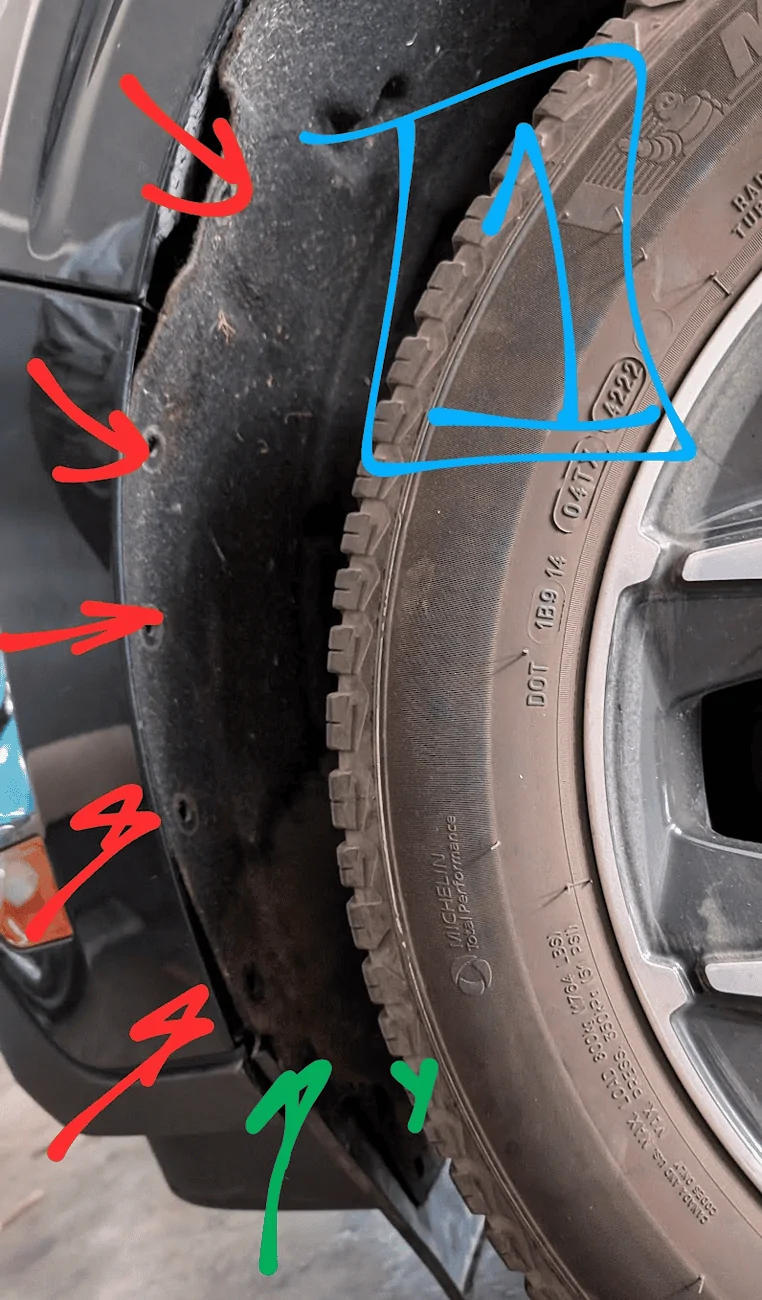
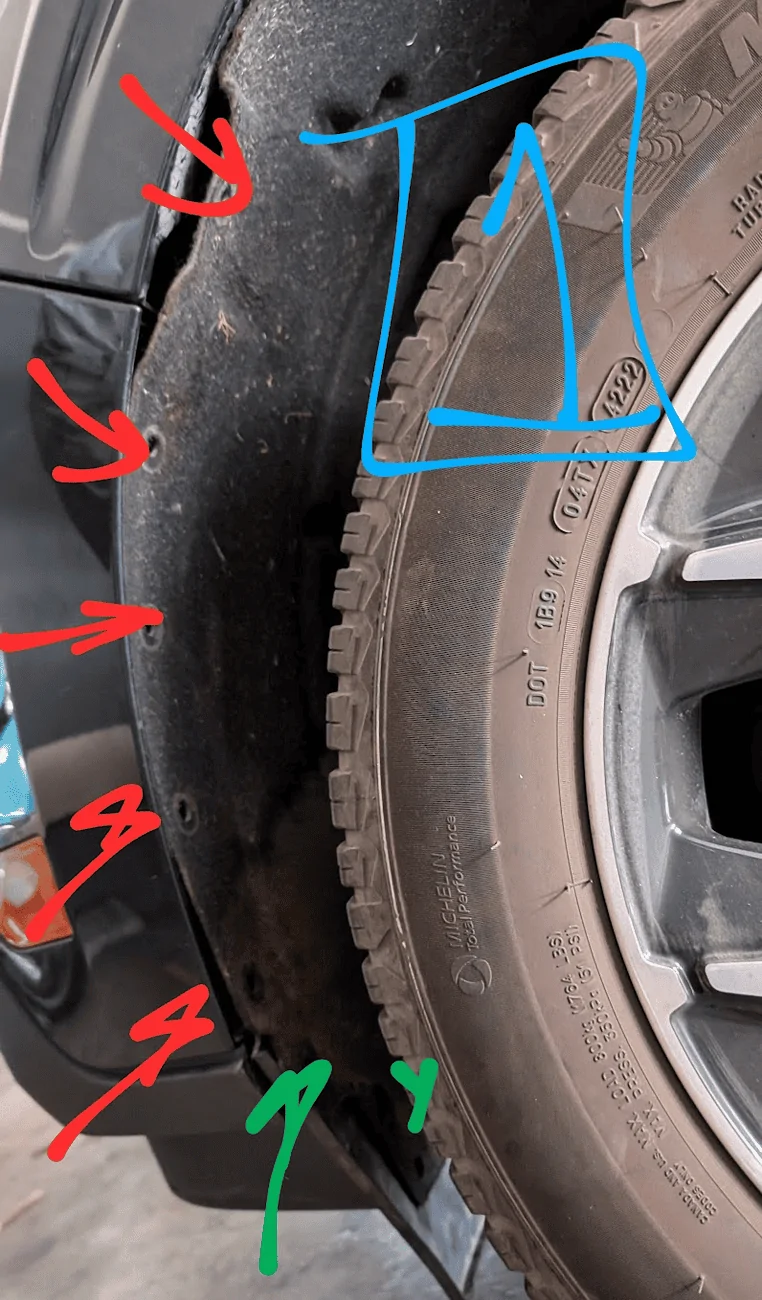
  1. Separate the cloth wheel well from the bumper (pic #1)
    • Several trim clips (red) and 2-3x 7mm bolts (green). You don't need to fully remove the front mud flap, just enough to detach it from the bumper
      Ford Maverick CVF Intercooler Install on 2022 Maverick Ecoboost 2.0 -- DIY instructions writeup with photos 1720500940713-0s
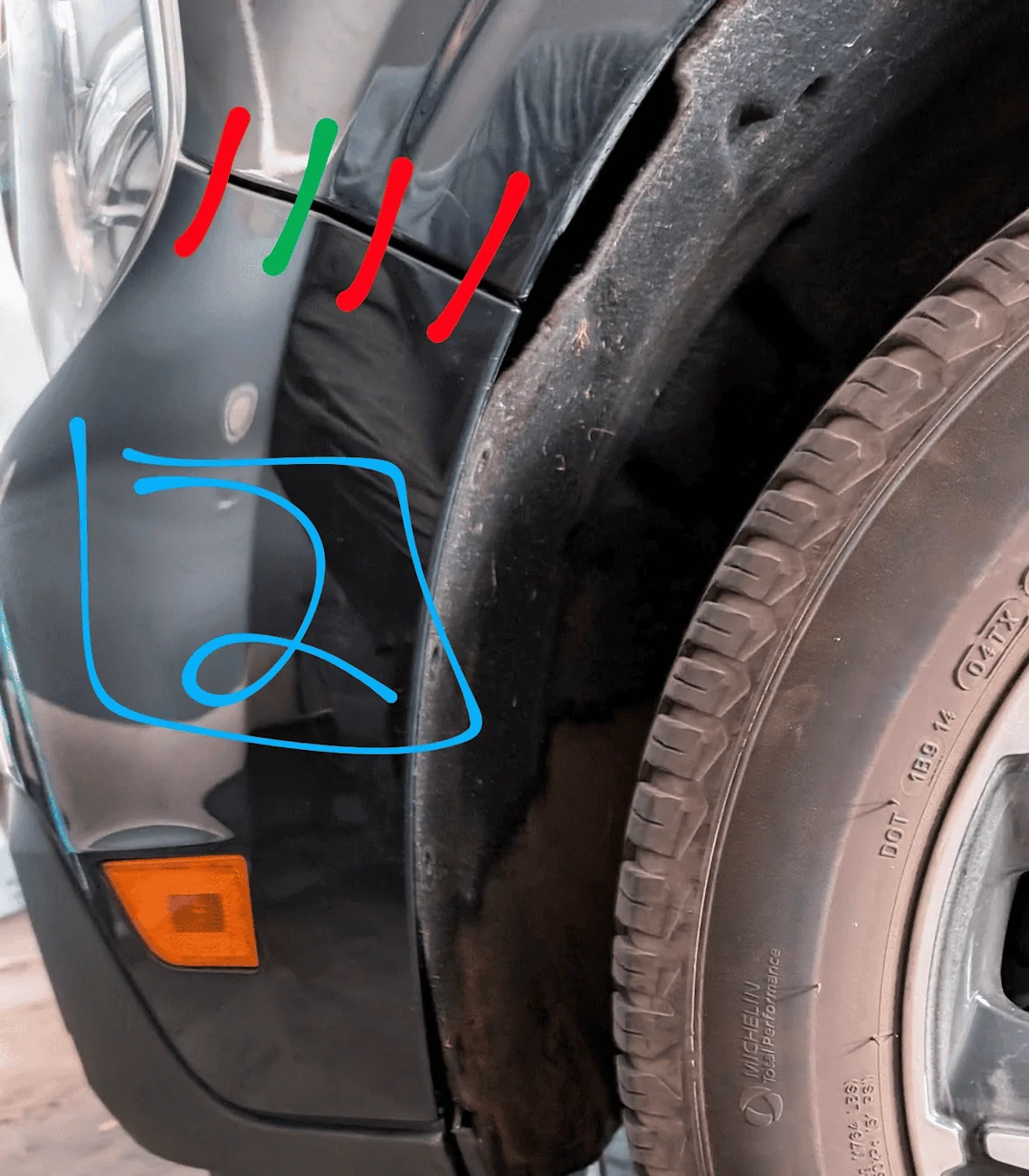
  2. Remove the 3x 10mm screws that hold the bumper in pace
    • Shown as red on picture #2
      Ford Maverick CVF Intercooler Install on 2022 Maverick Ecoboost 2.0 -- DIY instructions writeup with photos 1720501067111-q4
      Ford Maverick CVF Intercooler Install on 2022 Maverick Ecoboost 2.0 -- DIY instructions writeup with photos 1720501113387-io
  3. Then use needle nose pliers to remove plastic clips
    • Green on pic #2
    • You’re just loosening the clips and getting them ready. The bumper won’t come off yet as there are other screws holding it in place
  4. Use a T30 torx bit to remove both the bumper screws as well as the ones holding the undercarriage cloth or the front skid plate.
    • You’ll need to remove some of the screws further under the car so you can get to the exiting intercooler/hoses
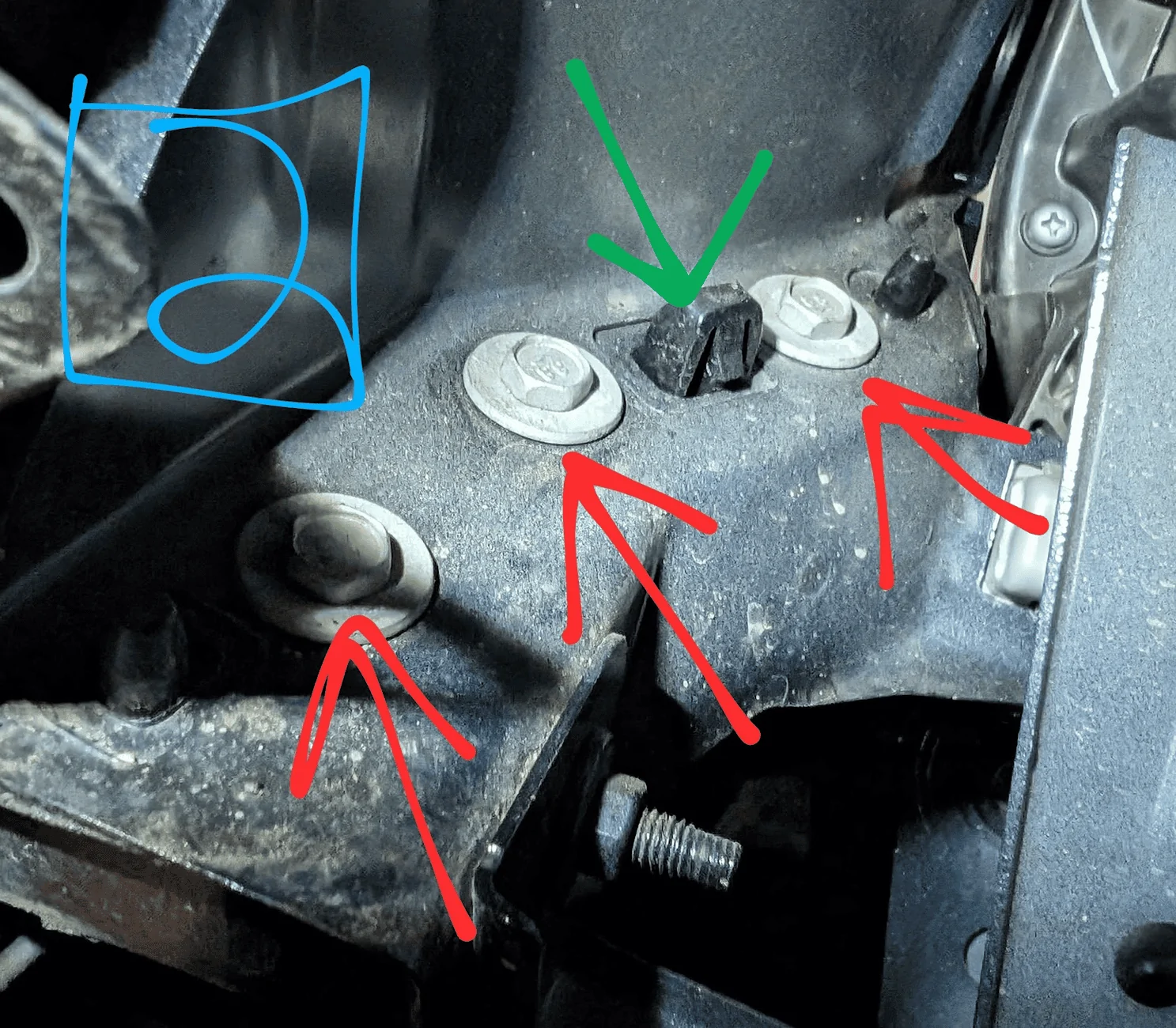
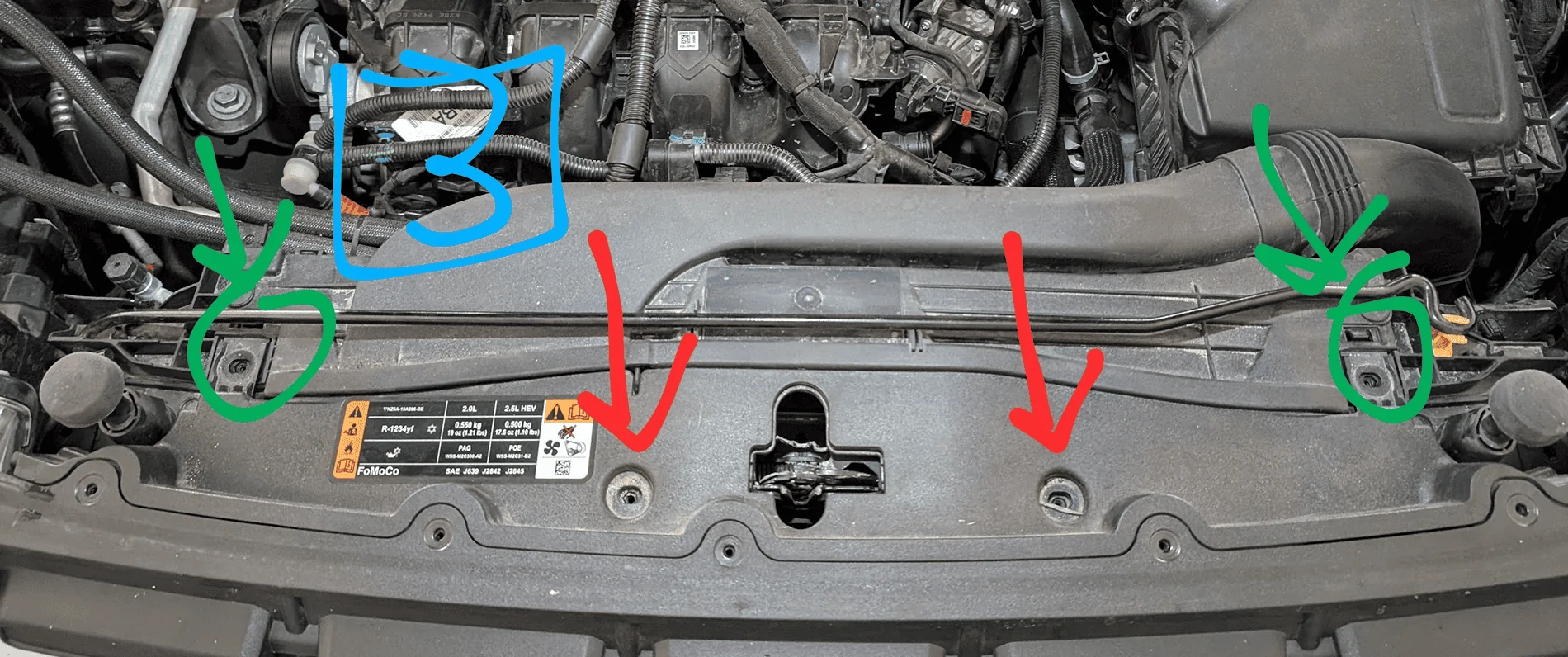
  5. Remove 4x 10mm bolts in the engine bay that hold the bumper
    • Bolts are shown in pic #3. Green bolts also have a clips that hold the bumper
      Ford Maverick CVF Intercooler Install on 2022 Maverick Ecoboost 2.0 -- DIY instructions writeup with photos 1720501368674-ro
  6. Release the 2 clips that hold the bumper in place
    • Shown in pick #3 as green
    • Be careful here as you need to detach both before the bummer will move. I tried to do 1 then the other and ended up snapping 1 off.
  7. Slowly pull the bumper forward
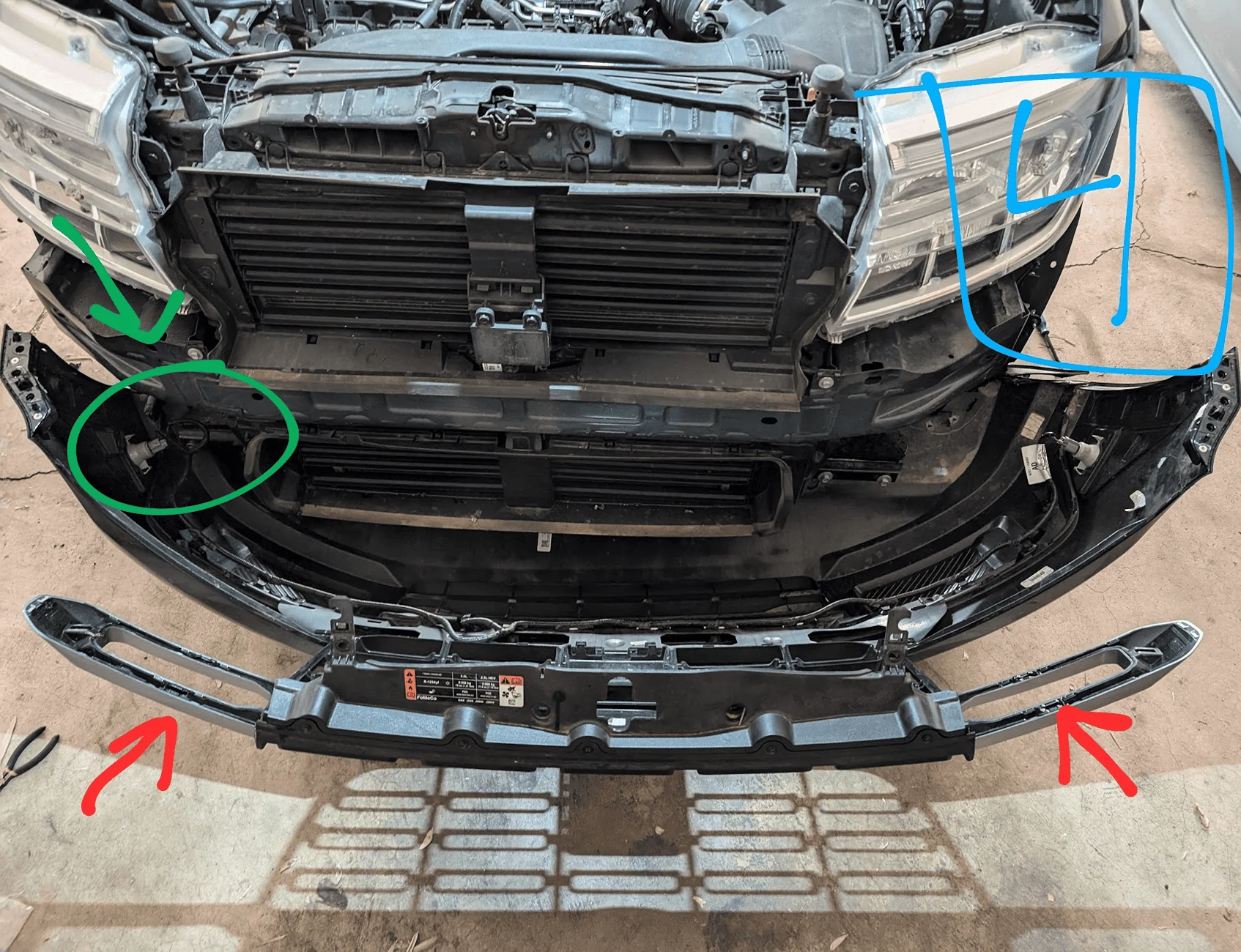
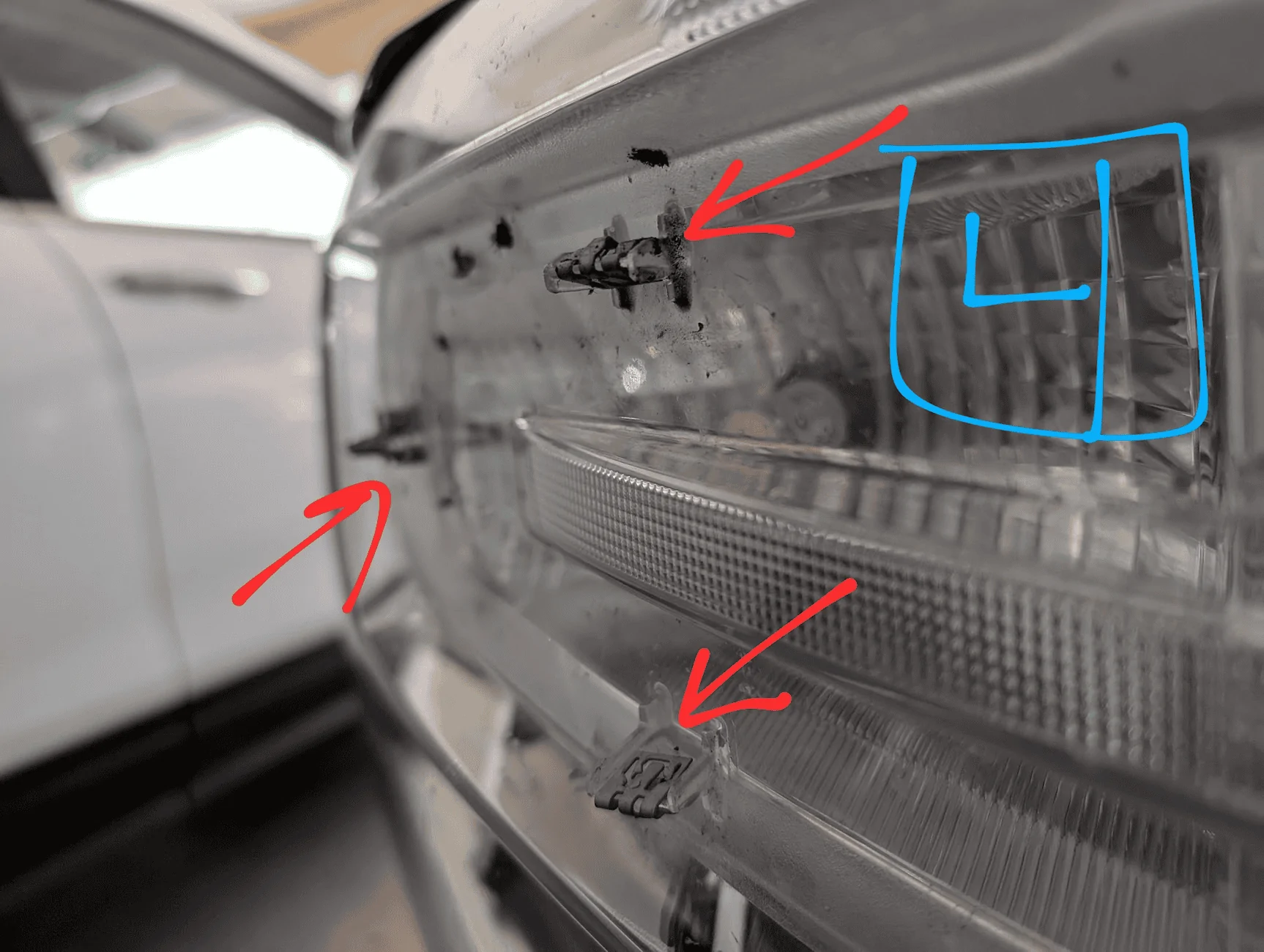
    • It’s 1 massive piece that includes the silver hoops on the headlights. There are several clips that hold this area on. There are 3 on each headlight shown as red on pics #4. They will snap off, but be careful to to twist this plastic piece as it can break
    • NOTE: you may need to disconnect a wiring harness on the passenger before pulling off the bumper. It’s shown as green on pic #4. I believe this is a part of the adaptive cruise control (Lariat trim & copilot 360).
      Ford Maverick CVF Intercooler Install on 2022 Maverick Ecoboost 2.0 -- DIY instructions writeup with photos 1720501474383-4m
      Ford Maverick CVF Intercooler Install on 2022 Maverick Ecoboost 2.0 -- DIY instructions writeup with photos 1720501646178-0t
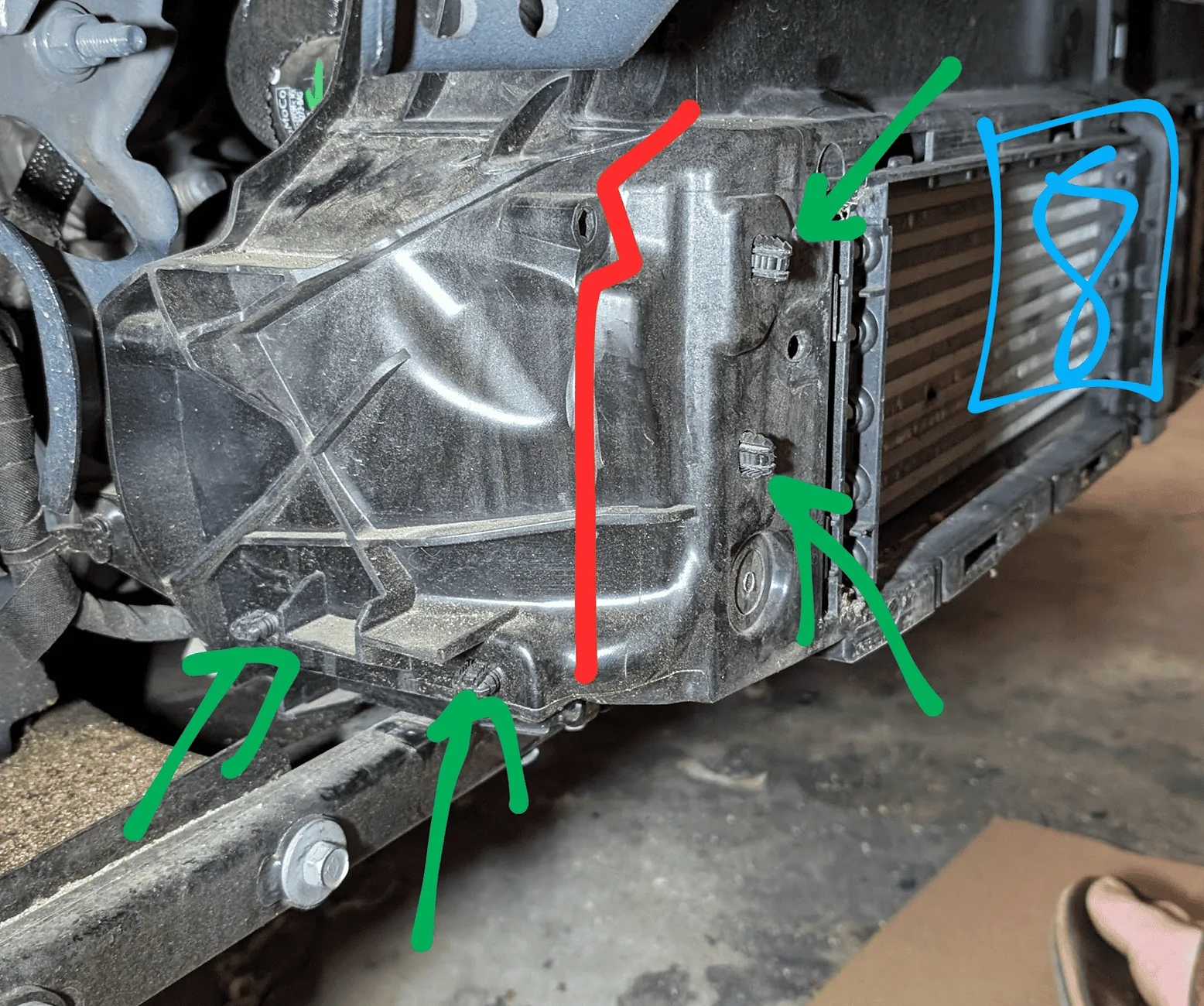
  8. Remove the front trim/funnel for the active aero
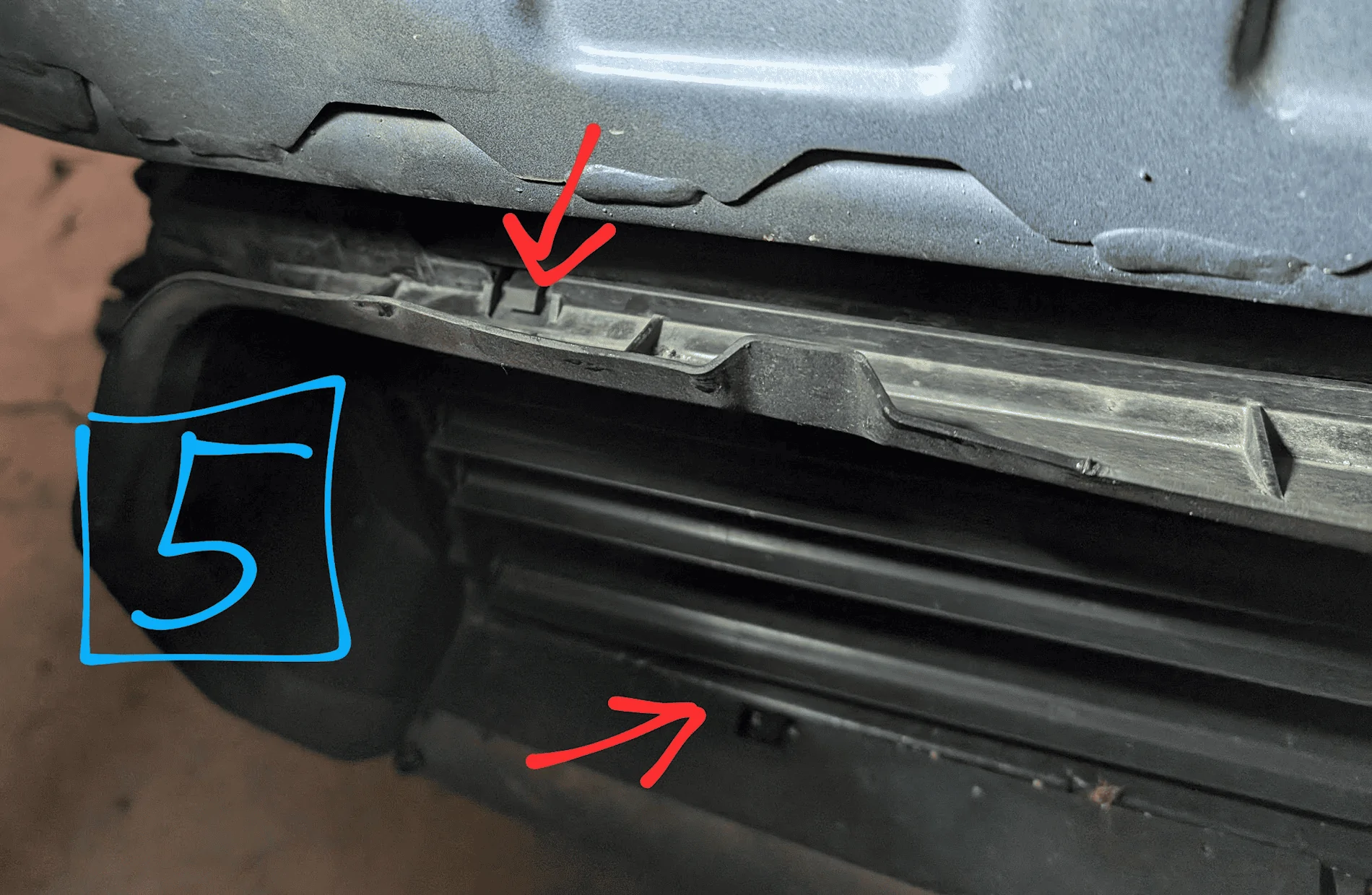
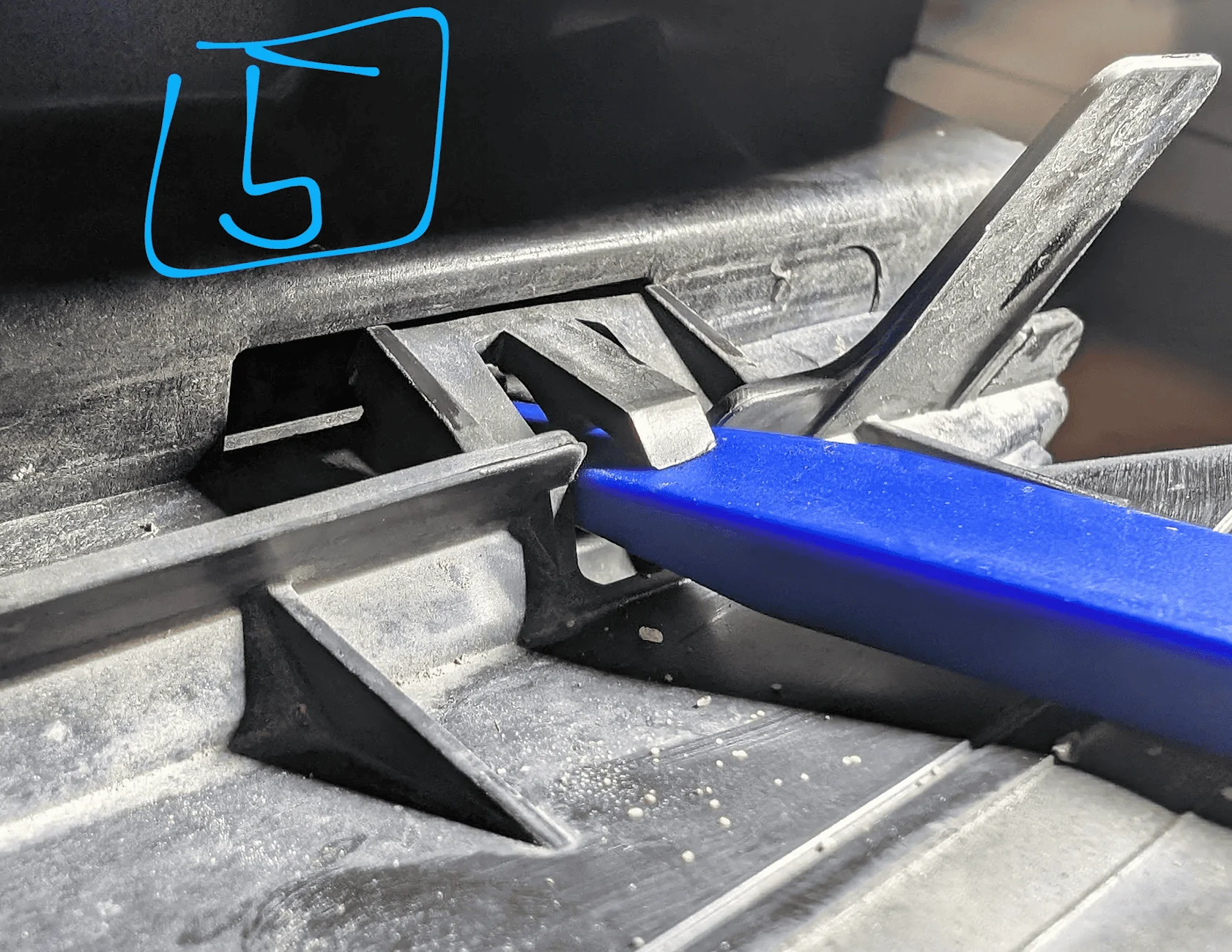
    • 2 clips and 2 snaps. Passenger side is shown as red on pic #5
    • NOTE: the top 2 clips open UP as shown in pic #5
    • I was not able to find a way to reuse this piece as it wouldn’t fit
      Ford Maverick CVF Intercooler Install on 2022 Maverick Ecoboost 2.0 -- DIY instructions writeup with photos 1720501788911-kk
      Ford Maverick CVF Intercooler Install on 2022 Maverick Ecoboost 2.0 -- DIY instructions writeup with photos 1720501871211-5v
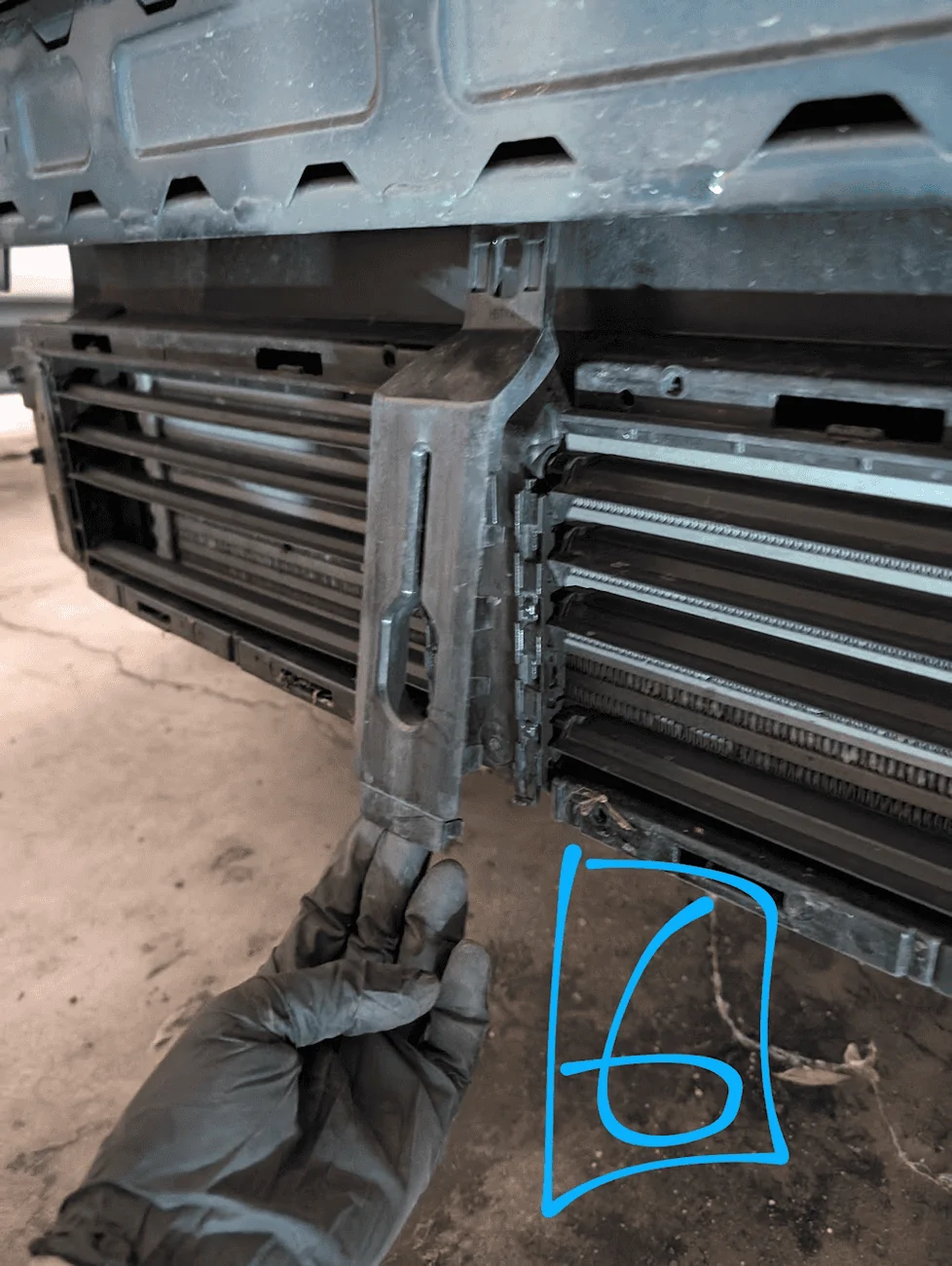
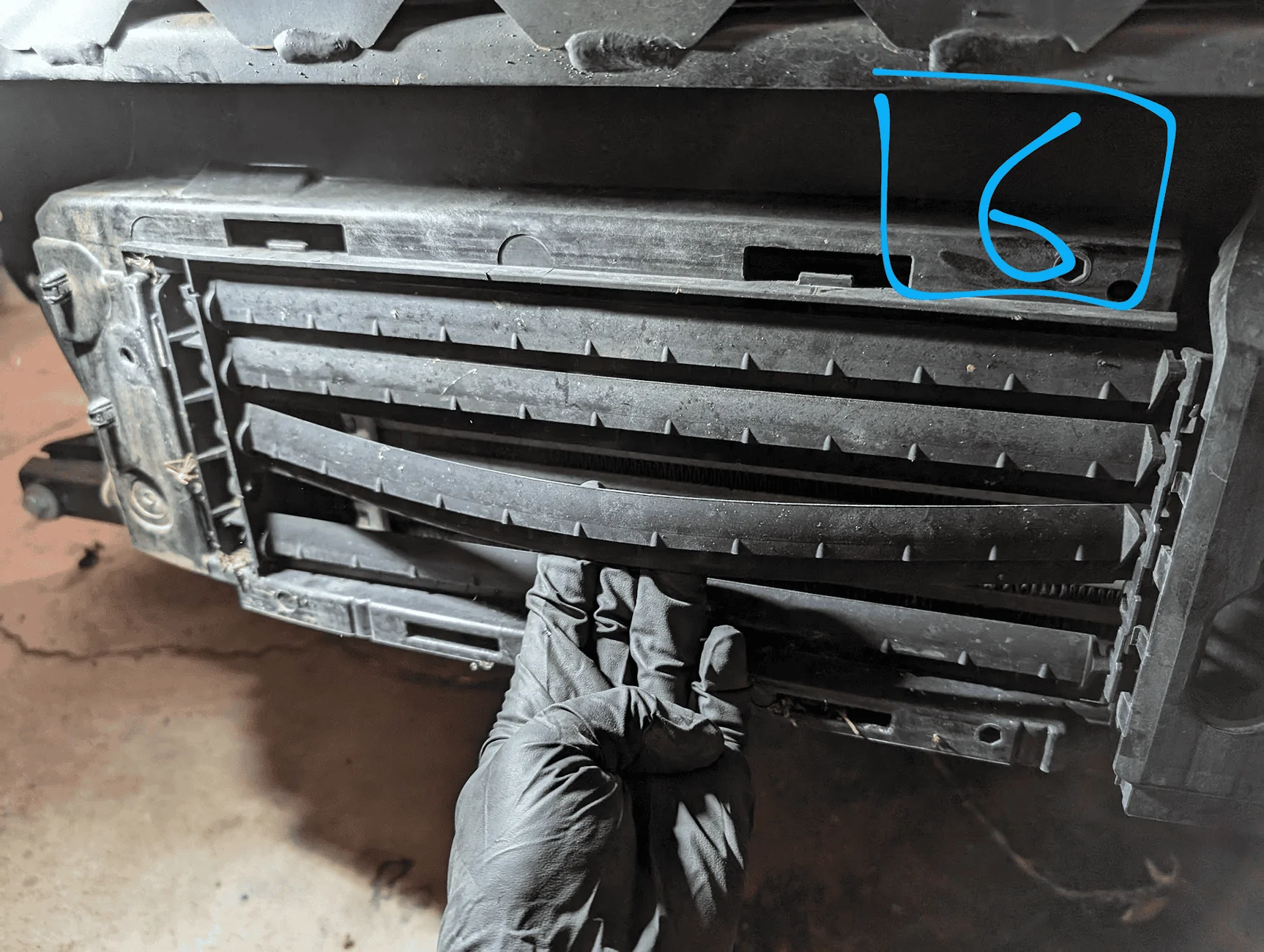
  9. Pull forward the vertical active aero control arm, then pull out the the blades themselves
    • The control arm releases the blades and so you can just pull the blades forward to snap them out (shown in pic #6)
    • You’ll need to remove all 4 blades in front of the intercooler as shown in pic #6
      Ford Maverick CVF Intercooler Install on 2022 Maverick Ecoboost 2.0 -- DIY instructions writeup with photos 1720501971859-mq
      Ford Maverick CVF Intercooler Install on 2022 Maverick Ecoboost 2.0 -- DIY instructions writeup with photos 1720502087712-wt
  10. Now is where you start cutting. The front aero component is a solid piece from the top radiator to the bottom intercooler. Unfortunately, you can’t just take pieces off, you have to cut them out. I tried to remove as little as possible to maintain the crumple zones and existing air flow as much as possible.
    • I used Dremel and cable/moon cutters to cut the plastic, but it’s a real pain. The plastic is thick and it easily melts when cut. This gums up the blade and sprays plastic bits all over. An angle grinder might be better, but there are tight areas you need to cut. Keep in mind that most of this won’t be seen later, so it doesn’t have to be perfect
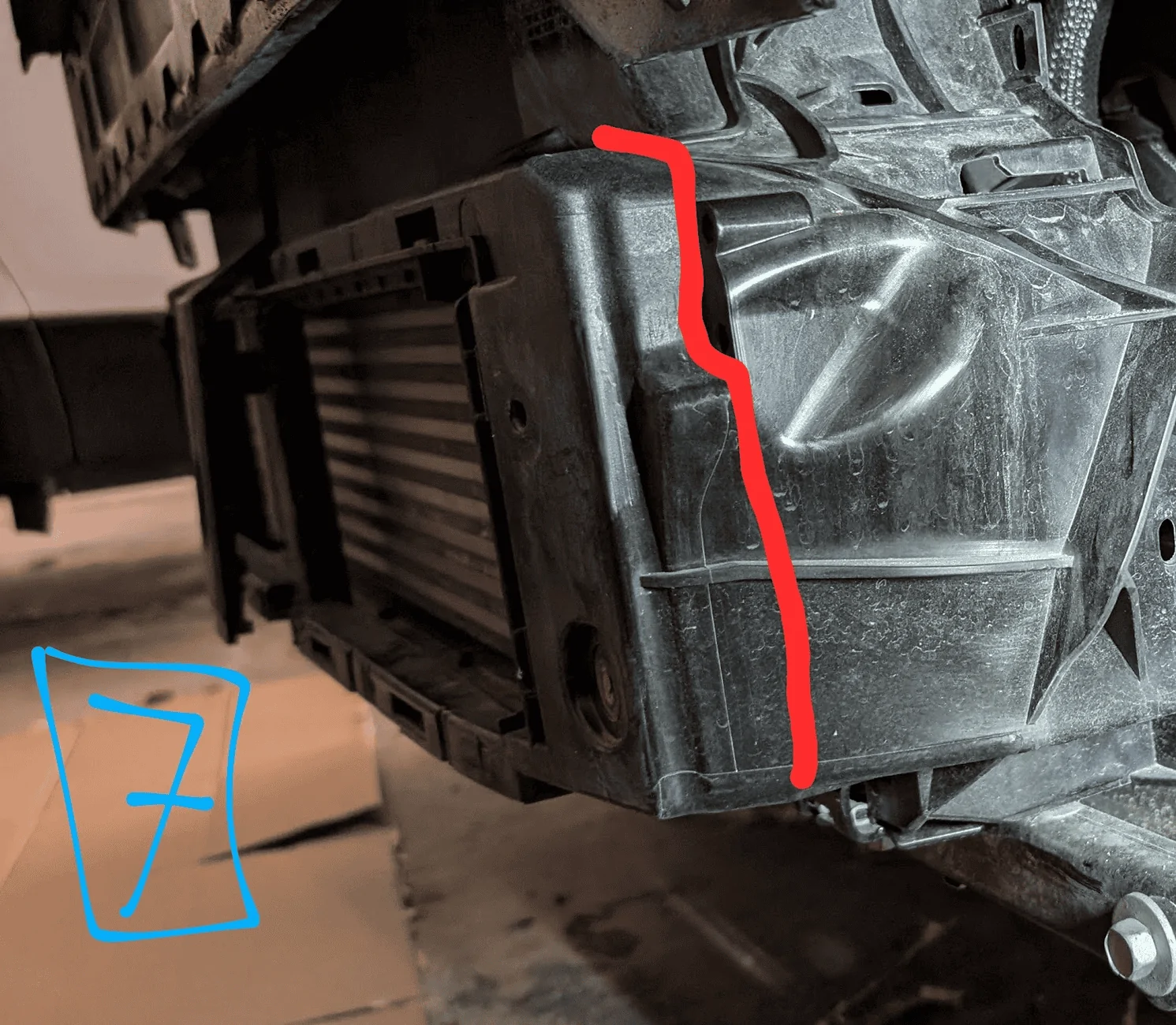
    • Driver side
      • Cut the so it’s semi-flush with the existing intercooler, shown as red on pic #7. This plastic is thick so go slow.
        Ford Maverick CVF Intercooler Install on 2022 Maverick Ecoboost 2.0 -- DIY instructions writeup with photos 1720502290447-9m
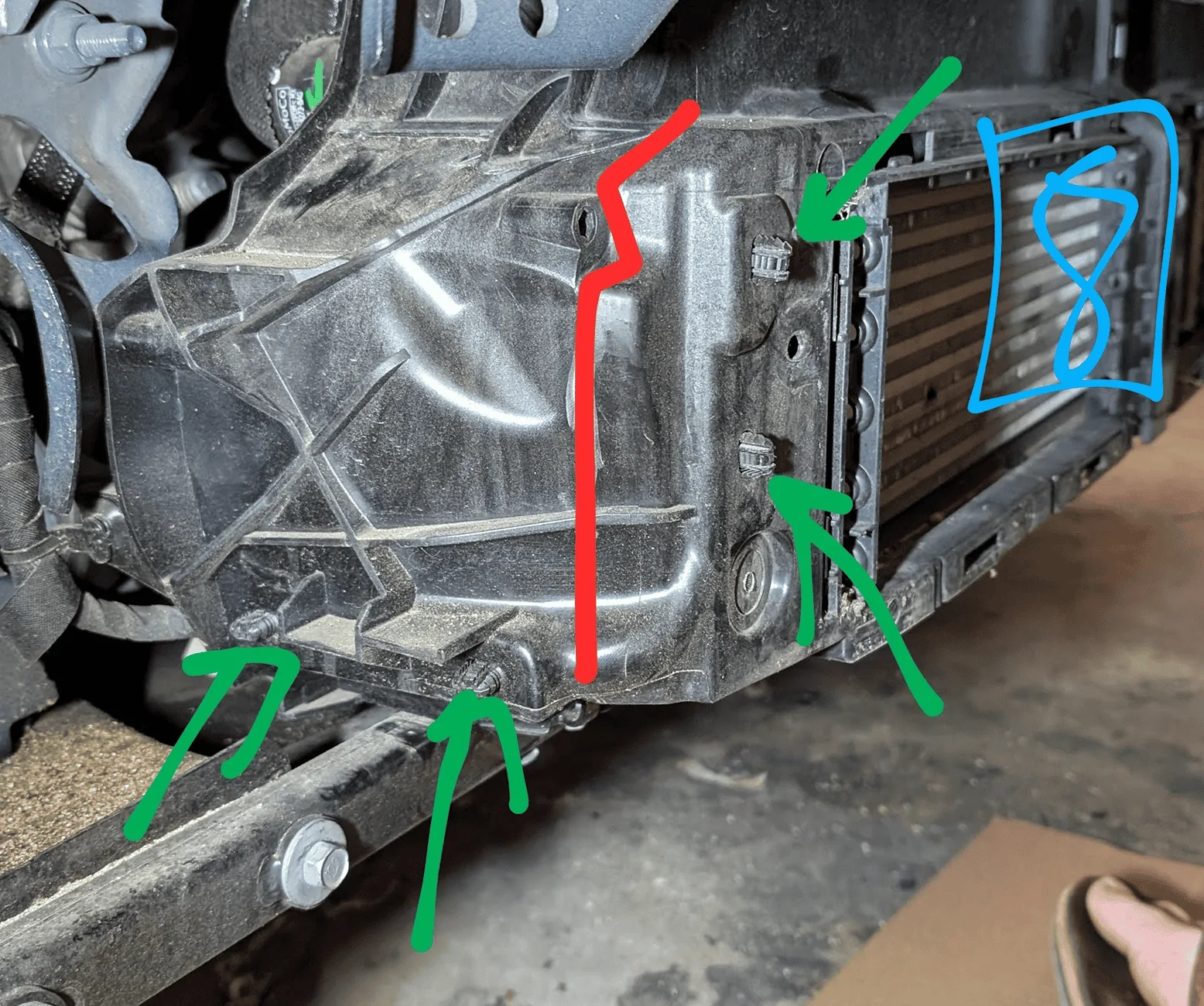
    • Passenger Side
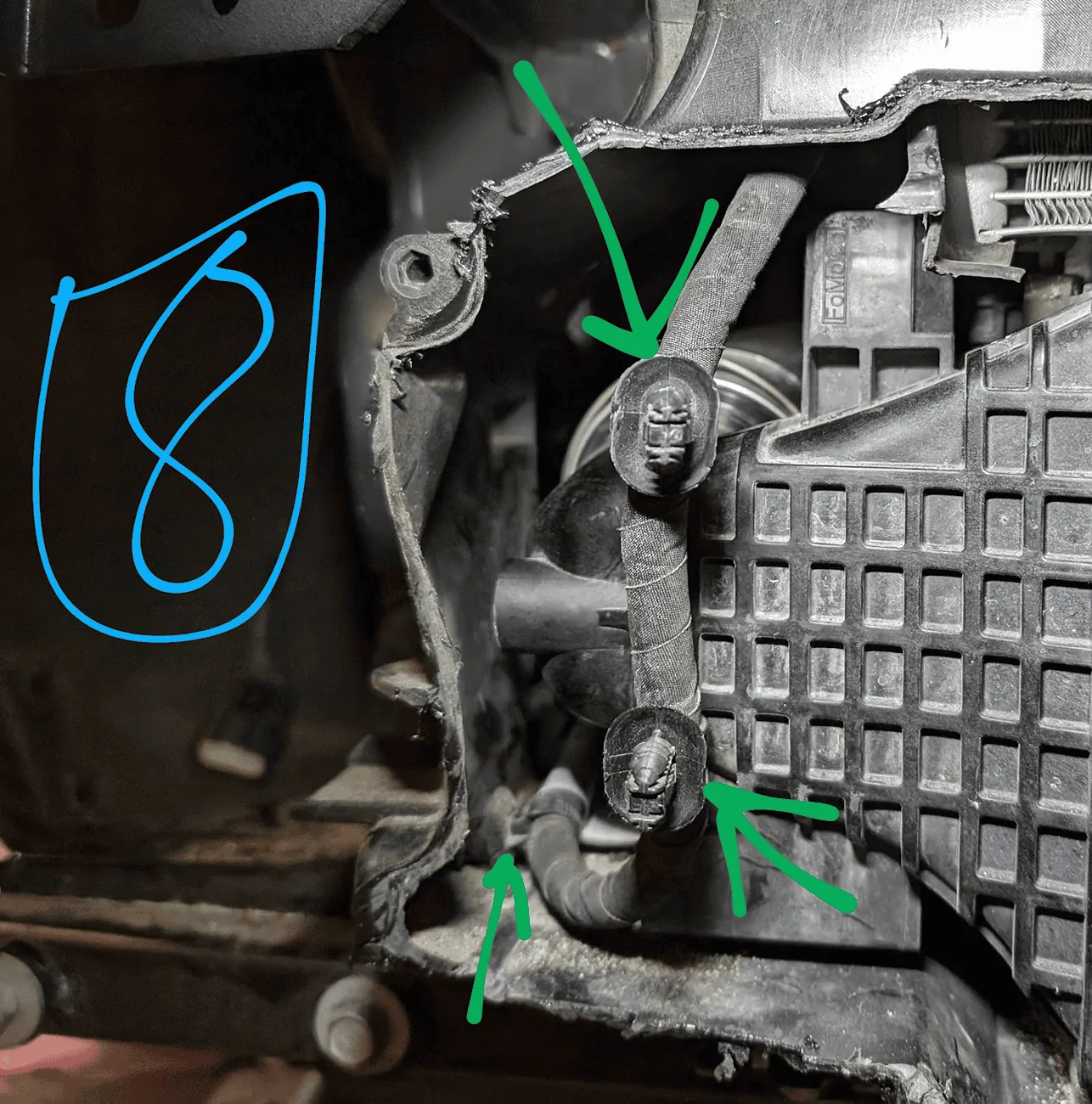
      • FIRST: disconnect the cable clipped into the plastic. You’ll want to reach in (as best you can) and push the cable out of the way so you don’t cut it. The clips and wire are shown as green on pic #8
      • Next, cut the plastic semi-flush with the existing intercooler, shown as red on pic #8. I frequently checked where the wire was as I was cutting so I didn’t damage it.
        Ford Maverick CVF Intercooler Install on 2022 Maverick Ecoboost 2.0 -- DIY instructions writeup with photos 1720502402912-dz
        Ford Maverick CVF Intercooler Install on 2022 Maverick Ecoboost 2.0 -- DIY instructions writeup with photos 1720502481418-uu
    • Top/Bottom
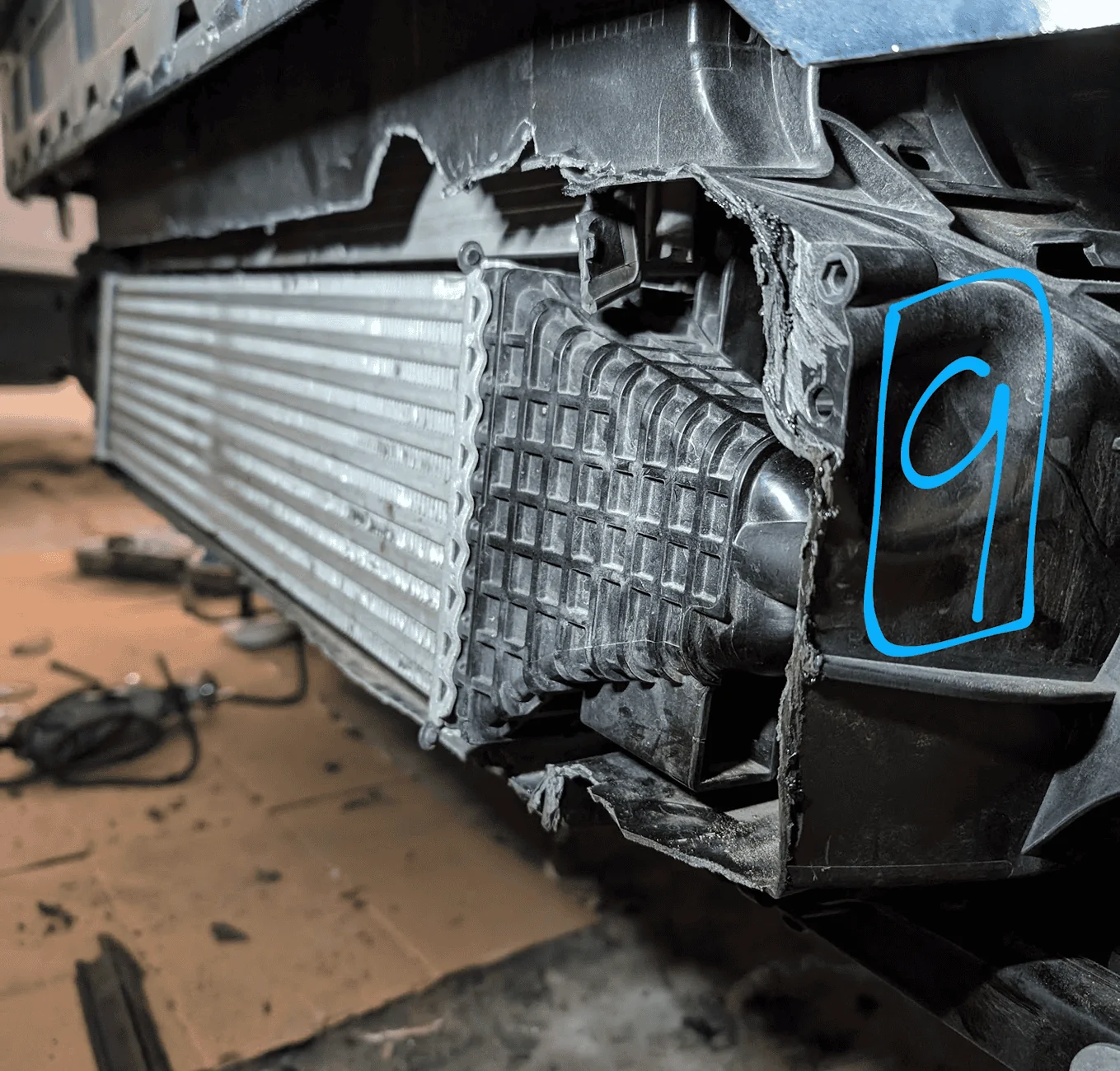
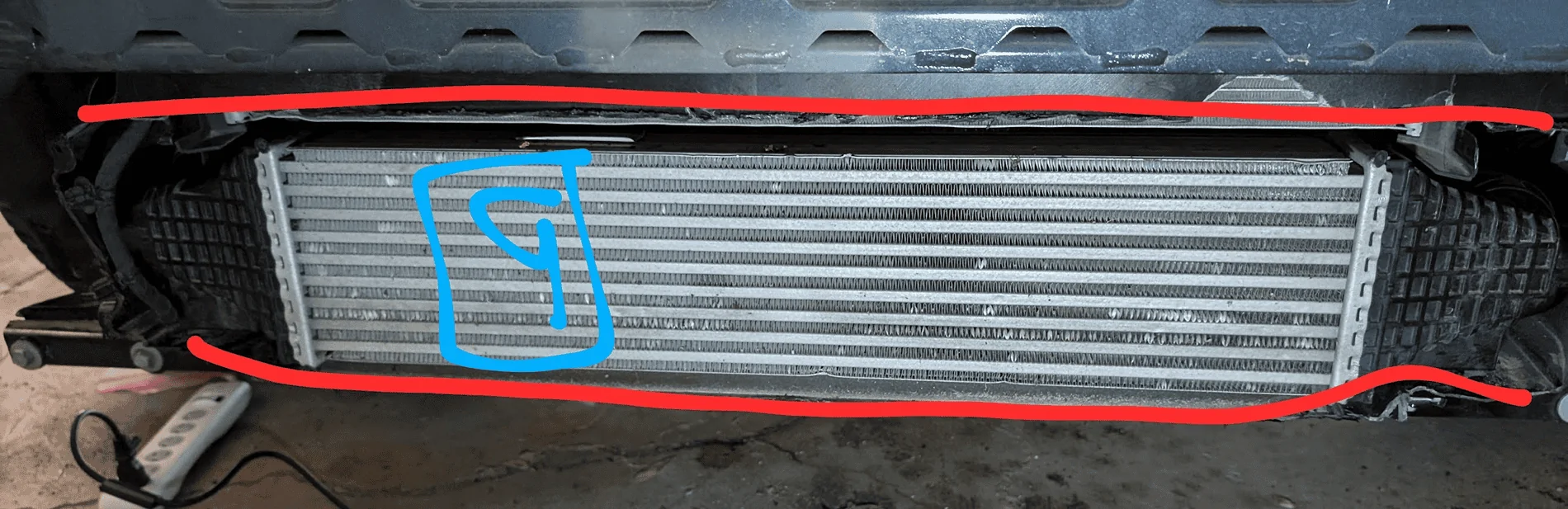
      • Cut the plastic at the top/bottom to connect what you’ve deleted on both sides. You can use your cutting tool and/or the cable/moon cutters as the plastic is thinner. Pic #9 shows what to cut and what it looks like after.
      • Once removed, it should be semi-flush with the front of the current intercooler. You’ll also need to cut off the active aero control arm to line up with the other cuts.
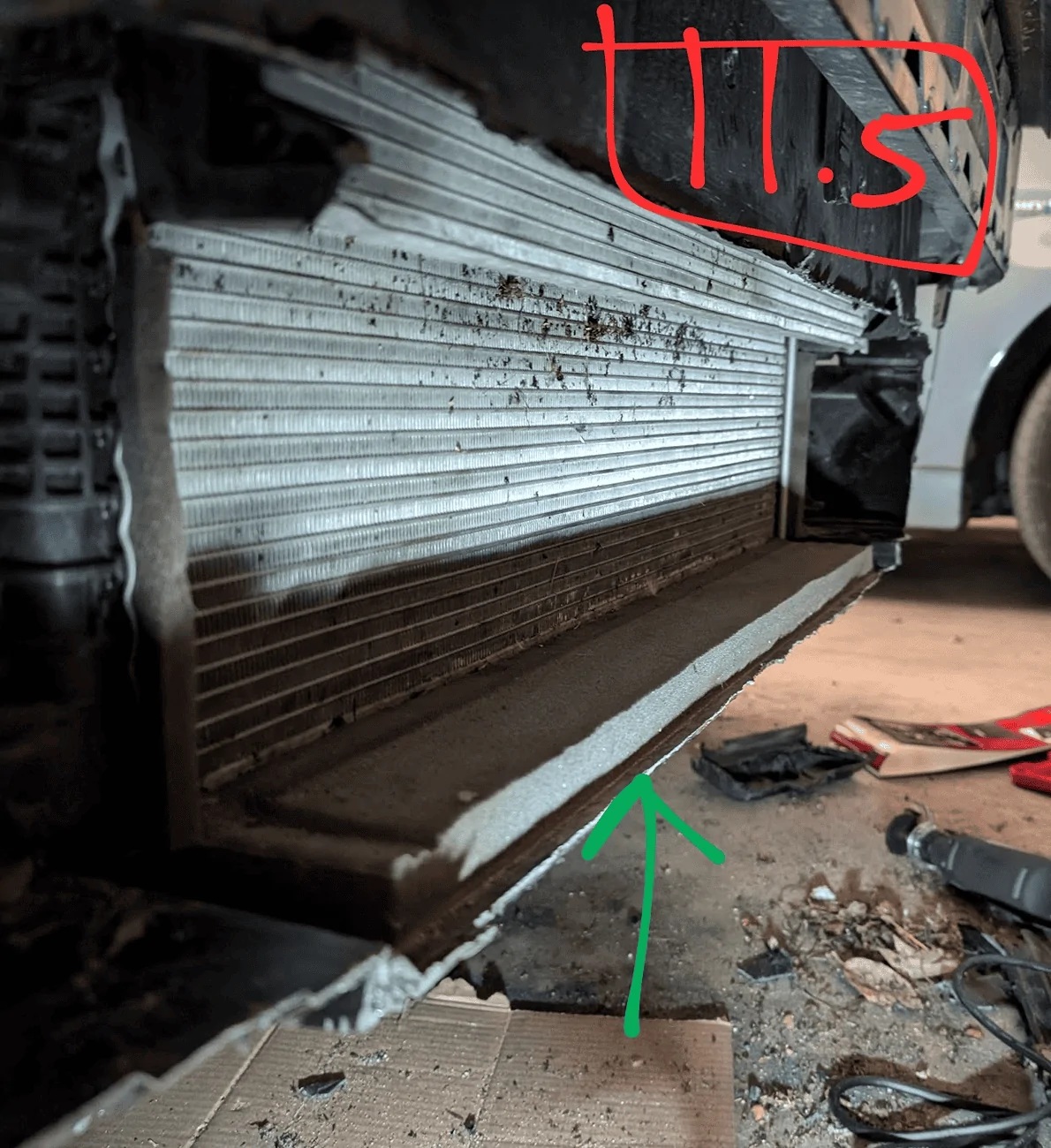
      • I chose to keep part of the existing foam/aero piece in place, shown in green on pic #11.5 once the old intercooler is out
        Ford Maverick CVF Intercooler Install on 2022 Maverick Ecoboost 2.0 -- DIY instructions writeup with photos 1720502626517-9n
        Ford Maverick CVF Intercooler Install on 2022 Maverick Ecoboost 2.0 -- DIY instructions writeup with photos 1720502683289-z2
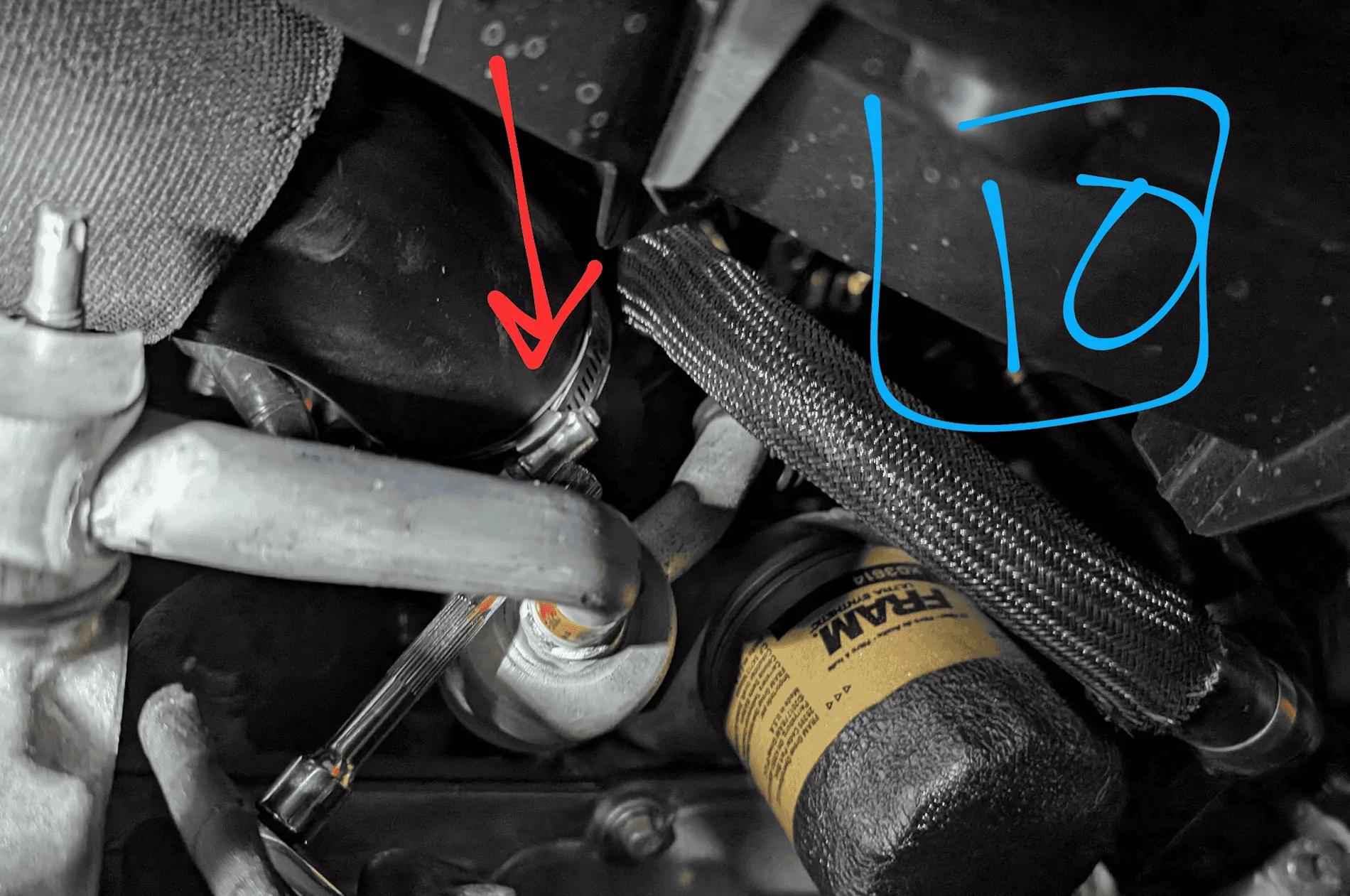
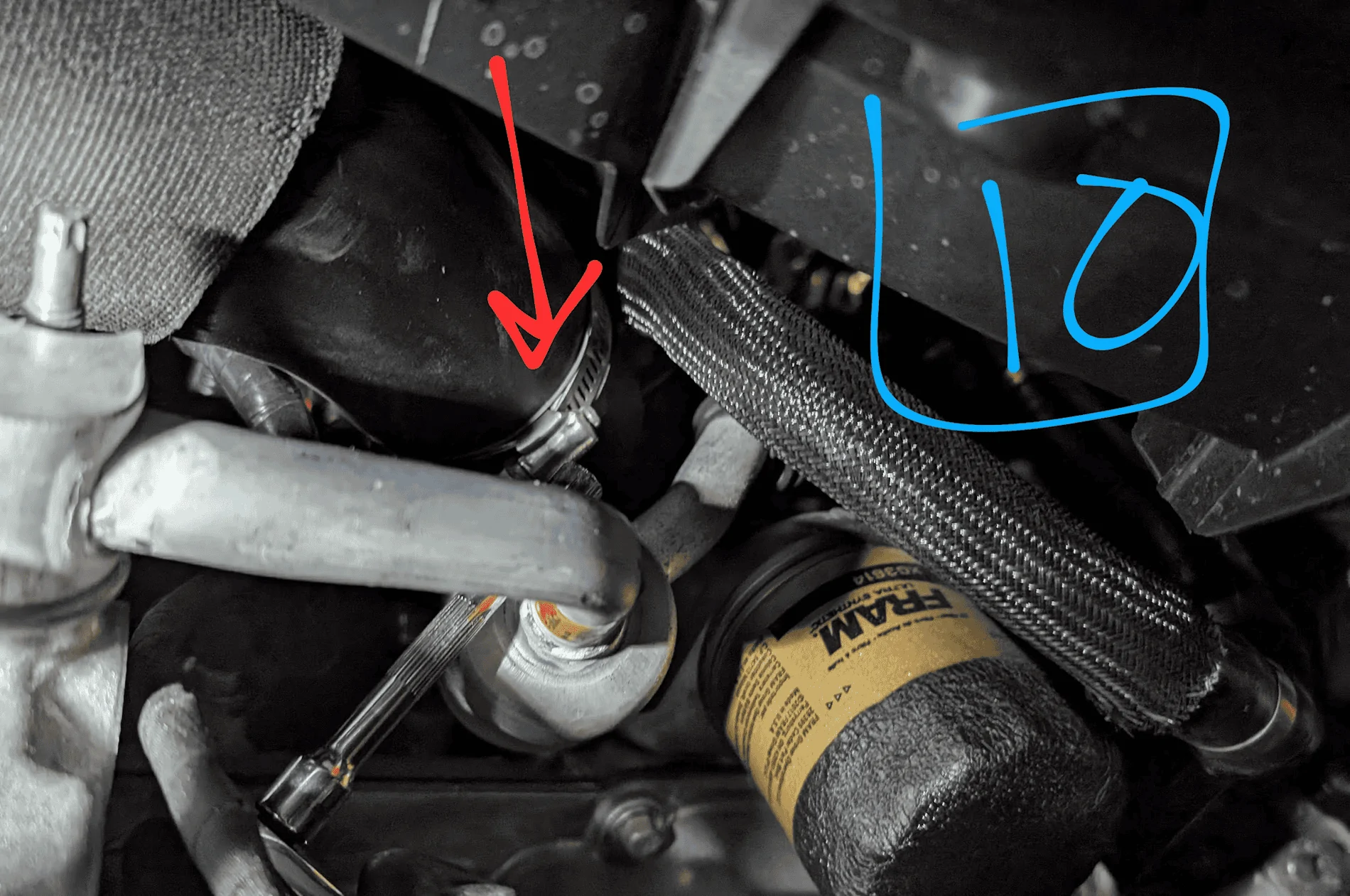
  11. Remove the hoses from the intake (not intercooler)
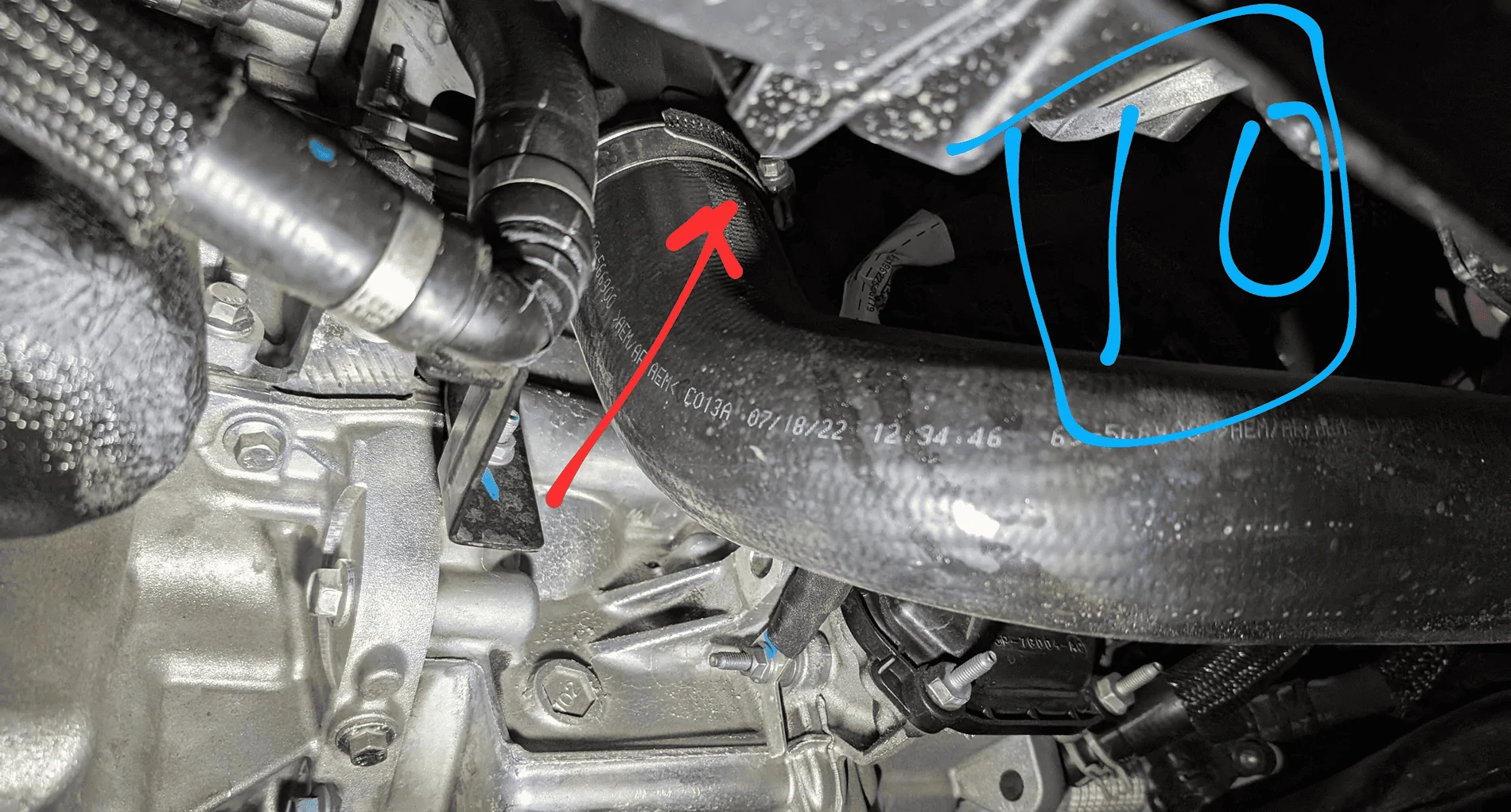
    • With this procedure, you won’t have access to the sides of the existing intercooler as I wanted to leave more of the existing system. Instead of disconnecting only the intercooler, I removed the hose clamps upstream and removed both the hoses and intercooler. If you want, you can cut out more plastic and likely remove only the intercooler.
    • The hoses are shown in pic #10. 1 of them is by the fuel filter, and the other by the crankcase
      Ford Maverick CVF Intercooler Install on 2022 Maverick Ecoboost 2.0 -- DIY instructions writeup with photos 1720502823740-qv
      Ford Maverick CVF Intercooler Install on 2022 Maverick Ecoboost 2.0 -- DIY instructions writeup with photos 1720502990089-t4
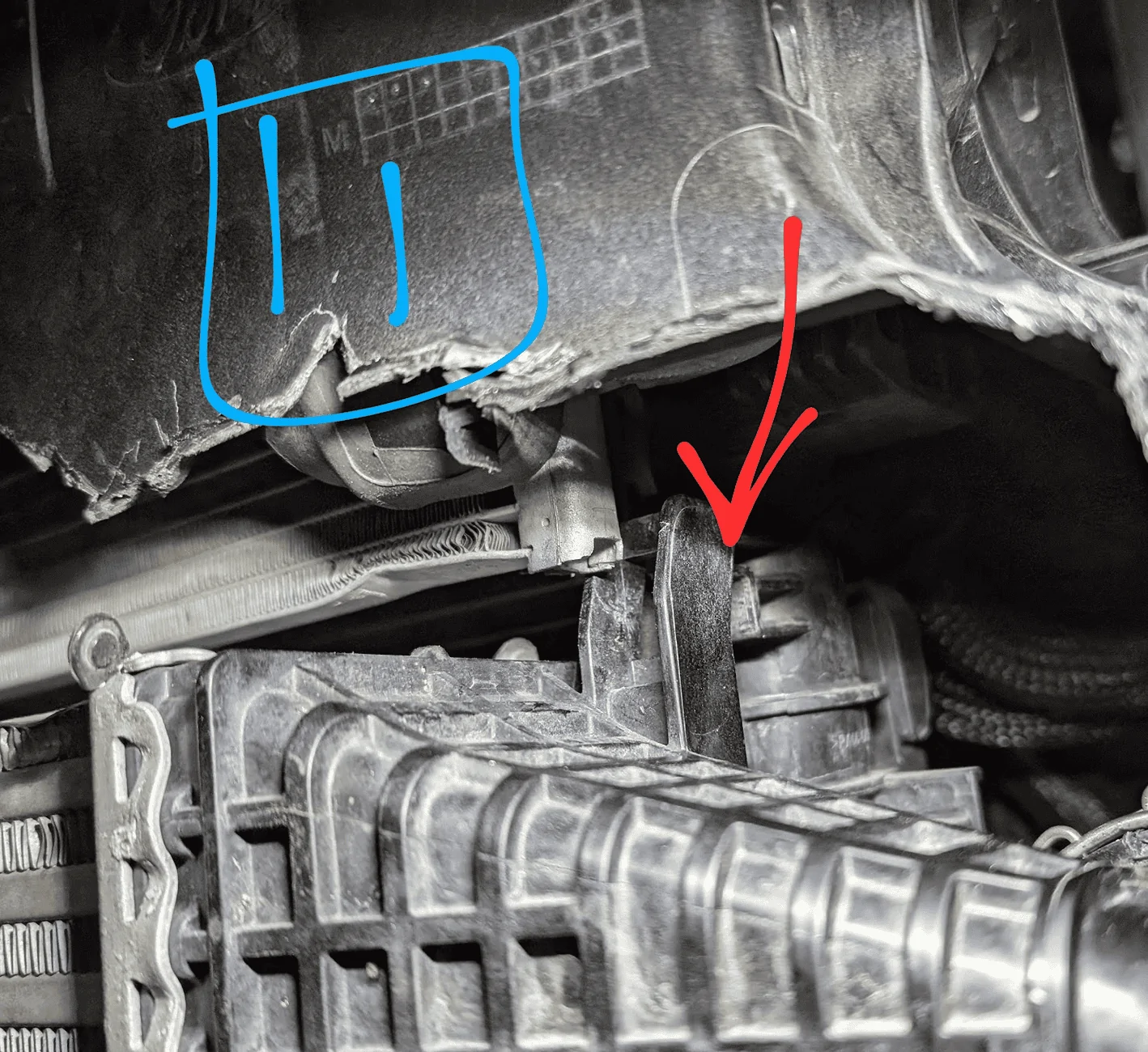
  12. Now shimmy the old intercooler out of place
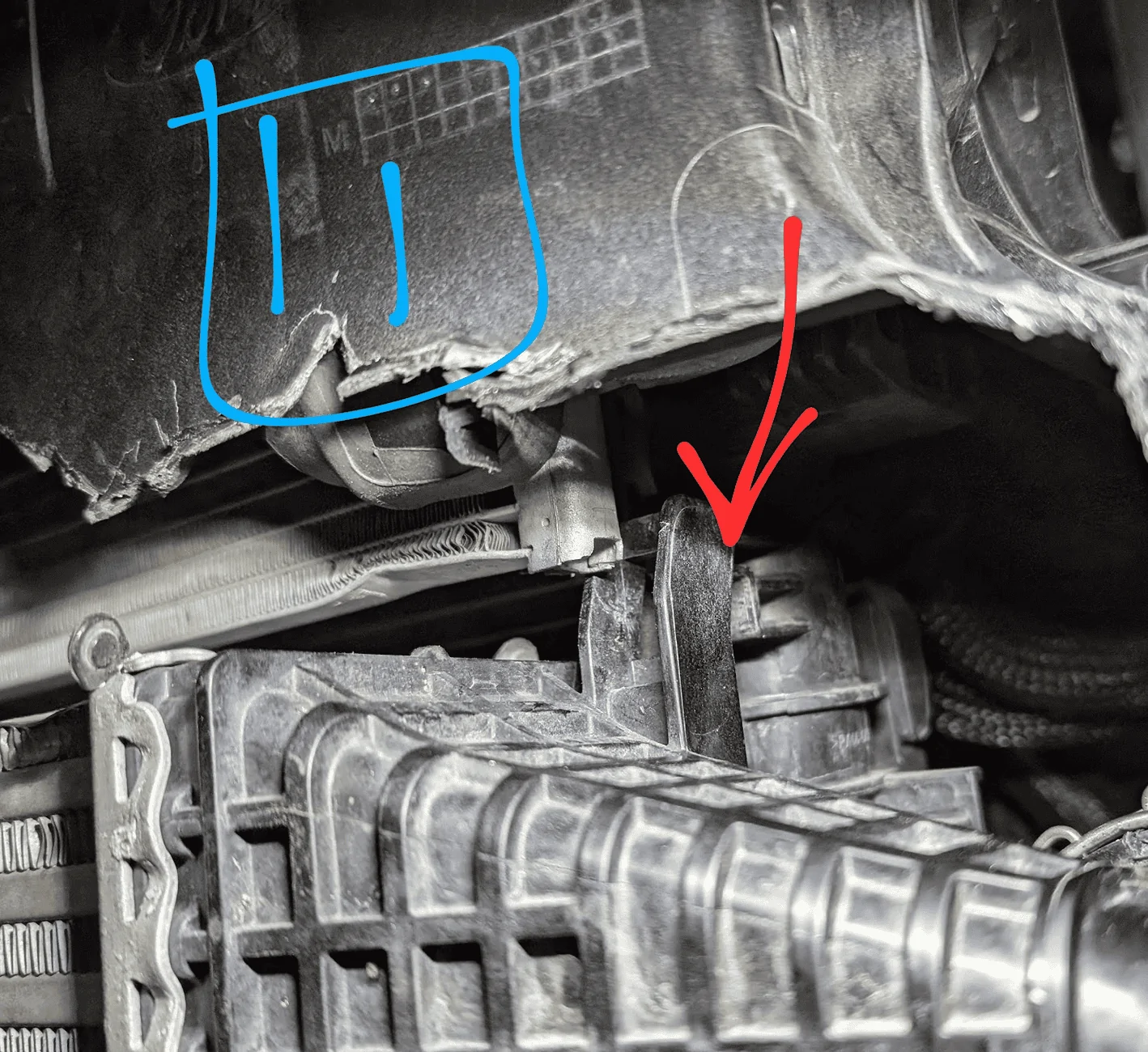
    • There are 2x clips at the bottom and 2x u-shaped brackets at the top that hold it in place. The driver side is shown in pic #11. The top is not a clamp and it should come off if you lift up and slide it side-to-side
    • Pic # 11.5 shows what it looks like with the intercooler removed. I chose leave the foam/plastic piece at the bottom (green arrow), it fits nicely under the new intercooler
      Ford Maverick CVF Intercooler Install on 2022 Maverick Ecoboost 2.0 -- DIY instructions writeup with photos 1720503127087-kf
      Ford Maverick CVF Intercooler Install on 2022 Maverick Ecoboost 2.0 -- DIY instructions writeup with photos 1720503171898-n
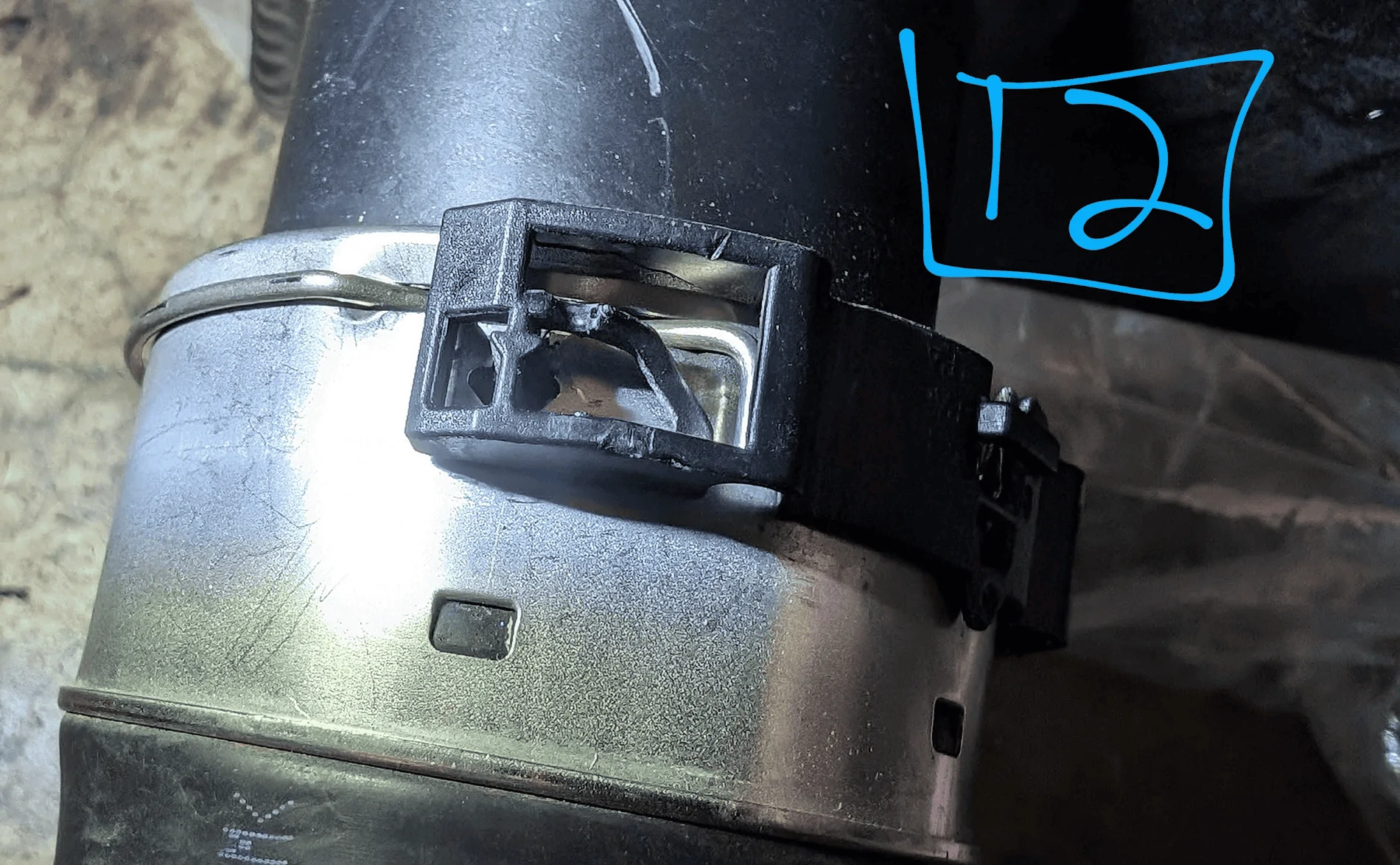
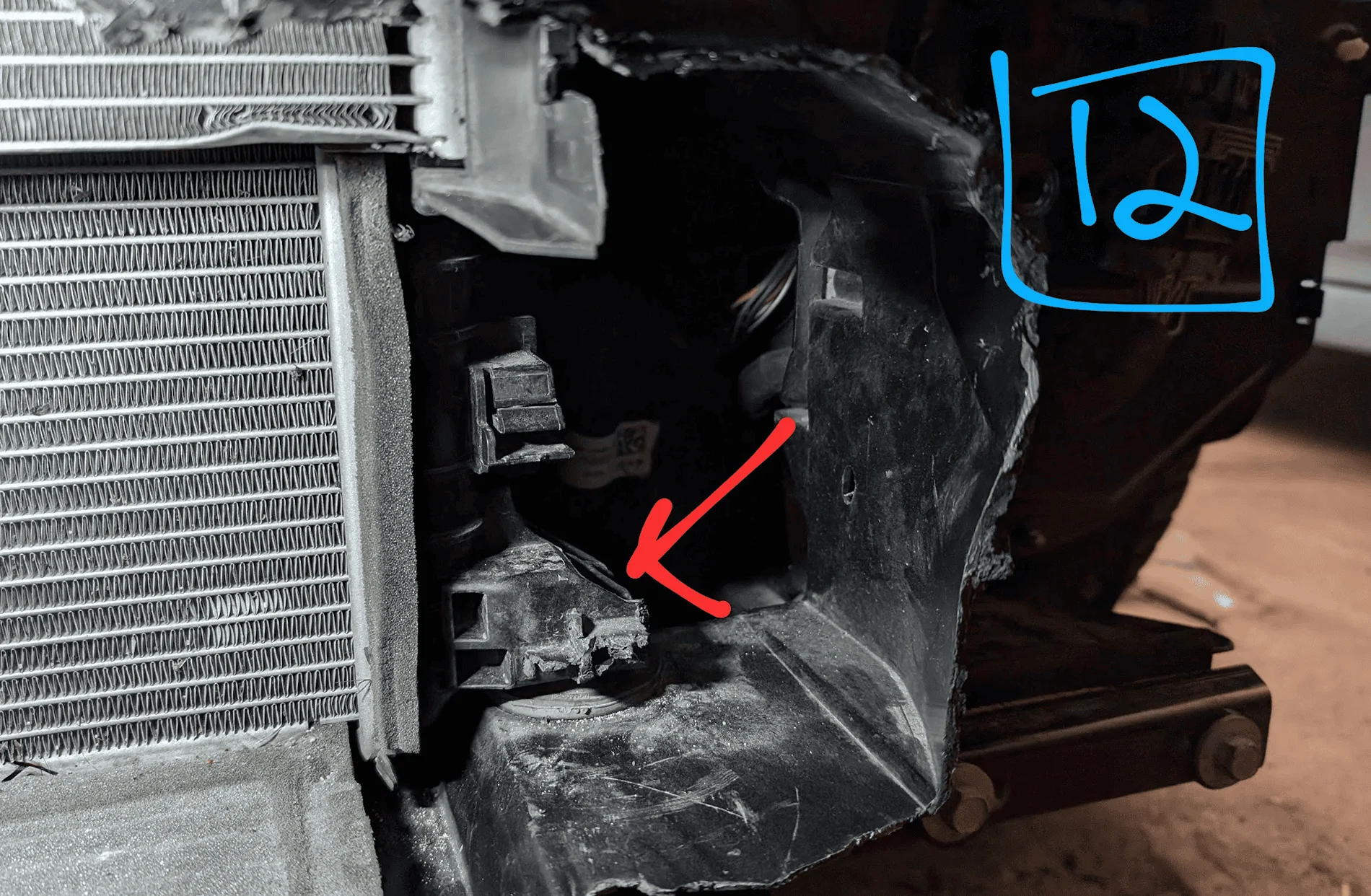
  13. Once the old intercooler is out, cut the 2 plastic brackets flush with the radiator
    • Pic #12 shows the finished product after it’s cut off.
    • My truck was super dirty and full of bugs under/behind the old intercooler
      Ford Maverick CVF Intercooler Install on 2022 Maverick Ecoboost 2.0 -- DIY instructions writeup with photos 1720503252677-c2
  14. Install the support beam on the new intercooler
    • Use the 3x provided screws
  15. Put the hoses on the new intercooler
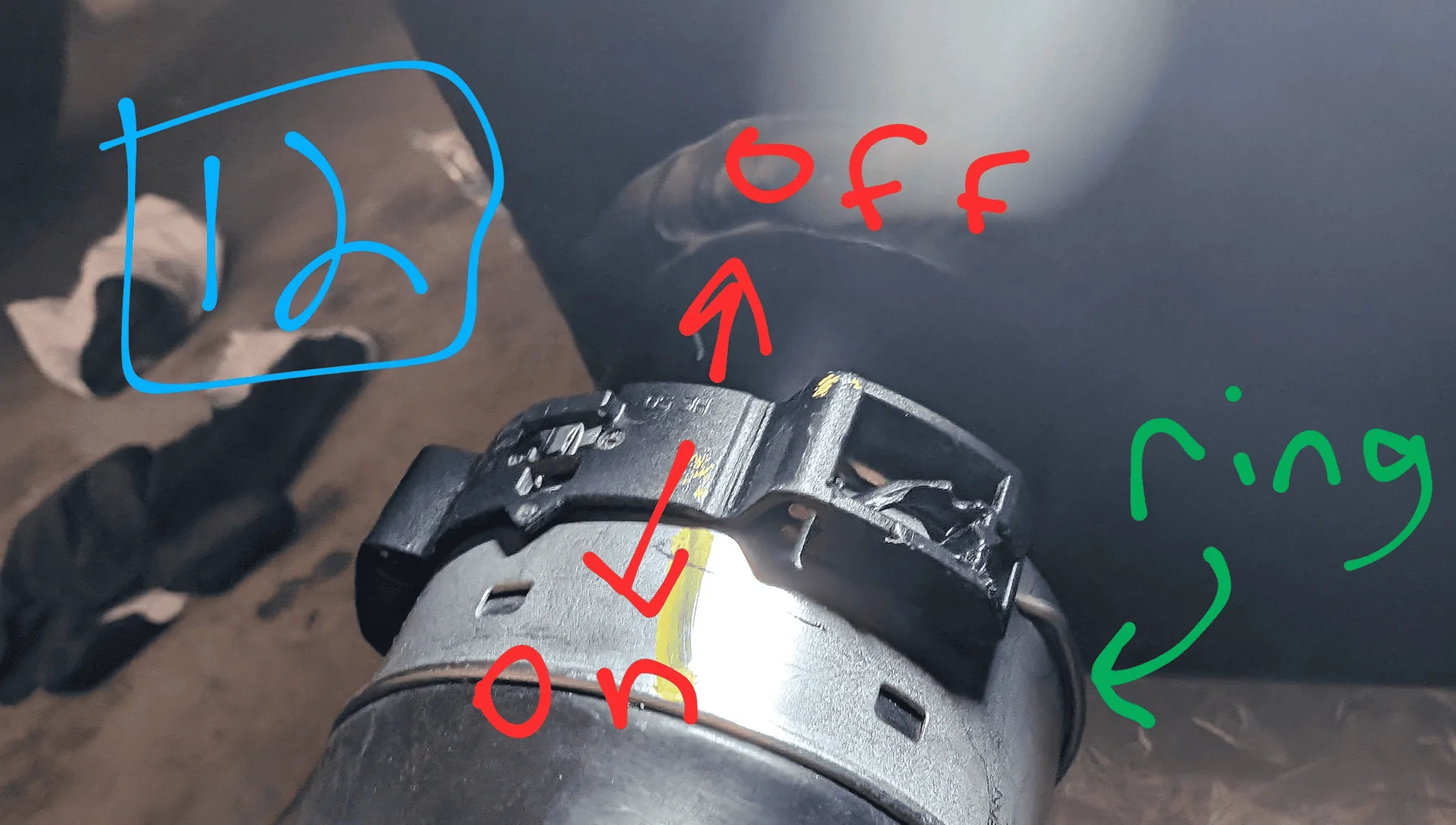
    • The hose clamps are a bit tricky. The metal ring fits into 3 slots (1 on top, 2 on the sides) and holds the hose in place, but allows it to rotate. The black plastic slides forward/backward to lock the rings in place.
    • Pic #12 shows the clip/ring up close (sorry, messed up the #s)
      Ford Maverick CVF Intercooler Install on 2022 Maverick Ecoboost 2.0 -- DIY instructions writeup with photos 1720503352844-mu
      Ford Maverick CVF Intercooler Install on 2022 Maverick Ecoboost 2.0 -- DIY instructions writeup with photos 1720503399582-xc
  16. Loosely mount the new intercooler
    • Rotate the hoses so they match the final position in the truck
    • Slowly work the hoses back through the truck. This will take some shimmying and back-and-forth to get them through.
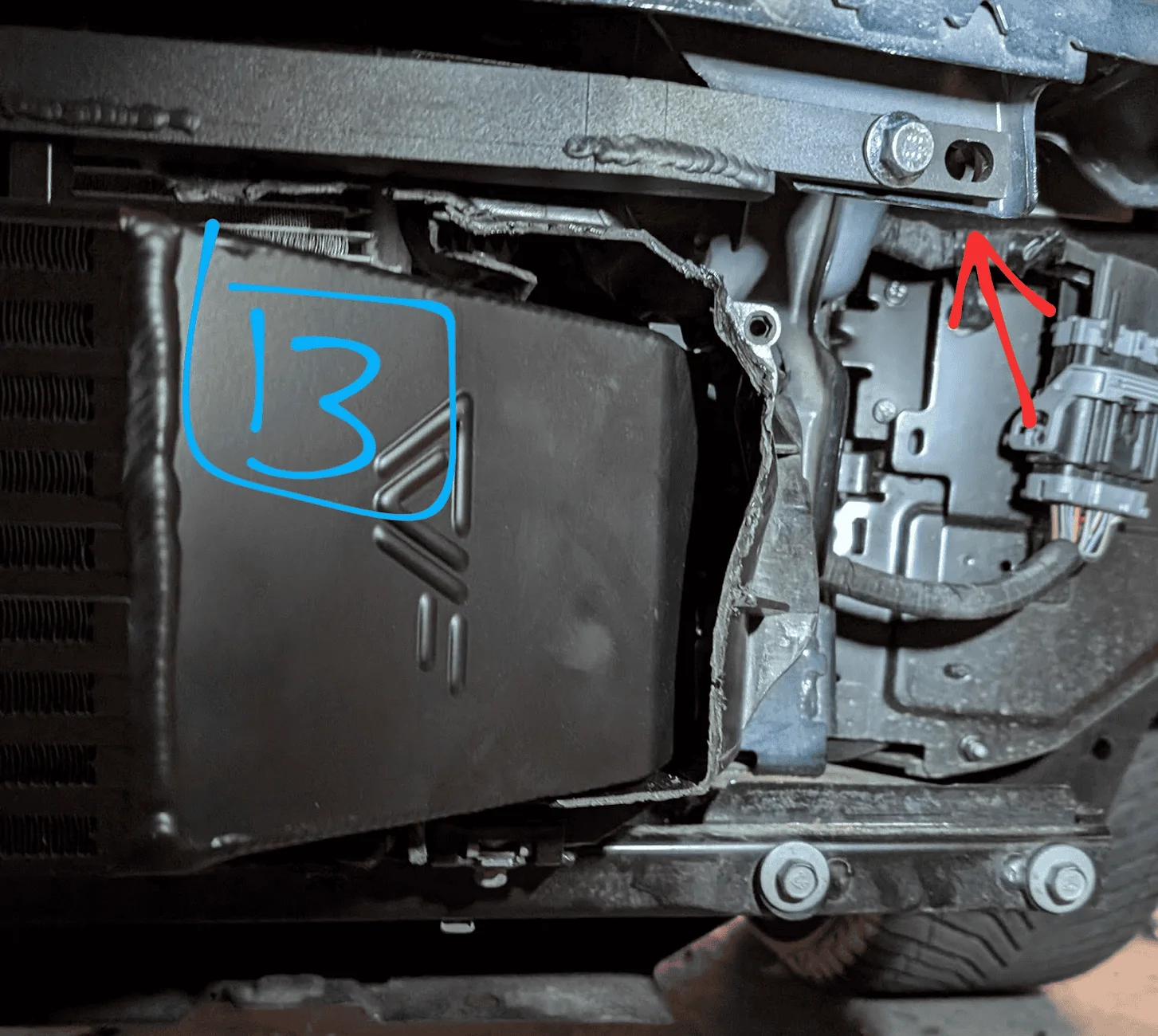
    • Then use the 4 bolts provided to attach the support beam & intercooler to the truck. Keep these bolt loose (for now)
    • Pic #13 shows the 1 of the bolts installed
      Ford Maverick CVF Intercooler Install on 2022 Maverick Ecoboost 2.0 -- DIY instructions writeup with photos 1720503524464-4z
  17. Re-attach the hoses to the engine
    • This was a major pain as there is not much space back there. Plus you’ll want to keep the hose & clamps in the same position as when it was taken off. These clamps are a bit different as they have a metal hoop under the screw clamp that seals off the hose
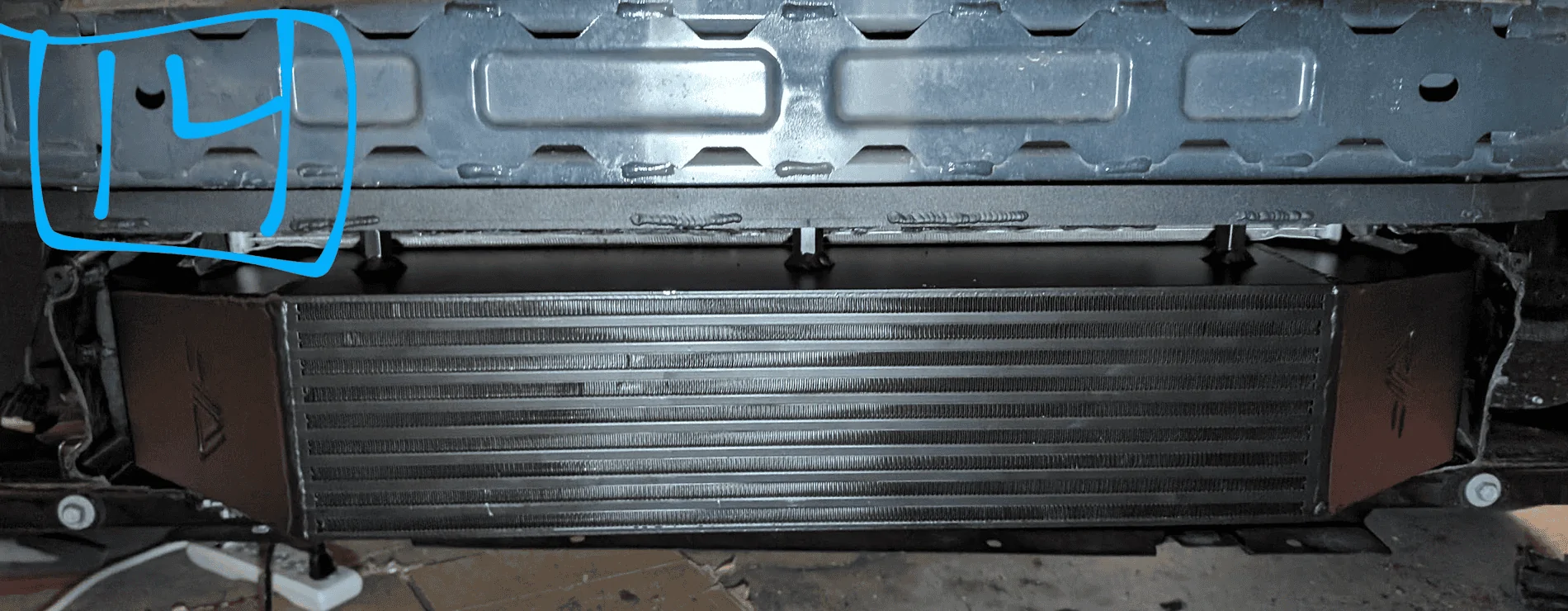
  18. Tighten the bolts on the support bracket
    • Mount the new intercooler in place. Pic #14 shows what mine looked like.
      Ford Maverick CVF Intercooler Install on 2022 Maverick Ecoboost 2.0 -- DIY instructions writeup with photos 1720503595438-7
  19. Re-attach the cable
    • The 1 you moved in step 10C. You can use the same clip holes, but I pushed it back a bit and didn’t mount in the same holes.
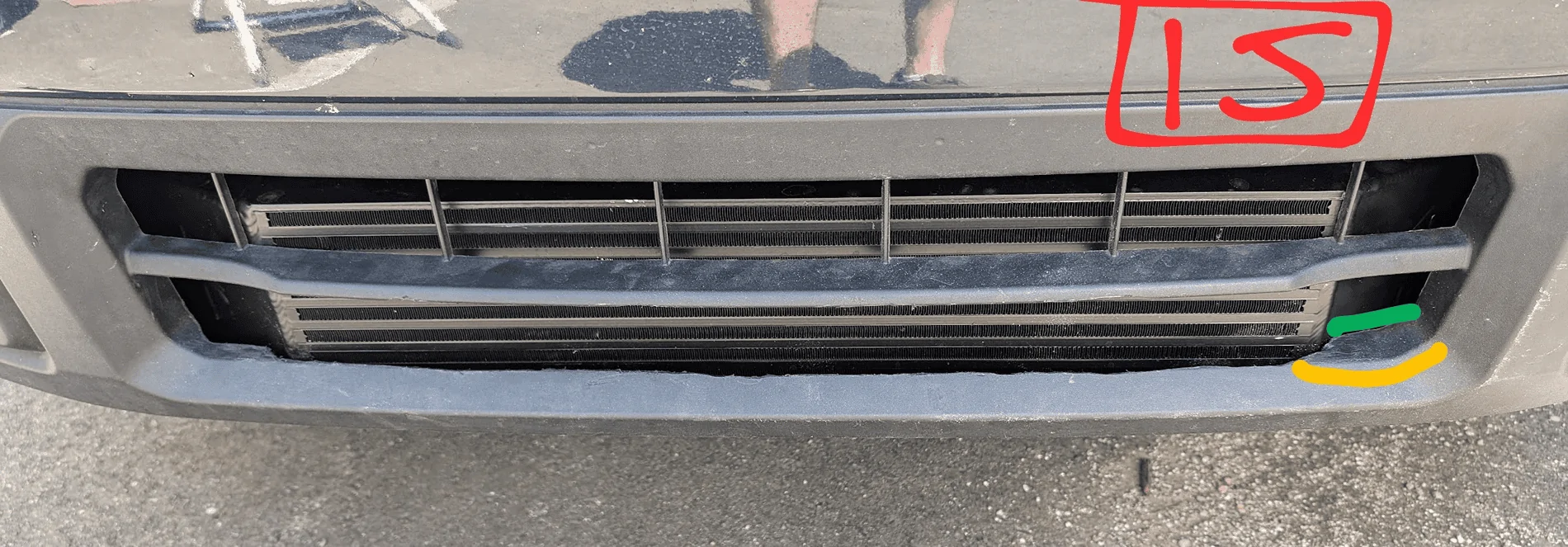
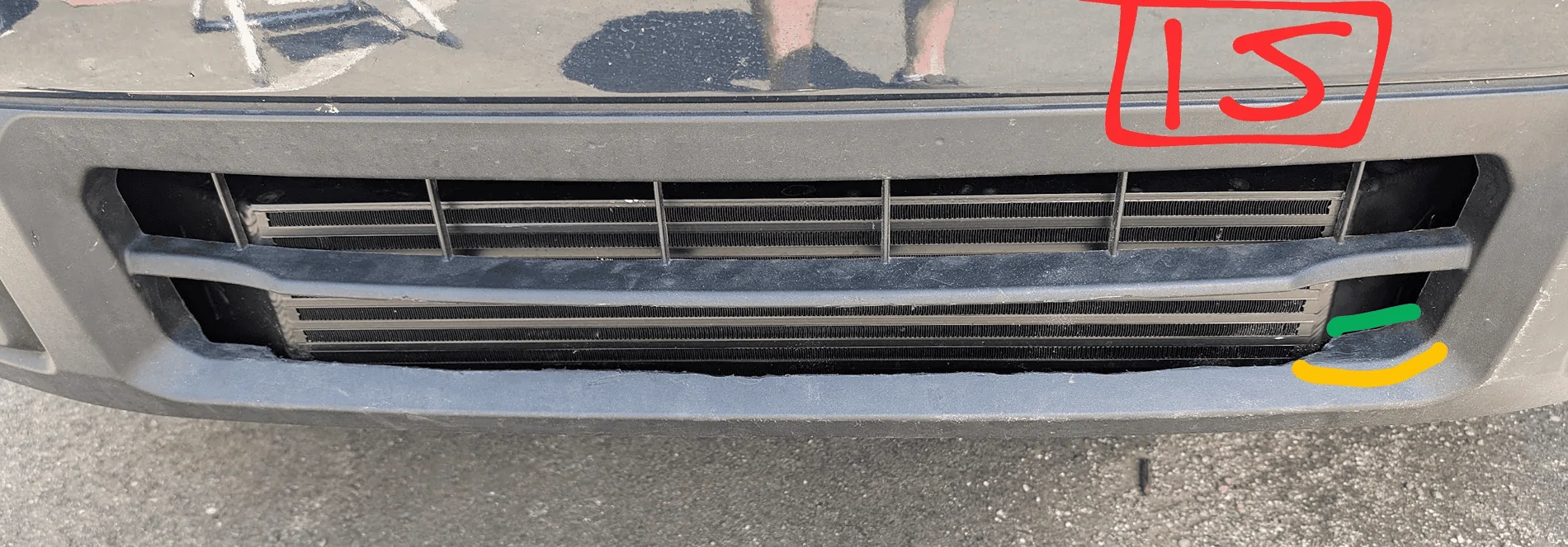
  20. Expand the lower opening in the front bumper
    • You’ll need to cut away some of the bumper so it will fit over the intercooler. I recommend attaching the 2 clips and screws at the top of the bummer to the truck, (arrows in pic #3). This way you can see how it fits with the new system, and how much you need to trim. You’ll need to remove enough so the holes in the bumper line up with the frame, as well as allow for hot air to flow out when stopped
    • Pic #15 shows how much I cut away with green being the original & yellow the edge/corner I cut to. I only needed to mess with the lower opening and cut up to the existing corner edge of the bumper (I’m going to straighten and clean it up later)
      Ford Maverick CVF Intercooler Install on 2022 Maverick Ecoboost 2.0 -- DIY instructions writeup with photos 1720503696970-d
  21. Remount the bumper
    1. Re-attach the cable on the passenger side pic #4
    2. Tighten the 4 screws at the top from pic #3 (if you haven’t already)
    3. Re-mount the T-30 torx screws on the underside of the bumper
    4. Clip and screw the sides of the bumper from pic #2
    5. Push on the loops around the headlights so the clips engage (pic #4)
    6. Re-attach the wheel well cloth (pic #1)
  22. Done!

Ford Maverick CVF Intercooler Install on 2022 Maverick Ecoboost 2.0 -- DIY instructions writeup with photos 1720502413338-2x
Ford Maverick CVF Intercooler Install on 2022 Maverick Ecoboost 2.0 -- DIY instructions writeup with photos 1720502909227-a1
Ford Maverick CVF Intercooler Install on 2022 Maverick Ecoboost 2.0 -- DIY instructions writeup with photos 1720503087241-5v
Ford Maverick CVF Intercooler Install on 2022 Maverick Ecoboost 2.0 -- DIY instructions writeup with photos 1720503678900-0s
<-- ignore these

Ford Maverick CVF Intercooler Install on 2022 Maverick Ecoboost 2.0 -- DIY instructions writeup with photos 1720501005492-wd
Sponsored

 
Last edited:

MM Mav

2.5L Hybrid
Well-known member
First Name
Amy
Joined
Sep 9, 2022
Threads
18
Messages
1,510
Reaction score
2,682
Location
Great Lakes Region
Vehicle(s)
2023 Hybrid Lariat Luxury w/CP360 + CP360A
Engine
2.5L Hybrid
Dang, that was a lot of work @Tscottok! Thanks for the detailed write up and photos.
 

Rileyotta

2.0L EcoBoost
Well-known member
First Name
Riley
Joined
May 17, 2022
Threads
3
Messages
377
Reaction score
204
Location
Edmonton
Vehicle(s)
Waiting for Maverick, driving 2013 Kia Sorento
Engine
2.0L EcoBoost
Clubs
 
Hey MTC,

I installed a @CVF-Jason CVF Intercooler (link) on my 22 Ecoboost Lariat. It's a bit different than the tremor install video I saw on youtube (link) and thought I'd share the steps. Sorry it's not a video as there was a lot of trail/error to get it working. Let me know your thoughts!

Tools Needed:
  • Flat Head screwdriver
  • Needle Nose pliers
  • Trim removal tool
    • Remove wheel well cloth
  • Non-black permanent marker
    • Mark where to cut
  • 7mm, 10mm, & 13 mm sockets/wrench
  • T-30 Trox bit
  • Drimmel, angle grinder, and/or other tool to cut plastic
    • I also used cable/moon cutters

Steps:
  1. Separate the cloth wheel well from the bumper (pic #1)
    • Several trim clips (red) and 2-3x 7mm bolts (green). You don't need to fully remove the front mud flap, just enough to detach it from the bumper
      1720500940713-0s.png
  2. Remove the 3x 10mm screws that hold the bumper in pace
    • Shown as red on picture #2
      1720501067111-q4.png
      1720501113387-io.png
  3. Then use needle nose pliers to remove plastic clips
    • Green on pic #2
    • You’re just loosening the clips and getting them ready. The bumper won’t come off yet as there are other screws holding it in place
  4. Use a T30 torx bit to remove both the bumper screws as well as the ones holding the undercarriage cloth or the front skid plate.
    • You’ll need to remove some of the screws further under the car so you can get to the exiting intercooler/hoses
  5. Remove 4x 10mm bolts in the engine bay that hold the bumper
    • Bolts are shown in pic #3. Green bolts also have a clips that hold the bumper
      1720501368674-ro.png
  6. Release the 2 clips that hold the bumper in place
    • Shown in pick #3 as green
    • Be careful here as you need to detach both before the bummer will move. I tried to do 1 then the other and ended up snapping 1 off.
  7. Slowly pull the bumper forward
    • It’s 1 massive piece that includes the silver hoops on the headlights. There are several clips that hold this area on. There are 3 on each headlight shown as red on pics #4. They will snap off, but be careful to to twist this plastic piece as it can break
    • NOTE: you may need to disconnect a wiring harness on the passenger before pulling off the bumper. It’s shown as green on pic #4. I believe this is a part of the adaptive cruise control (Lariat trim & copilot 360).
      1720501474383-4m.png
      1720501646178-0t.png
  8. Remove the front trim/funnel for the active aero
    • 2 clips and 2 snaps. Passenger side is shown as red on pic #5
    • NOTE: the top 2 clips open UP as shown in pic #5
    • I was not able to find a way to reuse this piece as it wouldn’t fit
      1720501788911-kk.png
      1720501871211-5v.png
  9. Pull forward the vertical active aero control arm, then pull out the the blades themselves
    • The control arm releases the blades and so you can just pull the blades forward to snap them out (shown in pic #6)
    • You’ll need to remove all 4 blades in front of the intercooler as shown in pic #6
      1720501971859-mq.png
      1720502087712-wt.png
  10. Now is where you start cutting. The front aero component is a solid piece from the top radiator to the bottom intercooler. Unfortunately, you can’t just take pieces off, you have to cut them out. I tried to remove as little as possible to maintain the crumple zones and existing air flow as much as possible.
    • I used Dremel and cable/moon cutters to cut the plastic, but it’s a real pain. The plastic is thick and it easily melts when cut. This gums up the blade and sprays plastic bits all over. An angle grinder might be better, but there are tight areas you need to cut. Keep in mind that most of this won’t be seen later, so it doesn’t have to be perfect
    • Driver side
      • Cut the so it’s semi-flush with the existing intercooler, shown as red on pic #7. This plastic is thick so go slow.
        1720502290447-9m.png
    • Passenger Side
      • FIRST: disconnect the cable clipped into the plastic. You’ll want to reach in (as best you can) and push the cable out of the way so you don’t cut it. The clips and wire are shown as green on pic #8
      • Next, cut the plastic semi-flush with the existing intercooler, shown as red on pic #8. I frequently checked where the wire was as I was cutting so I didn’t damage it.
        1720502402912-dz.png
        1720502481418-uu.png
    • Top/Bottom
      • Cut the plastic at the top/bottom to connect what you’ve deleted on both sides. You can use your cutting tool and/or the cable/moon cutters as the plastic is thinner. Pic #9 shows what to cut and what it looks like after.
      • Once removed, it should be semi-flush with the front of the current intercooler. You’ll also need to cut off the active aero control arm to line up with the other cuts.
      • I chose to keep part of the existing foam/aero piece in place, shown in green on pic #11.5 once the old intercooler is out
        1720502626517-9n.png
        1720502683289-z2.png
  11. Remove the hoses from the intake (not intercooler)
    • With this procedure, you won’t have access to the sides of the existing intercooler as I wanted to leave more of the existing system. Instead of disconnecting only the intercooler, I removed the hose clamps upstream and removed both the hoses and intercooler. If you want, you can cut out more plastic and likely remove only the intercooler.
    • The hoses are shown in pic #10. 1 of them is by the fuel filter, and the other by the crankcase
      1720502823740-qv.png
      1720502990089-t4.png
  12. Now shimmy the old intercooler out of place
    • There are 2x clips at the bottom and 2x u-shaped brackets at the top that hold it in place. The driver side is shown in pic #11. The top is not a clamp and it should come off if you lift up and slide it side-to-side
    • Pic # 11.5 shows what it looks like with the intercooler removed. I chose leave the foam/plastic piece at the bottom (green arrow), it fits nicely under the new intercooler
      1720503127087-kf.png
      1720503171898-np.png
  13. Once the old intercooler is out, cut the 2 plastic brackets flush with the radiator
    • Pic #12 shows the finished product after it’s cut off.
    • My truck was super dirty and full of bugs under/behind the old intercooler
      1720503252677-c2.png
  14. Install the support beam on the new intercooler
    • Use the 3x provided screws
  15. Put the hoses on the new intercooler
    • The hose clamps are a bit tricky. The metal ring fits into 3 slots (1 on top, 2 on the sides) and holds the hose in place, but allows it to rotate. The black plastic slides forward/backward to lock the rings in place.
    • Pic #12 shows the clip/ring up close (sorry, messed up the #s)
      1720503352844-mu.png
      1720503399582-xc.png
  16. Loosely mount the new intercooler
    • Rotate the hoses so they match the final position in the truck
    • Slowly work the hoses back through the truck. This will take some shimmying and back-and-forth to get them through.
    • Then use the 4 bolts provided to attach the support beam & intercooler to the truck. Keep these bolt loose (for now)
    • Pic #13 shows the 1 of the bolts installed
      1720503524464-4z.png
  17. Re-attach the hoses to the engine
    • This was a major pain as there is not much space back there. Plus you’ll want to keep the hose & clamps in the same position as when it was taken off. These clamps are a bit different as they have a metal hoop under the screw clamp that seals off the hose
  18. Tighten the bolts on the support bracket
    • Mount the new intercooler in place. Pic #14 shows what mine looked like.
      1720503595438-7e.png
  19. Re-attach the cable
    • The 1 you moved in step 10C. You can use the same clip holes, but I pushed it back a bit and didn’t mount in the same holes.
  20. Expand the lower opening in the front bumper
    • You’ll need to cut away some of the bumper so it will fit over the intercooler. I recommend attaching the 2 clips and screws at the top of the bummer to the truck, (arrows in pic #3). This way you can see how it fits with the new system, and how much you need to trim. You’ll need to remove enough so the holes in the bumper line up with the frame, as well as allow for hot air to flow out when stopped
    • Pic #15 shows how much I cut away with green being the original & yellow the edge/corner I cut to. I only needed to mess with the lower opening and cut up to the existing corner edge of the bumper (I’m going to straighten and clean it up later)
      1720503696970-de.png
  21. Remount the bumper
    1. Re-attach the cable on the passenger side pic #4
    2. Tighten the 4 screws at the top from pic #3 (if you haven’t already)
    3. Re-mount the T-30 torx screws on the underside of the bumper
    4. Clip and screw the sides of the bumper from pic #2
    5. Push on the loops around the headlights so the clips engage (pic #4)
    6. Re-attach the wheel well cloth (pic #1)
  22. Done!

1720501005492-wd.png
1720502413338-2x.png
1720502909227-a1.png
1720503087241-5v.png
1720503678900-0s.png
<-- ignore these
[/QUOTE
Pardon my ignorance, what are the benefits of this intercooler upgrade? I would be very interested to know
 

Sponsored

Dueces

2.0L EcoBoost
Well-known member
First Name
John
Joined
Jun 29, 2021
Threads
18
Messages
521
Reaction score
1,313
Location
USA
Vehicle(s)
2022 AWD Maverick XL, 2004 Insight Turbo
Engine
2.0L EcoBoost
This is an awesome writeup! Great job!
 

Bwicka

2.0L EcoBoost
Well-known member
First Name
Brian
Joined
Aug 17, 2023
Threads
19
Messages
883
Reaction score
1,283
Location
Lakeside,ca.
Vehicle(s)
2023 maverick tremor/2023 maverick hybrid lariat
Engine
2.0L EcoBoost
Clubs
 
A lot of pictures with circles and arrows and a paragraph on the back of each one.


reminds me of a song story on the dr’s show!
Awesome write up!
 

02Knight

2.5L Hybrid
Well-known member
First Name
Michael
Joined
Jul 2, 2024
Threads
1
Messages
83
Reaction score
74
Location
Texas
Vehicle(s)
2024 Ford Maverick XLT Hybrid
Engine
2.5L Hybrid
Clubs
 
Kudos on a great write up and detailed how to. Not that I would ever attempt this.
 

Barksdale123

2.0L EcoBoost
Well-known member
First Name
Bill
Joined
Feb 13, 2023
Threads
97
Messages
660
Reaction score
821
Location
SoFla
Vehicle(s)
2023 Ford Maverick
Engine
2.0L EcoBoost
Clubs
 
Hey MTC,

I installed a @CVF-Jason CVF Intercooler (link) on my 22 Ecoboost Lariat. It's a bit different than the tremor install video I saw on youtube (link) and thought I'd share the steps. Sorry it's not a video as there was a lot of trail/error to get it working. Let me know your thoughts!

Tools Needed:
  • Flat Head screwdriver
  • Needle Nose pliers
  • Trim removal tool
    • Remove wheel well cloth
  • Non-black permanent marker
    • Mark where to cut
  • 7mm, 10mm, & 13 mm sockets/wrench
  • T-30 Trox bit
  • Drimmel, angle grinder, and/or other tool to cut plastic
    • I also used cable/moon cutters

Steps:
  1. Separate the cloth wheel well from the bumper (pic #1)
    • Several trim clips (red) and 2-3x 7mm bolts (green). You don't need to fully remove the front mud flap, just enough to detach it from the bumper
      1720500940713-0s.png
  2. Remove the 3x 10mm screws that hold the bumper in pace
    • Shown as red on picture #2
      1720501067111-q4.png
      1720501113387-io.png
  3. Then use needle nose pliers to remove plastic clips
    • Green on pic #2
    • You’re just loosening the clips and getting them ready. The bumper won’t come off yet as there are other screws holding it in place
  4. Use a T30 torx bit to remove both the bumper screws as well as the ones holding the undercarriage cloth or the front skid plate.
    • You’ll need to remove some of the screws further under the car so you can get to the exiting intercooler/hoses
  5. Remove 4x 10mm bolts in the engine bay that hold the bumper
    • Bolts are shown in pic #3. Green bolts also have a clips that hold the bumper
      1720501368674-ro.png
  6. Release the 2 clips that hold the bumper in place
    • Shown in pick #3 as green
    • Be careful here as you need to detach both before the bummer will move. I tried to do 1 then the other and ended up snapping 1 off.
  7. Slowly pull the bumper forward
    • It’s 1 massive piece that includes the silver hoops on the headlights. There are several clips that hold this area on. There are 3 on each headlight shown as red on pics #4. They will snap off, but be careful to to twist this plastic piece as it can break
    • NOTE: you may need to disconnect a wiring harness on the passenger before pulling off the bumper. It’s shown as green on pic #4. I believe this is a part of the adaptive cruise control (Lariat trim & copilot 360).
      1720501474383-4m.png
      1720501646178-0t.png
  8. Remove the front trim/funnel for the active aero
    • 2 clips and 2 snaps. Passenger side is shown as red on pic #5
    • NOTE: the top 2 clips open UP as shown in pic #5
    • I was not able to find a way to reuse this piece as it wouldn’t fit
      1720501788911-kk.png
      1720501871211-5v.png
  9. Pull forward the vertical active aero control arm, then pull out the the blades themselves
    • The control arm releases the blades and so you can just pull the blades forward to snap them out (shown in pic #6)
    • You’ll need to remove all 4 blades in front of the intercooler as shown in pic #6
      1720501971859-mq.png
      1720502087712-wt.png
  10. Now is where you start cutting. The front aero component is a solid piece from the top radiator to the bottom intercooler. Unfortunately, you can’t just take pieces off, you have to cut them out. I tried to remove as little as possible to maintain the crumple zones and existing air flow as much as possible.
    • I used Dremel and cable/moon cutters to cut the plastic, but it’s a real pain. The plastic is thick and it easily melts when cut. This gums up the blade and sprays plastic bits all over. An angle grinder might be better, but there are tight areas you need to cut. Keep in mind that most of this won’t be seen later, so it doesn’t have to be perfect
    • Driver side
      • Cut the so it’s semi-flush with the existing intercooler, shown as red on pic #7. This plastic is thick so go slow.
        1720502290447-9m.png
    • Passenger Side
      • FIRST: disconnect the cable clipped into the plastic. You’ll want to reach in (as best you can) and push the cable out of the way so you don’t cut it. The clips and wire are shown as green on pic #8
      • Next, cut the plastic semi-flush with the existing intercooler, shown as red on pic #8. I frequently checked where the wire was as I was cutting so I didn’t damage it.
        1720502402912-dz.png
        1720502481418-uu.png
    • Top/Bottom
      • Cut the plastic at the top/bottom to connect what you’ve deleted on both sides. You can use your cutting tool and/or the cable/moon cutters as the plastic is thinner. Pic #9 shows what to cut and what it looks like after.
      • Once removed, it should be semi-flush with the front of the current intercooler. You’ll also need to cut off the active aero control arm to line up with the other cuts.
      • I chose to keep part of the existing foam/aero piece in place, shown in green on pic #11.5 once the old intercooler is out
        1720502626517-9n.png
        1720502683289-z2.png
  11. Remove the hoses from the intake (not intercooler)
    • With this procedure, you won’t have access to the sides of the existing intercooler as I wanted to leave more of the existing system. Instead of disconnecting only the intercooler, I removed the hose clamps upstream and removed both the hoses and intercooler. If you want, you can cut out more plastic and likely remove only the intercooler.
    • The hoses are shown in pic #10. 1 of them is by the fuel filter, and the other by the crankcase
      1720502823740-qv.png
      1720502990089-t4.png
  12. Now shimmy the old intercooler out of place
    • There are 2x clips at the bottom and 2x u-shaped brackets at the top that hold it in place. The driver side is shown in pic #11. The top is not a clamp and it should come off if you lift up and slide it side-to-side
    • Pic # 11.5 shows what it looks like with the intercooler removed. I chose leave the foam/plastic piece at the bottom (green arrow), it fits nicely under the new intercooler
      1720503127087-kf.png
      1720503171898-np.png
  13. Once the old intercooler is out, cut the 2 plastic brackets flush with the radiator
    • Pic #12 shows the finished product after it’s cut off.
    • My truck was super dirty and full of bugs under/behind the old intercooler
      1720503252677-c2.png
  14. Install the support beam on the new intercooler
    • Use the 3x provided screws
  15. Put the hoses on the new intercooler
    • The hose clamps are a bit tricky. The metal ring fits into 3 slots (1 on top, 2 on the sides) and holds the hose in place, but allows it to rotate. The black plastic slides forward/backward to lock the rings in place.
    • Pic #12 shows the clip/ring up close (sorry, messed up the #s)
      1720503352844-mu.png
      1720503399582-xc.png
  16. Loosely mount the new intercooler
    • Rotate the hoses so they match the final position in the truck
    • Slowly work the hoses back through the truck. This will take some shimmying and back-and-forth to get them through.
    • Then use the 4 bolts provided to attach the support beam & intercooler to the truck. Keep these bolt loose (for now)
    • Pic #13 shows the 1 of the bolts installed
      1720503524464-4z.png
  17. Re-attach the hoses to the engine
    • This was a major pain as there is not much space back there. Plus you’ll want to keep the hose & clamps in the same position as when it was taken off. These clamps are a bit different as they have a metal hoop under the screw clamp that seals off the hose
  18. Tighten the bolts on the support bracket
    • Mount the new intercooler in place. Pic #14 shows what mine looked like.
      1720503595438-7e.png
  19. Re-attach the cable
    • The 1 you moved in step 10C. You can use the same clip holes, but I pushed it back a bit and didn’t mount in the same holes.
  20. Expand the lower opening in the front bumper
    • You’ll need to cut away some of the bumper so it will fit over the intercooler. I recommend attaching the 2 clips and screws at the top of the bummer to the truck, (arrows in pic #3). This way you can see how it fits with the new system, and how much you need to trim. You’ll need to remove enough so the holes in the bumper line up with the frame, as well as allow for hot air to flow out when stopped
    • Pic #15 shows how much I cut away with green being the original & yellow the edge/corner I cut to. I only needed to mess with the lower opening and cut up to the existing corner edge of the bumper (I’m going to straighten and clean it up later)
      1720503696970-de.png
  21. Remount the bumper
    1. Re-attach the cable on the passenger side pic #4
    2. Tighten the 4 screws at the top from pic #3 (if you haven’t already)
    3. Re-mount the T-30 torx screws on the underside of the bumper
    4. Clip and screw the sides of the bumper from pic #2
    5. Push on the loops around the headlights so the clips engage (pic #4)
    6. Re-attach the wheel well cloth (pic #1)
  22. Done!

1720501005492-wd.png
1720502413338-2x.png
1720502909227-a1.png
1720503087241-5v.png
1720503678900-0s.png
<-- ignore these
That detailed description looks to me to be more understandable. What differences did you notice. than any video.
 

Yellow318

2.0L EcoBoost
Well-known member
First Name
Jake
Joined
Aug 10, 2023
Threads
6
Messages
115
Reaction score
139
Location
Alabama
Vehicle(s)
2023 Cyber Orange EB AWD Lairat Lux
Engine
2.0L EcoBoost
Very Nice, I’ll for sure be using this guide whenever my IC comes in. Thanks for the time and effort!
 
Sponsored

scotty

2.5L Hybrid
Well-known member
Joined
Jun 3, 2022
Threads
26
Messages
608
Reaction score
154
Location
pompano berach fl
Vehicle(s)
dodge caravan
Engine
2.5L Hybrid
Hey MTC,

I installed a @CVF-Jason CVF Intercooler (link) on my 22 Ecoboost Lariat. It's a bit different than the tremor install video I saw on youtube (link) and thought I'd share the steps. Sorry it's not a video as there was a lot of trail/error to get it working. Let me know your thoughts!

Tools Needed:
  • Flat Head screwdriver
  • Needle Nose pliers
  • Trim removal tool
    • Remove wheel well cloth
  • Non-black permanent marker
    • Mark where to cut
  • 7mm, 10mm, & 13 mm sockets/wrench
  • T-30 Trox bit
  • Drimmel, angle grinder, and/or other tool to cut plastic
    • I also used cable/moon cutters

Steps:
  1. Separate the cloth wheel well from the bumper (pic #1)
    • Several trim clips (red) and 2-3x 7mm bolts (green). You don't need to fully remove the front mud flap, just enough to detach it from the bumper
      1720500940713-0s.png
  2. Remove the 3x 10mm screws that hold the bumper in pace
    • Shown as red on picture #2
      1720501067111-q4.png
      1720501113387-io.png
  3. Then use needle nose pliers to remove plastic clips
    • Green on pic #2
    • You’re just loosening the clips and getting them ready. The bumper won’t come off yet as there are other screws holding it in place
  4. Use a T30 torx bit to remove both the bumper screws as well as the ones holding the undercarriage cloth or the front skid plate.
    • You’ll need to remove some of the screws further under the car so you can get to the exiting intercooler/hoses
  5. Remove 4x 10mm bolts in the engine bay that hold the bumper
    • Bolts are shown in pic #3. Green bolts also have a clips that hold the bumper
      1720501368674-ro.png
  6. Release the 2 clips that hold the bumper in place
    • Shown in pick #3 as green
    • Be careful here as you need to detach both before the bummer will move. I tried to do 1 then the other and ended up snapping 1 off.
  7. Slowly pull the bumper forward
    • It’s 1 massive piece that includes the silver hoops on the headlights. There are several clips that hold this area on. There are 3 on each headlight shown as red on pics #4. They will snap off, but be careful to to twist this plastic piece as it can break
    • NOTE: you may need to disconnect a wiring harness on the passenger before pulling off the bumper. It’s shown as green on pic #4. I believe this is a part of the adaptive cruise control (Lariat trim & copilot 360).
      1720501474383-4m.png
      1720501646178-0t.png
  8. Remove the front trim/funnel for the active aero
    • 2 clips and 2 snaps. Passenger side is shown as red on pic #5
    • NOTE: the top 2 clips open UP as shown in pic #5
    • I was not able to find a way to reuse this piece as it wouldn’t fit
      1720501788911-kk.png
      1720501871211-5v.png
  9. Pull forward the vertical active aero control arm, then pull out the the blades themselves
    • The control arm releases the blades and so you can just pull the blades forward to snap them out (shown in pic #6)
    • You’ll need to remove all 4 blades in front of the intercooler as shown in pic #6
      1720501971859-mq.png
      1720502087712-wt.png
  10. Now is where you start cutting. The front aero component is a solid piece from the top radiator to the bottom intercooler. Unfortunately, you can’t just take pieces off, you have to cut them out. I tried to remove as little as possible to maintain the crumple zones and existing air flow as much as possible.
    • I used Dremel and cable/moon cutters to cut the plastic, but it’s a real pain. The plastic is thick and it easily melts when cut. This gums up the blade and sprays plastic bits all over. An angle grinder might be better, but there are tight areas you need to cut. Keep in mind that most of this won’t be seen later, so it doesn’t have to be perfect
    • Driver side
      • Cut the so it’s semi-flush with the existing intercooler, shown as red on pic #7. This plastic is thick so go slow.
        1720502290447-9m.png
    • Passenger Side
      • FIRST: disconnect the cable clipped into the plastic. You’ll want to reach in (as best you can) and push the cable out of the way so you don’t cut it. The clips and wire are shown as green on pic #8
      • Next, cut the plastic semi-flush with the existing intercooler, shown as red on pic #8. I frequently checked where the wire was as I was cutting so I didn’t damage it.
        1720502402912-dz.png
        1720502481418-uu.png
    • Top/Bottom
      • Cut the plastic at the top/bottom to connect what you’ve deleted on both sides. You can use your cutting tool and/or the cable/moon cutters as the plastic is thinner. Pic #9 shows what to cut and what it looks like after.
      • Once removed, it should be semi-flush with the front of the current intercooler. You’ll also need to cut off the active aero control arm to line up with the other cuts.
      • I chose to keep part of the existing foam/aero piece in place, shown in green on pic #11.5 once the old intercooler is out
        1720502626517-9n.png
        1720502683289-z2.png
  11. Remove the hoses from the intake (not intercooler)
    • With this procedure, you won’t have access to the sides of the existing intercooler as I wanted to leave more of the existing system. Instead of disconnecting only the intercooler, I removed the hose clamps upstream and removed both the hoses and intercooler. If you want, you can cut out more plastic and likely remove only the intercooler.
    • The hoses are shown in pic #10. 1 of them is by the fuel filter, and the other by the crankcase
      1720502823740-qv.png
      1720502990089-t4.png
  12. Now shimmy the old intercooler out of place
    • There are 2x clips at the bottom and 2x u-shaped brackets at the top that hold it in place. The driver side is shown in pic #11. The top is not a clamp and it should come off if you lift up and slide it side-to-side
    • Pic # 11.5 shows what it looks like with the intercooler removed. I chose leave the foam/plastic piece at the bottom (green arrow), it fits nicely under the new intercooler
      1720503127087-kf.png
      1720503171898-np.png
  13. Once the old intercooler is out, cut the 2 plastic brackets flush with the radiator
    • Pic #12 shows the finished product after it’s cut off.
    • My truck was super dirty and full of bugs under/behind the old intercooler
      1720503252677-c2.png
  14. Install the support beam on the new intercooler
    • Use the 3x provided screws
  15. Put the hoses on the new intercooler
    • The hose clamps are a bit tricky. The metal ring fits into 3 slots (1 on top, 2 on the sides) and holds the hose in place, but allows it to rotate. The black plastic slides forward/backward to lock the rings in place.
    • Pic #12 shows the clip/ring up close (sorry, messed up the #s)
      1720503352844-mu.png
      1720503399582-xc.png
  16. Loosely mount the new intercooler
    • Rotate the hoses so they match the final position in the truck
    • Slowly work the hoses back through the truck. This will take some shimmying and back-and-forth to get them through.
    • Then use the 4 bolts provided to attach the support beam & intercooler to the truck. Keep these bolt loose (for now)
    • Pic #13 shows the 1 of the bolts installed
      1720503524464-4z.png
  17. Re-attach the hoses to the engine
    • This was a major pain as there is not much space back there. Plus you’ll want to keep the hose & clamps in the same position as when it was taken off. These clamps are a bit different as they have a metal hoop under the screw clamp that seals off the hose
  18. Tighten the bolts on the support bracket
    • Mount the new intercooler in place. Pic #14 shows what mine looked like.
      1720503595438-7e.png
  19. Re-attach the cable
    • The 1 you moved in step 10C. You can use the same clip holes, but I pushed it back a bit and didn’t mount in the same holes.
  20. Expand the lower opening in the front bumper
    • You’ll need to cut away some of the bumper so it will fit over the intercooler. I recommend attaching the 2 clips and screws at the top of the bummer to the truck, (arrows in pic #3). This way you can see how it fits with the new system, and how much you need to trim. You’ll need to remove enough so the holes in the bumper line up with the frame, as well as allow for hot air to flow out when stopped
    • Pic #15 shows how much I cut away with green being the original & yellow the edge/corner I cut to. I only needed to mess with the lower opening and cut up to the existing corner edge of the bumper (I’m going to straighten and clean it up later)
      1720503696970-de.png
  21. Remount the bumper
    1. Re-attach the cable on the passenger side pic #4
    2. Tighten the 4 screws at the top from pic #3 (if you haven’t already)
    3. Re-mount the T-30 torx screws on the underside of the bumper
    4. Clip and screw the sides of the bumper from pic #2
    5. Push on the loops around the headlights so the clips engage (pic #4)
    6. Re-attach the wheel well cloth (pic #1)
  22. Done!

1720501005492-wd.png
1720502413338-2x.png
1720502909227-a1.png
1720503087241-5v.png
1720503678900-0s.png
<-- ignore these
Gosh I wished I had your skills. Wished I lived in the neighborhood to watch and assist.
 

LADemien

2.0L EcoBoost
Well-known member
First Name
Lonnie
Joined
Apr 8, 2022
Threads
0
Messages
96
Reaction score
58
Location
Eufaula, Alabama
Vehicle(s)
2022 Ford Maverick Lariat 2.0 AWD
Engine
2.0L EcoBoost
Hey MTC,

I installed a @CVF-Jason CVF Intercooler (link) on my 22 Ecoboost Lariat. It's a bit different than the tremor install video I saw on youtube (link) and thought I'd share the steps. Sorry it's not a video as there was a lot of trail/error to get it working. Let me know your thoughts!

Tools Needed:
  • Flat Head screwdriver
  • Needle Nose pliers
  • Trim removal tool
    • Remove wheel well cloth
  • Non-black permanent marker
    • Mark where to cut
  • 7mm, 10mm, & 13 mm sockets/wrench
  • T-30 Trox bit
  • Drimmel, angle grinder, and/or other tool to cut plastic
    • I also used cable/moon cutters

Steps:
  1. Separate the cloth wheel well from the bumper (pic #1)
    • Several trim clips (red) and 2-3x 7mm bolts (green). You don't need to fully remove the front mud flap, just enough to detach it from the bumper
      1720500940713-0s.png
  2. Remove the 3x 10mm screws that hold the bumper in pace
    • Shown as red on picture #2
      1720501067111-q4.png
      1720501113387-io.png
  3. Then use needle nose pliers to remove plastic clips
    • Green on pic #2
    • You’re just loosening the clips and getting them ready. The bumper won’t come off yet as there are other screws holding it in place
  4. Use a T30 torx bit to remove both the bumper screws as well as the ones holding the undercarriage cloth or the front skid plate.
    • You’ll need to remove some of the screws further under the car so you can get to the exiting intercooler/hoses
  5. Remove 4x 10mm bolts in the engine bay that hold the bumper
    • Bolts are shown in pic #3. Green bolts also have a clips that hold the bumper
      1720501368674-ro.png
  6. Release the 2 clips that hold the bumper in place
    • Shown in pick #3 as green
    • Be careful here as you need to detach both before the bummer will move. I tried to do 1 then the other and ended up snapping 1 off.
  7. Slowly pull the bumper forward
    • It’s 1 massive piece that includes the silver hoops on the headlights. There are several clips that hold this area on. There are 3 on each headlight shown as red on pics #4. They will snap off, but be careful to to twist this plastic piece as it can break
    • NOTE: you may need to disconnect a wiring harness on the passenger before pulling off the bumper. It’s shown as green on pic #4. I believe this is a part of the adaptive cruise control (Lariat trim & copilot 360).
      1720501474383-4m.png
      1720501646178-0t.png
  8. Remove the front trim/funnel for the active aero
    • 2 clips and 2 snaps. Passenger side is shown as red on pic #5
    • NOTE: the top 2 clips open UP as shown in pic #5
    • I was not able to find a way to reuse this piece as it wouldn’t fit
      1720501788911-kk.png
      1720501871211-5v.png
  9. Pull forward the vertical active aero control arm, then pull out the the blades themselves
    • The control arm releases the blades and so you can just pull the blades forward to snap them out (shown in pic #6)
    • You’ll need to remove all 4 blades in front of the intercooler as shown in pic #6
      1720501971859-mq.png
      1720502087712-wt.png
  10. Now is where you start cutting. The front aero component is a solid piece from the top radiator to the bottom intercooler. Unfortunately, you can’t just take pieces off, you have to cut them out. I tried to remove as little as possible to maintain the crumple zones and existing air flow as much as possible.
    • I used Dremel and cable/moon cutters to cut the plastic, but it’s a real pain. The plastic is thick and it easily melts when cut. This gums up the blade and sprays plastic bits all over. An angle grinder might be better, but there are tight areas you need to cut. Keep in mind that most of this won’t be seen later, so it doesn’t have to be perfect
    • Driver side
      • Cut the so it’s semi-flush with the existing intercooler, shown as red on pic #7. This plastic is thick so go slow.
        1720502290447-9m.png
    • Passenger Side
      • FIRST: disconnect the cable clipped into the plastic. You’ll want to reach in (as best you can) and push the cable out of the way so you don’t cut it. The clips and wire are shown as green on pic #8
      • Next, cut the plastic semi-flush with the existing intercooler, shown as red on pic #8. I frequently checked where the wire was as I was cutting so I didn’t damage it.
        1720502402912-dz.png
        1720502481418-uu.png
    • Top/Bottom
      • Cut the plastic at the top/bottom to connect what you’ve deleted on both sides. You can use your cutting tool and/or the cable/moon cutters as the plastic is thinner. Pic #9 shows what to cut and what it looks like after.
      • Once removed, it should be semi-flush with the front of the current intercooler. You’ll also need to cut off the active aero control arm to line up with the other cuts.
      • I chose to keep part of the existing foam/aero piece in place, shown in green on pic #11.5 once the old intercooler is out
        1720502626517-9n.png
        1720502683289-z2.png
  11. Remove the hoses from the intake (not intercooler)
    • With this procedure, you won’t have access to the sides of the existing intercooler as I wanted to leave more of the existing system. Instead of disconnecting only the intercooler, I removed the hose clamps upstream and removed both the hoses and intercooler. If you want, you can cut out more plastic and likely remove only the intercooler.
    • The hoses are shown in pic #10. 1 of them is by the fuel filter, and the other by the crankcase
      1720502823740-qv.png
      1720502990089-t4.png
  12. Now shimmy the old intercooler out of place
    • There are 2x clips at the bottom and 2x u-shaped brackets at the top that hold it in place. The driver side is shown in pic #11. The top is not a clamp and it should come off if you lift up and slide it side-to-side
    • Pic # 11.5 shows what it looks like with the intercooler removed. I chose leave the foam/plastic piece at the bottom (green arrow), it fits nicely under the new intercooler
      1720503127087-kf.png
      1720503171898-np.png
  13. Once the old intercooler is out, cut the 2 plastic brackets flush with the radiator
    • Pic #12 shows the finished product after it’s cut off.
    • My truck was super dirty and full of bugs under/behind the old intercooler
      1720503252677-c2.png
  14. Install the support beam on the new intercooler
    • Use the 3x provided screws
  15. Put the hoses on the new intercooler
    • The hose clamps are a bit tricky. The metal ring fits into 3 slots (1 on top, 2 on the sides) and holds the hose in place, but allows it to rotate. The black plastic slides forward/backward to lock the rings in place.
    • Pic #12 shows the clip/ring up close (sorry, messed up the #s)
      1720503352844-mu.png
      1720503399582-xc.png
  16. Loosely mount the new intercooler
    • Rotate the hoses so they match the final position in the truck
    • Slowly work the hoses back through the truck. This will take some shimmying and back-and-forth to get them through.
    • Then use the 4 bolts provided to attach the support beam & intercooler to the truck. Keep these bolt loose (for now)
    • Pic #13 shows the 1 of the bolts installed
      1720503524464-4z.png
  17. Re-attach the hoses to the engine
    • This was a major pain as there is not much space back there. Plus you’ll want to keep the hose & clamps in the same position as when it was taken off. These clamps are a bit different as they have a metal hoop under the screw clamp that seals off the hose
  18. Tighten the bolts on the support bracket
    • Mount the new intercooler in place. Pic #14 shows what mine looked like.
      1720503595438-7e.png
  19. Re-attach the cable
    • The 1 you moved in step 10C. You can use the same clip holes, but I pushed it back a bit and didn’t mount in the same holes.
  20. Expand the lower opening in the front bumper
    • You’ll need to cut away some of the bumper so it will fit over the intercooler. I recommend attaching the 2 clips and screws at the top of the bummer to the truck, (arrows in pic #3). This way you can see how it fits with the new system, and how much you need to trim. You’ll need to remove enough so the holes in the bumper line up with the frame, as well as allow for hot air to flow out when stopped
    • Pic #15 shows how much I cut away with green being the original & yellow the edge/corner I cut to. I only needed to mess with the lower opening and cut up to the existing corner edge of the bumper (I’m going to straighten and clean it up later)
      1720503696970-de.png
  21. Remount the bumper
    1. Re-attach the cable on the passenger side pic #4
    2. Tighten the 4 screws at the top from pic #3 (if you haven’t already)
    3. Re-mount the T-30 torx screws on the underside of the bumper
    4. Clip and screw the sides of the bumper from pic #2
    5. Push on the loops around the headlights so the clips engage (pic #4)
    6. Re-attach the wheel well cloth (pic #1)
  22. Done!

1720501005492-wd.png
1720502413338-2x.png
1720502909227-a1.png
1720503087241-5v.png
1720503678900-0s.png
<-- ignore these
What is the payoff for all this work?
 

colinl

2.0L EcoBoost
Well-known member
First Name
Colin
Joined
Jun 21, 2022
Threads
32
Messages
5,440
Reaction score
6,179
Location
ICT
Vehicle(s)
'22 Maverick Lariat AWD, '22 Bronco OBX 2-Door
Engine
2.0L EcoBoost
Clubs
 
so, how many hours did this take you? also, what's your experience level - have you installed aftermarket intercoolers before on any vehicle? are you a tech by day?
 

colinl

2.0L EcoBoost
Well-known member
First Name
Colin
Joined
Jun 21, 2022
Threads
32
Messages
5,440
Reaction score
6,179
Location
ICT
Vehicle(s)
'22 Maverick Lariat AWD, '22 Bronco OBX 2-Door
Engine
2.0L EcoBoost
Clubs
 
What is the payoff for all this work?
the main benefit is reduced charge air temp which makes a big difference in sustained boost situations, such as driving on a track, driving fast on a curvy road like Deal's Gap, driving in the mountains, or towing.

how much reduced? that should be on CVF's site, they asked for it to be logged with their first round of test installers. OP here should have an idea also.

little difference in non-sustained, short-term boost situations. since stock piping is retained, I wouldn't expect significant differences other than charge temp.
Sponsored


Top