
Sponsored

Placing music on a USB drive

Meintc

2.5L Hybrid
Well-known member
First Name
Lynette
Joined
Oct 4, 2021
Threads
18
Messages
1,712
Reaction score
2,292
Location
Northern Lower TC Michigan
Vehicle(s)
2022 CO Hybrid Maverick
Engine
2.5L Hybrid
I re-formatted my extra USB drive to FAT 32. Copied music to the drive. The same music I have on another drive that worked in my 2018 Escape. BTW, that too doesn't work. I even didn't fill it as full as before. These drives are 8 gig. I put it in the drive and the light on the drive flashed. then on the screen I received a message that the drive was removed. The button on the screen is then gone. Ive pulled it out and and re-insert it and the truck doesn't recognize it. I then put the Wireless dongle back in and that seems to work. re-insert the USB drive and nothing.

My first thought is the drive is faulty, but the Motorola works in it. its very frustrating.

I've ordered another drive that someone here recommended and will receive it on Wednesday. But I don't even know if that will work.

The one saving grace is I have Amazon music that I can use, but I would rather listen to all the music I downloaded from CD's.
Sponsored


 

Meintc

2.5L Hybrid
Well-known member
First Name
Lynette
Joined
Oct 4, 2021
Threads
18
Messages
1,712
Reaction score
2,292
Location
Northern Lower TC Michigan
Vehicle(s)
2022 CO Hybrid Maverick
Engine
2.5L Hybrid
I think I fixed my problem. I won't know for sure until I actually use if to a time. So I will update this post when I know for sure. For any others that this may be an issue this is what I did:

When I ripped the CD on my computer it created a folder of the artist, then a folder of the album then on the album folder it had the songs. When I copied the Ripped music to my USB drive I copied all folders. That resulted in my Maverick not recognizing the drive. So when that didn't work I just thought a minute and decided to not copy the first folder and started with the Album folder that contained the mp3 files of the songs, and It worked while the truck was parked in my garage. Oh and my dongle was also plugged into the other port.
 

Meintc

2.5L Hybrid
Well-known member
First Name
Lynette
Joined
Oct 4, 2021
Threads
18
Messages
1,712
Reaction score
2,292
Location
Northern Lower TC Michigan
Vehicle(s)
2022 CO Hybrid Maverick
Engine
2.5L Hybrid
This will be my last post on this subject until I get service to look at my truck. I was driving home from work today. USB wss playing my music. Motorola was also active, but I wasn't using android auto. Then my music quit. The indicator light on both my drive and Motorola was dead. I unplugged both reinstated the USB drive only and nothing. I wasn't in the mood to even attempt to try to fix it when I returned home. If my new USB drive works when I transfer my music I'll post otherwise it needs FORD service work.
 

bdaniel230

2.0L EcoBoost
Well-known member
First Name
Daniel
Joined
Jan 21, 2022
Threads
1
Messages
372
Reaction score
228
Location
Middleton, Id
Vehicle(s)
2022 Ford Maverick XLT -Hot Chili Red - 4k Tow Fx4
Engine
2.0L EcoBoost
So songs can only be played sequentially. If you want to play song number 327 of 400 it seems I have to fast forward 326 times?
Yep life is tough in the first world.
 

CACTI_HYBRID

2.5L Hybrid
Well-known member
First Name
Rick
Joined
Feb 15, 2021
Threads
66
Messages
830
Reaction score
1,243
Location
Meridian, ID
Vehicle(s)
2022 Ford Maverick XL Hybrid
Engine
2.5L Hybrid
As long as the mp3 files have the correct metadata you should have no problem seeing your music files. I have my music files in directories using the hierarchy: Artist -> Album Name -> Album Tracks. Hell, I had a 2008 Ford Focus and was able to use voice commands to play "artist" or "album" or "track" using voice commands. Just make sure you set the audio source to USB.

Also note that you get the best audio quality using a USB drive, compared to streaming music from your phone. The reason is that with a USB drive the DAC (Digital Audio Controller) of your vehicle is used, rather than the tiny DAC in your phone.

Note that I have confirmed with Ford that in the Maverick you can use voice commands to play audio and make phone calls WITHOUT having your phone connected, using only Bluetooth.
I have a flash drive plugged into the Maverick's USB port under the dash. The truck's screen shows and will play from that device just fine. What I cannot figure out is how to use voice commands to ask for a particular song on that USB. Can do? If so, how? Thanks.
 

Sponsored

Ozarkbeard

Well-known member
Joined
May 22, 2022
Threads
14
Messages
4,344
Reaction score
5,477
Location
.
Vehicle(s)
.
Engine
Undecided
When you use the phone connected to USB, it uses the DAC in the phone. When you connect a thumb drive to USB, it uses the DAC of the vehicle.
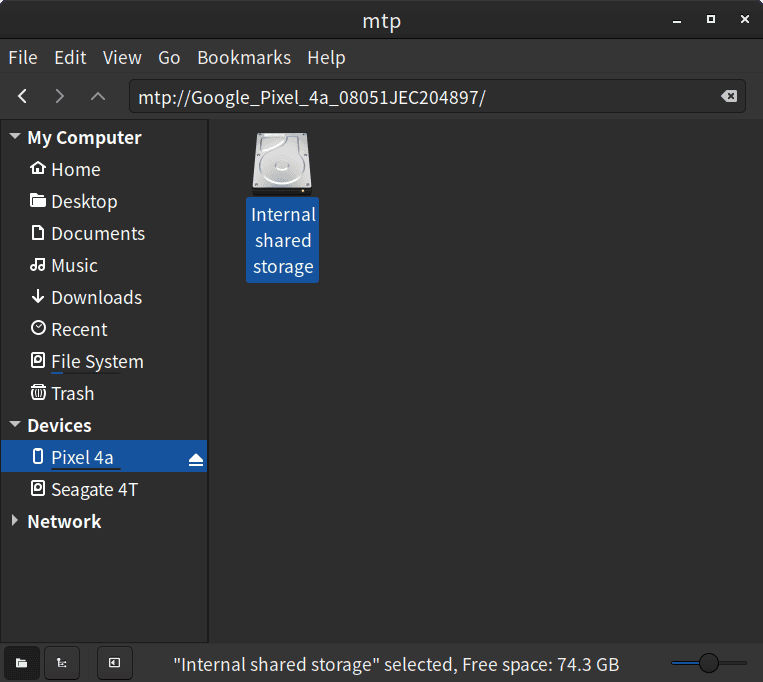
On Android, couldn't one just select USB File Transfer (aka MTP - Media Transfer Protocol) when connecting the USB cable to the Maverick? Then use the Mav's USB music player?

On my Linux PC, it makes the phone look like a removable drive when connected via USB.

I don't have my Maverick yet, but am hoping I can play music stored on my phone, via USB cable, using MTP.
Ford Maverick Placing music on a USB drive Screenshot from 2023-07-09 12-51-59
 

zBernie

2.5L Hybrid
Well-known member
First Name
Bernie
Joined
Sep 6, 2021
Threads
60
Messages
318
Reaction score
250
Location
Northeast
Vehicle(s)
Hyundai Sonata
Engine
2.5L Hybrid
I have a flash drive plugged into the Maverick's USB port under the dash. The truck's screen shows and will play from that device just fine. What I cannot figure out is how to use voice commands to ask for a particular song on that USB. Can do? If so, how? Thanks.
Even though the sound quality is better using the USB drive, when driving then scrolling for music, it annoyingly keeps stopping with a safety warning. This makes it unusable while driving. What I've done is load a micro SD card with all my music in my phone, then I use Musicolet to play the music. Also, I adjust the EQ in Musicolet and get a richer sound.
 

icegradner

2.5L Hybrid
Well-known member
Joined
Nov 5, 2021
Threads
19
Messages
3,815
Reaction score
5,935
Location
British Columbia, Canada
Vehicle(s)
2022 XLT Maverick Hybrid
Engine
2.5L Hybrid
Clubs
 
I have a flash drive plugged into the Maverick's USB port under the dash. The truck's screen shows and will play from that device just fine. What I cannot figure out is how to use voice commands to ask for a particular song on that USB. Can do? If so, how? Thanks.
Voice commands, as far as I know, only work with a connected phone. I don't think they work with a USB stick.
 

zBernie

2.5L Hybrid
Well-known member
First Name
Bernie
Joined
Sep 6, 2021
Threads
60
Messages
318
Reaction score
250
Location
Northeast
Vehicle(s)
Hyundai Sonata
Engine
2.5L Hybrid
On Android, couldn't one just select USB File Transfer (aka MTP - Media Transfer Protocol) when connecting the USB cable to the Maverick? Then use the Mav's USB music player?

On my Linux PC, it makes the phone look like a removable drive when connected via USB.

I don't have my Maverick yet, but am hoping I can play music stored on my phone, via USB cable, using MTP.
Screenshot from 2023-07-09 12-51-59.png
This has nothing to do with the USB thumb drive using the DAC of the car. It does this automatically. I'm a retired Systems Engineer III, I know what you are talking about but it's not what I'm talking about.
 

CACTI_HYBRID

2.5L Hybrid
Well-known member
First Name
Rick
Joined
Feb 15, 2021
Threads
66
Messages
830
Reaction score
1,243
Location
Meridian, ID
Vehicle(s)
2022 Ford Maverick XL Hybrid
Engine
2.5L Hybrid
Voice commands, as far as I know, only work with a connected phone. I don't think they work with a USB stick.
I have a small USB stick with hundreds of songs on it. I don't want to eat up storage on my phone keeping music on it. It works fine if I'm happy to simply have the music play sequentially or randomly. I just don't seem to be able to select songs with voice commands. I can live with that but it would be nice.
 
Sponsored

Eagle11

2.5L Hybrid
Well-known member
Joined
Aug 6, 2021
Threads
18
Messages
1,982
Reaction score
1,693
Location
Valley of the Sun
Vehicle(s)
'07 Boxster S, 2018 BMW M5, Ducati's, Suzuki's
Engine
2.5L Hybrid
Clubs
 
I have a flash drive plugged into the Maverick's USB port under the dash. The truck's screen shows and will play from that device just fine. What I cannot figure out is how to use voice commands to ask for a particular song on that USB. Can do? If so, how? Thanks.
That isn't possible, I don't even think the high end Sync does that.
 

Ozarkbeard

Well-known member
Joined
May 22, 2022
Threads
14
Messages
4,344
Reaction score
5,477
Location
.
Vehicle(s)
.
Engine
Undecided
This has nothing to do with the USB thumb drive using the DAC of the car. It does this automatically. I'm a retired Systems Engineer III, I know what you are talking about but it's not what I'm talking about.
I was referring to a post that mentioned sound quality when connecting a phone. Sorry if I quoted the wrong post.
 

lajlmt

2.5L Hybrid
Well-known member
First Name
Lance
Joined
Jan 17, 2022
Threads
16
Messages
1,161
Reaction score
1,028
Location
Rio Rancho
Vehicle(s)
โ€˜23 Maverick XLT LUX
Engine
2.5L Hybrid
Clubs
 

cyberdog

2.5L Hybrid
Well-known member
First Name
Ray
Joined
Oct 15, 2021
Threads
5
Messages
663
Reaction score
785
Location
08084
Vehicle(s)
2023 Maverick Lariat Hybrid
Engine
2.5L Hybrid
Your flash drive may have overheated. I have a tiny HP drive, that works until it gets hot, and then stops working, until you unplug it and allow it to cool. - It's barely visible when plugged in, and surprise, I think the 5v in the USB plug may stay HOT when the truck is off. (After coming out from a movie, it wouldn't play and was hot, took it out for 5 min, reinserted, and played fine all the way home, but was getting warm again).
 

numike

2.5L Hybrid
Well-known member
First Name
mike
Joined
Dec 17, 2021
Threads
69
Messages
372
Reaction score
218
Location
96912
Vehicle(s)
car
Engine
2.5L Hybrid
thank you for all the comments
What worked was doing a FULL format of the flash drive
again thank you
Sponsored


Top