
Sponsored

bikemendel

2.0L EcoBoost
Member
First Name
Mike
Joined
Dec 10, 2023
Threads
3
Messages
21
Reaction score
105
Location
Wisconsin, USA
Vehicle(s)
2024 Maverick XLT FX4
Engine
2.0L EcoBoost
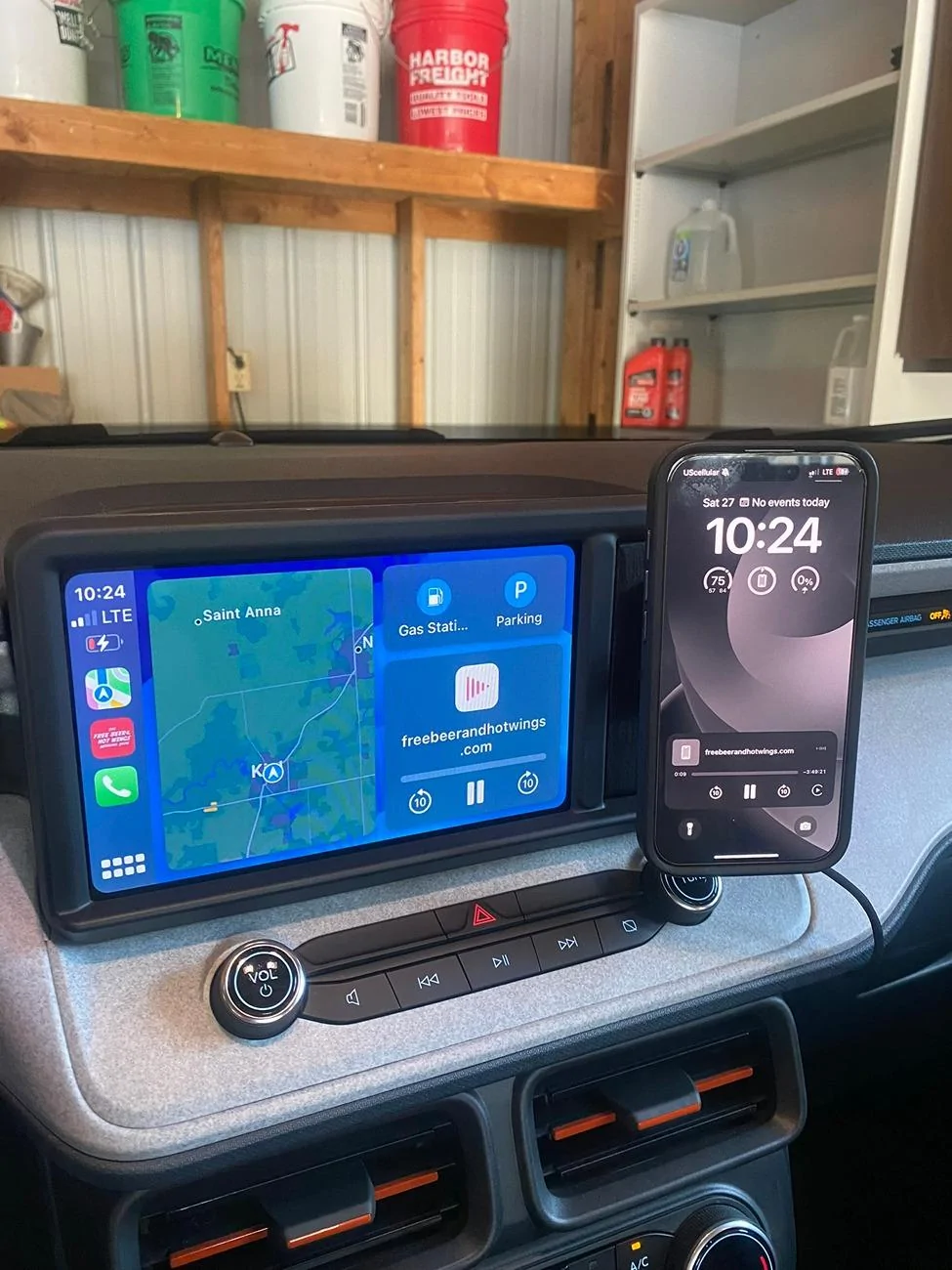
I'd been looking for a use for the cubby in the Maverick and nothing stood out. I saw a lot of different phone mounts people sold for in the cubbies but I thought a lot of them looked a little too gawdy, so I came up with something of my own.

For starters, I'm aware that there are much more viable solutions, and many more talented people have created 3D-printed solutions that would work just as well. But I'm a noob at woodworking and I like learning and experimenting. I also just wanted to share to maybe inspire others to make something of their own and come up with something more elegant than what I did lol.

This write-up isn't iPhone specific but I have one so this is the route I ended up going. I found a charger at TJ Maxx for a whopping $8 that charges with magsafe. It works great but it's ugly and sticks out into my space way too much. It has a ball adapter on the back of the charger unit so it works perfectly for what I planned to do, and if you ended up going this route that's what you'd need as well, something with a ball adapter and connector for the backside of this unit.
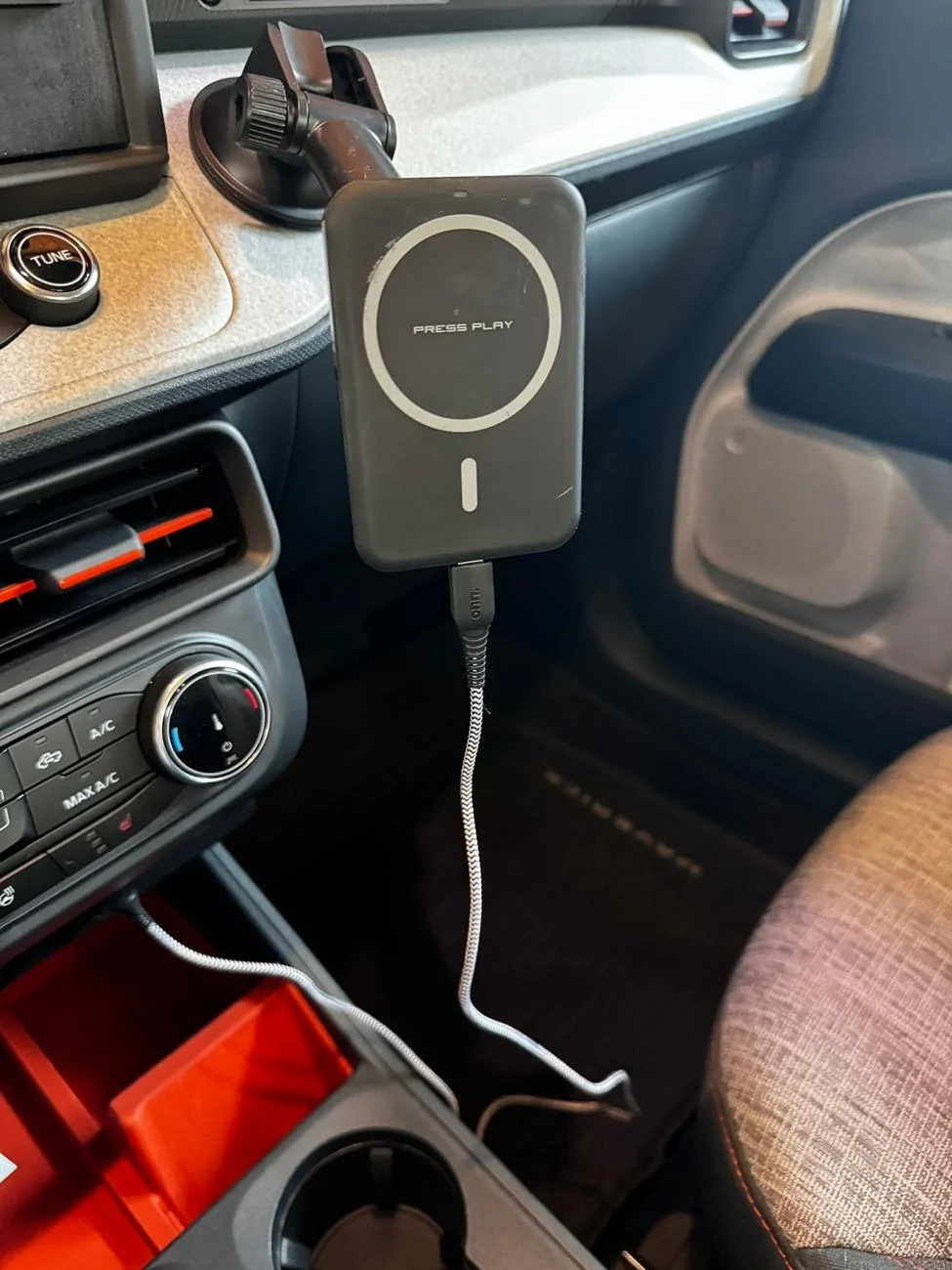
Ford Maverick DIY Wood + 3D Printed Cubby Phone Mount IMG_9156


A quick google search for something to fill the cubby with brought me to this Etsy page:

https://www.etsy.com/listing/1492710733/the-cubby-cup-ford-maverick-22232425

A 3D printed "cubby cup" that fits perfectly in the cubby. I've seen users post their own creations and have seen many online but I wanted something simple. So I bought one with a flat face and no frills from the US seller above and couldn't be happier. But I didn't like how sunk-in it looked and I felt that mounting a phone mount directly to the cup would result in the phone being too close to the dash and not allow for much rotation. And if I got something with an arm that extends out, then I wouldn't be able to make it as flush as possible and like it "belongs" on the dash. I also didn't like the idea of drilling too many holes in the 3D-printed cup, because I wasn't sure how fragile it would be and I didn't want to compromise it's structural integrity.

While I was experimenting with what I wanted to use to attach to the cubby cup, I took measurements of the "ball" on the end of my existing phone mount and looked around for a fixed mount I could use, and ended up finding this:

https://www.amazon.com/dp/B0CTM1DHNK
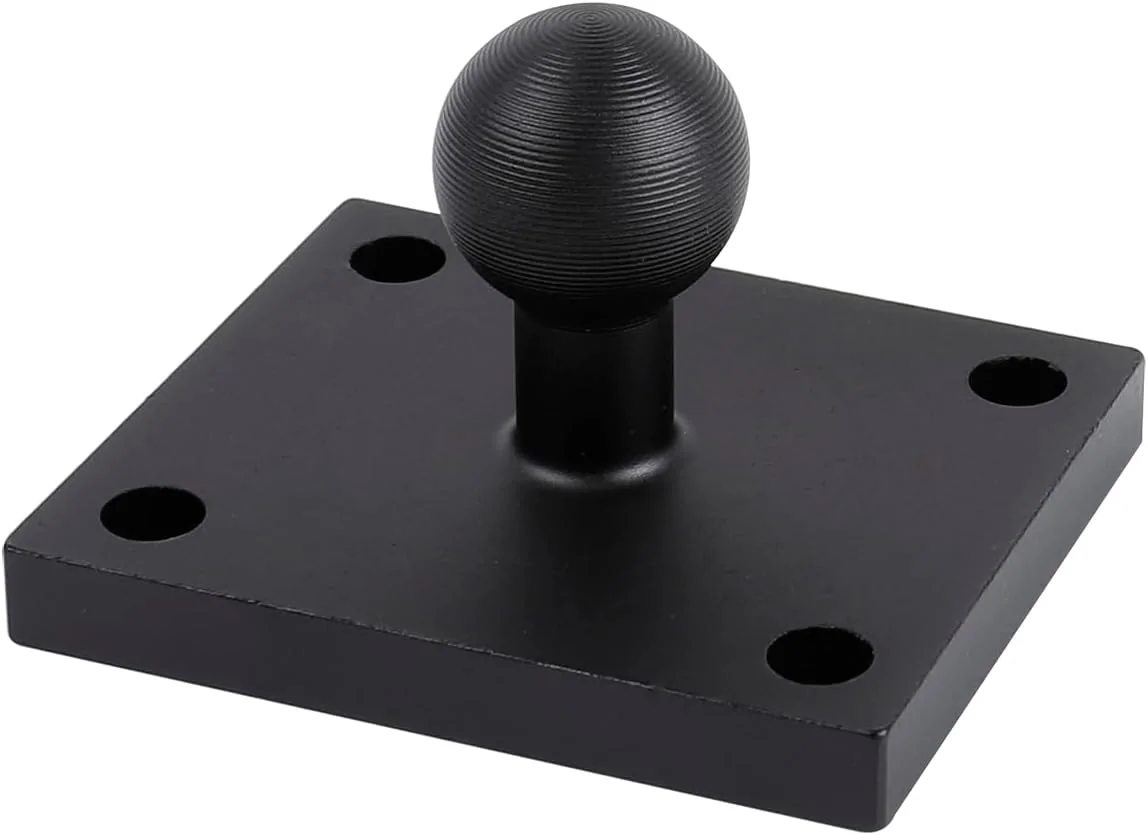
Ford Maverick DIY Wood + 3D Printed Cubby Phone Mount 512dsO0J+JL._AC_SL1500_


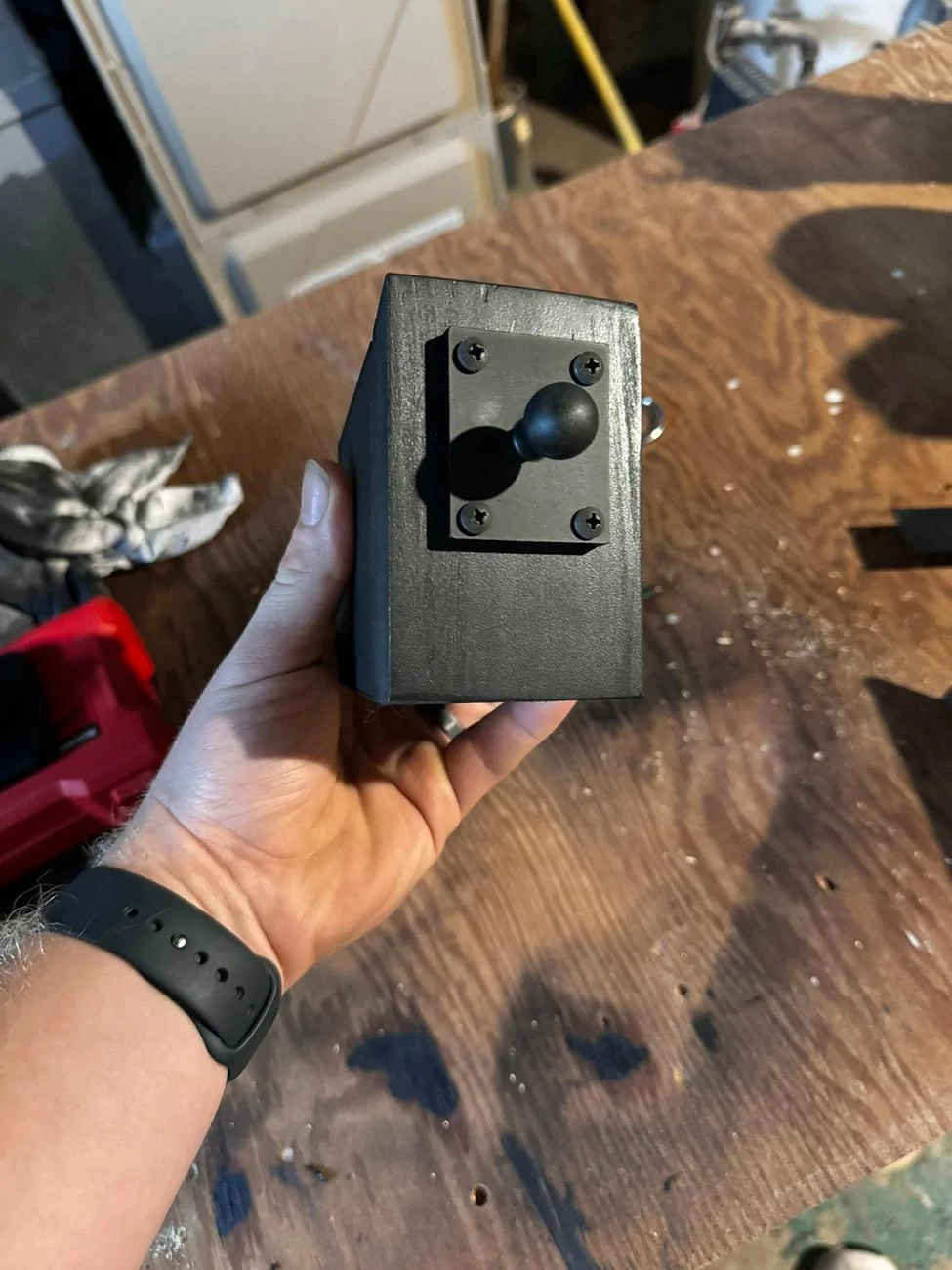
It's an aluminum ball adapter with a 17mm ball (which is exactly what my existing ball is) and is originally meant for Garmin GPSs, but works perfectly for what I needed it to do. I decided I would go with this to mount the Magsafe charger to.

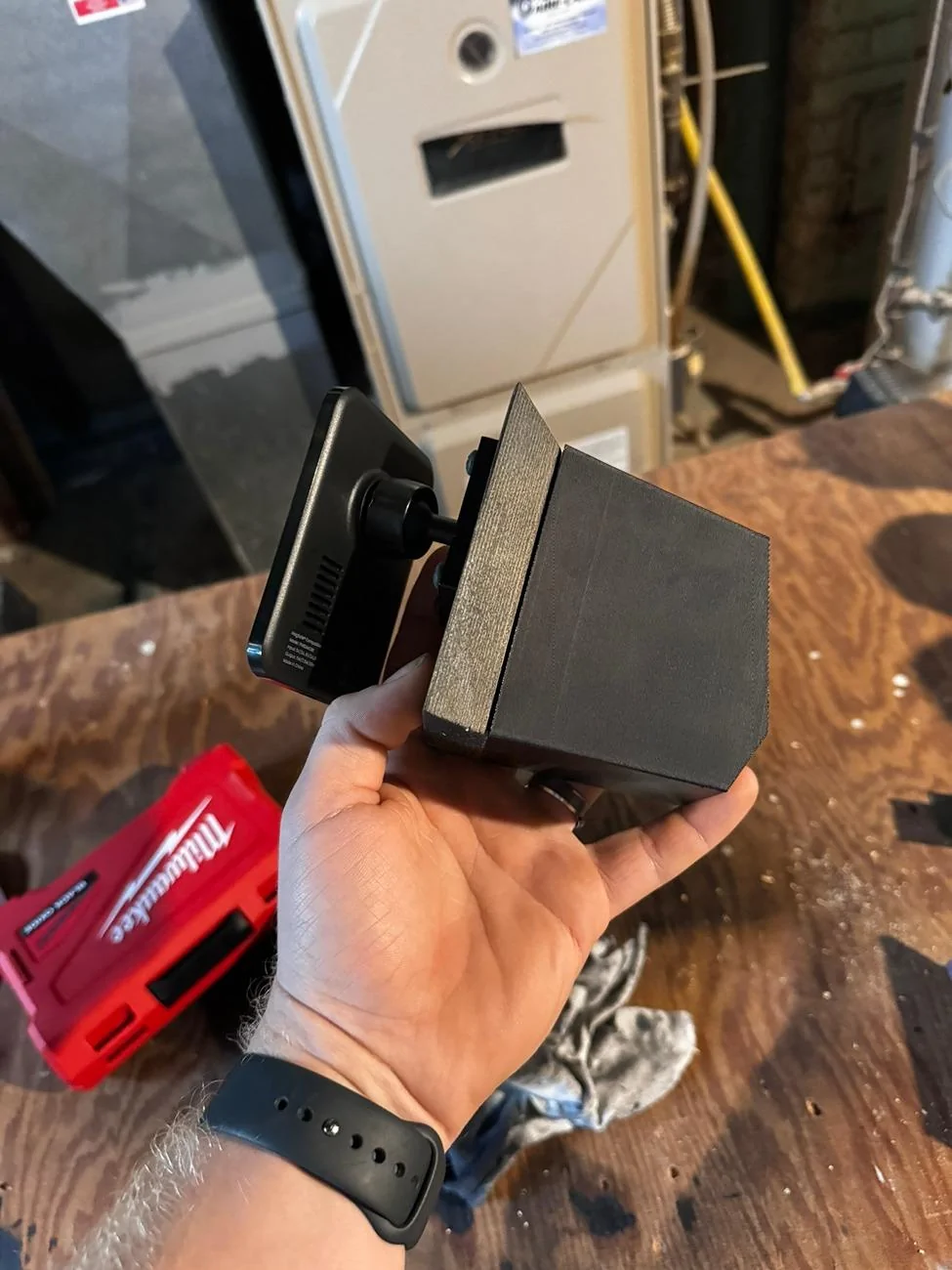
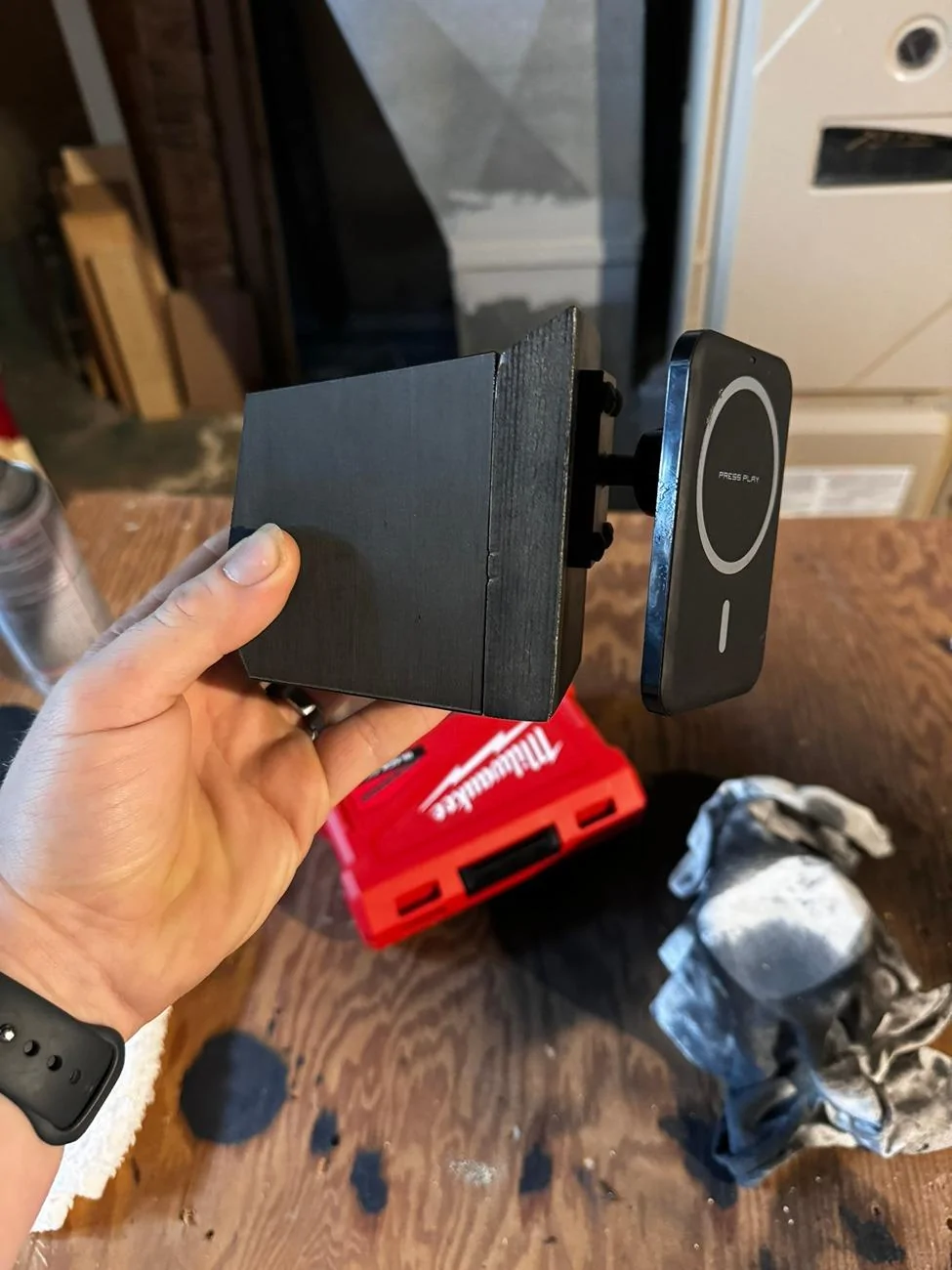
I found a piece of 3/4" pine laying around at work and took measurements of the space that was left in the cubby, and I worked out how I could miter the sides so that it would sit against the cubby cup and end up coming out flush with the plastic bezel for the radio. This is what I ended up cutting, using a miter saw to cut length and width and a table saw for the miters:
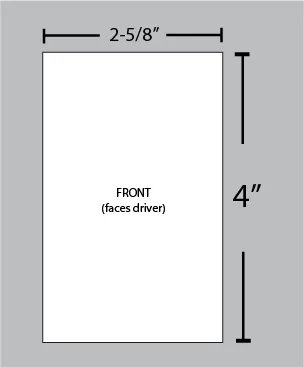
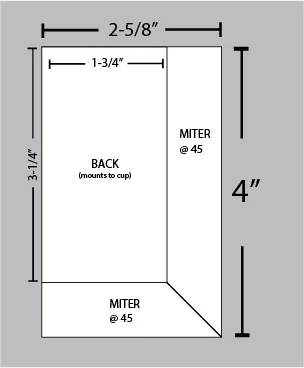
Ford Maverick DIY Wood + 3D Printed Cubby Phone Mount Asset 5-100


Ford Maverick DIY Wood + 3D Printed Cubby Phone Mount Asset 6-100


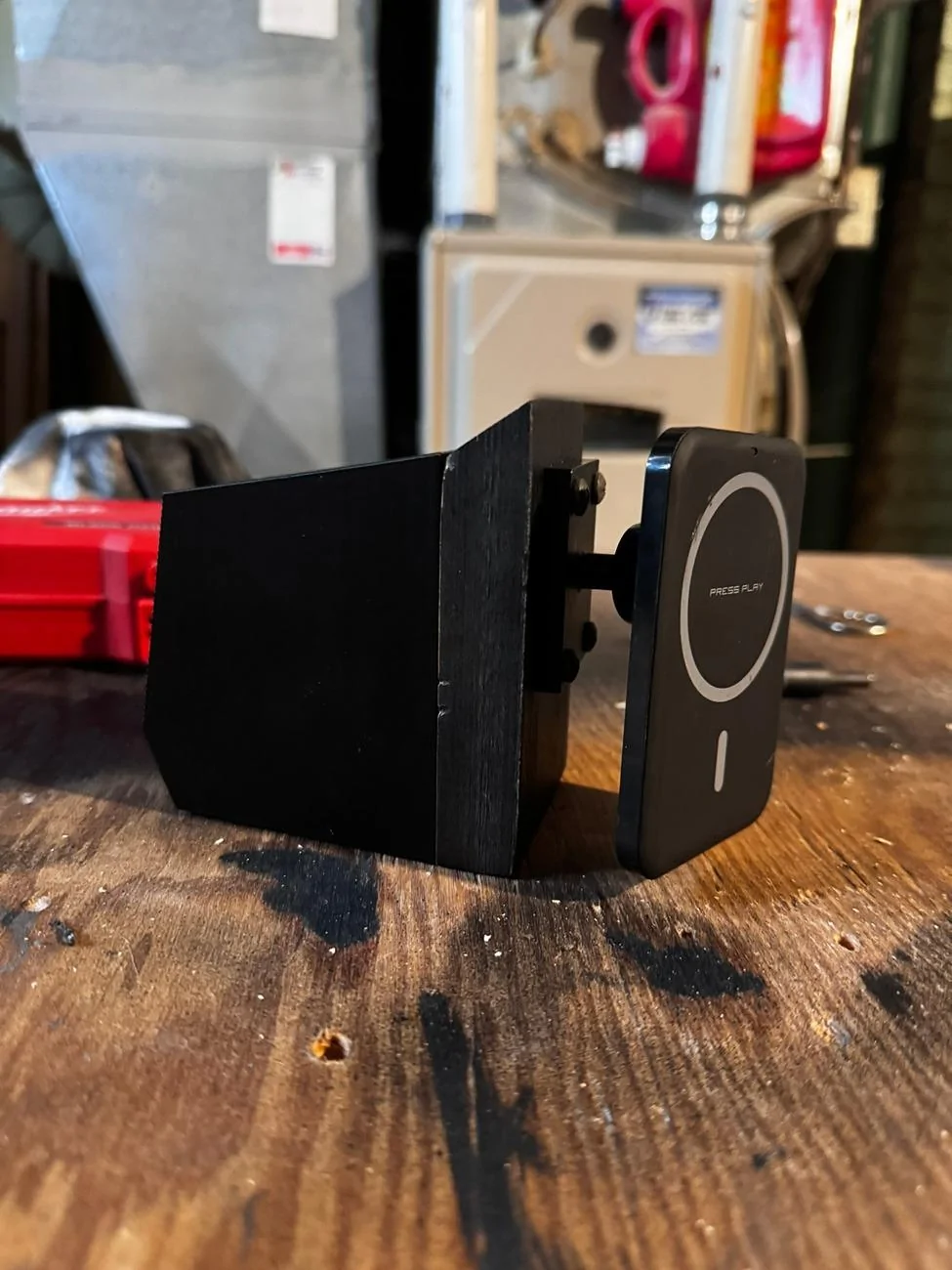
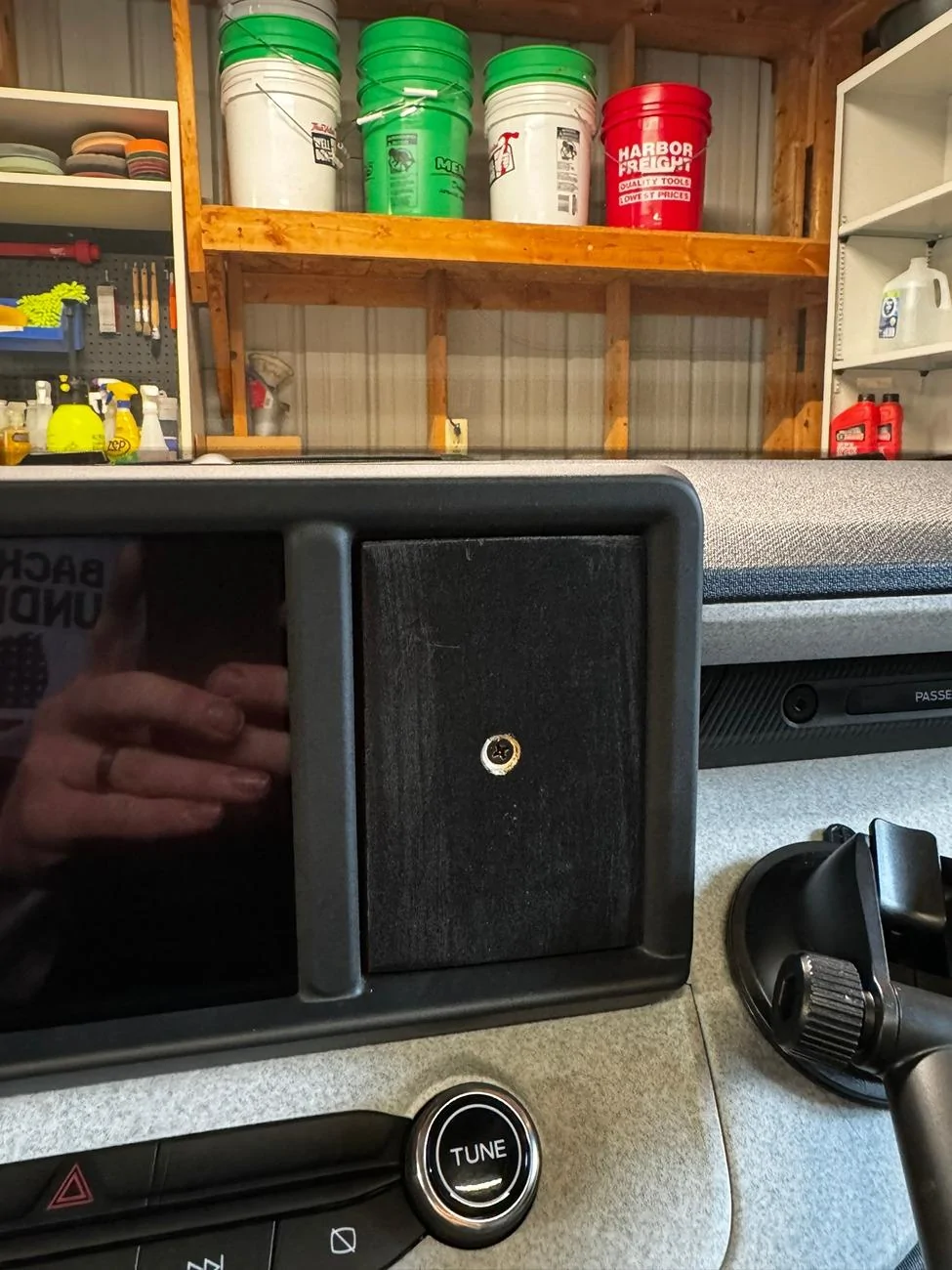
I decided I was fine with it not being perfect in regards to being exact measurements, then sanded it, painted it black and pre-drilled through the wood into the cup, and fastened it with an 8-32 counter-sunk machine screw and a nylon lock nut. I then used four #8 x 3/4" screws to fasten the adapter to the wood and it looked like this:
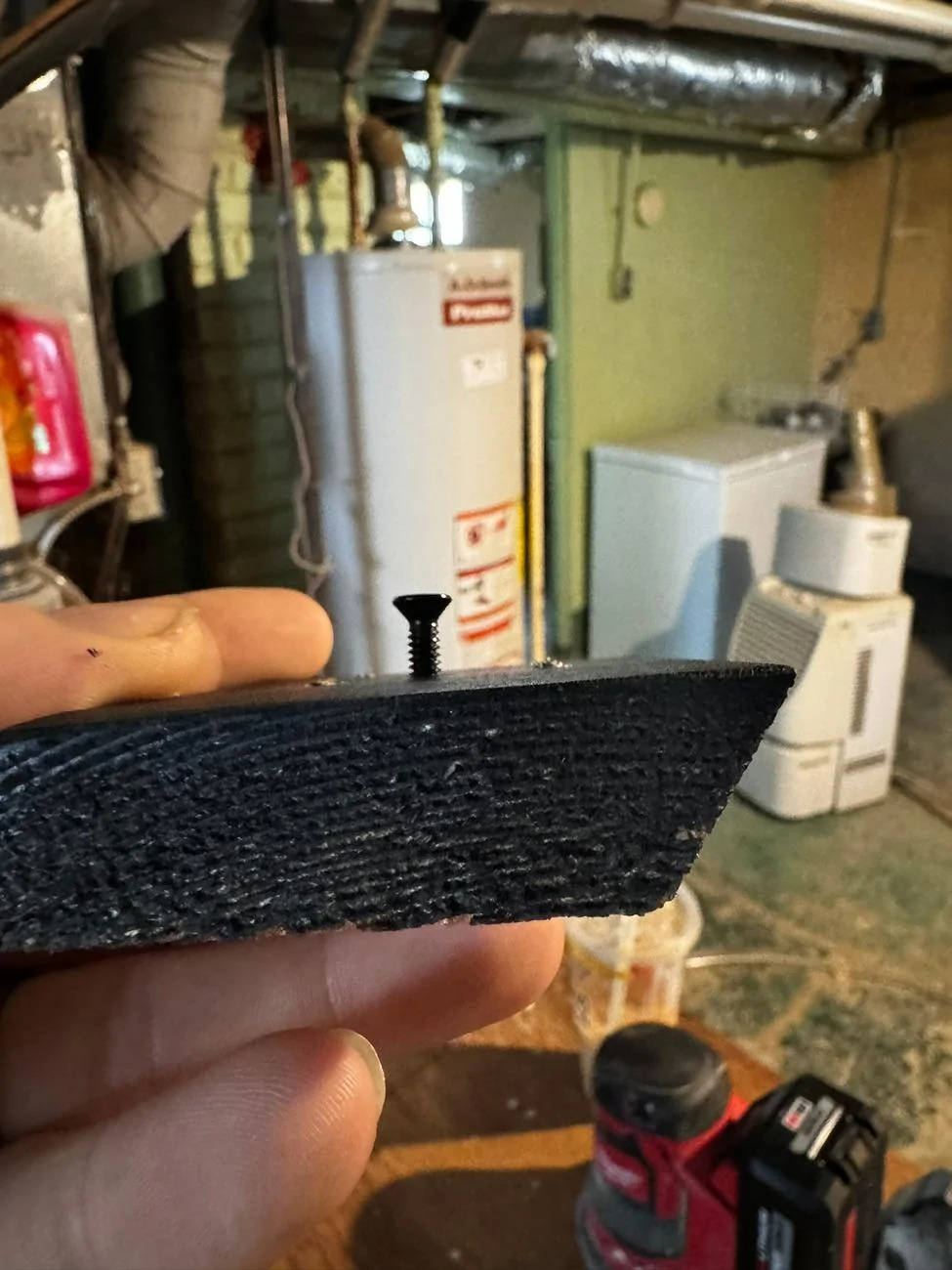
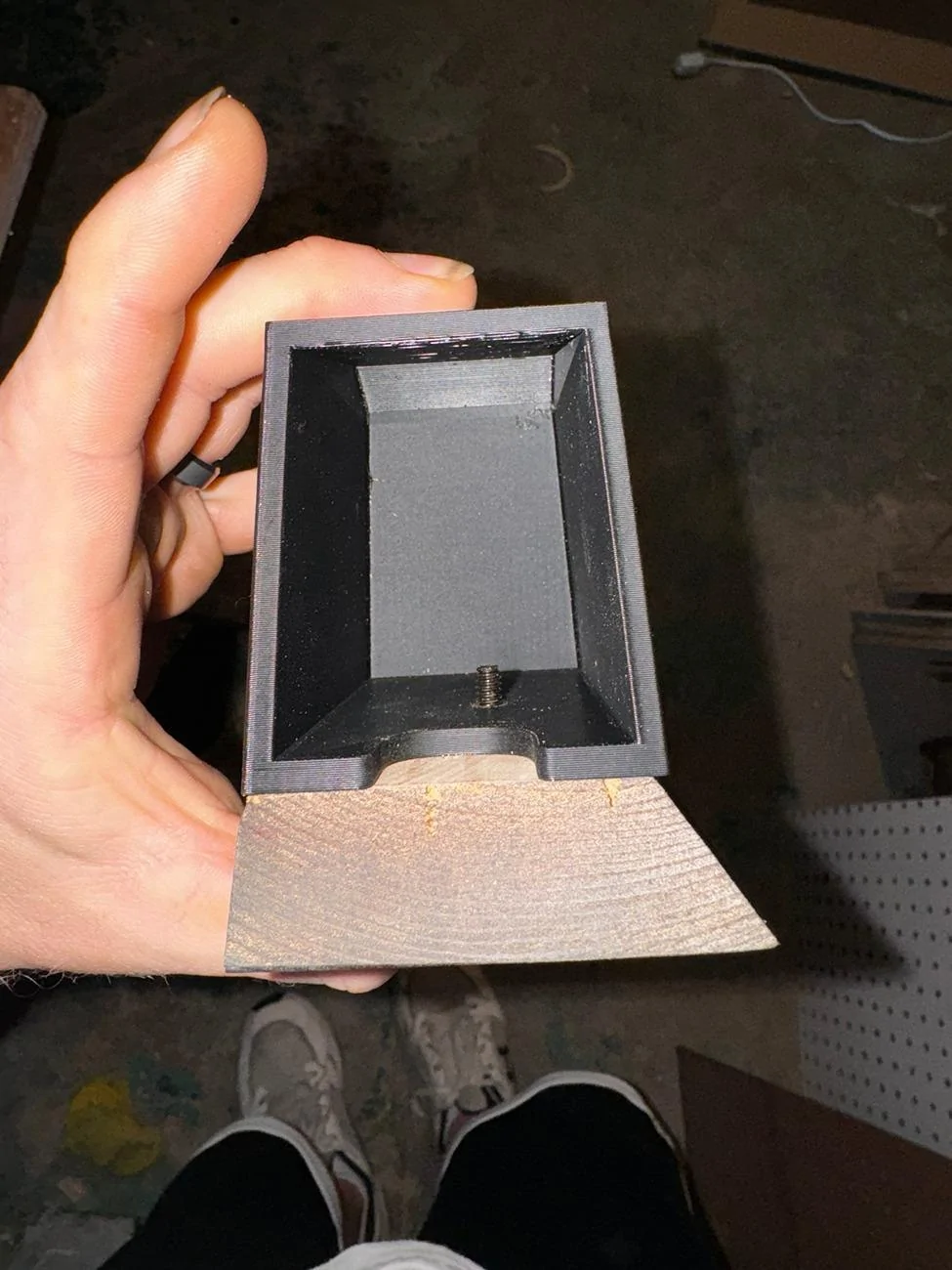
Ford Maverick DIY Wood + 3D Printed Cubby Phone Mount IMG_9148


Ford Maverick DIY Wood + 3D Printed Cubby Phone Mount IMG_9150


Ford Maverick DIY Wood + 3D Printed Cubby Phone Mount IMG_9136


Ford Maverick DIY Wood + 3D Printed Cubby Phone Mount IMG_9140


I wanted to use more than one screw to fasten the wood to the cubby cup, but I liked that the counter-sunk screw ended up being concealed behind the plate and I didn't want to put too many holes into the cup. If I did this again (which I likely will), I would try to find screws that look like the hex screws that Ford used all over the interior for the adapter to give it more of a matching aesthetic. I would also use a different wood, something with more grain to it that will absorb paint/stain better, or maybe just omit the 3D cup altogether and cut my own full piece of wood that slides in.

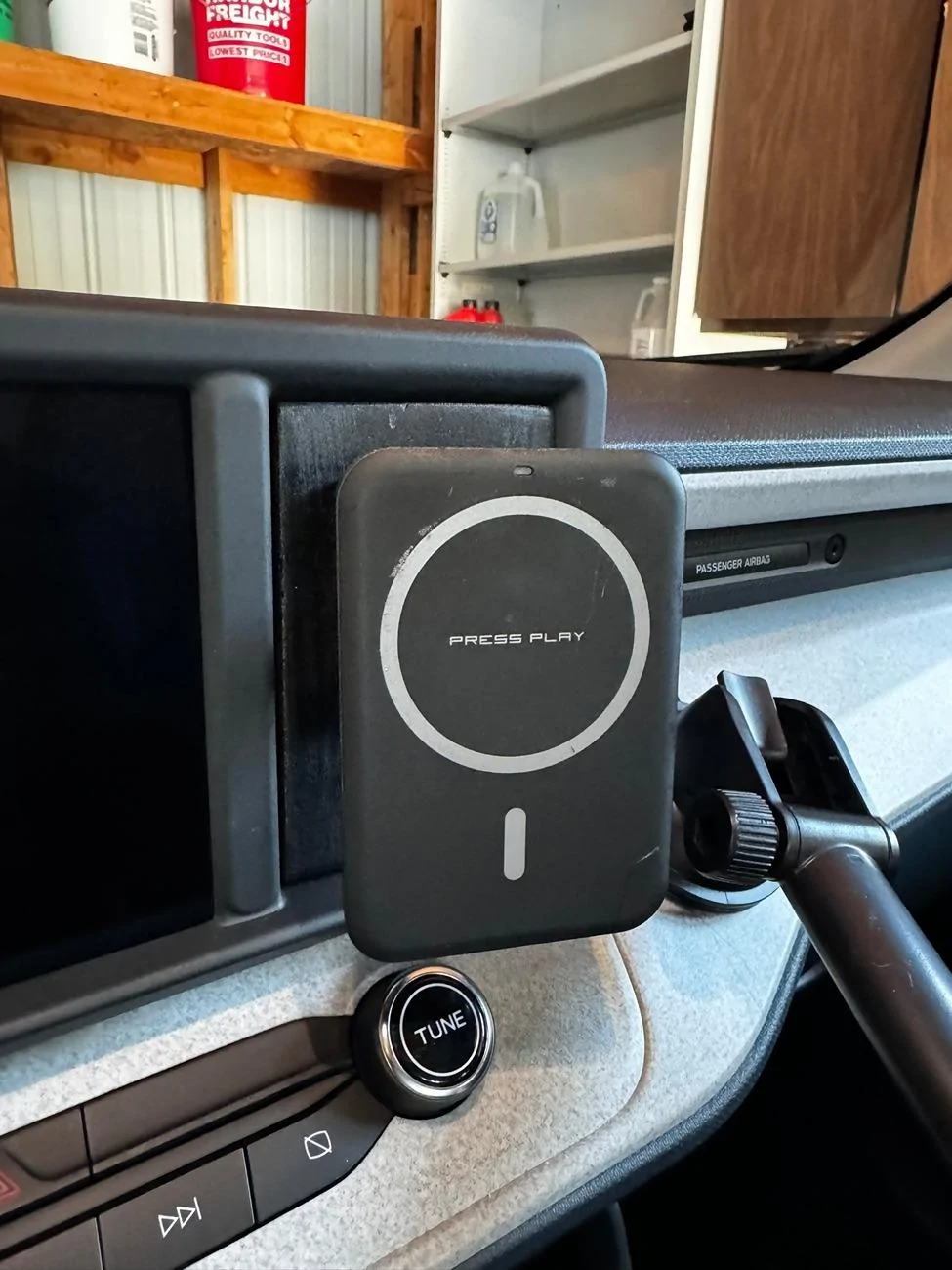
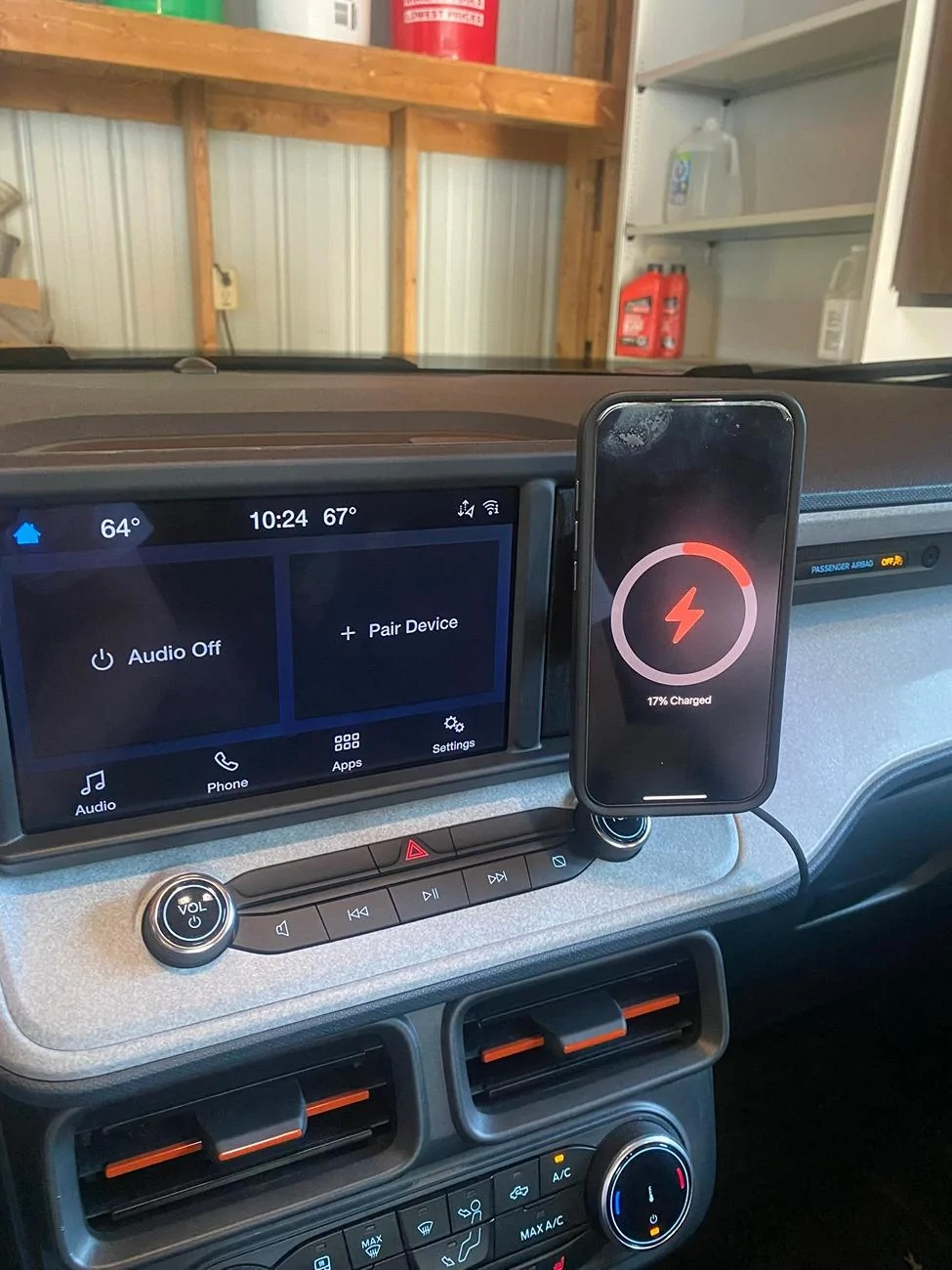
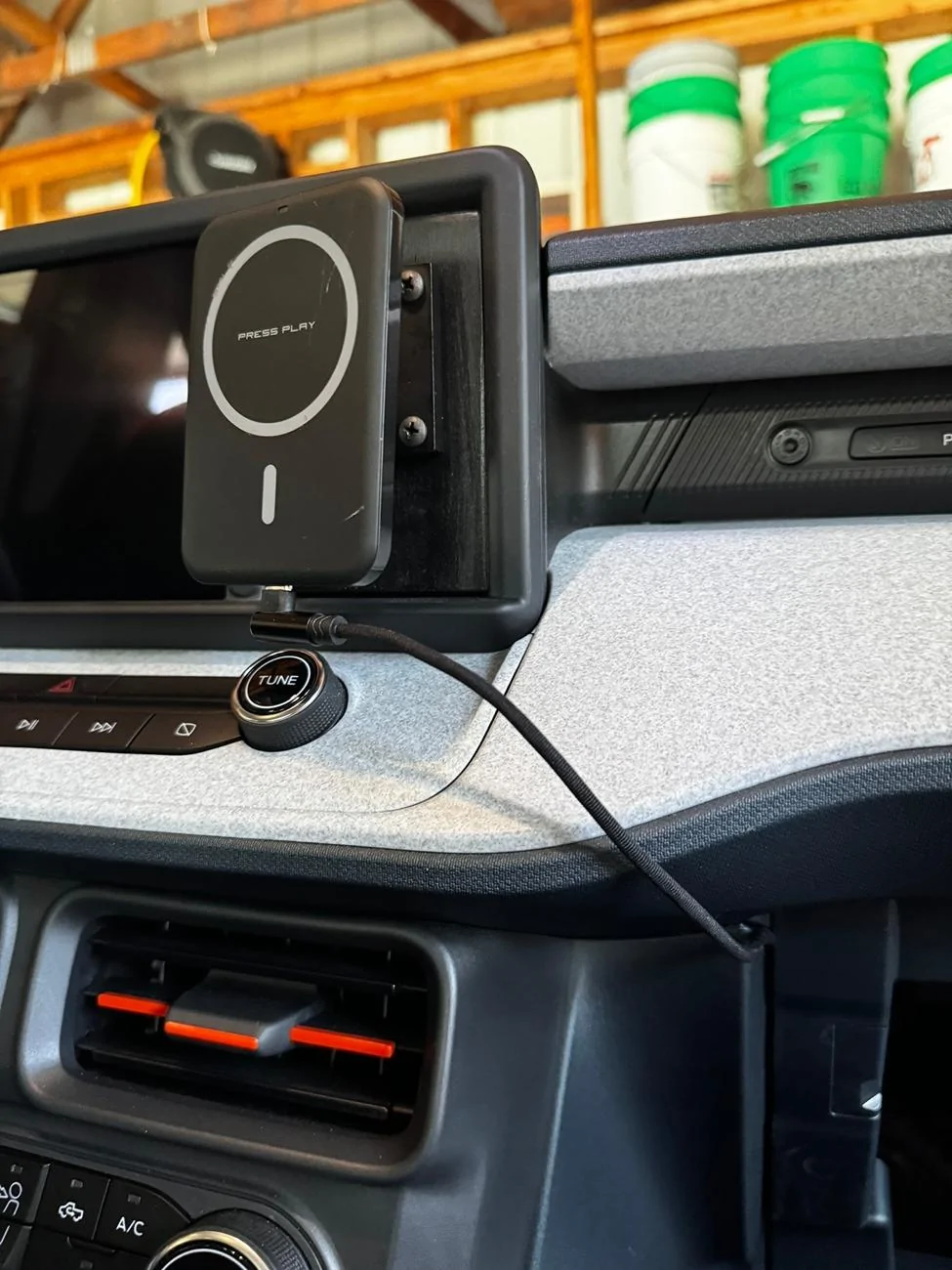
Final result:

Ford Maverick DIY Wood + 3D Printed Cubby Phone Mount IMG_9137


Ford Maverick DIY Wood + 3D Printed Cubby Phone Mount IMG_9138


Ford Maverick DIY Wood + 3D Printed Cubby Phone Mount IMG_9139


Ford Maverick DIY Wood + 3D Printed Cubby Phone Mount IMG_9158


Ford Maverick DIY Wood + 3D Printed Cubby Phone Mount IMG_9159


I wish I would have taken more pictures, but I hadn't thought of the idea of doing a write-up or thinking that anyone might care until I was almost done lol.

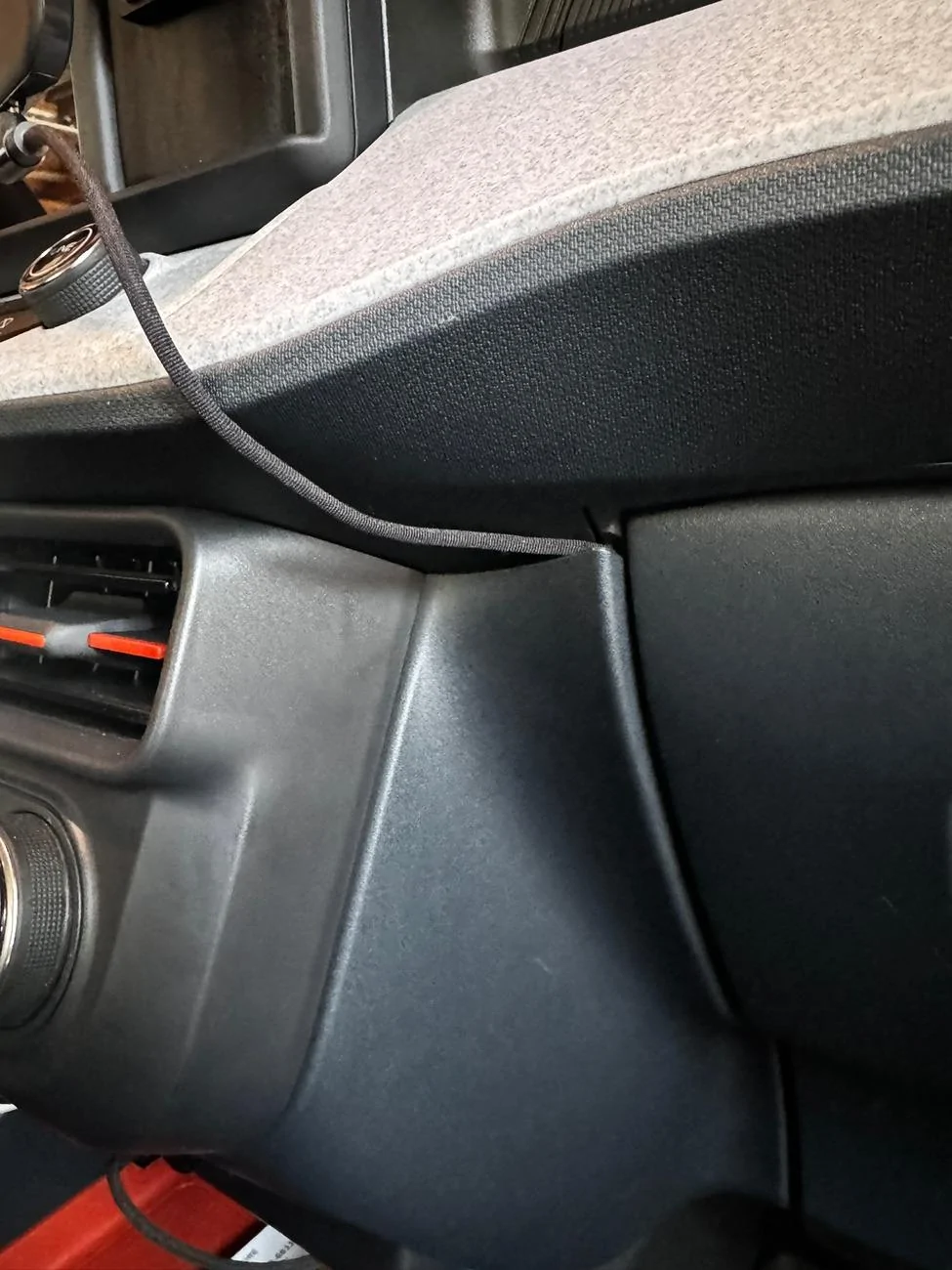
I took it one step further and experimented with tucking the wire that connects to the magsafe charger. Since the charger ends up coming close to the Tune knob and doesn't give much in the way of wiggle room for a straight cable, I opted to go with a right angle USB C cable I had laying around and tucked it into the dash.

Ford Maverick DIY Wood + 3D Printed Cubby Phone Mount IMG_9160


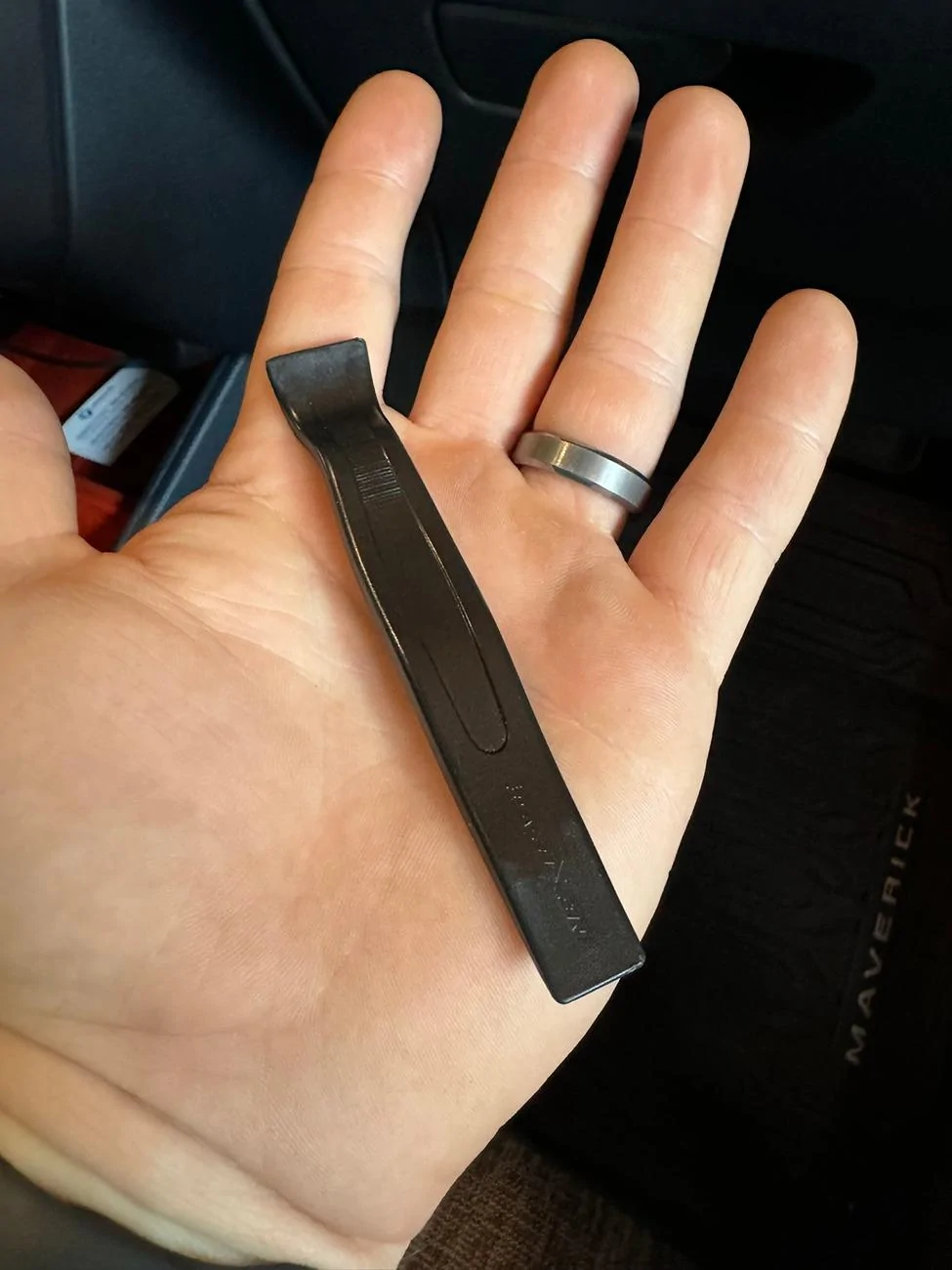
In order to achieve this, I needed to use a spudger tool that came with my Garmin dash cam to pry away at the plastic down the passenger side of the AC controls and the crevice between that and the glove box.

Ford Maverick DIY Wood + 3D Printed Cubby Phone Mount IMG_9167


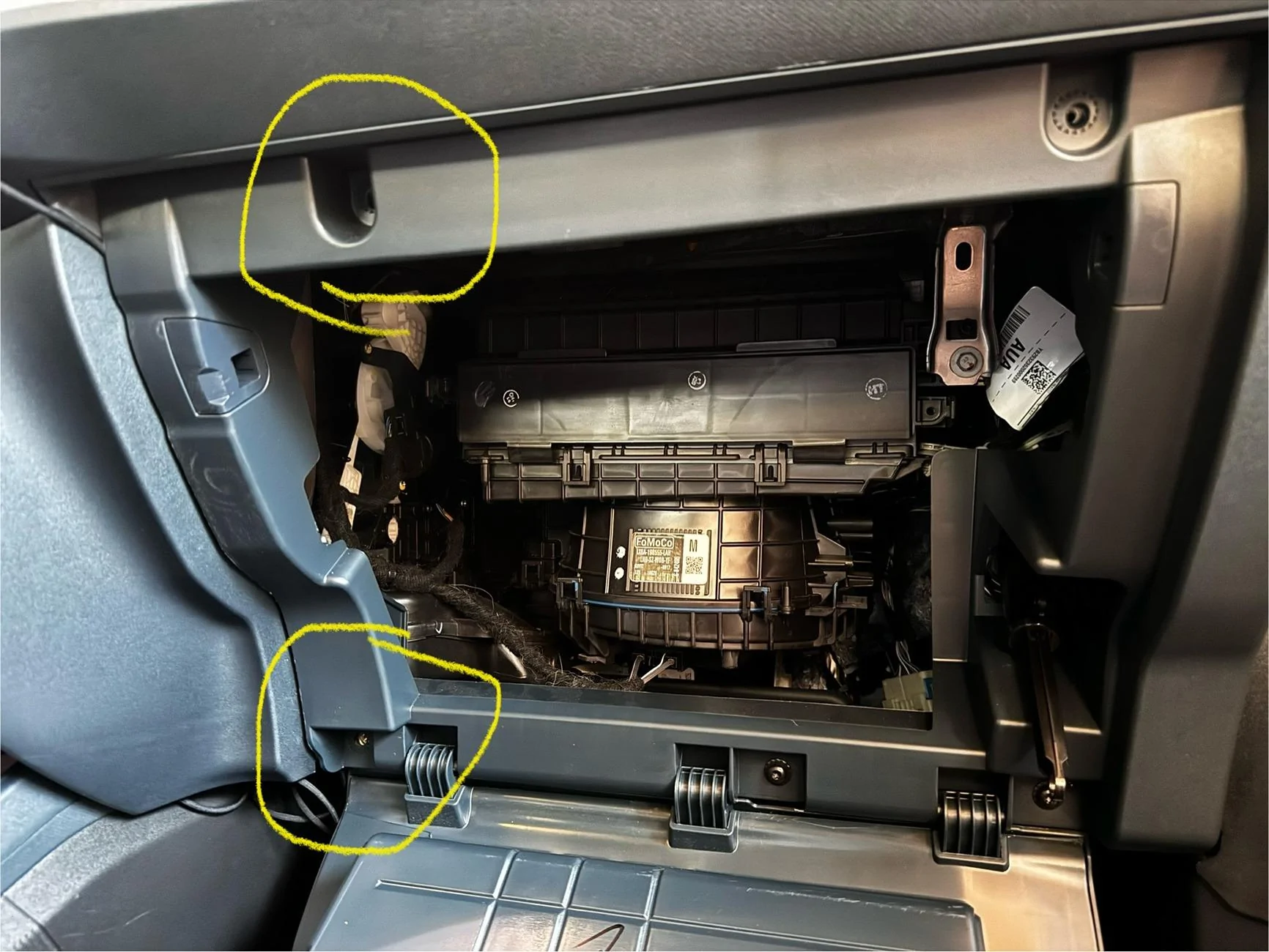
I had to remove these two screws from the glove box after I dropped it down, in order to give me enough flexibility in the plastic piece directly to the left, but then I just snaked the cable from underneath up through it and forced it in with the end of the spudger. The bolts holding this piece in are Torx T-25.

Ford Maverick DIY Wood + 3D Printed Cubby Phone Mount IMG_9162


Ford Maverick DIY Wood + 3D Printed Cubby Phone Mount IMG_9165


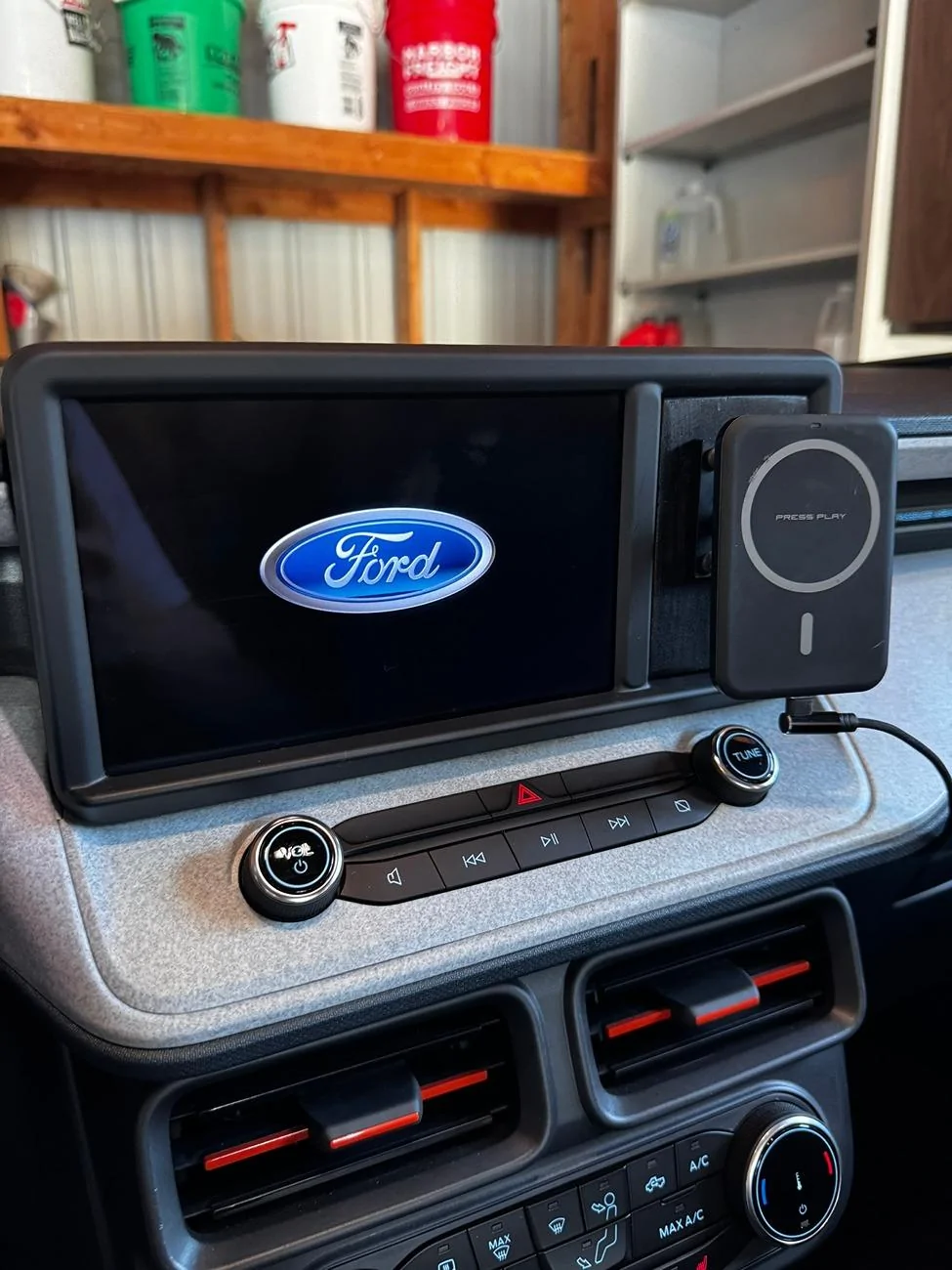
And now it's done, and I am satisfied (until I finish my plan for what I'd do differently).

Ford Maverick DIY Wood + 3D Printed Cubby Phone Mount IMG_9170


Ford Maverick DIY Wood + 3D Printed Cubby Phone Mount IMG_7580


Ford Maverick DIY Wood + 3D Printed Cubby Phone Mount IMG_7582


I took the truck for a drive and the cup stays in the cubby without an issue. The cup itself seems to push itself "down" just a bit with the weight of the wood and phone on the end, and so it seems to lodge itself ever so slightly against the ridge inside the cubby where the rubber fill-in piece used to sit, so it works out nicely. What I like about this is that the cup is still fully functional, and you could stow away anything you'd like in there (as Adam Sandler would say, "you can put your weed in there").

Total list of materials:

-Magsafe charger ($8 at TJ Maxx)
-Cubby Cup ($22 at the time on Etsy)
-17mm ball adapter ($10 at the time on Amazon)
-(1) 8-32 x 1-1/4" counter-sunk machine screw ($.50 at local Ace Hardware)
-(1) 8-32 nylock nut ($.50 at local Ace Hardware)
-(1) 1/8" drill bit
-(1) 3/16" drill bit
-(1) drill with phillips bit
-(1) piece of 3/4" pine wood
-(1) can of satin spray paint
-(4) #8 x 3/4" pan-head Phillips screws

Because I had some of my materials at the house and from work already, this project cost me $41 plus tax and about 3 hours of my time total, not including time spent waiting for paint to dry. If you would need paint, more screws, drill bits and wood, this could easily run you $50-65, more if you don't have the tools.

Hopefully this helps someone else with an idea they might have to make something cooler than this!
Sponsored

 
Last edited:

Montana

2.0L EcoBoost
Banned
Banned
Joined
Jun 13, 2023
Threads
24
Messages
4,094
Reaction score
6,347
Location
USA
Vehicle(s)
.
Engine
2.0L EcoBoost
I mounted a similar way with a RHINO mount inside the cubby and routed the cable through the back behind the dash entirely. With your setup, you could drill a small hole in the wood at the bottom and a small hole in the back of the cubby to route the cable that way. I also drilled a small hole, not visible unless you bend over and look from underneath, just above the USB ports for the cable to connect.
 

Jeff W8

2.5L Hybrid
Well-known member
First Name
Jeff
Joined
May 14, 2024
Threads
5
Messages
91
Reaction score
176
Location
Western Washington
Vehicle(s)
2023 Ford Maverick Lariat Hybrid
Engine
2.5L Hybrid
A MagSafe wireless charger is fantastic, and I did something like this too. Perfect way to use the cubby, I think. Nice looking phone mount 🙂
 

Eggflipper

2.0L EcoBoost
Well-known member
First Name
Gene
Joined
Mar 19, 2024
Threads
15
Messages
221
Reaction score
471
Location
Massachusetts
Vehicle(s)
2024 XLT TERRAIN
Engine
2.0L EcoBoost
Nice job. I wouldn’t have done it differently. Exactly what I would have done.
 

Sponsored

Kgassert

2.5L Hybrid
Member
First Name
Kevin
Joined
Dec 21, 2023
Threads
0
Messages
22
Reaction score
27
Location
Cincinnati
Vehicle(s)
2023 XLT
Engine
2.5L Hybrid
I am curious my folks mount the phone up there when the info is displayed on the screen. What is the advantage?
 

Jeff W8

2.5L Hybrid
Well-known member
First Name
Jeff
Joined
May 14, 2024
Threads
5
Messages
91
Reaction score
176
Location
Western Washington
Vehicle(s)
2023 Ford Maverick Lariat Hybrid
Engine
2.5L Hybrid
I am curious my folks mount the phone up there when the info is displayed on the screen. What is the advantage?
For me, seeing notifications and easier access when I'm stopped.
 

Jeff W8

2.5L Hybrid
Well-known member
First Name
Jeff
Joined
May 14, 2024
Threads
5
Messages
91
Reaction score
176
Location
Western Washington
Vehicle(s)
2023 Ford Maverick Lariat Hybrid
Engine
2.5L Hybrid
Ok, you don’t get notifications on your screen?
I don't get most of the notifications on the Mav screen due to using non-standard apps. Also, the notifications I do see on the Mav screen show almost nothing but the app and maybe another minor detail. I don't want to click through to see it either, which I don't have to do on my phone. Maybe it's an Apple CarPlay issue?
 

Kgassert

2.5L Hybrid
Member
First Name
Kevin
Joined
Dec 21, 2023
Threads
0
Messages
22
Reaction score
27
Location
Cincinnati
Vehicle(s)
2023 XLT
Engine
2.5L Hybrid
I don't get most of the notifications on the Mav screen due to using non-standard apps. Also, the notifications I do see on the Mav screen show almost nothing but the app and maybe another minor detail. I don't want to click through to see it either, which I don't have to do on my phone. Maybe it's an Apple CarPlay issue?
Ok, I don’t do anything fancy. Just android auto, Waze and I Heart radio. I very seldom have any reason to remove the phone from my pocket.
 
Sponsored

lonewoof

2.5L Hybrid
Well-known member
First Name
Rob
Joined
Apr 15, 2024
Threads
5
Messages
98
Reaction score
81
Location
94086
Vehicle(s)
2024 Maverick
Engine
2.5L Hybrid
Clubs
 
Nice nifty solution and use of the cubby. I love DIYers. Question on the wireless charger though:
1. I am an Android person
2. I have a XLT so no wireless Android Auto (AA) and no wireless charger
3. I installed a wireless adapter that uses Bluetooth I think to communicate with the dash system, so that works flawlessly
4. I installed a wireless coil charger (similar to this solution) and it charges my phone, but the wireless AA drains charge at a higher rate

Has anyone else gone through this or seen the same? Is it because
A. Apple Carplay is better than AA
OR
B. My wireless AA (and most on the market that use Bluetooth) sucks (literally sucks battery)
 
OP
OP
bikemendel

bikemendel

2.0L EcoBoost
Member
First Name
Mike
Joined
Dec 10, 2023
Threads
3
Messages
21
Reaction score
105
Location
Wisconsin, USA
Vehicle(s)
2024 Maverick XLT FX4
Engine
2.0L EcoBoost
That looks great. Thanks for the pics and write up.

If you wanted to wire it up differently, you might find inspiration from @DTF-Garage who took the dash tray (and more) apart, posted at https://www.mavericktruckclub.com/f...d-center-dash-removal-diy-how-to-video.22115/
I mounted a similar way with a RHINO mount inside the cubby and routed the cable through the back behind the dash entirely. With your setup, you could drill a small hole in the wood at the bottom and a small hole in the back of the cubby to route the cable that way. I also drilled a small hole, not visible unless you bend over and look from underneath, just above the USB ports for the cable to connect.
I had considered drilling a hole but wasn’t sure about how easily the screen and bezel came out. Once I put some more miles on it and find a reason to start another project I may just do that.


I am curious my folks mount the phone up there when the info is displayed on the screen. What is the advantage?
The main advantage is because CarPlay only shows me when I have calendar reminders and text messages. But it won’t let me read the text message. It just says “Message from [blank]” or something along those lines. So if I want to know what is said, I have to either grab my phone and stare at it long enough for FaceID to recognize my face (very dangerous while driving), or there is a setting in CarPlay to allow Siri to read my messages out loud. I don’t like that for three reasons:

For one, it interrupts what I’m listening to. Secondly, my family likes to send me Instagram reels through text because I don’t use the Instagram app, and Siri will read the ENTIRE description of the video (including hashtags) and she will go on for over a minute, almost two minutes in some cases. Thirdly it’s a privacy thing for me. If my windows are open and my volume is up, I dont think everyone at the stop light wants to know that my dog had diarrhea lol.

But, my point is that with the way I have the mount placed, the face recognition will recognize me without having to hold the phone because it’s aimed at my face. All I have to do is give it one tap to wake it up and I can see everything on the Lock Screen, including texts or emails that came through. That way I don’t have to touch the phone much if at all, and just give a quick glance.

I think the correct solution would be for CarPlay to allow me to read the text on the truck’s screen. They let me type in addresses while I’m driving and that’s far more distracting.


Nice nifty solution and use of the cubby. I love DIYers. Question on the wireless charger though:
1. I am an Android person
2. I have a XLT so no wireless Android Auto (AA) and no wireless charger
3. I installed a wireless adapter that uses Bluetooth I think to communicate with the dash system, so that works flawlessly
4. I installed a wireless coil charger (similar to this solution) and it charges my phone, but the wireless AA drains charge at a higher rate

Has anyone else gone through this or seen the same? Is it because
A. Apple Carplay is better than AA
OR
B. My wireless AA (and most on the market that use Bluetooth) sucks (literally sucks battery)
I haven’t had Android for a while but I always had issues getting Android Auto to work properly in my Golf. I went through 5+ cables and had issues with Spotify and Maps all the time. I never used AA wirelessly though.

My guess would be that because the phone is constantly sending data to another device it’s just eating battery. It could be that Apple has better optimization and limitations on what data is being sent so that it can send less and not use as much battery, but I know that my phone drains slightly faster if I’m not charging it and using CarPlay too.
 

lonewoof

2.5L Hybrid
Well-known member
First Name
Rob
Joined
Apr 15, 2024
Threads
5
Messages
98
Reaction score
81
Location
94086
Vehicle(s)
2024 Maverick
Engine
2.5L Hybrid
Clubs
 
I haven’t had Android for a while but I always had issues getting Android Auto to work properly in my Golf. I went through 5+ cables and had issues with Spotify and Maps all the time. I never used AA wirelessly though.

My guess would be that because the phone is constantly sending data to another device it’s just eating battery. It could be that Apple has better optimization and limitations on what data is being sent so that it can send less and not use as much battery, but I know that my phone drains slightly faster if I’m not charging it and using CarPlay too.
Yeah that's what I figured. But you're saying with wireless Carplay you're able to charge your phone wirelessly, right?
 

Dad

2.5L Hybrid
Well-known member
First Name
Tom
Joined
Jan 9, 2022
Threads
58
Messages
5,307
Reaction score
5,692
Location
SoCal
Vehicle(s)
2022 Maverick, - Lariat, Hyundai Palisade
Engine
2.5L Hybrid
I'd been looking for a use for the cubby in the Maverick and nothing stood out. I saw a lot of different phone mounts people sold for in the cubbies but I thought a lot of them looked a little too gawdy, so I came up with something of my own.

For starters, I'm aware that there are much more viable solutions, and many more talented people have created 3D-printed solutions that would work just as well. But I'm a noob at woodworking and I like learning and experimenting. I also just wanted to share to maybe inspire others to make something of their own and come up with something more elegant than what I did lol.

This write-up isn't iPhone specific but I have one so this is the route I ended up going. I found a charger at TJ Maxx for a whopping $8 that charges with magsafe. It works great but it's ugly and sticks out into my space way too much. It has a ball adapter on the back of the charger unit so it works perfectly for what I planned to do, and if you ended up going this route that's what you'd need as well, something with a ball adapter and connector for the backside of this unit.

IMG_9156.JPEG


A quick google search for something to fill the cubby with brought me to this Etsy page:

https://www.etsy.com/listing/1492710733/the-cubby-cup-ford-maverick-22232425

A 3D printed "cubby cup" that fits perfectly in the cubby. I've seen users post their own creations and have seen many online but I wanted something simple. So I bought one with a flat face and no frills from the US seller above and couldn't be happier. But I didn't like how sunk-in it looked and I felt that mounting a phone mount directly to the cup would result in the phone being too close to the dash and not allow for much rotation. And if I got something with an arm that extends out, then I wouldn't be able to make it as flush as possible and like it "belongs" on the dash. I also didn't like the idea of drilling too many holes in the 3D-printed cup, because I wasn't sure how fragile it would be and I didn't want to compromise it's structural integrity.

While I was experimenting with what I wanted to use to attach to the cubby cup, I took measurements of the "ball" on the end of my existing phone mount and looked around for a fixed mount I could use, and ended up finding this:

https://www.amazon.com/dp/B0CTM1DHNK

512dsO0J+JL._AC_SL1500_.jpg


It's an aluminum ball adapter with a 17mm ball (which is exactly what my existing ball is) and is originally meant for Garmin GPSs, but works perfectly for what I needed it to do. I decided I would go with this to mount the Magsafe charger to.

I found a piece of 3/4" pine laying around at work and took measurements of the space that was left in the cubby, and I worked out how I could miter the sides so that it would sit against the cubby cup and end up coming out flush with the plastic bezel for the radio. This is what I ended up cutting, using a miter saw to cut length and width and a table saw for the miters:

Asset 5-100.jpg


Asset 6-100.jpg


I decided I was fine with it not being perfect in regards to being exact measurements, then sanded it, painted it black and pre-drilled through the wood into the cup, and fastened it with an 8-32 counter-sunk machine screw and a nylon lock nut. I then used four #8 x 3/4" screws to fasten the adapter to the wood and it looked like this:
IMG_9148.JPEG


IMG_9150.JPEG


IMG_9136.JPEG


IMG_9140.JPEG


I wanted to use more than one screw to fasten the wood to the cubby cup, but I liked that the counter-sunk screw ended up being concealed behind the plate and I didn't want to put too many holes into the cup. If I did this again (which I likely will), I would try to find screws that look like the hex screws that Ford used all over the interior for the adapter to give it more of a matching aesthetic. I would also use a different wood, something with more grain to it that will absorb paint/stain better, or maybe just omit the 3D cup altogether and cut my own full piece of wood that slides in.

Final result:

IMG_9137.JPEG


IMG_9138.JPEG


IMG_9139.JPEG


IMG_9158.JPEG


IMG_9159.JPEG


I wish I would have taken more pictures, but I hadn't thought of the idea of doing a write-up or thinking that anyone might care until I was almost done lol.

I took it one step further and experimented with tucking the wire that connects to the magsafe charger. Since the charger ends up coming close to the Tune knob and doesn't give much in the way of wiggle room for a straight cable, I opted to go with a right angle USB C cable I had laying around and tucked it into the dash.

IMG_9160.JPEG


In order to achieve this, I needed to use a spudger tool that came with my Garmin dash cam to pry away at the plastic down the passenger side of the AC controls and the crevice between that and the glove box.

IMG_9167.JPEG


I had to remove these two screws from the glove box after I dropped it down, in order to give me enough flexibility in the plastic piece directly to the left, but then I just snaked the cable from underneath up through it and forced it in with the end of the spudger. The bolts holding this piece in are Torx T-25.

IMG_9162.JPEG


IMG_9165.JPEG


And now it's done, and I am satisfied (until I finish my plan for what I'd do differently).

IMG_9170.JPEG


IMG_7580.JPEG


IMG_7582.JPEG


I took the truck for a drive and the cup stays in the cubby without an issue. The cup itself seems to push itself "down" just a bit with the weight of the wood and phone on the end, and so it seems to lodge itself ever so slightly against the ridge inside the cubby where the rubber fill-in piece used to sit, so it works out nicely. What I like about this is that the cup is still fully functional, and you could stow away anything you'd like in there (as Adam Sandler would say, "you can put your weed in there").

Total list of materials:

-Magsafe charger ($8 at TJ Maxx)
-Cubby Cup ($22 at the time on Etsy)
-17mm ball adapter ($10 at the time on Amazon)
-(1) 8-32 x 1-1/4" counter-sunk machine screw ($.50 at local Ace Hardware)
-(1) 8-32 nylock nut ($.50 at local Ace Hardware)
-(1) 1/8" drill bit
-(1) 3/16" drill bit
-(1) drill with phillips bit
-(1) piece of 3/4" pine wood
-(1) can of satin spray paint
-(4) #8 x 3/4" pan-head Phillips screws

Because I had some of my materials at the house and from work already, this project cost me $41 plus tax and about 3 hours of my time total, not including time spent waiting for paint to dry. If you would need paint, more screws, drill bits and wood, this could easily run you $50-65, more if you don't have the tools.

Hopefully this helps someone else with an idea they might have to make something cooler than this!
Wow! Great post! Thank you for the time and effort you spent documenting your project. I'm thinking it may have taken longer than actually making and installing it.
 

Deweyordeweynot

2.5L Hybrid
Well-known member
First Name
Dewey
Joined
May 10, 2023
Threads
32
Messages
585
Reaction score
674
Location
Macomb, MI
Vehicle(s)
2024 XLT Oxford White / 2018 Subaru Forester
Engine
2.5L Hybrid
Clubs
 
I'd been looking for a use for the cubby in the Maverick and nothing stood out. I saw a lot of different phone mounts people sold for in the cubbies but I thought a lot of them looked a little too gawdy, so I came up with something of my own.

For starters, I'm aware that there are much more viable solutions, and many more talented people have created 3D-printed solutions that would work just as well. But I'm a noob at woodworking and I like learning and experimenting. I also just wanted to share to maybe inspire others to make something of their own and come up with something more elegant than what I did lol.

This write-up isn't iPhone specific but I have one so this is the route I ended up going. I found a charger at TJ Maxx for a whopping $8 that charges with magsafe. It works great but it's ugly and sticks out into my space way too much. It has a ball adapter on the back of the charger unit so it works perfectly for what I planned to do, and if you ended up going this route that's what you'd need as well, something with a ball adapter and connector for the backside of this unit.

IMG_9156.webp


A quick google search for something to fill the cubby with brought me to this Etsy page:

https://www.etsy.com/listing/1492710733/the-cubby-cup-ford-maverick-22232425

A 3D printed "cubby cup" that fits perfectly in the cubby. I've seen users post their own creations and have seen many online but I wanted something simple. So I bought one with a flat face and no frills from the US seller above and couldn't be happier. But I didn't like how sunk-in it looked and I felt that mounting a phone mount directly to the cup would result in the phone being too close to the dash and not allow for much rotation. And if I got something with an arm that extends out, then I wouldn't be able to make it as flush as possible and like it "belongs" on the dash. I also didn't like the idea of drilling too many holes in the 3D-printed cup, because I wasn't sure how fragile it would be and I didn't want to compromise it's structural integrity.

While I was experimenting with what I wanted to use to attach to the cubby cup, I took measurements of the "ball" on the end of my existing phone mount and looked around for a fixed mount I could use, and ended up finding this:

https://www.amazon.com/dp/B0CTM1DHNK

512dsO0J+JL._AC_SL1500_.webp


It's an aluminum ball adapter with a 17mm ball (which is exactly what my existing ball is) and is originally meant for Garmin GPSs, but works perfectly for what I needed it to do. I decided I would go with this to mount the Magsafe charger to.

I found a piece of 3/4" pine laying around at work and took measurements of the space that was left in the cubby, and I worked out how I could miter the sides so that it would sit against the cubby cup and end up coming out flush with the plastic bezel for the radio. This is what I ended up cutting, using a miter saw to cut length and width and a table saw for the miters:

Asset 5-100.webp


Asset 6-100.webp


I decided I was fine with it not being perfect in regards to being exact measurements, then sanded it, painted it black and pre-drilled through the wood into the cup, and fastened it with an 8-32 counter-sunk machine screw and a nylon lock nut. I then used four #8 x 3/4" screws to fasten the adapter to the wood and it looked like this:
IMG_9148.webp


IMG_9150.webp


IMG_9136.webp


IMG_9140.webp


I wanted to use more than one screw to fasten the wood to the cubby cup, but I liked that the counter-sunk screw ended up being concealed behind the plate and I didn't want to put too many holes into the cup. If I did this again (which I likely will), I would try to find screws that look like the hex screws that Ford used all over the interior for the adapter to give it more of a matching aesthetic. I would also use a different wood, something with more grain to it that will absorb paint/stain better, or maybe just omit the 3D cup altogether and cut my own full piece of wood that slides in.

Final result:
IMG_9137.webp


IMG_9138.webp


IMG_9139.webp


IMG_9158.webp


IMG_9159.webp


I wish I would have taken more pictures, but I hadn't thought of the idea of doing a write-up or thinking that anyone might care until I was almost done lol.

I took it one step further and experimented with tucking the wire that connects to the magsafe charger. Since the charger ends up coming close to the Tune knob and doesn't give much in the way of wiggle room for a straight cable, I opted to go with a right angle USB C cable I had laying around and tucked it into the dash.
IMG_9160.webp


In order to achieve this, I needed to use a spudger tool that came with my Garmin dash cam to pry away at the plastic down the passenger side of the AC controls and the crevice between that and the glove box.
IMG_9167.webp


I had to remove these two screws from the glove box after I dropped it down, in order to give me enough flexibility in the plastic piece directly to the left, but then I just snaked the cable from underneath up through it and forced it in with the end of the spudger. The bolts holding this piece in are Torx T-25.
IMG_9162.webp


IMG_9165.webp


And now it's done, and I am satisfied (until I finish my plan for what I'd do differently).
IMG_9170.webp


IMG_7580.webp


IMG_7582.webp


I took the truck for a drive and the cup stays in the cubby without an issue. The cup itself seems to push itself "down" just a bit with the weight of the wood and phone on the end, and so it seems to lodge itself ever so slightly against the ridge inside the cubby where the rubber fill-in piece used to sit, so it works out nicely. What I like about this is that the cup is still fully functional, and you could stow away anything you'd like in there (as Adam Sandler would say, "you can put your weed in there").

Total list of materials:

-Magsafe charger ($8 at TJ Maxx)
-Cubby Cup ($22 at the time on Etsy)
-17mm ball adapter ($10 at the time on Amazon)
-(1) 8-32 x 1-1/4" counter-sunk machine screw ($.50 at local Ace Hardware)
-(1) 8-32 nylock nut ($.50 at local Ace Hardware)
-(1) 1/8" drill bit
-(1) 3/16" drill bit
-(1) drill with phillips bit
-(1) piece of 3/4" pine wood
-(1) can of satin spray paint
-(4) #8 x 3/4" pan-head Phillips screws

Because I had some of my materials at the house and from work already, this project cost me $41 plus tax and about 3 hours of my time total, not including time spent waiting for paint to dry. If you would need paint, more screws, drill bits and wood, this could easily run you $50-65, more if you don't have the tools.

Hopefully this helps someone else with an idea they might have to make something cooler than this!
I like it, but went a different route and routed the wire through a small hole in the back, but your way works too. Well done!

Ford Maverick DIY Wood + 3D Printed Cubby Phone Mount 17223515542949115103712751101471
Sponsored


Top