
Sponsored

Wireless Android Auto and Phone Charging Glitch

Jeff D.

2.0L EcoBoost
Well-known member
First Name
Jeff
Joined
Oct 22, 2023
Threads
17
Messages
641
Reaction score
736
Location
Duluth, MN.
Vehicle(s)
'24 Maverick Lariat & '25 Chevy Equinox LT
Engine
2.0L EcoBoost
I have a Motorola MA1 Android Auto wireless dongle I use with a Pixel 6a phone. I've had flawless service using these except for a recent incident.

On a longer trip my phone battery was running low, so I plugged it in only to charge since it was connected wirelessly already. I plugged it into the USB-C port above the USB-A port in the lower center console. This didn't cause an issue at first.

We stopped to eat for about 1/2 hour. I left everything connected as is during that time. When we returned and I started the truck the Sync 3 lit up and Android Auto started normally, but Google Maps was stuck and pressing AA buttons did nothing. It was all locked up. I had to unplug both the phone and the MA1 and replug in the MA1 to get things to work correctly again.

After some reading I learned that others have had the same issue when the phone is connected both wirelessly and via a cable to data ports and the system is restarted.

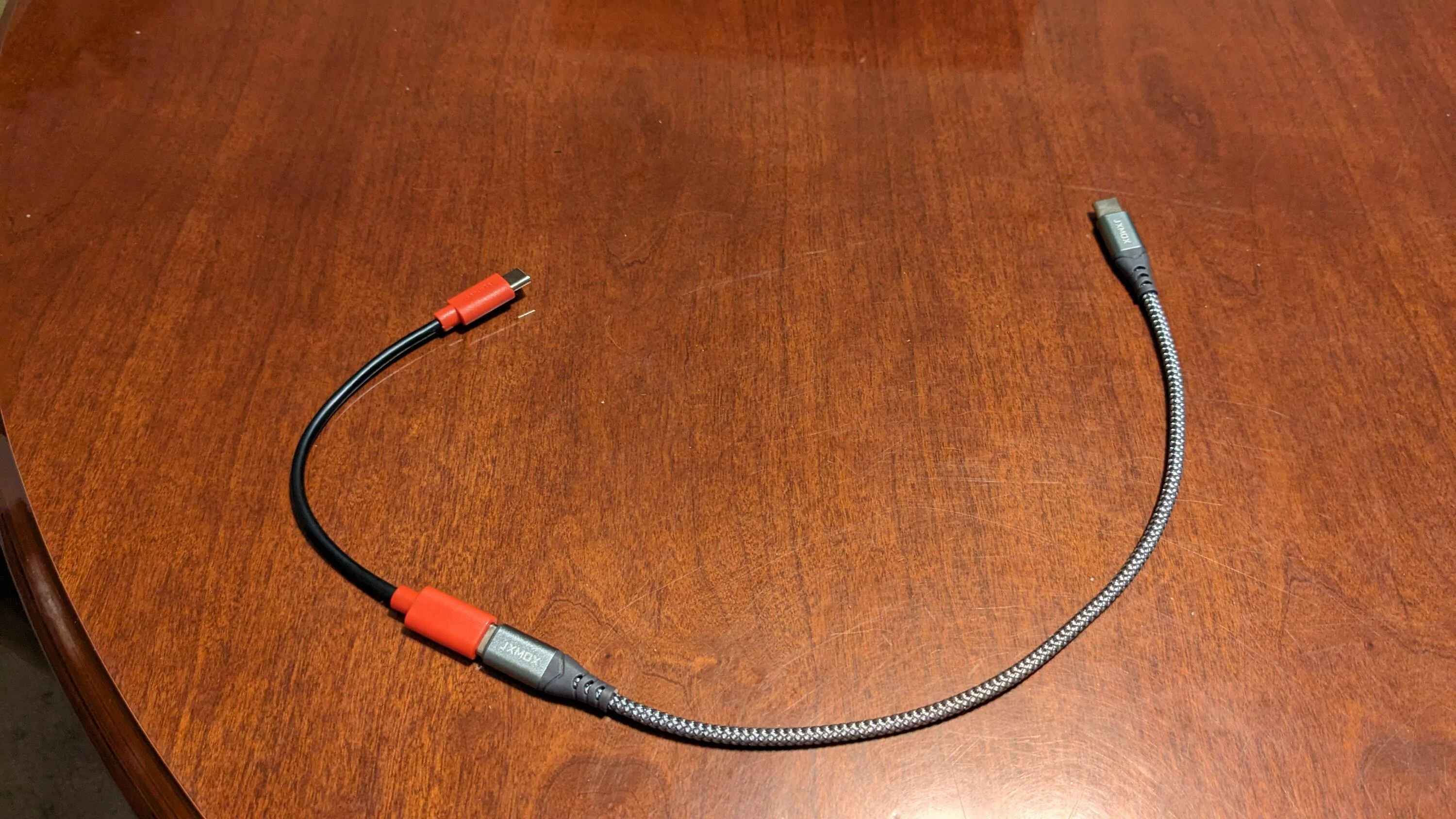
So, I ordered a "charging only data blocker" cord to place inline with my charging cable (short red & black cord in pic). This prevents the cord from transferring data but still allows it to be used for charging.

After retesting a couple times by hooking everything up and restarting the vehicle, I've not had the problem again.

Thought I'd share in case it could help someone else. A person could also just plug their phone in via the rear seat USB to charge since that one is not a data port, or unplug the wireless dongle and use a cord for both charging and AA, and get the same results.
Ford Maverick Wireless Android Auto and Phone Charging Glitch PXL_20240215_025042396
Sponsored


Bob The Builder

2.0L EcoBoost
Well-known member
First Name
Butch
Joined
Dec 2, 2021
Threads
54
Messages
2,597
Reaction score
4,884
Location
Vermont
Vehicle(s)
2020 Jeep Cherokee ** 2023 Mav FX/4
Engine
2.0L EcoBoost
Wireless is handy, but to be honest I have no issue plugging In my phone every time I want to use CarPlay. Killing two birds with one stone is the way I look at it.

Everything has run perfectly since I broke down and bought a good quality cable.
 

SaltyJim

2.5L Hybrid
Active member
First Name
Jim
Joined
Jul 10, 2023
Threads
0
Messages
34
Reaction score
14
Location
South Chicago Suburbs
Vehicle(s)
2024 Maverick Hot Pepper Red Lariat Lux Hybrid
Engine
2.5L Hybrid
Clubs
 
I have a Motorola MA1 Android Auto wireless dongle I use with a Pixel 6a phone. I've had flawless service using these except for a recent incident.

On a longer trip my phone battery was running low, so I plugged it in only to charge since it was connected wirelessly already. I plugged it into the USB-C port above the USB-A port in the lower center console. This didn't cause an issue at first.

We stopped to eat for about 1/2 hour. I left everything connected as is during that time. When we returned and I started the truck the Sync 3 lit up and Android Auto started normally, but Google Maps was stuck and pressing AA buttons did nothing. It was all locked up. I had to unplug both the phone and the MA1 and replug in the MA1 to get things to work correctly again.

After some reading I learned that others have had the same issue when the phone is connected both wirelessly and via a cable to data ports and the system is restarted.

So, I ordered a "charging only data blocker" cord to place inline with my charging cable (short red & black cord in pic). This prevents the cord from transferring data but still allows it to be used for charging.

After retesting a couple times by hooking everything up and restarting the vehicle, I've not had the problem again.

Thought I'd share in case it could help someone else. A person could also just plug their phone in via the rear seat USB to charge since that one is not a data port, or unplug the wireless dongle and use a cord for both charging and AA, and get the same results.

PXL_20240215_025042396.jpg
Did you try just putting the phone on the wireless charger instead of connecting with a cable to charge? Then the wireless Android Auto connection wouldn't get confused with the cable connection.
 

Ozarkbeard

Well-known member
Joined
May 22, 2022
Threads
14
Messages
4,344
Reaction score
5,476
Location
.
Vehicle(s)
.
Engine
Undecided
...A person could also just plug their phone in via the rear seat USB to charge since that one is not a data port...
Not all trim levels have the rear USB charging points. The ones that don't, though, have a 12 volt PowerPoint there. One can plug in a 12 volt charging adapter and use that, or use a charging adapter in the PowerPoint in the front section of the console.
 

NJBob

2.0L EcoBoost
Well-known member
First Name
Bob
Joined
Dec 25, 2021
Threads
139
Messages
2,391
Reaction score
1,579
Location
New Jersey
Vehicle(s)
2022 Maverick, 2003 MR2, 2019 Forrester, 1969 Z/28
Engine
2.0L EcoBoost
Where did you get the charging only cord? I to have the Motorola dongle and the wireless charger. The 12 v is used by a radar detector
However that cord would be nice to charge a passengers phone. But would love a usb c to usb c charge only.
 
Last edited:

Sponsored

StarNut

2.5L Hybrid
Well-known member
First Name
Rob
Joined
Jul 18, 2023
Threads
4
Messages
119
Reaction score
145
Location
Virginia
Vehicle(s)
2024 Marvick Lariat Hybrid
Engine
2.5L Hybrid
Clubs
 
Did you try just putting the phone on the wireless charger instead of connecting with a cable to charge? Then the wireless Android Auto connection wouldn't get confused with the cable connection.
Good idea, but I'm pretty sure the 6A doesn't have wireless charging.
 

SaltyJim

2.5L Hybrid
Active member
First Name
Jim
Joined
Jul 10, 2023
Threads
0
Messages
34
Reaction score
14
Location
South Chicago Suburbs
Vehicle(s)
2024 Maverick Hot Pepper Red Lariat Lux Hybrid
Engine
2.5L Hybrid
Clubs
 
Good idea, but I'm pretty sure the 6A doesn't have wireless charging.
Thought you had a Lariat, right? Pretty sure all Lariats have the wireless charging pad under the dash on the left side right under the push button start.

Edit: Sorry you were talking about the Pixel 6A not having wireless charging. I can't answer that as I have the Samsung S21+.
 

Art Vandelay

2.5L Hybrid
Well-known member
First Name
Brian
Joined
Jan 24, 2021
Threads
19
Messages
810
Reaction score
1,372
Location
New York
Vehicle(s)
2023 Hybrid Lariat Alto Blue
Engine
2.5L Hybrid
I also have the MA1 and this has happened to me. On the rare instance that I need to charge my phone when in the Maverick I do one of two things to solve that problem.

The first option and the most obvious is to unplug the MA1 and just use the USB cable to charge the phone and connect Android Auto.
The second option is to instead charge the phone using a charger in the 12V port. You can get them on Amazon or just about anywhere.
Something like this one: https://www.amazon.com/Charger-AINO...=12v+cell+phone+charger&qid=1708014735&sr=8-4
 
OP
OP
Jeff D.

Jeff D.

2.0L EcoBoost
Well-known member
First Name
Jeff
Joined
Oct 22, 2023
Threads
17
Messages
641
Reaction score
736
Location
Duluth, MN.
Vehicle(s)
'24 Maverick Lariat & '25 Chevy Equinox LT
Engine
2.0L EcoBoost
Did you try just putting the phone on the wireless charger instead of connecting with a cable to charge? Then the wireless Android Auto connection wouldn't get confused with the cable connection.
I would certainly do that but the Pixel 6a phone doesn't have wireless charging capabilities, unfortunately.
 
OP
OP
Jeff D.

Jeff D.

2.0L EcoBoost
Well-known member
First Name
Jeff
Joined
Oct 22, 2023
Threads
17
Messages
641
Reaction score
736
Location
Duluth, MN.
Vehicle(s)
'24 Maverick Lariat & '25 Chevy Equinox LT
Engine
2.0L EcoBoost
Where did you get the charging only cord? I to have the Motorola dongle and the wireless charger. The 12 v is used by a radar detector
However that cord would be nice to charge a passengers phone. But would love a usb c to usb c charge only.
I got it from E-Bay. They're on Amazon too, but it didn't have free shipping.

https://www.ebay.com/itm/404789971790

I plugged that into a short USB-C male to USB-C Male cord.
 
Sponsored
OP
OP
Jeff D.

Jeff D.

2.0L EcoBoost
Well-known member
First Name
Jeff
Joined
Oct 22, 2023
Threads
17
Messages
641
Reaction score
736
Location
Duluth, MN.
Vehicle(s)
'24 Maverick Lariat & '25 Chevy Equinox LT
Engine
2.0L EcoBoost
I also have the MA1 and this has happened to me. On the rare instance that I need to charge my phone when in the Maverick I do one of two things to solve that problem.

The first option and the most obvious is to unplug the MA1 and just use the USB cable to charge the phone and connect Android Auto.
The second option is to instead charge the phone using a charger in the 12V port. You can get them on Amazon or just about anywhere.
Something like this one: https://www.amazon.com/Charger-AINO...=12v+cell+phone+charger&qid=1708014735&sr=8-4
Oh, For F#%&% Sake! I didn't realize there was a 12volt recepticle right there. It's not labled and the flip down cover blends in enough I didn't see it. I knew the back window button was in the middle but never noticed that flip up cap. :unsure:

I went out at lunch and looked after two of you mentioned a 12 volt recepticle. I would just used that had I known it existed.

Duh!
 

Art Vandelay

2.5L Hybrid
Well-known member
First Name
Brian
Joined
Jan 24, 2021
Threads
19
Messages
810
Reaction score
1,372
Location
New York
Vehicle(s)
2023 Hybrid Lariat Alto Blue
Engine
2.5L Hybrid
Oh, For F#%&% Sake! I didn't realize there was a 12volt recepticle right there. It's not labled and the flip down cover blends in enough I didn't see it. I knew the back window button was in the middle but never noticed that flip up cap. :unsure:

I went out at lunch and looked after two of you mentioned a 12 volt recepticle. I would just used that had I known it existed.

Duh!
I can see how that could have been missed especially since the 12V ports aren't used as much these days now that most vehicles come with USB ports.
Sponsored


Top