
Sponsored

Tire Pressure

MichaelG

2.5L Hybrid
Well-known member
First Name
Michael
Joined
Jan 19, 2022
Threads
18
Messages
324
Reaction score
323
Location
SE Michigan
Vehicle(s)
2002 Ranger
Engine
2.5L Hybrid
That is what I was thinking. But I've spent the last four days going through every option in the manual and the menu, and I still haven't found an option to toggle displaying/hiding the tire pressure screen. At this point, I'm thinking it is a system glitch and I might have to ask my Ford dealer to try to fix it.
Does anyone know where in the XLT menu you go to toggle displaying/hiding the tire pressure screen?
Use the OK button on the steering wheel to scroll to settings (picture of two gears on the left part of the display, picture of a Maverick in center of display). Press Menu button just right of the OK button. Highlight 'Information' and press the OK button. Use the OK button to highlight 'Tire pressure' and the display for the tire pressures will come up.
Sponsored


MoveOver

2.5L Hybrid
Well-known member
First Name
Jan
Joined
Jun 16, 2023
Threads
3
Messages
75
Reaction score
61
Location
Rockville
Vehicle(s)
Maverick Hybrid
Engine
2.5L Hybrid
Use the OK button on the steering wheel to scroll to settings (picture of two gears on the left part of the display, picture of a Maverick in center of display). Press Menu button just right of the OK button. Highlight 'Information' and press the OK button. Use the OK button to highlight 'Tire pressure' and the display for the tire pressures will come up.
Only if selected the Tire Pressure option in the other menu.
 

Shakesbear

2.0L EcoBoost
Well-known member
First Name
J. R.
Joined
Jan 5, 2022
Threads
3
Messages
1,171
Reaction score
1,417
Location
Heart of the Texas Hill Country
Vehicle(s)
Lariat AWD, FX4, 4K, Lux, no CP360 assist
Engine
2.0L EcoBoost
I have an old school "analog" type pressure gauge with the needle that rotates to your pressure reading. It is more accurate than the digital one I have, and more accurate than the TPMS readings. That said, it is within 1 pound of the TPMS on my Lariat, but the TPMS readings on my wife's Caddy are off by 3 to 5 lbs. The TPMS is just good for "Head up" to check the pressures yourself ;)
 

Ozarkbeard

Well-known member
Joined
May 22, 2022
Threads
14
Messages
4,344
Reaction score
5,477
Location
.
Vehicle(s)
.
Engine
Undecided
... I missed the part about changing menus by pushing the OK button instead of just toggling it up down...
IMO, it works like most any modern menu-driven remote control with navigation ▲ ▼ arrows and a Select/OK button. Seemed very intuitive to me, first time I sat in the truck.
 

Montana

2.0L EcoBoost
Banned
Banned
Joined
Jun 13, 2023
Threads
24
Messages
4,094
Reaction score
6,347
Location
USA
Vehicle(s)
.
Engine
2.0L EcoBoost
That is what I was thinking. But I've spent the last four days going through every option in the manual and the menu, and I still haven't found an option to toggle displaying/hiding the tire pressure screen. At this point, I'm thinking it is a system glitch and I might have to ask my Ford dealer to try to fix it.
Does anyone know where in the XLT menu you go to toggle displaying/hiding the tire pressure screen?
So, my Escape was setup the same way, and I had no idea you could click the OK button on the steering wheel or that it moved up and down. I read the manual and was like "mine is clearly defective cuz it doesn't have that".... so I brought it in and had someone walk out and show me in 2 seconds. I was red in the face. It literally says "click the menu button" and it all made sense after seeing it. For reference here is the Maverick manual how to:

Ford Maverick Tire Pressure Capture001.PNG


Ford Maverick Tire Pressure Capture002.PNG


The bottom of page 118 is how to select the display for tire pressure. Keep in mind that if you have too many screens already, you won't be able to select it. So you'll have to organize your screens. Mine is setup for Trip 1, Trip 2, Tire Pressure, and the base screen. That's it. I have no need to scroll through anything else. I don't need to know what angle I'm sitting on or have some "coach" telling me how to drive or which wheel is using power or what my music is. I just need MPG info and tire pressure info quickly and then it's eyes back on the road.

Here is a video on how to change those screens:


So in the "Select Screens" menu is where you want to deselect and select what you want to see. If you deselect everything and then go in order of the screens you want that's how it will display to you as you scroll (I think - it may be default the way it's setup in the menu, I'm not near my truck right now so forgive me for not checking).

I hope this helps clear some things up.
 

Sponsored

jdetterb

2.5L Hybrid
New member
Joined
Nov 15, 2023
Threads
0
Messages
3
Reaction score
0
Location
21113
Vehicle(s)
Ford Maverick XLT Hybrid
Engine
2.5L Hybrid
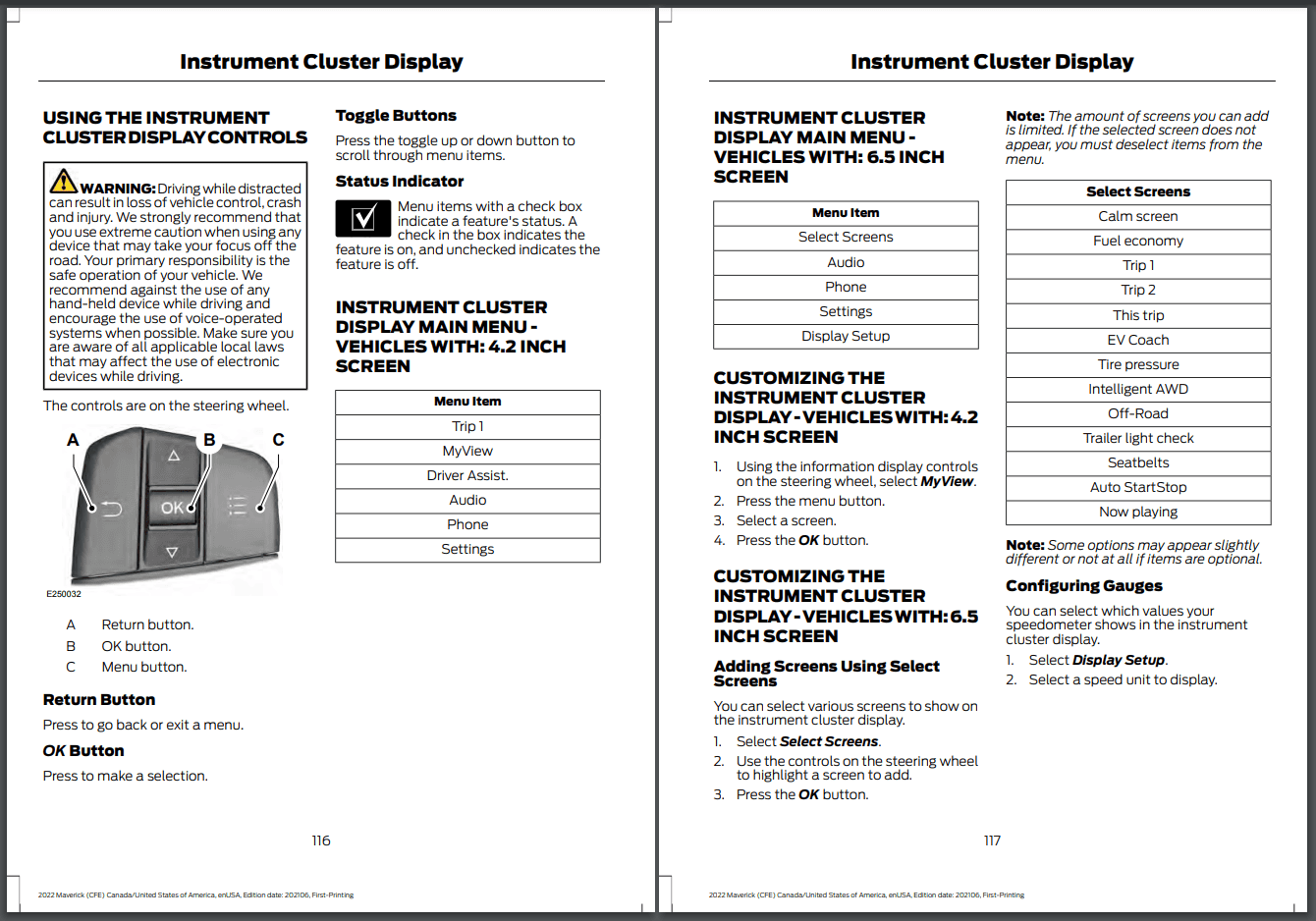
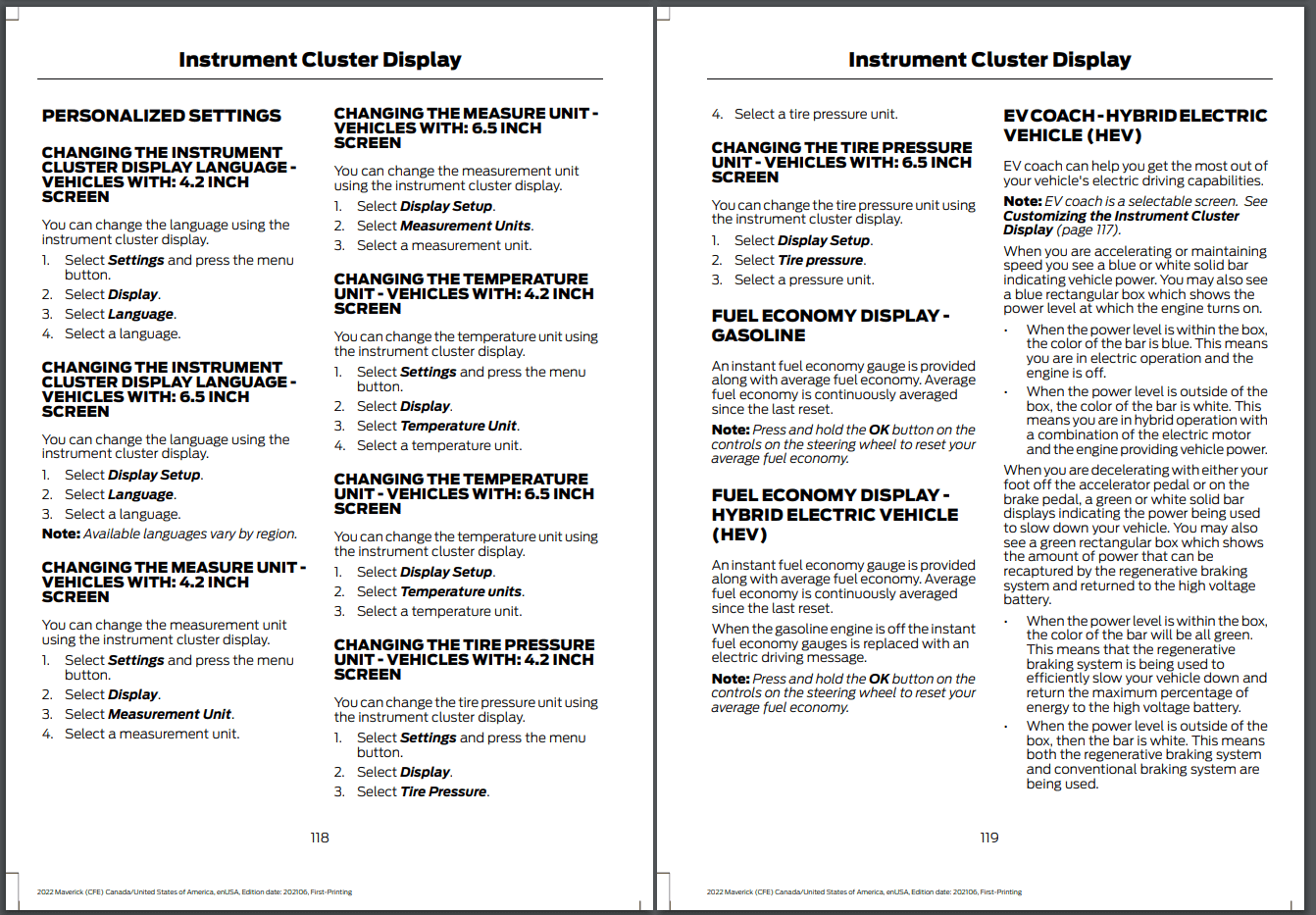
So, my Escape was setup the same way, and I had no idea you could click the OK button on the steering wheel or that it moved up and down. I read the manual and was like "mine is clearly defective cuz it doesn't have that".... so I brought it in and had someone walk out and show me in 2 seconds. I was red in the face. It literally says "click the menu button" and it all made sense after seeing it. For reference here is the Maverick manual how to:

Capture001.PNG


Capture002.PNG


The bottom of page 118 is how to select the display for tire pressure. Keep in mind that if you have too many screens already, you won't be able to select it. So you'll have to organize your screens. Mine is setup for Trip 1, Trip 2, Tire Pressure, and the base screen. That's it. I have no need to scroll through anything else. I don't need to know what angle I'm sitting on or have some "coach" telling me how to drive or which wheel is using power or what my music is. I just need MPG info and tire pressure info quickly and then it's eyes back on the road.

Here is a video on how to change those screens:


So in the "Select Screens" menu is where you want to deselect and select what you want to see. If you deselect everything and then go in order of the screens you want that's how it will display to you as you scroll (I think - it may be default the way it's setup in the menu, I'm not near my truck right now so forgive me for not checking).

I hope this helps clear some things up.
Thanks for sharing. Unfortunately this doesn't really resolve the issue. I use the Menu button, OK button, etc. Select Screens is only available on the Lariat edition. XLT only has MyView...and no option for tire pressure screen. Same for Trip 1, Trip 2, Settings,...as well as Phone and Audio.

I used to be able to see the tire pressure screen, but it disappeared a few days ago after I filled up my tires. I thought it used to be in MyView or Settings under Information or Display, but no option there now. Tire Pressure under Display just lets you choose psi vs kPa vs bar; that's page 118 above explains.

Thanks anyways.

If anyone has other ideas, I'm all ears.
 
Last edited:

dalola

2.0L EcoBoost
Well-known member
First Name
Retired
Joined
Oct 8, 2021
Threads
15
Messages
2,515
Reaction score
4,288
Location
SE Ohio 🇺🇸
Website
sunsetridgecabinhockinghills.com
Vehicle(s)
'24 Mustang Mach-E P4X, '24 Bronco Big Bend 2Dr Sasquatch, Hot Rods
Engine
2.0L EcoBoost
I have an old school "analog" type pressure gauge with the needle that rotates to your pressure reading. It is more accurate than the digital one I have, and more accurate than the TPMS readings. That said, it is within 1 pound of the TPMS on my Lariat, but the TPMS readings on my wife's Caddy are off by 3 to 5 lbs. The TPMS is just good for "Head up" to check the pressures yourself ;)
Agreed. My Mav TPMS readings are also about 5 psi low vs actual(Jaco analog gauge).
Sponsored


Top