
Sponsored

New Remote software updates

OP
OP
TedTX

TedTX

2.5L Hybrid
Well-known member
First Name
Ted
Joined
Aug 12, 2022
Threads
20
Messages
1,614
Reaction score
1,311
Location
San Antonio TX
Vehicle(s)
Maverick
Engine
2.5L Hybrid
Fords record of software updates and recalls on a recall update and their stupid battery charging software calibrations don’t inspire a lot of confidence from this old guy, much less one over the air. Reminds me of the nightmares customers went through with GM bricking vehicles trying to do over the air updates not long ago. Just my thoughts/opinion
Totally agree! This is likely the reason Ford remained Mumm with this functionality. However cost of doing business faking they still needed to physical access an internet device with wheels.
Ford had demonstrated many other capabilities build in to our Poverty XL Mavericks to me. But that is not relevant to this thread.
Sponsored


 

HeyBales

2.5L Hybrid
Well-known member
First Name
Mike
Joined
May 3, 2024
Threads
4
Messages
4,836
Reaction score
4,388
Location
KC Metro area
Vehicle(s)
2005 Toyota RAV4, 2024 XLT Hybrid
Engine
2.5L Hybrid
24 XLT - No Connected Services Available.
With Android app v5.19.0 - 2023255.

Wasn't it the tow package on certain models that used to display more info to assist in aligning the hitch, which showed up in that space?
And then it was removed?
Maybe it was moved to the center stack screen to be big & visible.
Be curious what Lariat trims see in that space.
 
OP
OP
TedTX

TedTX

2.5L Hybrid
Well-known member
First Name
Ted
Joined
Aug 12, 2022
Threads
20
Messages
1,614
Reaction score
1,311
Location
San Antonio TX
Vehicle(s)
Maverick
Engine
2.5L Hybrid
"entire set of all software twice"

What exactly do you think was updated?

Part of the infotainment center software has indeed been updatable since the start.
And that's all that could update. Few features.
None of the over 15 modules could be updated, neither the radio module itself.

Do you have some before after pictures perchance of just the radio software being upgraded?
Or wrote down version numbers of what you think changed?

Actually the whole center stack software - which would take care of the rear-view camera software upgrade. That was not possible for pre-25MY systems on XL/XLT. (Lariat didn't need it, so unknown if it could have).

25MY sounds like it has the same claims an prior years - updates that can improve all these things - which prior years it never could.
Exactly what I stated. It's standard practice to grab everything on an internet connection. Replace everything with the latest known versions and put the device back to work.
 
OP
OP
TedTX

TedTX

2.5L Hybrid
Well-known member
First Name
Ted
Joined
Aug 12, 2022
Threads
20
Messages
1,614
Reaction score
1,311
Location
San Antonio TX
Vehicle(s)
Maverick
Engine
2.5L Hybrid
@ HayBales. The version they put on my Truck was a bench test version for Model Yr 2025. The tech guy name and phone number was added to my contact list.
They WILL not do this for everyone. It was an emergency.
It appears easier to remote flash the radio after what you experienced. I had a 2022 radio with 2025 software versions.
I know because wireless Android Auto worked I was overjoyed.
 

Snox801

2.0L EcoBoost
Well-known member
First Name
Levi
Joined
Nov 16, 2023
Threads
39
Messages
1,742
Reaction score
2,035
Location
Spring Lake Michigan
Vehicle(s)
23 F150-2016 RS/ 22 GT500/ rx8 x2/ 95 mustang GT/ 17 edge.
Engine
2.0L EcoBoost
Yes, they probably just mass emailed it.

I'd love for it to be true, but I'm not holding my breath. I don't think our Gen 1's were designed for remote updates.
Maybe not, I have a 23 f-150 xl and randomly started getting messages on my truck about remote updates.
 

Sponsored

Duke Nukm2001

2.0L EcoBoost
Well-known member
First Name
Larry
Joined
Feb 23, 2024
Threads
2
Messages
112
Reaction score
106
Location
North Carolina
Vehicle(s)
2024 Atlas Blue Metallic Maverick XLT (aka "Brett Maverick").
Engine
2.0L EcoBoost
Clubs
 
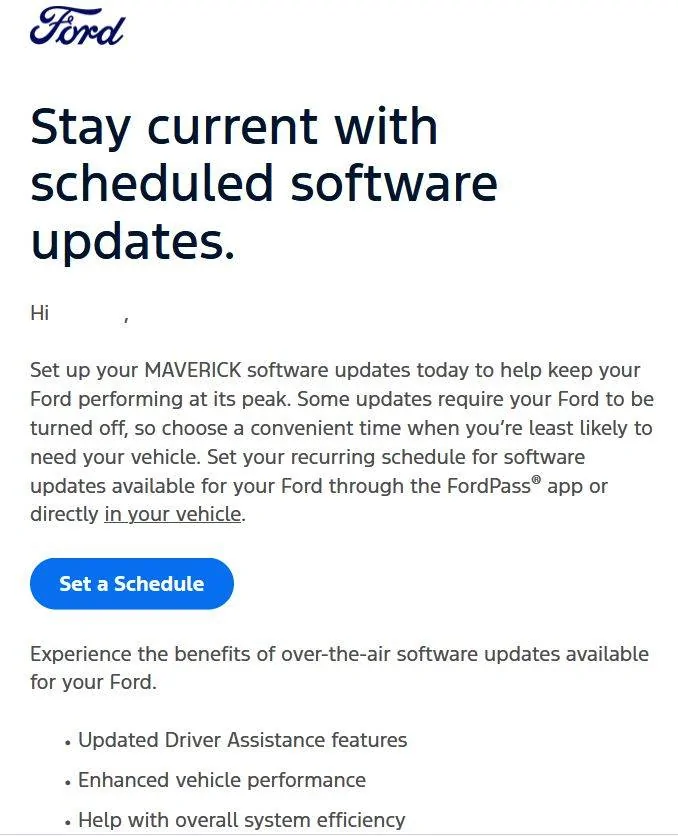
I just got an email from Ford announcing the new function. The links don't actually work, and if I login to ford.com or use the FordPass app I'm told, "Sorry, there are no connected services available at the moment."

I suspect that this new feature may not apply to my XL and I doubt Ford will let me update my backup camera software or battery management software over the air.

t1.jpg
Same with me, just checked.
 
OP
OP
TedTX

TedTX

2.5L Hybrid
Well-known member
First Name
Ted
Joined
Aug 12, 2022
Threads
20
Messages
1,614
Reaction score
1,311
Location
San Antonio TX
Vehicle(s)
Maverick
Engine
2.5L Hybrid
Maybe not, I have a 23 f-150 xl and randomly started getting messages on my truck about remote updates.
That means systems are working. Bare with Ford. This final step should have been a cake walk. But, No!
This happens to everyone that makes software and hardware. It's humbling, to hear "Are you sure you know what your doing?"
 
Last edited:

nbmav

2.5L Hybrid
Well-known member
First Name
Kevin
Joined
May 6, 2025
Threads
5
Messages
197
Reaction score
229
Location
North Bend, WA
Vehicle(s)
2026 Lariat
Engine
2.5L Hybrid
A few of you have mentioned that it says "no connected services", that is not where you set up the software updates. On the app you go to "Settings" in the vehicle tab (vs. Service) and then select "Software Updates" and that is where it will allow you to turn on automatic updates and specify when it is allowed to update.
 
OP
OP
TedTX

TedTX

2.5L Hybrid
Well-known member
First Name
Ted
Joined
Aug 12, 2022
Threads
20
Messages
1,614
Reaction score
1,311
Location
San Antonio TX
Vehicle(s)
Maverick
Engine
2.5L Hybrid
A few of you have mentioned that it says "no connected services", that is not where you set up the software updates. On the app you go to "Settings" in the vehicle tab (vs. Service) and then select "Software Updates" and that is where it will allow you to turn on automatic updates and specify when it is allowed to update.
Thanks, hidden in plain sight.
 

huunvubu

2.5L Hybrid
Well-known member
First Name
Steve
Joined
Jul 21, 2021
Threads
56
Messages
2,754
Reaction score
4,699
Location
coppell tx
Vehicle(s)
2023 Ford Maverick Hybrid
Engine
2.5L Hybrid
A few of you have mentioned that it says "no connected services", that is not where you set up the software updates. On the app you go to "Settings" in the vehicle tab (vs. Service) and then select "Software Updates" and that is where it will allow you to turn on automatic updates and specify when it is allowed to update.
There is NO "Software Updates" in the vehicle tab (vs. Service) in my FordPass App.

This what I see:

1. Starting the FordPass App I see "Settings" which I click on
2. The ONLY entry is "Vehicle Access" and nowhere "Software Updates" shown
3. If I click on "Vehicle Access" the only entries are: "Invite Driver(s)", my Full Name and "Reset Instructions"

Again I cannot find this "Software Updates" anywhere on the FordPass App.
 
Sponsored
OP
OP
TedTX

TedTX

2.5L Hybrid
Well-known member
First Name
Ted
Joined
Aug 12, 2022
Threads
20
Messages
1,614
Reaction score
1,311
Location
San Antonio TX
Vehicle(s)
Maverick
Engine
2.5L Hybrid
Check your phone for available updates. Ford doesn't have much say when the updates are performed. It's in the queue. Others got it so it's coming
 
OP
OP
TedTX

TedTX

2.5L Hybrid
Well-known member
First Name
Ted
Joined
Aug 12, 2022
Threads
20
Messages
1,614
Reaction score
1,311
Location
San Antonio TX
Vehicle(s)
Maverick
Engine
2.5L Hybrid
It's also being added to the information screen of our trucks. Check in the morning
 

HeyBales

2.5L Hybrid
Well-known member
First Name
Mike
Joined
May 3, 2024
Threads
4
Messages
4,836
Reaction score
4,388
Location
KC Metro area
Vehicle(s)
2005 Toyota RAV4, 2024 XLT Hybrid
Engine
2.5L Hybrid
Check your phone for available updates. Ford doesn't have much say when the updates are performed. It's in the queue. Others got it so it's coming
Where are you getting your info, like it'll be on the screen in the morning?
 

HeyBales

2.5L Hybrid
Well-known member
First Name
Mike
Joined
May 3, 2024
Threads
4
Messages
4,836
Reaction score
4,388
Location
KC Metro area
Vehicle(s)
2005 Toyota RAV4, 2024 XLT Hybrid
Engine
2.5L Hybrid
A few of you have mentioned that it says "no connected services", that is not where you set up the software updates. On the app you go to "Settings" in the vehicle tab (vs. Service) and then select "Software Updates" and that is where it will allow you to turn on automatic updates and specify when it is allowed to update.
25 Lariat, or XLT/XL.

Tad bit of difference to prior model years - Lariat and especially non-Lariat.

There are some big difference to be realized now that you have a 25, be aware of big upgrades.
 

huunvubu

2.5L Hybrid
Well-known member
First Name
Steve
Joined
Jul 21, 2021
Threads
56
Messages
2,754
Reaction score
4,699
Location
coppell tx
Vehicle(s)
2023 Ford Maverick Hybrid
Engine
2.5L Hybrid
Check your phone for available updates. Ford doesn't have much say when the updates are performed. It's in the queue. Others got it so it's coming
My FordPass Android Version is 5.19.0 and googling it shows that there is an update to Version 5.20.0 on June 1, 2025 but I am not seeing that an update to it is available.

I followed these steps to try to force an update:

1. Check for Updates:
  • Open the Google Play Store.
  • Search for "FordPass".
  • If an "Update" option appears next to the app, tap it to begin the update.
2. Force Update (If needed):
  • Clear Cache and Data:
    • Go to your device's Settings.
    • Select "Apps" or "App Manager".
    • Find FordPass in the list of apps.
    • Tap "Storage".
    • Tap "Clear Cache".
    • If necessary, you can also tap "Clear Data," but be aware that this will erase your app data and you may need to relogin.
  • Force Stop the App:
    • Go to your device's Settings.
    • Select "Apps" or "App Manager".
    • Find FordPass in the list of apps.
    • Tap "Force Stop".
    • Tap "OK" to confirm.
  • Restart Your Device: This can help resolve temporary glitches.
Step 1 did not work

I then did step 2 without doing "Clear Data" and after rebooting it is still showing that FordPass app is up to date with version 5.19.0 when it clearly is not.
Sponsored


Top