
Sponsored

Issue using USB thumb drive

billbillw

2.0L EcoBoost
Well-known member
First Name
Bill
Joined
Sep 15, 2022
Threads
2
Messages
744
Reaction score
786
Location
Metro Atlanta
Vehicle(s)
'23 Maverick Lariat FX4
Engine
2.0L EcoBoost
Looking for some advice.

I am going to have a friend transfer music from cd's to a SanDisk Ultra Fit USB 3.2 Gen 1 Flash Drive 64GB that I bought. I have a Hybrid XL with the base stereo.

Which format should I use?
Are you talking about the formatting of the USB or the file type of music?

FAT32 is the most universal standard for formatting the USB. It will easily handle music file sizes and the drive size of 64GB.

If you are talking about the music format, then MP3 with a decently high bit rate (320Kbps or V0) will give you a sound that is pretty close to CD, but be far smaller in size compared to FLAC or uncompressed .wav. I use V0 on all mine. That will typically give you an album size of around 100MB. You will easily be able to fit several hundred CDs on that 64GB drive.
Sponsored


 

Snowbird

2.5L Hybrid
Well-known member
Joined
Jan 15, 2022
Threads
19
Messages
573
Reaction score
490
Location
Vermont/North Carolina
Vehicle(s)
Honda CRV 2018
Engine
2.5L Hybrid
Are you talking about the formatting of the USB or the file type of music?

FAT32 is the most universal standard for formatting the USB. It will easily handle music file sizes and the drive size of 64GB.

If you are talking about the music format, then MP3 with a decently high bit rate (320Kbps or V0) will give you a sound that is pretty close to CD, but be far smaller in size compared to FLAC or uncompressed .wav. I use V0 on all mine. That will typically give you an album size of around 100MB. You will easily be able to fit several hundred CDs on that 64GB drive.
Thanks for the reply. I wish I could remotely understand it!

All this stuff is "greek" to me so I can not answer your question. That is why I am getting a friend to help me. I will give him this information.
 

gp1200x

2.0L EcoBoost
Well-known member
First Name
Paul
Joined
Apr 16, 2023
Threads
40
Messages
518
Reaction score
375
Location
NY
Vehicle(s)
GT500,C8-Z51, 2023 Lariat Lux 4K Co360
Engine
2.0L EcoBoost
The USB file playback setup is a hot-mess on the Maverick (non Sync3). I wish my iPod would work with it. I have had numerous frustrations with it. Can't browse until it scans (why does it have to scan every time you start the car?), you can't browse while in motion, and it doesn't go back to the same spot you were at when browsing. So basically, you have to sit there for 5+ minutes after starting the truck, then select, otherwise, you are trying to do it at a stoplight which can be frustrating, or you have to pull over to a parking lot and make a selection. After each album is finished, you have to repeat the process.

I was hoping to make it easier to at least bring up a playlist of all albums by each of my favorite artists, so I put 24 M3U playlists on my USB stick, each for an artist with all their albums in chronological release order. Turns out the playlist feature is broken too. Out of those 24 M3U, it only sees two playlists, and in those playlists, it only shows about 1 album worth of music, and they aren't in correct order! WTF?

And if the official Ford account here chimes in and asks me for my VIN "to look into it", I will ignore because there is nothing they can do.
same issues with my Lariat....very frustrating for a 2023 car!!
 

austinhiddy

2.0L EcoBoost
Active member
First Name
Austin
Joined
Oct 4, 2023
Threads
7
Messages
39
Reaction score
41
Location
Northern Illinois
Vehicle(s)
2023 Maverick Lariat Lux
Engine
2.0L EcoBoost
@Ford Motor Company I've written into your official support on ford.com without seeing any follow up. I'm constantly experiencing issues with USB audio on my Maverick. I've never had issues like this on my 2016 F-150 Lariat. I'm using the same USB drive and it's just constant issue after issue. The main ones being:

-The indexing never saves. Re-indexes all 2500 songs on startup.
-The drive isn't located immediately on startup. It takes about 45-60 seconds until it's found, but then it has to index again. The audio then jumps to FM.
-The music never picks up where it was left off after turning the truck off and back on later. Guessing it's due to the re-indexing.
-Should go without saying, but the ability to not select songs while in motion is insane.

I've tried all troubleshooting steps. This system is a lemon. Why was my 2016 F-150 better than this 2023 Maverick? They're both Sync3, it makes no sense.

I'm a single-issue voter and this makes me want to trade in this truck and never look back.
 

Timothyd

2.5L Hybrid
Well-known member
First Name
Tim
Joined
Nov 10, 2021
Threads
52
Messages
4,119
Reaction score
3,511
Location
Illinois
Vehicle(s)
Buick Encore, Miata, motorcycles
Engine
2.5L Hybrid
Clubs
 
I have been using USB sticks in my cars for the last dozen or more years. Great way to do audio books instead of carrying dozens of CDs in your vehicle.
The radio in the maverick (lariat) is constantly losing the USB drive though, switches to FM and since the volume is up to hear spoken work the radio is at a ridiculous volume.
I turn the radio off before I turn the car off, then when turning on I wait for a while, long enough that the drive should be ready, before turning the radio on.
Defective radio or is this a widespread issue? or am I the only weirdo using USB drives?
I am not leashed to my phone and do not want to use that to play the music, believe it or not I actually drive places without having it on me :D
Using USB sticks for some time myself but haven't gotten around to putting them in the Mav. Still getting used to everything else in it. Ley us know when you come up with some tricks.

Thanks, Tim
 

Sponsored

SLJ

2.0L EcoBoost
Well-known member
First Name
Steve
Joined
Nov 9, 2023
Threads
9
Messages
650
Reaction score
1,084
Location
Elbridge New York
Vehicle(s)
2023 Maverick XLT 4K
Engine
2.0L EcoBoost
Clubs
 
There was an issue with some. My USB audio (XLT, not sync) did it until it did an update in the driveway. Saw another post on it that there was a Sync update the dealer did to to fix it. There's a way to check in setting to see what # yours is. I'll see if I can find the post and put it here.
When mine was doing it I noticed if I turned off audio before shutting the truck off it was okay when turned back on the next time. If I left it on it always came back on on some random FM freq.

Found it: Sync #22251 An issue of not holding last music source. Would likely have to manually download new version onto flash drive and install. You can check your Sync version in settings.
 
Last edited:

AzureBlueBill

2.0L EcoBoost
Well-known member
First Name
Bill
Joined
Sep 26, 2023
Threads
8
Messages
511
Reaction score
670
Location
Torrington, Connecticut
Vehicle(s)
2024 Maverick Lariat / 1998 Mustang Cobra
Engine
2.0L EcoBoost
Agree that not being able to browse via the screen while in motion is ludicrous.

But you can kind of, sort of get around that while moving by using the physical tuning (right hand) knob of the radio while already playing something on the USB to go forward or back.

Other than that have experienced none of what else you describe. Have you tried doing a soft reset of the system? See here:
https://www.mavericktruckclub.com/forum/threads/screen-issue.13883/#post-273930
The browsing tip is much appreciated!
 

AzureBlueBill

2.0L EcoBoost
Well-known member
First Name
Bill
Joined
Sep 26, 2023
Threads
8
Messages
511
Reaction score
670
Location
Torrington, Connecticut
Vehicle(s)
2024 Maverick Lariat / 1998 Mustang Cobra
Engine
2.0L EcoBoost
Looking for some advice.

I am going to have a friend transfer music from cd's to a SanDisk Ultra Fit USB 3.2 Gen 1 Flash Drive 64GB that I bought. I have a Hybrid XL with the base stereo.

Which format should I use?
First format the drive using "exFAT". Regular MP3 files are the best type of files. If you are converting from .wav files, use a minimum bit rate of 320 kbit/s and a sample rate of 48000HZ. Don't try to play .wav files, it just won't work. I was having huge problems with my USB drive too, and this helped a lot. But the whole system is really crappy if you ask me.
 

SLINGSHOT

2.5L Hybrid
Banned
Banned
First Name
Charles
Joined
Apr 30, 2022
Threads
25
Messages
1,390
Reaction score
2,267
Location
NE Iowa
Vehicle(s)
2017 RAV4
Engine
2.5L Hybrid
Clubs
 
I can plug any thumb drive of any formatted type and any capacity into my cheap $200 lap top and play multiple audio and video files.
My $33,000 Ford is limited to certain formats for the drive and the files. Would probably cost Ford 3 cents per unit to do the same, but some half assed engineer is stuck in 1990.
FORD, fire your current 'infotainment" people and hire a 12 year old to update your crap.
 

billbillw

2.0L EcoBoost
Well-known member
First Name
Bill
Joined
Sep 15, 2022
Threads
2
Messages
744
Reaction score
786
Location
Metro Atlanta
Vehicle(s)
'23 Maverick Lariat FX4
Engine
2.0L EcoBoost
@Ford Motor Company I've written into your official support on ford.com without seeing any follow up. I'm constantly experiencing issues with USB audio on my Maverick. I've never had issues like this on my 2016 F-150 Lariat. I'm using the same USB drive and it's just constant issue after issue. The main ones being:

-The indexing never saves. Re-indexes all 2500 songs on startup.
-The drive isn't located immediately on startup. It takes about 45-60 seconds until it's found, but then it has to index again. The audio then jumps to FM.
-The music never picks up where it was left off after turning the truck off and back on later. Guessing it's due to the re-indexing.
-Should go without saying, but the ability to not select songs while in motion is insane.

I've tried all troubleshooting steps. This system is a lemon. Why was my 2016 F-150 better than this 2023 Maverick? They're both Sync3, it makes no sense.

I'm a single-issue voter and this makes me want to trade in this truck and never look back.
So, your Sync 3 still has to re-scan every startup? I would have thought that was only an issue with the lower end non-Sync units like mine. In fact, I almost sought out the upgrade parts for that reason. I'm glad I didn't...
That is a real eye opener. You would expect Sync3 to work consistently across the Ford lineup, but apparently, they found some way to cheap it out on the Maverick!
 
Sponsored

billbillw

2.0L EcoBoost
Well-known member
First Name
Bill
Joined
Sep 15, 2022
Threads
2
Messages
744
Reaction score
786
Location
Metro Atlanta
Vehicle(s)
'23 Maverick Lariat FX4
Engine
2.0L EcoBoost
After doing some digging, I found this old post at the F150 forum:
https://www.f150forum.com/f118/playlists-sync3-usb-jump-drive-351129/index2/#post5267206

It is pretty tedious, but I took out a spare laptop, put the USB in, installed iTunes, created a new library of just the USB songs, and re-did all my playlists using iTunes. Then I used Notepad to replace the drive letter with ../
It probably took an hour or more.
I took the little USB drive out, planned a little drive and was initially met with frustration. The head unit took forever to scan, it locked up on USB playback multiple times, I did a system reset a couple times. Nothing seemed to work. I was about to give up. In the meantime, I did some shopping at Walmart (parked way out in the far end), came back drove home and I had a couple dozen properly working playlists!

That is at least one step forward. I will have to see if it is reliable or if I have issues with it freezing up or having extended scan times. Hopefully it works.
Just wanted to update. The playlist playback using the method above has been reliable, except when you re-start the vehicle and the song playing finishes before the USB scan is complete. Yes, it re-scans at each re-start. There is no saved information regarding the playlists or the usb folder structure. I've come into the habit of checking how much time remains on the song before I turn off the truck. If its less than 3 minutes, I rewind to the beginning of the song and then turn off.

I should also clarify, the process of making the playlist in iTunes is only the 1st step. You have to export the playlist, and then edit the drive reference using Notepad. Luckily, Notepad remembers the find/replace command (even months later) and there is a button to "replace all" so its fairly quick once you do the 1st one.
 

Nw_adventure

2.0L EcoBoost
Well-known member
Joined
Aug 3, 2021
Threads
101
Messages
3,134
Reaction score
2,928
Location
Salt Lake city
Vehicle(s)
Honda Element/ Toyota Highlander
Engine
2.0L EcoBoost
Just wanted to update. The playlist playback using the method above has been reliable, except when you re-start the vehicle and the song playing finishes before the USB scan is complete. Yes, it re-scans at each re-start. There is no saved information regarding the playlists or the usb folder structure. I've come into the habit of checking how much time remains on the song before I turn off the truck. If its less than 3 minutes, I rewind to the beginning of the song and then turn off.

I should also clarify, the process of making the playlist in iTunes is only the 1st step. You have to export the playlist, and then edit the drive reference using Notepad. Luckily, Notepad remembers the find/replace command (even months later) and there is a button to "replace all" so its fairly quick once you do the 1st one.
Is this all good with the newer Sync 3/ update ?
 

baseballchamps

2.0L EcoBoost
Well-known member
First Name
Randy
Joined
Oct 29, 2021
Threads
4
Messages
149
Reaction score
160
Location
NJ
Vehicle(s)
2001 Ford Taurus SES
Engine
2.0L EcoBoost
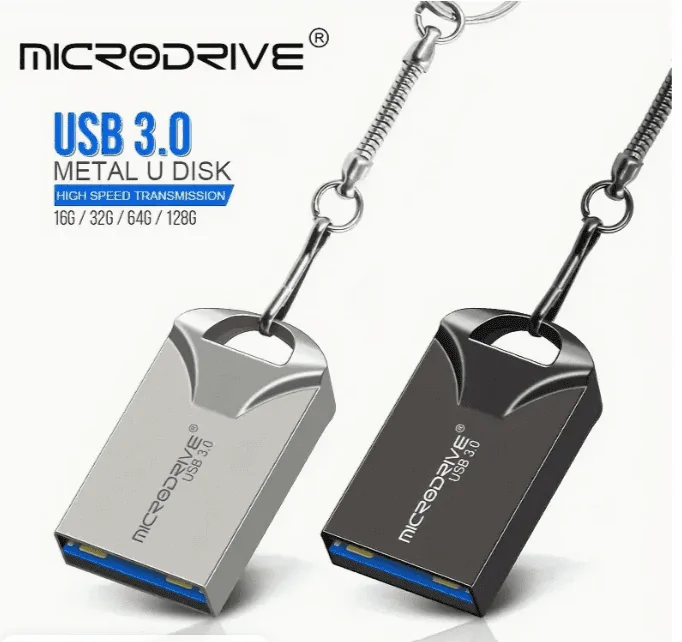
I had a similar experience until I Found a Mini USB. The larger USB bounces when you hit a bump and you lose the connection. Never had an issue with the mini.
Ford Maverick Issue using USB thumb drive 1715300537980-bl
 
OP
OP

Nosrepmodnar

2.5L Hybrid
Well-known member
First Name
Brad
Joined
Sep 2, 2023
Threads
10
Messages
112
Reaction score
97
Location
Nv
Vehicle(s)
Lariat hybrid
Engine
2.5L Hybrid
ford support is ridiculous.
I called because i wanted these issues that are still present after the latest update.
They were like we are not specialists you should take it to your dealer.
I don't expect you to fix it i want it recorded in whatever bug log ford may have.
My 2010 hyundai has no issues playing off usb drives, my $20 mp3 player can follow a playlist :D

I do agree with the micro drive post. less bounce plus you are less apt to hit it when putting things in the caddy.
 

billbillw

2.0L EcoBoost
Well-known member
First Name
Bill
Joined
Sep 15, 2022
Threads
2
Messages
744
Reaction score
786
Location
Metro Atlanta
Vehicle(s)
'23 Maverick Lariat FX4
Engine
2.0L EcoBoost
Is this all good with the newer Sync 3/ update ?
Mine is the non-Sync 3 unit. The last update was quite some time ago and it didn't cause any issues, but helped somewhat with stability and it seems to scan faster now.

Also, the issue of browsing USB contents while moving was fixed using FORScan quite some time ago. Thanks to somebody poking around, they found an easy fix, at least for the non-Sync units.
Sponsored

 
Last edited:


Top