
Sponsored

CD's on/to Thumb Drives

JiMav

2.0L EcoBoost
Well-known member
First Name
Jim
Joined
Aug 22, 2021
Threads
2
Messages
46
Reaction score
59
Location
Myrtle Beach
Vehicle(s)
22 Maverick XLT Eco FX4 Lux, Moonroof
Engine
2.0L EcoBoost
I use windows media player to burn cd's to my computer, then sync to a little 256gb usb flash drive which I plug into the usb port in the center console. The "source" on the head unit recognizes the usb input and it works flawlessly for me. I prefer not subscribe to media sources when I own so much of my own music.
Sponsored


 

AutobahnSHO

2.5L Hybrid
Well-known member
First Name
Will
Joined
Oct 11, 2021
Threads
18
Messages
2,113
Reaction score
2,277
Location
S.Carolina
Vehicle(s)
Maverick, Miata
Engine
2.5L Hybrid
Regular Windows Media player also allows you to rip CDs to MP3 (make sure to not choose their "WMA" format if you want to play them on "any" device!).
 

BobC

2.0L EcoBoost
Well-known member
First Name
Bob
Joined
Feb 16, 2022
Threads
0
Messages
93
Reaction score
86
Location
Freeport, IL
Vehicle(s)
17 Impala, 23 Maverick EB AWD Lux 4K Fx4 360
Engine
2.0L EcoBoost
Anyone know what the maximum capacity usb stick it can use? You can get low profile ones that barely stick out of the usb port and just leave it in there all the time.
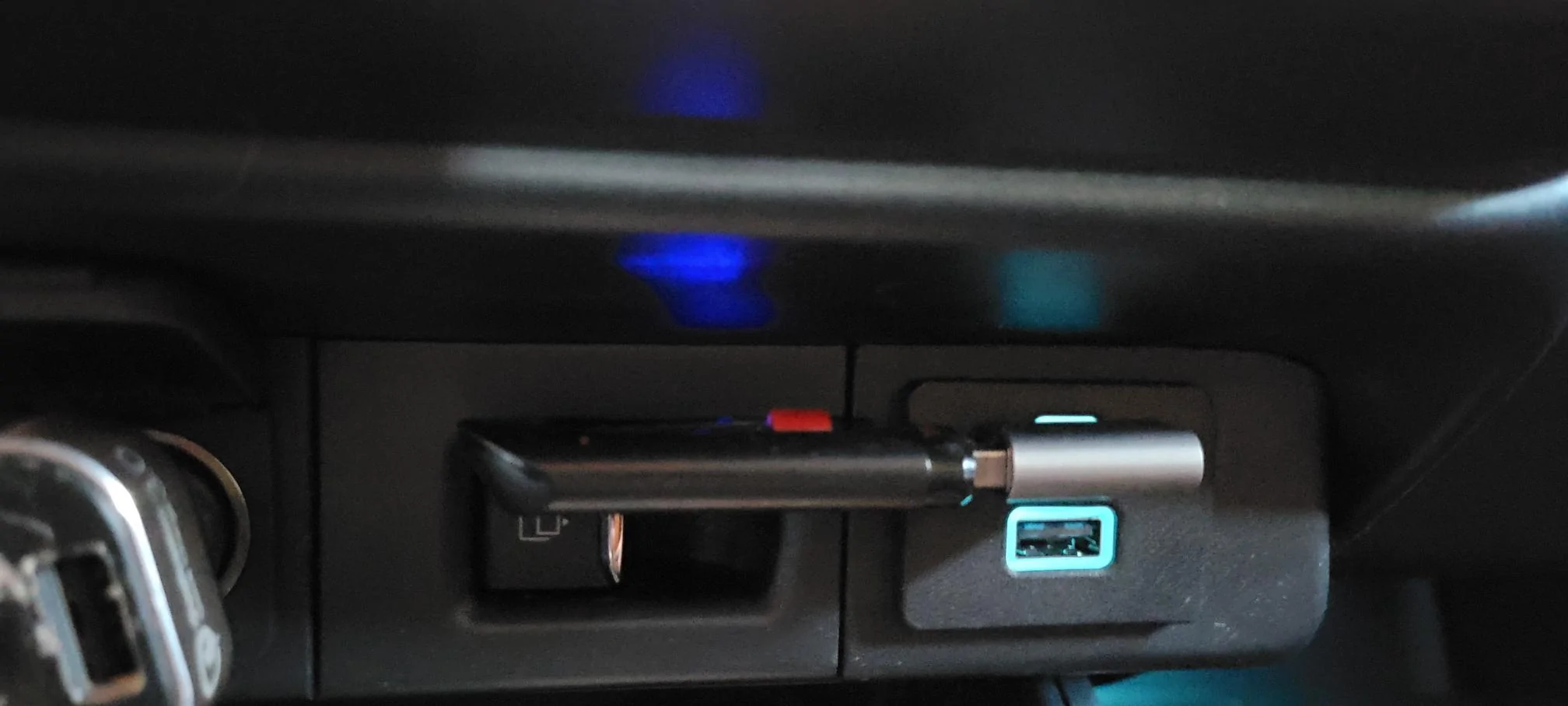
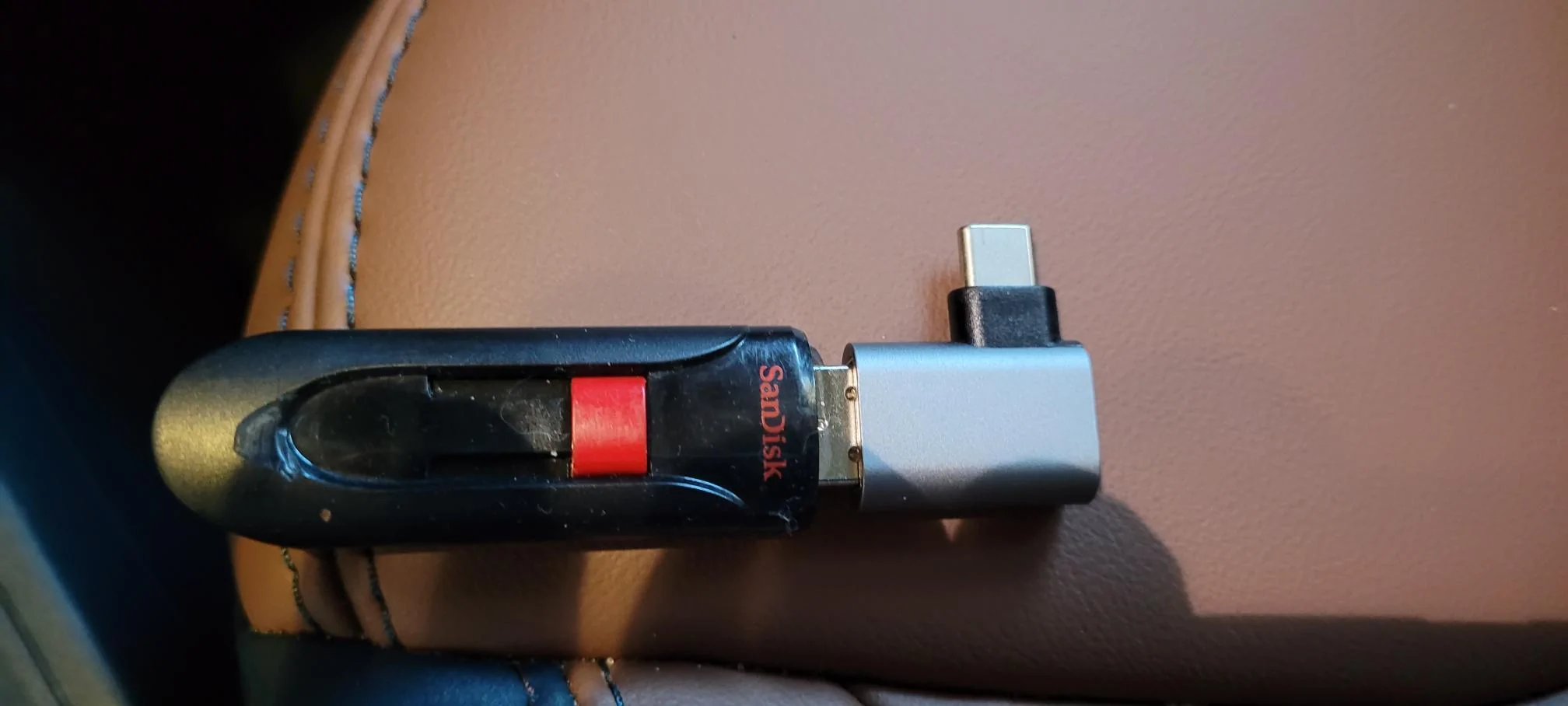
Most likely limited to USB size (4, 8, 16, 32 or 64GB), music format, and individual file size. I have a SanDisk USB 3.0, 16BG capacity with over 2,100 MP3 formatted songs ripped from CDs onto my PC. Then downloaded onto the USB drive. Inserted into the top USB connection port with a right angle connector (Amazon) so the USB doesn't stick out so much.

Some GM vehicles won't recognize mixed format music (MP3, WMA, WAV etc) on the same USB. Don't ask how I know.

Ford Maverick CD's on/to Thumb Drives SansDisc MAV


Ford Maverick CD's on/to Thumb Drives SansDisc w rt angl
 

RichardCranium

2.0L EcoBoost
Well-known member
First Name
R
Joined
Sep 1, 2023
Threads
20
Messages
1,075
Reaction score
1,463
Location
California
Vehicle(s)
2024 Maverick XL 2.0 AWD 4K CP360
Engine
2.0L EcoBoost
Clubs
 
Most likely limited to USB size (4, 8, 16, 32 or 64GB), music format, and individual file size. I have a SanDisk USB 3.0, 16BG capacity with over 2,100 MP3 formatted songs ripped from CDs onto my PC. Then downloaded onto the USB drive. Inserted into the top USB connection port with a right angle connector (Amazon) so the USB doesn't stick out so much.

Some GM vehicles won't recognize mixed format music (MP3, WMA, WAV etc) on the same USB. Don't ask how I know.

SansDisc MAV.jpg


SansDisc w rt angl.jpg
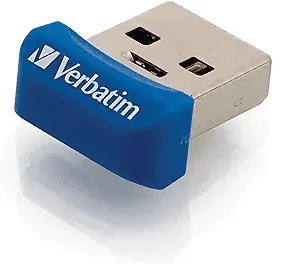
Does the audio system in the dash read the file information? or does it just list every song on the drive? Thanks for the pics and the ideas. right angle adapter is a great idea as well. I was thinking something like this as well
Ford Maverick CD's on/to Thumb Drives 1698160432120

https://a.co/d/4PkKaW3
64GB for $8.99
 

BobC

2.0L EcoBoost
Well-known member
First Name
Bob
Joined
Feb 16, 2022
Threads
0
Messages
93
Reaction score
86
Location
Freeport, IL
Vehicle(s)
17 Impala, 23 Maverick EB AWD Lux 4K Fx4 360
Engine
2.0L EcoBoost
Does the audio system in the dash read the file information? or does it just list every song on the drive? Thanks for the pics and the ideas. right angle adapter is a great idea as well. I was thinking something like this as well
1698160432120.png

https://a.co/d/4PkKaW3
64GB for $8.99
The Ford in dash will show media sources, pick USB, then it will show the current song playing depending on your choice, you can also browse the USB file by song titles etc. Just depends on how you have the USB music files set up. I just play by song title in alpha order. Also can play random.
 

Sponsored

Gpp

2.0L EcoBoost
Well-known member
First Name
Gil
Joined
Sep 28, 2021
Threads
173
Messages
849
Reaction score
1,144
Location
Sanford nc
Vehicle(s)
2022 ford maverick
Engine
2.0L EcoBoost
Clubs
 
I just got a used 2023 Maverick and I want to play the music from my CD's. Does anyone know how to put the music on Thumb Drives and will they play by plugging them into the USB ports on the truck? Or is the USB only a power source? Will my home computer transfer CD music to Thumb Drives, it has a CD slot and empty USB ports. Any additional details/suggestions would be greatly appreciated. Thanks
Go here if you have a mac😎
https://support.apple.com/guide/mus...In the Music app on,> Create [format] Version.
 

Ron#Maverick

2.5L Hybrid
Member
First Name
Ron
Joined
Apr 14, 2022
Threads
0
Messages
12
Reaction score
2
Location
Duncan, OK
Vehicle(s)
2022 Maverick
Engine
2.5L Hybrid
I have all cds on computer. Download to thumb drives is straight forward. Thumb drive works on main USB port in dash. Great sound.

with phone plugged into USB port, I listen to Pandora without problems.
 

TexasHybrid

2.5L Hybrid
Well-known member
First Name
Jim
Joined
Sep 20, 2022
Threads
15
Messages
92
Reaction score
104
Location
Texas
Vehicle(s)
Maverick Lariat Hybrid
Engine
2.5L Hybrid
the large thumb drive with ripping to it is good.

alternative:

I subscribe to apple music. I rip my music and it gets loaded to my library. So i have some stuff not on iTunes and is always available.

i also stream audio from my NAS, that is beyond the OP question.
 

billbillw

2.0L EcoBoost
Well-known member
First Name
Bill
Joined
Sep 15, 2022
Threads
2
Messages
744
Reaction score
786
Location
Metro Atlanta
Vehicle(s)
'23 Maverick Lariat FX4
Engine
2.0L EcoBoost
Most likely limited to USB size (4, 8, 16, 32 or 64GB), music format, and individual file size. I have a SanDisk USB 3.0, 16BG capacity with over 2,100 MP3 formatted songs ripped from CDs onto my PC. Then downloaded onto the USB drive. Inserted into the top USB connection port with a right angle connector (Amazon) so the USB doesn't stick out so much.

Some GM vehicles won't recognize mixed format music (MP3, WMA, WAV etc) on the same USB. Don't ask how I know.
The Maverick will take very large USB drives. 256GB has been verified. Larger probably work, but there is no need for anything that large. The Mavericks limitation is something like 10,000 files which will easily fit on a 256GB. I have a 128GB that has about 6000 files of V0 MP3s and it not even 1/3 full. V0 MP3 is one of the larger MP3 file sizes, just slightly smaller than 256Kbps MP3s which are typically the largest. You could easily fit 10,000 FLAC files (CD quality) and still be under 256GB.

BTW, that right angle connector probably cost you almost as much as what the SanDisk Ultra Fit are running now. The last I checked they were around $12 for a 256GB Ultra Fit 3.1.
 

Snowbird

2.5L Hybrid
Well-known member
Joined
Jan 15, 2022
Threads
20
Messages
576
Reaction score
498
Location
Vermont/North Carolina
Vehicle(s)
Honda CRV 2018
Engine
2.5L Hybrid
The Maverick will take very large USB drives. 256GB has been verified. Larger probably work, but there is no need for anything that large. The Mavericks limitation is something like 10,000 files which will easily fit on a 256GB. I have a 128GB that has about 6000 files of V0 MP3s and it not even 1/3 full. V0 MP3 is one of the larger MP3 file sizes, just slightly smaller than 256Kbps MP3s which are typically the largest. You could easily fit 10,000 FLAC files (CD quality) and still be under 256GB.

BTW, that right angle connector probably cost you almost as much as what the SanDisk Ultra Fit are running now. The last I checked they were around $12 for a 256GB Ultra Fit 3.1.
I am using a 64GB SanDisk Ultra Fit with no issues. My friend has loaded more music onto it than I think I will ever have time to listen to!
 
Sponsored

RobbieAG

2.0L EcoBoost
Well-known member
First Name
Robert
Joined
Jul 20, 2023
Threads
6
Messages
144
Reaction score
136
Location
Greensboro NC
Vehicle(s)
2024 Maverick XL EB AWD 4k Tow CP360
Engine
2.0L EcoBoost
I've done that with a lot of my CDs. You first have to rip them using iTunes or Windows Media Player. Then just copy them to your thumb drive and insert it into the stereo's USB port.
 

MavTime

2.5L Hybrid
Well-known member
Joined
Sep 17, 2023
Threads
11
Messages
222
Reaction score
292
Location
California
Vehicle(s)
23 Maverick Hybrid XLT
Engine
2.5L Hybrid
Clubs
 
I just got a used 2023 Maverick and I want to play the music from my CD's. Does anyone know how to put the music on Thumb Drives and will they play by plugging them into the USB ports on the truck? Or is the USB only a power source? Will my home computer transfer CD music to Thumb Drives, it has a CD slot and empty USB ports. Any additional details/suggestions would be greatly appreciated. Thanks
I still have tons of CDs and like listening to an album and not all of it is available on streaming and my last car still had a CD player, so I get wanting a way to listen to them. Ripping CDs can be a pain or at least a lot of work for a big collection, so someone bought one of the CD players that plugs into the USB port and shows up like an iPod or USB stick on the display. They make two different ones on Amazon, but we know this one works in the video. I still haven't pulled the trigger on one yet.


They have them for as low as $52 https://www.amazon.com/Xglysmyc-Universal-Connection-Navigation-Port-Plug/dp/B0BBMYCYRK/
 

BobC

2.0L EcoBoost
Well-known member
First Name
Bob
Joined
Feb 16, 2022
Threads
0
Messages
93
Reaction score
86
Location
Freeport, IL
Vehicle(s)
17 Impala, 23 Maverick EB AWD Lux 4K Fx4 360
Engine
2.0L EcoBoost
The Ford in dash will show media sources, pick USB, then it will show the current song playing depending on your choice, you can also browse the USB file by song titles etc. Just depends on how you have the USB music files set up. I just play by song title in alpha order. Also can play random.
The Maverick will take very large USB drives. 256GB has been verified. Larger probably work, but there is no need for anything that large. The Mavericks limitation is something like 10,000 files which will easily fit on a 256GB. I have a 128GB that has about 6000 files of V0 MP3s and it not even 1/3 full. V0 MP3 is one of the larger MP3 file sizes, just slightly smaller than 256Kbps MP3s which are typically the largest. You could easily fit 10,000 FLAC files (CD quality) and still be under 256GB.

BTW, that right angle connector probably cost you almost as much as what the SanDisk Ultra Fit are running now. The last I checked they were around $12 for a 256GB Ultra Fit 3.1.
I chose the rt angle as I wanted to use the USB-C port and I already had the flash drive. The connector was $8 for a 2pk.
 

Sembazuru

2.5L Hybrid
Well-known member
First Name
Chris
Joined
Jul 28, 2022
Threads
2
Messages
299
Reaction score
319
Location
Wilmington, de
Vehicle(s)
2023 Maverick XLT Lux Hybrid
Engine
2.5L Hybrid
Another option for ripping CDs on your computer is MediaMonkey. (I prefer MediaMonkey to iTunes, but I also eschew Apple products where I can so I may be biased. 🤠) It's only available on Winblows and Android. I use it to maintain my music library (I buy CDs, rip to mp3 (VBR mode) and archive the physical disc incase I loose files or files get corrupted) on my laptop and synchronize music to my phone. It can also copy playlists (or selections of the library or your full library) to USB drives, but I haven't tried on my Mav yet so I don't know if the Mav can navigate the folder structure that I typically use, nor if the Mav can understand playlists. I may play with this over the weekend, or I may forget to. 🤷‍♂️
 

Halo9x

2.0L EcoBoost
Well-known member
First Name
Hal
Joined
May 4, 2023
Threads
2
Messages
823
Reaction score
692
Location
Abilene, TX
Vehicle(s)
Maverick XLT 2023
Engine
2.0L EcoBoost
Clubs
 
I just got a used 2023 Maverick and I want to play the music from my CD's. Does anyone know how to put the music on Thumb Drives and will they play by plugging them into the USB ports on the truck? Or is the USB only a power source? Will my home computer transfer CD music to Thumb Drives, it has a CD slot and empty USB ports. Any additional details/suggestions would be greatly appreciated. Thanks
Why not simply play your music from your phone?
Sponsored


Top