Sponsored

Can CarPlay maps be used with Sync?

Andrew.802

2.5L Hybrid
Active member
First Name
Andrew
Joined
Jun 24, 2024
Threads
13
Messages
35
Reaction score
8
Location
Vermont
Vehicle(s)
2025 Lariat Hybrid AWD
Engine
2.5L Hybrid
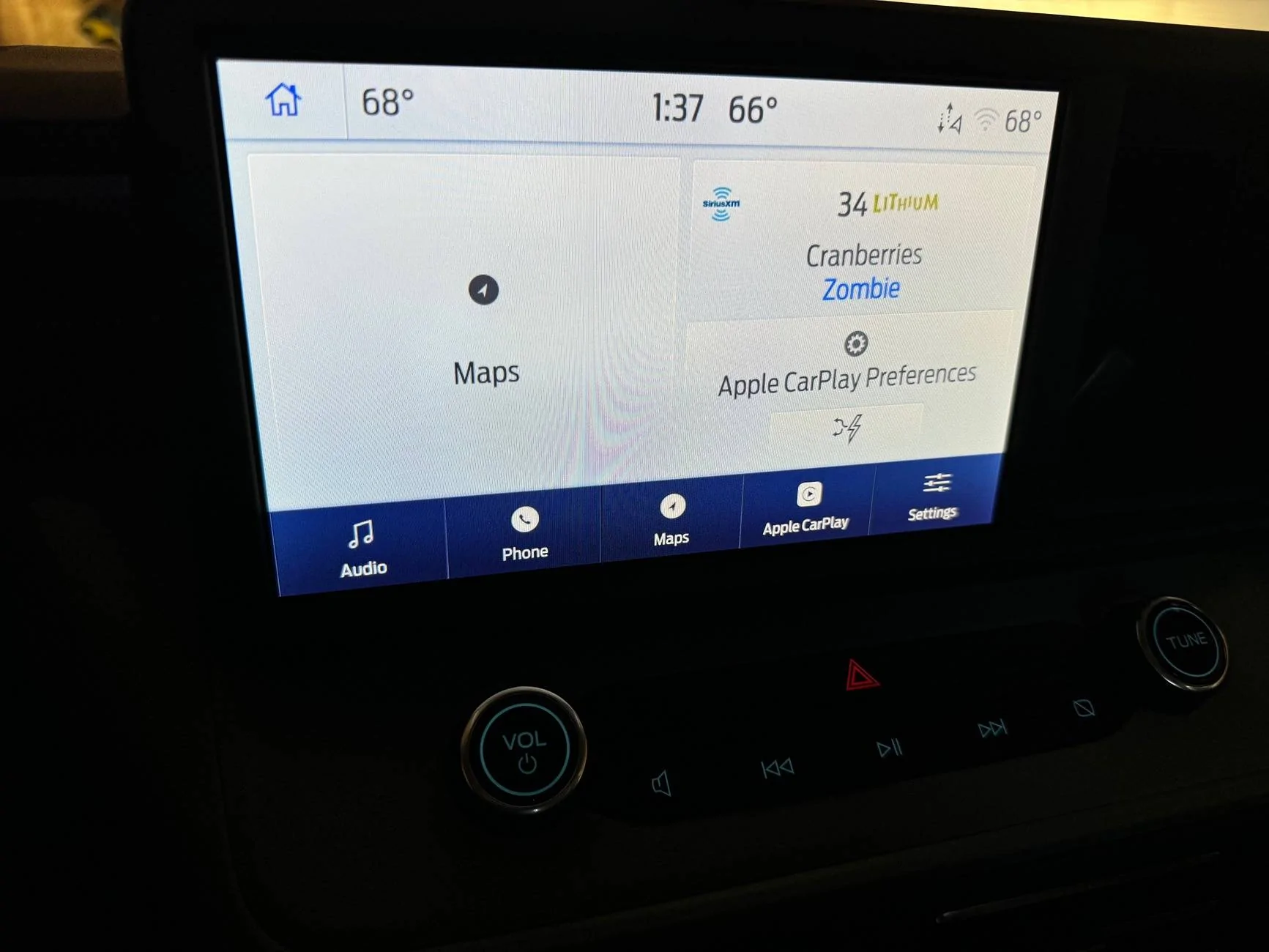
I hate when I have CarPLay on, I am not able to use CarPlay maps on the main screen of sync. My Subaru would show the CarPlay map even on the main Subaru infotainment screen. Anyone know of a setting to turn this on? It says maps, but if I tap it, it opens Carplay. Ideally, I would like to have this screen open with the CarPlay maps from CarPlay showing where Ford Navigation would be.
Ford Maverick Can CarPlay maps be used with Sync? IMG_1129
Sponsored


TarpDogg

2.5L Hybrid
Well-known member
First Name
Nathan
Joined
Aug 5, 2021
Threads
2
Messages
120
Reaction score
134
Location
Ohio
Vehicle(s)
2022 Maverick Hybrid XLT
Engine
2.5L Hybrid
The short answer is no. The longer answer would be to just use the CarPlay "dashboard" screen. This lets you see your map as the largest portion, your next navigation step in the top right corner and your Now Playing in a smaller rectangle. The Now Playing will only show what's currently playing from your phone, however, and not what's playing on the radio or Sirius XM. I would argue though, that as long as you have great cell coverage during your daily driving, the Sirius XM App running on iPhone has MUCH higher quality audio than the Satellite feed does. If you played through the app, then that Dashboard screen would show that as well. Hope that helps
 
OP
OP

Andrew.802

2.5L Hybrid
Active member
First Name
Andrew
Joined
Jun 24, 2024
Threads
13
Messages
35
Reaction score
8
Location
Vermont
Vehicle(s)
2025 Lariat Hybrid AWD
Engine
2.5L Hybrid
The short answer is no. The longer answer would be to just use the CarPlay "dashboard" screen. This lets you see your map as the largest portion, your next navigation step in the top right corner and your Now Playing in a smaller rectangle. The Now Playing will only show what's currently playing from your phone, however, and not what's playing on the radio or Sirius XM. I would argue though, that as long as you have great cell coverage during your daily driving, the Sirius XM App running on iPhone has MUCH higher quality audio than the Satellite feed does. If you played through the app, then that Dashboard screen would show that as well. Hope that helps

Hah...while not providing a solution, you have highlighted my conundrum. It's very irritating but it is what it is.
 

Carlitos_92

2.0L EcoBoost
Well-known member
Joined
Mar 24, 2024
Threads
4
Messages
2,257
Reaction score
4,585
Location
Texas
Vehicle(s)
2023 Area 51 XLT EB AWD Lux FX4
Engine
2.0L EcoBoost
Clubs
 
The short answer is no. The longer answer would be to just use the CarPlay "dashboard" screen. This lets you see your map as the largest portion, your next navigation step in the top right corner and your Now Playing in a smaller rectangle. The Now Playing will only show what's currently playing from your phone, however, and not what's playing on the radio or Sirius XM. I would argue though, that as long as you have great cell coverage during your daily driving, the Sirius XM App running on iPhone has MUCH higher quality audio than the Satellite feed does. If you played through the app, then that Dashboard screen would show that as well. Hope that helps
I don't have Sync in my XLT, but I understand OP's frustration. I use CarPlay like you describe, since I don't have SXM natively in the truck, either. It's more fiddly to change SXM stations, but I agree the sound quality is much better on the app than in OEM setups, generally. I remember activating my first SXM radio in my previous car and being supremely disappointed that it sounded like AM radio compared the the MP3s I'd been listening to...
 

dldjtad

2.5L Hybrid
Well-known member
First Name
David
Joined
Dec 17, 2023
Threads
1
Messages
169
Reaction score
120
Location
Bartow, FL
Vehicle(s)
2023 Ford Maverick
Engine
2.5L Hybrid
I hate when I have CarPLay on, I am not able to use CarPlay maps on the main screen of sync. My Subaru would show the CarPlay map even on the main Subaru infotainment screen. Anyone know of a setting to turn this on? It says maps, but if I tap it, it opens Carplay. Ideally, I would like to have this screen open with the CarPlay maps from CarPlay showing where Ford Navigation would be.
IMG_1129.jpg
If I’m understanding your question correctly, it sounds like you can’t get maps to open on the infotainment center. You’ll either have to plug your phone directly into the USB port, or get a third-party dongle if you don’t want to plug it in. Hope this helps.
 

Sponsored

Toddman45

2.0L EcoBoost
Well-known member
First Name
Todd
Joined
May 21, 2024
Threads
27
Messages
1,995
Reaction score
2,787
Location
St. Louis, MO
Vehicle(s)
24' Ford Maverick XLT, 19' Ford Explorer Limited, 14' Chevy Equinox
Engine
2.0L EcoBoost
CarPlay maps should display on your screen when you connect your phone via USBC cable to the USB port in the car just touch the maps button and make sure you have your phone enabled for car play.

What you have showing is the Ford sync screen so if you touch the map buttons on the left it should display the maps via CarPlay
 
OP
OP

Andrew.802

2.5L Hybrid
Active member
First Name
Andrew
Joined
Jun 24, 2024
Threads
13
Messages
35
Reaction score
8
Location
Vermont
Vehicle(s)
2025 Lariat Hybrid AWD
Engine
2.5L Hybrid
CarPlay maps should display on your screen when you connect your phone via USBC cable to the USB port in the car just touch the maps button and make sure you have your phone enabled for car play.

What you have showing is the Ford sync screen so if you touch the map buttons on the left it should display the maps via CarPlay
Ya...I don't want that. I want the map app from CarPlay to be on the main infotainment system where Ford Navigation would be.
 

Toddman45

2.0L EcoBoost
Well-known member
First Name
Todd
Joined
May 21, 2024
Threads
27
Messages
1,995
Reaction score
2,787
Location
St. Louis, MO
Vehicle(s)
24' Ford Maverick XLT, 19' Ford Explorer Limited, 14' Chevy Equinox
Engine
2.0L EcoBoost
Ya...I don't want that. I want the map app from CarPlay to be on the main infotainment system where Ford Navigation would be.
It doesn't work that way with either Android auto or Apple CarPlay, to see maps via Apple CarPlay you need to touch the maps icon to get into the car play display of maps. Do you understand what I'm saying?

In the photo you posted it's displaying the Ford sync/ford radio information to get into the car play part of the display you need to touch the screen where it shows CarPlay maps on the left. Or on the bottom right side of the slider on the screen touch Apple CarPlay on the radio display.

You can either display Fords vehicle information on the screen or Android Auto / Apple CarPlay but not both at the same time. That's just how it works
 
OP
OP

Andrew.802

2.5L Hybrid
Active member
First Name
Andrew
Joined
Jun 24, 2024
Threads
13
Messages
35
Reaction score
8
Location
Vermont
Vehicle(s)
2025 Lariat Hybrid AWD
Engine
2.5L Hybrid
It doesn't work that way with either Android auto or Apple CarPlay, to see maps via Apple CarPlay you need to touch the maps icon to get into the car play display of maps. Do you understand what I'm saying?

In the photo you posted it's displaying the Ford sync/ford radio information to get into the car play part of the display you need to touch the screen where it shows CarPlay maps on the left. Or on the bottom right side of the slider on the screen touch Apple CarPlay on the radio display.

You can either display Fords vehicle information on the screen or Android Auto / Apple CarPlay but not both at the same time. That's just how it works
Ya....I understand that's how it works. I was hoping I was missing something, as my old Subaru and my wife's Toyota allow what I am saying.
 

Toddman45

2.0L EcoBoost
Well-known member
First Name
Todd
Joined
May 21, 2024
Threads
27
Messages
1,995
Reaction score
2,787
Location
St. Louis, MO
Vehicle(s)
24' Ford Maverick XLT, 19' Ford Explorer Limited, 14' Chevy Equinox
Engine
2.0L EcoBoost
Ya....I understand that's how it works. I was hoping I was missing something, as my old Subaru and my wife's Toyota allow what I am saying.
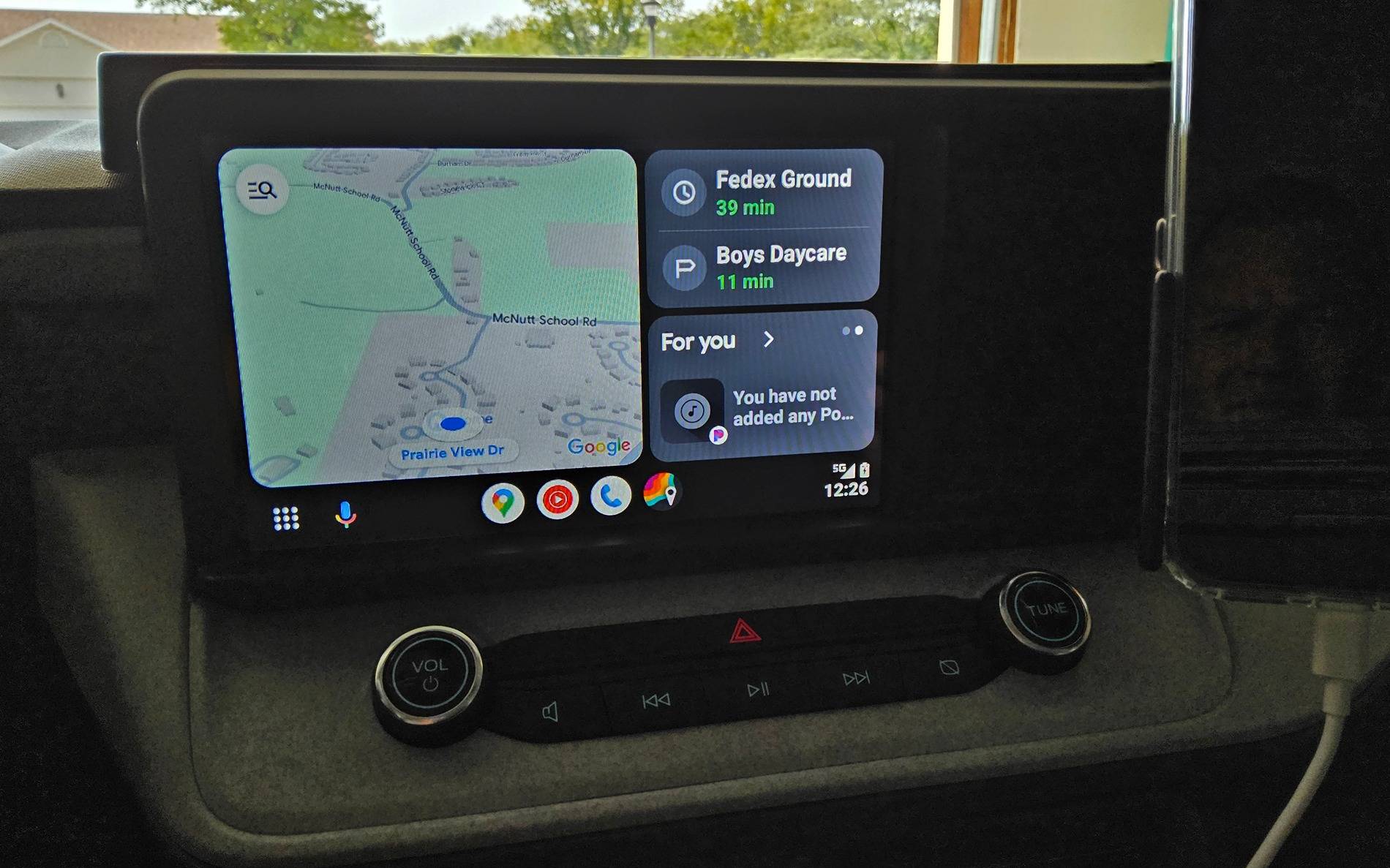
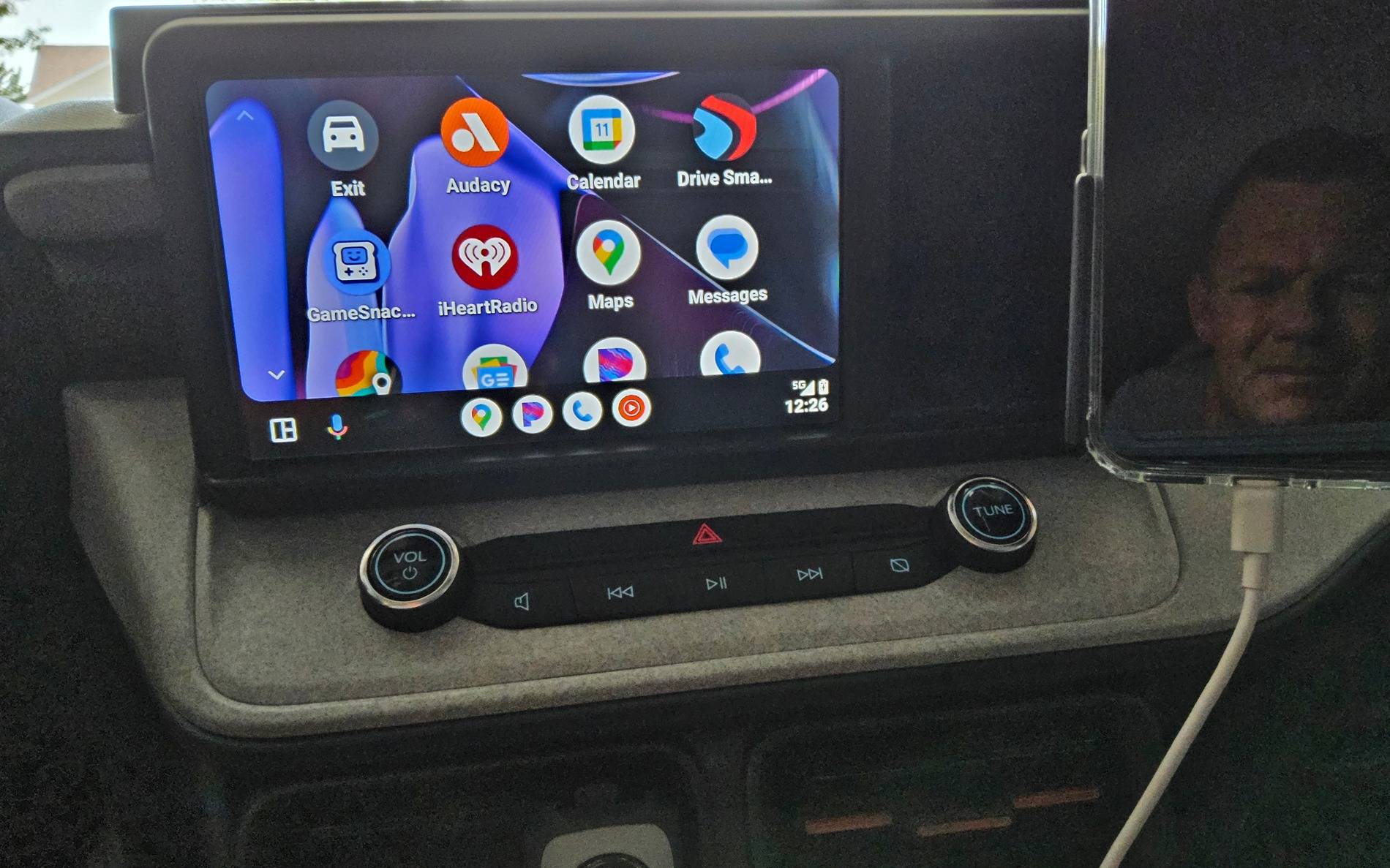
You're not That's just how it works and is designed to... Android auto is the same with my Google Pixel 9 XL.

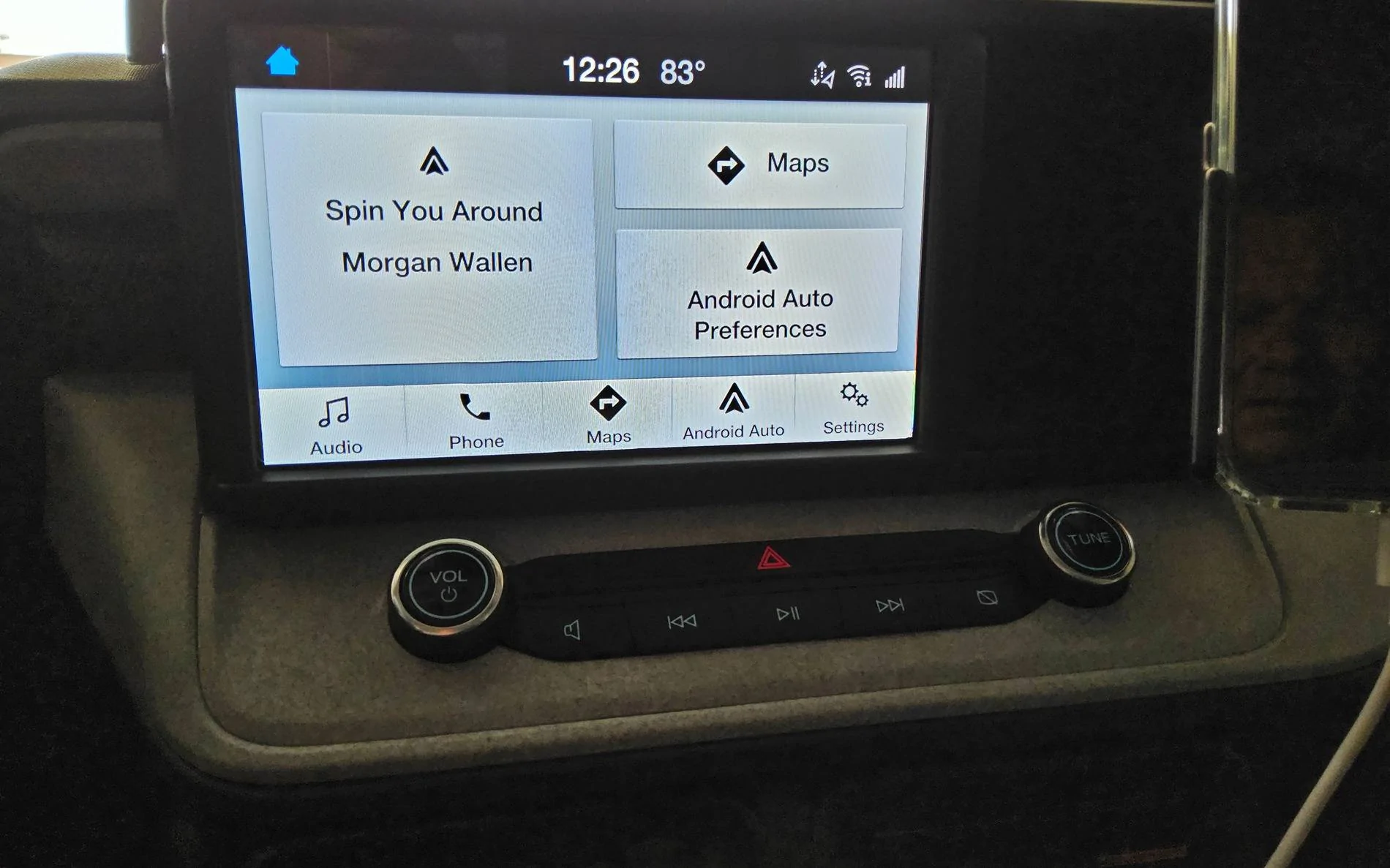
Ford Maverick Can CarPlay maps be used with Sync? 20240911_122640


Ford Maverick Can CarPlay maps be used with Sync? 20240911_122613


Ford Maverick Can CarPlay maps be used with Sync? 20240911_122625
 
Sponsored

TwoTone

Well-known member
Joined
Dec 3, 2023
Threads
4
Messages
556
Reaction score
791
Location
MD
Vehicle(s)
Outback 3.6
Engine
Undecided
Ya....I understand that's how it works. I was hoping I was missing something, as my old Subaru and my wife's Toyota allow what I am saying.
What year Subaru- I know mine doesn't do what your describing.
 

badger_biker

2.5L Hybrid
Active member
First Name
Bob
Joined
Mar 9, 2024
Threads
4
Messages
32
Reaction score
19
Location
Wisconsin
Vehicle(s)
Ordering Maverick Lariat
Engine
2.5L Hybrid
I hate when I have CarPLay on, I am not able to use CarPlay maps on the main screen of sync. My Subaru would show the CarPlay map even on the main Subaru infotainment screen. Anyone know of a setting to turn this on? It says maps, but if I tap it, it opens Carplay. Ideally, I would like to have this screen open with the CarPlay maps from CarPlay showing where Ford Navigation would be.
IMG_1129.jpg
I’ve had the same complaint. It seems like a complete waste of screen space. Why even have that Maps area if you can’t get anything to display?
Sponsored


Top