
Sponsored

Alpine Optim8 DSP/Amp - Lane's Review, Thoughts, Results...

Aaron F

2.0L EcoBoost
Well-known member
First Name
Aaron
Joined
Jan 31, 2023
Threads
5
Messages
196
Reaction score
170
Location
Sterling Heights, MI
Vehicle(s)
2023 Maverick Lariat Lux w/ 4k and BAP / 2025 Maverick AWD Hybrid Lariat w/ 4k
Engine
2.0L EcoBoost
Question for an expert! Is there a way to improve the sound of the Bang Olefsun system in my Lariat. Maybe an after market amp equalizer?
Try changing out your door speakers, sound deaden the front doors, and change the tweeters.
Sponsored


colinl

2.0L EcoBoost
Well-known member
First Name
Colin
Joined
Jun 21, 2022
Threads
32
Messages
5,440
Reaction score
6,179
Location
ICT
Vehicle(s)
'22 Maverick Lariat AWD, '22 Bronco OBX 2-Door
Engine
2.0L EcoBoost
Clubs
 
Try changing out your door speakers, sound deaden the front doors, and change the tweeters.
💯

Upgrading the door speakers is a huge upgrade for the B&O system. Might as well deaden while you have the panels off.
 

Aaron F

2.0L EcoBoost
Well-known member
First Name
Aaron
Joined
Jan 31, 2023
Threads
5
Messages
196
Reaction score
170
Location
Sterling Heights, MI
Vehicle(s)
2023 Maverick Lariat Lux w/ 4k and BAP / 2025 Maverick AWD Hybrid Lariat w/ 4k
Engine
2.0L EcoBoost
Initial Set Up

Once I finished up the physical installation, the Alpine software was installed on the laptop and the laptop plugged into the DSP via USB cable. The software sees the processor and establishes a connection.

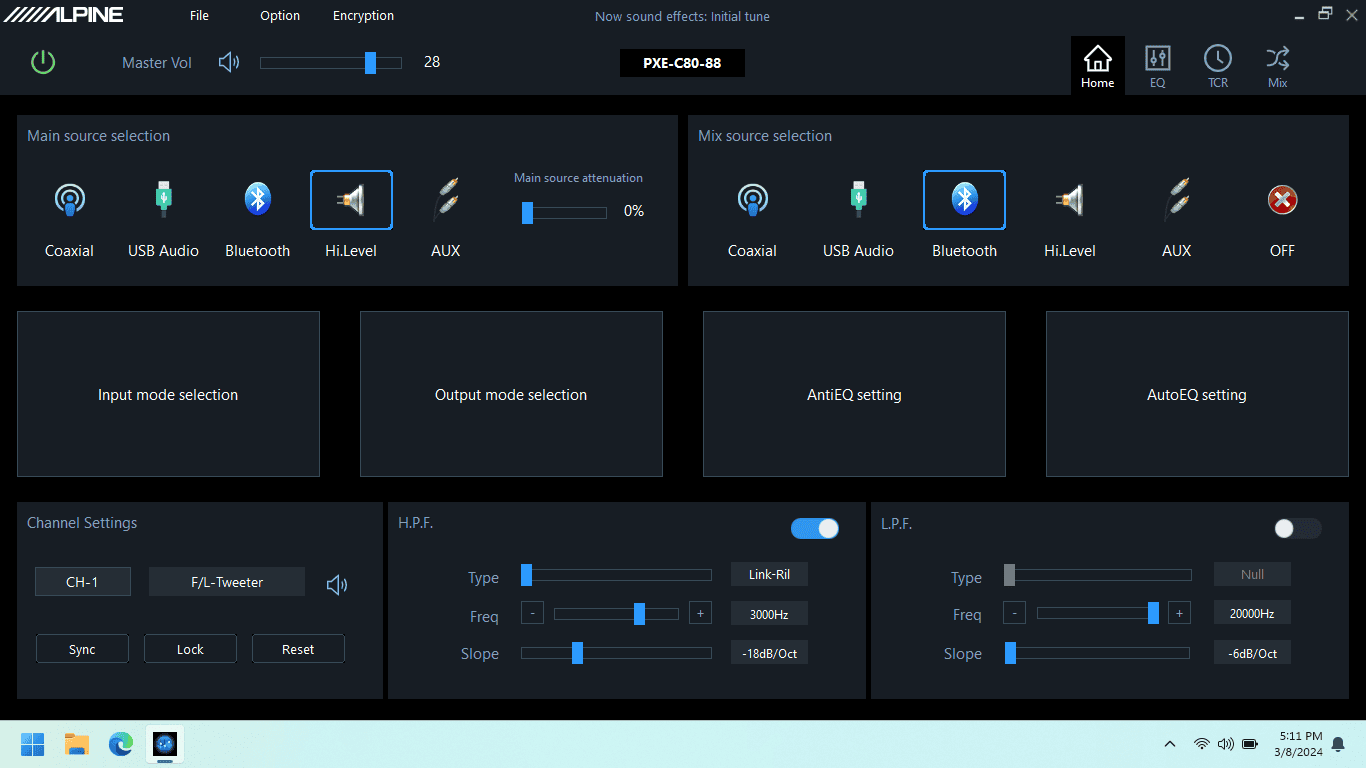
Main Screen.png

Here's the main screen. I selected the high-level inputs as the main source, and enabled Bluetooth as the secondary source.

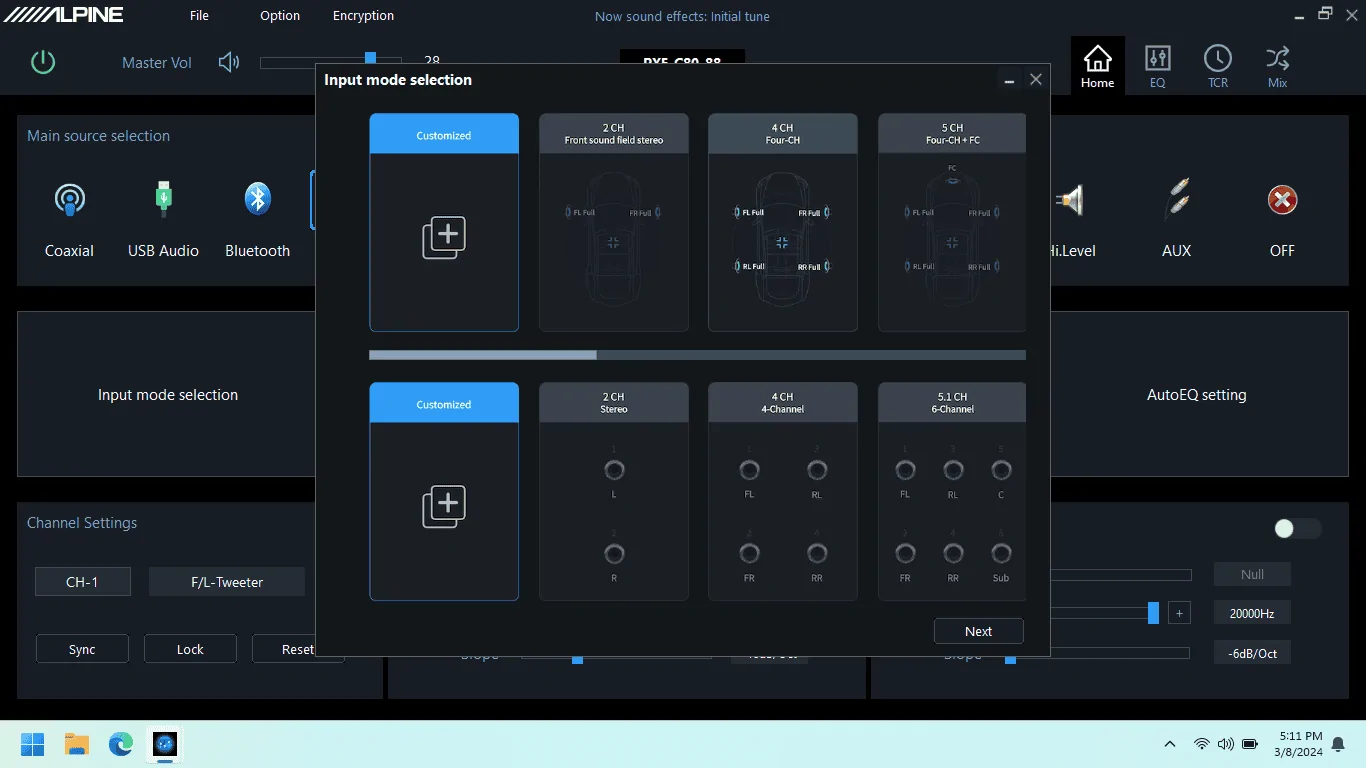
Input Mode Sel.png

There are a bunch of configurations already in the software for typical input set ups. Select one of those, or create your own. This was easy - I selected 4-channel input which corresponds to the factory radio high-level output.

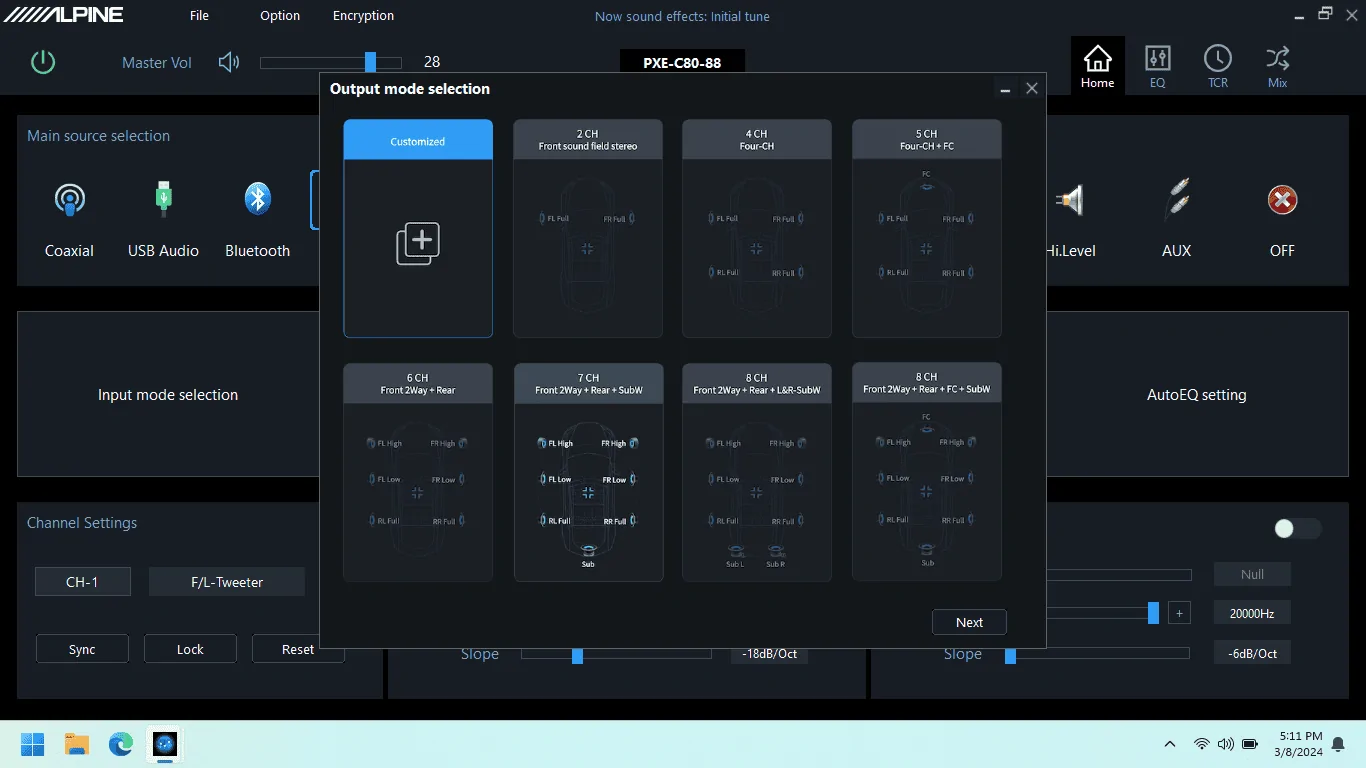
output mode sel.png

Output mode selection is similar, I selected Front 2-way + Rear + Sub since I'll be using separate amp channels for dash tweeters and front door woofers.


Output Mode Mapping).png

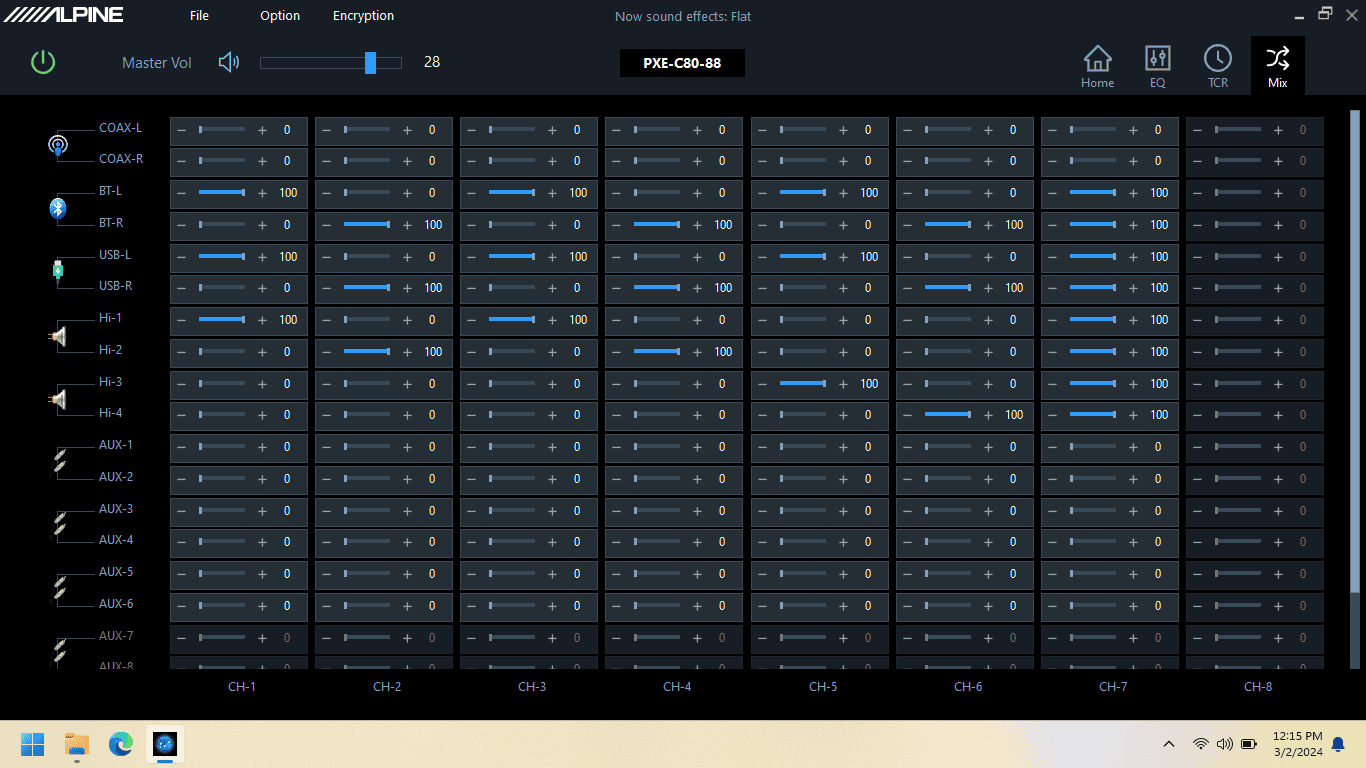
Next, the Mix screen lets you map each of your input source channels to each DSP/amp channel. It looks complex because that's a LOT of sliders, but it is really straightforward. You're essentially telling it which signal goes where.


anti-eq.jpg

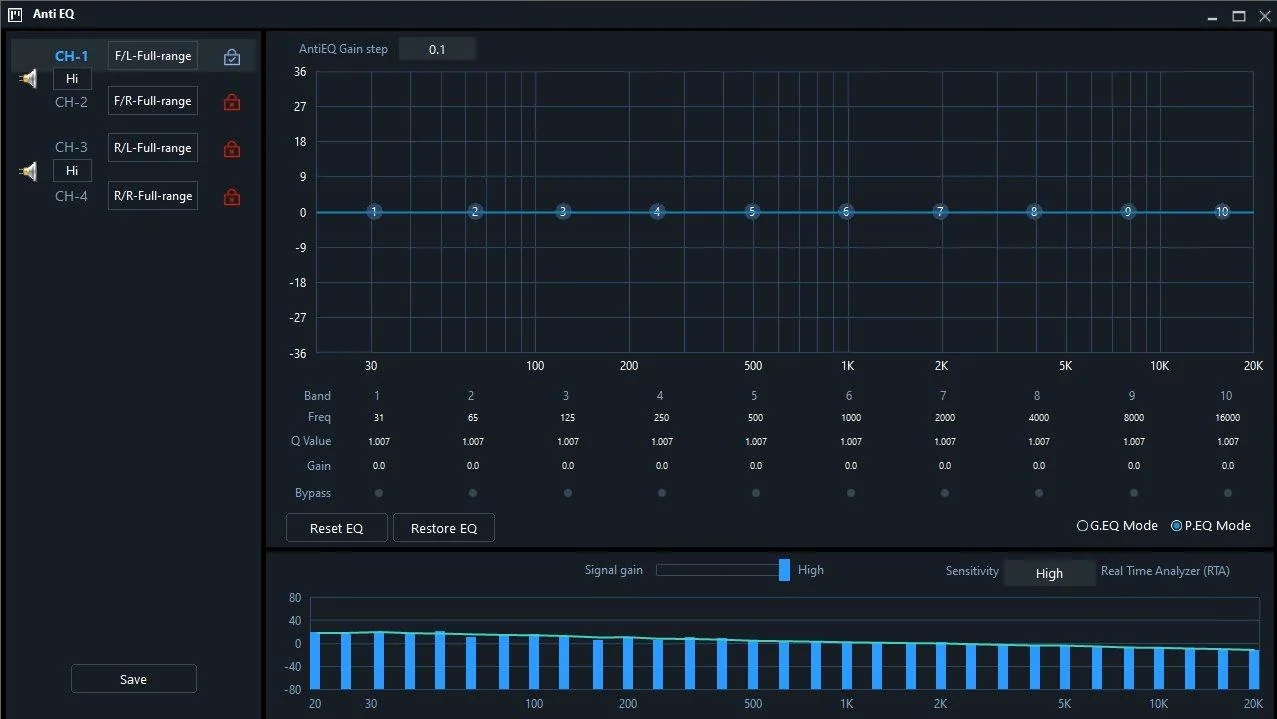
The Anti-EQ screen allows you to see and correct anything odd in the output frequency response of the factory radio. Put on a pink noise track, and the DSP shows you a frequency response graph in the RTA section at the bottom of the screen. Before I went through this, I had enabled Flat EQ via ForScan, and turned off Speed Compensated Volume in the factory radio. I had also set Occupancy Mode to All Seats.

The response graph shows a gradual decline across the whole frequency spectrum, but does not show any significant dips/peaks/holes in the response. That was outstanding. It does look like the DSP analyzes each input channel independently and shows you the graph for one channel at a time (see the blue lock with the checkmark in it in the upper left pane above).

If an issue shows up, you can make corrections on the EQ in the top pane, and you can do it in either graphic or parametric mode. Any corrections made are saved into the unit's memory and I believe they are applied to the signal first, before freq changes through the Auto-EQ or manual EQ functionality. One oddity though - it looks as though any manual corrections you make would need to be made to each input channel separately. I couldn't find any way to make a change to the graph and have the DSP apply it to all 4 channels.


auto eq meas.png

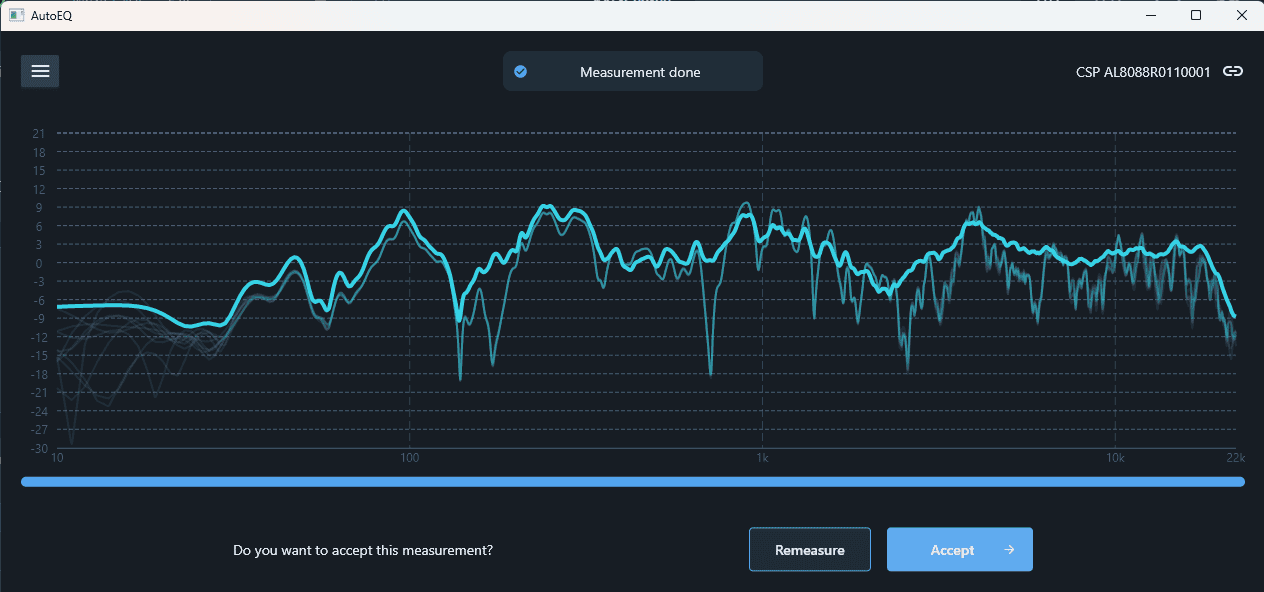
Next up was measurement by the AutoEQ functionality. You can install an app on your iPhone (no Android) and use its internal mic to do this wirelessly. Or, you can use a mic & cable plugged into the processor. Alpine sells the mic/cable kit for an additional cost, or a Dayton calibrated mic & generic TRRS cable can be purchased for half of what the Alpine kit goes for. I used the mic & cable connected directly to the DSP.

The processor plays a bunch of sweep chirps over maybe a minute or so and asks that you move the microphone around as it measures. I expect that's to give it a better sampling. The graph above is mine, but keep in mind this will vary greatly, even if you have the "same" vehicle. While the Mav will have peaks/valleys common between everyone's trucks (glass/plastic reflections, carpet absorption), a lot of other things cause variation (cloth seats vs. vinyl is one example, but it'll mainly be everyone's different choice of speakers). In a nutshell, peaks & valleys are bad, straighter/smoother lines are good.

Auto EQ - reduced bass boost.png

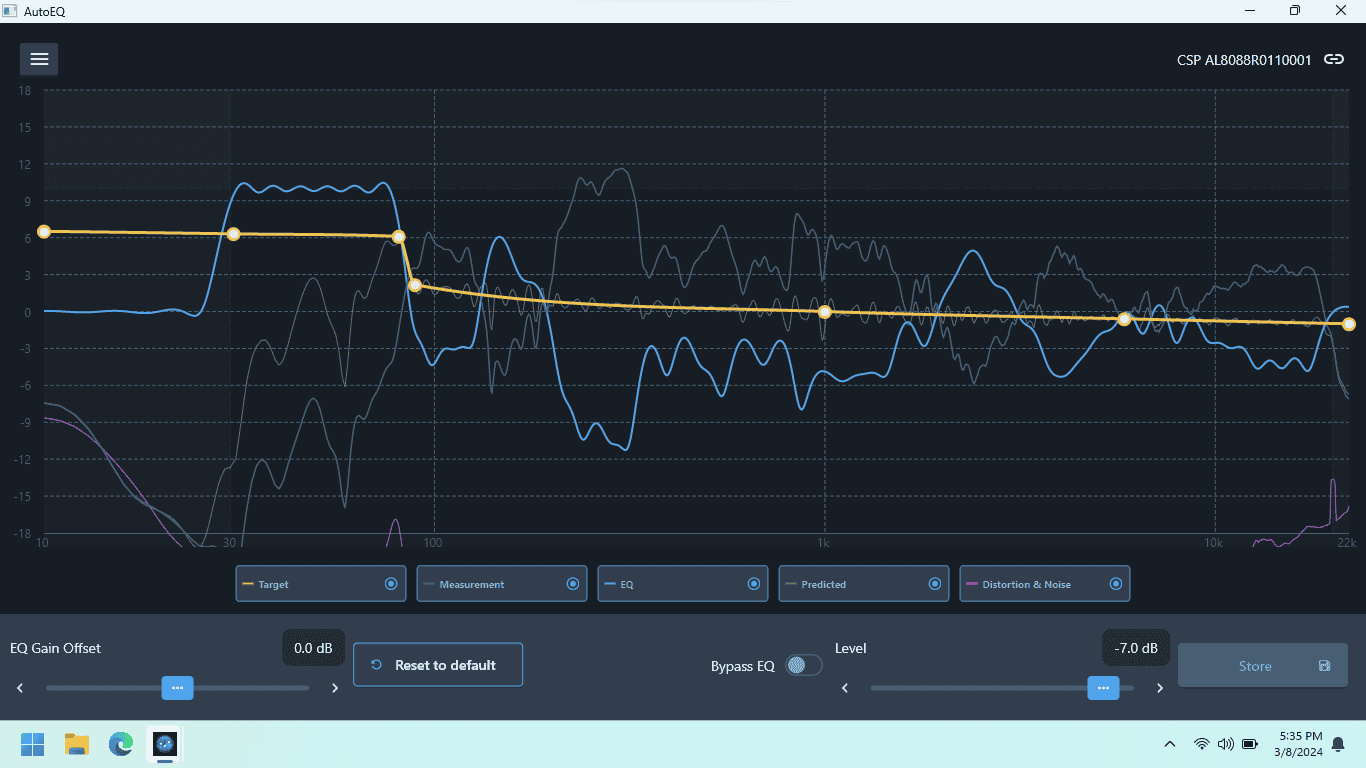
Once you have that response graph, the DSP calculates what it needs to do in order to correct it. The tan line in the graph shows the curve it wants to acheive, and the blue line shows the correction it applies to acheive it. The correction is roughly opposite of the issues that it measured. Before the DSP applies this correction, the user has the ability to drag that yellow line to manually tweak the target response. It's a hell of a thing to watch the real-time changes to the other lines (EQ and predicted) as this is done.

The upward jog in the yellow line as the frequency enters subwoofer range is put there by the software and is easy enough to change to your tastes. I expect it does this so that there is some headroom for adjusting the sub level from the remote display panel.


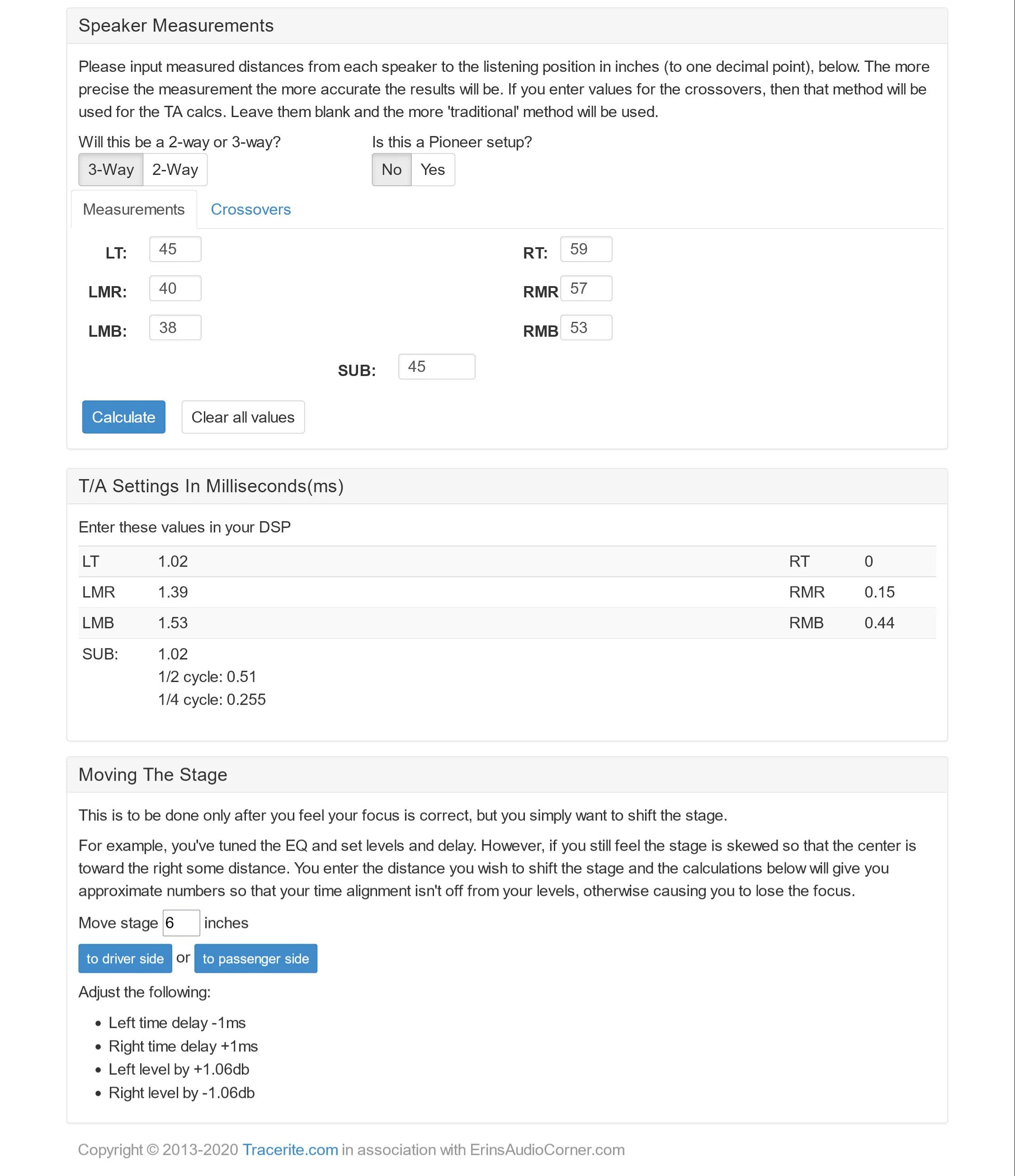
Next up is time correction. The YouTube set up video from Alpine references Tracerite.com. Measure the distance from your head to each speaker and enter them on the form. It will then calculate the millisecond delay for each driver.

Speaker Measurements #3.jpg

These were my actual measurements. The tweeter distances do take into account the path length from the tweeter up to the window glass and then a 90 degree angle toward the driver's seat since they have reflected instead of direct output.

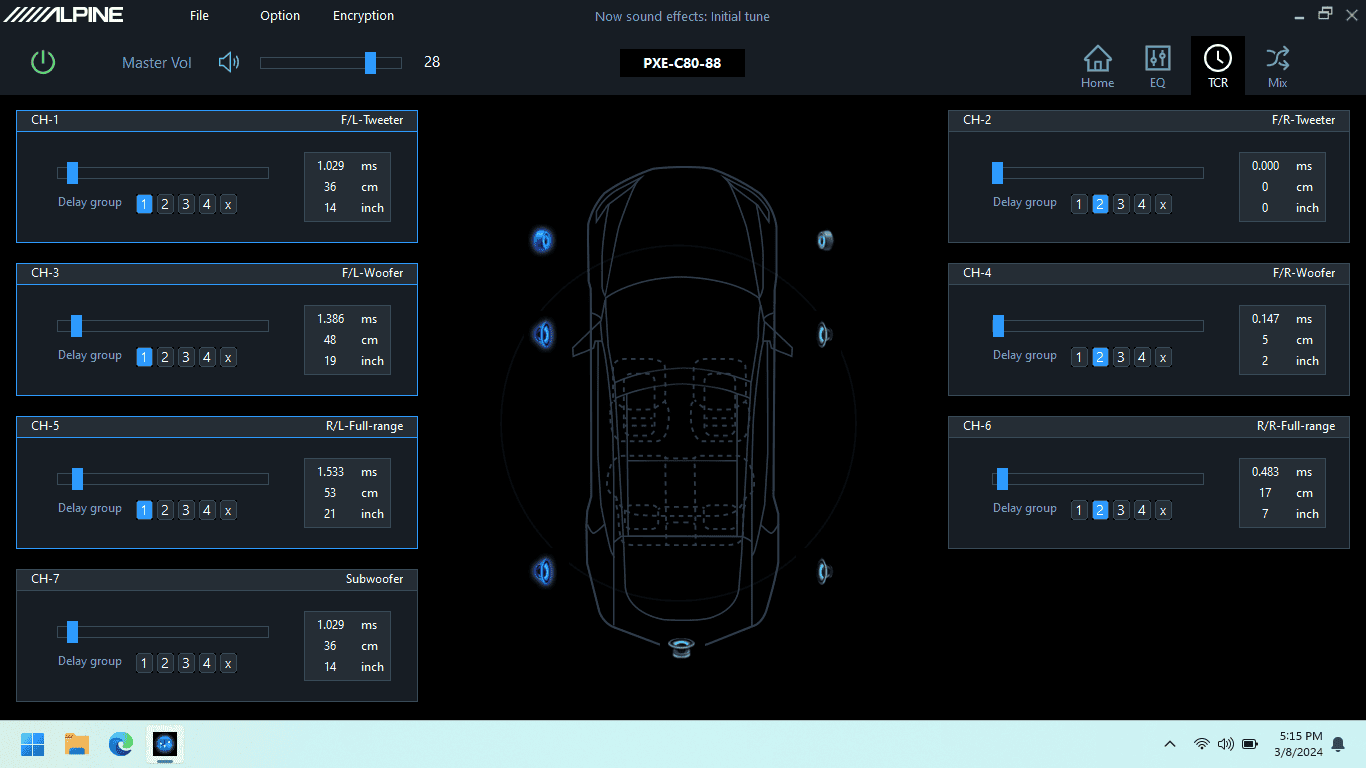
Time Corr.png

Each delay time is entered into the software. Ignore the distance shown on the screen as it isn't accurate and doesn't seem to apply. I have no idea why. Just like all the other settings that can be modified in this software, you are able to hear the effect of each change real-time which is outstanding.

I assigned different delay groups to all the left speakers vs. right. I've been playing around with trying to subtly shift where the image center is. By default, it sounds a bit toward the center of the vehicle and I'd like to hear how it sounds directly in front of the driver. The Tracerite site gives instructions for that shift, but I'm seeing if the delay group functionality will do it. When the drivers are in a group, any manual change you make to the delay for one driver applies a similar change to the other drivers automatically, but on a percentage basis. That's seriously cool. Not sure if that will do what I'm looking for yet and I'll need more tuning time to experiment with that.

I think this is pretty much it for initial set up. Next up, adjusting the sound to personal taste.
Regarding the time delay and making sense of it..... It is shocking that with all the genius technology in this unit, Alpine flopped on doing internal time delay measurements. If you were to put in your own measurements, their instruction is that your furthest speaker is your Zero, and then every other speaker distance entered would be the difference between your furthest speaker measurement, and the measured speaker from the listening position. So, in your measurements, your front Right tweeter is the furthest and gets marked as Zero. It makes sense then, that the closest speaker would show the largest measurement, and the highest time delay. But, most other DSP calculate this internally just by you adding your speaker measurements in raw form.
 
OP
OP
Lane

Lane

2.5L Hybrid
Well-known member
First Name
Lane
Joined
Jul 20, 2023
Threads
15
Messages
407
Reaction score
979
Location
Central Wisconsin
Website
photos.app.goo.gl
Vehicle(s)
2023 Area 51 Hybrid XL, 2006 VW Jetta Smyth UTE
Engine
2.5L Hybrid
Yeah, agreed. And it is weird that their product person says to go to someone else's website for the calculations, right in the YouTube video.

I think I read somewhere that some other DSP required you to input your measurements but flip them from one side to the other? Or something weird like that also. Saw this while I was considering which to buy and was doing research. Could it have been Puzu?
 
Last edited:

Whatthewhat11

2.5L Hybrid
Well-known member
First Name
Zach
Joined
May 8, 2022
Threads
15
Messages
68
Reaction score
88
Location
Pittsburgh
Vehicle(s)
Maverick Hybrid
Engine
2.5L Hybrid
Awesome write-up. I'll be doing a full system upgrade soon and you convinced me this auto DSP is the one I should get. I already have a couple amps so I'll be getting the 6-channel.
 

Sponsored

OP
OP
Lane

Lane

2.5L Hybrid
Well-known member
First Name
Lane
Joined
Jul 20, 2023
Threads
15
Messages
407
Reaction score
979
Location
Central Wisconsin
Website
photos.app.goo.gl
Vehicle(s)
2023 Area 51 Hybrid XL, 2006 VW Jetta Smyth UTE
Engine
2.5L Hybrid
When I was shopping for the stuff I needed for my install, I was not able to find a lower price on the DSP than what Crutchfield had it for. Plus, if I didn't like it, it would have been a no-hassle return. That's a big perk because the thing isn't cheap, and that's always a big risk.

If anyone is new to them, create a login on their site with this link. It'll give you $20 to spend, and when you buy something, they'll give me $20 to spend. If you find what I've shared in this thread marginally useful, I'd appreciate it. And with that cash, we'll both enjoy more stuff. Win-win.
 

ryan2366

2.5L Hybrid
Well-known member
First Name
Ryan
Joined
Feb 22, 2022
Threads
12
Messages
331
Reaction score
356
Location
Canada
Vehicle(s)
2025 Maverick Lariat - Hybrid AWD
Engine
2.5L Hybrid
Clubs
 
Amazing system and detailing of install on both of your threads.

How much do you think a similar setup with the purchase of speakers you didn’t already have would cost?

Cheers
 

Aaron F

2.0L EcoBoost
Well-known member
First Name
Aaron
Joined
Jan 31, 2023
Threads
5
Messages
196
Reaction score
170
Location
Sterling Heights, MI
Vehicle(s)
2023 Maverick Lariat Lux w/ 4k and BAP / 2025 Maverick AWD Hybrid Lariat w/ 4k
Engine
2.0L EcoBoost
Amazing system and detailing of install on both of your threads.

How much do you think a similar setup with the purchase of speakers you didn’t already have would cost?

Cheers
There's no need to spend more than $75-100 to replace the rear speakers, since they just provide rear fill. You can get some pretty good components in the $150 to $300 range to replace your fronts. I think the optim8 currently runs about $800 bucks. If you aren't installing it yourself, the install and tuning costs will vary widely from shop to shop.

This amplifier supposedly runs super efficiently and only accepts up to a 10 gauge power wire. So even if you are running a separate small subwoofer and amp, you will probably be fine with an 8 gauge amplifier wiring kit.
 

colinl

2.0L EcoBoost
Well-known member
First Name
Colin
Joined
Jun 21, 2022
Threads
32
Messages
5,440
Reaction score
6,179
Location
ICT
Vehicle(s)
'22 Maverick Lariat AWD, '22 Bronco OBX 2-Door
Engine
2.0L EcoBoost
Clubs
 
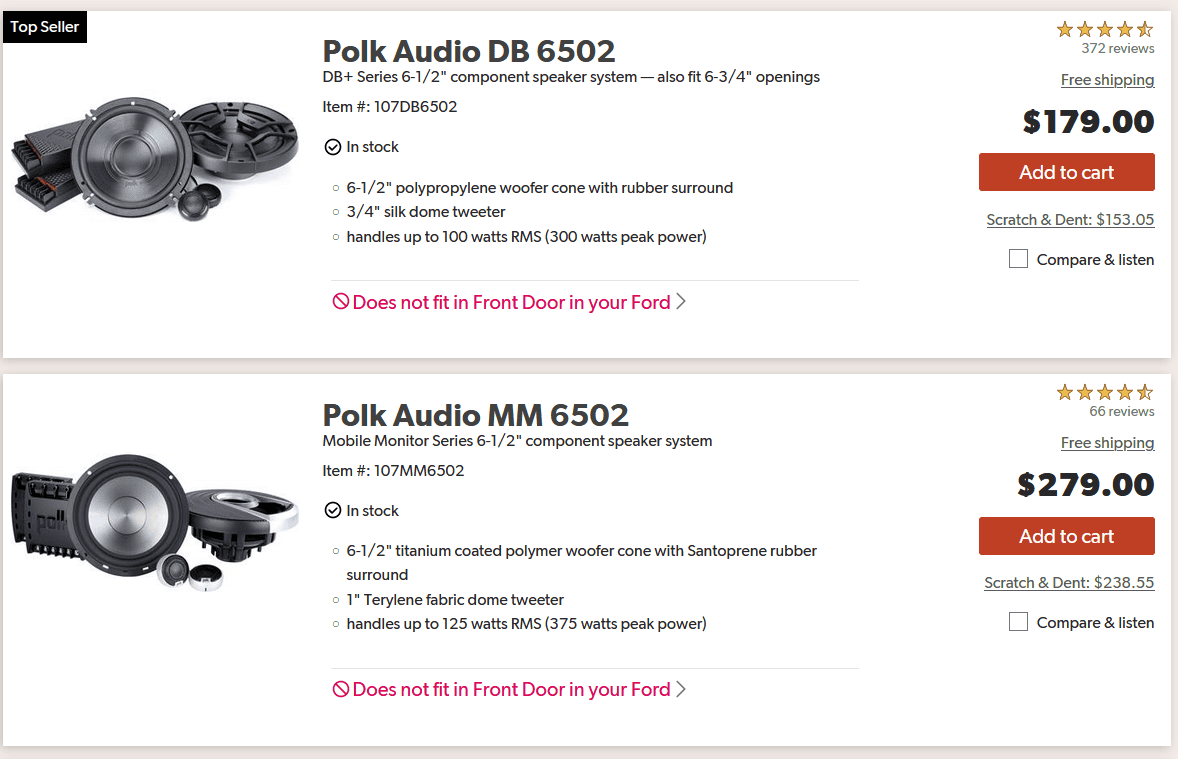
I'm not exactly certain why Crutchfield lists the 2 polk 6.5" components (MM and DB series) as not fitting the Maverick. I don't think they are overly deep. I put a set of MM 6.5 components in my wife's SUV that our son is now driving like 10 years ago and the cones and tweeters look the same, not to say for sure that they actually are the same.

I generally like silk or other fabric tweeters, but my current components have plastic tweeter domes and I like them a lot. I listened to them at a local shop before buying. They're on sale now - possibly going closeout, as there has been a new model (ASE165) for well over a year now, maybe 2. https://www.crutchfield.com/S-uG78Qc1yecI/p_091RSE165/Focal-RSE-165.html

Ford Maverick Alpine Optim8 DSP/Amp - Lane's Review, Thoughts, Results... polk65
 
OP
OP
Lane

Lane

2.5L Hybrid
Well-known member
First Name
Lane
Joined
Jul 20, 2023
Threads
15
Messages
407
Reaction score
979
Location
Central Wisconsin
Website
photos.app.goo.gl
Vehicle(s)
2023 Area 51 Hybrid XL, 2006 VW Jetta Smyth UTE
Engine
2.5L Hybrid
I'm not exactly certain why Crutchfield lists the 2 polk 6.5" components (MM and DB series) as not fitting the Maverick. I don't think they are overly deep.
After installing mine, I'm going to guess that it's because of the plastic reinforcement ribs I had to trim inside the door to accomodate the diameter of the magnet or just the general shape of the woofer's backside. That definitely seems like it would be a limiting factor in determining what fits.

Ford Maverick Alpine Optim8 DSP/Amp - Lane's Review, Thoughts, Results... 06a-


That was super easy to do and it would definitely allow a much greater selection of door speakers to fit.

With the current Polk, I suppose it could be the tweeter diameter also. A person would have to dig up and look at the specs closely to see.
 
Last edited:
Sponsored

Aaron F

2.0L EcoBoost
Well-known member
First Name
Aaron
Joined
Jan 31, 2023
Threads
5
Messages
196
Reaction score
170
Location
Sterling Heights, MI
Vehicle(s)
2023 Maverick Lariat Lux w/ 4k and BAP / 2025 Maverick AWD Hybrid Lariat w/ 4k
Engine
2.0L EcoBoost
I'm not exactly certain why Crutchfield lists the 2 polk 6.5" components (MM and DB series) as not fitting the Maverick. I don't think they are overly deep. I put a set of MM 6.5 components in my wife's SUV that our son is now driving like 10 years ago and the cones and tweeters look the same, not to say for sure that they actually are the same.

I generally like silk or other fabric tweeters, but my current components have plastic tweeter domes and I like them a lot. I listened to them at a local shop before buying. They're on sale now - possibly going closeout, as there has been a new model (ASE165) for well over a year now, maybe 2. https://www.crutchfield.com/S-uG78Qc1yecI/p_091RSE165/Focal-RSE-165.html

polk65.png
I called crutchfield on some of the fitment issues they listed. Some of the speakers that aren't too deep still don't fit because the magnet is too wide.
 

Ginger187

2.0L EcoBoost
Active member
First Name
Chris
Joined
Jan 13, 2024
Threads
3
Messages
36
Reaction score
39
Location
Buffalo, New York
Vehicle(s)
2023 Ford Maverick
Engine
2.0L EcoBoost
EQ Screen

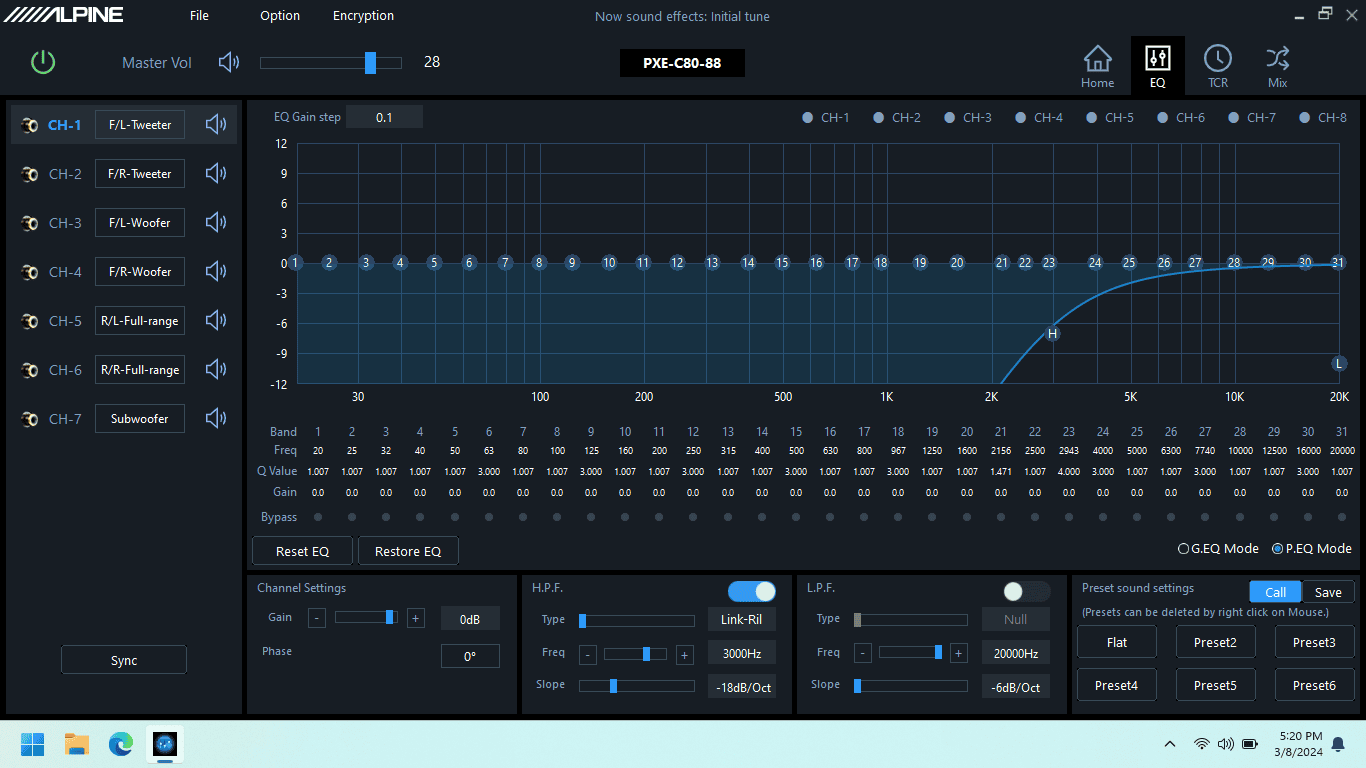
Next up is the main EQ screen. As the last part of initial set up, this screen is the best place to set up your crossover points. In the left pane, you'll see your driver configuration. Click any individual driver and you can adjust its frequency response curve, low- or high-pass filters, its crossover point, crossover type, crossover slope, and phase (if it's the sub). The Sync button lets you copy an applied change (change LF tweeter, then copy to RF tweeter). It also lets you tie two opposite-side drivers together to apply a single change to both if you'd prefer to do it that way.


After the initial configuration has been done, I'd expect that 90% of all other changes for personal listening tastes will be made on this screen.

EQ - One Chan.png

Making EQ adjustments is done similarly to how the crossover settings above are made. Click any individual driver in that left pane and you can adjust its frequency response curve. The Sync button lets you copy an applied change and it also lets you tie two drivers (L and R) together to apply a single change to both.

The frequency response graph pane can be used in standard graphic EQ mode, or you can use it in parametric mode to have control over the Q (the width) of frequency band and the center of frequency band you're adjusting.

One surprise, and some functionality I didn't expect - there are a HUGE number of parametric bands available on this EQ screen, 31 actually. That's not typical. Ususally if a unit offers parametric control, you have to make do with a lesser number of bands. Not here. It has huge flexibility. But with that comes something odd. Use the standard (non-parametric) functionality and you'd expect that the band width (Q) would be very narrow and would minimally affect the level of adjacent bands. Well, it's not narrow. It's really wide, on each band. So wide that I doubt I'll use it, even though I specifically wanted this functionality. Maybe I'll get some screen captures at some point to show a comparison.

Below each band is a bypass button so you can enable/disable the change and easily hear the audible effect. By default, the main pane on this screen will show you an outline in it to represent the frequency range that the selected driver (upper left pane) is reproducing.

At that point, it seems like I'm limited to making changes to the EQ for that specific driver only. Example: if you have the CH-1 selected in the upper left pane (my LF tweeter), you can't drag the curve to increase the level at 70hz. To do that, I'd have to click CH-7 (my sub) in that left pane first.

EQ - All Channels.png

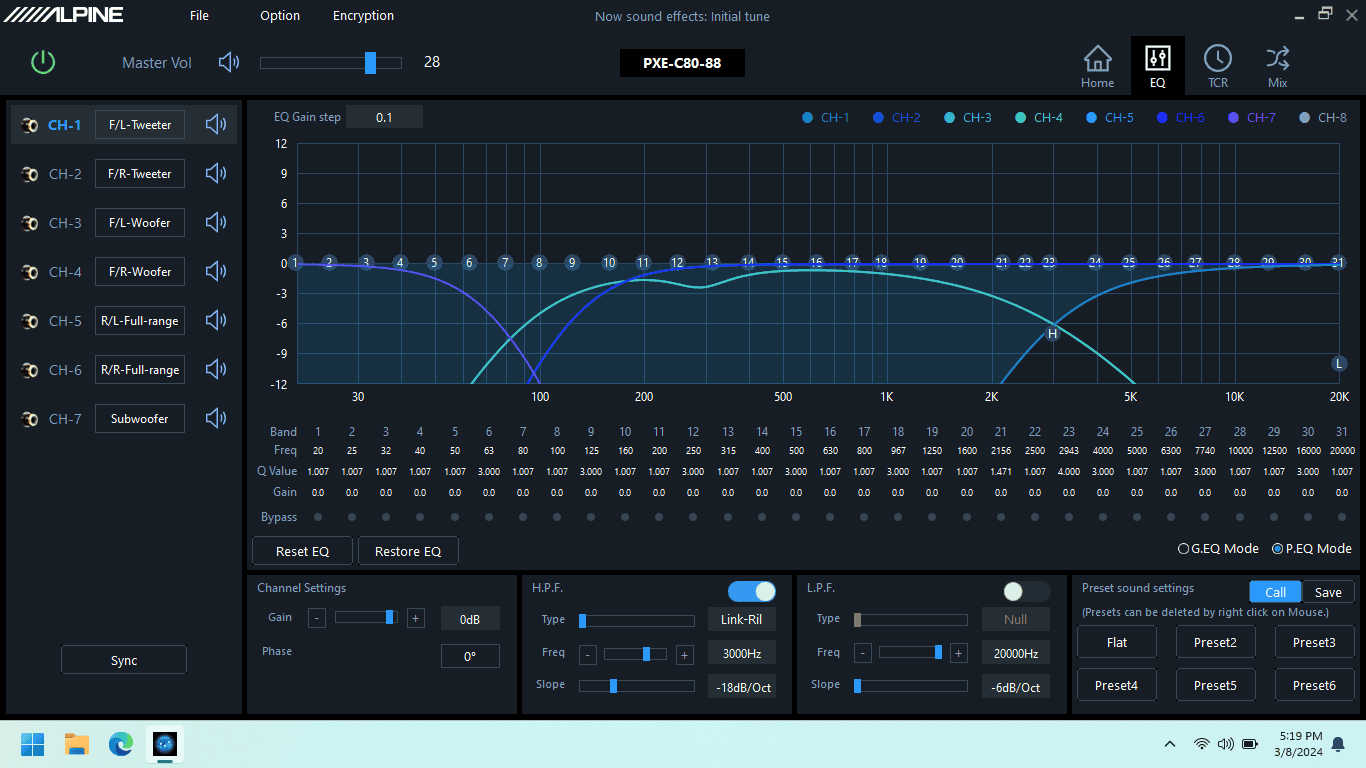
Click the buttons for multiple drivers across the top right (that say CH-1, CH-2, etc), and it will overlay different colored outlines to the display showing you their frequency range being reproduced.

I have not been able to find a way to drag the curve to adjust a frequency's level and have it be applied to two different drivers. For example, my tweeter/woofer crossover point is at 3000hz. If I want to add a few db at 3000hz, I can't drag the curve and have the DSP apply it to both drivers even though both are technically reproducing that frequency (although at a lower level due to the crossover roll-off slope at that freq). I've had to make the change to each driver independently, or, I've had to make the change to the overall system correction on either the Anti-EQ or Auto-EQ screens which doesn't feel like the best way to do this.

On the bottom right pane of this screen is where settings are either saved to the DSP or loaded from the DSP's memory. While you can hear any change that you make real-time, you do have to specifically save to the processor's memory. Presets can be named, and once they're saved to the processor, they are selectable from the unit's control panel installed upfront. And it's absolutely outstanding that a preset seems to encompass every setting this software allows you to change.

Next up - how does it sound?
Any issues with rattling since a lot of the materials are plastic? Been thinking about upgrading some speakers for a nice rich sound but I'm hesitant as I get some occasional rattle with the stock speakers. Thanks.
 
OP
OP
Lane

Lane

2.5L Hybrid
Well-known member
First Name
Lane
Joined
Jul 20, 2023
Threads
15
Messages
407
Reaction score
979
Location
Central Wisconsin
Website
photos.app.goo.gl
Vehicle(s)
2023 Area 51 Hybrid XL, 2006 VW Jetta Smyth UTE
Engine
2.5L Hybrid
Any issues with rattling since a lot of the materials are plastic? Been thinking about upgrading some speakers for a nice rich sound but I'm hesitant as I get some occasional rattle with the stock speakers. Thanks.
No, don't let a few rattles stand in the way of enjoying the sound system and vehicle more. Most are easily solved.

I've had the most noticeable plastic rattling behind the rear seat and it seems to be in places where the trim edges rest against metal. Easily solved by cutting some scrap foam into chunks, and sliding them behind the offending panel's edge with a putty knife. It's low-tech and solves it quickly. My rear sliding window has some vibration at a high volume, but a small strip of stiff foam slid under left & right edges of that little piece of glass took care of most of that as well. I'm trying to add pics to this post, but the forum isn't letting me do it right now for some reason.

When I took apart the doors, I tightened all the screws holding the door panel's individual plastic parts together. They were barely finger tight from the factory. I had a buzz from one of the door panels with the factory radio and it seems to be gone after just that tightening. At a very high volume, I have some issues in the doors with some noise that I suspect is a lot of flex in the big plastic center section of the door that each woofer mounts in. Was able to get rid of most of that by adjusting that woofer crossover point with the DSP as I mentioned earlier in this thread.

Really, any of these rattles seemed to only show up at very high volumes.
 

Ginger187

2.0L EcoBoost
Active member
First Name
Chris
Joined
Jan 13, 2024
Threads
3
Messages
36
Reaction score
39
Location
Buffalo, New York
Vehicle(s)
2023 Ford Maverick
Engine
2.0L EcoBoost
No, don't let a few rattles stand in the way of enjoying the sound system and vehicle more. Most are easily solved.

I've had the most noticeable plastic rattling behind the rear seat and it seems to be in places where the trim edges rest against metal. Easily solved by cutting some scrap foam into chunks, and sliding them behind the offending panel's edge with a putty knife. It's low-tech and solves it quickly. My rear sliding window has some vibration at a high volume, but a small strip of stiff foam slid under left & right edges of that little piece of glass took care of most of that as well. I'm trying to add pics to this post, but the forum isn't letting me do it right now for some reason.

When I took apart the doors, I tightened all the screws holding the door panel's individual plastic parts together. They were barely finger tight from the factory. I had a buzz from one of the door panels with the factory radio and it seems to be gone after just that tightening. At a very high volume, I have some issues in the doors with some noise that I suspect is a lot of flex in the big plastic center section of the door that each woofer mounts in. Was able to get rid of most of that by adjusting that woofer crossover point with the DSP as I mentioned earlier in this thread.

Really, any of these rattles seemed to only show up at very high volumes.
Appreciate the info, I'll keep that in mind upon improving my speakers.
 

HushCarAudio

Well-known member
Gold Sponsor
First Name
Bruce
Joined
Oct 7, 2023
Threads
1
Messages
78
Reaction score
70
Location
Aubrey TX
Vehicle(s)
Maverick
Engine
Undecided
Question for an expert! Is there a way to improve the sound of the Bang Olefsun system in my Lariat. Maybe an after market amp equalizer?
No you'll have to fully bypass the B&O system for any decent audio quality.
Sponsored


Top